
Product Overview
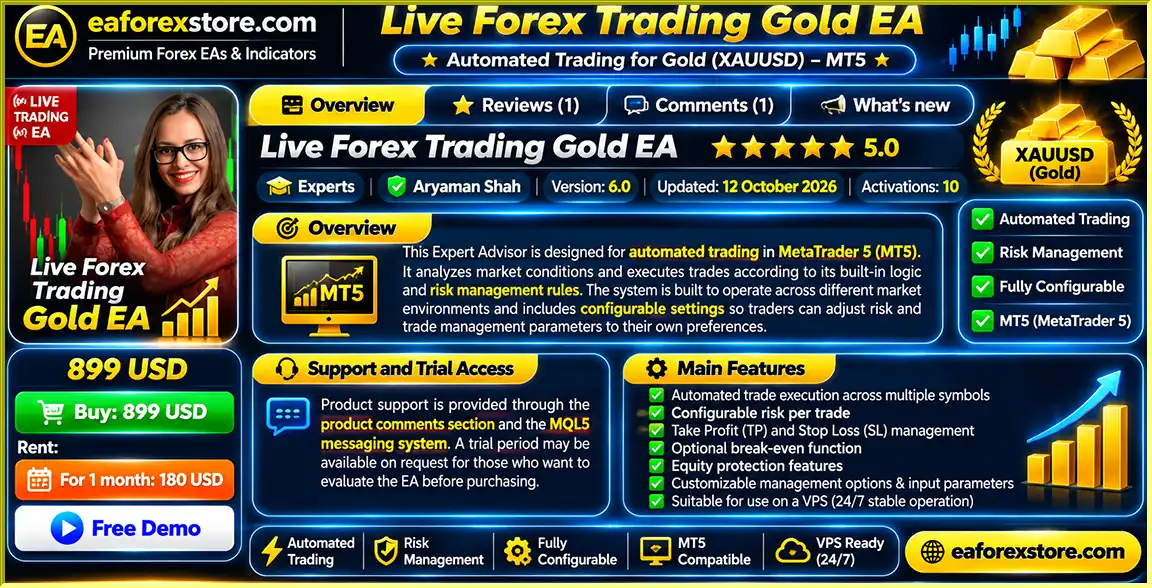
Live Forex Trading Gold EA MT5 is a fully automated Forex trading robot designed for MetaTrader 5, helping traders analyze market conditions, identify trading opportunities, and execute trades automatically.
The EA supports multi-symbol trading, configurable risk per trade, automatic Stop Loss and Take Profit management, break-even functionality, and equity protection. Its customizable settings allow traders to adjust trading parameters according to their account size and risk preferences.
With automated trade execution and flexible money management, Live Forex Trading Gold EA MT5 is designed for traders seeking a convenient and systematic automated Forex trading solution with reduced manual intervention.
About the Developer
- Author: Aryaman Shah
- Experience: Over 1 years of experience on MQL5.
- Notable Products: Live Forex Trading Gold EA MT5, Quantum Pegasus EA MT5 and other advisors.
- Flagship Product: Live Forex Trading Gold EA MT5 is rated as the best performing product of the year.
>>> Delivery time 24h-48h after payment.
>>> Refund if not delivered.
>>> You will receive the latest version without any limitations (ID+Time).Reviewed by Jason Stap <<<
Key Features of Live Forex Trading Gold EA MT5
Fully Automated Forex Trading
Live Forex Trading Gold EA MT5 automatically analyzes market conditions and executes trades according to its built-in trading algorithm.
Once properly configured, the EA can monitor trading opportunities and manage positions without requiring traders to place every order manually.
This helps reduce time spent monitoring charts and supports a more systematic trading process.
Multi-Symbol Trading Support
The EA supports automated trading across multiple trading symbols.
This allows traders to explore opportunities across different financial instruments supported by their broker and the EA's configuration.
Multi-symbol trading can provide greater market coverage, although it may also increase overall account exposure.
Configurable Risk Per Trade
Live Forex Trading Gold EA allows traders to adjust risk parameters according to their preferred trading approach.
The EA supports position sizing based on account risk settings, helping traders establish structured trading exposure.
Automatic Stop Loss Management
The EA includes configurable Stop Loss functionality to help manage potential losses on individual trades.
Stop Loss levels are applied according to the selected trading parameters and the EA's programmed trade management rules.
Automatic Take Profit Management
Live Forex Trading Gold EA supports configurable Take Profit settings.
These allow traders to define profit objectives and automate trade exits when the relevant conditions are reached.
Optional Break-Even Function
The EA includes an optional break-even feature designed to adjust trade protection when an open position moves favorably.
Depending on the configured settings, this function can move the Stop Loss toward the entry price to reduce remaining trade risk.
Equity Protection
Built-in equity protection functionality allows traders to configure account-level risk controls.
These settings can help restrict trading activity or manage exposure when the account reaches predefined equity conditions.
The exact protective actions depend on the selected EA parameters.
Customizable Trade Management
Traders can adjust available position management settings through the EA Inputs tab.
This provides flexibility for different account sizes, trading preferences, and broker conditions.
Adaptable Trading Configuration
Live Forex Trading Gold EA is designed to operate across different market environments using its predefined trading logic.
Its configurable parameters allow traders to adjust the trading setup rather than relying on a single fixed configuration.
However, no automated strategy performs reliably under every market condition.
VPS Compatibility
The EA is suitable for operation on a Forex VPS.
A VPS can help maintain continuous MetaTrader 5 connectivity and allow automated trading to operate without keeping a personal computer running.
Product Support and Trial Access
Product support is available through the product comments section and the MQL5 messaging system.
A trial period may be available upon request, allowing traders to evaluate the EA before purchasing.
Trial availability should be confirmed directly with the developer.
How It Works
Live Forex Trading Gold EA MT5 follows a systematic automated trading process based on market analysis, predefined execution rules, and configurable risk management.
Step 1: Analyze Market Conditions
The EA monitors supported trading symbols and evaluates market conditions according to its built-in trading algorithm.
Step 2: Identify Trading Opportunities
When market conditions meet the programmed requirements, the EA identifies potential Buy or Sell trading opportunities.
Step 3: Calculate Position Size
Before placing an order, the EA determines the appropriate position size according to the configured account risk parameters.
This helps maintain a structured approach to trading volume.
Step 4: Execute Trades Automatically
When a valid trading signal is generated, the EA can execute the corresponding trade through MetaTrader 5.
This reduces the need for manual order placement.
Step 5: Apply Stop Loss and Take Profit
The EA manages positions using its configured Stop Loss and Take Profit settings.
These parameters establish predefined protective levels and profit objectives.
Step 6: Activate Break-Even Protection
If the optional break-even function is enabled, the EA can adjust trade protection after a position reaches the configured conditions.
This may reduce remaining exposure on a favorable trade.
Step 7: Monitor Account Equity
The EA monitors the relevant equity protection parameters and applies its programmed account protection rules when configured conditions are met.
Step 8: Manage Active Positions
Open positions are managed according to the EA's trading logic and customizable trade management settings.
Step 9: Continue Automated Trading
The EA continues monitoring supported symbols while MetaTrader 5 remains connected and automated trading is enabled.
A reliable VPS is recommended for uninterrupted operation.
Why Choose Live Forex Trading Gold EA MT5?
Automated Trading with Less Manual Work
Live Forex Trading Gold EA handles market analysis, order execution, and trade management automatically.
This helps traders reduce the time required for routine trading activities.
Multi-Symbol Trading Flexibility
The EA supports multiple trading symbols, providing access to trading opportunities across different supported instruments.
Adjustable Risk Management
Configurable risk per trade allows traders to tailor position sizing to their account balance and preferred trading exposure.
Built-In Stop Loss and Take Profit
Automatic Stop Loss and Take Profit management helps establish predefined exit conditions for trades.
Optional Break-Even Protection
The break-even function provides an additional trade management option when positions move favorably.
Account Equity Protection
Equity protection settings allow traders to configure additional account-level trading controls.
Customizable Trading Parameters
The EA offers adjustable inputs for trading and risk management.
This allows users to personalize the system according to their preferred trading conditions.
Suitable for VPS Operation
Live Forex Trading Gold EA can operate on a VPS, supporting continuous trading during active market sessions.
Developer Support
Users can contact the developer through the MQL5 messaging system or product comments section for installation, configuration, and product-related questions.
Trial Availability
A trial may be available upon request, giving traders an opportunity to evaluate the EA before purchasing.
Live Forex Trading Gold EA MT5 Backtest Results
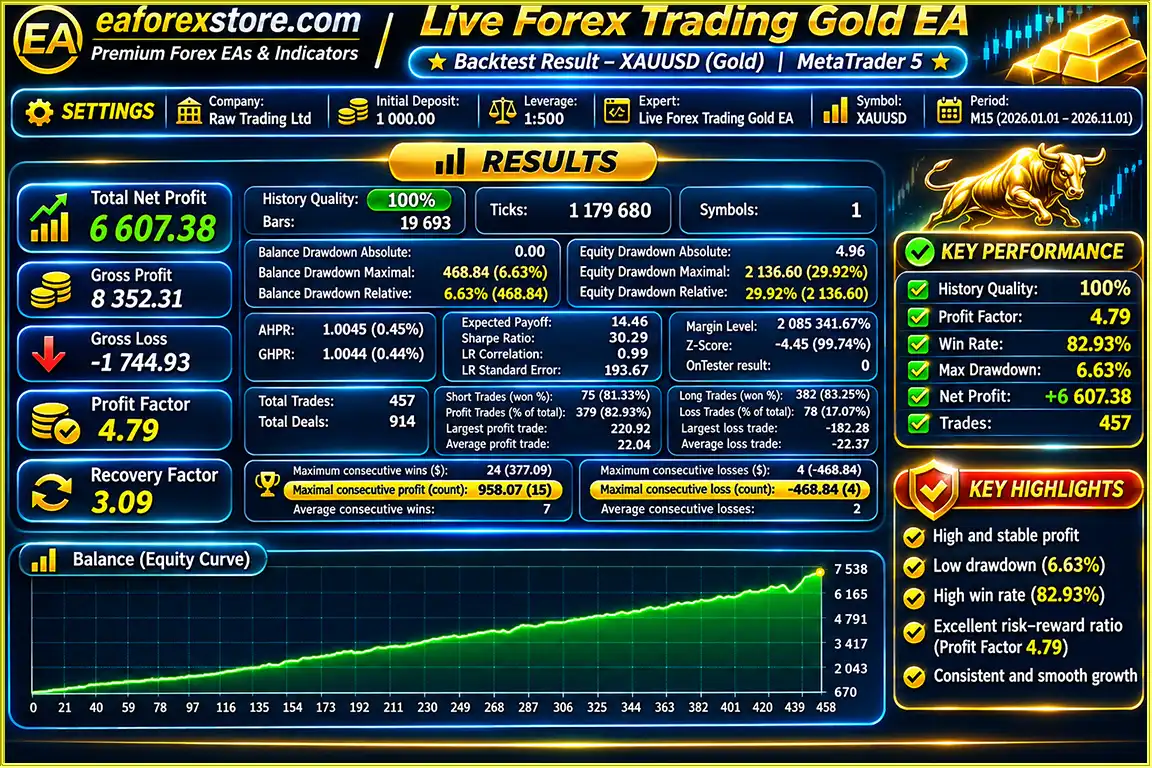
- Initial Deposit: $1.000
- Total Net Profit: $6.607,38
- Win Rate: 82.93%
- Maximum Drawdown: 6.63%
Risk Management & Alerts
Risk management is an essential component of Live Forex Trading Gold EA MT5. The EA includes configurable features designed to help control position exposure and manage trading activity.
Risk-Based Position Sizing
The EA supports position sizing according to account risk parameters.
Traders can adjust the available settings to match their preferred risk level and account conditions.
Stop Loss Protection
Configurable Stop Loss functionality helps define protective exit levels for individual positions.
However, Stop Loss orders may experience slippage during volatile markets.
Take Profit Management
Take Profit settings allow the EA to close positions when their programmed profit objectives are reached.
Break-Even Functionality
The optional break-even function can adjust protective levels toward the trade entry price when selected conditions are satisfied.
Break-even execution does not guarantee a zero-loss outcome because trading costs and slippage may still apply.
Equity Protection
Equity protection parameters provide additional account-level controls.
These settings are intended to help manage trading exposure when configured equity thresholds are reached.
Custom Trade Management
The EA allows traders to customize position management parameters through its Inputs tab.
This flexibility helps accommodate different trading preferences and account conditions.
Multi-Symbol Exposure
Because the EA supports multiple trading instruments, traders should consider the combined risk of simultaneous positions.
Correlated markets can create larger exposure than expected.
Broker Compatibility
Trading results may be affected by broker spreads, commissions, margin requirements, slippage, and execution speed.
Traders should verify the EA's settings under their intended broker conditions.
Trading Alerts and Notifications
Specific built-in Telegram alerts, email notifications, and custom mobile push alerts have not been confirmed in the supplied product information.
Traders can monitor open positions, account equity, and trading history through MetaTrader 5.
Important Risk Considerations
- Automated Forex trading involves significant financial risk.
- Stop Loss orders cannot guarantee execution at the requested price.
- Break-even functionality does not eliminate trading losses.
- Equity protection cannot guarantee capital preservation.
- Multi-symbol trading may increase combined account exposure.
- Market volatility can affect order execution and profitability.
- Trading losses may exceed deposits in certain market conditions.
- Broker conditions can significantly influence results.
- Historical performance does not guarantee future profits.
- Demo testing is recommended before live trading.
Pros and Cons
Pros
- Fully automated trading on MetaTrader 5.
- Supports multiple trading symbols.
- Automatically analyzes market conditions.
- Executes trading orders without manual intervention.
- Includes configurable risk per trade.
- Supports automatic Stop Loss management.
- Offers Take Profit management.
- Includes optional break-even functionality.
- Features account equity protection settings.
- Provides customizable trade management parameters.
- Allows flexible configuration for different trading accounts.
- Suitable for VPS operation.
- Can reduce time spent monitoring charts.
- Supports systematic trading execution.
- Developer support is available through MQL5.
- Trial access may be available upon request.
Cons
- Trading profitability is not guaranteed.
- Exact entry and exit algorithms are not specified.
- Recommended trading symbols and timeframes are not provided.
- Detailed equity protection behavior depends on EA settings.
- Multi-symbol trading can increase total account exposure.
- Stop Loss orders may experience slippage.
- Break-even settings cannot guarantee zero-loss trades.
- Broker execution conditions may affect results.
- Continuous automated trading may require a VPS.
- Independently verified live trading results have not been provided.
- Trial availability is not guaranteed.
- Automated trading still requires periodic monitoring.
How to Install Live Forex Trading Gold EA MT5
Installing Live Forex Trading Gold EA MT5 follows the standard MetaTrader 5 Expert Advisor installation process.
Step 1: Install MetaTrader 5
Download and install MetaTrader 5 from your broker or the official MetaTrader website.
Log in to your trading account and confirm that the intended trading symbols are available.
Step 2: Add the Expert Advisor
Open MetaTrader 5 and navigate to:
File → Open Data Folder → MQL5 → Experts
Copy the Live Forex Trading Gold EA file into the Experts folder.
Restart MetaTrader 5 or refresh the Expert Advisors list in the Navigator panel.
Step 3: Open a Trading Chart
Open a trading symbol supported by the Expert Advisor.
Select the timeframe recommended by the developer.
The supplied product information does not specify exact trading symbols or required timeframes, so confirm these settings before live trading.
Step 4: Attach the EA
Locate Live Forex Trading Gold EA in the Navigator panel.
Drag and drop the Expert Advisor onto the selected chart.
Confirm that the EA has the necessary trading permissions.
Step 5: Configure Risk Per Trade
Open the EA Inputs tab and review the available risk settings.
Choose parameters appropriate for your account balance and trading preferences.
Step 6: Configure Stop Loss and Take Profit
Review the available Stop Loss and Take Profit settings.
Set appropriate protective levels and profit targets according to the EA's supported inputs.
Step 7: Enable Break-Even Protection
If desired, enable the optional break-even function.
Configure its activation conditions using the available EA parameters.
Step 8: Configure Equity Protection
Review the available equity protection settings.
Set the relevant limits according to your acceptable account risk exposure.
Step 9: Review Trade Management Settings
Adjust additional trade management parameters according to your preferences and the developer's recommendations.
Step 10: Enable Algorithmic Trading
Enable Algorithmic Trading in MetaTrader 5.
Verify that the EA is active and permitted to execute trades.
Step 11: Backtest the EA
Use the MetaTrader 5 Strategy Tester to evaluate the EA using historical market data.
Review drawdown, trading frequency, execution assumptions, and overall strategy behavior.
Step 12: Test on a Demo Account
Before using real capital, run the EA on a demo account.
Verify compatibility with your broker, trading instruments, and risk settings.
Step 13: Use a Reliable VPS
For uninterrupted automated trading, consider using a Forex VPS.
This helps maintain platform connectivity during active trading sessions.
Step 14: Contact Support if Needed
For assistance with installation, configuration, or trial access, contact the developer through the MQL5 messaging system or the product comments section.
Recommended Setup
| Parameter | Configuration |
|---|---|
| Expert Advisor | Live Forex Trading Gold EA MT5 |
| Trading Platform | MetaTrader 5 |
| Trading Type | Automated Forex Trading |
| Trading Symbols | Multiple Supported Symbols |
| Timeframe | Confirm with Developer |
| Risk Per Trade | Configurable |
| Position Sizing | Account Risk-Based |
| Stop Loss | Configurable |
| Take Profit | Configurable |
| Break-Even | Optional |
| Equity Protection | Included |
| Trade Management | Customizable |
| Minimum Deposit | Not Specified |
| Recommended Leverage | Not Specified |
| VPS | Supported / Recommended |
| Trial Access | Available Upon Request, Subject to Confirmation |
| Customer Support | MQL5 Comments and Messaging |
What’s Included in the Download Package?
- Experts: Live Forex Trading Gold EA.ex5
>>> Join VIP Membership Now <<<
Final Thoughts
Live Forex Trading Gold EA MT5 is an automated Forex trading robot designed to simplify market analysis, trade execution, and position management through MetaTrader 5.
With multi-symbol trading support, configurable risk per trade, automatic Stop Loss and Take Profit management, optional break-even functionality, and equity protection settings, the EA provides a flexible automated trading framework.
Its customizable inputs allow traders to adjust the system according to different account conditions and trading preferences.
The EA is also suitable for VPS operation, helping maintain continuous automated trading during active market sessions.
For traders who want to evaluate the system before purchasing, trial access may be available upon request through the MQL5 messaging system.
However, automated trading cannot guarantee profitability or eliminate financial risk. Market conditions, broker execution, leverage, and position sizing can significantly affect results.
For traders seeking a MetaTrader 5 automated Forex Expert Advisor with multi-symbol trading and customizable risk management, Live Forex Trading Gold EA MT5 offers a configurable trading solution worth evaluating through backtesting and demo trading.
Live Forex Trading Gold EA MT5 – Automated Trading with Flexible Risk and Trade Management.
Risk Disclaimer: Forex and CFD trading involve significant financial risk. Losses may exceed deposits under certain market conditions. Automated trading, Stop Loss orders, break-even functions, and equity protection settings cannot guarantee profits or prevent all losses. Past performance does not guarantee future results. Always evaluate trading risks and test the EA on a demo account before using real funds.