





-
 Unlimited Activations
-
 Instant delivery
-
 Easy to install





 Unlimited Activations
Instant delivery
Easy to install
 Free Update
 Free Install Support

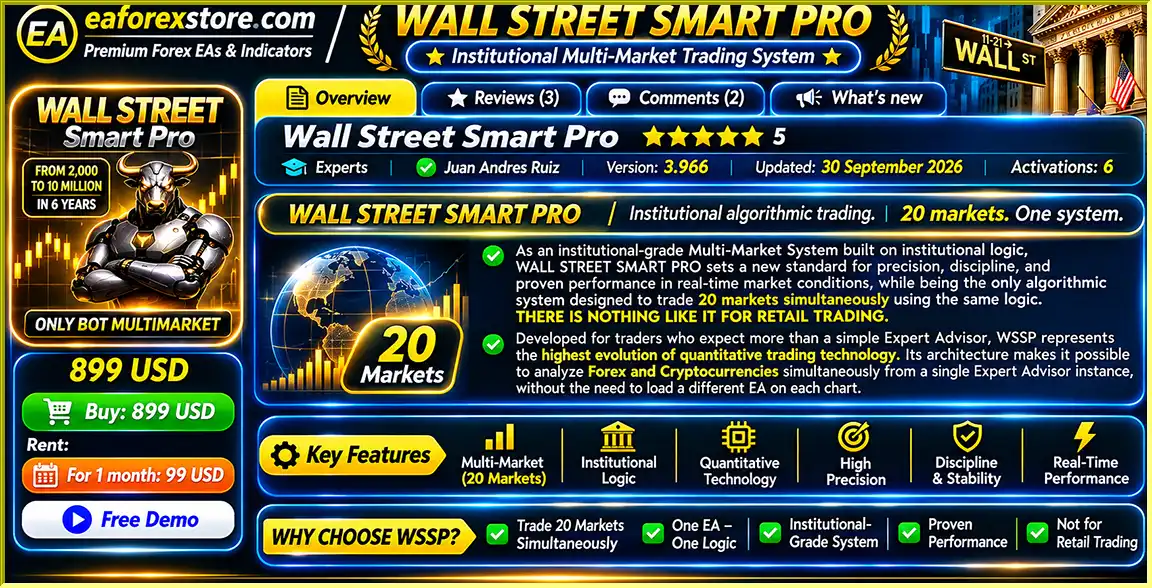
Wall Street Smart Pro EA MT5 is a sophisticated automated Forex and cryptocurrency trading robot developed for traders seeking multi-market analysis, systematic trade execution, and structured capital management.
Unlike conventional Expert Advisors that require installation on multiple trading charts, Wall Street Smart Pro can monitor up to 20 configured markets from a single EA instance. This centralized architecture simplifies portfolio management while allowing each supported instrument to operate according to its own market-specific trading parameters.
The system follows an institutional-inspired Smart Money Concept (SMC) approach, identifying liquidity zones, potential liquidity sweeps, structural highs and lows, and trend conditions before evaluating trade opportunities.
Its strategy integrates several technical indicators, including the Relative Strength Index (RSI), Awesome Oscillator, Moving Average Convergence Divergence (MACD), and a 20-period Exponential Moving Average (EMA).
Designed with risk management as a central priority, Wall Street Smart Pro EA MT5 includes percentage-based position risk, daily loss restrictions, simultaneous trade limits, market-specific losing trade controls, and configurable trading-time filters.
The developer states that the software was developed using institutional trading logic and offers publicly observable real-account performance. However, claims about institutional origins, exclusivity, and historical profitability should be independently verified before making an investment decision.
With its multi-market capability and centralized management features, Wall Street Smart Pro EA MT5 is positioned as an automated trading solution for users who want to manage Forex and cryptocurrency exposure through a single MetaTrader 5 Expert Advisor.
>>> Delivery time 24h-48h after payment.
>>> Refund if not delivered.
>>> You will receive the latest version without any limitations (ID+Time).Reviewed by Jason Stap <<<
Wall Street Smart Pro EA MT5 Overview
One of the main features of Wall Street Smart Pro EA is its ability to monitor up to 20 supported financial markets through a single MetaTrader 5 chart.
The system supports both Forex currency pairs and major cryptocurrencies, allowing traders to diversify their automated market monitoring without installing the EA separately on every chart.
Supported Cryptocurrency Markets:
Supported Forex Markets:
The supplied product description refers to 20 markets, although the explicitly listed instruments total 19. Buyers should verify the complete supported-symbol list with the developer.
Wall Street Smart Pro uses Smart Money Concepts to evaluate price action and identify potential trading opportunities.
Its algorithm focuses on:
This approach aims to reduce reliance on isolated technical signals by requiring multiple conditions to align before opening a position.
WSSP incorporates several widely used technical indicators to confirm trading opportunities.
Relative Strength Index (RSI): Evaluates momentum and potential overbought or oversold conditions.
Awesome Oscillator (AO): Analyzes momentum changes and divergence signals.
MACD: Identifies momentum shifts and potential directional confirmations through crossover conditions.
20-Period EMA: Helps evaluate price direction and trend conditions on a lower timeframe.
These indicators operate alongside the EA’s liquidity and market structure analysis to determine whether configured trade-entry criteria have been satisfied.
Although the EA uses a shared trading framework, each supported market has its own configured mathematical parameters and trading conditions.
This allows the algorithm to evaluate instruments independently rather than applying identical entry thresholds to every market.
Not all monitored instruments will necessarily generate trades simultaneously.
Wall Street Smart Pro EA MT5 uses a stated default risk setting of 1% of account balance per trade, subject to the EA’s calculation method and broker execution conditions.
Traders can modify global management parameters to align the system with their preferred risk profile.
The EA includes a configurable daily loss restriction.
For example, traders can set a 3% daily loss threshold. According to the developer’s description, when the configured threshold is reached, the EA stops initiating new trades until the next trading day.
Users can configure the maximum number of positions permitted to remain open simultaneously.
This feature helps manage aggregate market exposure when multiple instruments generate trading opportunities.
The system supports a maximum of two losing trades per day for each monitored market, according to the supplied specifications.
This restriction is intended to limit repeated trading after unsuccessful signals on the same instrument.
Wall Street Smart Pro incorporates time-based restrictions intended to avoid trading during selected periods of potentially unfavorable market conditions.
These include:
The EA provides an optional feature to close open positions before the end of the trading day.
By default, the described closing window is five minutes before daily market close, with configurable timing and enable/disable options.
This feature may be particularly useful for traders operating under certain funded account restrictions.
Wall Street Smart Pro EA MT5 follows a structured algorithmic trading process based on liquidity analysis, market structure, indicator confirmation, and automated trade execution.
The Expert Advisor monitors its supported Forex and cryptocurrency instruments from a single MT5 instance.
Each instrument is evaluated using its individual configuration and trading conditions.
The algorithm identifies potential liquidity areas around important structural price levels, including previous highs, lows, and other market structure points.
These zones are used to identify areas where liquidity sweeps may occur.
Wall Street Smart Pro EA MT5 evaluates whether price has moved through an identified liquidity area in a manner consistent with its configured sweep-detection logic.
A liquidity sweep alone does not automatically trigger a trade.
The system compares the detected liquidity event with the broader market structure.
It evaluates whether the potential trading opportunity aligns with the configured directional and structural conditions.
Before executing an eligible trade, the EA evaluates a combination of technical signals:
The combination of these indicators provides additional confirmation according to the system’s programmed criteria.
When liquidity, structural, indicator, and risk conditions align, Wall Street Smart Pro can automatically execute a trading position.
Trade execution remains subject to broker conditions, instrument availability, account margin, and the EA’s configured exposure restrictions.
Following execution, the EA applies its available management rules, including per-trade risk parameters, daily loss controls, maximum open positions, and selected trading-time restrictions.
The Expert Advisor continues monitoring supported instruments and evaluates new opportunities according to its trading logic.
Its centralized architecture allows traders to operate the multi-market system without attaching separate EA instances to every supported chart.
Wall Street Smart Pro EA MT5 is designed to monitor multiple Forex and cryptocurrency markets from a single MetaTrader 5 installation.
This eliminates the need to manage a separate EA chart for each monitored instrument.
The system combines liquidity sweeps and market structure analysis with technical indicator confirmation.
This structured approach is designed to identify trading opportunities that satisfy multiple programmed conditions.
Each supported instrument uses its own market-specific parameters while sharing the system’s underlying trading framework.
This allows the EA to evaluate trading conditions across different markets without treating every instrument identically.
The EA offers several portfolio-level management features, including maximum daily loss restrictions, simultaneous position limits, and percentage-based risk settings.
Built-in trading windows help the EA avoid selected periods around market opens and closes, when spreads and execution conditions may become less favorable.
The optional end-of-day closing function and daily loss restrictions may assist traders who need to manage exposure around proprietary trading firm rules.
However, funded account compatibility depends on the specific firm’s policies, including restrictions on automated trading, drawdown calculations, and holding periods.
The developer primarily optimized and tested the EA using VT Markets trading conditions.
Using comparable broker settings may help make testing environments more consistent, although it does not guarantee similar trading performance.
According to the developer, Wall Street Smart Pro is offered as a limited edition of 1,000 lifetime licenses worldwide.
This licensing claim should be confirmed directly with the seller, including the remaining availability and applicable license terms.
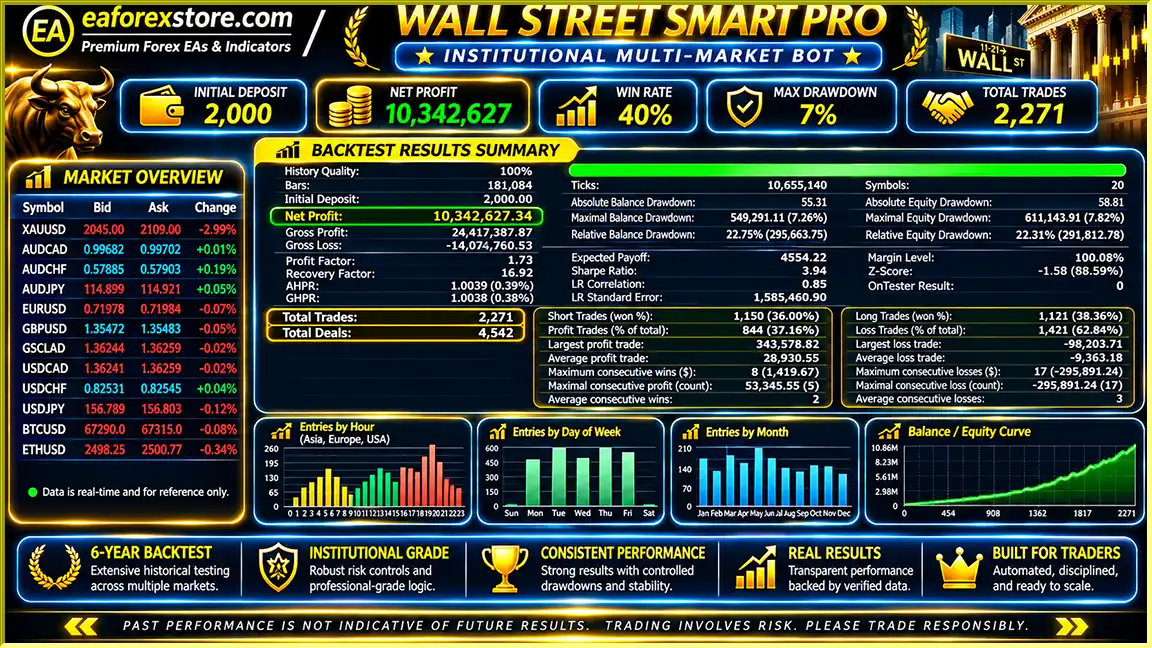
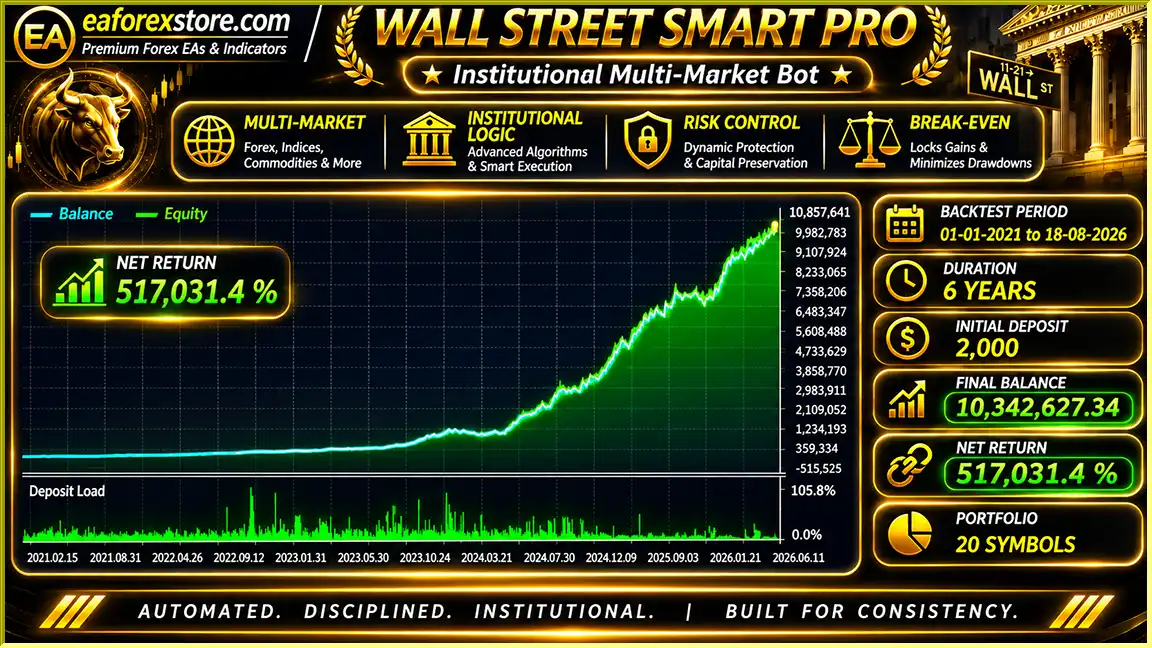
Wall Street Smart Pro EA MT5 Backtets
Wall Street Smart Pro EA Backtets
Wall Street Smart Pro EA MT5 incorporates several risk management mechanisms designed to control trading frequency, account exposure, and daily trading activity.
The developer describes a default risk allocation of approximately 1% of account balance per trade.
Actual exposure depends on the EA’s position-sizing calculation, stop placement, contract specifications, and execution conditions.
Traders can configure a daily loss percentage to restrict trading after a specified account decline.
For example, setting a 3% threshold is intended to stop new trading activity when the EA’s daily loss condition is triggered.
The exact calculation basis, including treatment of floating losses, commissions, and other positions, should be verified before live deployment.
The global position limit allows traders to control the maximum number of simultaneous trades.
This can help manage portfolio exposure when multiple monitored instruments generate signals.
The system supports a restriction of two losing trades per market per day.
This mechanism is designed to reduce repeated losses on instruments experiencing unfavorable trading conditions.
WSSP restricts trading during specified intervals around the New York opening period and daily market transitions.
These filters aim to reduce exposure to unfavorable spread conditions and selected volatility windows.
The optional automatic position-closing feature can close open positions before the daily market close.
This helps limit overnight exposure when enabled, although it cannot prevent all losses or protect against every market gap.
The developer states that users can follow real-account trading activity, including executed trades, drawdown, and account performance.
Independent verification of the monitoring source is recommended.
Alert System Note: Dedicated push notifications, email alerts, and audible alerts are not confirmed in the supplied product specifications. Buyers should check these capabilities with the developer.
Risk Warning: Even with percentage-based risk settings, daily loss restrictions, and position limits, losses may exceed configured thresholds during price gaps, slippage, market disconnections, or rapid volatility. Multiple Forex pairs can also carry correlated exposure.
Download and install the MetaTrader 5 trading platform through your broker or the official MetaTrader website.
Log in to your demo or trading account and verify the platform connection.
Obtain Wall Street Smart Pro EA MT5 through its authorized product listing.
Complete the installation or activation process according to the developer’s instructions.
According to the developer, Wall Street Smart Pro should be attached to only one chart.
Open either:
You do not need to attach the EA separately to every monitored instrument.
Open the MT5 Navigator panel and locate Wall Street Smart Pro under Expert Advisors.
Drag the EA onto your selected H1 chart.
Review the available global settings, including:
The developer describes the default configuration as a moderate investor profile. Traders seeking more conservative exposure should evaluate alternative settings through testing.
Activate algorithmic trading in MetaTrader 5 and confirm that the EA has the necessary permissions.
Ensure that the supported Forex and cryptocurrency instruments are available through your broker.
The developer provides the following reference configuration for demonstration backtesting:
| Parameter | Developer’s Suggested Setting |
|---|---|
| Trading Symbol | BTCUSD |
| Timeframe | H1 |
| Starting Date | January 1, 2021 |
| Ending Date | Latest available data |
| Modeling Mode | 1-Minute OHLC |
| Initial Deposit | USD 500 or more |
| Optimization | Disabled |
| Historical Data | Highest available quality |
The developer advertises backtest results exceeding 400,000% under specific conditions. This is an unverified promotional claim, not an independently established result or a reasonable expectation of future returns.
Significantly different results should prompt a review of data quality, spreads, commissions, modeling assumptions, broker specifications, and configuration—not an automatic conclusion that the backtest was performed incorrectly.
Before deploying real funds, conduct forward testing under current market conditions.
Evaluate trading frequency, realized losses, drawdown, position exposure, and trading costs.
Compare live demo behavior with historical backtesting results.
After completing suitable testing, determine whether the EA matches your account size, risk tolerance, and broker environment.
The developer recommends VT Markets because its market data and execution conditions were used primarily during development and testing.
Broker recommendations should be assessed independently, including trading fees, regulation, account protection, and service availability in your jurisdiction.
For continuous trading, a compatible Windows VPS running MetaTrader 5 may provide a more consistent hosting environment.
>>> Join VIP Membership Now <<<
Wall Street Smart Pro EA MT5 offers a distinctive combination of centralized multi-market monitoring, Smart Money trading concepts, technical indicator confirmation, and configurable portfolio-level risk controls.
Its ability to evaluate multiple Forex and cryptocurrency instruments from a single Expert Advisor instance is a practical advantage for traders seeking to simplify their automated trading environment.
The integration of liquidity sweep detection, structural analysis, RSI, Awesome Oscillator, MACD, and EMA-based confirmation provides a systematic framework for identifying potential trade opportunities.
Meanwhile, daily loss limits, simultaneous trade restrictions, per-market losing trade controls, and optional end-of-day closing features support more structured exposure management.
Nevertheless, the software’s advanced architecture should not be confused with guaranteed profitability. Exceptional backtesting claims, institutional affiliations, and live performance records require independent verification.
Overall, Wall Street Smart Pro EA MT5 is worth evaluating for experienced automated trading users who want a multi-market Smart Money Forex robot with customizable risk management and centralized MetaTrader 5 operation.
Thorough backtesting, realistic demo testing, and careful broker evaluation remain essential before trading with real capital.
Wall Street Smart Pro EA MT5 – Multi-Market Automation. Smart Money Analysis. Structured Risk Management.
Risk Disclaimer: Forex and cryptocurrency trading involve substantial financial risk. Leveraged trading can result in rapid and significant losses. Automated trading systems, including Wall Street Smart Pro, cannot guarantee profits or prevent all losses. Historical backtests, simulated performance, and past live results do not guarantee future trading outcomes. Always verify promotional claims, understand the risks, and avoid trading with money you cannot afford to lose.
1. What is Wall Street Smart Pro EA MT5, and how does it work?
Wall Street Smart Pro EA MT5 is an advanced automated Forex and cryptocurrency trading robot designed for the MetaTrader 5 platform. It uses Smart Money Concepts (SMC), liquidity sweep detection, market structure analysis, and technical indicators such as RSI, MACD, Awesome Oscillator, and EMA to identify potential trading opportunities. The Expert Advisor automatically analyzes market conditions, executes eligible trades, and manages risk according to its configured trading parameters.
2. How many Forex pairs and cryptocurrencies can Wall Street Smart Pro EA trade?
Wall Street Smart Pro EA MT5 is designed to monitor up to 20 financial markets simultaneously from a single MetaTrader 5 chart. It supports major Forex currency pairs and cryptocurrencies, including Bitcoin (BTCUSD) and Ethereum (ETHUSD). Unlike conventional MT5 trading robots that require installation on multiple charts, Wall Street Smart Pro provides centralized multi-market monitoring and automated trade execution. The developer's complete supported-symbol list should be verified, as the supplied documentation explicitly identifies 19 instruments.
3. Is Wall Street Smart Pro EA MT5 profitable, and does it guarantee returns?
Wall Street Smart Pro EA MT5 is designed to identify trading opportunities using institutional-inspired Smart Money trading strategies and multiple technical confirmations. The developer advertises substantial historical backtesting returns and states that real-account trading performance can be monitored publicly. However, these claims require independent verification, and no automated Forex trading robot can guarantee consistent profits. Actual results depend on market conditions, trading costs, execution quality, and risk management settings.
4. What risk management features does Wall Street Smart Pro EA MT5 offer?
Wall Street Smart Pro EA MT5 includes percentage-based position sizing, configurable daily loss limits, maximum simultaneous trade restrictions, and market-specific losing trade controls. Its stated default risk setting is approximately 1% of account balance per trade. The EA also supports trading-time restrictions and optional end-of-day position closing. These advanced risk management features help traders control automated trading exposure, although market volatility, slippage, and price gaps can still cause losses.
5. Can I use Wall Street Smart Pro EA MT5 with a funded trading account?
Wall Street Smart Pro EA MT5 includes several features that may be useful for proprietary trading firm (prop firm) accounts, including daily loss restrictions, position limits, trading-session controls, and automatic end-of-day position closing. These tools can help traders manage exposure according to selected trading rules. However, compatibility with funded accounts depends on each prop firm's policies regarding Expert Advisors, drawdown calculations, automated trading, and overnight positions. Traders should verify the firm's requirements before using the EA.
6. Which broker and trading timeframe are recommended for Wall Street Smart Pro EA MT5?
The developer recommends VT Markets because Wall Street Smart Pro EA MT5 was primarily developed, optimized, and tested using its trading environment. For installation, the EA can be attached to a BTCUSD H1 or EURUSD H1 chart while monitoring multiple supported markets from one instance. Trading performance may vary between brokers because of differences in spreads, commissions, execution speed, liquidity, and symbol specifications. Users should test the EA with their chosen broker before live trading.
7. How do I install Wall Street Smart Pro EA on MetaTrader 5?
To install Wall Street Smart Pro EA MT5, download the Expert Advisor file and open your MetaTrader 5 platform. Place the EA in the appropriate Experts directory, restart or refresh MT5, and attach it to a BTCUSD H1 or EURUSD H1 chart. Configure the risk percentage, daily loss limits, maximum open trades, and trading-time restrictions. Enable algorithmic trading and verify that your broker supports the required instruments. Backtesting and demo forward testing are recommended before using real funds.
8. What is included when I purchase Wall Street Smart Pro EA MT5, and how long does delivery take?
According to the product listing, customers receive the latest version of Wall Street Smart Pro EA MT5, including the Wall Street Smart Pro.ex5 Expert Advisor file. The advertised delivery time is 24–48 hours after payment, with a refund offered if the product is not delivered. The seller also describes the product as having no ID or time limitations and advertises a limited edition of 1,000 lifetime licenses worldwide. Buyers should confirm license availability, activation requirements, and purchase conditions before ordering.
In stock
In stock
In stock
In stock
In stock
Out of stock
No account yet?
Create an Account












 Automatic EA
 EA Best Seller
 Expert Advisor MT4
 Expert Advisor MT5
 HFT EA



Reviews
Clear filtersThere are no reviews yet.