

Product Overview
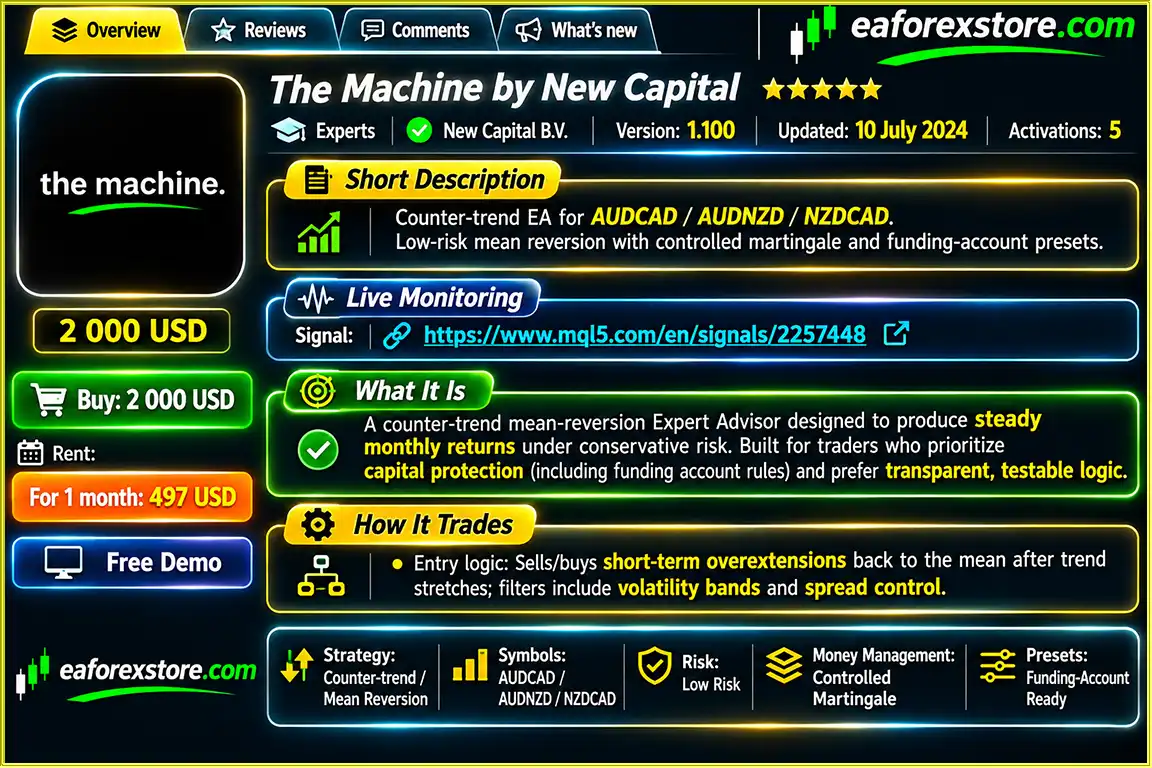
The Machine by New Capital EA MT5 is an automated Forex trading Expert Advisor developed for MetaTrader 5, specializing in counter-trend and mean-reversion strategies across three currency pairs: AUDCAD, AUDNZD, and NZDCAD.
Designed for traders who prefer systematic trading and configurable risk management, this EA identifies short-term price overextensions and seeks opportunities when the market begins returning toward its average value.
Unlike traditional trend-following robots, The Machine EA focuses on potential reversals and corrective movements after prices deviate from their established trading ranges.
The system combines volatility-based entry filters, automated position management, spread restrictions, and optional controlled martingale recovery to manage trading opportunities under different market conditions.
With adjustable risk settings, pair-specific configuration files, and equity protection tools, The Machine by New Capital EA MT5 offers a flexible automated trading solution for personal Forex accounts and eligible proprietary trading environments.
The EA is designed to pursue systematic returns while managing exposure through predefined trading rules. However, its recovery mechanism can increase drawdown substantially during prolonged market trends.
About the Developer
- Author: Nico Schirrmacher
- Experience: Over 3 years of experience on MQL5.
- Notable Products: The Machine by New Capital EA MT5, The Scalper by Profectus AI EA MT5 and other advisors.
- Flagship Product: The Machine by New Capital EA MT5 is rated as the best performing product of the year.
>>> Delivery time 24h-48h after payment.
>>> Refund if not delivered.
>>> You will receive the latest version without any limitations (ID+Time).Reviewed by Jason Stap <<<
Key Features of The Machine by New Capital EA MT5
Multi-Currency Forex Trading
Specially developed for AUDCAD, AUDNZD, and NZDCAD, allowing traders to deploy the strategy across three supported currency pairs.
Counter-Trend Mean Reversion Strategy
Identifies temporary price overextensions and looks for potential reversals toward average market levels.
Volatility-Based Entry Filtering
Uses volatility bands and configurable price-deviation thresholds to evaluate trading opportunities.
Controlled Martingale Recovery
Provides an optional position-recovery system with adjustable lot multipliers and maximum recovery levels.
Automated Risk Management
Includes configurable risk percentages, initial lot sizes, daily equity stops, and maximum drawdown settings.
Dynamic Position Sizing
Supports fixed lot sizes and automatic balance-based lot calculations.
Spread Protection
Restricts new trade entries when spreads exceed the configured maximum threshold.
Flexible Stop-Loss and Take-Profit
Supports predefined SL/TP management, with ATR-based parameters available for volatility-sensitive trade exits.
Optional Trailing Stop
Allows traders to activate trailing-stop management to respond to favorable price movements.
Trading Session Restrictions
Provides configurable trading hours to help avoid periods of low liquidity or unfavorable execution conditions.
Ready-to-Use Set Files
Includes pair-specific configuration presets designed to simplify installation and initial setup.
Backtesting and Performance Evaluation
Provides backtest reports and configuration guidance to help users evaluate trading behavior before live deployment.
How It Works
The Machine by New Capital EA MT5 operates using a mean-reversion trading framework that attempts to identify temporary market imbalances and profit from corrective price movements.
Step 1: Detecting Price Overextensions
The EA continuously monitors supported Forex pairs to identify situations where prices move significantly away from their recent average.
These movements are evaluated using configurable mean periods, volatility bands, and overextension thresholds.
Step 2: Evaluating Market Conditions
Before opening a position, the robot checks relevant trading conditions, including current spreads, volatility, and permitted trading sessions.
This filtering process is intended to reduce entries during unfavorable execution environments.
Step 3: Executing Counter-Trend Trades
When price conditions meet the strategy's requirements, the EA opens a trade in anticipation of a potential return toward the mean.
Buy positions may be considered after significant downward extensions, while Sell positions may be evaluated following upward overextensions.
Step 4: Managing Active Positions
Once a trade is opened, the Expert Advisor manages its position using configured stop-loss, take-profit, and optional trailing-stop rules.
ATR-based parameters can be used to adapt exit distances to market volatility.
Step 5: Applying Optional Recovery Logic
If recovery mode is enabled and price continues moving against an existing position, the system may open additional positions according to its configured recovery rules.
The multiplier and maximum number of recovery levels are restricted by user-defined settings.
This controlled martingale approach limits the number of recovery steps but does not eliminate the possibility of significant losses.
Step 6: Monitoring Account Exposure
The EA applies available equity protection and daily risk restrictions to help manage overall account exposure.
During strong directional markets, floating drawdown can increase as counter-trend positions remain open.
Why Choose The Machine by New Capital EA MT5?
The Machine by New Capital EA MT5 offers a specialized approach for traders interested in automated mean-reversion strategies rather than conventional trend-following systems.
Its primary trading concept is based on identifying short-term deviations from average market prices. This approach seeks to capture corrective movements that may occur after temporary buying or selling pressure.
The EA is specifically configured for AUDCAD, AUDNZD, and NZDCAD, allowing users to focus on a limited group of currency pairs rather than applying a generic strategy across unrelated instruments.
Another distinguishing feature is its adjustable recovery system. Traders can enable or disable controlled martingale functionality and configure the multiplier and maximum number of recovery steps.
The availability of conservative presets, daily equity restrictions, and maximum drawdown parameters gives users flexibility when selecting their preferred risk exposure.
Pair-specific set files also simplify the configuration process, making the EA more accessible to traders who want a structured starting point for testing.
For traders seeking an MT5 Forex robot that combines counter-trend entries, automated position management, and configurable recovery controls, The Machine provides a dedicated mean-reversion framework.
Nevertheless, users should understand that controlled martingale remains a high-risk money-management technique, particularly during sustained market trends.
The Machine by New Capital EA MT5 Signal Results
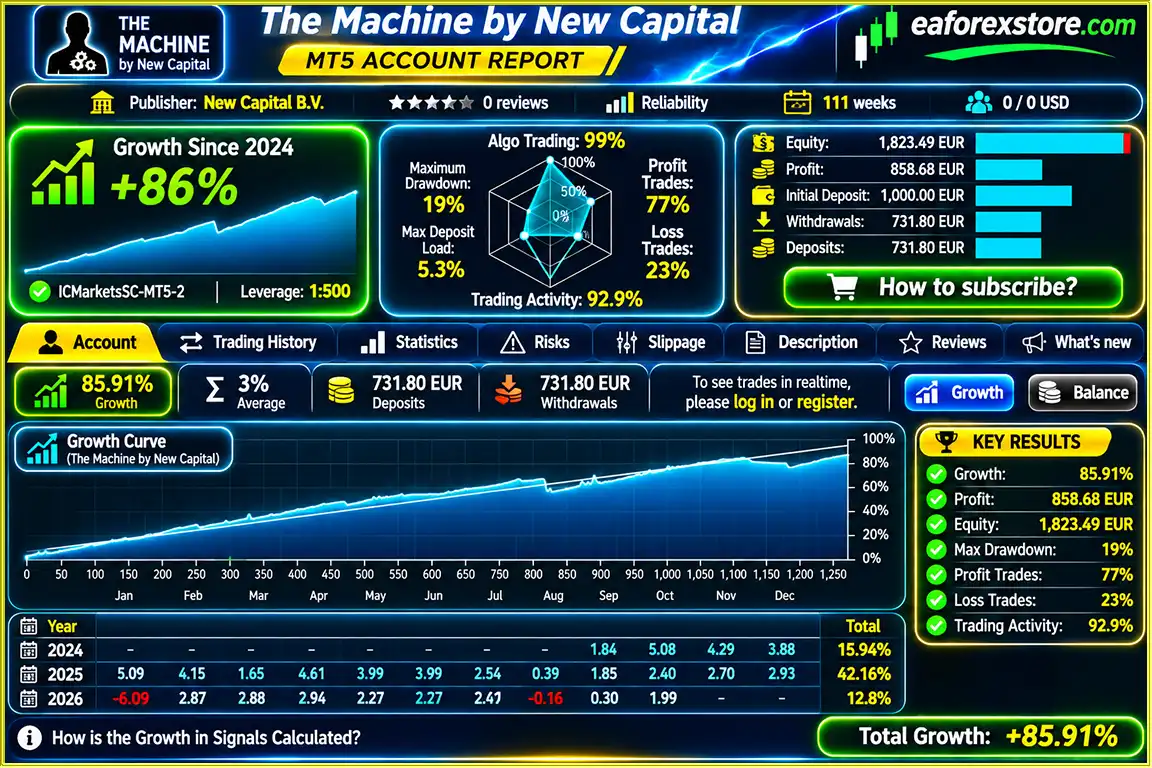
🔺XAUUSD pair – 11 consecutive weeks
- Initial Deposit: $1.000
- Growth Rate: +86%
- Win Rate (% of total): 77%
- Maximum Drawdown: 19%
Risk Management & Alerts
Risk control is an important part of The Machine by New Capital EA MT5, particularly because mean-reversion strategies can experience extended adverse price movements.
Initial Position Risk Control
The EA supports percentage-based risk settings and configurable initial trade volumes.
Users can choose fixed lot sizes or automatic balance-based position sizing.
Daily Equity Stop
A configurable daily equity stop can restrict trading activity when account equity reaches a predefined daily loss threshold.
The exact behavior of this soft stop should be verified in the installed EA version, particularly regarding whether existing positions remain open.
Maximum Drawdown Protection
The MaxDrawdown parameter provides an additional account-level risk-control mechanism.
However, slippage, price gaps, and rapid market changes may cause realized losses to exceed intended thresholds.
Controlled Martingale Limits
The recovery system includes configurable maximum levels and lot multipliers.
Limiting recovery steps can constrain the number of additional positions, but larger subsequent orders can still create substantial combined exposure.
Spread Filtering
The EA checks trading spreads before allowing new entries and can avoid trading when transaction costs exceed configured limits.
Trading Session Management
Users can configure permitted trading hours to reduce exposure during low-liquidity periods.
Optional News Protection
Certain builds may provide news-related trading restrictions. Availability and operation should be confirmed in the specific EA version.
Stop-Loss and Trailing Management
Configurable stop-loss, take-profit, and optional trailing-stop parameters help manage individual trades.
Important: Dedicated push notifications, email alerts, and mobile alerts are not confirmed in the supplied specifications.
No risk-control feature can guarantee capital preservation, especially when multiple recovery positions are open during a prolonged directional move.
Pros and Cons
Pros
- Designed specifically for AUDCAD, AUDNZD, and NZDCAD.
- Uses a systematic counter-trend mean-reversion strategy.
- Includes configurable volatility and spread filters.
- Supports fixed and automatic position sizing.
- Provides optional controlled martingale recovery.
- Allows users to set recovery multipliers and maximum levels.
- Includes daily equity and maximum drawdown parameters.
- Offers flexible stop-loss and take-profit management.
- Supports optional trailing stops.
- Includes ready-to-use configuration files for supported pairs.
- Provides backtesting reports for strategy evaluation.
- Suitable for testing on personal and eligible funding accounts.
Cons
- Controlled martingale can significantly increase risk exposure.
- Strong directional trends may produce extended floating drawdowns.
- Conservative presets do not guarantee low realized losses.
- Performance depends on broker spreads, commissions, and execution.
- Not suitable for every proprietary trading firm's rules.
- Requires careful recovery-level and position-size configuration.
- Historical profitability metrics can change over time.
- Live signals may be paused or restarted when risk limits are reached.
- May not suit traders seeking a non-martingale strategy.
How to Install
Installing The Machine by New Capital EA MT5 involves the standard MetaTrader 5 Expert Advisor setup process.
Step 1: Install MetaTrader 5
Download and install MetaTrader 5 from your preferred Forex broker or the official MetaTrader website.
Step 2: Add the Expert Advisor
Open the trading platform and navigate to:
File → Open Data Folder → MQL5 → Experts
Copy the supplied EX5 file into the Experts directory.
Step 3: Refresh the Navigator
Restart MetaTrader 5 or refresh the Expert Advisors section to load the installed EA.
Step 4: Open a Supported Currency Pair
Select AUDCAD, AUDNZD, or NZDCAD from the Market Watch window.
Open a chart for the desired instrument.
Step 5: Attach the EA
Drag The Machine by New Capital EA MT5 onto the chart and enable algorithmic trading permissions.
Step 6: Load the Set File
Open the EA input settings and load the appropriate configuration file for the selected pair.
Use the timeframe specified in the corresponding set file or installation instructions.
Step 7: Configure Risk Parameters
Review initial lot size, percentage risk, recovery multiplier, maximum recovery levels, daily equity stop, and maximum drawdown settings.
Step 8: Enable Automated Trading
Activate Algo Trading and confirm that the EA is operating correctly.
Step 9: Perform Demo Testing
Use MetaTrader 5 Strategy Tester with realistic trading costs and real-tick modeling.
Evaluate the system on a demo account before considering live trading.
For continuous operation, a stable VPS may be used to maintain uninterrupted platform connectivity.
Recommended Trading Setup
| Parameter | Configuration |
|---|---|
| Platform | MetaTrader 5 |
| Trading Pairs | AUDCAD, AUDNZD, NZDCAD |
| Trading Strategy | Counter-Trend Mean Reversion |
| Entry Method | Price Overextension and Pullback |
| Recovery System | Optional Controlled Martingale |
| Position Sizing | Fixed Lot or Automatic Lot |
| Risk Settings | Adjustable |
| Stop-Loss / Take-Profit | Configurable |
| Trailing Stop | Optional |
| Daily Equity Stop | Available |
| Maximum Drawdown Control | Available |
| Spread Filter | Available |
| Trading Session Filter | Available |
| Recommended Starting Mode | Conservative Presets |
| Backtesting Method | Every Tick Based on Real Ticks |
| VPS | Recommended for Continuous Operation |
What’s Included in the Download Package?
- Experts: The Machine by New Capital.ex5
>>> Join VIP Membership Now <<<
Final Thoughts
The Machine by New Capital EA MT5 is an automated Forex trading system developed for traders interested in counter-trend market opportunities and mean-reversion strategies.
By focusing on AUDCAD, AUDNZD, and NZDCAD, the EA applies a specialized trading framework that seeks to identify temporary price deviations and potential returns toward average market levels.
Its combination of configurable entry filters, automated trade management, equity protection settings, and optional controlled martingale recovery provides flexibility for different account configurations.
The supplied performance information references a Profit Factor of approximately 1.77 across more than 2,700 trades in live monitoring. These figures are developer-reported, time-dependent, and should be independently checked against the latest available trading records.
While the system includes conservative configuration options, its recovery mechanism requires careful consideration. Prolonged market trends can lead to significant floating drawdown, even when martingale multipliers and recovery levels are capped.
For traders exploring a specialized AUDCAD, AUDNZD, and NZDCAD mean-reversion EA for MetaTrader 5, The Machine by New Capital offers a configurable trading system that should be evaluated through comprehensive backtesting, forward testing, and disciplined risk management.
The Machine by New Capital EA MT5 – Automated Mean Reversion Trading with Configurable Risk and Controlled Recovery.