





-
 Unlimited Activations
-
 Instant delivery
-
 Easy to install




 Unlimited Activations
Instant delivery
Easy to install
 Free Update
 Free Install Support

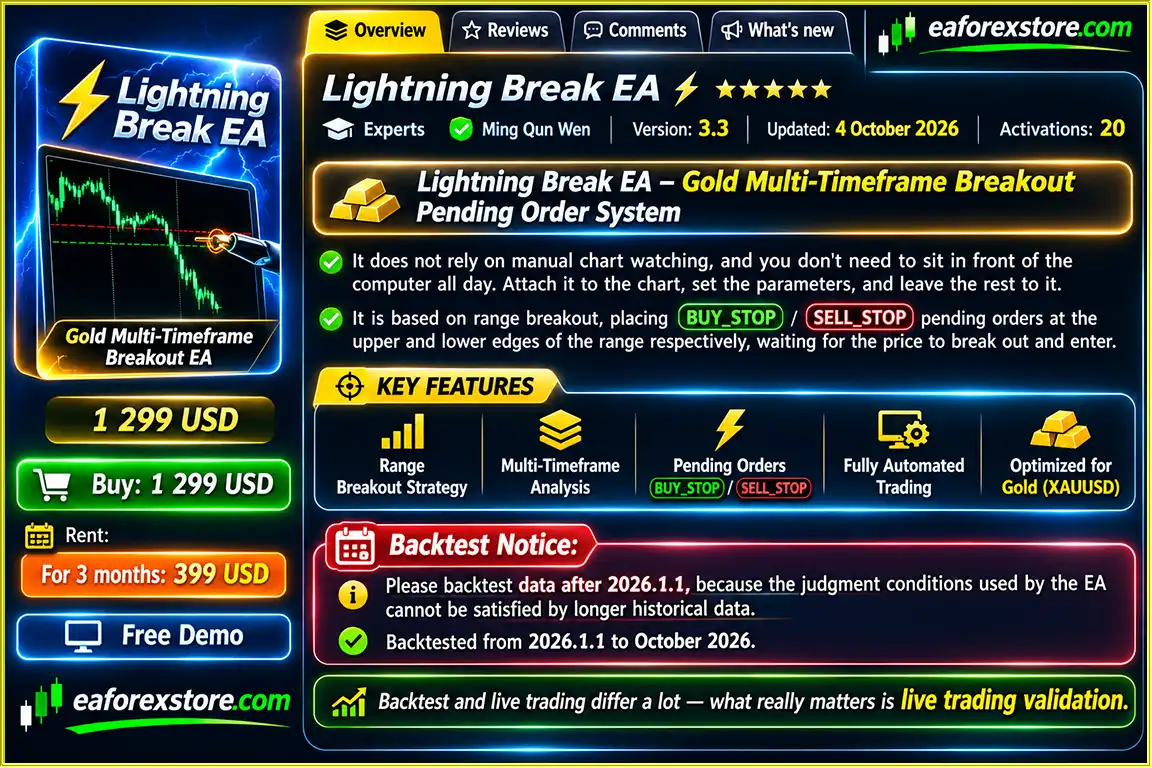
Lightning Break EA MT5 is an automated gold trading Expert Advisor developed for MetaTrader 5, designed to capture potential breakout opportunities in the XAUUSD market. Using a multi-timeframe range breakout strategy, this trading robot identifies key price boundaries and places pending orders to participate in directional movements when gold breaks beyond established trading ranges.
Unlike trading systems that require constant chart monitoring, Lightning Break EA automates the process of identifying breakout levels, preparing trading orders, and managing active positions.
The EA uses Buy Stop and Sell Stop pending orders positioned near the upper and lower boundaries of identified price ranges. When the market moves beyond these levels and triggers an order, the system manages the resulting position using predefined stop-loss and take-profit parameters.
A key characteristic of Lightning Break EA MT5 is its straightforward money-management approach. The strategy does not use Martingale, grid recovery, or additional position averaging. Every executed order includes protective stop-loss and take-profit levels.
With multi-timeframe signal coordination, configurable lot sizing, and economic news restrictions, Lightning Break EA provides an automated solution for traders interested in systematic XAUUSD breakout trading.
>>> Delivery time 24h-48h after payment.
>>> Refund if not delivered.
>>> You will receive the latest version without any limitations (ID+Time).Reviewed by Jason Stap <<<
Lightning Break EA MT5 Overview
Combines signals from M15, M30, H1, and H4 to evaluate breakout opportunities across different market perspectives.
Identifies relevant upper and lower price boundaries where potential breakout movements may occur.
Places pending orders around established trading ranges to participate when price breaks beyond predefined levels.
Developed for gold trading, focusing on breakout opportunities and directional price movements.
Does not use Martingale, progressive lot multiplication, or recovery-based position averaging.
Each executed order includes a stop-loss level intended to limit losses when price moves against the trade.
Automatically assigns take-profit levels to manage profitable trades according to the strategy’s trading rules.
Supports both fixed lot sizes and automatic percentage-based risk calculations.
Includes configurable restrictions for major economic announcements, including NFP, Federal Reserve interest rate decisions, CPI, GDP, and unemployment-related reports.
The recommended setup uses an H1 chart while maintaining signal analysis across multiple enabled timeframes.
Monitors trading conditions, places pending orders, and manages positions without requiring continuous manual supervision.
Can operate through a stable VPS environment for traders seeking continuous automated market monitoring.
Lightning Break EA MT5 follows a structured breakout trading process that focuses on price movement beyond established market ranges.
Step 1: Identifying Trading Ranges
The Expert Advisor analyzes gold price behavior to identify relevant trading boundaries.
These boundaries represent areas where price has previously remained within a defined range.
Step 2: Multi-Timeframe Signal Coordination
The system incorporates signals from four timeframes:
The supplied strategy configuration recommends keeping all four timeframe signals enabled.
Step 3: Placing Pending Orders
After identifying qualified trading conditions, the EA prepares pending orders around the established range.
A Buy Stop order is positioned near the upper boundary, while a Sell Stop order is placed near the lower boundary.
These orders are intended to participate when price breaks beyond the range.
Step 4: Executing Breakout Trades
When market price reaches a pending-order level and the broker’s execution conditions are satisfied, the order may be triggered.
The strategy seeks to capture a continuation movement following the breakout.
Step 5: Applying Stop-Loss and Take-Profit
Every executed trade includes predefined stop-loss and take-profit levels.
The EA manages the position according to its programmed exit conditions without relying on position averaging or Martingale recovery.
Step 6: Filtering Major News Events
When the economic news filter is enabled, the robot can restrict trading around selected high-impact announcements.
This helps reduce exposure to periods when spreads, volatility, and execution uncertainty may increase.
The strategy is designed to automate the breakout trading process while maintaining predefined trade-management rules.
Lightning Break EA MT5 offers a focused approach to automated gold trading by combining breakout execution with multi-timeframe market analysis and straightforward position management.
One of its primary advantages is the use of pending orders. Instead of continuously entering the market, the EA identifies potential breakout boundaries and prepares orders that activate when price reaches the relevant levels.
This approach allows the system to participate in qualifying directional movements without requiring the trader to monitor every price fluctuation manually.
Another important feature is its non-Martingale trading structure. Lightning Break does not depend on increasing position sizes after losses or adding recovery positions to unfavorable trades.
The combination of predefined stop-loss and take-profit levels also makes individual trade risk easier to evaluate before execution.
Its four-timeframe signal framework provides an additional analytical layer, allowing the strategy to consider market conditions from M15 through H4 while operating from the recommended H1 chart.
The integrated news filter further supports disciplined execution by restricting trading around selected economic announcements.
For traders seeking an automated XAUUSD breakout Expert Advisor with pending-order execution and configurable risk controls, Lightning Break EA MT5 provides a specialized trading framework.
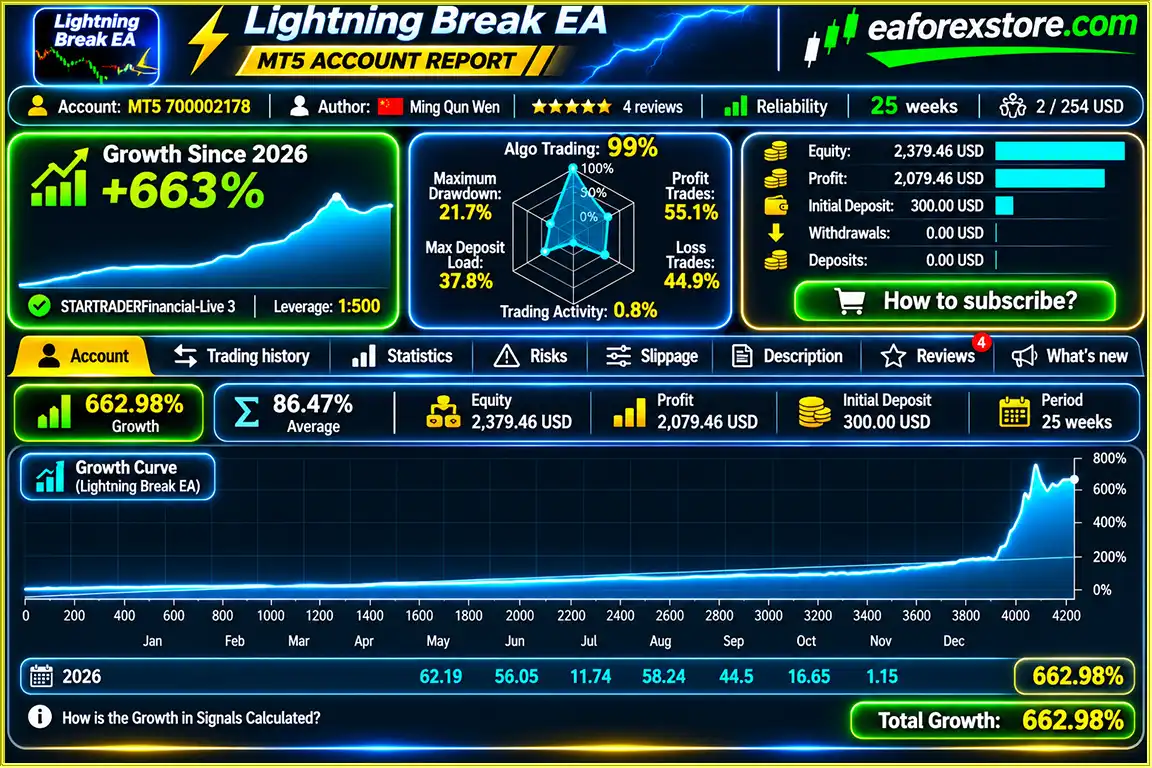
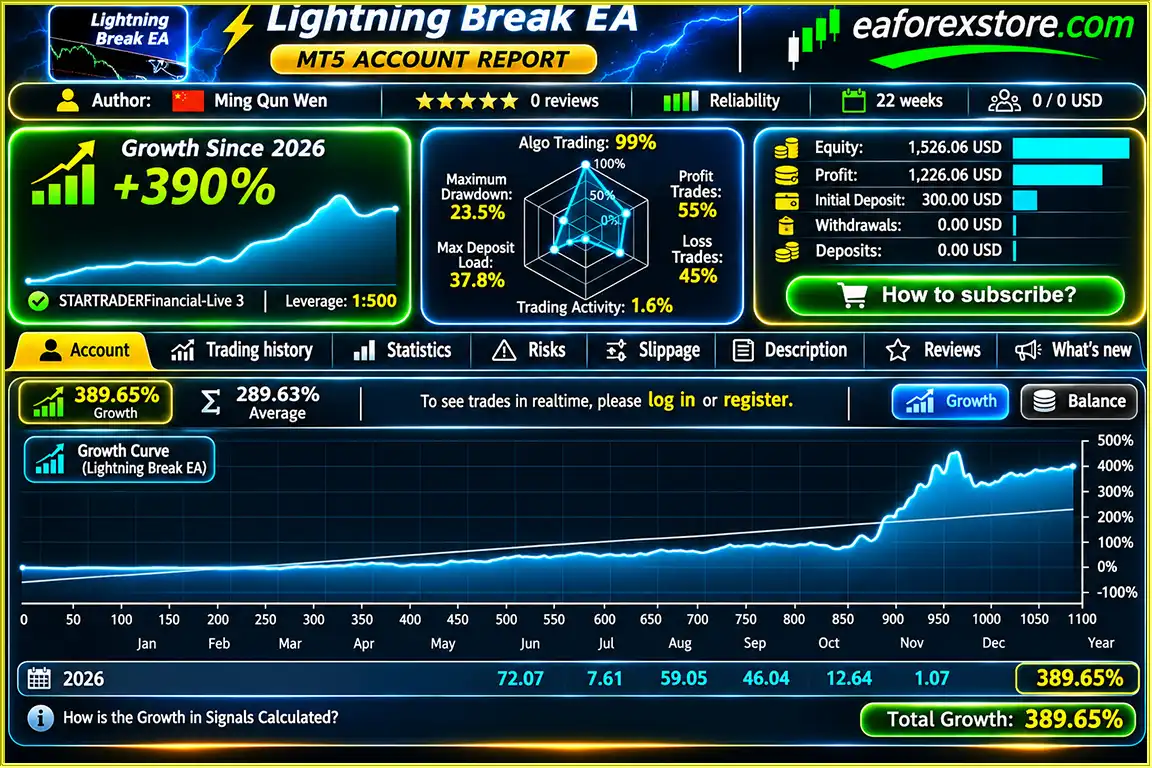
Lightning Break EA MT5 Signal Results
Lightning Break EA Signal Results
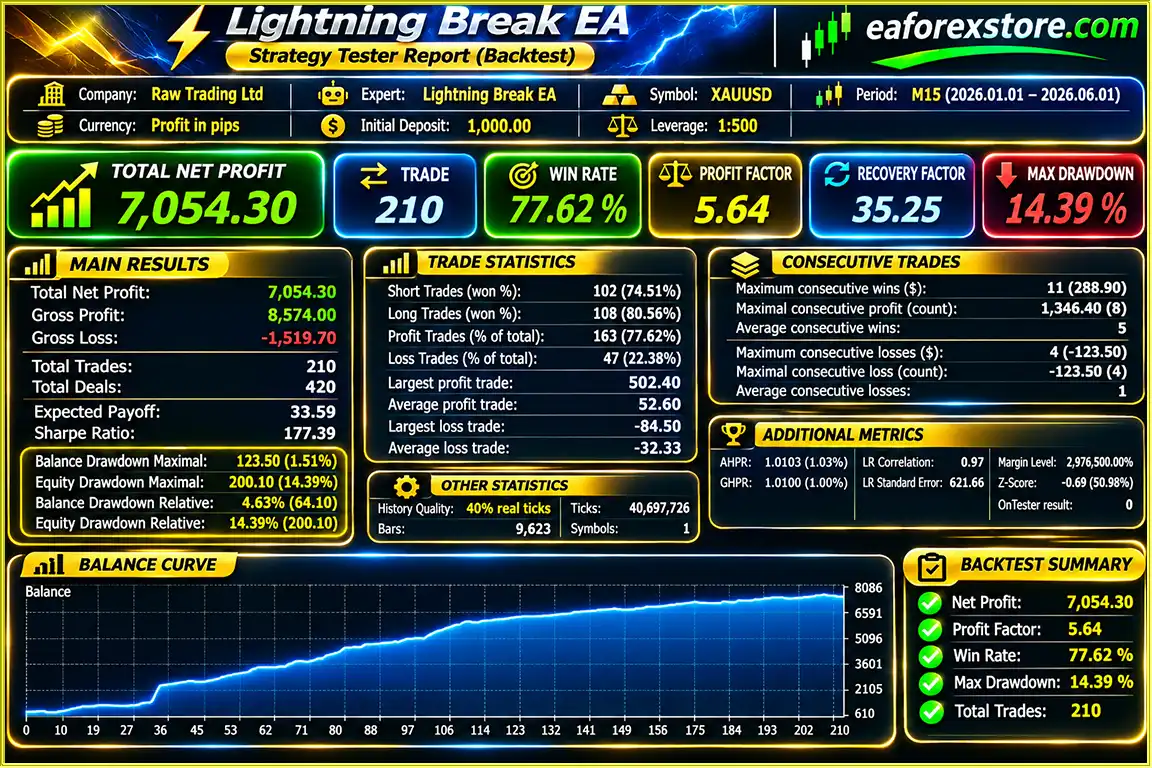
Lightning Break EA MT5 backtets
Risk management is a central part of Lightning Break EA MT5, particularly because gold breakouts can be accompanied by rapid volatility, false signals, and execution slippage.
The EA allows traders to define a fixed trading volume for each position.
The developer provides the following example capital-to-lot guidelines:
| Example Capital | Suggested Fixed Lot |
|---|---|
| $130 | 0.01 |
| $300 | 0.02 |
| $650 | 0.05 |
| $1,300 | 0.10 |
These figures are developer-provided examples rather than universally safe position sizes. Actual risk depends on the stop-loss distance, contract specifications, leverage, and account conditions.
Traders can enable percentage-based position sizing by activating the relevant risk management parameter.
The supplied developer guidance suggests a risk-per-trade setting between 2.0% and 2.8%.
This represents the intended percentage exposure calculated using the system’s stop-loss parameters. Actual losses may exceed the intended risk because of gaps, slippage, or execution differences.
Every position opened by the strategy includes a stop-loss order designed to limit adverse price exposure.
A stop loss does not guarantee execution at the exact requested price.
Predefined take-profit levels provide an automated mechanism for closing positions when the market reaches the configured profit target.
The EA does not increase exposure through Martingale, grid trading, or averaging into losing positions.
This helps avoid the escalating position sizes associated with many recovery-based strategies.
Lightning Break EA includes filters for five major categories of economic announcements:
In the supplied configuration, all five news-event categories are enabled for blocking.
News filtering is intended to reduce exposure to unstable execution conditions, but it cannot prevent all slippage, spread expansion, or market volatility.
Users may disable the event filters if they choose to allow trading around economic announcements.
The developer recommends testing such conditions using a minimum volume of 0.01 lots before considering larger positions.
Trading through major news releases can expose orders to substantial slippage and unpredictable execution conditions.
Important: Dedicated push notifications, email alerts, and mobile trading alerts are not confirmed in the supplied product specifications.
Step 1: Install MetaTrader 5
Download and install the MetaTrader 5 platform from your preferred broker or the official MetaTrader website.
Step 2: Copy the Expert Advisor File
Open MetaTrader 5 and select:
File → Open Data Folder → MQL5 → Experts
Place the supplied Lightning Break EA file into the Experts directory.
Step 3: Refresh Expert Advisors
Restart MetaTrader 5 or refresh the Expert Advisors section in the Navigator window.
Step 4: Open XAUUSD
Select your broker’s XAUUSD instrument and open a trading chart.
Step 5: Set the H1 Timeframe
Change the chart timeframe to H1, as recommended in the developer’s setup instructions.
Step 6: Attach Lightning Break EA
Drag the Expert Advisor onto the XAUUSD H1 chart and enable algorithmic trading permissions.
Step 7: Configure Lot Size
Choose between fixed lot sizing and automatic percentage-based risk calculation.
For fixed lot operation, disable the risk-percentage lot sizing option and enter your selected fixed volume.
Step 8: Enable Multi-Timeframe Signals
Confirm that all four signal options are activated:
Step 9: Configure Economic News Protection
Review the five major economic event filters and enable the appropriate restrictions for your trading preferences.
Step 10: Test and Activate
Use MetaTrader 5 Strategy Tester and a demo account to evaluate the EA before live trading.
The developer recommends testing historical data beginning January 1, 2026, because earlier historical conditions may not satisfy the strategy’s internal requirements.
For continuous operation, consider using a stable VPS.
| Parameter | Developer Configuration |
|---|---|
| Platform | MetaTrader 5 |
| Trading Instrument | XAUUSD |
| Recommended Chart | H1 |
| Trading Strategy | Range Breakout |
| Order Types | Buy Stop / Sell Stop |
| M15 Signal | Enabled |
| M30 Signal | Enabled |
| H1 Signal | Enabled |
| H4 Signal | Enabled |
| Fixed Lot Mode | Available |
| Default Example Lot | 0.05 |
| Automatic Risk Sizing | Available |
| Suggested Risk Setting | 2.0%–2.8% |
| Stop Loss | Included with Each Trade |
| Take Profit | Included with Each Trade |
| Martingale | Not Used |
| Position Averaging | Not Used |
| Major News Filtering | Available |
| Developer Backtest Period | January–October 2026 |
| VPS | Recommended |
>>> Join VIP Membership Now <<<
ightning Break EA MT5 is an automated gold trading robot developed around a multi-timeframe breakout strategy and pending-order execution.
By analyzing price ranges across M15, M30, H1, and H4, the system attempts to identify potential breakout opportunities and participate in directional market movements.
Its Buy Stop and Sell Stop execution model, predefined stop-loss and take-profit levels, and non-Martingale approach provide a structured framework for automated XAUUSD trading.
The addition of configurable risk-based lot sizing and major economic news filters gives traders greater flexibility when managing trading activity and market exposure.
However, breakout strategies remain vulnerable to false signals, sudden reversals, spread expansion, and execution slippage.
The developer’s historical testing covers January through October 2026, but these results should not be interpreted as a guarantee of future performance. Independent forward testing and live execution monitoring are essential before committing significant capital.
For traders searching for a Gold Breakout EA for MetaTrader 5 that combines multi-timeframe analysis, automatic pending orders, and non-Martingale trade management, Lightning Break EA MT5 offers a focused strategy worth evaluating.
Lightning Break EA MT5 – Capture Gold Breakout Opportunities with Automated Pending Orders and Multi-Timeframe Analysis.
1. What is Lightning Break EA MT5, and how does it work?
Lightning Break EA MT5 is an automated gold trading robot designed for the MetaTrader 5 platform. It uses a multi-timeframe range breakout strategy to identify potential trading opportunities in XAUUSD. The EA analyzes price boundaries across M15, M30, H1, and H4 timeframes, automatically placing Buy Stop and Sell Stop pending orders when trading conditions are met. Each executed trade includes predefined stop-loss and take-profit levels.
2. Is Lightning Break EA MT5 profitable, and what is its win rate?
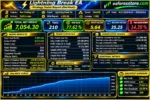
According to the supplied performance reports, Lightning Break EA MT5 achieved a reported 77.62% win rate with a 14.39% maximum drawdown during a five-month backtest. Separate 25-week trading signal reports showed approximately 55% win rates, 663% account growth, and maximum drawdowns ranging from 21.7% to 23.5%. These results have not been independently verified and do not guarantee future profitability. Actual performance depends on market volatility, broker execution, and risk management.
3. What is the best timeframe and trading pair for Lightning Break EA MT5?
Lightning Break EA MT5 is specifically developed for XAUUSD (Gold) trading on MetaTrader 5. The developer recommends attaching the EA to the H1 (one-hour) chart while enabling all four timeframe signals: M15, M30, H1, and H4. This multi-timeframe breakout strategy allows the trading robot to evaluate potential price breakouts across different market conditions.
4. Does Lightning Break EA MT5 use Martingale, Grid Trading, or position averaging?
No. Lightning Break EA MT5 does not use Martingale, Grid Trading, or position averaging. The robot does not progressively increase lot sizes after losing trades or open additional recovery positions to compensate for previous losses. Instead, each trade is managed using its own predefined stop-loss and take-profit parameters, providing a structured approach to automated gold trading risk management.
5. What is the minimum deposit required to trade with Lightning Break EA MT5?
The developer provides example configurations starting with $130 and a fixed lot size of 0.01. Other examples include $300 with 0.02 lots, $650 with 0.05 lots, and $1,300 with 0.10 lots. However, these figures are illustrative and do not establish a guaranteed safe minimum deposit. Actual capital requirements depend on broker leverage, margin requirements, stop-loss distance, and individual risk tolerance.
6. Does Lightning Break EA MT5 include risk management and an economic news filter?
Yes. Lightning Break EA MT5 includes automatic stop-loss and take-profit protection, fixed or percentage-based lot sizing, and configurable economic news filters. The EA can restrict trading around major announcements such as Non-Farm Payrolls (NFP), Federal Reserve interest rate decisions, CPI, GDP, and unemployment reports. These features help manage trading exposure but cannot eliminate losses caused by false breakouts, slippage, or sudden market volatility.
7. Can I backtest Lightning Break EA MT5, and what historical data should I use?
Yes. Lightning Break EA MT5 can be tested using the MetaTrader 5 Strategy Tester. The developer specifically recommends using historical data beginning January 1, 2026, because earlier market data may not satisfy the EA's internal trading conditions. The supplied developer testing covers January through October 2026. Traders should also conduct demo and forward testing, as historical backtest performance may differ significantly from live trading results.
8. How do I install Lightning Break EA MT5, and what is included in the download?
To install Lightning Break EA MT5, copy the supplied Lightning Break.ex5 file into the MetaTrader 5 MQL5/Experts folder. Restart MT5, open an XAUUSD chart, select the H1 timeframe, and attach the Expert Advisor. Enable Algo Trading, configure fixed lot or percentage-based risk settings, activate the M15, M30, H1, and H4 signals, and review the economic news filters. The product listing states that delivery takes 24–48 hours after payment and includes the latest version without ID or time limitations.
In stock
In stock
In stock
In stock
In stock
Out of stock
No account yet?
Create an Account












 Automatic EA
 EA Best Seller
 Expert Advisor MT4
 Expert Advisor MT5
 HFT EA



Reviews
Clear filtersThere are no reviews yet.