





-
 Unlimited Activations
-
 Instant delivery
-
 Easy to install




 Unlimited Activations
Instant delivery
Easy to install
 Free Update
 Free Install Support

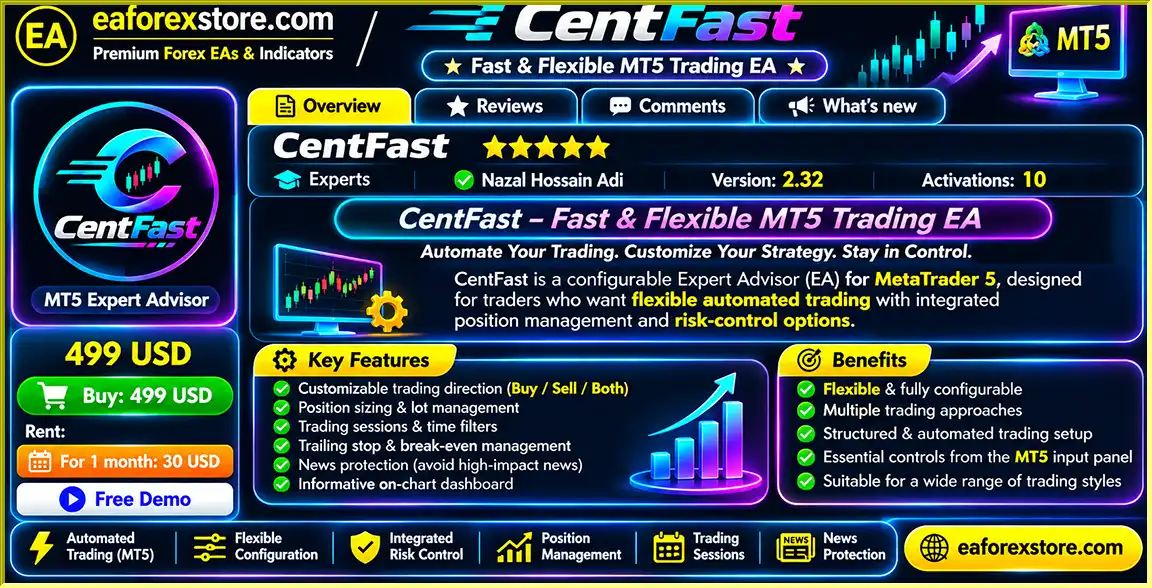
CentFast EA MT5 is a configurable automated Forex trading robot developed to simplify trade execution, position management, and risk control on the MetaTrader 5 platform.
Built for traders who value flexibility and automation, CentFast combines essential trading tools into one comprehensive Expert Advisor. Its customizable settings allow users to manage trading directions, position sizes, Stop Loss and Take Profit levels, trailing stops, break-even protection, and market-session restrictions.
Unlike basic trading robots with limited configuration options, CentFast provides a more adaptable trading environment through its risk-based lot sizing, economic news filters, margin protection, and professional on-chart monitoring dashboard.
Whether you are exploring automated Forex trading strategies or managing an established MT5 trading setup, CentFast offers a practical solution for automating trading operations without sacrificing control over important risk parameters.
The EA also supports continuous operation on a compatible Windows VPS, making it suitable for traders who want their automated trading system available during selected market sessions.
>>> Delivery time 24h-48h after payment.
>>> Refund if not delivered.
>>> You will receive the latest version without any limitations (ID+Time).Reviewed by Jason Stap <<<
CentFast EA MT5 Overview
CentFast EA MT5 provides a comprehensive collection of automated trading and risk management features designed to improve operational efficiency and trading flexibility.
CentFast EA MT5 automates trading activities according to its configured strategy and market conditions, reducing the need for constant manual trade execution.
Key capabilities include:
Traders can select from three trading directions:
These settings allow users to align the EA’s permitted trading direction with their preferences and market outlook.
CentFast EA MT5 offers two position-sizing methods.
Fixed Lot Trading: Use a predefined lot size for each eligible trade, providing consistent nominal trade volume.
Risk-Based Lot Trading: Calculate position sizes using a configured risk percentage and the applicable risk parameters.
This flexibility helps traders customize exposure according to account size, instrument specifications, and individual risk tolerance.
CentFast EA MT5 includes several trailing-stop options for automated trade management:
These tools allow protective stop levels to adjust according to the selected trailing method and configured conditions.
The break-even feature can automatically move a position’s Stop Loss toward its entry price after a predefined favorable price movement.
Where supported, traders can also configure a break-even offset to adjust the protective stop beyond the original entry level.
CentFast supports configurable trading restrictions for four major Forex sessions:
Additional scheduling controls include trading start and end times, selected trading days, and Friday trading restrictions.
The built-in news protection system helps manage trading activity around scheduled economic announcements.
Traders can configure news impact levels, affected currencies, pre-news and post-news protection periods, and supported position-closing rules.
CentFast EA MT5 features an on-chart dashboard displaying key trading and account information, including:
The dashboard allows traders to monitor important account metrics directly from their MetaTrader 5 charts.
CentFast EA MT5 operates as an automated trading system within MetaTrader 5, combining configurable trading logic with position management and account protection tools.
Step 1: Configure Your Trading Strategy
After attaching the EA to a trading chart, users configure their preferred trading direction, position sizing, Stop Loss, Take Profit, and other available parameters.
Step 2: Monitor Market Conditions
CentFast EA MT5 evaluates the market according to its internal trading strategy and configured settings. Trading-session filters, news restrictions, and risk parameters help determine whether automated trading is permitted.
Step 3: Execute Eligible Trades
When the EA’s trading conditions are satisfied, it can automatically execute Buy or Sell orders according to the selected trading mode and applicable restrictions.
Step 4: Manage Open Positions
After trade execution, CentFast manages eligible positions using its configured Stop Loss, Take Profit, trailing-stop, and break-even features.
Step 5: Apply Trading Restrictions
The EA uses configured session, news, position-limit, and margin-related controls to manage trading activity and exposure.
Step 6: Display Account Performance
Traders can review account information, floating profit or loss, trading statistics, spreads, and operational status through the built-in MT5 dashboard.
This automated workflow helps reduce repetitive trading tasks while preserving user control over the EA’s available settings.
CentFast EA MT5 distinguishes itself through its combination of trading automation, customizable risk controls, and comprehensive position management features.
Instead of relying on multiple separate tools for order execution, trade management, and account monitoring, CentFast integrates these functions into one MetaTrader 5 Expert Advisor.
The EA offers flexible settings for trading direction, lot sizing, Stop Loss, Take Profit, trailing stops, break-even protection, and trading schedules.
This allows users to configure the system around different trading requirements.
Risk-based position sizing, margin protection, maximum position limits, and automated stop management provide multiple layers of configurable exposure control.
CentFast EA MT5 enables traders to restrict trading during selected sessions or around scheduled economic announcements, helping them apply more consistent operational rules.
The real-time on-chart dashboard provides convenient access to account conditions and performance statistics without requiring traders to navigate multiple MT5 windows.
Compatibility with the MetaTrader 5 Strategy Tester allows users to evaluate the EA under historical market conditions before considering live deployment.
CentFast EA MT5 can operate on a compatible Windows VPS running MetaTrader 5, supporting continuous availability without requiring a personal computer to remain switched on.
CentFast is particularly suitable for traders seeking a configurable MT5 automated trading robot with integrated trade management, account monitoring, and risk protection tools.
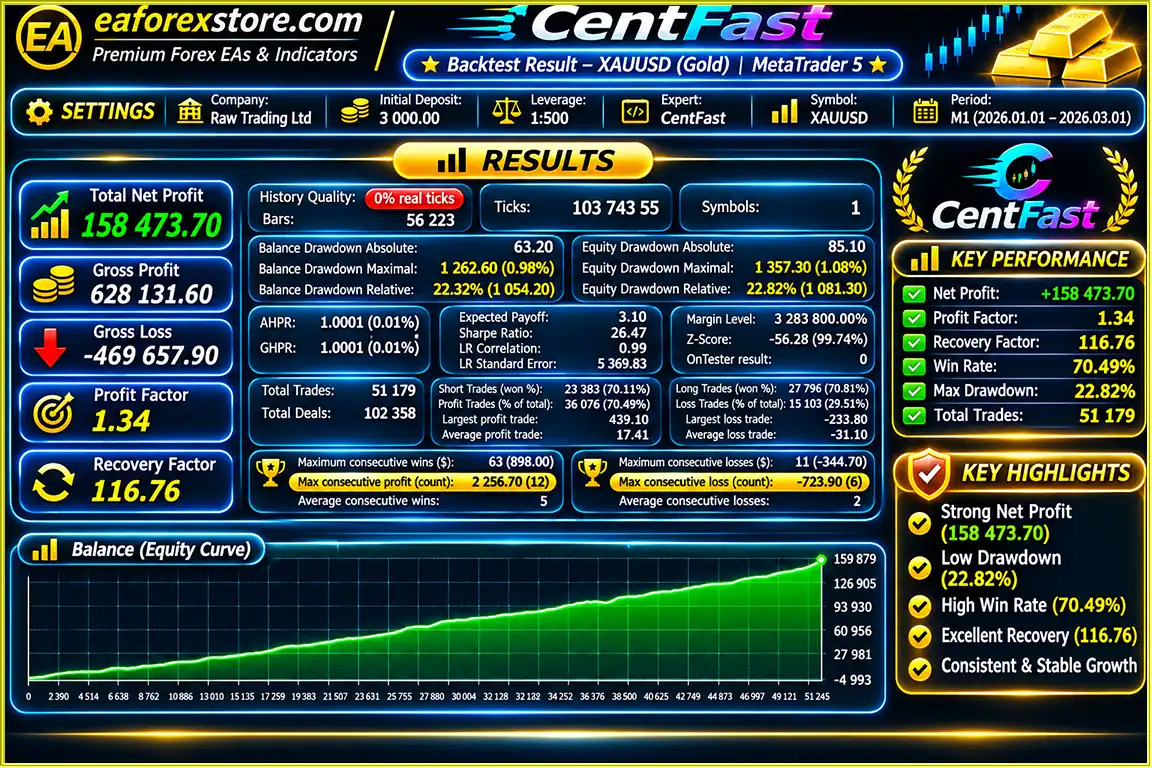
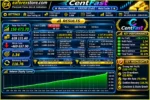
CentFast EA MT5 backtets
Risk management is a central component of CentFast EA MT5. The Expert Advisor includes several configurable mechanisms intended to help traders manage position exposure and control automated trading activity.
Users can select a predefined lot size or configure risk-based lot calculations.
Risk-based sizing can help align trade volume with selected risk parameters, although actual losses may exceed intended levels during gaps, slippage, or abnormal execution conditions.
Configurable Stop Loss and Take Profit settings help establish predefined trade exit levels.
These tools support structured trade management but cannot guarantee execution at the requested price.
Fixed-distance, volatility-based, and combined trailing modes allow users to automate adjustments to protective stop levels under supported conditions.
The automatic break-even function helps manage existing positions after favorable price movement by adjusting stop levels toward the entry price.
However, commissions, swaps, spreads, and execution slippage may still result in losses.
Built-in margin safeguards allow traders to configure operational restrictions intended to reduce excessive account exposure.
CentFast provides configurable news filters to restrict trading around scheduled high-impact economic events.
Depending on the selected parameters, users can adjust pre-news and post-news protection intervals and supported position-closing behavior.
The real-time dashboard displays margin information, floating profit or loss, spread conditions, and trading status to help users monitor their automated trading environment.
Important: CentFast includes risk controls and monitoring features, but the supplied specifications do not establish a dedicated push-notification, email, or audible alert system. These functions should be verified separately before being advertised.
No automated risk management system can eliminate financial losses. Market gaps, execution delays, spread widening, and unexpected volatility can reduce the effectiveness of protective trading settings.
Installing CentFast EA MT5 is straightforward using the MetaTrader 5 platform.
Open the MetaTrader 5 terminal and access the integrated MQL5 Market.
Search for CentFast EA MT5, purchase or obtain the product as applicable, and complete the installation process.
Select your preferred trading instrument in MetaTrader 5 and open its chart.
Choose a suitable timeframe based on the EA’s supported trading conditions and configuration requirements.
Locate CentFast in the MT5 Navigator under Expert Advisors.
Drag the EA onto your selected chart or double-click it to open the configuration window.
Adjust the available settings according to your trading requirements:
Review and configure the additional trading protection features:
Verify broker-server time and daylight-saving adjustments when setting trading-session restrictions.
Enable algorithmic trading in MetaTrader 5 and ensure that the EA has the required trading permissions.
Confirm that the Expert Advisor is active and that its trading configuration is accepted by the platform.
Before using CentFast on a live account, open the MetaTrader 5 Strategy Tester.
Evaluate historical performance using appropriate symbols, timeframes, broker specifications, and realistic trading costs.
Pay particular attention to drawdown, execution assumptions, transaction costs, and overall strategy behavior.
Run CentFast on a demo account to evaluate its behavior under current market conditions.
Monitor trade execution, slippage, spread sensitivity, margin requirements, and position management.
After adequate testing, determine whether the EA is suitable for your risk tolerance and trading environment.
For continuous operation, install and run MetaTrader 5 with CentFast on a compatible Windows VPS.
Ensure the terminal remains connected and monitor the EA periodically.
Installation Tip: Always verify broker contract specifications, minimum lot sizes, volume steps, stop-distance restrictions, and margin requirements before enabling automated trading with real funds.
>>> Join VIP Membership Now <<<
CentFast EA MT5 offers a comprehensive automated trading environment for MetaTrader 5 users who prioritize flexibility, customizable position management, and integrated risk controls.
Its combination of automated trade execution, Buy and Sell trading modes, fixed and risk-based lot sizing, advanced trailing stops, break-even protection, economic news filters, and margin safeguards makes it a practical option for traders seeking greater operational control.
The professional real-time dashboard adds convenience by presenting trading statistics, account conditions, and market information in one accessible interface.
However, CentFast should be evaluated as a trading automation tool rather than a guaranteed profit-generating system. Its effectiveness depends on the underlying strategy, selected parameters, broker execution conditions, transaction costs, and market behavior.
Traders should conduct thorough backtesting and demo forward testing before considering live use.
For those searching for a MetaTrader 5 automated trading EA with flexible risk management, advanced trade management features, and an integrated performance dashboard, CentFast is worth evaluating.
CentFast EA MT5 – Automate Your Trading. Customize Your Risk. Stay in Control.
Risk Disclaimer: Forex and CFD trading involve substantial financial risk, particularly when leverage is used. CentFast does not guarantee profits, prevent all losses, or ensure any specific trading result. Past performance and simulated results are not reliable indicators of future performance. Always trade responsibly and use capital you can afford to lose.
1. What is CentFast EA MT5, and how does it work?
CentFast EA MT5 is an automated Forex trading robot designed for the MetaTrader 5 platform. It automatically analyzes market conditions, executes Buy and Sell orders based on its configured trading strategy, and manages open positions. The Expert Advisor includes advanced risk management tools such as Stop Loss, Take Profit, trailing stops, break-even protection, and economic news filters, helping traders automate trading activities while maintaining control over key settings.
2. Is CentFast EA MT5 suitable for beginners?
Yes, CentFast EA MT5 can be used by beginners who have a basic understanding of Forex trading and the MetaTrader 5 platform. Its customizable trading parameters and real-time dashboard make it easier to monitor automated trading activities. However, beginners should first test the Forex trading robot on an MT5 demo account and understand its risk management settings before trading with real money.
3. Can CentFast EA MT5 trade Gold (XAUUSD) and other Forex pairs?
CentFast EA MT5 includes published backtesting results for Gold (XAUUSD) and supports automated trading on MetaTrader 5. Traders can select their preferred trading instrument and configure the available trading parameters. However, compatibility and performance for specific Forex currency pairs, symbols, and timeframes should be verified through backtesting and demo trading before live deployment.
4. Does CentFast EA MT5 guarantee profits or offer a high win rate?
No, CentFast EA MT5 does not guarantee profits or a specific win rate. The product information reports a historical XAUUSD backtest with a 70.49% win rate over two months. However, backtesting results do not guarantee future trading performance. Actual profitability depends on market volatility, broker spreads, trading costs, execution speed, risk settings, and overall market conditions.
5. What risk management features does CentFast EA MT5 offer?
CentFast EA MT5 includes multiple risk management features, including fixed and risk-based lot sizing, customizable Stop Loss and Take Profit levels, advanced trailing stops, automatic break-even protection, margin safeguards, and maximum position limits. It also provides economic news protection and trading-session filters to help traders manage market exposure. These tools can support more disciplined automated Forex trading but cannot eliminate the risk of financial losses.
6. Can CentFast EA MT5 run 24/7 on a VPS?
Yes, CentFast EA MT5 can operate continuously on a compatible Windows VPS running MetaTrader 5. A Forex VPS allows the trading robot to remain active without requiring your personal computer to stay switched on. For reliable automated trading, ensure the VPS maintains a stable internet connection, the MT5 terminal remains operational, and algorithmic trading is enabled. Trading execution still depends on configured schedules and broker market availability.
7. How do I install and set up CentFast EA on MetaTrader 5?
To install CentFast EA MT5, obtain the Expert Advisor through the available distribution method and install it in MetaTrader 5. Open your preferred trading chart, locate CentFast under Expert Advisors in the Navigator panel, and attach it to the chart. Configure trading direction, lot size, Stop Loss, Take Profit, trailing stops, news filters, and risk settings. Enable algorithmic trading, then use the MT5 Strategy Tester and a demo account to evaluate the EA before considering live trading.
8. What do I receive after purchasing CentFast EA MT5, and how long does delivery take?
According to the product information, customers receive the latest version of CentFast EA MT5, including the CentFast.ex5 Expert Advisor file. The stated delivery time is 24–48 hours after payment, and the seller advertises a refund if the product is not delivered. The listing also describes the version as having no ID or time limitations. Customers should confirm licensing terms, installation requirements, and delivery conditions with the seller before purchasing.
In stock
In stock
In stock
In stock
In stock
Out of stock
No account yet?
Create an Account












 Automatic EA
 EA Best Seller
 Expert Advisor MT4
 Expert Advisor MT5
 HFT EA



Reviews
Clear filtersThere are no reviews yet.