
Product Overview
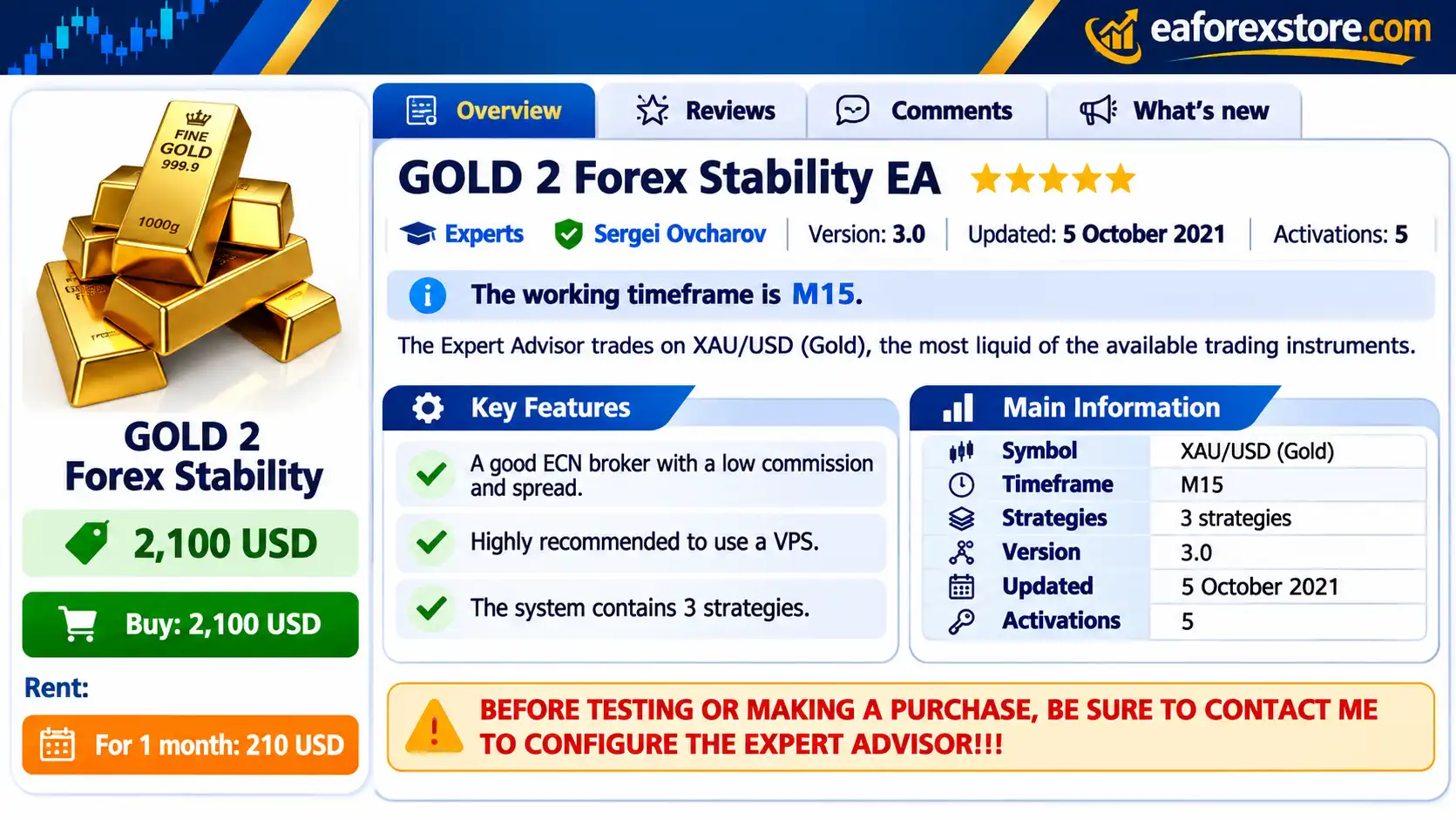
GOLD 2 Forex Stability EA MT4 is an automated gold trading Expert Advisor designed for the MetaTrader 4 platform. Developed specifically for XAUUSD (Gold), the trading robot operates on the M15 timeframe and incorporates three trading strategies within a single automated trading system.
The Expert Advisor is designed to perform trading operations according to its programmed algorithms, allowing traders to automate aspects of gold market analysis, trade execution, and position management.
Unlike general-purpose Forex trading robots that support numerous currency pairs, GOLD 2 Forex Stability EA MT4 focuses on XAUUSD, an actively traded precious metals instrument known for its substantial trading volume and frequent price movements.
The developer recommends using a reliable ECN broker with low trading spreads and commissions. A Virtual Private Server (VPS) is also strongly recommended to support continuous operation and stable connectivity.
One important aspect of this EA is its requirement for individual configuration and developer consultation before testing or purchasing. The developer offers assistance with configuring the Expert Advisor and can connect to a demo account to evaluate system behavior under the selected trading conditions.
For traders interested in an automated XAUUSD trading robot with multiple strategies and personalized setup support, GOLD 2 Forex Stability EA MT4 offers a specialized solution for MetaTrader 4.
About the Developer
- Author: Sergei Ovodkov
- Experience: Over + 5 years of experience on MQL5.
- Notable Products: GOLD 2 Forex Stability EA MT4, Secha4 EA MT4, Forex Stability 2 EA MT4 and other advisors.
- Flagship Product: GOLD 2 Forex Stability EA MT4 is rated as the best performing product of the year.
>>> Delivery time 24h-48h after payment.
>>> Refund if not delivered.
>>> You will receive the latest version without any limitations (ID+Time).> Reviewed by Jason Stap <<<
Key Features Of GOLD 2 Forex Stability EA MT4
Automated XAUUSD Gold Trading
GOLD 2 Forex Stability EA MT4 is developed specifically for trading gold against the US dollar.
The Expert Advisor is intended to automate trading operations on XAUUSD according to its programmed strategy rules.
This allows users to participate in automated gold trading without manually executing every order.
Three Integrated Trading Strategies
One of the main features of GOLD 2 Forex Stability EA MT4 is the inclusion of three trading strategies.
The system combines these strategies within a single Expert Advisor to support its automated trading activity.
However, the developer has not disclosed the exact entry conditions, indicators, or algorithms used by the three strategies.
M15 Trading Timeframe
The recommended trading timeframe is M15.
This means the EA is designed to operate on 15-minute price charts, providing its specified environment for evaluating trading opportunities.
Fully Automated Trading Functionality
GOLD 2 Forex Stability EA MT4 is presented as an automated trading system developed using MetaTrader's MQL programming environment.
Automated Expert Advisors can execute predefined trading operations when their programmed conditions are satisfied.
The exact degree of automation for individual risk-management and trade-management functions should be verified with the developer.
ECN Broker Recommendation
The developer recommends using an ECN broker offering competitive spreads, low commissions, and reliable execution.
Broker conditions can influence automated trading performance, particularly when transaction costs and execution speed affect trade outcomes.
VPS Compatibility and Continuous Operation
A VPS is highly recommended for running GOLD 2 Forex Stability EA MT4.
A reliable VPS can help keep MetaTrader 4 operating continuously without depending on a local computer remaining powered on.
Individual EA Configuration
The developer emphasizes the importance of configuring the Expert Advisor before testing or purchasing.
This requirement suggests that users should verify their broker conditions, trading environment, and EA settings before evaluating performance.
Demo Account Assistance
The developer offers to connect the Expert Advisor to a buyer's demo account to check its operation and stability.
This allows prospective users to observe how the system behaves in a simulated trading environment before considering live deployment.
Demo trading results do not guarantee equivalent live-account performance.
MQL-Based Expert Advisor
GOLD 2 Forex Stability EA MT4 is designed for the MetaTrader 4 trading environment, which supports automated strategies developed using the MQL4 programming language.
This enables automated market monitoring, order execution, and trade-management functionality according to the EA's implemented features.
How It Works
GOLD 2 Forex Stability EA MT4 operates as an automated trading system designed to evaluate XAUUSD market conditions and execute trades using its three integrated strategies.
Step 1: XAUUSD Market Monitoring
The Expert Advisor operates on the XAUUSD chart using the recommended M15 timeframe.
It monitors market data according to the trading conditions programmed into its algorithms.
Step 2: Trading Strategy Evaluation
The EA incorporates three separate trading strategies.
These strategies are used within the automated system to identify potential trading opportunities.
The exact method of combining or selecting between the three strategies is not disclosed in the supplied product documentation.
Step 3: Trading Signal Generation
When the system identifies conditions that satisfy its programmed rules, it can generate trading signals for potential positions.
Step 4: Automated Order Execution
The Expert Advisor can execute trading instructions through MetaTrader 4, subject to broker execution conditions, available margin, and its configured permissions.
Step 5: Position Management
Automated trading systems can use programmed rules to maintain and close positions.
However, the available description does not specify the exact stop-loss, take-profit, trailing-stop, or lot-sizing mechanisms implemented in GOLD 2 Forex Stability EA MT4.
These details should be confirmed with the developer before live trading.
Step 6: Continuous Platform Operation
For continuous automated trading, MetaTrader 4 must remain active and connected to the broker.
A VPS can help maintain platform availability and reduce interruptions caused by local computer shutdowns or internet instability.
Step 7: Demo Evaluation and Configuration
The developer recommends contacting them before testing the Expert Advisor.
Users can request help configuring the EA and evaluating its operation on a demo account.
Why Choose GOLD 2 Forex Stability EA MT4?
GOLD 2 Forex Stability EA MT4 offers a focused automated trading solution for traders interested in the gold market.
Dedicated Gold Trading System
The Expert Advisor is designed specifically for XAUUSD rather than being presented as a universal multi-currency trading robot.
Three Trading Strategies
The EA incorporates three strategies within one trading system, providing a multi-strategy architecture for automated trading.
M15 Trading Environment
The recommended 15-minute timeframe provides a defined starting point for installation and performance evaluation.
Automated Execution
The system can reduce repetitive manual order-placement tasks by executing trades according to its programmed rules.
ECN Broker Focus
The developer recommends low-spread, low-commission ECN trading conditions to support the EA's operation.
VPS-Based Operation
The recommended VPS setup can help maintain MetaTrader connectivity for continuous automated trading.
Developer Configuration Support
The ability to request setup assistance can be useful for traders who are unfamiliar with the EA's configuration requirements.
Demo Account Evaluation
The developer offers to help connect the EA to a demo account, allowing users to evaluate its functionality before using real capital.
These features may appeal to traders seeking a dedicated XAUUSD Expert Advisor with multiple trading strategies and access to developer setup assistance.
GOLD 2 Forex Stability EA MT4 Backtest Results
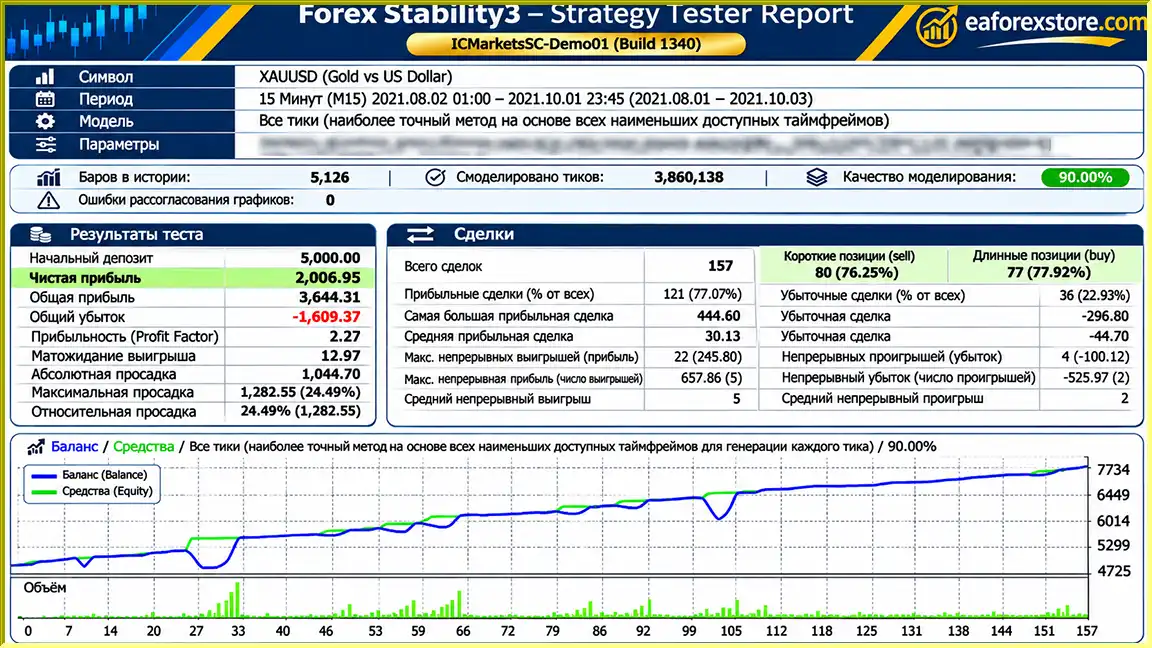
🔺XAUUSD – August 2 to October 1, 2021
- Initial Deposit: $5,000
- Total Net Profit:$2,036.95
- Win Rate (% of total): 77.07%
- Maximum Drawdown: 24.49%
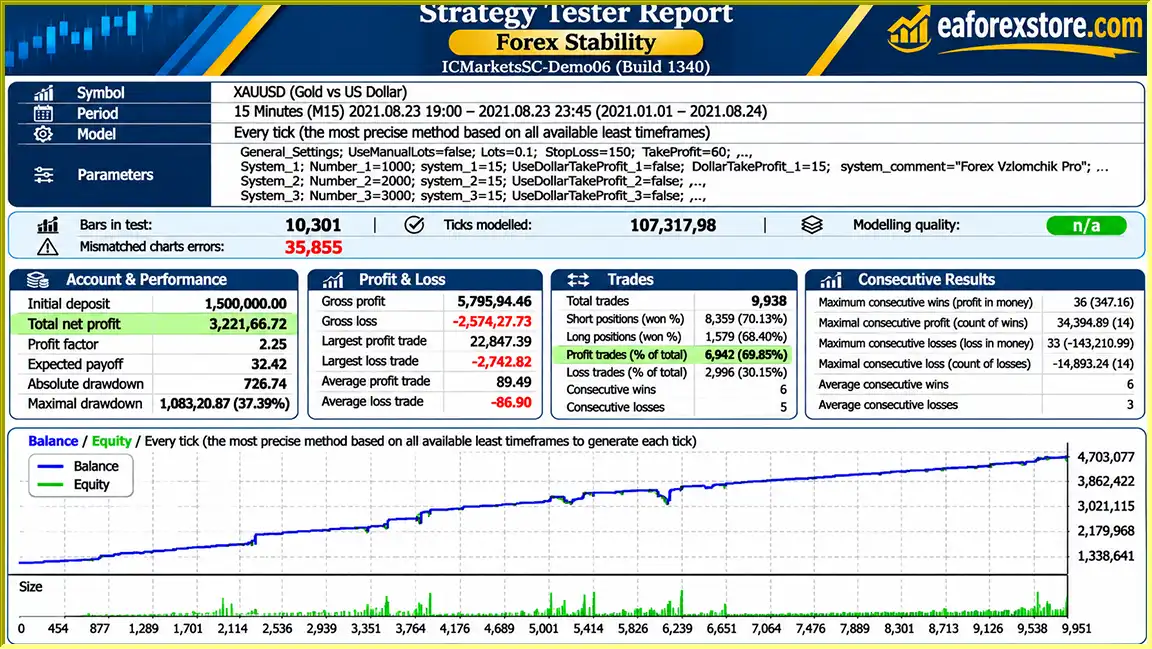
🔺XAUUSD – March 19 to August 23, 2021
- Initial Deposit: $150,000
- Total Net Profit: $322,166.72
- Win Rate (% of total): 69.85%
- Maximum Drawdown: 37.39%
Risk Management & Alerts
Risk management is particularly important when using GOLD 2 Forex Stability EA MT4, as XAUUSD can experience rapid price changes during economic announcements, shifts in monetary policy expectations, and periods of market volatility.
Recommended Trading Configuration
| Parameter | Developer's Recommendation |
|---|---|
| Trading Platform | MetaTrader 4 |
| Trading Instrument | XAUUSD (Gold) |
| Timeframe | M15 |
| Number of Strategies | 3 |
| Broker Type | ECN |
| Spread | Low |
| Commission | Low |
| VPS | Highly Recommended |
| Initial Configuration | Contact Developer |
| Demo Testing | Developer Assistance Available |
| Minimum Deposit | Not Specified |
| Recommended Leverage | Not Specified |
Gold Market Volatility
Gold prices can move rapidly in response to macroeconomic developments, including interest rate expectations, inflation data, US dollar movements, and geopolitical events.
These conditions may create trading opportunities but also increase downside risk.
Broker Spread and Commission Risk
The developer recommends low-spread and low-commission ECN brokers.
Trading costs are especially relevant when an automated system executes multiple transactions, as spreads and commissions can reduce net profitability.
Execution Slippage
During periods of high volatility, trading orders may execute at prices different from those expected.
A low-spread broker cannot guarantee that slippage will never occur.
VPS and Connection Stability
A VPS can help maintain uninterrupted access to the MetaTrader platform.
However, VPS operation does not eliminate trading risk, prevent broker outages, or guarantee successful order execution.
Stop-Loss and Money Management
The provided product description does not disclose specific stop-loss rules, maximum drawdown limits, lot-sizing formulas, or equity protection parameters.
Traders should confirm these features with the developer before using the EA on a live account.
Demo Account Monitoring
The developer offers demo account setup assistance.
Before live deployment, users should evaluate:
- Trade entry and exit behavior
- Maximum drawdown
- Position sizing
- Broker execution quality
- Spread and commission costs
- Trading frequency
- Margin consumption
- Performance during volatile gold market conditions
Alerts and Notifications
The supplied documentation does not specify dedicated pop-up, email, mobile push, or sound-alert functionality within the EA.
Traders can use MetaTrader 4's available monitoring and notification tools where supported.
Recommended Risk Management Practices
- Contact the developer before purchasing or testing.
- Confirm the exact functions of all three strategies.
- Verify stop-loss and position-sizing rules.
- Test the EA on a demo account.
- Use a broker with competitive trading costs.
- Monitor drawdown and available margin.
- Use conservative position sizing.
- Evaluate performance during major economic events.
- Maintain reliable VPS connectivity.
- Avoid assuming that demo performance guarantees live profitability.
Risk Warning: Gold trading involves substantial financial risk. Automated trading strategies, low spreads, and VPS connectivity cannot guarantee profits or prevent trading losses.
Pros and Cons
Pros
- Specifically designed for XAUUSD gold trading.
- Supports automated trading on MetaTrader 4.
- Includes three integrated trading strategies.
- Uses the M15 timeframe.
- Designed for use with low-cost ECN trading environments.
- Compatible with VPS-based operation.
- Can reduce repetitive manual trading activity.
- Developer offers individual configuration assistance.
- Demo account setup support is available.
- Provides a focused trading environment for gold market automation.
Cons
- Limited to XAUUSD rather than multiple currency pairs.
- The three trading strategies are not explained in detail.
- Requires developer consultation before testing or purchasing.
- No specific minimum deposit or recommended leverage is disclosed.
- Stop-loss and money management mechanisms are not documented.
- No independently verified performance statistics are provided.
- Trading outcomes depend on broker execution and market conditions.
- Gold volatility can produce substantial losses.
- VPS operation introduces an additional service cost.
- Demo-account results may differ from live trading performance.
How to Install GOLD 2 Forex Stability EA MT4
Installing GOLD 2 Forex Stability EA MT4 requires MetaTrader 4, a compatible trading account, and the Expert Advisor installation file.
Step 1: Contact the Developer
Before testing or purchasing the Expert Advisor, contact the developer as instructed in the product description.
Request information about the recommended configuration, supported broker conditions, and the three integrated trading strategies.
Step 2: Prepare a Trading Account
Select a broker offering XAUUSD trading through MetaTrader 4.
The developer recommends an ECN account with competitive spreads, low commissions, and reliable execution.
Step 3: Download the Expert Advisor
Obtain GOLD 2 Forex Stability EA MT4 from the authorized product provider.
Verify that the installation file is compatible with MetaTrader 4.
Step 4: Install the EA in MetaTrader 4
If the EA is supplied as an EX4 file:
- Open MetaTrader 4.
- Click File → Open Data Folder.
- Navigate to MQL4 → Experts.
- Copy the EA file into the Experts folder.
- Restart MetaTrader 4 or refresh the Navigator panel.
If the product is distributed through the MQL5 marketplace, use its official installation procedure.
Step 5: Open an XAUUSD Chart
Locate XAUUSD in the Market Watch panel.
Open the gold trading chart and select the M15 timeframe.
Step 6: Attach GOLD 2 Forex Stability EA
Find the Expert Advisor in the Navigator panel and drag it onto the XAUUSD M15 chart.
Open the input settings window to review the configuration options.
Step 7: Configure the Expert Advisor
Follow the developer's recommended configuration instructions.
Because the supplied description does not include detailed input parameters, avoid changing unfamiliar settings without understanding their effects.
Step 8: Set Up a VPS
For continuous operation, consider installing MetaTrader 4 on a reliable VPS.
Choose a VPS with stable connectivity to your broker's trading infrastructure.
Step 9: Enable Automated Trading
Enable automated trading in MetaTrader 4.
Verify that the EA is correctly initialized and check the Experts and Journal tabs for errors.
Step 10: Test on a Demo Account
The developer offers assistance with connecting the EA to a demo account.
Use this opportunity to evaluate trading behavior under the intended broker conditions.
Step 11: Review Trading Results
Monitor relevant metrics such as:
- Total net profit or loss
- Maximum equity drawdown
- Profit factor
- Number of trades
- Average trade duration
- Consecutive losses
- Spread and commission costs
- Margin usage
- Strategy behavior during high volatility
Step 12: Evaluate Live Trading Readiness
Before considering live deployment, confirm the EA's risk-management functionality and verify that its trading behavior is consistent with your risk tolerance.
What’s Included in the Download Package?
- Expertsp: GOLD 2 Forex Stability.ex4
>> Join VIP Membership Now <<<
Final Thoughts
GOLD 2 Forex Stability EA MT4 is an automated gold trading Expert Advisor developed for XAUUSD on the MetaTrader 4 platform.
Its primary characteristics include three integrated trading strategies, a recommended M15 timeframe, compatibility with low-cost ECN trading environments, and support for continuous VPS-based operation.
The developer also emphasizes personalized configuration and offers assistance with demo account testing before purchase or live deployment.
However, the supplied product description does not disclose the internal strategy algorithms, detailed risk-management settings, minimum deposit requirements, or independently verified performance statistics.
As a result, claims of trading stability or consistent profitability should not be treated as established facts without supporting evidence.
For traders interested in a dedicated automated gold trading system, GOLD 2 Forex Stability EA MT4 may be worth evaluating through careful demo testing and consultation with the developer.
Before purchasing GOLD 2 Forex Stability EA MT4, contact the developer to confirm its configuration requirements, evaluate its trading behavior, and understand the risks associated with automated XAUUSD trading.