
Product Overview
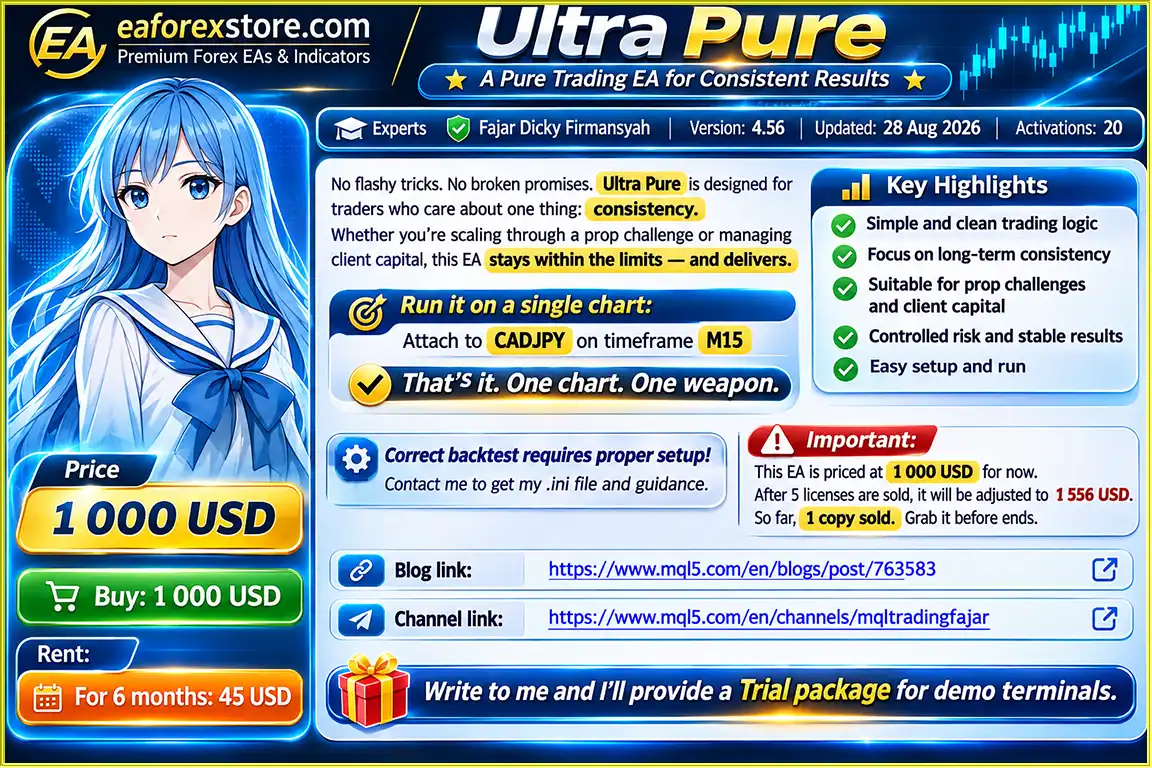
Ultra Pure EA MT5 is an automated Forex trading robot developed for MetaTrader 5, designed to provide systematic trade execution, multi-currency market monitoring, and flexible risk management within a streamlined trading environment.
Built around a Volume Acceleration trading strategy, Ultra Pure EA MT5 analyzes changes in market volume behavior to identify potential breakout opportunities across multiple Forex currency pairs.
Unlike traditional Expert Advisors that require multiple chart windows, Ultra Pure EA operates from a single CADJPY M15 chart while internally managing up to 15 supported currency pairs. This efficient configuration helps traders maintain a clean trading workspace without sacrificing multi-market coverage.
The EA includes automatic lot size calculation, fixed lot trading options, and a configurable drawdown protection mechanism, making it suitable for traders seeking rule-based automation with defined risk controls.
Whether you are exploring automated Forex strategies, evaluating an EA for prop firm trading conditions, or managing your own trading account, Ultra Pure EA MT5 offers a structured approach to algorithmic trading.
About the Developer
- Author: Fajar Dicky Firmansyah
- Experience: Over +1 years of experience on MQL5.
- Notable Products: Ultra Pure EA MT5, Iron Stops EA MT5, Urban Pulse EA MT5, Silent Exit MT5, Pixel Haven 5 EA MT5 and other advisors.
- Flagship Product: Ultra Pure EA MT5 is rated as the best performing product of the year.
>>> Delivery time 24h-48h after payment.
>>> Refund if not delivered.
>>> You will receive the latest version without any limitations (ID+Time).Reviewed by Jason Stap <<<
Key Features of Ultra Pure EA MT5
Multi-Currency Trading from One Chart
Ultra Pure EA MT5 can monitor and manage trading opportunities across 15 Forex currency pairs while running on a single CADJPY M15 chart.
This one-chart architecture simplifies installation, reduces chart clutter, and allows traders to manage a diversified group of currency pairs through one Expert Advisor instance.
Volume Acceleration Trading Strategy
The EA uses volume acceleration analysis to detect notable changes in market activity that may precede price breakouts.
By focusing on shifts in volume behavior, the strategy seeks to identify potential trading opportunities under its programmed market conditions.
Automatic Risk-Based Lot Sizing
Ultra Pure EA MT5 features automatic lot size calculation based on account size and stop-loss distance.
This functionality helps traders apply position-sizing rules more consistently without manually calculating trade volume for every position.
Fixed Lot and Manual Lot Options
Traders can choose between automatic risk-based position sizing and fixed lot trading, depending on their account requirements and risk preferences.
Configurable Drawdown Protection
An integrated drawdown guard is designed to stop automated trading activity when floating losses exceed a predefined percentage threshold.
This feature provides an additional layer of risk control during unfavorable market conditions.
Simplified MT5 Installation
The EA requires only one chart for operation. Attach Ultra Pure EA MT5 to CADJPY on the M15 timeframe, configure the recommended settings, and enable automated trading.
Prop Firm Trading Considerations
Ultra Pure EA MT5 may be evaluated by traders participating in prop firm challenges or funded account programs.
Its position-sizing and drawdown controls can help support rule-based trading, although compliance with specific prop firm requirements is not guaranteed.
Exclusive Customer Support and Bonus
Verified customers can request access to a private Telegram channel for EA updates, configuration files, and trading guidance.
A promotional bonus Expert Advisor is also available upon request after purchase, subject to confirmation of the current offer.
How It Works
Ultra Pure EA MT5 follows a systematic automated trading process using market volume behavior, predefined trade conditions, and integrated risk management.
Step 1: Monitor Market Activity
The EA continuously monitors supported currency pairs for market conditions relevant to its programmed trading strategy.
Step 2: Analyze Volume Acceleration
The trading algorithm identifies significant changes in volume behavior that may indicate increasing market activity and potential breakout conditions.
Step 3: Evaluate Trading Opportunities
When the programmed market conditions are satisfied, the EA determines whether a potential trading opportunity meets its internal execution rules.
Step 4: Calculate Position Size
Depending on the selected money management mode, the EA calculates trade volume using account size and stop-loss distance or applies a predefined fixed lot size.
Step 5: Execute Automated Trades
Once an eligible setup is identified, Ultra Pure EA MT5 can execute trades automatically through the MetaTrader 5 platform.
Step 6: Apply Risk Controls
The integrated drawdown guard monitors floating losses against the configured protection threshold and is designed to restrict trading activity when that threshold is exceeded.
Step 7: Continue Multi-Pair Monitoring
The EA continues monitoring its supported instruments through one chart, removing the need to attach separate Expert Advisor instances to every currency pair.
Note: Exact entry conditions, exit logic, and order-management behavior depend on the EA's programmed rules and configuration.
Why Choose Ultra Pure EA MT5?
Choosing the right MT5 Forex Expert Advisor requires more than searching for aggressive profit targets. A practical automated trading system should offer clear configuration requirements, consistent rule execution, and useful risk management features.
Ultra Pure EA MT5 emphasizes these essential elements.
Designed for Systematic Trading
The EA operates according to predefined trading conditions, helping reduce the need for discretionary intervention in routine trade execution.
Multi-Pair Coverage Without Complex Setup
Monitor 15 Forex currency pairs from a single CADJPY M15 chart rather than managing multiple EA installations across numerous chart windows.
Flexible Money Management
Automatic risk-based lot sizing and fixed lot options allow traders to adjust position sizing to their capital and preferred risk approach.
Integrated Drawdown Monitoring
A configurable floating drawdown threshold provides an additional mechanism for controlling exposure during adverse market conditions.
Suitable for Strategy Evaluation
Ultra Pure EA MT5 can be assessed on demo accounts and tested against the specific trading requirements of personal or prop firm accounts.
Private Customer Resources
Verified buyers can request configuration files, product updates, and additional guidance through the private customer Telegram channel.
For traders looking for a multi-currency Forex robot for MetaTrader 5, Ultra Pure EA provides an automated trading framework that combines volume-based market analysis with configurable risk controls.
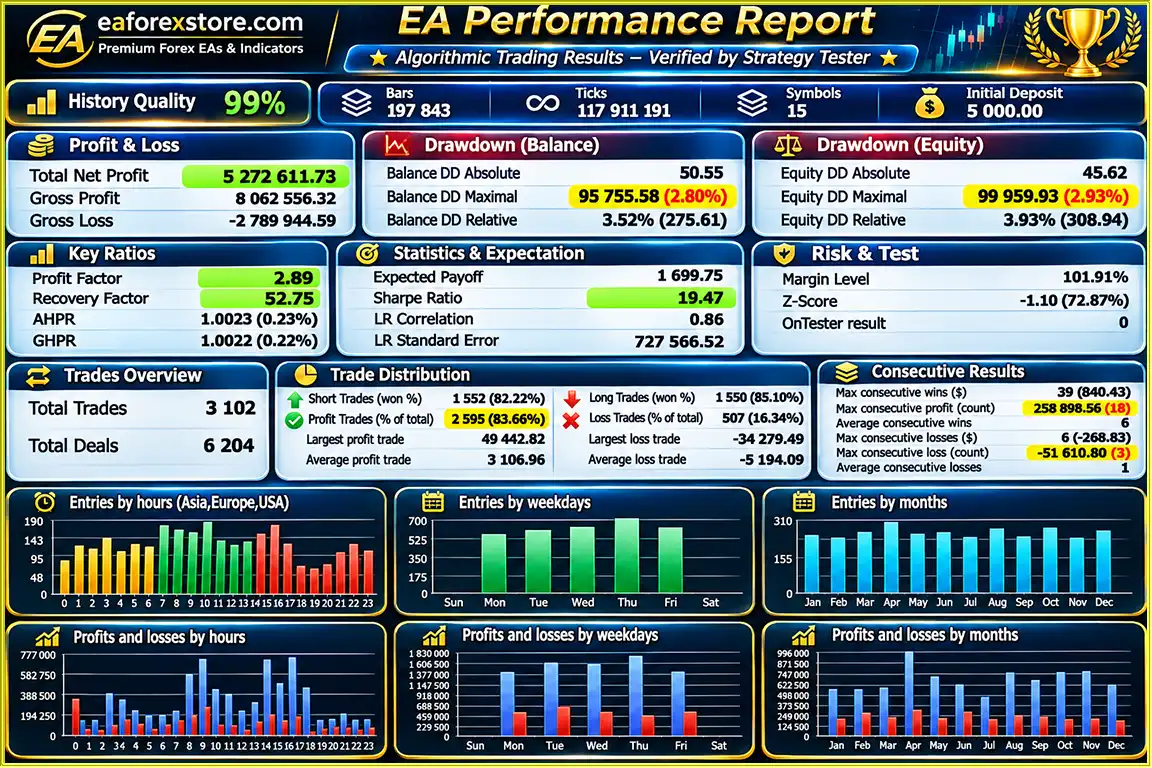
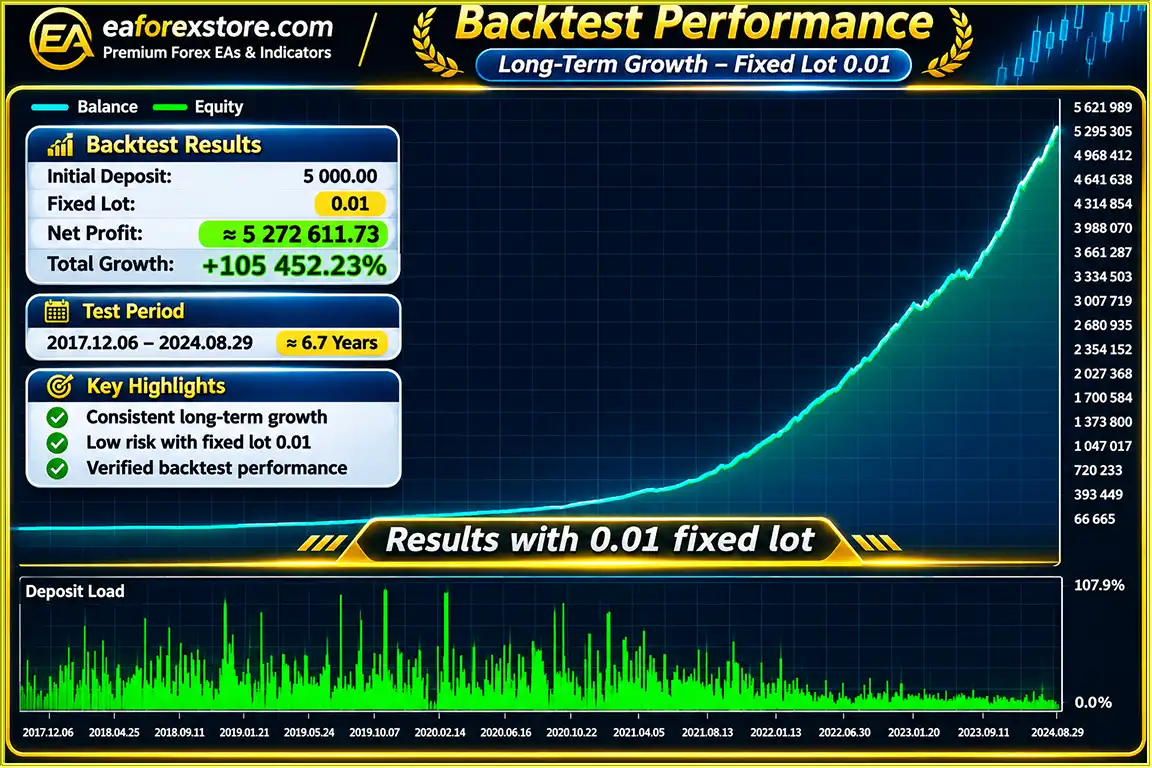
Ultra Pure EA MT5 Backtest Results
🔺Test Period: 06/12/2017 - 29/08/2024 (6,7 Year)
- Initial Deposit: $5.000
- Total Net Profit: $5.272.611,73
- Win Rate: 83,66%
- Maximum Drawdown: 2.80%
Risk Management & Alerts
Risk management is an important component of Ultra Pure EA MT5. The Expert Advisor includes several features intended to help traders control position sizing and limit automated trading exposure.
Automatic Position Sizing
The automatic lot calculation feature uses account size and stop-loss distance to determine trading volume according to the selected risk settings.
Fixed Lot Control
Traders who prefer predefined position sizes can use the fixed lot option instead of automatic lot calculation.
Floating Drawdown Guard
The EA includes a configurable drawdown threshold intended to stop trading activity when floating losses exceed the specified account percentage.
Multi-Currency Exposure Awareness
Because Ultra Pure EA MT5 can trade multiple Forex pairs, traders should consider combined exposure, correlated currency movements, and the potential for simultaneous losses.
Important Risk Considerations
- Drawdown protection does not guarantee that losses will remain below the configured threshold, especially during slippage, price gaps, or fast-moving markets.
- Automatic lot sizing cannot eliminate trading risk.
- Multi-currency trading may increase total account exposure.
- Prop firm rules vary, and traders must verify whether automated trading and the EA's risk behavior are permitted.
- Backtest results and demo performance do not guarantee future live trading results.
Alert Availability: Specific Telegram trade alerts, mobile push notifications, and email notifications have not been confirmed as built-in EA features. Private Telegram access is provided for customer updates and support, not necessarily real-time trade signals.
Pros and Cons
Pros
- Supports automated trading on MetaTrader 5.
- Monitors 15 Forex currency pairs from a single chart.
- Uses a volume acceleration trading approach.
- Includes automatic risk-based lot calculation.
- Supports fixed lot trading preferences.
- Offers configurable floating drawdown protection.
- Provides a simple CADJPY M15 installation structure.
- Includes access to private customer support resources.
- Offers a demo-terminal trial package upon request.
- May be evaluated for prop firm trading environments.
Cons
- Requires the MetaTrader 5 platform.
- Must be installed on the specified CADJPY M15 chart.
- Correct backtesting requires appropriate configuration and the recommended settings file.
- Performance may vary with broker conditions, spreads, slippage, and execution quality.
- Trading multiple currency pairs can create correlated exposure.
- Drawdown protection cannot prevent every loss.
- No independently verified performance statistics have been supplied.
- Prop firm compatibility must be checked individually.
- Continuous automated trading requires a stable terminal connection, typically through a VPS.
How to Install Ultra Pure EA MT5
Installing Ultra Pure EA MT5 is straightforward when the correct chart, timeframe, and configuration are used.
Step 1: Install MetaTrader 5
Download and install the MetaTrader 5 trading platform from your broker or the official MetaTrader website.
Step 2: Add the Expert Advisor
Open MetaTrader 5 and navigate to:
File → Open Data Folder → MQL5 → Experts
Copy the Ultra Pure EA file into the Experts folder, then refresh the Navigator panel or restart MetaTrader 5.
Step 3: Open the Correct Trading Chart
Open the CADJPY currency pair and set the chart timeframe to M15 (15 minutes).
This is the primary chart required for Ultra Pure EA MT5.
Step 4: Attach Ultra Pure EA
Find Ultra Pure EA in the Navigator panel and attach it to the CADJPY M15 chart.
Step 5: Configure the EA Settings
Load the recommended preset file, if provided, and review the available settings, including lot sizing, drawdown protection, and trading permissions.
For accurate strategy testing, contact the developer to obtain the recommended .ini configuration file and setup instructions.
Step 6: Enable Algorithmic Trading
Enable automated trading in MetaTrader 5 and confirm that the EA has the necessary permissions to operate.
Ensure that all supported currency symbols are available through your broker.
Step 7: Test Before Live Trading
Run a backtest using appropriate historical data and broker settings, followed by forward testing on a demo account.
Contact the developer if you would like to request the available trial package for demo terminals.
Step 8: Run the EA
After completing testing and configuration, the EA can operate from the CADJPY M15 chart while managing its supported currency pairs internally.
For uninterrupted operation, consider using a stable Forex VPS.
Recommended Setup
| Parameter | Required Configuration |
|---|---|
| Trading Platform | MetaTrader 5 |
| Expert Advisor | Ultra Pure EA MT5 |
| Primary Currency Pair | CADJPY |
| Chart Timeframe | M15 |
| Trading Strategy | Volume Acceleration |
| Number of Supported Pairs | 15 |
| Lot Sizing | Automatic or Fixed Lot |
| Drawdown Protection | Configurable |
| Installation | Single Chart |
Supported Forex Pairs:
CADJPY, NZDCAD, EURNZD, AUDNZD, GBPNZD, EURCHF, AUDCHF, CHFJPY, AUDJPY, EURCAD, GBPAUD, EURAUD, GBPCHF, NZDCHF, CADCHF.
Important: Correct backtesting requires the recommended setup. Contact the developer for the appropriate configuration file and instructions before evaluating historical performance.
What’s Included in the Download Package?
- Experts: Ultra Pure EA.ex5
>>> Join VIP Membership Now <<<
Final Thoughts
Ultra Pure EA MT5 is a multi-currency automated Forex trading robot designed for traders who value structured execution, streamlined configuration, and adjustable risk management.
Its combination of volume acceleration analysis, automatic lot sizing, fixed lot options, and floating drawdown protection creates a practical framework for evaluating automated trading strategies on MetaTrader 5.
One of its most distinctive features is the ability to monitor 15 currency pairs from a single CADJPY M15 chart, simplifying the trading workspace while maintaining multi-market coverage.
Although no Expert Advisor can guarantee consistent profits or eliminate market risk, Ultra Pure EA MT5 provides tools that may help traders implement their chosen risk parameters more systematically.