





-
 Unlimited Activations
-
 Instant delivery
-
 Easy to install





 Unlimited Activations
Instant delivery
Easy to install
 Free Update
 Free Install Support

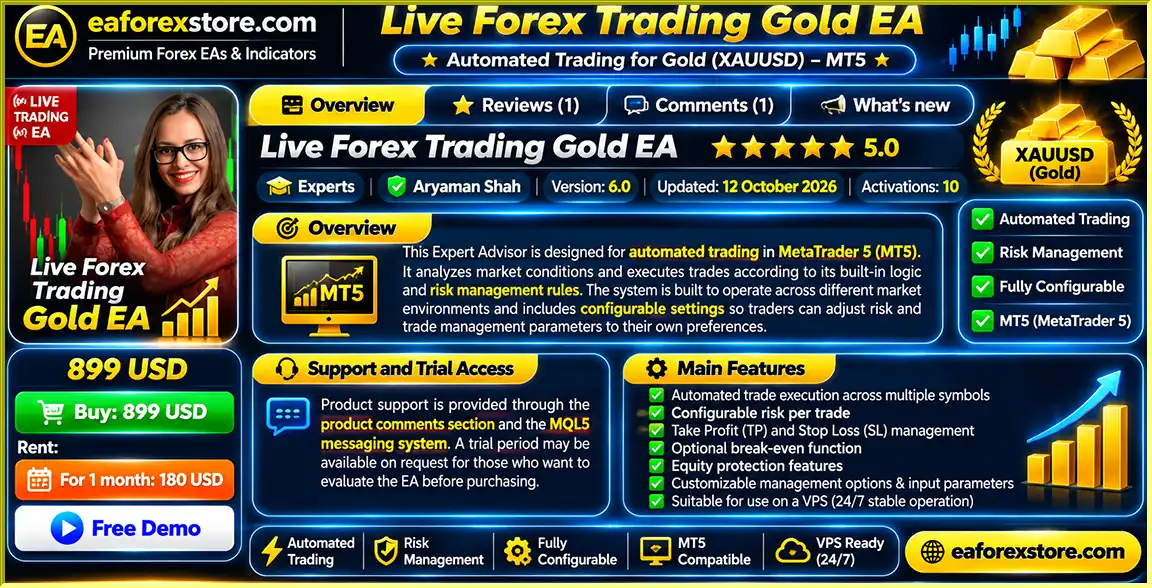
Live Forex Trading Gold EA MT5 is a fully automated Forex trading robot designed for MetaTrader 5, helping traders analyze market conditions, identify trading opportunities, and execute trades automatically.
The EA supports multi-symbol trading, configurable risk per trade, automatic Stop Loss and Take Profit management, break-even functionality, and equity protection. Its customizable settings allow traders to adjust trading parameters according to their account size and risk preferences.
With automated trade execution and flexible money management, Live Forex Trading Gold EA MT5 is designed for traders seeking a convenient and systematic automated Forex trading solution with reduced manual intervention.
>>> Delivery time 24h-48h after payment.
>>> Refund if not delivered.
>>> You will receive the latest version without any limitations (ID+Time).Reviewed by Jason Stap <<<
Live Forex Trading Gold EA MT5 Overview
Live Forex Trading Gold EA MT5 automatically analyzes market conditions and executes trades according to its built-in trading algorithm.
Once properly configured, the EA can monitor trading opportunities and manage positions without requiring traders to place every order manually.
This helps reduce time spent monitoring charts and supports a more systematic trading process.
The EA supports automated trading across multiple trading symbols.
This allows traders to explore opportunities across different financial instruments supported by their broker and the EA’s configuration.
Multi-symbol trading can provide greater market coverage, although it may also increase overall account exposure.
Live Forex Trading Gold EA allows traders to adjust risk parameters according to their preferred trading approach.
The EA supports position sizing based on account risk settings, helping traders establish structured trading exposure.
The EA includes configurable Stop Loss functionality to help manage potential losses on individual trades.
Stop Loss levels are applied according to the selected trading parameters and the EA’s programmed trade management rules.
Live Forex Trading Gold EA supports configurable Take Profit settings.
These allow traders to define profit objectives and automate trade exits when the relevant conditions are reached.
The EA includes an optional break-even feature designed to adjust trade protection when an open position moves favorably.
Depending on the configured settings, this function can move the Stop Loss toward the entry price to reduce remaining trade risk.
Built-in equity protection functionality allows traders to configure account-level risk controls.
These settings can help restrict trading activity or manage exposure when the account reaches predefined equity conditions.
The exact protective actions depend on the selected EA parameters.
Traders can adjust available position management settings through the EA Inputs tab.
This provides flexibility for different account sizes, trading preferences, and broker conditions.
Live Forex Trading Gold EA is designed to operate across different market environments using its predefined trading logic.
Its configurable parameters allow traders to adjust the trading setup rather than relying on a single fixed configuration.
However, no automated strategy performs reliably under every market condition.
The EA is suitable for operation on a Forex VPS.
A VPS can help maintain continuous MetaTrader 5 connectivity and allow automated trading to operate without keeping a personal computer running.
Product support is available through the product comments section and the MQL5 messaging system.
A trial period may be available upon request, allowing traders to evaluate the EA before purchasing.
Trial availability should be confirmed directly with the developer.
Live Forex Trading Gold EA MT5 follows a systematic automated trading process based on market analysis, predefined execution rules, and configurable risk management.
The EA monitors supported trading symbols and evaluates market conditions according to its built-in trading algorithm.
When market conditions meet the programmed requirements, the EA identifies potential Buy or Sell trading opportunities.
Before placing an order, the EA determines the appropriate position size according to the configured account risk parameters.
This helps maintain a structured approach to trading volume.
When a valid trading signal is generated, the EA can execute the corresponding trade through MetaTrader 5.
This reduces the need for manual order placement.
The EA manages positions using its configured Stop Loss and Take Profit settings.
These parameters establish predefined protective levels and profit objectives.
If the optional break-even function is enabled, the EA can adjust trade protection after a position reaches the configured conditions.
This may reduce remaining exposure on a favorable trade.
The EA monitors the relevant equity protection parameters and applies its programmed account protection rules when configured conditions are met.
Open positions are managed according to the EA’s trading logic and customizable trade management settings.
The EA continues monitoring supported symbols while MetaTrader 5 remains connected and automated trading is enabled.
A reliable VPS is recommended for uninterrupted operation.
Live Forex Trading Gold EA handles market analysis, order execution, and trade management automatically.
This helps traders reduce the time required for routine trading activities.
The EA supports multiple trading symbols, providing access to trading opportunities across different supported instruments.
Configurable risk per trade allows traders to tailor position sizing to their account balance and preferred trading exposure.
Automatic Stop Loss and Take Profit management helps establish predefined exit conditions for trades.
The break-even function provides an additional trade management option when positions move favorably.
Equity protection settings allow traders to configure additional account-level trading controls.
The EA offers adjustable inputs for trading and risk management.
This allows users to personalize the system according to their preferred trading conditions.
Live Forex Trading Gold EA can operate on a VPS, supporting continuous trading during active market sessions.
Users can contact the developer through the MQL5 messaging system or product comments section for installation, configuration, and product-related questions.
A trial may be available upon request, giving traders an opportunity to evaluate the EA before purchasing.
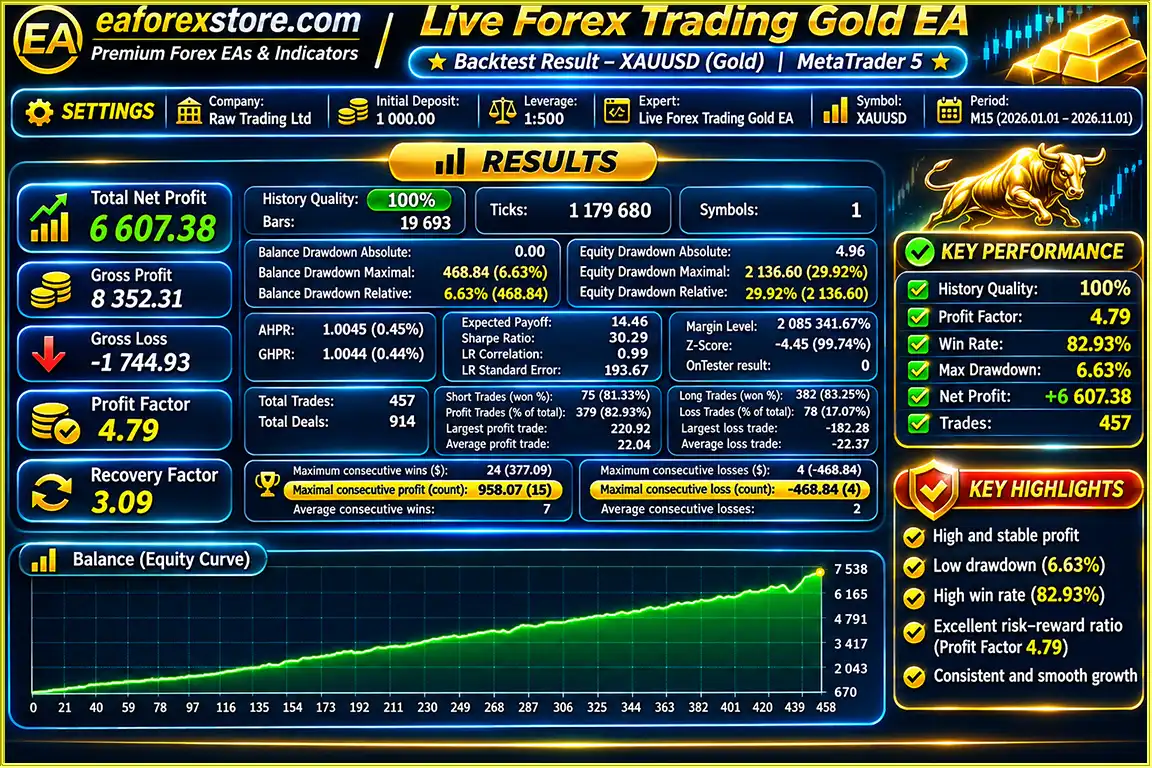
Live Forex Trading Gold EA MT5 backtets
Risk management is an essential component of Live Forex Trading Gold EA MT5. The EA includes configurable features designed to help control position exposure and manage trading activity.
The EA supports position sizing according to account risk parameters.
Traders can adjust the available settings to match their preferred risk level and account conditions.
Configurable Stop Loss functionality helps define protective exit levels for individual positions.
However, Stop Loss orders may experience slippage during volatile markets.
Take Profit settings allow the EA to close positions when their programmed profit objectives are reached.
The optional break-even function can adjust protective levels toward the trade entry price when selected conditions are satisfied.
Break-even execution does not guarantee a zero-loss outcome because trading costs and slippage may still apply.
Equity protection parameters provide additional account-level controls.
These settings are intended to help manage trading exposure when configured equity thresholds are reached.
The EA allows traders to customize position management parameters through its Inputs tab.
This flexibility helps accommodate different trading preferences and account conditions.
Because the EA supports multiple trading instruments, traders should consider the combined risk of simultaneous positions.
Correlated markets can create larger exposure than expected.
Trading results may be affected by broker spreads, commissions, margin requirements, slippage, and execution speed.
Traders should verify the EA’s settings under their intended broker conditions.
Specific built-in Telegram alerts, email notifications, and custom mobile push alerts have not been confirmed in the supplied product information.
Traders can monitor open positions, account equity, and trading history through MetaTrader 5.
Installing Live Forex Trading Gold EA MT5 follows the standard MetaTrader 5 Expert Advisor installation process.
Download and install MetaTrader 5 from your broker or the official MetaTrader website.
Log in to your trading account and confirm that the intended trading symbols are available.
Open MetaTrader 5 and navigate to:
File → Open Data Folder → MQL5 → Experts
Copy the Live Forex Trading Gold EA file into the Experts folder.
Restart MetaTrader 5 or refresh the Expert Advisors list in the Navigator panel.
Open a trading symbol supported by the Expert Advisor.
Select the timeframe recommended by the developer.
The supplied product information does not specify exact trading symbols or required timeframes, so confirm these settings before live trading.
Locate Live Forex Trading Gold EA in the Navigator panel.
Drag and drop the Expert Advisor onto the selected chart.
Confirm that the EA has the necessary trading permissions.
Open the EA Inputs tab and review the available risk settings.
Choose parameters appropriate for your account balance and trading preferences.
Review the available Stop Loss and Take Profit settings.
Set appropriate protective levels and profit targets according to the EA’s supported inputs.
If desired, enable the optional break-even function.
Configure its activation conditions using the available EA parameters.
Review the available equity protection settings.
Set the relevant limits according to your acceptable account risk exposure.
Adjust additional trade management parameters according to your preferences and the developer’s recommendations.
Enable Algorithmic Trading in MetaTrader 5.
Verify that the EA is active and permitted to execute trades.
Use the MetaTrader 5 Strategy Tester to evaluate the EA using historical market data.
Review drawdown, trading frequency, execution assumptions, and overall strategy behavior.
Before using real capital, run the EA on a demo account.
Verify compatibility with your broker, trading instruments, and risk settings.
For uninterrupted automated trading, consider using a Forex VPS.
This helps maintain platform connectivity during active trading sessions.
For assistance with installation, configuration, or trial access, contact the developer through the MQL5 messaging system or the product comments section.
| Parameter | Configuration |
|---|---|
| Expert Advisor | Live Forex Trading Gold EA MT5 |
| Trading Platform | MetaTrader 5 |
| Trading Type | Automated Forex Trading |
| Trading Symbols | Multiple Supported Symbols |
| Timeframe | Confirm with Developer |
| Risk Per Trade | Configurable |
| Position Sizing | Account Risk-Based |
| Stop Loss | Configurable |
| Take Profit | Configurable |
| Break-Even | Optional |
| Equity Protection | Included |
| Trade Management | Customizable |
| Minimum Deposit | Not Specified |
| Recommended Leverage | Not Specified |
| VPS | Supported / Recommended |
| Trial Access | Available Upon Request, Subject to Confirmation |
| Customer Support | MQL5 Comments and Messaging |
>>> Join VIP Membership Now <<<
Live Forex Trading Gold EA MT5 is an automated Forex trading robot designed to simplify market analysis, trade execution, and position management through MetaTrader 5.
With multi-symbol trading support, configurable risk per trade, automatic Stop Loss and Take Profit management, optional break-even functionality, and equity protection settings, the EA provides a flexible automated trading framework.
Its customizable inputs allow traders to adjust the system according to different account conditions and trading preferences.
The EA is also suitable for VPS operation, helping maintain continuous automated trading during active market sessions.
For traders who want to evaluate the system before purchasing, trial access may be available upon request through the MQL5 messaging system.
However, automated trading cannot guarantee profitability or eliminate financial risk. Market conditions, broker execution, leverage, and position sizing can significantly affect results.
For traders seeking a MetaTrader 5 automated Forex Expert Advisor with multi-symbol trading and customizable risk management, Live Forex Trading Gold EA MT5 offers a configurable trading solution worth evaluating through backtesting and demo trading.
Live Forex Trading Gold EA MT5 – Automated Trading with Flexible Risk and Trade Management.
Risk Disclaimer: Forex and CFD trading involve significant financial risk. Losses may exceed deposits under certain market conditions. Automated trading, Stop Loss orders, break-even functions, and equity protection settings cannot guarantee profits or prevent all losses. Past performance does not guarantee future results. Always evaluate trading risks and test the EA on a demo account before using real funds.
1. What is Live Forex Trading Gold EA MT5, and how does it work?
Live Forex Trading Gold EA MT5 is a fully automated Forex trading robot designed for the MetaTrader 5 platform. It uses built-in trading algorithms to analyze market conditions, identify potential Buy and Sell opportunities, and execute trades automatically. The Expert Advisor supports multi-symbol trading, risk-based position sizing, automatic Stop Loss and Take Profit management, optional break-even functionality, and equity protection. Its customizable settings help traders automate their trading strategies while reducing the need for constant manual monitoring.
2. Is Live Forex Trading Gold EA MT5 suitable for beginners and experienced traders?
Live Forex Trading Gold EA MT5 may be suitable for both beginners and experienced Forex traders interested in automated trading. Its configurable parameters allow users to adjust risk per trade, position sizing, Stop Loss, Take Profit, and trade management settings according to their preferences. Beginners should understand basic Forex trading concepts, including leverage, margin, and risk management, before using the EA. Testing the trading robot on a demo account is strongly recommended before investing real money.
3. Which trading symbols and timeframes does Live Forex Trading Gold EA MT5 support?
Live Forex Trading Gold EA MT5 supports automated trading across multiple symbols, allowing traders to explore opportunities in different financial instruments supported by their broker and the EA's configuration. However, the developer has not provided a definitive list of compatible currency pairs, gold trading symbols, or recommended chart timeframes in the supplied product information. Traders should contact the developer to confirm supported instruments, optimal timeframes, and recommended settings before starting live automated trading.
4. How profitable is Live Forex Trading Gold EA MT5, and what are its backtest results?
According to the supplied 10-month XAUUSD (Gold) backtest, Live Forex Trading Gold EA MT5 reported the following performance:
- Initial Deposit: $1,000
- Total Net Profit: $6,607.38
- Win Rate: 82.93%
- Maximum Drawdown: 6.63%
- Backtest Period: 10 months
These results represent historical simulated trading performance and have not been independently verified. Actual live trading results may differ significantly because of gold market volatility, spreads, slippage, broker execution, and risk settings. Past backtest performance does not guarantee future profitability.
5. What is the minimum deposit required to use Live Forex Trading Gold EA MT5?
The developer has not specified an official minimum deposit requirement for Live Forex Trading Gold EA MT5. The appropriate starting capital depends on the selected trading symbols, risk percentage, lot sizing, broker leverage, and margin requirements. Although the published XAUUSD backtest used an initial deposit of $1,000, this amount should not be considered a guaranteed safe minimum for live trading. Traders should evaluate their account conditions and test the EA on a demo account before committing real capital.
6. What risk management and account protection features does Live Forex Trading Gold EA MT5 offer?
Live Forex Trading Gold EA MT5 includes configurable risk per trade, automatic Stop Loss and Take Profit management, optional break-even protection, and account equity protection settings. The break-even feature can move protective levels toward the entry price after selected conditions are met, while equity protection helps manage trading activity when predefined account thresholds are reached. These features support systematic risk management but cannot eliminate losses. Slippage, market gaps, and trading costs may cause actual losses to exceed expected levels.
7. Can Live Forex Trading Gold EA MT5 run automatically 24/5, and does it require a VPS?
Yes, Live Forex Trading Gold EA MT5 is designed for automated trading during active Forex market sessions while MetaTrader 5 remains connected and Algorithmic Trading is enabled. The EA can monitor supported trading symbols, execute orders, and manage positions without constant manual intervention. A Forex VPS is not strictly required, but it is recommended for continuous 24/5 operation. Using a reliable VPS helps maintain stable platform connectivity even when the trader's personal computer is switched off. Regular account monitoring remains important.
8. How do I install Live Forex Trading Gold EA MT5, and can I try it before purchasing?
To install Live Forex Trading Gold EA MT5, open MetaTrader 5 and navigate to File → Open Data Folder → MQL5 → Experts. Copy the Live Forex Trading Gold EA.ex5 file into the Experts folder, then restart or refresh MetaTrader 5. Open a supported trading chart, attach the Expert Advisor, configure the risk per trade, Stop Loss, Take Profit, break-even, and equity protection settings, and enable Algorithmic Trading.
A trial period may be available upon request through the MQL5 messaging system, subject to developer confirmation. According to the product information, customers receive the latest EA version, with delivery typically taking 24–48 hours after payment. A refund is offered if the product is not delivered. Technical support is available through the MQL5 product comments section and messaging system.
In stock
In stock
In stock
In stock
In stock
Out of stock
No account yet?
Create an Account












 Automatic EA
 EA Best Seller
 Expert Advisor MT4
 Expert Advisor MT5
 HFT EA



Reviews
Clear filtersThere are no reviews yet.