









-
 Unlimited Activations
-
 Instant delivery
-
 Easy to install






 Unlimited Activations
Instant delivery
Easy to install
Unlimited Activations
Instant delivery
Easy to install
 Free Update
 Free Install Support

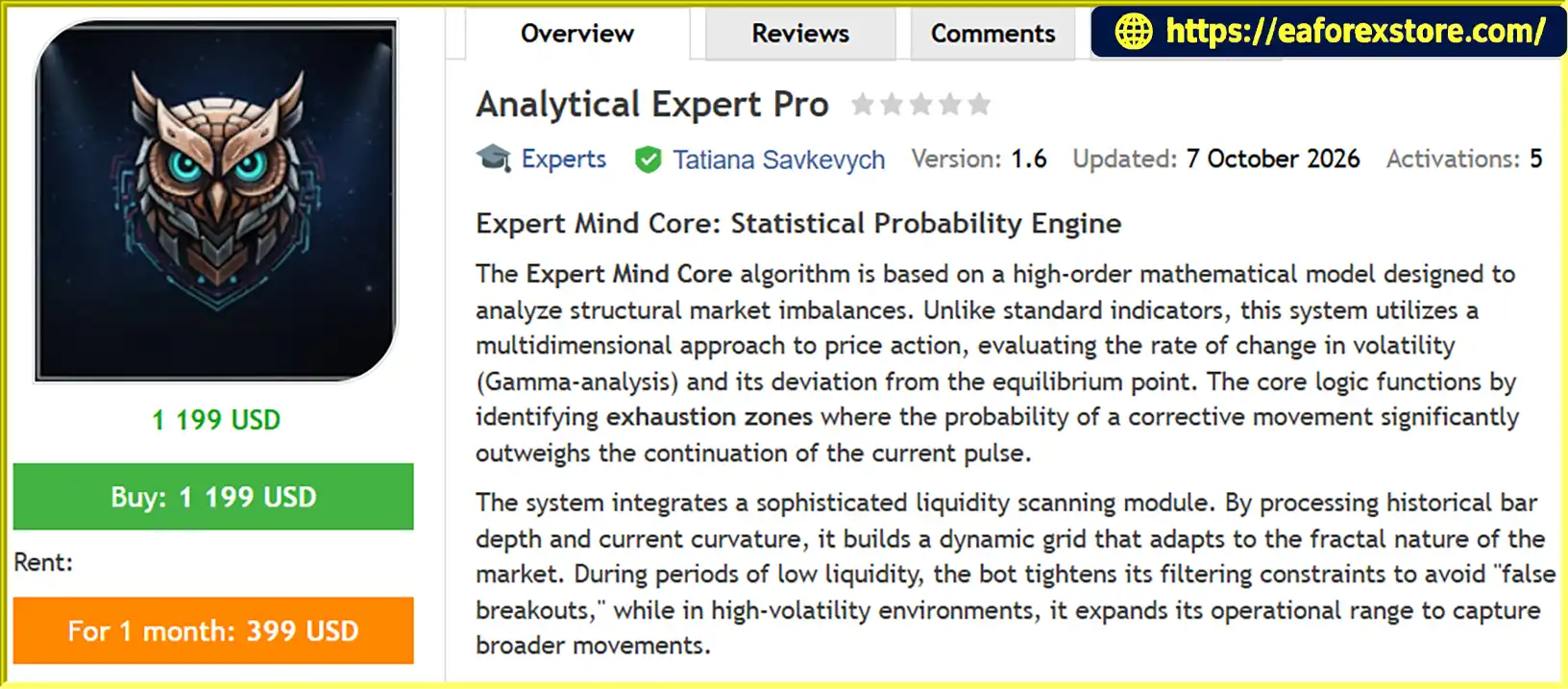
Analytical Expert Pro EA MT5 is an automated trading Expert Advisor designed for the MetaTrader 5 platform. Powered by the Expert Mind Core algorithm, this trading system uses advanced mathematical modeling, statistical probability analysis, and multidimensional price action evaluation to identify potential market reversal opportunities.
Unlike traditional trading robots that rely primarily on standard technical indicators, Analytical Expert Pro EA MT5 focuses on structural market imbalances, volatility changes, and price deviations from equilibrium. Its Gamma-analysis approach evaluates changes in volatility and market curvature to detect potential exhaustion zones where a corrective price movement may occur.
The EA also incorporates a dynamic liquidity scanning module that analyzes historical bar depth and current price curvature. This allows its filtering logic to adapt to different market conditions, helping reduce exposure to potential false breakouts during periods of low liquidity while adjusting its operational range when volatility increases.
Designed for traders seeking a more analytical approach to automated trading, Analytical Expert Pro EA MT5 combines configurable signal sensitivity, directional trading controls, flexible position management, and multiple profit and loss protection mechanisms within a single trading system.
>>> Delivery time 24h-48h after payment.
>>> Refund if not delivered.
>>> You will receive the latest version without any limitations (ID+Time).Reviewed by Jason Stap <<<
Analytical Expert Pro EA MT5 Overview
Analytical Expert Pro EA MT5 follows a mathematical market-analysis process designed to identify potential trading opportunities based on price behavior, volatility, and liquidity conditions.
The Expert Mind Core algorithm evaluates historical price data and current market curvature to assess the market’s structural condition. The BarDepthLimit parameter determines how much historical bar data is considered during this analysis.
The EA uses its Gamma-analysis approach to examine changes in volatility and deviations from an equilibrium reference. The CurvatureIndex and DeviationMultiplier parameters help define the sensitivity of the analytical envelope used to evaluate market conditions.
When the algorithm identifies conditions that may indicate a weakening price movement, it evaluates the possibility of a corrective move. These exhaustion zones are treated as potential trading opportunities rather than guaranteed reversal signals.
The liquidity scanning module assesses historical bar depth and current price behavior. During low-liquidity conditions, the EA is designed to apply tighter filtering to help avoid unreliable signals. When volatility increases, its operational range can expand according to the configured parameters.
The MainSignalSens setting further determines the selectivity of the signal-generation process.
When the configured conditions are satisfied, the EA can execute trades according to its directional settings and broker-supported execution policy. The IdentifierID parameter helps identify its orders, while CapitalReference determines the equity reference used for volume scaling.
After opening a position, the EA applies its configured profit and loss management rules. GlobalTP and GlobalSL define the relevant protection levels, while TrailActivation controls the activation of its trailing and hidden exit mechanism.
Actual execution and protection behavior may vary depending on broker conditions, trading costs, platform connectivity, and the EA’s configuration.
Analytical Expert Pro EA MT5 is designed around a mathematical framework that evaluates volatility, price curvature, and market structure rather than relying exclusively on conventional indicator signals. This approach provides an alternative for traders interested in systematic market analysis.
Market conditions can change significantly between quiet trading sessions and periods of elevated volatility. The EA’s liquidity scanning and filtering mechanisms are designed to adjust to these changing conditions, helping traders manage signal selection more systematically.
The EA offers multiple parameters for customizing market analysis, signal sensitivity, trade direction, and position management. Traders can adjust the system to suit their testing objectives, broker environment, and preferred level of selectivity.
With configurable profit targets, loss limits, volume scaling, and trailing exit controls, Analytical Expert Pro EA MT5 brings several important trade-management functions into one automated trading solution.
Built for MetaTrader 5, the EA can operate within an established trading environment that supports automated order execution, strategy testing, and parameter optimization.
The adjustable analytical parameters allow traders to investigate how different configurations respond to historical market conditions. Proper backtesting and forward testing can help evaluate whether the EA is appropriate for a particular trading strategy and broker.
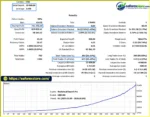
Analytical Expert Pro EA MT5 Backtets
Analytical Expert Pro EA Backtets
Risk management is an essential part of using Analytical Expert Pro EA MT5. Although the system includes several position-control mechanisms, no automated trading algorithm can eliminate market risk or guarantee profitable results.
The GlobalTP and GlobalSL parameters are designed to define overall profit-taking and loss-protection levels. Traders should verify how these settings are calculated and applied before deploying the EA on a live account.
CapitalReference determines the equity reference step used for volume scaling. Users should carefully review the resulting position sizes to ensure that trading exposure remains appropriate for their account balance, equity, and risk tolerance.
The Long and Short controls allow traders to restrict the EA to selected trade directions. These options can be useful when testing specific market conditions or evaluating directional strategies.
The TrailActivation parameter determines when the trailing mechanism becomes active. The hidden exit mode is intended to manage exit conditions after the configured profit threshold is reached. Because hidden exits may depend on the EA remaining active and connected, traders should understand the behavior of these controls before live deployment.
The ExecutionPolicy setting supports broker-compatible order filling methods, including FOK and IOC where available. Traders should also consider spread, slippage, execution delays, and VPS reliability.
A VPS with latency below 5 ms is recommended by the system’s implementation guidance for optimal execution conditions. However, actual latency and execution quality depend on the VPS location, broker infrastructure, and network conditions.
Important risk considerations:
The EA’s configuration and execution environment should be reviewed carefully before live trading. Capital management decisions and the risks associated with trading remain the operator’s responsibility.
Follow these steps to install and configure Analytical Expert Pro EA MT5 on MetaTrader 5.
Obtain the official Analytical Expert Pro EA MT5 package from the authorized provider. Confirm that the package is compatible with MetaTrader 5.
Launch MetaTrader 5 on your computer and open the platform’s main interface.
Navigate to File → Open Data Folder. Open the MQL5 directory, followed by the Experts folder.
Copy the supplied EA file, typically with an .ex5 extension, into the Experts folder. If the provider supplies additional files or installation instructions, follow the official documentation.
Return to MetaTrader 5 and open the Navigator panel. Right-click Expert Advisors and select Refresh. Alternatively, restart the terminal if the EA does not appear.
Open the chart for the instrument you intend to trade, then drag Analytical Expert Pro EA MT5 from the Navigator onto the chart.
Confirm the relevant settings and enable algorithmic trading only after reviewing the EA’s permissions and configuration.
Review the main settings before starting the EA:
The exact parameter names, value ranges, and behavior should be confirmed against the EA’s official documentation.
Run a historical backtest using suitable market data and realistic trading costs. Continue with demo forward testing to assess execution behavior, drawdown, and the stability of the strategy.
For continuous operation, consider a reliable VPS close to your broker’s trading servers. The system’s implementation recommendations specify latency below 5 ms as a target, although this does not guarantee better trading results.
Once installation and testing are complete, monitor the terminal, Experts and Journal logs, and account exposure regularly.
>>> Join VIP Membership Now <<<
Analytical Expert Pro EA MT5 is an automated trading solution for MetaTrader 5 that focuses on mathematical market analysis, volatility evaluation, liquidity scanning, and potential price exhaustion patterns. Its Expert Mind Core algorithm combines configurable analytical parameters with automated execution and integrated position-management controls.
The EA may appeal to traders looking for a systematic approach to evaluating market structure and adapting signal filters to changing conditions. Its configurable settings also provide opportunities for strategy testing and parameter optimization.
However, the effectiveness of any automated trading system depends on market conditions, configuration, execution quality, and risk management. Before using Analytical Expert Pro EA MT5 on a live account, traders should conduct comprehensive backtesting, demo forward testing, and careful position-sizing analysis.
Trade responsibly, validate your results, and never risk capital you cannot afford to lose.
1. What Is Analytical Expert Pro EA MT5?
Analytical Expert Pro EA MT5 is an automated Expert Advisor for the MetaTrader 5 platform. It uses the Expert Mind Core algorithm, mathematical modeling, statistical probability analysis, volatility evaluation, and price-structure analysis to identify potential market exhaustion and reversal opportunities. It also includes configurable trading directions and position-management controls.
2. How Does Analytical Expert Pro EA MT5 Identify Trading Opportunities?
The EA evaluates historical price data, market curvature, volatility changes, and potential deviations from equilibrium. Its Gamma-analysis approach is designed to identify possible exhaustion zones where corrective price movements may occur. Dynamic liquidity scanning and configurable signal sensitivity help filter potential entries. These signals indicate opportunities, not guaranteed reversals.
3. What Are the Main Features of Analytical Expert Pro EA MT5?
Key features include the Expert Mind Core algorithm, Gamma-based volatility analysis, dynamic liquidity scanning, adaptive market filters, adjustable signal sensitivity, Long and Short controls, capital-based volume scaling, global profit and loss settings, and trailing or hidden exit management. It also supports broker-dependent order execution policies such as FOK and IOC.
4. Which Markets Can Analytical Expert Pro EA MT5 Trade?
The supplied backtest information includes AUDUSD and USDCAD. However, the product description does not explicitly establish that these are the only supported instruments or provide a complete list of compatible markets. Traders should confirm supported symbols, timeframes, and broker requirements with the official EA documentation before deployment.
5. What Do the Main Settings in Analytical Expert Pro EA MT5 Control?
The EA includes several adjustable parameters:
MainSignalSens: Controls the selectivity of entry signals.
CurvatureIndex and DeviationMultiplier: Help calibrate market-structure and analytical-envelope sensitivity.
BarDepthLimit and WindowPeriod: Define historical analysis depth and the analysis window.
CapitalReference: Sets the equity reference step used for position-volume scaling.
GlobalTP and GlobalSL: Configure global profit-target and loss-protection parameters.
TrailActivation: Controls when the trailing mechanism activates.
Long and Short: Allow traders to select the permitted trading directions.
The exact value ranges and calculations should be verified using the official documentation.
6. What Are the Reported Backtest Results for Analytical Expert Pro EA MT5?
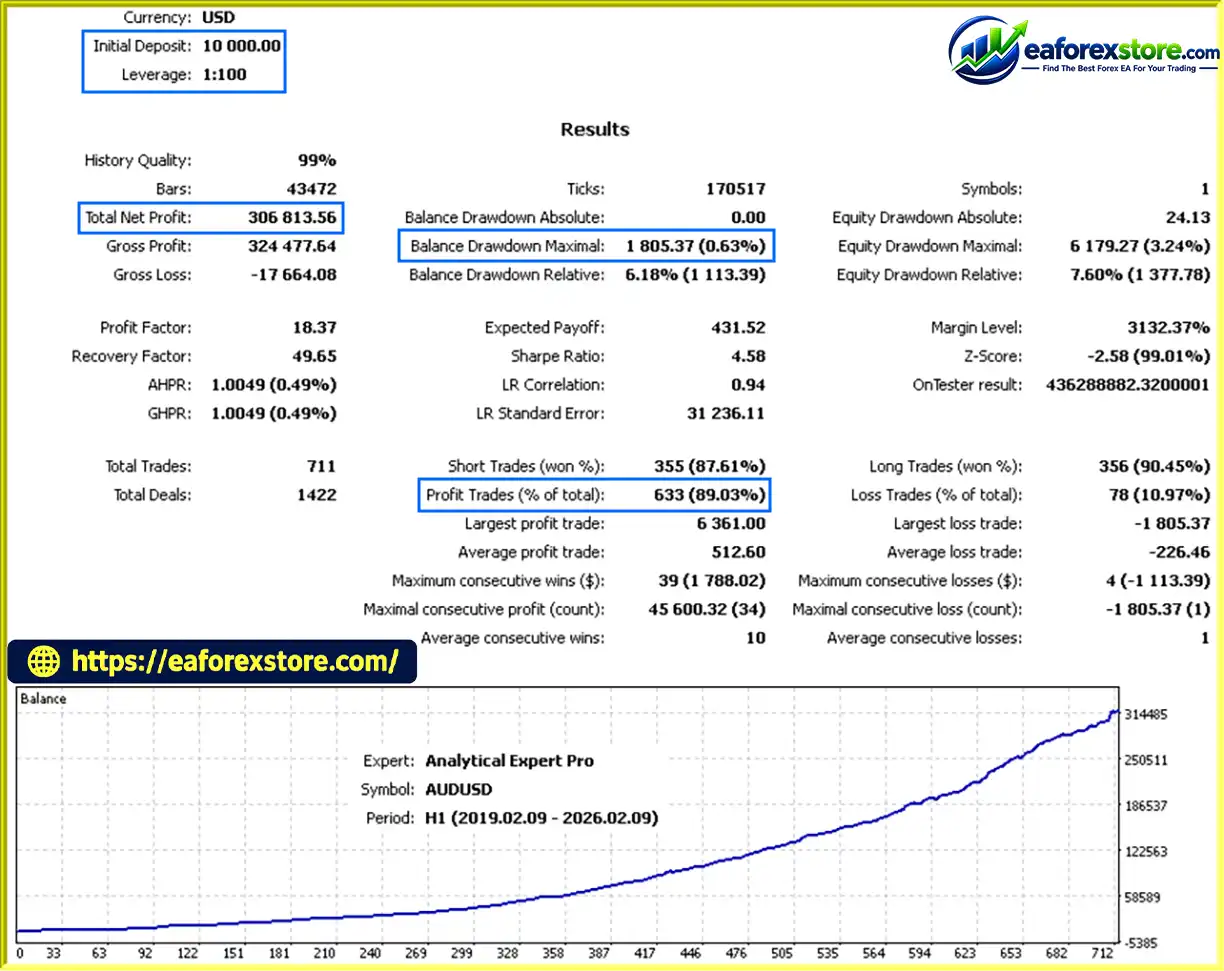
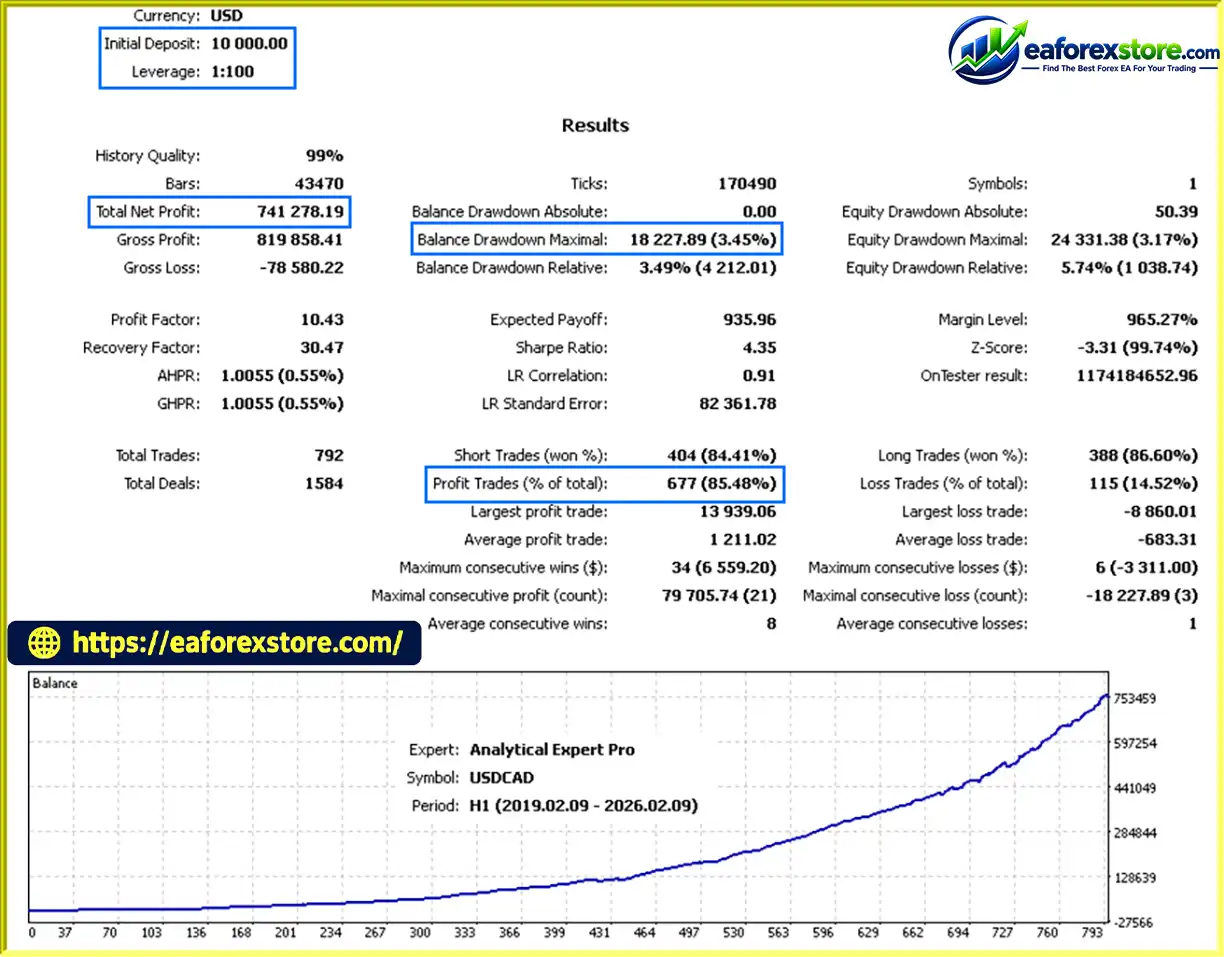
The supplied product description reports two historical tests covering February 9, 2019, to February 9, 2026:
AUDUSD: Initial deposit of $10,000, reported net profit of $306,813.56, an 89.03% win rate, and 0.63% maximum drawdown.
USDCAD: Initial deposit of $10,000, reported net profit of $741,278.19, an 85.48% win rate, and 3.45% maximum drawdown.
These are figures reported in the supplied description and have not been independently verified. The unusually large reported profits relative to the stated drawdowns warrant careful examination of the original Strategy Tester reports, including equity drawdown, leverage, lot sizing, modeling quality, and trading costs.
7. Does Analytical Expert Pro EA MT5 Support Stop Loss and Trailing Management?
Yes. The EA includes GlobalTP and GlobalSL settings for configurable profit-taking and loss protection, as well as a TrailActivation parameter for its trailing and hidden exit mechanism. Traders should verify how these controls are calculated, whether exits are managed locally by the EA, and how terminal disconnections or broker execution conditions may affect their operation.
8. How Do You Install Analytical Expert Pro EA MT5?
Download the authorized EA package and open MetaTrader 5. Select File → Open Data Folder, navigate to MQL5/Experts, and copy the supplied .ex5 file into that directory. Refresh the Navigator panel, attach the EA to the intended chart, and configure the execution policy, capital reference, analysis parameters, profit and loss controls, and trading directions. Backtest with realistic costs and forward-test on a demo account before using real funds. A reliable VPS may help maintain continuous operation, but it cannot guarantee trading performance.
In stock
In stock
In stock
In stock
In stock
Out of stock
No account yet?
Create an Account












 Automatic EA
 EA Best Seller
 Expert Advisor MT4
 Expert Advisor MT5
 HFT EA


Reviews
Clear filtersThere are no reviews yet.