









-
 Unlimited Activations
-
 Instant delivery
-
 Easy to install







 Unlimited Activations
Instant delivery
Easy to install
Unlimited Activations
Instant delivery
Easy to install
 Free Update
 Free Install Support

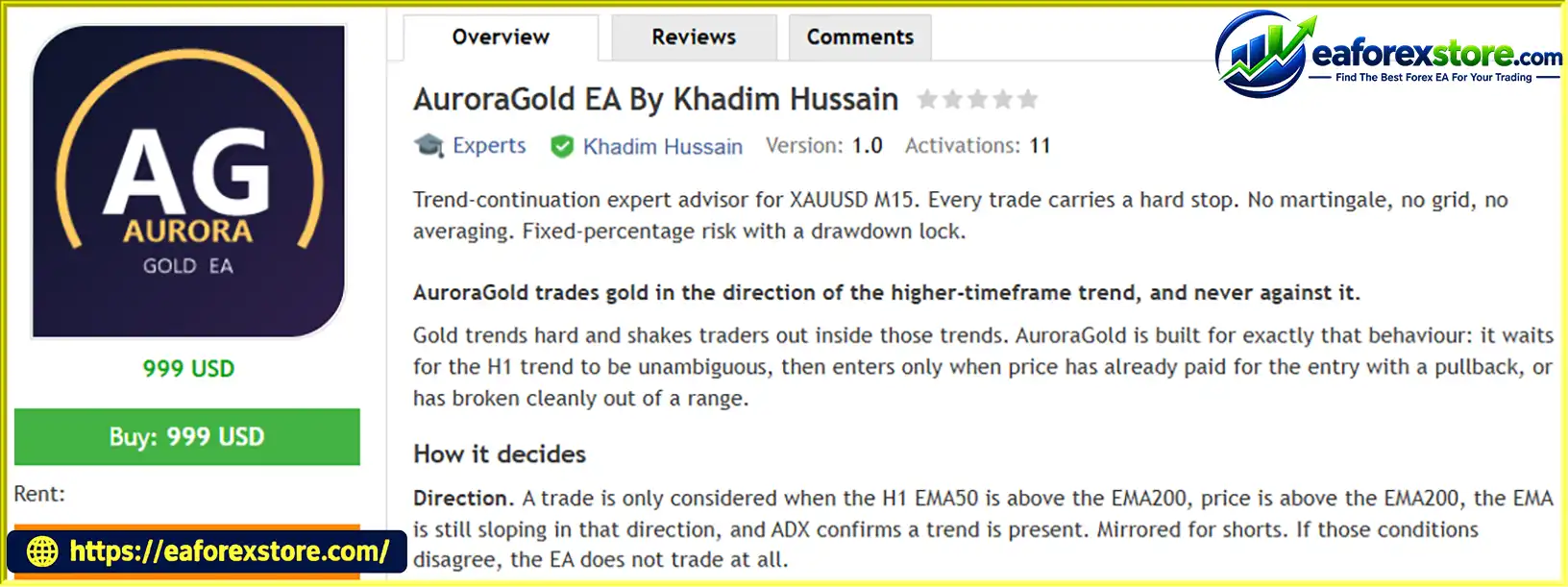
AuroraGold EA By Khadim Hussain MT5 is an automated trading Expert Advisor designed specifically for XAUUSD (Gold) on the MetaTrader 5 platform. Operating on the M15 timeframe, this trend-continuation trading robot focuses on identifying established higher-timeframe trends and entering trades when price offers a potential continuation opportunity.
Unlike trading systems that attempt to predict market reversals or trade against the prevailing trend, AuroraGold EA MT5 follows a trend-aligned approach. It evaluates the H1 market direction using EMA50, EMA200, price positioning, EMA slope, and ADX trend confirmation before considering a trade.
The EA uses two primary entry methods: pullback entries and Donchian channel breakouts. This combination allows the system to seek opportunities when price temporarily retraces within an established trend or breaks beyond a recent trading range. Both entry methods require confirmation from the higher-timeframe trend filter.
AuroraGold EA MT5 also emphasizes risk management through fixed-percentage position sizing, ATR-based Stop Loss placement, partial profit-taking, break-even protection, and ATR chandelier trailing stops. Its design excludes martingale, grid trading, and averaging down, while requiring a real Stop Loss to be attached to every trade.
Additional safeguards include an equity drawdown lock, a daily loss cap, equity targets and floors, spread filtering, volatility filtering, session restrictions, and an optional economic calendar news filter.
Key product specifications:
AuroraGold EA MT5 is intended for traders who prefer disciplined trend-following automation with predefined loss limits rather than aggressive recovery strategies. However, its effectiveness depends on market conditions, broker execution, account specifications, and the selected risk parameters.
> Delivery time 24h-48h after payment.
>>> Refund if not delivered.
>>> You will receive the latest version without any limitations (ID+Time).Reviewed by Jason Stap <<<
AuroraGold EA By Khadim Hussain MT5 Overview
AuroraGold EA MT5 uses the H1 timeframe to determine the dominant market direction before searching for entries on M15.
For potential buy trades, the system checks whether the EMA50 is above the EMA200, price is above the EMA200, the trend EMA is sloping upward, and ADX confirms sufficient trend strength. Short trades use the corresponding bearish conditions.
This multi-condition approach is designed to avoid trades when market direction is unclear or when the trend indicators disagree.
The EA combines two complementary entry methods.
Pullback Trading: The pullback strategy waits for RSI to enter a predefined retracement zone and then recover. The last closed M15 candle must also close above the previous candle’s high and above EMA20 for a potential buy entry. The sell logic mirrors these conditions.
Donchian Breakout Trading: The breakout strategy looks for a closed M15 candle to move beyond a 24-bar Donchian channel extreme while satisfying the EMA20 condition. This allows the EA to identify potential continuation trades when price moves beyond a recent range.
Either entry method can be disabled, giving traders greater control over how the system searches for opportunities.
AuroraGold EA MT5 uses the Average True Range (ATR) to calculate its Stop Loss distance. The default multiplier is 3× ATR, creating a relatively wide protective stop intended to accommodate gold’s frequent intraday price fluctuations.
A wider stop does not automatically mean greater monetary risk. When position sizing is calculated correctly, the EA reduces the lot size to maintain the selected percentage risk.
Nevertheless, actual losses can exceed the intended amount during gaps, slippage, or execution problems.
The EA is designed to close part of a position when the first profit target is reached. It then moves the Stop Loss on the remaining position toward the entry price, subject to the EA’s execution rules.
This approach aims to secure some realized profit while reducing the amount of initial trade risk on the remaining position. Break-even adjustments do not eliminate all risk because commissions, swaps, slippage, and execution costs may still produce a net loss.
After the initial profit-taking stage, the remaining position is managed using an ATR chandelier trailing stop.
This dynamic exit method adjusts protection according to market volatility and price movement rather than relying entirely on a fixed Take Profit level. Its purpose is to allow a strong gold trend to continue while progressively protecting accumulated gains.
AuroraGold EA MT5 does not use martingale lot escalation, grid accumulation, or averaging down according to the supplied specifications.
Instead, it is designed around individual trend-continuation positions with predefined risk. The default one-position-at-a-time approach helps prevent multiple losing positions from accumulating through a recovery sequence.
The EA includes several risk controls designed to restrict trading when account or market conditions become unfavorable:
These features provide multiple layers of control, but they cannot guarantee that losses will remain within predefined limits under every market condition.
AuroraGold EA MT5 calculates position risk using the broker’s profit-calculation mechanism rather than relying exclusively on a symbol’s tick value.
According to the supplied specifications, the EA also performs a final risk check before submitting an order. This is intended to reduce the possibility of oversized positions when brokers use unusual contract specifications.
Correct risk calculation still depends on accurate broker data, available minimum lot sizes, and the EA’s implementation.
The EA provides diagnostic information explaining why trades are accepted or rejected. Its reported statistics include filter activity, spread conditions, weekly and monthly consistency, and performance attribution by entry hour and weekday.
These diagnostics can help traders identify restrictive filters, unsuitable trading sessions, or broker-specific execution issues instead of assuming that a lack of trades indicates a malfunction.
AuroraGold EA MT5 follows a structured trading process that combines trend identification, entry confirmation, position sizing, and active trade management.
The EA analyzes the H1 chart using EMA50, EMA200, price position, EMA slope, and ADX.
A bullish setup requires the specified trend conditions to align in the upward direction. A bearish setup requires the corresponding conditions to align downward.
When the conditions conflict or the trend is insufficiently confirmed, the EA avoids opening a new position.
Once the trend is confirmed, the EA checks its enabled entry strategies.
For a pullback, it evaluates the RSI retracement and recovery conditions together with the last closed M15 candle’s relationship to the previous candle and EMA20.
For a breakout, it checks whether the last closed candle has broken beyond the relevant 24-bar Donchian extreme and satisfied the EMA20 requirement.
Using closed candles helps the strategy avoid relying solely on temporary intrabar signals, although it does not prevent false breakouts.
The EA calculates an ATR-based Stop Loss, using a default distance of approximately three times ATR according to the supplied description.
Position size is then derived from the stop distance and the configured percentage risk. When the stop distance increases, the position size should decrease to maintain a similar intended monetary risk.
The EA also considers the broker’s minimum lot size. If the minimum permitted volume would create excessive risk, the system may refuse the trade.
When the entry conditions and risk checks are satisfied, the EA attempts to place the order with a real Stop Loss attached.
This is an important distinction from systems that manage exits exclusively through virtual or hidden stops. A broker-side Stop Loss can provide protection even if the trading terminal disconnects, although gaps and slippage can still cause the final execution price to differ from the requested level.
When the first profit target is reached, the EA closes a portion of the position according to its configured trade-management rules.
The remaining position is then managed with a break-even adjustment and trailing protection.
The ATR chandelier trailing stop follows favorable price movement while allowing the trade room to fluctuate according to market volatility.
The remaining position can stay open while the trend continues, but it may close if price reverses sufficiently to trigger the trailing stop.
Throughout the trading process, AuroraGold EA MT5 applies its configured account and market protections.
These may include the daily loss cap, peak-equity drawdown lock, spread ceiling, volatility band, trading-session window, and optional news blackout.
If a risk threshold is reached, the EA is designed to restrict trading according to the corresponding rule. Traders should verify exactly how each safeguard behaves in their own MT5 environment.
Gold frequently experiences sharp directional movements, temporary pullbacks, and sudden volatility changes. AuroraGold EA MT5 is designed around these characteristics rather than attempting to apply a generic multi-market strategy without adjustment.
Its XAUUSD focus may appeal to traders who want an automated approach tailored to gold’s intraday behavior.
The EA requires higher-timeframe trend confirmation before considering an entry. This may help filter out some countertrend trades and align positions with established directional movement.
However, trend filters can lag, and gold can reverse quickly even when the indicators remain aligned.
The two entry methods address different market situations. Pullbacks seek continuation after temporary retracements, while breakouts seek continuation when price moves beyond a recent range.
This combination provides flexibility without requiring the system to depend on a single entry pattern.
ATR-based Stop Loss placement and percentage-based position sizing are intended to keep monetary exposure consistent relative to account equity.
The EA’s minimum-lot risk check is particularly relevant for gold traders using smaller accounts, where the minimum tradable volume may exceed the intended percentage risk.
The stated absence of grid trading, martingale, and averaging reduces exposure to the specific risks associated with accumulating positions or increasing lot sizes to recover losses.
The strategy still experiences normal trading losses, and consecutive losing trades remain possible.
The daily loss cap, equity drawdown lock, spread filter, volatility filter, and session controls allow traders to define operating boundaries.
These safeguards can support disciplined automated trading when their calculations and trigger behavior have been verified.
Detailed filter and performance reports can help users understand when the EA trades, why it skips opportunities, and how results vary across sessions and weekdays.
This information can be useful for identifying weaknesses before committing capital to a live account.
AuroraGold EA By Khadim Hussain MT5 Backtets
The performance of AuroraGold EA MT5 depends on the quality of its trend signals, market volatility, spread conditions, execution costs, and risk configuration.
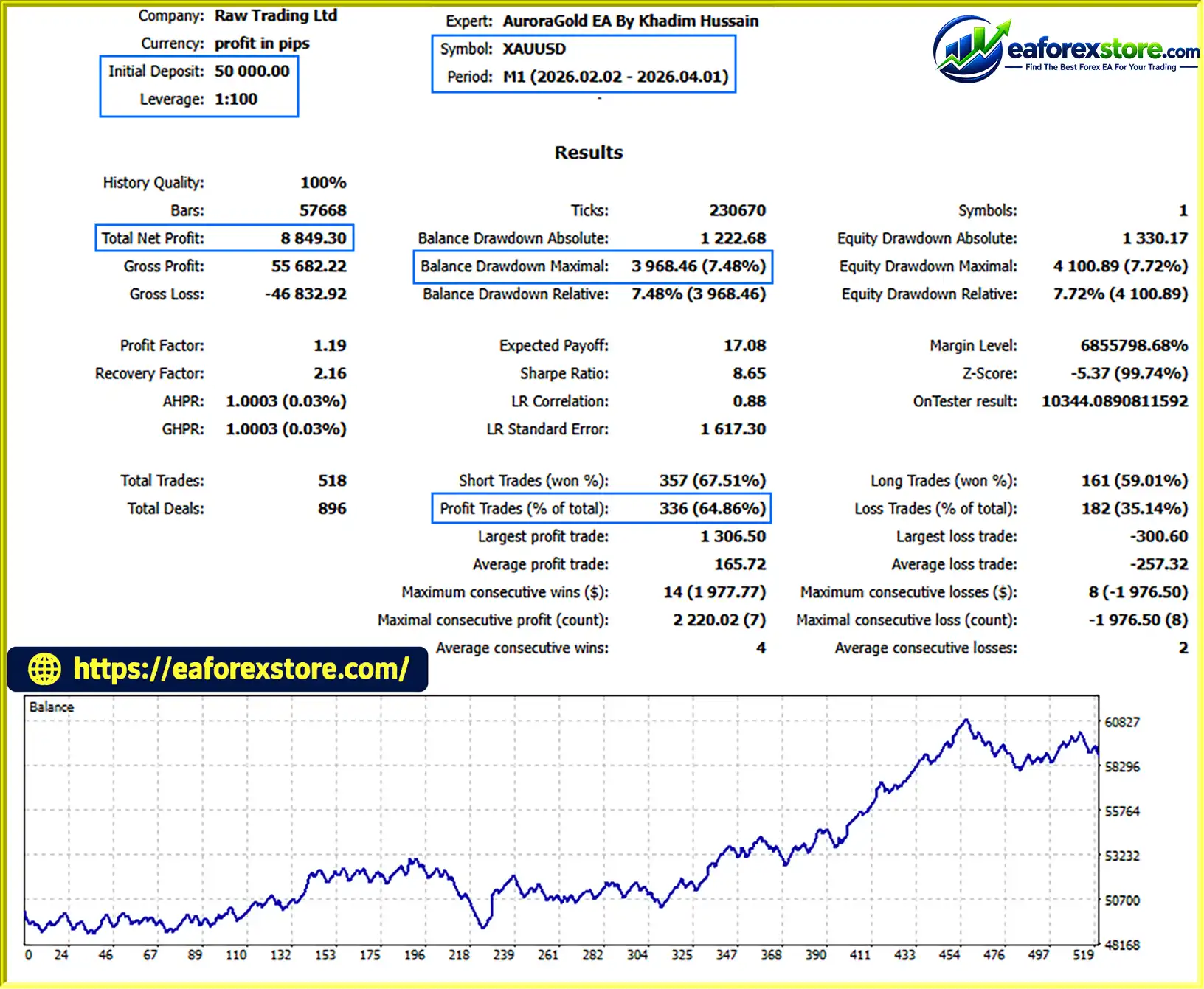
The product description does not provide independently verified profitability statistics, a complete audited trading record, or sufficient backtest data to establish a particular win rate or expected return. Therefore, traders should evaluate the EA through their own testing rather than assuming that its protective features guarantee profitable results.
The EA uses a fixed-percentage risk approach in which position size changes according to the selected risk percentage and Stop Loss distance.
For example, if the intended risk is 0.50% of account equity, the approximate risk amounts would be:
| Account equity | Intended risk at 0.50% |
|---|---|
| $1,000 | $5 |
| $2,000 | $10 |
| $5,000 | $25 |
| $10,000 | $50 |
These values illustrate the intended risk calculation. They do not represent guaranteed maximum losses, particularly when minimum lot restrictions, gaps, slippage, or other execution issues apply.
One of AuroraGold EA MT5’s important limitations is the minimum position size permitted by the broker.
According to the supplied startup example, a minimum position of 0.01 lots risks approximately $25.92 at the current ATR.
At a 0.50% risk setting, the approximate equity required to accommodate that risk is:
$25.92 ÷ 0.005 = $5,184.
This is an illustrative calculation based on the supplied example, not a permanent account minimum. The actual required equity changes with ATR, the Stop Loss distance, broker contract specifications, and the selected risk percentage.
If the account is too small to support the minimum lot at the intended risk level, the EA may reject most entry signals rather than opening oversized positions.
A cent account may provide a smaller effective trading exposure if the broker’s contract specifications support it. Traders should verify the actual contract size and risk calculation rather than assuming every cent account works the same way.
The equity drawdown lock is designed to stop new trading when drawdown from a specified peak exceeds the configured limit.
This can help prevent the EA from continuing to open trades after an extended period of losses. However, users should verify whether the lock closes existing positions, how the equity peak is calculated, and whether the restriction persists after a terminal restart.
The daily loss cap is designed to close positions and stop trading for the remainder of the day when the configured loss threshold is reached. The EA also checks whether a prospective trade could breach the daily limit.
This approach may help restrict daily losses, but gaps, execution delays, and differences between the EA’s calculations and the broker’s account records can still lead to a breach.
The spread ceiling helps prevent trading when transaction costs become excessive. The volatility band evaluates current ATR relative to its own average, allowing the EA to adapt its trading restrictions to changing volatility conditions.
These filters can reduce exposure to unfavorable market conditions, although they may also prevent trades during some profitable opportunities.
AuroraGold EA MT5 is configured to focus on the London and New York sessions by default and avoid opening new trades late on Friday.
An optional MT5 economic calendar filter can block entries around scheduled economic events. Traders should confirm the news filter’s configuration and calendar availability before relying on it.
Before using the EA with real money, follow a structured evaluation process:
Backtest results can vary significantly between brokers, even when the same EA settings and historical period are used. Past performance does not guarantee future results.
Although AuroraGold EA MT5 emphasizes structured risk management, several limitations should be considered before deployment.
XAUUSD can experience sudden price movements in response to economic releases, central bank decisions, geopolitical developments, and changes in market liquidity.
An ATR-based Stop Loss allows for volatility, but it cannot eliminate the risk of rapid adverse movements or execution at unfavorable prices.
EMA50, EMA200, and ADX confirmation can help identify directional conditions, but these indicators are based on historical prices.
By the time all conditions align, part of a trend may already have occurred. The EA may also generate losing trades when a previously established trend reverses.
A Donchian breakout can reverse after briefly moving beyond the channel boundary. Similarly, a pullback may continue into a deeper correction instead of resuming the dominant trend.
Neither entry method guarantees continuation.
The broker’s minimum lot size can create a mismatch between the requested risk percentage and the actual tradable exposure.
This is especially important for smaller accounts. The EA’s refusal to take an oversized trade may reduce trading frequency, so users should review the startup balance requirement and rejection messages.
Differences in spreads, price feeds, execution speed, contract specifications, and commissions can materially affect results.
A strategy that performs well on one broker may produce different outcomes on another. Broker-specific testing is essential.
Daily loss caps and equity drawdown locks are designed to restrict trading, but their effectiveness depends on implementation and execution.
Unexpected gaps, slippage, terminal failures, and other technical issues can cause realized losses to exceed the intended thresholds.
The optional economic calendar filter depends on the availability and configuration of MT5 calendar data. It may not protect against every unscheduled announcement or sudden market event.
Traders should not treat a news filter as a substitute for appropriate position sizing.
The use of trend indicators, hard Stop Loss orders, and multiple risk controls does not establish that the EA will be profitable.
Traders should evaluate performance using independent testing and should avoid choosing settings solely because they produce attractive historical equity curves.
Risk warning: Trading gold and other leveraged instruments involves substantial risk. AuroraGold EA MT5 may lose money, including during periods when its trend conditions appear favorable. Always test the EA, understand its limitations, and risk only capital you can afford to lose.
Overall, AuroraGold EA MT5 offers a structured approach to automated gold trading, but its practical value depends on realistic testing, compatible broker conditions, and conservative risk management.
Follow these steps to install AuroraGold EA By Khadim Hussain MT5 and prepare it for testing.
setting
Obtain the AuroraGold EA MT5 package from the official developer or authorized provider.
The main Expert Advisor file will typically use the .ex5 extension. If the package contains additional files, presets, or instructions, retain them and follow the provider’s documentation.
Launch MT5 and log in to your broker account. A demo account is recommended for the initial setup and testing process.
In MetaTrader 5:
MQL5 folder.Experts directory.If the developer provides additional dependencies, install them according to the supplied instructions.
Return to MT5 and open the Navigator panel.
Right-click Expert Advisors and select Refresh. If AuroraGold EA MT5 does not appear, restart the terminal and check that the file was placed in the correct directory.
Open the gold chart provided by your broker and select the M15 timeframe.
The EA is designed to support broker-specific symbol names such as XAUUSD, XAUUSDm, or GOLD, according to the supplied specifications. Nevertheless, verify that the symbol is supported by the installed version and that its contract specifications are correct.
The trend timeframe is a separate input and is H1 by default.
Drag AuroraGold EA MT5 from the Navigator panel onto the chart or double-click its name.
Review the EA properties and enable the necessary permissions. Make sure the platform’s Algo Trading control is enabled.
Check the Experts and Journal tabs for initialization messages, errors, or warnings.
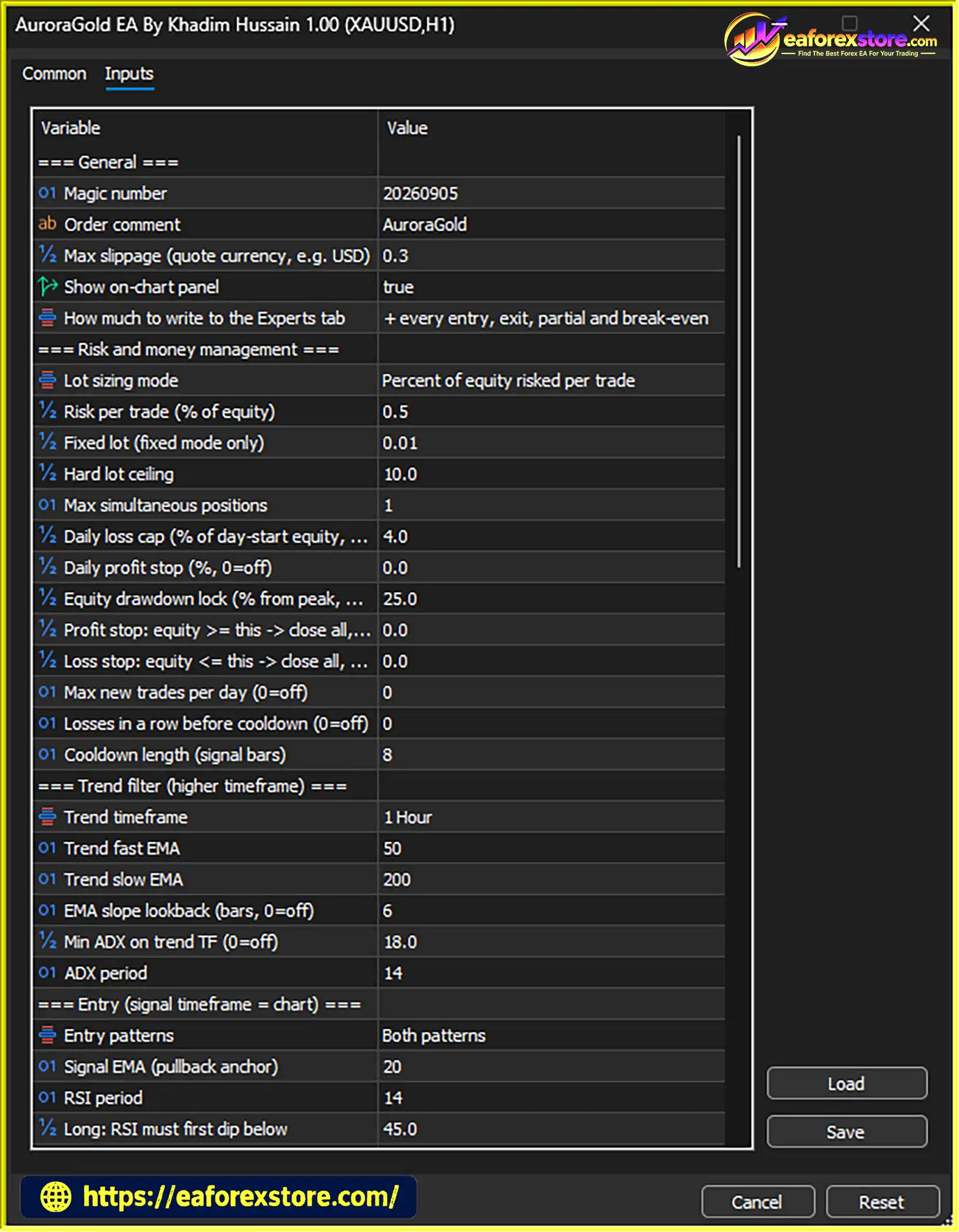
Review the available parameters for the trend filter, pullback strategy, and Donchian breakout strategy.
Choose the configuration you want to test. If both entry methods are enabled, the EA can evaluate both according to its internal rules.
Avoid changing many parameters simultaneously, as this can make it difficult to identify which settings affect performance.
Review the following settings where available:
Start with conservative risk settings and verify the EA’s behavior before increasing exposure.
Pay particular attention to the minimum balance requirement. Read the startup log to identify the monetary risk associated with a 0.01-lot position at the current ATR and determine whether your equity supports the requested percentage risk.
If the provider supplies .set preset files, you can load one through the EA’s Inputs settings.
Presets should be treated as starting points rather than guarantees of profitability. Confirm that the selected preset matches your broker, account type, symbol, and risk tolerance.
Before live trading:
Review drawdown, profit factor, average trade outcome, trade frequency, and the behavior of each entry method.
Run the EA on a demo account to observe its performance under current market conditions.
Verify that:
If the EA is not trading, inspect the diagnostic reports and startup logs to determine whether the filters are rejecting signals or the account does not support the minimum required position size.
Installation tip: A stable MT5 terminal and reliable internet connection are important for ongoing trade management. Although a VPS can improve uptime, it does not eliminate market risk or guarantee uninterrupted execution.
>>> Join VIP Membership Now <<<
AuroraGold EA By Khadim Hussain MT5 is a trend-continuation Expert Advisor designed to trade gold using higher-timeframe direction, M15 pullback entries, and Donchian breakout signals. Its trading logic emphasizes waiting for trend confirmation instead of opening positions against the prevailing market direction.
The EA’s strongest characteristics are its ATR-based Stop Loss, percentage-based position sizing, partial profit-taking, break-even adjustments, and chandelier trailing stop. The stated exclusion of martingale, grid trading, and averaging also makes its approach distinct from recovery-based systems that accumulate exposure after losses.
Another notable feature is its attention to practical account limitations. By checking the risk associated with the broker’s minimum lot size, AuroraGold EA MT5 is designed to reject trades when the requested percentage risk cannot be respected. Its diagnostic reports can also help traders understand why the system is inactive or why certain signals are filtered out.
However, no combination of indicators or risk controls guarantees profitable trading. Gold’s volatility, broker-dependent execution, minimum lot restrictions, and the possibility of false breakouts can all affect results. The EA’s daily loss controls should also be verified rather than assumed to provide an absolute loss ceiling.
Final verdict: AuroraGold EA MT5 may be worth evaluating for traders seeking an automated gold trading system built around trend continuation, real Stop Loss orders, and structured risk management. The most responsible approach is to begin with realistic backtesting, continue with demo forward testing, and deploy live capital only after verifying the EA’s behavior on the intended broker and account.
1. What Is AuroraGold EA By Khadim Hussain MT5?
AuroraGold EA By Khadim Hussain MT5 is an automated trading Expert Advisor designed specifically for XAUUSD (Gold) on MetaTrader 5. It operates on the M15 timeframe and uses a trend-continuation strategy to identify potential entries in the direction of the higher-timeframe trend. The EA combines pullback trading, Donchian channel breakouts, ATR-based Stop Loss placement, and automated trade management.
2. How Does AuroraGold EA MT5 Identify Trading Opportunities?
AuroraGold EA MT5 uses the H1 timeframe to confirm market direction through EMA50, EMA200, price positioning, EMA slope, and ADX trend strength. Once the trend conditions align, it searches for pullback or breakout opportunities on M15. Pullback entries use RSI, EMA20, and candle confirmation, while breakout entries rely on a 24-bar Donchian channel. These filters are designed to identify potential trend-continuation trades rather than predict market reversals.
3. Does AuroraGold EA MT5 Use Martingale or Grid Trading?
No. According to the supplied product specifications, AuroraGold EA MT5 does not use martingale, grid trading, or averaging down. It focuses on individual trend-following positions with predefined risk and a real Stop Loss attached to each trade. This avoids the specific risks associated with escalating lot sizes or accumulating positions to recover losses, although ordinary trading losses and drawdowns remain possible.
4. What Risk Management Features Does AuroraGold EA MT5 Offer?
AuroraGold EA MT5 includes percentage-based position sizing, an ATR-based Stop Loss with a default multiplier of 3× ATR, partial profit-taking, break-even protection, and an ATR chandelier trailing stop. It also offers an equity drawdown lock, daily loss cap, equity targets and floors, spread filtering, volatility filtering, session restrictions, and an optional economic calendar news filter. These features are designed to manage exposure but cannot guarantee a fixed maximum loss under all market conditions.
5. What Are the Backtest Results of AuroraGold EA By Khadim Hussain MT5?
The supplied product description reports a two-month XAUUSD backtest with an initial deposit of $50,000, net profit of $8,849.30, a 64.86% win rate, and maximum drawdown of 7.48%. These figures are presented as reported results and have not been independently verified here. Traders should examine the complete backtest report, testing dates, broker conditions, transaction costs, and equity drawdown before drawing conclusions about the EA's performance.
6. What Is the Minimum Account Balance Required for AuroraGold EA MT5?
The required account balance depends on the selected risk percentage, current ATR, Stop Loss distance, broker contract specifications, and minimum tradable lot size. The supplied example estimates that a 0.01-lot position could risk approximately $25.92 at the prevailing ATR. At a 0.50% risk setting, this corresponds to approximately $5,184 in account equity to accommodate that intended risk. This is an illustrative calculation, not a fixed minimum deposit requirement. Traders should check the EA's startup diagnostics and broker specifications before trading.
7. Which Timeframe and Trading Instrument Does AuroraGold EA MT5 Support?
AuroraGold EA MT5 is designed specifically for XAUUSD (Gold), using M15 for trade entries and H1 for higher-timeframe trend confirmation by default. Its strategy combines EMA-based trend analysis, ADX confirmation, RSI pullback conditions, EMA20 entry confirmation, and Donchian channel breakouts. Traders should confirm the supported gold symbol, account type, and broker specifications before attaching the EA to a chart.
8. How Do I Install AuroraGold EA MT5 on MetaTrader 5?
To install AuroraGold EA MT5, open MetaTrader 5 and select File → Open Data Folder. Navigate to MQL5/Experts and copy the supplied EA file into that directory. Return to MT5, refresh the Navigator panel, and attach the EA to an XAUUSD M15 chart. Configure the risk percentage, Stop Loss, trade-management rules, and protective filters according to the developer's instructions. Check the startup diagnostics, verify the minimum lot risk, and test the EA on a demo account before enabling live trading.
In stock
In stock
In stock
In stock
In stock
Out of stock
No account yet?
Create an Account












 Automatic EA
 EA Best Seller
 Expert Advisor MT4
 Expert Advisor MT5
 HFT EA


Reviews
Clear filtersThere are no reviews yet.