
Product Overview
TOPG Pro EA MT5 is an automated trading Expert Advisor developed for MetaTrader 5 (MT5), specifically designed to trade gold (XAUUSD) using supply and demand levels, market structure confirmation, and systematic risk management. Unlike conventional trading robots that enter immediately when the price touches a support or resistance zone, TOPG Pro EA requires additional confirmation before executing a trade.
The core strategy is based on identifying important supply and demand levels, waiting for price to revisit those areas, and confirming that the internal market structure has shifted in the anticipated direction. This approach aims to filter out low-quality entries and avoid trading every price reaction at a marked zone.
TOPG Pro EA MT5 features several categories of trading levels, including A+ / TJL2, TJL1, L1, L3, RBS, and SBR. Traders can enable or disable individual level types and configure separate reward-to-risk targets to match their preferred trading strategy. The EA also incorporates an Internal Structure Shift (ISS) confirmation mechanism to help identify potential entry opportunities.
In addition to its entry logic, TOPG Pro EA includes advanced trade management tools such as structure-based trailing stops, configurable stop-loss buffers, dynamic position sizing, daily drawdown limits, spread filtering, trading session controls, and an economic news filter.
Designed for gold traders who prefer a structured, rule-based approach, TOPG Pro EA MT5 combines supply and demand analysis with automated execution and multiple risk-control mechanisms. However, its profitability depends on market conditions, broker price feeds, execution quality, and the effectiveness of its underlying strategy.
About the Developer
- Author: Khadim Hussain
- Experience: Over 1 years of experience on MQL5.
- Notable Products: TOPG Pro EA MT5, AuroraGold EA MT5, TOPG Forex EA MT5 and other advisors.
- Flagship Product: TOPG Pro EA MT5 is rated as the best performing product of the year.
> Delivery time 24h-48h after payment.
>>> Refund if not delivered.
>>> You will receive the latest version without any limitations (ID+Time).Reviewed by Jason Stap <<<

Key Features of TOPG Pro EA MT5
Automated Supply and Demand Levels
TOPG Pro EA automatically identifies and categorizes trading levels using a selectable timeframe. These levels provide the foundation for its trading decisions, helping the EA identify areas where price may react or where a potential trend continuation or reversal could develop.
The system supports several level categories:
- A+ / TJL2: Primary high-quality zones traded by default.
- TJL1 / L1 / L3: Secondary levels that can be enabled according to trading preferences.
- RBS / SBR: Rally-Base-Rally and Supply-Base-Rally level classifications that can be configured independently.
This flexible level engine allows traders to focus on selected zones instead of taking every available setup.
Internal Structure Shift (ISS) Confirmation
One of the main features of TOPG Pro EA MT5 is its Internal Structure Shift confirmation system.
Rather than entering a trade as soon as price reaches a supply or demand zone, the EA waits for the internal market structure to shift in the intended trading direction.
This confirmation-based approach is designed to reduce premature entries and help distinguish a potentially valid reaction from a simple touch of a price level.
Although structural confirmation may improve entry discipline, it cannot eliminate false breakouts, failed reversals, or losing trades.
Extreme A+ Level Management
The Extreme A+ feature handles situations in which two strong trading zones are located close together.
Depending on the configured settings, the EA can treat these zones as a combined area, trade them separately, or focus on the outer edge.
This functionality provides greater flexibility when multiple supply or demand levels overlap and helps traders customize how the system interprets closely grouped price zones.
Configurable Stop-Loss Placement
TOPG Pro EA MT5 places stop-loss orders beyond the relevant trading level, with an adjustable buffer to account for spread and other entry considerations.
The EA can skip a setup when the required stop-loss distance exceeds the configured maximum. This helps prevent trades from being opened when the entry structure does not meet the system's risk requirements.
Every trade is designed to include a stop loss, although actual losses can exceed the planned amount because of slippage, price gaps, or execution limitations.
Flexible Take-Profit Targets
The EA supports two primary take-profit approaches:
- Opposing-level target: Targets the next relevant supply or demand level in the opposite direction.
- Fixed reward-to-risk target: Uses a predefined reward multiple relative to the initial risk.
When no suitable opposing level is available beyond the entry, the EA can use a configured fallback reward-to-risk ratio.
Setups that fail to meet the minimum required reward-to-risk ratio are skipped, helping maintain a more selective approach to trade execution.
Structure-Based Trailing Stop
Unlike a conventional trailing stop that follows price by a fixed number of points, TOPG Pro EA uses market structure to manage stop-loss movement.
It reads swing points from a selected timeframe and adjusts the stop according to the developing price structure. This is designed to give profitable trades room to develop while maintaining a defined risk-management framework.
The effectiveness of this approach depends on the quality of the identified swing points and the market's volatility.
Dynamic Position Sizing
TOPG Pro EA MT5 offers several position-sizing options, including:
- Fixed-percentage risk based on account balance.
- Fixed-percentage risk based on account equity.
- Fixed-lot sizing.
- Fixed-money risk settings.
Percentage-based sizing adjusts trade volume as the account balance or equity changes. This can support more consistent risk allocation, provided the stop-loss distance, tick value, and broker contract specifications are calculated correctly.
Advanced Drawdown and Trading Filters
The EA includes multiple controls designed to limit trading activity during unfavorable conditions. These include daily drawdown protection, a hard drawdown stop, maximum daily trade limits, consecutive-loss controls, spread filtering, configurable trading sessions, an economic news filter, and weekend position management.
These features allow traders to establish operational limits rather than relying entirely on manual intervention.
How Does TOPG Pro EA MT5 Work?
TOPG Pro EA MT5 follows a structured trading process that combines level identification, price-action confirmation, trade execution, and position management.
Step 1: Identify Supply and Demand Levels
The EA analyzes market data on the selected level timeframe to identify its supported supply and demand zones.
Each zone is assigned a category, such as A+ / TJL2 or one of the optional secondary level types. Traders can configure which categories are eligible for trading.
Step 2: Wait for Price to Return to a Level
After a relevant zone has been identified, the EA waits for the market price to revisit that area.
A price touch alone does not trigger an entry. This distinction is important because price can move through a zone without producing the expected reaction.
Step 3: Confirm the Internal Structure Shift
Once price reaches a qualifying level, the EA looks for an Internal Structure Shift (ISS) in the intended trade direction.
This step is designed to provide evidence that short-term market structure is responding to the zone before an order is placed.
If the required confirmation does not occur, the EA can remain inactive rather than entering prematurely.
Step 4: Evaluate Stop Loss and Reward-to-Risk
Before entering a trade, the system calculates the stop-loss placement beyond the relevant zone and applies the configured buffer.
It then determines whether the potential target satisfies the minimum reward-to-risk requirement. If the stop is too wide or the potential reward is insufficient, the setup is skipped.
Step 5: Calculate Position Size and Execute
When all entry conditions are satisfied, the EA calculates the appropriate trading volume according to the selected sizing method.
It then submits the order through MetaTrader 5, subject to broker execution conditions, trading permissions, and available margin.
Step 6: Manage the Open Position
After entry, TOPG Pro EA manages the trade using its configured stop-loss and take-profit rules.
The system can use opposing-level targets or fixed reward-to-risk targets and may adjust the stop according to market structure through its trailing-stop mechanism.
Step 7: Apply Risk and Safety Controls
Throughout operation, the EA monitors its configured trading limits and filters. Depending on the settings, it can stop opening new positions after reaching a daily drawdown threshold, a maximum number of losses, or other predefined limits.
It can also restrict entries during unsuitable spreads, outside configured trading sessions, or around qualifying economic news events.
Together, these components create a rule-based trading workflow intended to prioritize confirmed setups and disciplined risk management.
Why Choose TOPG Pro EA MT5?
TOPG Pro EA MT5 may be suitable for traders who prefer supply and demand trading with additional market structure confirmation instead of entering immediately at a marked price level.
Confirmation-based entries: The EA waits for an Internal Structure Shift before entering, helping avoid trades based solely on a price touch.
Flexible level selection: Traders can choose between primary and secondary zone categories according to their preferences and testing results.
Customizable reward-to-risk settings: Separate targets and minimum reward requirements provide flexibility when evaluating different types of setups.
Market-structure trailing: Stop management follows swing points rather than relying exclusively on a fixed trailing distance.
Multiple position-sizing options: Fixed-percentage, fixed-lot, and fixed-money modes allow traders to configure their exposure.
Integrated drawdown controls: Daily and hard drawdown limits, loss-streak restrictions, and trade-count limits help establish predefined operational boundaries.
Session and news filtering: Configurable trading windows and an economic calendar filter can restrict entries during selected periods or important announcements.
No martingale or grid trading: The supplied strategy description specifies that the EA does not increase lot sizes to recover losses and does not average into losing positions.
Gold-focused strategy: The system is designed for XAUUSD and broker-specific gold symbol variants, making its trading logic relevant to traders who specialize in gold.
Nevertheless, selecting an EA should involve more than comparing its feature list. Traders should verify historical performance, execution requirements, parameter behavior, and drawdown characteristics before committing real capital.
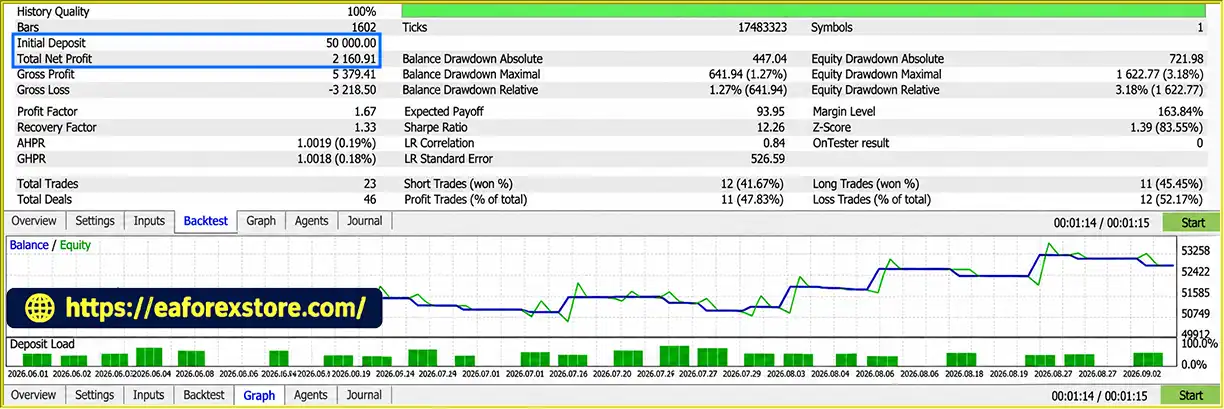
TOPG Pro EA MT5 Backtest Results
- Initial Deposit: $50,000
- Total Net Profit: $2,160.91
- Maximum Drawdown: 1,27%
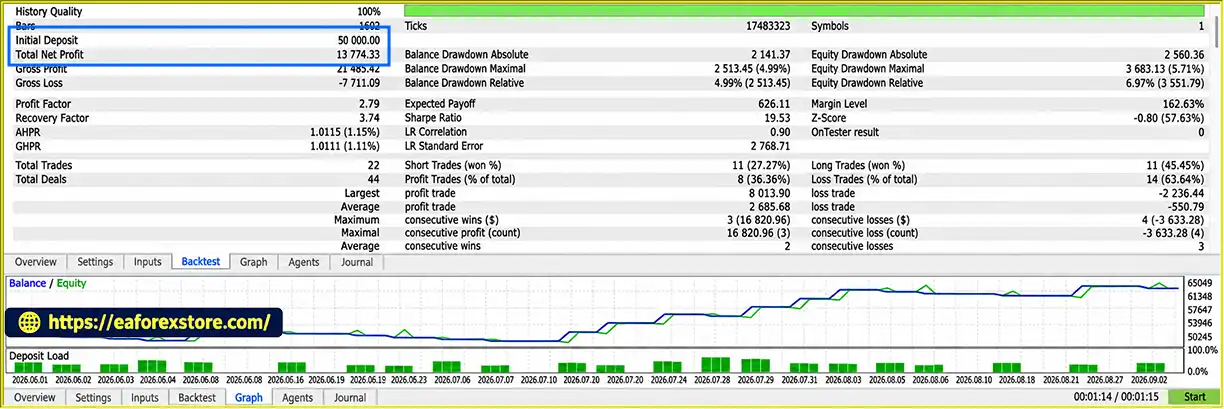
- Initial Deposit: $50,000
- Total Net Profit: $13,774.33
- Maximum Drawdown: 4.99%
Performance and Risk Management
Risk management is a central component of TOPG Pro EA MT5. Its configuration options are designed to limit exposure, filter unsuitable setups, and manage trades systematically. However, risk controls cannot guarantee profits or prevent every unexpected loss.
Fixed-Percentage Risk Management
Traders can select a risk percentage based on account balance or equity. The EA uses the chosen risk model to determine position size relative to the stop-loss distance.
Percentage-based sizing can help keep planned monetary risk proportional to account size. However, actual losses may differ from the intended amount due to slippage, gaps, commissions, or incorrect broker specifications.
Daily Drawdown Stop
The daily drawdown stop is designed to suspend trading for the remainder of the day after the configured equity drawdown threshold is reached.
This feature can help prevent continued trading after a difficult session. Traders should confirm how the EA calculates the daily reference point, whether floating losses count toward the limit, and when the daily restriction resets.
Hard Drawdown Stop
The hard drawdown stop provides an additional protection threshold at which the EA stops trading entirely.
This mechanism is intended to prevent further exposure after a deeper drawdown. The exact behavior, including the handling of existing positions and the conditions for restarting, should be verified in the EA documentation and demo testing.
Maximum Trades and Losing Streak Controls
TOPG Pro EA supports limits on the number of trades per day, the number of losing trades per day, and consecutive losses.
These settings help restrict activity when market conditions are unfavorable and reduce the risk of repeated entries exhausting the daily risk budget.
Spread and Trading Session Filters
The spread filter prevents entries when trading costs exceed the configured threshold. Two configurable session windows allow traders to define when new trades may be opened.
Because gold spreads and liquidity can change throughout the day, these controls can be useful for avoiding less favorable execution conditions.
Economic News Filter
The EA includes a filter based on the MetaTrader 5 economic calendar, with configurable minimum news importance.
This is designed to restrict trading around selected economic announcements. Traders should verify that the broker provides the necessary calendar data and that the filter's currency, event timing, and importance settings work as intended.
News filtering cannot eliminate the risk of unexpected announcements or abrupt market reactions.
Trend Alignment Filters
Optional trend filters for M5, M15, and H1 can require a trade setup to align with the prevailing direction on selected timeframes.
This may help traders restrict entries to setups that agree with their chosen trend criteria. However, additional filters can also reduce trading frequency and may exclude profitable opportunities.
Weekend Protection
The weekend-flat feature is designed to close positions before the weekend and prevent new entries during the configured restriction period.
Its effectiveness depends on correct timing, broker availability, and successful order execution. Traders should confirm how the EA handles failed closing attempts and any remaining pending orders.
Recommended Performance Evaluation
To evaluate TOPG Pro EA MT5 objectively, traders should monitor:
- Net profit: Overall profitability after trading costs.
- Maximum drawdown: The largest observed decline in balance or equity.
- Profit factor: Gross profits divided by gross losses.
- Average reward-to-risk: The relationship between average winning and losing trades.
- Win rate: The percentage of closed trades that are profitable.
- Trade frequency: The number of trades generated under different market conditions.
- Execution costs: Spreads, commissions, swaps, and slippage.
- Risk-control behavior: Whether daily stops, hard stops, and loss limits activate as expected.
The supplied product description does not provide verified backtest statistics or audited live trading results. Therefore, no specific return, win rate, or maximum drawdown should be assumed without supporting evidence.
Weaknesses and Risk Warnings
Although TOPG Pro EA MT5 includes several advanced features, traders should understand its limitations before using it on a live account.
Dependence on Broker Price Feeds
Supply and demand levels are derived from market prices, which can differ slightly between brokers because of feed characteristics, spreads, and price history.
These differences may change where zones are identified and which setups qualify for entry. Backtesting on the intended broker's data can help assess this issue, although it cannot guarantee identical live results.
False Internal Structure Shifts
An Internal Structure Shift does not guarantee that a market reversal or continuation will succeed. Price may briefly break internal structure before reversing again.
The EA can therefore experience losing trades even when all entry conditions have been satisfied.
Low Trading Frequency
Because the system waits for a level retest and additional structural confirmation, some market movements may occur without generating an entry.
Strict filters may also result in extended periods without trades. This is a natural consequence of selective trading logic and should not automatically be interpreted as a problem or an advantage.
Stop-Loss Execution Risk
The EA places stops beyond relevant levels and applies a configurable buffer, but stop orders do not guarantee a specific exit price in all market conditions.
Gaps, slippage, spread widening, and insufficient liquidity may cause the actual loss to exceed the planned one-R risk.
News and Session Filter Limitations
The economic calendar and session controls depend on correct configuration and available market information.
An incorrect broker GMT offset, missing calendar data, or a mismatch between configured and actual trading hours may cause entries to occur at unintended times.
Configuration Complexity
The EA offers multiple level types, trend filters, reward-to-risk settings, risk-sizing modes, and protection controls.
Incorrect combinations can produce unexpected trading behavior. Traders should understand each relevant parameter and test the selected configuration before live use.
Trailing Stop Trade-Offs
Structure-based trailing may allow profitable trades more room to develop, but it can also return some unrealized profits before the position closes.
In strongly trending conditions, trailing may protect gains differently than in choppy or rapidly reversing markets. Its impact should be assessed through historical and forward testing.
No Verified Profitability Guarantee
The available description explains the EA's features and intended behavior but does not establish independently verified profitability.
Marketing descriptions should not be treated as proof of a reliable trading edge. Past performance, even when verified, does not predict future results.
Risk warning: Gold trading and leveraged Forex or CFD trading involve substantial financial risk. You may lose some or all of your trading capital. Always test the EA on a demo account, use conservative risk settings, and trade only with money you can afford to lose.
Pros and Cons of TOPG Pro EA MT5
Pros
- Automated supply and demand analysis: Identifies and categorizes potential trading zones.
- ISS confirmation: Waits for internal market structure confirmation instead of entering on every level touch.
- Flexible level selection: Supports A+ / TJL2, TJL1, L1, L3, RBS, and SBR categories.
- Customizable trade targets: Supports opposing-level targets and fixed reward-to-risk settings.
- Structure-based trailing stop: Uses swing points from a selected timeframe for trade management.
- Multiple risk-sizing methods: Offers percentage-based, fixed-lot, and fixed-money sizing.
- No martingale or grid: Does not rely on increasing lots to recover losses or averaging into losing positions.
- Comprehensive trading limits: Includes daily drawdown, hard drawdown, trade-count, and losing-streak controls.
- Trading filters: Supports spread, session, news, and optional trend alignment filters.
- Weekend-flat feature: Designed to reduce exposure before the weekend.
Cons
- Gold-focused compatibility: Primarily intended for XAUUSD and broker-specific gold symbols.
- Broker-feed sensitivity: Differences in price data may affect level placement and trading signals.
- Potentially limited trade frequency: Multiple confirmation requirements may reduce the number of entries.
- Configuration requirements: Risk settings, trading sessions, news filters, and GMT offsets must be configured correctly.
- Execution risks remain: Slippage and gaps may cause losses to exceed planned stop-loss amounts.
- No guaranteed results: Market structure and supply and demand levels can fail.
- Performance data not supplied: Independent profitability, drawdown, and win-rate claims cannot be established from the provided information.
- Requires ongoing monitoring: Risk controls and automated execution should be checked regularly.
Overall Pros and Cons Assessment
TOPG Pro EA MT5 offers a structured framework for automated gold trading by combining supply and demand levels with internal structure confirmation and multiple risk-management controls.
Its main appeal is the emphasis on waiting for confirmation before entering a trade. However, its complexity and dependence on broker-specific price data make careful configuration and realistic testing essential.
How to Install TOPG Pro EA MT5
Follow these steps to install TOPG Pro EA MT5 on MetaTrader 5.
Step 1: Download the EA
Obtain the TOPG Pro EA MT5 file from the official developer or a trusted provider. Confirm that the package is compatible with MetaTrader 5.
The compiled Expert Advisor file generally uses the .ex5 extension. If source code is provided, it may use .mq5.
Step 2: Open the MT5 Data Folder
- Launch MetaTrader 5.
- Select File from the main menu.
- Click Open Data Folder.
- Open the
MQL5directory. - Navigate to the
Expertsfolder.
Step 3: Copy the EA File
Copy the EA's .ex5 file into the MQL5/Experts directory.
If the developer supplies supporting files, install them in the specified directories. Follow the official instructions for any required indicators or libraries.
Step 4: Refresh the Navigator
Return to MetaTrader 5 and open the Navigator panel.
Right-click Expert Advisors and select Refresh. If the EA does not appear, restart the platform and confirm that the file was installed in the correct location.
For an .mq5 source file, open MetaEditor and compile the file before running it.
Step 5: Open an XAUUSD Chart
Open a chart for XAUUSD or the equivalent gold symbol provided by your broker.
Attach TOPG Pro EA MT5 to the chart. Follow the developer's instructions for selecting the chart timeframe and level-detection timeframe, which may be configured separately.
Step 6: Configure the Broker GMT Offset
One of the most important setup requirements is the InpBrokerGMT parameter.
Set this input to the correct GMT offset of your broker's server. The EA's session and news windows are expressed in PKT (UTC+5) and converted using the supplied broker offset.
Check your broker's server time in Market Watch and verify whether its offset changes with daylight saving time.
An incorrect GMT offset can cause the EA to trade during unintended hours or apply news restrictions at the wrong times. Test the configuration before enabling live trading.
Step 7: Configure Trading and Risk Settings
Review the EA's available input parameters and configure the following where supported:
- Eligible supply and demand level categories.
- Extreme A+ zone-handling preferences.
- Internal Structure Shift entry confirmation.
- Stop-loss buffer and maximum stop distance.
- Take-profit method and minimum reward-to-risk ratio.
- Position-sizing method and risk percentage.
- Daily and hard drawdown thresholds.
- Maximum trades and losing-trade limits.
- Spread limits and trading session windows.
- Economic news importance and trend filters.
- Weekend position management.
The exact parameter names and available options may vary by version. Use the developer's documentation rather than assuming every feature has an identical input name.
Step 8: Enable Algo Trading
Enable Algo Trading in MT5 and allow automated trading in the EA's settings when required.
Check the Experts and Journal tabs for initialization messages, invalid parameters, rejected orders, or other errors.
Step 9: Backtest the EA
Open View → Strategy Tester and select TOPG Pro EA MT5.
Choose XAUUSD, a suitable historical period, and realistic trading costs. Where possible, use high-quality historical tick data and broker-specific price history.
Evaluate net profit, profit factor, maximum drawdown, trade frequency, and the performance of the selected risk settings.
Step 10: Forward-Test on a Demo Account
Run the EA on a demo account before deploying it on a funded account.
Verify that level detection, ISS confirmation, stop-loss placement, trailing behavior, news filtering, session timing, and drawdown controls operate as expected.
Monitor the EA over different market conditions rather than relying on a short period of favorable results.
Step 11: Consider VPS Hosting
If continuous operation is required, use a reliable VPS with a stable connection to the broker.
Confirm that the EA remains active, the platform stays connected, and the broker's server time and session settings remain correct.
Important: Start with conservative risk settings and do not assume that a profitable backtest will produce the same results in live trading.
What’s Included in the Download Package?
- Experts: TOPG Pro EA.ex5
>>> Join VIP Membership Now <<<
Final Thoughts on TOPG Pro EA MT5
TOPG Pro EA MT5 is an automated gold trading system designed around supply and demand zones, Internal Structure Shift confirmation, and structured trade management. Rather than entering whenever price touches a marked zone, it waits for additional evidence that market structure is moving in the intended direction.
Its combination of configurable level categories, reward-to-risk targets, structure-based trailing stops, dynamic position sizing, and drawdown controls provides a comprehensive framework for systematic trading. Optional trend filters, session windows, spread restrictions, and economic news filtering offer further customization.
However, the strategy is not without limitations. Broker-specific price feeds can influence the levels it identifies, structural confirmation can fail, and market gaps or slippage may cause losses beyond planned amounts. Correct configuration of the broker GMT offset is also essential because session and news windows depend on it.
For traders interested in automated supply and demand trading on XAUUSD, TOPG Pro EA MT5 may be worth evaluating through careful backtesting and forward testing. Its effectiveness should be measured using verified performance statistics, realistic trading costs, and transparent drawdown analysis rather than feature descriptions alone.
Final verdict: TOPG Pro EA MT5 combines confirmation-based entries with flexible trade management and multiple risk-control mechanisms, making it a potential candidate for traders seeking a structured gold trading Expert Advisor. Nevertheless, no automated system guarantees profitability. Thorough testing, correct configuration, and disciplined risk management remain essential before live deployment.