









-
 Unlimited Activations
-
 Instant delivery
-
 Easy to install





 Unlimited Activations
Instant delivery
Easy to install
Unlimited Activations
Instant delivery
Easy to install
 Free Update
 Free Install Support

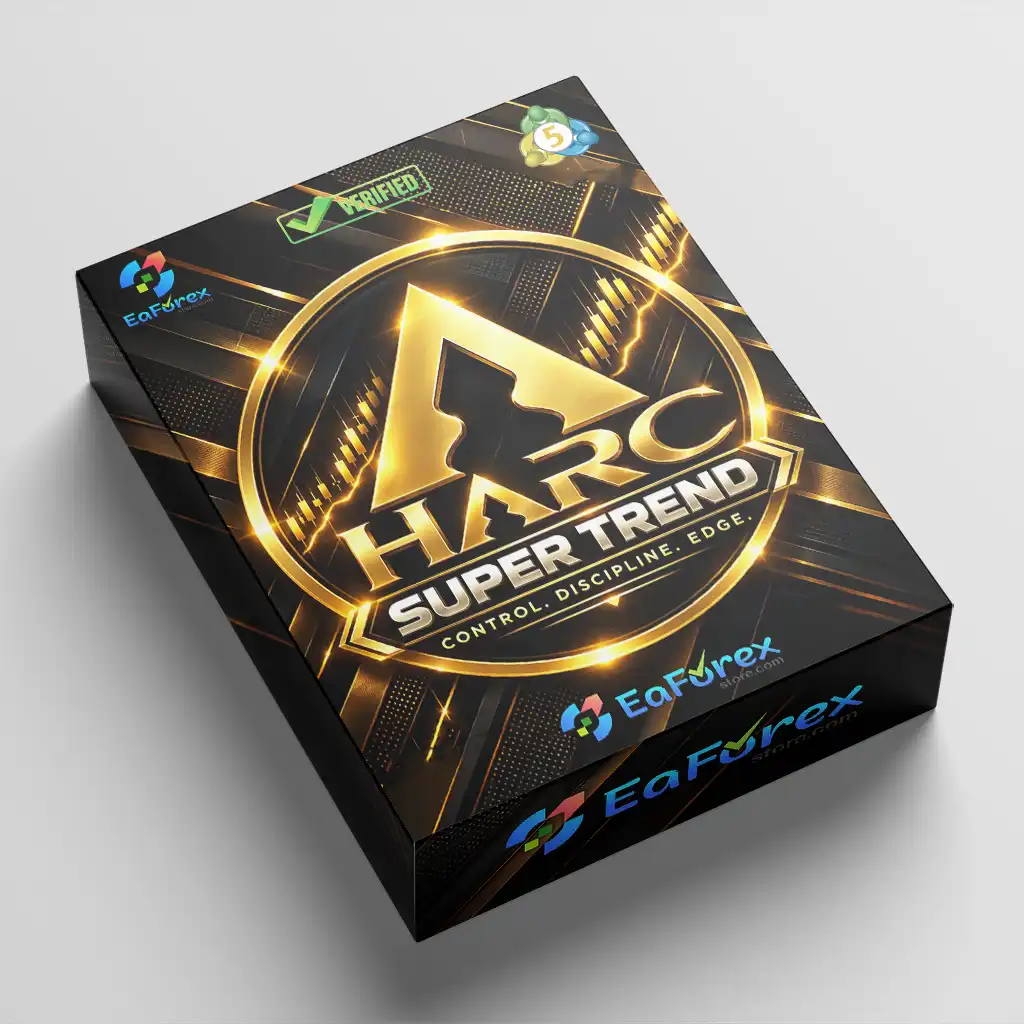
HARC Edge One EA MT5 is an automated Expert Advisor designed for the MetaTrader 5 (MT5) trading platform. It uses a Supertrend-based trading strategy to identify market direction and search for potential pullback entry opportunities. By combining higher-timeframe trend analysis with lower-timeframe entry conditions, the EA aims to provide a structured approach to automated trading.
The strategy uses the H1 timeframe to determine the broader market direction and the M15 timeframe to identify potential trade entries. A position is considered when price interacts with the M15 Supertrend level in alignment with the directional bias established by the H1 Supertrend.
HARC Edge One EA MT5 supports both BUY and SELL trading logic and is designed to maintain only one active EA position at a time. It also includes configurable risk settings, automated position sizing, Stop Loss and Take Profit controls, trading session filters, and maximum holding time management.
The EA has been tested in the MetaTrader 5 Strategy Tester using XAUUSD historical data. However, backtest performance should be evaluated carefully, as historical results do not guarantee future profitability. Traders should validate the strategy under their own broker conditions before deploying it on a live account.
>>> Delivery time 24h-48h after payment.
>>> Refund if not delivered.
>>> You will receive the latest version without any limitations (ID+Time).Reviewed by Jason Stap <<<
HARC Edge One EA MT5 uses the Supertrend indicator to evaluate market direction and identify potential trading opportunities. This trend-following approach helps establish a directional framework for its automated trading decisions.
The EA combines two timeframes to separate trend identification from entry timing.
This multi-timeframe structure is designed to align shorter-term trading opportunities with the established higher-timeframe trend.
The EA monitors the M15 Supertrend level and evaluates potential entries when price touches the relevant level in the direction of the H1 trend. This approach aims to identify opportunities during pullbacks rather than relying exclusively on immediate trend-following entries.
HARC Edge One EA MT5 calculates trading volume according to the configured risk percentage and the distance between the entry price and Stop Loss. This allows position size to adjust according to the selected risk settings and trade parameters.
The default risk setting is 1% of the initial account balance. Traders can adjust the available risk parameters to suit their account size, trading objectives, and risk tolerance.
The EA includes configurable Stop Loss and Take Profit settings to define trade protection and profit targets. These controls help establish predefined trade-management rules, although they cannot eliminate the risk of losses caused by market gaps, slippage, or execution limitations.
HARC Edge One EA MT5 includes trading session filters for the London and New York sessions. These settings allow traders to restrict trading activity to their preferred market periods.
The default session settings are London from 08:00 to 16:00 and New York from 13:00 to 21:00, based on the EA’s configured trading-session clock.
The EA supports a maximum holding time parameter to help manage how long a position remains open. This feature allows traders to configure time-based trade management according to their strategy requirements.
HARC Edge One EA MT5 is designed to maintain one active EA position at a time. This helps prevent the strategy from opening multiple simultaneous positions under its normal operating rules.
The EA uses a Magic Number to identify its trades within MetaTrader 5. This supports trade identification and helps distinguish the EA’s positions from manual trades or positions opened by other automated systems.
HARC Edge One EA MT5 follows a structured trading process that combines trend analysis, pullback identification, automated order execution, and predefined risk management.
The EA evaluates the H1 Supertrend indicator to establish the broader market direction. This directional bias determines whether the strategy should look for BUY or SELL opportunities.
After establishing the H1 trend, the EA monitors the M15 Supertrend level for potential entry conditions. It looks for price interactions with the relevant level that align with the higher-timeframe direction.
A trade is considered when the M15 Supertrend touch condition is satisfied and the H1 directional bias agrees with the setup. This helps maintain consistency between the broader trend and the entry signal.
Before placing a trade, the EA calculates the trading volume based on the configured risk percentage and the distance between the entry price and Stop Loss. Actual monetary risk can vary due to slippage, gaps, contract specifications, and execution conditions.
When the required conditions are met, the EA can place a BUY or SELL order according to its programmed rules. The configured Stop Loss, Take Profit, and maximum holding time settings determine the intended trade-management framework.
The EA checks its configured trading-session settings to determine whether new trading activity is permitted. This allows the strategy to focus on the selected London and New York trading periods.
HARC Edge One EA MT5 combines Supertrend-based market direction with pullback entry conditions. Rather than evaluating entries independently, the strategy uses the H1 trend as a directional filter for M15 trading opportunities.
The separation between trend identification and entry timing provides a clear framework for automated trading. The H1 timeframe establishes directional bias, while M15 is used to monitor potential entry opportunities around the Supertrend level.
The EA allows traders to configure risk percentage and trade-management parameters. This flexibility helps users adapt the strategy to different account sizes and trading requirements, subject to the limitations of their broker and account type.
With automated position sizing, Stop Loss and Take Profit controls, session filters, and maximum holding time management, the EA provides a systematic trading framework that requires less manual order execution.
The session filters allow users to define when the EA can look for new trading opportunities. Traders can evaluate whether the configured sessions suit their preferred instruments and broker time settings.
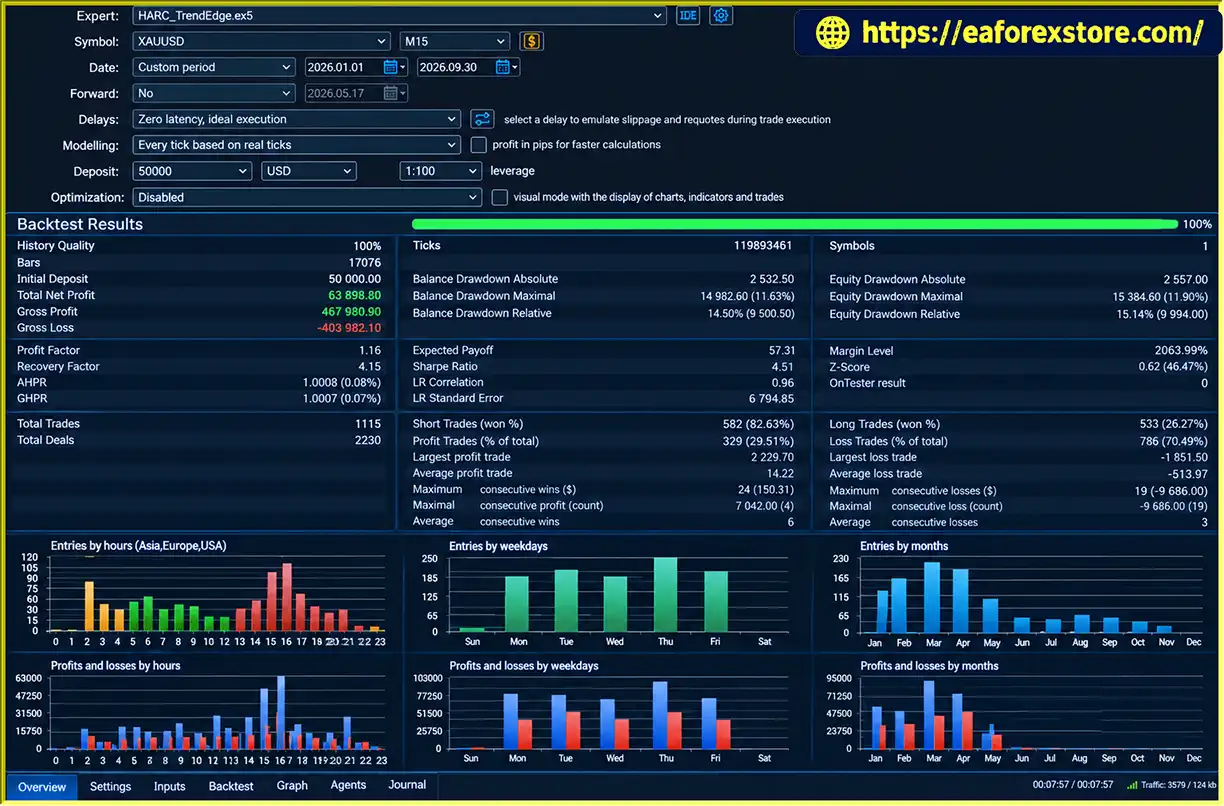
The EA has been tested on XAUUSD using the MetaTrader 5 Strategy Tester. This provides a historical testing reference for traders interested in evaluating its behavior on Gold, although the supplied information does not establish that XAUUSD is the only supported instrument.
The one-active-position design limits the number of simultaneous positions opened by the EA under its normal operating rules. However, it does not guarantee low drawdown or prevent losses during adverse market conditions.
HARC Edge One EA MT5 Backtets
Risk management is an important component of HARC Edge One EA MT5. Although the EA includes configurable position sizing and trade-management controls, automated trading still involves market, execution, and leverage risks.
The EA calculates position volume using the configured risk percentage and the distance between the entry price and Stop Loss. The default risk setting is 1% of the initial account balance.
Users should understand how this setting works before trading live. Risk calculated from the initial balance may not automatically decrease as account equity falls, so traders should review the available parameters and determine whether the default approach suits their risk-management requirements.
Stop Loss and Take Profit settings establish predefined levels for trade protection and profit targets. Traders should configure these parameters according to their trading objectives, instrument volatility, and broker specifications.
Stop Loss orders do not guarantee execution at the exact requested price under all market conditions.
The maximum holding time setting provides an additional trade-management control by allowing positions to be managed according to a configured time limit. Users should verify how this parameter interacts with Stop Loss and Take Profit conditions in the EA.
The default London session runs from 08:00 to 16:00, while the New York session runs from 13:00 to 21:00. These times follow the EA’s configured trading-session clock and should not automatically be assumed to match the local time displayed by the trader’s computer.
Users should confirm the applicable time zone and account for daylight saving time where relevant.
The EA is designed to maintain one active position at a time. This can simplify trade monitoring, but it does not eliminate exposure to sudden price movements, consecutive losses, or unfavorable execution.
The supplied product information does not confirm whether HARC Edge One EA MT5 includes dedicated email notifications, push alerts, or a custom alert dashboard. Traders should check the available EA inputs and MetaTrader 5 notification settings before relying on any specific alert function.
Regularly monitor the following:
Risk disclaimer: Historical backtest results do not guarantee future performance. Actual results may differ because of broker conditions, spreads, liquidity, slippage, execution delays, symbol specifications, and changing market behavior.
Obtain the HARC Edge One EA MT5 package from the official product provider. Confirm that the files are compatible with your MetaTrader 5 platform.
Launch MetaTrader 5 and log in to the trading account you intend to use for testing.
Select File → Open Data Folder in MetaTrader 5. Navigate to the MQL5/Experts directory.
Copy the supplied Expert Advisor files into the appropriate MQL5/Experts folder. If the package contains additional indicators or dependencies, follow the developer’s instructions for installing them.
Return to MetaTrader 5 and refresh the Navigator panel or restart the platform. Locate HARC Edge One EA MT5 under Expert Advisors.
Open the chart for the instrument you intend to trade and select the M15 timeframe. If you plan to reproduce the documented testing setup, begin with XAUUSD, subject to broker symbol availability.
Attach the EA to the chart and review the available input parameters. Configure the risk percentage, Stop Loss, Take Profit, trading sessions, maximum holding time, and Magic Number according to your requirements.
Confirm that the configured session clock matches the intended trading schedule.
Enable automated trading in MetaTrader 5 and verify that the EA has the necessary permissions. Check the Experts and Journal tabs for errors or execution issues.
Use the MetaTrader 5 Strategy Tester to evaluate the EA with historical data. Review the trading results, drawdown, trade frequency, and execution assumptions rather than focusing exclusively on net profit.
Run the EA on a demo account under conditions similar to your intended live environment. Observe its entry behavior, risk calculations, session filters, and position-management rules.
Consider live deployment only after completing sufficient testing. Monitor the EA regularly and reassess its settings when market conditions, account equity, or broker specifications change.
Installation note: Exact file formats, licensing requirements, activation procedures, and additional dependencies depend on the package provided by the developer.
>>> Join VIP Membership Now <<<
HARC Edge One EA MT5 is an automated trading system for MetaTrader 5 that combines Supertrend-based trend identification, M15 pullback entry monitoring, configurable position sizing, and predefined trade-management controls.
Its multi-timeframe approach provides a clear structure for evaluating potential entries in the direction of the broader H1 trend. Features such as London and New York session filters, maximum holding time, and one active EA position at a time add further control to the strategy’s operating framework.
The EA may be worth evaluating for traders interested in systematic trend-following strategies, particularly those who want to test its behavior on XAUUSD. However, the effectiveness of the approach depends on market conditions, configuration, broker execution, and the quality of risk management.
Before using HARC Edge One EA MT5 with real funds, conduct independent backtesting, validate the strategy on a demo account, and verify its behavior under realistic spreads and execution conditions. Pay particular attention to drawdown, risk per trade, session timing, and the reliability of the historical testing assumptions.
Ultimately, HARC Edge One EA MT5 should be evaluated as a trading tool rather than a guarantee of profits. Careful testing, realistic expectations, and disciplined risk management remain essential when trading leveraged financial markets.
1. What Is HARC Edge One EA MT5?
HARC Edge One EA MT5 is an automated trading Expert Advisor designed for MetaTrader 5. It uses a Supertrend-based strategy to identify market direction and potential pullback entries. The EA combines higher-timeframe trend analysis, lower-timeframe entry conditions, automated position sizing, and configurable trade-management tools to help traders execute a systematic trading strategy.
2. How Does HARC Edge One EA MT5 Generate Trading Signals?
HARC Edge One EA MT5 uses the H1 timeframe to determine the overall market trend and the M15 timeframe to identify potential entry opportunities. It monitors price interactions with the M15 Supertrend level and looks for setups aligned with the H1 trend direction. The EA supports both BUY and SELL trades, depending on the confirmed market conditions and configured parameters.
3. Which Markets Does HARC Edge One EA MT5 Support?
HARC Edge One EA MT5 has been tested on XAUUSD (Gold) using the MetaTrader 5 Strategy Tester. The available product information does not establish that Gold is the only supported instrument. Traders should verify compatibility with their broker's symbols and test the EA on each intended market before live deployment.
4. What Is the Recommended Risk Setting for HARC Edge One EA MT5?
The default risk setting is 1% of the initial account balance. The EA calculates position size using the configured risk percentage and the distance between the entry price and Stop Loss. Traders can adjust the available risk parameters to suit their account size and risk tolerance. Actual losses may exceed the intended risk because of slippage, market gaps, and execution conditions.
5. Does HARC Edge One EA MT5 Support Stop Loss and Take Profit?
Yes. HARC Edge One EA MT5 includes configurable Stop Loss and Take Profit settings to establish predefined trade-management levels. It also supports maximum holding time management, which helps control how long a position remains open. These features provide a structured approach to trade management but cannot guarantee that orders will execute at their requested prices under all market conditions.
6. What Are the Default London and New York Trading Sessions?
HARC Edge One EA MT5 provides configurable filters for the London and New York sessions. The default London session runs from 08:00 to 16:00, while the New York session runs from 13:00 to 21:00, according to the EA's configured trading-session clock. Traders should verify the applicable time zone and account for daylight saving changes before enabling automated trading.
7. Are the Backtest Results of HARC Edge One EA MT5 Guaranteed to Be Profitable?
No. Historical backtest results do not guarantee future profitability. The published XAUUSD backtest covers nine months, with an initial deposit of $50,000, total net profit of $63,898.80, and maximum drawdown of 11.63%. Actual performance may differ because of market volatility, spreads, slippage, broker execution, and configuration differences. Independent backtesting and demo forward-testing are recommended before live trading.
8. How Do I Install HARC Edge One EA MT5 on MetaTrader 5?
To install HARC Edge One EA MT5, download the EA file, open MetaTrader 5, and navigate to File → Open Data Folder → MQL5 → Experts. Copy the supplied .ex5 file into the Experts folder, refresh the Navigator panel, and attach the EA to an M15 chart. Configure the risk percentage, Stop Loss, Take Profit, trading sessions, and maximum holding time. Test the EA on a demo account before considering live deployment.
In stock
In stock
In stock
In stock
In stock
Out of stock
No account yet?
Create an Account












 Automatic EA
 EA Best Seller
 Expert Advisor MT4
 Expert Advisor MT5
 HFT EA


Reviews
Clear filtersThere are no reviews yet.