









-
 Unlimited Activations
-
 Instant delivery
-
 Easy to install






 Unlimited Activations
Instant delivery
Easy to install
Unlimited Activations
Instant delivery
Easy to install
 Free Update
 Free Install Support

Gold Breakout Prime EA MT5 is an automated Expert Advisor designed for the MetaTrader 5 (MT5) trading platform. It uses a price action-based breakout strategy to identify potential trading opportunities when the market moves beyond recently established highs and lows.
The EA analyzes recent market structure using a configurable number of historical bars to calculate dynamic breakout levels. It then places Buy Stop and Sell Stop pending orders around these levels, allowing the system to participate when price breaks through the defined range.
Designed primarily for XAUUSD (Gold), Gold Breakout Prime EA MT5 can also be configured for major currency pairs such as EURUSD and GBPUSD. The EA supports the M5 and M15 timeframes, making it suitable for traders interested in short-term breakout opportunities and intraday momentum.
A key feature of the system is its focus on predefined risk management. It does not use Martingale, Grid, Hedging, or Averaging strategies, according to the supplied product description. Instead, individual trades use Stop Loss and Take Profit settings, with an optional trailing stop to manage positions as the market moves in a favorable direction.
The EA also includes automatic lot sizing, margin checks, configurable trading sessions, pending order expiration, and Magic Number identification. These functions provide a structured framework for automated breakout trading without requiring constant manual order placement.
Gold Breakout Prime EA MT5 has a stated minimum deposit of $100. However, the appropriate starting balance depends on broker margin requirements, minimum lot sizes, Stop Loss distance, and the selected risk percentage.
As with any automated trading system, users should backtest the EA and evaluate it on a demo account before using real funds. Breakout strategies can experience false breakouts, slippage, and sudden reversals, particularly during volatile market conditions.
>>> Delivery time 24h-48h after payment.
>>> Refund if not delivered.
>>> You will receive the latest version without any limitations (ID+Time).Reviewed by Jason Stap <<<
Gold Breakout Prime EA MT5 Overview
Gold Breakout Prime EA MT5 uses recent market highs and lows to identify potential breakout levels. Its configurable BarsN parameter determines the number of historical bars used to calculate the dynamic breakout channel.
This allows the EA to evaluate recent price structure and establish levels for potential breakout entries. The effectiveness of these levels depends on market conditions, the selected timeframe, and the parameter configuration.
The EA places Buy Stop and Sell Stop pending orders around predefined breakout levels, based on the configured order distance.
A Buy Stop order is intended to trigger when price rises through the specified level, while a Sell Stop order is intended to trigger when price falls through its specified level.
This approach allows the EA to prepare for potential upward or downward breakouts without requiring the trader to manually enter every position.
According to the supplied product description, Gold Breakout Prime EA MT5 does not use Martingale, Grid, Hedging, or Averaging strategies.
Instead, each trade is managed as an independent breakout setup with predefined Stop Loss and Take Profit levels. This avoids the specific exposure patterns associated with increasing position sizes after losses or accumulating multiple grid positions, although ordinary trading losses remain possible.
The EA supports automatic position sizing based on a configurable risk percentage and Stop Loss distance.
The RiskPercent parameter determines the intended risk level, while UseFixedLot allows users to choose between risk-based sizing and a fixed lot size.
Automatic position sizing can help maintain more consistent planned risk across trades with different Stop Loss distances. Actual losses may differ from the planned amount because of slippage, gaps, commissions, and execution conditions.
The EA includes a trailing stop mechanism designed to protect open positions as price moves favorably.
The Tsltrigger parameter defines the profit threshold at which trailing stop management begins, while Tslpoints specifies the trailing distance according to the EA’s point-based settings.
This mechanism can help manage developing trades without requiring manual Stop Loss adjustments. However, a trailing stop does not guarantee that profits will be secured at the expected price.
Gold Breakout Prime EA MT5 includes a configurable time filter that allows users to restrict trading activity to selected hours.
Traders can define active periods, such as the London session, the New York session, or their overlap. The EA is also described as automatically deleting pending orders when the configured trading conditions no longer permit them to remain active.
The exact behavior should be verified through the EA’s settings and testing. Correct session configuration is important because the EA’s clock may differ from the trader’s local time.
The ExpirationHours parameter controls how long pending orders remain active before they are automatically canceled.
This feature is intended to prevent outdated breakout orders from remaining active indefinitely after the market structure or trading conditions have changed.
The EA includes a margin-checking mechanism intended to reduce lot size when available free margin is insufficient for the intended trade.
This can help reduce order rejection caused by insufficient margin. It does not eliminate margin risk or guarantee that every order will be accepted by the broker.
Gold Breakout Prime EA MT5 provides several configurable inputs, allowing traders to adapt the strategy to their preferred trading conditions.
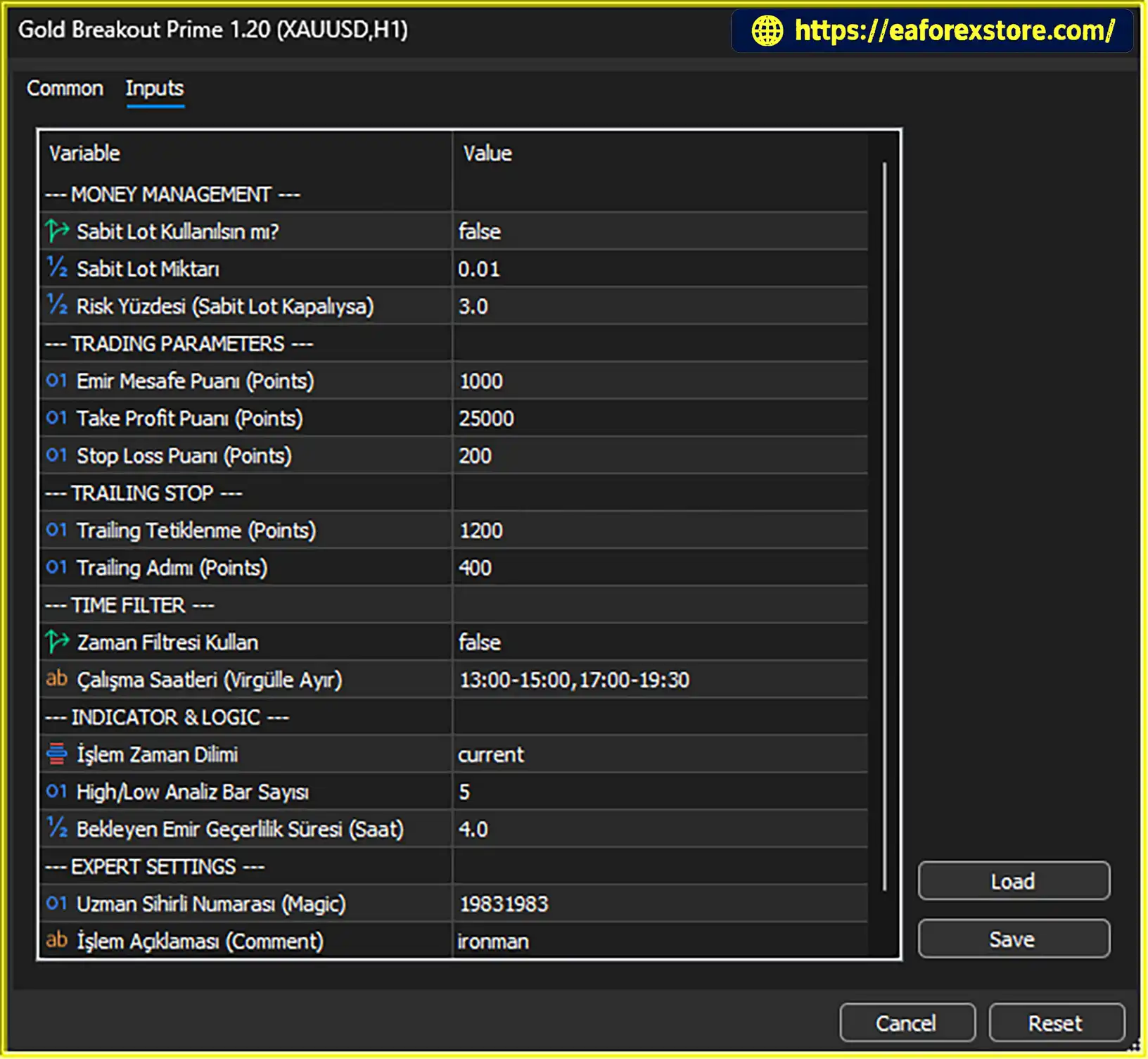
Key parameters include risk percentage, fixed lot size, pending order distance, Stop Loss, Take Profit, trailing stop settings, trading sessions, breakout channel length, pending order expiration, and Magic Number identification.
Gold Breakout Prime EA MT5 follows a systematic breakout process based on recent market structure, pending order placement, and automated trade management.
The EA evaluates historical price bars to determine recent highs and lows. The BarsN parameter controls the number of bars used in calculating the dynamic breakout channel.
These levels provide the reference points for identifying potential breakout opportunities.
After establishing the relevant highs and lows, the EA uses the configured OrderDistPoints parameter to determine how far pending orders should be placed from the breakout levels.
The distance helps define the entry conditions and should be adjusted according to the instrument, broker specifications, and market volatility.
The EA places Buy Stop and Sell Stop orders around the calculated levels according to its programmed logic.
If price moves through a pending order’s trigger level and the broker executes it, a new position may be opened. A breakout does not guarantee continued movement in the same direction, so false breakouts remain a significant risk.
When a trade is opened, the configured Slpoints and Tppoints parameters define the intended Stop Loss and Take Profit distances.
These settings establish the trade’s planned risk and profit target. Their suitability depends on the instrument’s price behavior, contract specifications, and the account’s risk limits.
When a position reaches the configured trailing stop activation threshold, the EA can begin adjusting the Stop Loss as price moves favorably.
The Tsltrigger and Tslpoints parameters determine the activation threshold and trailing distance. Traders should test these settings to understand how they affect trade duration, stop-out frequency, and realized results.
The EA checks its configured trading hours to determine when new trading activity is permitted. Pending orders can also expire after the period specified by ExpirationHours.
These controls are designed to limit exposure to outdated breakout setups and keep trading activity within the user’s selected schedule.
Before placing an order, the EA determines the appropriate trading volume based on the selected fixed-lot or risk-percentage method. It also checks available margin and can reduce lot size when necessary.
Users should verify the actual risk calculations and broker compatibility before deploying the EA on a live account.
Gold Breakout Prime EA MT5 focuses on identifying opportunities when price moves beyond recent market highs and lows. This makes it suitable for traders who prefer breakout strategies over approaches based primarily on oscillators or countertrend entries.
The EA prepares Buy Stop and Sell Stop orders around predefined breakout levels, reducing the need for manual entry placement.
This can be particularly useful for traders who want to automate their response to potential intraday price expansion.
The configurable risk percentage allows users to define a planned risk level for each trade. Automatic lot sizing then adjusts position volume according to the calculated Stop Loss distance.
This provides a more structured alternative to selecting lot sizes without considering trade-level risk.
The supplied strategy description explicitly excludes Martingale, Grid, Hedging, and Averaging techniques.
For traders who prefer independent trades with predefined Stop Loss and Take Profit levels, this design may be more suitable than recovery systems that increase exposure after losses.
However, the absence of these techniques does not mean that the EA is low-risk or consistently profitable.
The trailing stop mechanism gives traders an automated way to manage open positions as the market moves in their favor.
Its practical value should be evaluated through testing because trailing stops can close trades prematurely in choppy markets or fail to preserve expected profits during rapid reversals.
The configurable time filter allows traders to focus on selected market sessions instead of necessarily allowing pending orders to remain active throughout the day.
This can help align the EA with a preferred intraday schedule, provided the time settings are configured correctly.
The stated minimum deposit is $100, providing an initial reference for traders evaluating the EA.
However, the minimum deposit alone does not establish whether an account can safely support the strategy. Traders should calculate margin requirements and realistic potential losses before choosing an account size.
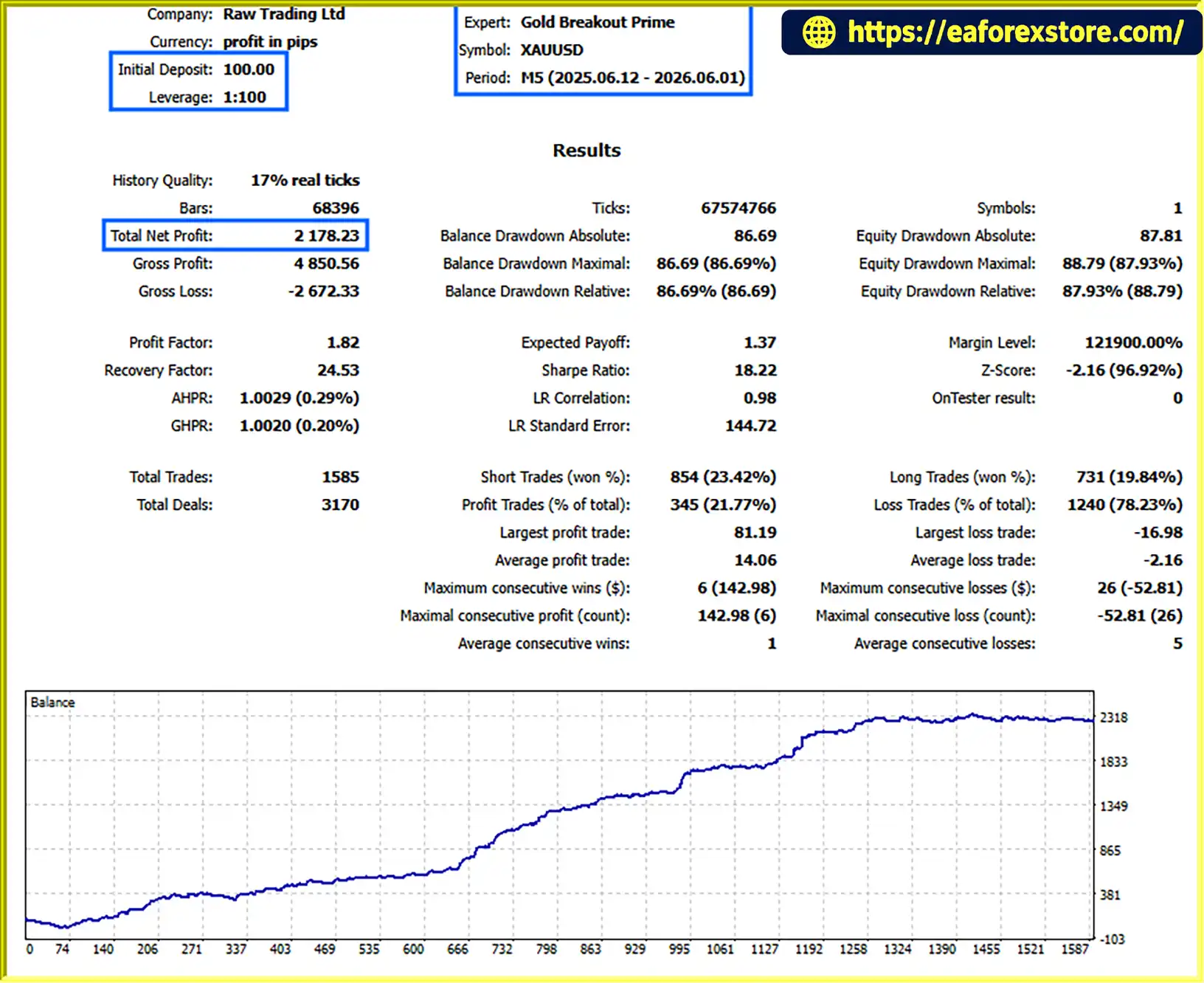
Gold Breakout Prime EA MT5 Backtets
Risk management is essential when using Gold Breakout Prime EA MT5. Breakout trading can encounter false signals, sharp reversals, spread widening, and slippage, especially when markets move rapidly.
The RiskPercent parameter allows users to define the intended percentage of account balance risked per trade when automatic lot sizing is enabled.
The product description suggests a range of 1% to 3% as a reference. However, risking 3% per trade can produce substantial drawdowns after consecutive losses. More conservative settings may be appropriate depending on the trader’s financial circumstances and risk tolerance.
Users should verify whether the EA calculates risk from balance or equity and confirm how it handles minimum lot sizes, volume steps, and broker-specific contract specifications.
The UseFixedLot parameter allows users to switch to fixed-lot trading, while FixedLot specifies the chosen volume.
Fixed-lot trading does not automatically maintain a consistent percentage of account risk. The monetary risk can vary as Stop Loss distances and market conditions change.
The Slpoints and Tppoints parameters define the intended Stop Loss and Take Profit distances.
These settings should be evaluated against the instrument’s volatility, spread, and trading costs. A Stop Loss can limit planned exposure but cannot guarantee the exact exit price under all market conditions.
The trailing stop settings help manage positions after the market moves in the intended direction.
Traders should avoid assuming that trailing stops eliminate downside risk. Sudden reversals, gaps, and execution delays can cause realized results to differ from the intended stop level.
The EA checks available free margin and can reduce the trading volume when necessary. Nevertheless, high leverage, insufficient capital, or sudden market movements can still result in significant losses or margin liquidation.
Users should confirm that the selected account has sufficient margin for the intended trades and avoid choosing position sizes solely because the broker permits them.
The UseTimeFilter parameter enables or disables the trading session filter. The ActiveTimes parameter defines the permitted trading periods, while ExpirationHours controls how long pending orders remain active.
These settings should be configured according to the EA’s clock and the broker’s server time. Users should also verify the behavior of pending orders when a session ends.
The supplied product information does not confirm whether Gold Breakout Prime EA MT5 includes dedicated push notifications, email alerts, or a custom alert dashboard. Traders should inspect the EA’s available inputs and MetaTrader 5 notification settings before relying on these functions.
Regularly monitor:
Important risk warning: Historical testing cannot guarantee future profitability. Actual trading results may differ because of market conditions, spreads, liquidity, slippage, execution quality, and broker specifications.
seting
Obtain the Gold Breakout Prime EA MT5 package from the official product provider. Verify that the files are compatible with your MetaTrader 5 installation.
Launch MetaTrader 5 on your computer and log in to the trading account you intend to use for testing.
Select File → Open Data Folder in MetaTrader 5. Open the MQL5 directory and navigate to Experts.
Copy the supplied Expert Advisor files into the appropriate MQL5/Experts folder. If the package contains additional indicators or dependencies, follow the developer’s installation instructions.
Return to MetaTrader 5 and refresh the Navigator panel or restart the platform. Locate Gold Breakout Prime EA MT5 under Expert Advisors.
Open the XAUUSD chart or another supported instrument and select M5 or M15. Confirm the exact symbol name used by your broker because Gold instruments may include prefixes or suffixes.
Attach the EA to the chart and review its available settings.
Key parameters include:
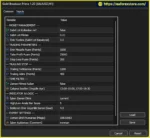
UseFixedLot: Enables fixed-lot trading instead of automatic risk-based sizing.FixedLot: Sets the manually selected trading volume.RiskPercent: Defines the intended percentage risk when automatic lot sizing is used.OrderDistPoints: Sets the distance between breakout levels and pending orders.Tppoints: Defines the Take Profit distance in points.Slpoints: Defines the Stop Loss distance in points.Tsltrigger: Sets the profit threshold for activating the trailing stop.Tslpoints: Defines the trailing stop distance in points.UseTimeFilter: Enables or disables the trading session filter.ActiveTimes: Defines the permitted trading periods.BarsN: Sets the number of historical bars used to calculate the breakout channel.ExpirationHours: Determines how long pending orders remain active.InpMagic: Sets the Magic Number used to identify the EA’s trades.The correct values depend on the instrument, broker specifications, trading timeframe, and selected risk level.
Enable automated trading in MetaTrader 5 and confirm that the EA has the required permissions. Check the Experts and Journal tabs for initialization errors, rejected orders, or other execution issues.
Use the MetaTrader 5 Strategy Tester to evaluate the EA using historical data and realistic trading costs. Review net profit, maximum drawdown, profit factor, trade frequency, and performance across different market conditions.
Test different breakout distances and risk settings without selecting parameters solely because they produce the highest historical returns.
Run the EA on a demo account to observe how pending orders behave, how the trailing stop activates, and how the session filter manages trading activity.
Pay particular attention to false breakouts, execution costs, and the actual position sizes generated by the risk settings.
A reliable Virtual Private Server (VPS) may help maintain a stable MetaTrader 5 environment when continuous operation is required. Monitor the platform regularly because VPS hosting cannot eliminate broker outages, execution problems, or trading losses.
Installation note: File formats, licensing, activation procedures, and additional dependencies depend on the package supplied by the developer.
Gold Breakout Prime EA MT5 is primarily designed for Gold trading, although the supplied description also identifies major Forex pairs as potential instruments.
Recommended configuration guidelines:
Before using the EA, confirm the broker’s minimum lot size, contract specifications, margin requirements, spread, commission, and order execution rules.
For Gold trading in particular, pending order distance and Stop Loss settings should account for the instrument’s volatility and the broker’s point and tick specifications.
>>> Join VIP Membership Now <<<
Gold Breakout Prime EA MT5 is an automated breakout trading system for MetaTrader 5 that uses recent market highs and lows to identify potential price expansion opportunities. Its main components include pending order placement, configurable Stop Loss and Take Profit levels, automatic lot sizing, trailing stop management, trading session filters, and pending order expiration.
The strategy may appeal to traders who prefer price action-based breakout trading and want to automate the process of monitoring key levels. Its stated exclusion of Martingale, Grid, Hedging, and Averaging techniques may also appeal to users who prefer independent trades with predefined risk parameters.
However, breakout trading remains exposed to false signals, sudden reversals, slippage, and changing spreads. The stated $100 minimum deposit should be viewed as a reference rather than a guarantee of sufficient trading capital, especially when trading Gold with leverage.
Before deploying Gold Breakout Prime EA MT5 on a live account, conduct realistic backtesting, validate the strategy on a demo account, and confirm that position sizing and margin requirements match your risk tolerance.
Overall, Gold Breakout Prime EA MT5 may be worth evaluating for traders seeking an automated price action breakout strategy on MetaTrader 5. Its suitability depends on the quality of testing, the broker’s execution environment, and disciplined risk management rather than the strategy’s feature list alone.
1. What Is Gold Breakout Prime EA MT5?
Gold Breakout Prime EA MT5 is an automated Expert Advisor designed for the MetaTrader 5 (MT5) platform. It uses a price action breakout strategy to identify potential trading opportunities when the market moves beyond recent highs and lows. The EA automates pending order placement, position sizing, Stop Loss and Take Profit management, and trailing stops according to its configured parameters.
2. Which Trading Pairs and Timeframes Does Gold Breakout Prime EA MT5 Support?
Gold Breakout Prime EA MT5 is primarily designed for XAUUSD (Gold) and supports the M5 (5-minute) and M15 (15-minute) timeframes. According to the product description, it can also be configured for major currency pairs such as EURUSD and GBPUSD. Traders should backtest each instrument and timeframe separately to determine whether the strategy performs appropriately under different market conditions.
3. What Is the Minimum Deposit Required for Gold Breakout Prime EA MT5?
The stated minimum deposit for Gold Breakout Prime EA MT5 is $100. However, the actual capital required depends on the broker's margin requirements, minimum lot size, Stop Loss distance, leverage, and selected risk percentage. A $100 account may not provide sufficient margin or risk flexibility for every trading configuration, particularly when trading Gold.
4. Does Gold Breakout Prime EA MT5 Use Martingale or Grid Trading?
No. According to the supplied product description, Gold Breakout Prime EA MT5 does not use Martingale, Grid, Hedging, or Averaging strategies. Instead, it manages individual breakout trades using predefined Stop Loss and Take Profit levels. Although this approach avoids certain risks associated with recovery and position-accumulation systems, it does not eliminate trading losses or guarantee consistent profitability.
5. How Does Gold Breakout Prime EA MT5 Identify Breakout Entries?
The EA analyzes recent market highs and lows to calculate dynamic breakout levels. The BarsN parameter controls the number of historical bars used to establish the breakout channel, while OrderDistPoints determines the distance of pending orders from the calculated levels. The EA then places Buy Stop and Sell Stop orders according to its programmed rules. False breakouts and sudden price reversals can still result in losing trades.
6. Does Gold Breakout Prime EA MT5 Support Automatic Lot Sizing and Risk Management?
Yes. Gold Breakout Prime EA MT5 supports automatic lot sizing based on a configurable risk percentage and Stop Loss distance. Traders can also enable fixed-lot trading using the UseFixedLot and FixedLot parameters. Additional risk-management features include Stop Loss, Take Profit, trailing stops, margin checks, trading session filters, and pending order expiration. Actual risk may differ from the intended amount because of slippage, gaps, commissions, and broker execution conditions.
7. What Are the Backtest Results of Gold Breakout Prime EA MT5?
The supplied one-year XAUUSD backtest reports an initial deposit of $100 and total net profit of $2,178.23. However, the available information does not provide a complete set of performance statistics, such as maximum drawdown, win rate, profit factor, or independently verified live trading results. Traders should review the original backtest report and test the EA with realistic spreads, commissions, and slippage. Historical profits do not guarantee future performance.
8. How Do I Install Gold Breakout Prime EA MT5 on MetaTrader 5?
To install Gold Breakout Prime EA MT5, download the EA package and open MetaTrader 5. Select File → Open Data Folder, navigate to MQL5/Experts, and copy the supplied Gold Breakout Prime EA.ex5 file into that directory. Refresh the Navigator panel or restart MT5, attach the EA to your chosen chart, configure the trading parameters, and enable automated trading. Before using a live account, run a historical backtest and test the EA on a demo account to verify order placement, lot sizing, session filters, and trailing stop behavior.
In stock
In stock
In stock
In stock
In stock
Out of stock
No account yet?
Create an Account












 Automatic EA
 EA Best Seller
 Expert Advisor MT4
 Expert Advisor MT5
 HFT EA


Reviews
Clear filtersThere are no reviews yet.