
Product Overview
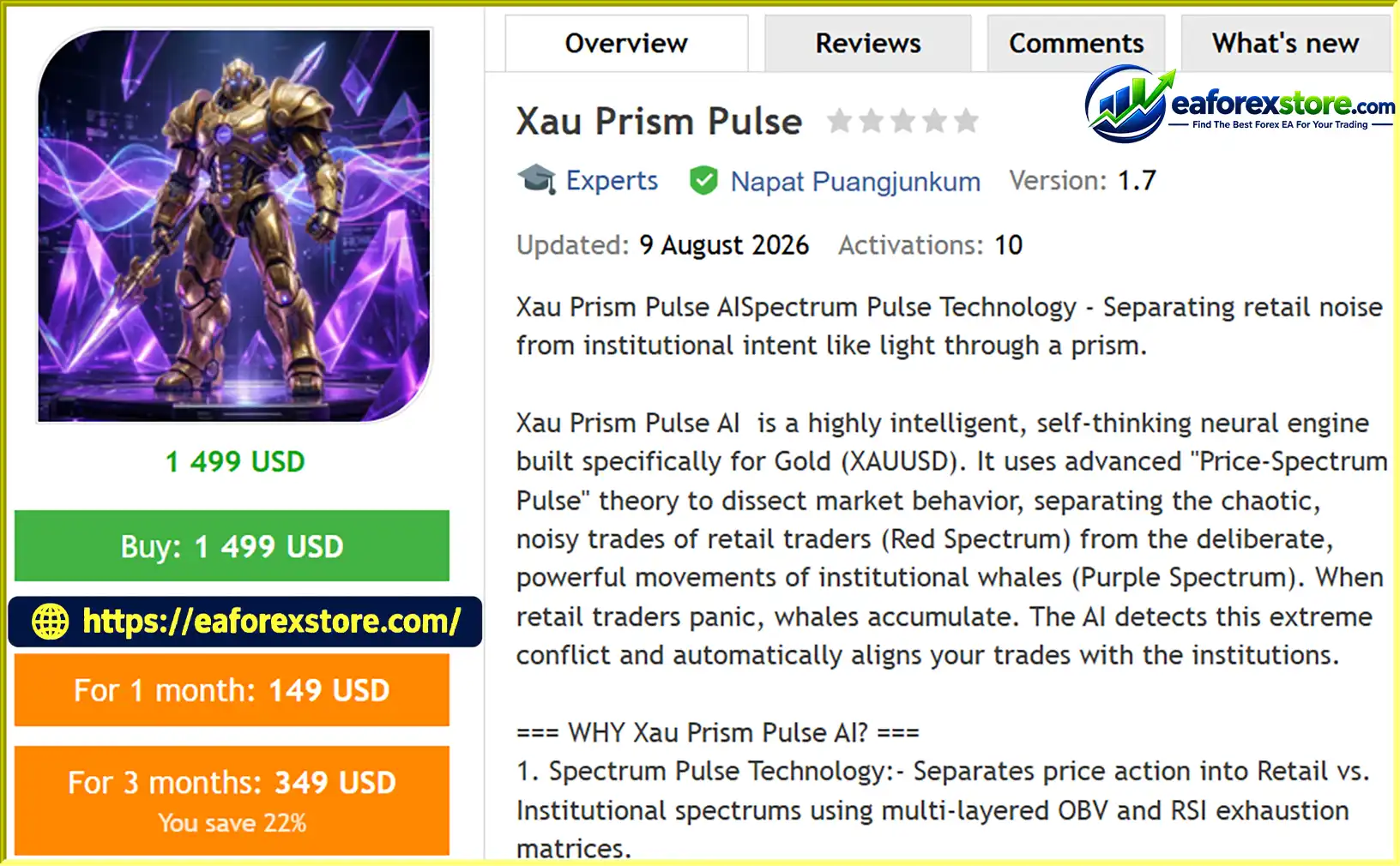
Xau Prism Pulse EA MT5 is an automated Expert Advisor designed specifically for Gold (XAUUSD) trading on the MetaTrader 5 platform. It combines price-action analysis, technical indicators, volume-based calculations, and configurable risk management to identify potential trading opportunities in the gold market.
Built around its proprietary-sounding “Price-Spectrum Pulse” concept, Xau Prism Pulse AI aims to distinguish between retail-driven price movements and potential institutional activity. Its analytical framework combines On-Balance Volume (OBV), Relative Strength Index (RSI), and a moving-average-based trend component to evaluate market momentum, volume behavior, and potential exhaustion signals.
The EA's primary objective is to identify situations where short-term retail trading pressure may conflict with a stronger directional market movement. By analyzing these conditions, the system seeks to identify potential opportunities aligned with the prevailing trend.
One of its main features is the Aegis Shield, a three-stage drawdown protection mechanism designed to reduce trading exposure as account losses increase. Depending on the configured thresholds, the system can reduce lot size, restrict trading to selected setups, and eventually halt new trading activity.
Xau Prism Pulse EA MT5 also includes an on-chart Heads-Up Display (HUD) that presents important account and trading information, including balance, equity, spread, daily drawdown, and the current protection status. Integrated BUY and SELL buttons provide an additional level of manual control, while automatic Stop Loss and Take Profit placement supports more structured trade execution.
Another distinctive feature is Ghost Protocol V3, which is described as providing virtual Stop Loss, Take Profit, and automatic breakeven management. These functions are intended to manage exits internally rather than exposing every exit level directly to the broker. However, virtual protection depends on the EA remaining operational and connected to the trading account.
With four configurable presets ranging from conservative risk settings to aggressive trading and small-account configurations, Xau Prism Pulse EA MT5 offers flexibility for traders with different risk preferences.
Designed for the XAUUSD M15 chart, the EA combines automated trade analysis, account monitoring, manual intervention, and multi-stage drawdown controls in one MT5 trading interface.
About the Developer
- Author: Napat Puangjunkum
- Experience: Over 1 years of experience on MQL5.
- Notable Products: Xau Prism Pulse EA MT5, Titan Trend Architect EA MT5, Chronos Auto Adaptive Matrix EA MT5, Plutus Golden Vault Mech EA MT5 ,XAU Temporal Interference EA MT5, Olympus Harmonic Apex EA MT5, Autobot Genesis EVO EA MT5.and other advisors.
- Flagship Product: Xau Prism Pulse EA MT5 is rated as the best performing product of the year.
>>> Delivery time 24h-48h after payment.
>>> Refund if not delivered.
>>> You will receive the latest version without any limitations (ID+Time).Reviewed by Jason Stap <<<
Key Features of Xau Prism Pulse EA MT5
Price-Spectrum Pulse Technology
Xau Prism Pulse AI uses a proprietary-described Price-Spectrum Pulse framework to analyze potential differences between retail trading pressure and stronger directional market activity.
Its Red Spectrum concept represents retail-side momentum and potential exhaustion, while the Purple Spectrum represents the trend or directional component associated with larger market participants.
The system combines OBV-based volume analysis, RSI readings, and moving-average calculations to evaluate these conditions. Although these indicators can help identify momentum changes and possible trend continuation, they cannot reliably identify institutional orders or confirm the intentions of specific market participants on their own.
Multi-Layer OBV and RSI Analysis
The EA uses two important technical components:
- On-Balance Volume (OBV): Evaluates cumulative volume behavior to identify potential changes in buying and selling pressure.
- Relative Strength Index (RSI): Measures momentum and helps identify potential exhaustion or overextended market conditions.
These calculations are intended to help the EA assess whether current price movement is supported by its underlying momentum and volume characteristics.
Purple Spectrum Trend Detection
The Purple Spectrum component uses a configurable moving-average period, with a default value of 50 for the Whale EMA parameter.
This setting provides a trend reference for evaluating potential trade direction. Combined with the other analytical components, it aims to filter market conditions and identify setups that meet the EA's trading criteria.
Aegis Shield: Three-Stage Drawdown Protection
The Aegis Shield is one of the EA's central risk management features. It uses three drawdown stages to adjust trading behavior when losses reach predefined thresholds.
- Stage 1 – Exposure Reduction: Reduces lot size by 50% when the first drawdown threshold is reached.
- Stage 2 – Selective Trading: Restricts the EA to setups that meet its stricter high-probability criteria.
- Stage 3 – Trading Halt: Stops further trading when the maximum configured drawdown threshold is reached.
The default thresholds are described as 5%, 10%, and 20%, respectively. Traders should verify whether these thresholds are calculated from balance, equity, a daily reference point, or another measure before using the EA with real funds.
The protection system is designed to limit additional exposure during adverse conditions, but it cannot guarantee that drawdown will remain within a specific percentage.
Intelligent HUD and Account Monitoring
Xau Prism Pulse EA MT5 includes an on-chart Heads-Up Display designed to provide an overview of account conditions and EA status.
The HUD displays key information such as:
- Account balance
- Account equity
- Current spread
- Aegis Shield protection stage
- Daily drawdown status
This dashboard helps traders monitor the EA's activity without constantly switching between different MT5 terminal windows.
One-Click BUY and SELL Trading
The EA includes on-chart BUY and SELL buttons for manual trading intervention.
These controls allow traders to initiate trades directly from the chart, with automatic Stop Loss and Take Profit placement according to the applicable EA settings.
The exact behavior of manual orders, including whether all automated filters apply to them, should be verified in the EA documentation before live use.
Ghost Protocol V3: Virtual Trade Protection
Ghost Protocol V3 is described as supporting virtual Stop Loss, virtual Take Profit, and automatic breakeven management.
Instead of necessarily placing every exit level with the broker, the EA monitors the relevant price conditions internally and attempts to close or manage the position when its configured exit criteria are met.
This approach may keep certain exit levels hidden from the broker, but it introduces operational considerations. If the terminal disconnects, the EA stops running, or the market gaps through a virtual exit level, the position may remain exposed longer than intended.
Traders should understand how the feature works and whether any emergency server-side protection is available.
Four Configurable Trading Presets
Xau Prism Pulse EA MT5 provides four presets to accommodate different account sizes and risk preferences.
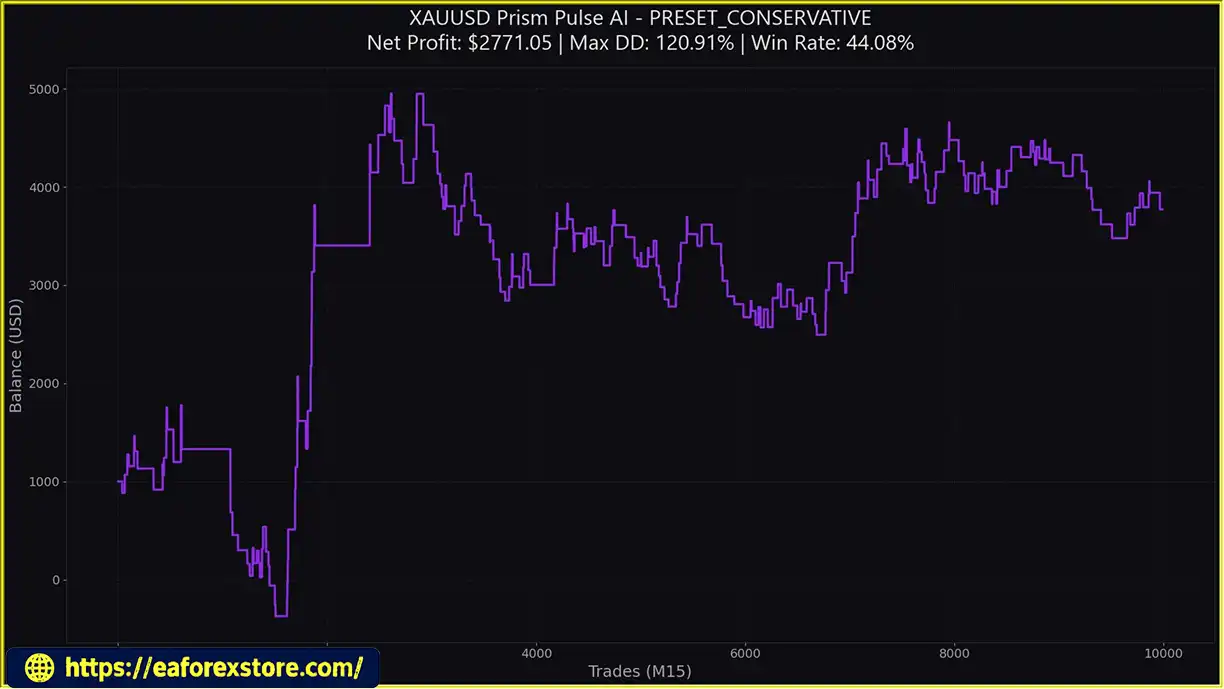
Setup 1: Conservative – The Fortress
- Intended risk: 0.5% per trade
- Focuses on capital preservation
- Uses wider Stop Loss settings to allow more room for price fluctuations
- Intended for traders who prefer lower risk and potentially fewer trading opportunities
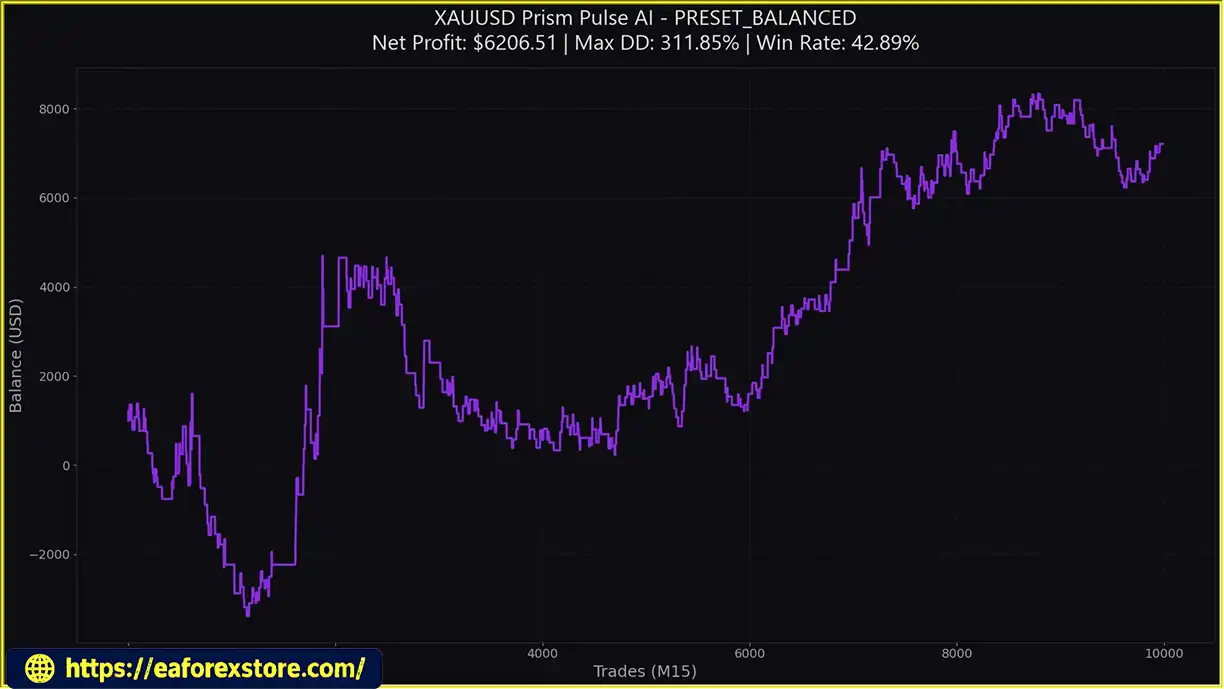
Setup 2: Balanced – The Emperor
- Intended risk: 1.0% per trade
- Designed to balance risk and potential returns
- Recommended by the developer for standard accounts
- Suitable as a starting point for evaluating the system, provided the risk settings are independently verified
Setup 3: Aggressive – The Conqueror
- Intended risk: 2.0% per trade
- Designed for traders who accept greater exposure
- Uses tighter Stop Loss and Take Profit settings for a more aggressive trading approach
- Requires careful monitoring because consecutive losses can increase drawdown quickly
Setup 4: Micro $100 Capital Mode – The Vanguard
- Intended for small accounts, including certain Cent or Micro accounts
- Uses the minimum lot size where supported
- Employs wider Stop Loss and Take Profit settings
- Designed to accommodate smaller account balances, although margin requirements and minimum volume restrictions still apply
These presets represent the developer's stated configurations rather than independently verified performance profiles. Traders should confirm the actual lot-sizing, Stop Loss, Take Profit, and drawdown parameters loaded by each preset.
Custom Risk and Spread Settings
Traders can adjust selected parameters to suit their broker and account conditions.
The custom risk option allows the user to specify a risk percentage, while the maximum spread parameter helps prevent new trades from being opened when spreads exceed the configured limit.
These settings can improve control over trade exposure and execution conditions, but they do not eliminate slippage, requotes, or unexpected volatility.
How Xau Prism Pulse EA MT5 Works
Xau Prism Pulse EA MT5 combines technical analysis, trade filtering, risk-based position sizing, and automated trade management in a structured workflow.
Step 1: Analyze the Gold Market
The EA operates on the XAUUSD M15 chart, evaluating price behavior using its configured technical parameters.
Its analytical framework incorporates a moving average, RSI, and OBV-based calculations to assess trend direction, momentum, and potential changes in buying or selling pressure.
Step 2: Evaluate Retail Momentum and Trend Conditions
The system compares the components of its Price-Spectrum Pulse framework to identify potential differences between short-term momentum and the broader directional trend.
For example, a potential setup may be considered when momentum appears exhausted while the trend component continues to support a particular direction. The precise entry conditions depend on the EA's internal rules.
This process is intended to filter potential opportunities rather than trade every short-term price fluctuation.
Step 3: Apply Trade Filters
Before opening an automated trade, the EA can evaluate its configured entry conditions and maximum spread parameter.
The purpose is to avoid entering when the spread exceeds the permitted threshold or when the required setup conditions are not satisfied.
The effectiveness of these filters depends on the implementation and the quality of the underlying market data.
Step 4: Calculate Risk and Position Size
Once a potential entry meets the EA's conditions, the selected preset determines the applicable risk configuration.
Depending on the selected setup, the EA uses the associated risk percentage and trade parameters to establish position size and protective exit levels.
Conservative, Balanced, Aggressive, and Micro modes provide different starting configurations. Traders should verify how the EA calculates monetary risk, particularly when using virtual Stop Loss settings.
Step 5: Execute and Manage Trades
The EA executes eligible trades and manages them according to its configured Stop Loss, Take Profit, and breakeven rules.
Traders can also use the on-chart BUY and SELL buttons for manual intervention. Ghost Protocol V3 is designed to manage selected exit conditions internally when virtual protection is enabled.
Step 6: Monitor Drawdown with Aegis Shield
As account drawdown increases, the Aegis Shield adjusts the system's trading behavior according to its configured stages.
At the first threshold, exposure is reduced. At the second threshold, the EA applies stricter setup selection. At the third threshold, it halts further trading.
The system's ability to respond correctly depends on its drawdown calculation, execution state, and configuration.
Step 7: Monitor Account Conditions
The HUD displays important information such as balance, equity, spread, and protection status.
This allows traders to check current account conditions and identify when the EA has reduced activity or reached a trading halt threshold.
Regular supervision remains important, particularly when the EA uses virtual exits or automated drawdown controls.
Why Choose Xau Prism Pulse EA MT5?
Designed Specifically for Gold
Gold has distinctive volatility patterns and can experience rapid price changes during economic announcements, changes in interest-rate expectations, and geopolitical events.
Xau Prism Pulse EA MT5 is built specifically for XAUUSD, allowing its settings and trading logic to focus on the characteristics of this market rather than attempting to trade multiple unrelated instruments.
Combines Multiple Technical Components
The combination of moving-average trend analysis, RSI momentum readings, and OBV calculations provides a multi-component approach to evaluating potential trade opportunities.
Rather than relying exclusively on one indicator, the system attempts to evaluate trend and momentum conditions together.
Provides Multi-Stage Drawdown Controls
The Aegis Shield offers a structured response to adverse account conditions. Its staged approach is intended to reduce exposure, restrict entries, and eventually stop trading as drawdown increases.
This provides more configurable risk controls than a system that continues trading without changing its behavior during losses.
Offers Different Risk Presets
Four presets allow traders to begin with configurations designed for different risk preferences and account sizes.
The Conservative and Balanced options provide lower nominal risk allocations than the Aggressive preset, while the Micro mode is designed for smaller accounts.
Choosing a preset should still involve checking actual lot sizes, margin requirements, Stop Loss distances, and potential loss under realistic execution conditions.
Includes Manual and Automated Trading Controls
The on-chart BUY and SELL buttons provide direct access to manual order entry, while the EA's automated functions handle its programmed trading conditions.
This combination can be useful for traders who want automated analysis but prefer to retain some control over order initiation.
Makes Account Conditions Easier to Monitor
The integrated HUD presents key account metrics and protection status on the chart.
Having balance, equity, spread, and daily drawdown information readily available can help traders monitor account exposure and understand the EA's current operating state.
Supports Customization
Parameters such as the Whale EMA period, Retail RSI period, OBV volume multiplier, risk percentage, maximum spread, and drawdown thresholds allow traders to adjust selected aspects of the system.
Customization can help align the EA with different broker conditions, but extensive optimization against historical data can also increase the risk of overfitting.
Xau Prism Pulse EA MT5 Reviews
- Xau Prism Pulse EA MT5 combines moving-average trend detection, RSI momentum analysis, and OBV-based volume calculations to identify potential XAUUSD trading opportunities. Its Price-Spectrum Pulse framework aims to filter short-term market noise and evaluate entries in the context of the prevailing trend.
- The EA features the Aegis Shield system, which is designed to reduce position size, apply stricter trade filters, and halt new trading activity as predefined drawdown thresholds are reached. Combined with configurable risk presets, this approach provides traders with additional tools to manage exposure during unfavorable market conditions.
- Xau Prism Pulse EA MT5 offers four trading presets, an integrated account-monitoring HUD, and convenient BUY and SELL buttons for manual intervention. Its Ghost Protocol V3 feature supports virtual Stop Loss, Take Profit, and automatic breakeven management, providing additional trade-management flexibility while requiring reliable terminal operation.
Risk Management & Alerts
Risk management is a major component of Xau Prism Pulse EA MT5. Its preset configurations, drawdown protection stages, spread filter, and virtual exit functionality are intended to help traders manage exposure in a structured way.
However, no automated protection system can eliminate market risk or guarantee a maximum loss under all conditions.
Aegis Shield Drawdown Protection
The default Aegis Shield thresholds are described as follows:
- DD1: 5% – Reduces lot size by 50%.
- DD2: 10% – Restricts trading to selected high-probability setups.
- DD3: 20% – Halts trading.
These thresholds should be confirmed in the EA's input settings. Traders should also determine whether drawdown is measured from the start-of-day balance, account equity peak, initial deposit, or another reference value.
A trading halt may prevent new entries without automatically closing existing positions. Confirm the EA's exact behavior at DD3 and maintain separate safeguards where appropriate.
Risk Percentage and Preset Selection
The stated risk allocations are:
- Conservative: 0.5% per trade
- Balanced: 1.0% per trade
- Aggressive: 2.0% per trade
- Micro mode: Uses minimum lot sizing where supported; actual risk depends on the configured parameters
Higher risk percentages can increase both potential returns and potential losses. Traders should consider starting with a lower-risk configuration and testing the system before increasing exposure.
Maximum Spread Filter
The InpMaxSpread parameter has a stated default value of 40.
The interpretation of this value depends on the EA's implementation and the broker's symbol pricing conventions. Verify whether it is expressed in points or another unit and check how it behaves with your broker's XAUUSD symbol.
A spread filter can prevent some unfavorable entries, but it does not protect against all execution costs.
Virtual Stop Loss and Take Profit
Ghost Protocol V3 is designed to manage selected exits internally.
Virtual Stop Loss and Take Profit levels are not necessarily held by the broker as server-side orders. If the terminal shuts down, internet connectivity fails, or the EA stops executing, virtual exit management may become unavailable.
For this reason, traders should establish what protection remains active during disconnections and consider whether server-side emergency stops are necessary for their risk tolerance.
Breakeven Management
The automatic breakeven feature is designed to move trade protection toward the entry price once the relevant conditions are met.
Although breakeven management may help protect an unrealized gain, execution costs and slippage can still result in a small net loss. The exact activation and exit behavior should be verified in testing.
Manual Trading Risks
The BUY and SELL buttons provide convenient chart-based order entry, but manual trades can still lose money.
Before using these controls, confirm whether manual orders are subject to the EA's normal filters, position-sizing rules, and Aegis Shield restrictions.
Alerts and Account Monitoring
The supplied specifications describe a HUD for real-time account information and protection status but do not confirm support for push notifications, email alerts, or other external notification channels.
Traders should check the EA documentation for available alert options and monitor the MT5 Experts and Journal tabs for execution errors or connectivity problems.
Recommended risk management practices:
- Test the EA on a demo account before live deployment.
- Start with the Conservative preset or a lower custom risk level where appropriate.
- Verify how all drawdown stages are calculated and enforced.
- Confirm the behavior of the trading halt at DD3.
- Test virtual exit management during terminal disconnections.
- Check spread units, symbol specifications, and broker execution conditions.
- Avoid increasing risk simply because previous trades were profitable.
- Review backtest and forward-test results across different volatility environments.
- Never assume that the Aegis Shield guarantees a specific maximum account loss.
Pros and Cons of Xau Prism Pulse EA MT5
Pros
- Gold-focused automation: Designed specifically for XAUUSD trading on MT5.
- Multi-indicator analysis: Combines moving-average, RSI, and OBV-based components.
- Three-stage drawdown protection: Adjusts exposure and trading activity as configured loss thresholds are reached.
- Four preset configurations: Offers conservative, balanced, aggressive, and micro-account options.
- Integrated account HUD: Displays balance, equity, spread, daily drawdown, and protection status.
- One-click manual trading: Provides on-chart BUY and SELL controls.
- Virtual trade management: Offers virtual Stop Loss, Take Profit, and automatic breakeven functionality.
- Configurable risk parameters: Supports adjustments to risk percentage, indicator periods, spread limits, and drawdown thresholds.
- Spread filtering: Can prevent entries when the configured maximum spread is exceeded.
- Small-account configuration: Includes a preset designed for $100 accounts, subject to broker and margin requirements.
Cons
- No guaranteed institutional-flow detection: OBV, RSI, and moving averages cannot independently confirm institutional orders or distinguish all retail activity from institutional activity.
- Gold volatility risk: XAUUSD can experience rapid price movements and unexpected slippage.
- Virtual exit dependency: Hidden Stop Loss and Take Profit management may fail to operate as intended if the terminal or EA becomes unavailable.
- Aggressive preset exposure: The stated 2% risk per trade can produce substantial drawdown during consecutive losses.
- Drawdown threshold uncertainty: The precise calculation and enforcement of the Aegis Shield stages must be verified.
- Manual intervention risk: User-initiated orders may behave differently from automated entries.
- Broker-specific conditions: Spreads, contract sizes, minimum lot restrictions, and execution policies can affect performance.
- Potential over-optimization: Excessive parameter tuning may improve historical results without improving future performance.
- No verified performance figures supplied: The described features do not establish actual profitability, win rate, or expected drawdown.
How to Install Xau Prism Pulse EA MT5
Follow these steps to install and configure Xau Prism Pulse EA MT5 on MetaTrader 5.
Step 1: Obtain the EA File
Obtain the official EA package and any accompanying documentation or preset files from the developer.
Verify that the files are intended for MetaTrader 5 and review the installation requirements before copying them into your platform.
Step 2: Open MetaTrader 5
Launch MT5 and log in to your broker account. Ensure that the platform is connected and that the Gold trading symbol is available.
Depending on the broker, the symbol may appear as XAUUSD, GOLD, or another variation.
Step 3: Install the EA
- Open MetaTrader 5.
- Select File → Open Data Folder.
- Navigate to MQL5 → Experts.
- Copy the supplied EA file into the Experts directory.
- Return to MT5 and refresh the Navigator panel or restart the platform if necessary.
If the developer supplies a compiled .ex5 file, install it as provided. If additional indicators or libraries are included, follow the official installation instructions.
Step 4: Open the XAUUSD M15 Chart
Open the Gold chart and select the M15 timeframe.
The EA is designed to operate on this timeframe, so verify that the chart uses the correct symbol and that sufficient historical price data is available.
Step 5: Attach the EA to the Chart
Locate Xau Prism Pulse EA MT5 in the Navigator panel and drag it onto the XAUUSD M15 chart.
Review the EA properties and enable algorithmic trading in the terminal. Ensure that any required permissions are enabled only when they are genuinely needed and trusted.
The supplied instructions mention enabling Allow WebRequest if required. WebRequest access should only be configured if the EA actually needs to communicate with a documented external service. If required, authorize only the appropriate trusted URL.
Step 6: Select a Preset
Open the EA's Inputs tab and select the preferred InpPreset option.
Choose from the following configurations:
- Setup 1 – Conservative: Intended risk of 0.5% per trade.
- Setup 2 – Balanced: Intended risk of 1.0% per trade.
- Setup 3 – Aggressive: Intended risk of 2.0% per trade.
- Setup 4 – Micro $100 Capital Mode: Designed for smaller accounts using minimum lot sizing where supported.
After selecting a preset, inspect the loaded values to confirm the actual risk, Stop Loss, Take Profit, and drawdown thresholds.
Step 7: Review the Main Parameters
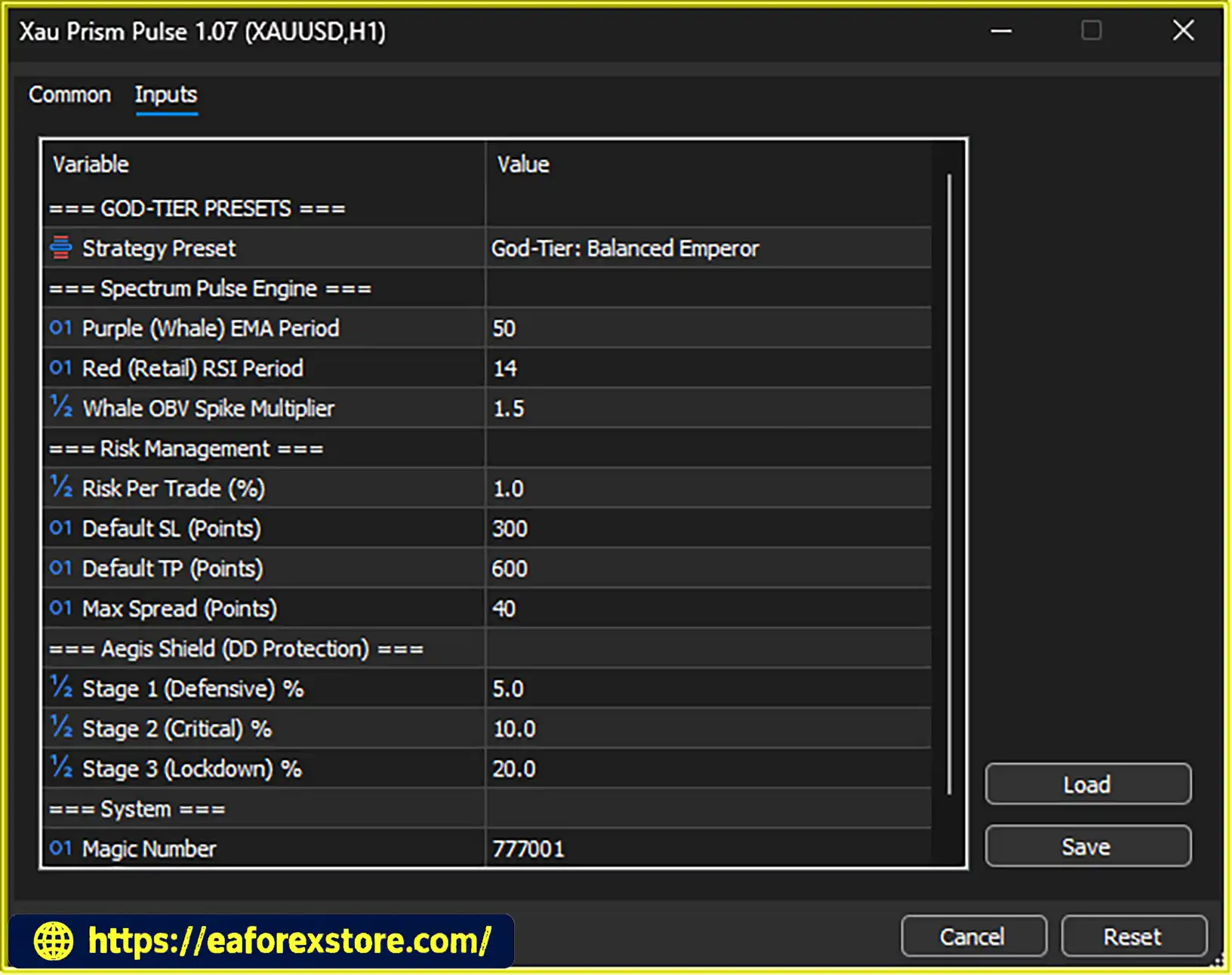
The main parameters described for Xau Prism Pulse EA MT5 include:
- InpPreset: Selects the trading preset.
- InpPurplePeriod: Sets the Whale EMA period; default 50.
- InpRedPeriod: Sets the Retail RSI period; default 14.
- InpWhaleVolumeMult: Sets the OBV spike multiplier; default 1.5.
- InpRiskPercent: Sets the risk percentage when using custom risk; default 1.0.
- InpMaxSpread: Sets the maximum permitted spread; default 40.
- InpDD1: Sets the first Aegis Shield drawdown threshold; default 5%.
- InpDD2: Sets the second Aegis Shield drawdown threshold; default 10%.
- InpDD3: Sets the third Aegis Shield drawdown threshold; default 20%.
The exact effect of each parameter depends on the EA's implementation. Avoid changing multiple settings simultaneously before establishing a reliable baseline.
Step 8: Verify the HUD and Trading Permissions
Confirm that the on-chart HUD displays the expected account information and Aegis Shield status.
Check that algorithmic trading is enabled and review the Experts and Journal tabs for initialization messages or errors.
Before allowing automated entries, confirm the current spread, account balance, equity, and selected risk configuration.
Step 9: Backtest and Forward-Test
Use the MT5 Strategy Tester to evaluate the EA with historical XAUUSD data.
Where available, use real tick data and realistic spread, commission, and execution assumptions. Examine profitability alongside maximum drawdown, consecutive losses, average trade duration, and sensitivity to the selected parameters.
Follow this with demo forward testing to verify that entries, virtual exits, breakeven management, and drawdown protection behave as expected in live market conditions.
Step 10: Begin Live Trading Carefully
Only consider live deployment after testing the EA and confirming that its risk settings are suitable for your account.
Start with conservative exposure, monitor the EA regularly, and avoid relying exclusively on the HUD or automated protections as substitutes for independent risk management.
What’s Included in the Download Package?
- Experts: Xau Prism Pulse EA MT5.ex5
>>> Join VIP Membership Now <<<
Final Thoughts
Xau Prism Pulse EA MT5 combines automated Gold trading, multi-indicator analysis, configurable risk presets, and three-stage drawdown protection in a single MetaTrader 5 solution.
Its main appeal lies in the combination of trend and momentum analysis with the Aegis Shield risk framework. The ability to reduce lot size, restrict trading activity, and halt new entries as drawdown increases offers a structured approach to managing adverse trading conditions.
The four presets provide flexibility for traders who prefer different risk levels, while the on-chart HUD and manual BUY and SELL controls offer convenient monitoring and intervention. Ghost Protocol V3 adds another layer of trade management through virtual exits and automatic breakeven functionality, although these features require particular attention to terminal availability and execution reliability.
However, the EA's proprietary Price-Spectrum Pulse terminology should not be interpreted as proof that it can identify institutional orders or predict market direction reliably. OBV, RSI, and moving averages are analytical tools, not direct measurements of institutional intent. Likewise, drawdown protection can reduce exposure without guaranteeing that losses remain within predefined limits.
For traders evaluating an automated XAUUSD strategy, Xau Prism Pulse EA MT5 may be worth testing for its configurable trading approach and integrated risk controls. The most appropriate preset will depend on account size, broker conditions, execution costs, and individual risk tolerance.
Ultimately, successful automated trading requires realistic testing, disciplined position sizing, reliable execution, and ongoing supervision. Treat the EA's advertised features as capabilities to verify rather than guarantees of performance, and assess its results independently before committing real capital.