
Product Overview
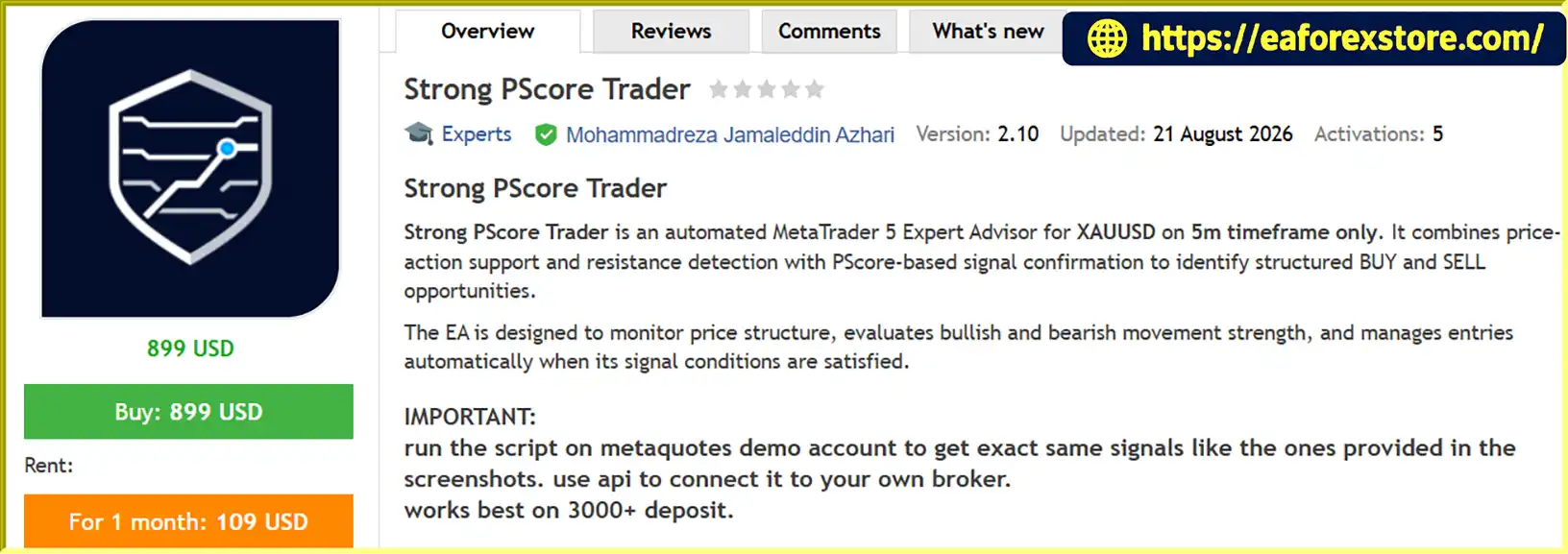
Strong PScore Trader EA MT5 is an automated trading system developed for the MetaTrader 5 (MT5) platform, designed exclusively for trading XAUUSD (Gold) on the M5 (5-minute) timeframe. This Expert Advisor (EA) combines price action analysis, automated support and resistance detection, and PScore-based signal confirmation to identify potential BUY and SELL trading opportunities.
The EA evaluates bullish and bearish price movements to determine which side demonstrates stronger market momentum. When the required PScore difference is reached and the entry conditions are satisfied, the system can automatically calculate position size, execute trades, and manage risk according to its configured parameters.
Unlike trading systems that rely on grid strategies, martingale position scaling, or arbitrage, Strong PScore Trader EA MT5 uses a structured signal-based approach to trading. Its primary objective is to identify potential opportunities in the gold market while applying predefined risk and trade-management rules.
For users seeking an automated gold trading solution with a straightforward configuration, Strong PScore Trader EA MT5 offers a combination of market structure analysis, signal filtering, and automated execution.
Important: The developer recommends testing the EA on a MetaQuotes demo account to compare its signals with the provided screenshots. Connecting the EA to another broker may require an API integration or other compatible connection method, depending on the EA's implementation. The stated recommendation for a deposit of $3,000 or more should not be interpreted as a guarantee of safety or profitability.
About the Developer
- Author: Mohammadreza Jamaleddin Azhari
- Experience: Over 1 years of experience on MQL5.
- Notable Products: Strong PScore Trader EA MT5 and other advisors.
- Flagship Product: Strong PScore Trader EA MT5 is rated as the best performing product of the year.
> Delivery time 24h-48h after payment.
>>> Refund if not delivered.
>>> You will receive the latest version without any limitations (ID+Time).Reviewed by Jason Stap <<<
Key Features of Strong PScore Trader EA MT5
Strong PScore Trader EA MT5 includes several features designed to simplify automated gold trading on MetaTrader 5.
Exclusive XAUUSD Trading
The EA is specifically designed for the XAUUSD currency symbol, commonly known as gold. Gold can experience substantial price movements and changing volatility, making broker execution quality, spreads, and risk settings important considerations.
M5 Timeframe Optimization
The system is intended to operate on the 5-minute chart. This timeframe allows the EA to evaluate short-term price movements and identify potential trading opportunities using its internal signal logic.
Users should avoid assuming that the same settings will perform equally well on other timeframes without additional testing.
Automated Support and Resistance Detection
The EA identifies support and resistance levels using price action patterns. These levels can help the system evaluate potential turning points, market reactions, and areas where buying or selling pressure may emerge.
Automating this process reduces the need to identify every potential level manually.
PScore-Based BUY and SELL Signals
The EA evaluates bullish and bearish price swings using its internal PScore logic. It compares the relative strength of these movements and looks for a sufficient difference before considering a trade.
This filtering mechanism is intended to help distinguish stronger directional signals from less convincing market conditions.
Automatic Lot-Size Calculation
Strong PScore Trader EA MT5 can calculate position size using the selected risk percentage. This feature helps users align trade volume with their chosen risk settings.
However, the actual monetary loss may differ from the planned amount because of slippage, gaps, execution delays, and other market conditions.
Built-In Stop-Loss and Trade Management
The EA incorporates stop-loss, risk/reward, and trade-management logic. These functions are designed to define trade risk and manage positions according to the system's rules.
Users should verify the stop-loss behavior and all relevant parameters in the Strategy Tester before using real funds.
One Active Position at a Time
The EA is designed to maintain one active position at a time on the trading symbol. This can help limit simultaneous exposure from multiple positions generated by the same EA.
It does not eliminate the possibility of substantial losses, especially when trading volatile gold markets.
No Martingale, Grid, or Arbitrage
According to the supplied product description, Strong PScore Trader EA MT5 does not use martingale, grid trading, or arbitrage strategies.
Avoiding these approaches removes certain risks associated with progressively increasing position sizes or accumulating multiple grid positions. Nevertheless, the EA remains exposed to normal market risk and strategy-related losses.
Adjustable Trading Parameters
The EA provides two key configurable inputs:
- Risk Percent per Trade: Default value of 8.0%.
- PScore Gap: Default value of 3.
The Risk Percent parameter controls the percentage used for position-sizing calculations. PScore Gap defines the minimum difference between bullish and bearish PScore values required to generate a trading signal.
A higher PScore Gap generally makes the system more selective and may reduce the number of trades.
How Does Strong PScore Trader EA MT5 Work?
Strong PScore Trader EA MT5 follows a structured process to evaluate market conditions and execute trades automatically.
Step 1: Detect Support and Resistance
The EA analyzes price action to identify potential support and resistance levels. These levels provide a framework for evaluating market structure and possible trading opportunities.
Step 2: Evaluate Bullish and Bearish Price Swings
The system examines bullish and bearish price movements and assigns internal PScore values to assess their relative strength.
This process helps the EA determine whether buying or selling pressure is sufficiently dominant to justify further evaluation.
Step 3: Confirm the PScore Difference
The EA compares the bullish and bearish PScore values against the configured PScore Gap.
When the required difference is reached, the system proceeds to evaluate additional entry conditions. Increasing the threshold may filter out some signals, although it does not guarantee better trading results.
Step 4: Check Entry and Risk Conditions
Before entering a position, the EA evaluates whether its trading and risk-management conditions are satisfied.
These conditions determine whether a potential signal qualifies for automated execution.
Step 5: Calculate Position Size
When the entry conditions are valid, the EA calculates the lot size based on the configured risk percentage and its position-sizing logic.
Users should confirm that the calculation reflects their account currency, broker's contract specifications, and intended maximum loss.
Step 6: Execute and Manage the Trade
The EA executes the trade when all required conditions are met and manages the position using its built-in stop-loss, risk/reward, and trade-management rules.
The process repeats as new market conditions develop, subject to the EA's operating rules and its one-active-position design.
Why Choose Strong PScore Trader EA MT5?
Choosing an automated trading system requires more than evaluating its advertised features. Traders should consider its strategy, configuration requirements, risk controls, and compatibility with their broker.
Strong PScore Trader EA MT5 may be worth evaluating for the following reasons.
A Structured Approach to Gold Trading
The combination of support and resistance detection with PScore-based signal confirmation gives the EA a defined framework for evaluating potential gold trades.
Rather than requiring the user to manually assess every short-term price movement, the system automates its specified decision-making process.
Automated Trade Execution
Once configured correctly, the EA can monitor market conditions and execute qualifying trades without requiring manual confirmation for every entry.
This can reduce the time spent monitoring charts, although the system still requires regular supervision.
Straightforward Configuration
The two highlighted inputs, Risk Percent per Trade and PScore Gap, allow users to adjust position-sizing risk and signal selectivity without needing to change the underlying strategy code.
Traders should understand each parameter before making adjustments.
No Martingale or Grid Strategy
The stated absence of martingale and grid methods may appeal to traders who prefer a system that does not depend on progressively increasing exposure or accumulating grid positions.
This design characteristic does not make the EA inherently safe, and its actual risk profile must still be evaluated.
Designed for a Specific Market and Timeframe
The EA's exclusive focus on XAUUSD and the M5 timeframe provides a clearly defined operating environment. This specialization may simplify testing and parameter evaluation.
However, gold's volatility, spread fluctuations, and changing market conditions can affect results significantly.
Suitable for Structured Demo Testing
The EA can be evaluated using the MT5 Strategy Tester and a demo account before any live deployment. This gives users an opportunity to assess trade frequency, drawdown, execution behavior, and compatibility with their trading environment.
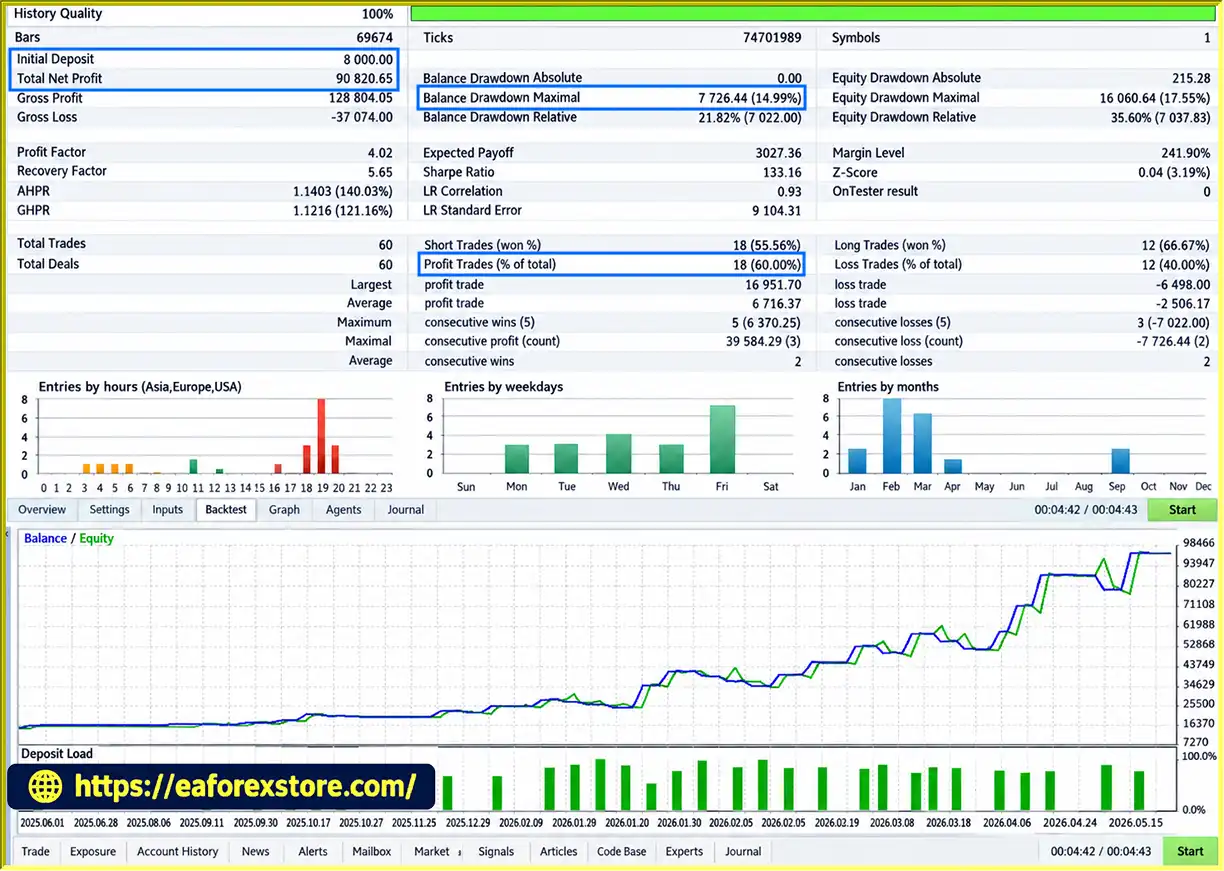
Strong PScore Trader EA MT5 Backtest Results
- Initial Deposit: $8.000
- Total Net Profit: $90.820,65
- Win Rate (% of total): 60.00%
- Maximum Drawdown: 14.99%
Performance and Risk Management
Performance and risk management are essential considerations when evaluating Strong PScore Trader EA MT5.
Although the system includes automated position sizing and trade-management features, its actual results depend on market conditions, broker execution, account settings, and the effectiveness of its strategy.
Risk Percent per Trade
The default Risk Percent per Trade setting is 8.0%.
This is an aggressive risk setting if it represents the percentage of account equity or balance exposed to loss on each trade. Even a short sequence of losing trades could cause substantial drawdown.
For example, assuming each trade loses exactly 8% of the remaining account equity, with no slippage, fees, or other costs:
| Consecutive losses | Approximate equity remaining |
|---|---|
| 1 | 92.00% |
| 3 | 77.87% |
| 5 | 65.91% |
| 10 | 43.44% |
These figures illustrate the effect of compounding losses. They are hypothetical calculations, not a performance forecast. Actual results may be worse if execution losses exceed the planned risk.
Risk management recommendation: Consider testing a substantially lower risk percentage, such as 0.5%–1% per trade, if the EA supports it and its lot-sizing behavior has been verified. This is an illustrative starting range for evaluation, not a guarantee of safety or a personalized financial recommendation.
PScore Gap Optimization
The default PScore Gap is 3. This parameter controls the minimum difference between bullish and bearish PScore values needed to generate a signal.
- Lower PScore Gap: May allow more signals but could admit weaker setups.
- Higher PScore Gap: May reduce trading frequency and make the EA more selective.
Neither setting guarantees improved profitability. Test multiple values across different market periods and compare the resulting drawdown, trade frequency, and risk-adjusted performance.
Stop-Loss and Risk/Reward Management
The EA includes stop-loss and risk/reward logic. Before live deployment, users should verify how the stop-loss is calculated, whether it is placed on the broker's server, and how the system handles rejected orders or changing spreads.
A stop-loss can help control planned trade risk but cannot guarantee the exact exit price under all market conditions.
Broker and Execution Conditions
Gold trading conditions vary between brokers. Relevant factors include:
- Spread and commission costs.
- Slippage and execution speed.
- Minimum lot size and lot-step requirements.
- Contract specifications and margin requirements.
- Server availability and trading-session conditions.
The developer recommends using a MetaQuotes demo account to compare the EA's signals with the supplied screenshots. If a different broker requires an API connection, confirm that the integration is officially supported and secure before proceeding.
Recommended Testing Procedure
Before trading live, evaluate the EA using:
- Historical backtesting with realistic spread and commission assumptions.
- Out-of-sample testing on data not used to optimize the settings.
- Forward testing on a demo account.
- Maximum drawdown and consecutive-loss analysis.
- Checks for correct lot sizing, stop-loss placement, and order execution.
- Stress testing under different volatility and spread conditions.
A profitable backtest does not establish that an EA will remain profitable in live markets. Independent testing and ongoing monitoring are essential.
Weaknesses and Risk Warnings
Despite its automation features, Strong PScore Trader EA MT5 has several limitations that prospective users should understand.
Exclusive XAUUSD Compatibility
The EA is described as being designed exclusively for gold. It may not be suitable for other currency pairs, indices, or commodities.
Its performance should not be assumed to transfer to other instruments without specific testing.
M5 Timeframe Dependency
The EA is intended for the 5-minute timeframe. Short-term price movements can be noisy, and changes in spreads or volatility may have a significant effect on trade outcomes.
Using another timeframe may produce different signals or behavior and should not be attempted without verification.
Aggressive Default Risk Setting
The default risk parameter of 8.0% deserves particular attention. If it represents the intended account risk per trade, it can expose the account to substantial losses during unfavorable market conditions.
Users should verify the exact calculation and avoid assuming that automatic lot sizing guarantees capital protection.
Dependence on Broker Conditions
Differences in gold pricing, spreads, commissions, execution quality, and contract specifications can cause results to differ from those shown in screenshots or backtests.
Signal matching on a MetaQuotes demo account does not guarantee identical execution or profitability with another broker.
No Guaranteed Profitability
No automated trading system can guarantee profits. Price-action analysis and PScore-based signal confirmation may fail during unexpected news events, sharp reversals, ranging conditions, or sudden changes in volatility.
Users should be prepared for losing trades and periods of drawdown.
Limited Evidence of Verified Performance
The supplied product information does not include independently verified live-account results, a complete audited trading history, or sufficient statistical evidence to establish long-term profitability.
Claims about performance should therefore be evaluated cautiously. Review verifiable results before committing capital.
Installation and Connectivity Risks
The EA requires correct MT5 configuration and may require additional integration to reproduce signals on another broker. Unverified third-party API connections can introduce security, compatibility, or execution risks.
Only use documented, trusted integrations and never share account passwords or sensitive authentication credentials with unverified providers.
Capital Loss Warning
Trading gold with leverage involves substantial financial risk. Users should trade only with capital they can afford to lose and should not rely on the EA as a source of guaranteed income.
Pros and Cons of Strong PScore Trader EA MT5
Pros
- Automates BUY and SELL trading decisions on XAUUSD.
- Uses price-action support and resistance detection.
- Applies PScore-based signal confirmation.
- Calculates lot size using a configurable risk percentage.
- Includes stop-loss and trade-management logic.
- Supports a defined one-active-position approach.
- Does not use martingale, grid, or arbitrage strategies according to the supplied description.
- Offers adjustable PScore Gap settings.
- Can be evaluated with the MT5 Strategy Tester and a demo account.
Cons
- Designed exclusively for XAUUSD.
- Intended for the M5 timeframe rather than general multi-timeframe trading.
- The default 8.0% risk setting may be excessively aggressive.
- Results may vary between brokers because of execution and trading conditions.
- Higher PScore thresholds may reduce the number of trading opportunities.
- Requires monitoring, testing, and periodic evaluation.
- No independently verified profitability data was provided.
- Does not eliminate market risk, slippage, drawdown, or the possibility of losing capital.
Overall assessment: Strong PScore Trader EA MT5 offers a defined approach to automated gold trading, but its suitability depends on verified strategy behavior, conservative risk configuration, and realistic testing. Its feature list alone is not sufficient evidence of a profitable trading edge.
How to Install Strong PScore Trader EA MT5
Follow these steps to install and configure Strong PScore Trader EA MT5 on MetaTrader 5.
Step 1: Download the EA
Obtain the Strong PScore Trader EA MT5 files from the official developer or a trusted source.
Ensure that the files are compatible with your version of MetaTrader 5 and scan downloaded files when appropriate.
Step 2: Open MetaTrader 5
Launch MetaTrader 5 and log in to your trading account. For initial setup, use a demo account rather than a live account.
Step 3: Install the EA
If the EA is supplied as an .ex5 file:
- Open MetaTrader 5.
- Select File → Open Data Folder.
- Navigate to
MQL5 → Experts. - Copy the EA file into the Experts folder.
- Return to MT5 and refresh the Navigator window or restart the platform.
If the developer provides a different installation package, follow the accompanying instructions.
Step 4: Open the XAUUSD Chart
Open the Market Watch window and select the gold symbol supported by your broker.
Some brokers use alternative symbol names, such as XAUUSD.a or GOLD. Confirm that the EA supports your broker's symbol naming and contract specifications before attaching it.
Set the chart timeframe to M5 (5 minutes).
Step 5: Attach the EA to the Chart
Open the Navigator panel, locate Strong PScore Trader EA MT5 under Expert Advisors, and drag it onto the XAUUSD M5 chart.
Review the EA's settings and enable the required algorithmic trading permissions.
Step 6: Configure the Trading Parameters
Set the available inputs according to your testing plan.
- Risk Percent per Trade: Default 8.0%. Consider evaluating a substantially lower setting before live use.
- PScore Gap: Default 3. The developer identifies this as a tested setting, but it should still be independently validated.
Do not assume that the developer's default settings are appropriate for your account size or risk tolerance.
Step 7: Enable Algo Trading
Enable the Algo Trading button in MT5 and verify that automated trading is permitted in the EA's properties and platform settings.
Check the Experts and Journal tabs for errors, rejected orders, or configuration warnings.
Step 8: Test the EA
Run a backtest using the MT5 Strategy Tester, then conduct forward testing on a demo account.
Monitor the EA's entries, exits, lot-size calculations, spread sensitivity, and drawdown. If matching the developer's screenshots is important, first follow the recommended MetaQuotes demo-account setup and verify the symbol and testing conditions.
Step 9: Verify Broker Compatibility
If you intend to use a different broker, confirm whether the EA supports that broker directly or requires an API integration.
Do not connect an account through an undocumented integration or provide sensitive credentials to an unverified service.
Step 10: Consider Live Trading Only After Testing
Proceed to a live account only after you understand the strategy's behavior and have evaluated its risk under realistic conditions.
Start with an appropriately small exposure, monitor execution closely, and never treat previous backtest results as a guarantee of future returns.
What’s Included in the Download Package?
- Experts: Strong PScore Trader.ex5
>>> Join VIP Membership Now <<<
Final Thoughts
Strong PScore Trader EA MT5 is an automated Expert Advisor designed for traders who want to apply a structured, price-action-based approach to XAUUSD trading on the M5 timeframe. Its combination of support and resistance detection, PScore signal confirmation, automatic lot sizing, and built-in trade management provides a defined framework for evaluating short-term gold market opportunities.
The EA's stated avoidance of martingale, grid, and arbitrage strategies may appeal to traders who prefer a signal-based trading system. However, these characteristics do not remove the risks associated with gold volatility, leverage, execution costs, or changing market conditions.
The most important consideration is risk management. The default Risk Percent per Trade setting of 8.0% may be aggressive, so users should verify its behavior and test lower values where supported. The recommended MetaQuotes demo account can also help users compare signals with the supplied screenshots before considering another broker or a live account.
Ultimately, Strong PScore Trader EA MT5 should be evaluated through independent backtesting, out-of-sample analysis, and forward testing rather than promotional claims alone. Traders who understand its limitations, configure risk carefully, and monitor its performance may find it useful as a tool for systematic gold trading.
Final verdict: Strong PScore Trader EA MT5 is a specialized automated trading solution worth investigating for XAUUSD M5 trading, provided that users prioritize capital preservation, verify broker compatibility, and establish credible performance evidence before risking real money.