
Product Overview
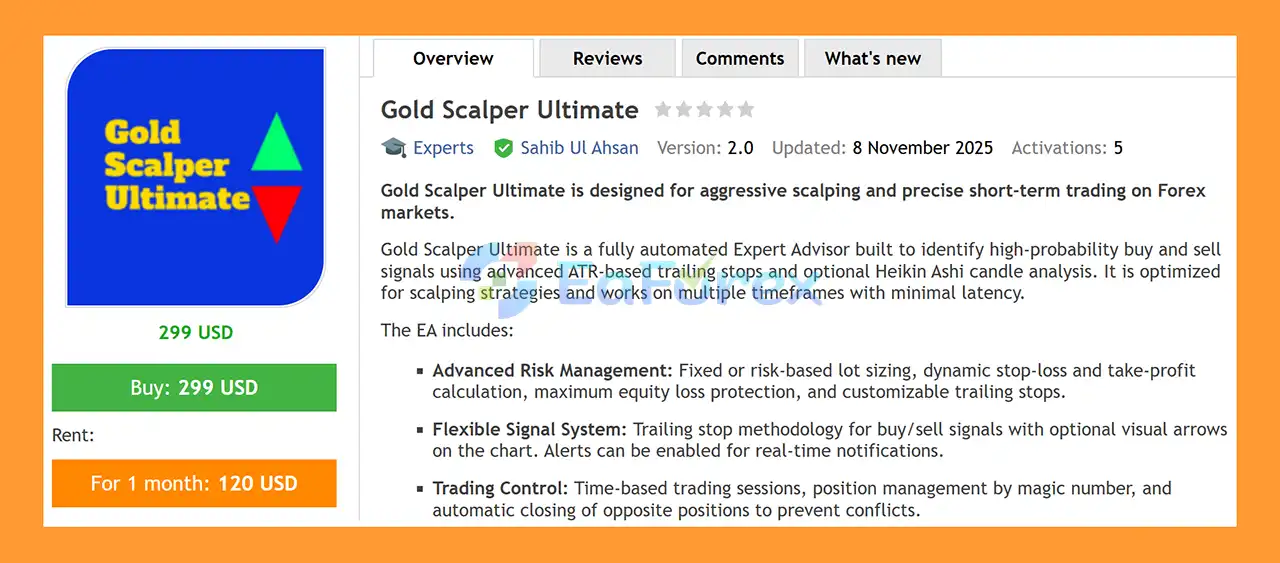
Gold Scalper Ultimate EA MT5 is an automated Expert Advisor for MetaTrader 5 designed for short-term trading and scalping strategies across the Forex market. The EA uses ATR-based trade management, configurable risk controls, and optional Heikin Ashi confirmation to analyze market conditions and manage trades automatically.
The system is designed for fast-moving market environments where volatility can change quickly. By using Average True Range (ATR) calculations, the EA can adapt important trade-management parameters to the current level of market volatility.
Gold Scalper Ultimate also provides flexible configuration options, allowing traders to adjust risk, entry sensitivity, Stop Loss, Take Profit, trailing stops, trading sessions, and visualization settings according to their preferred trading approach.
The EA includes additional broker-condition checks before executing orders, helping ensure that trade parameters comply with minimum stop levels, available margin, volume restrictions, and other execution requirements.
About the Developer
- Author: Sahib Ul Ahsan
- Experience: Over +1 years of experience on MQL5.
- Notable Products: Gold Scalper Ultimate EA, Gold Beast EA, QuantBot Studio EA, MagicCrossOverEA, Smart Combine EA, Gold Trend EA Pro other advisors.
- Flagship Product: Gold Scalper Ultimate EA MT5 is rated as the best performing product of the year.
>> Delivery time 24h-48h after payment.
>>> Refund if not delivered.
>>> You will receive the latest version without any limitations (ID+Time).>>Reviewed by Jason Stap <<
Main Features of Gold Scalper Ultimate EA MT5
ATR-Based Trade Management
A core component of Gold Scalper Ultimate EA is its use of the Average True Range (ATR) indicator for trade management.
ATR measures market volatility and can help the EA determine appropriate distances for trade-management parameters.
The system can use ATR values for:
- Dynamic Stop Loss calculation
- Trailing Stop management
- Volatility-based trade management
- Adaptation to changing market conditions
Using volatility-based calculations allows the EA's trade management to respond to changes in market activity rather than relying exclusively on static distances.
Optional Heikin Ashi Confirmation
Gold Scalper Ultimate EA MT5 includes an optional Heikin Ashi filter that can be enabled or disabled through the input settings.
Heikin Ashi candles provide an alternative representation of price movement and can be used as an additional confirmation layer.
When enabled, the filter can help the EA evaluate candle direction and potentially avoid some signals during less stable market conditions.
Flexible Scalping Configuration
The EA is designed for short-term trading and provides configurable parameters that allow traders to adjust the system according to different scalping preferences.
Users can customize:
- ATR period
- Signal sensitivity
- Risk percentage
- Stop Loss
- Take Profit
- Trailing Stop
- Trading sessions
- Visualization settings
How Does Gold Scalper Ultimate EA MT5 Work?
Gold Scalper Ultimate EA MT5 uses a combination of volatility analysis and optional candle confirmation to identify and manage short-term trading opportunities.
A simplified workflow is:
Market Analysis → Volatility Assessment → Signal Evaluation → Optional Heikin Ashi Confirmation → Broker Condition Check → Trade Execution → Dynamic Position Management
The EA first evaluates the current market environment using its configured parameters.
ATR values are used to assess market volatility and support the calculation of dynamic trade-management levels.
If the optional Heikin Ashi filter is enabled, the EA can use candle information as an additional confirmation before executing a trade.
Before placing an order, the system checks important broker conditions, including:
- Minimum Stop Loss distance
- Available margin
- Permitted trading volume
- Execution parameters
If the required conditions are satisfied, the EA can execute the trade automatically.
Once a position is open, Gold Scalper Ultimate manages the trade according to the configured Stop Loss, Take Profit, and trailing-stop settings.
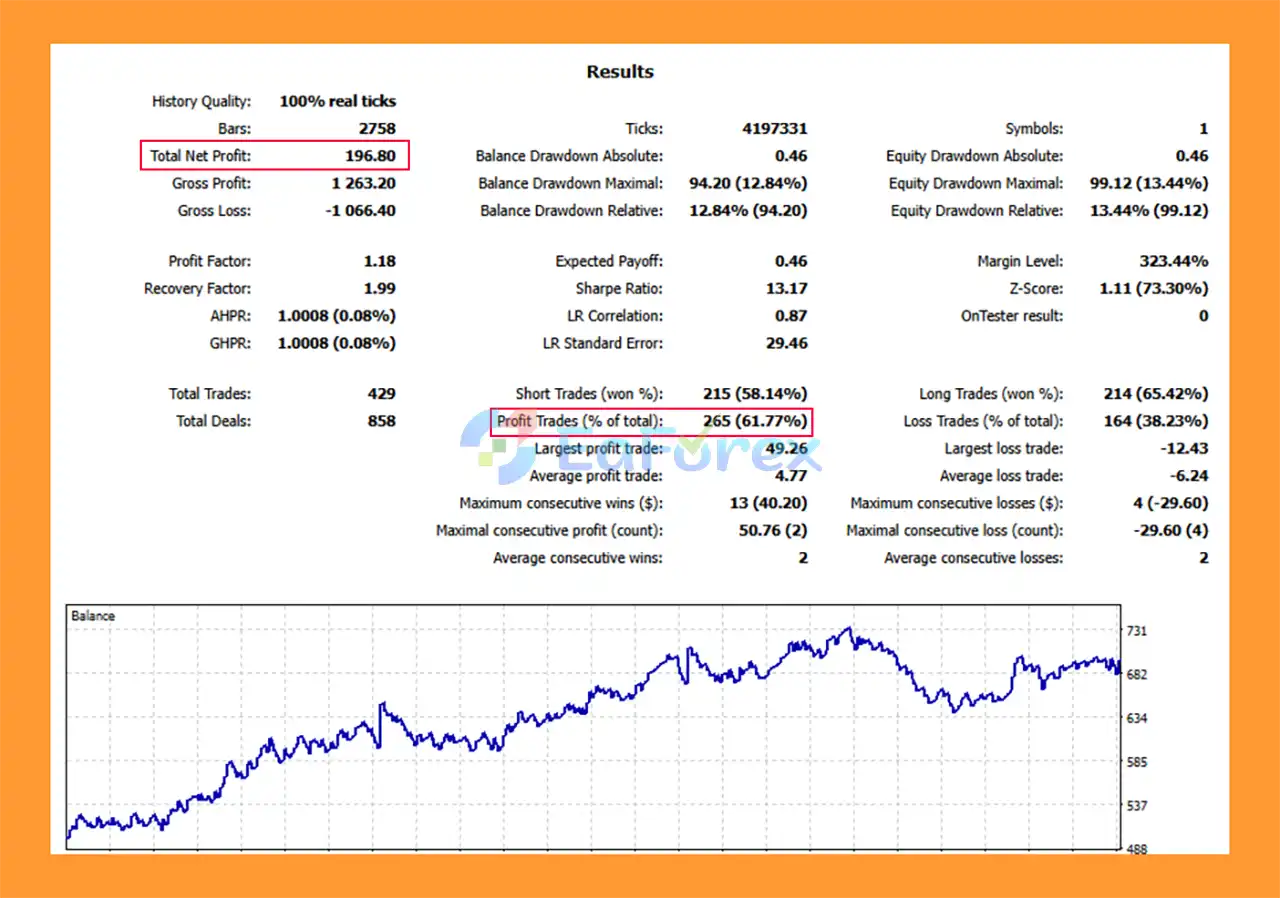
Gold Scalper Ultimate EA MT5 Backtest Results
- Total Net Profit: $196,80
- Win Rate (% of total): 61,77%
- Maximum Drawdown: 12,84%
Performance and Risk Management
Gold Scalper Ultimate EA MT5 includes several features designed to help traders control risk during automated short-term trading.
Fixed Lot or Risk-Based Position Sizing
Users can choose between fixed lot sizing and risk-based position sizing.
Fixed lot sizing allows traders to specify a predetermined trading volume, while risk-based sizing can calculate the position size according to the selected risk percentage.
Stop Loss and Take Profit
The EA provides configurable Stop Loss and Take Profit settings, allowing users to establish predefined trade-management levels.
Dynamic Trailing Stop
The trailing stop can be configured to manage profitable positions as the market moves in the intended direction.
Combined with ATR-based calculations, the trailing mechanism can adapt to changing volatility conditions.
Equity Protection
Gold Scalper Ultimate EA MT5 includes equity protection settings designed to provide an additional layer of account-level risk control.
These settings can help limit trading activity when predefined equity conditions are reached.
Margin and Volume Validation
Before executing an order, the EA checks available margin and permitted trading volume.
This helps prevent orders from being submitted when broker or account conditions do not support the requested position size.
Trading Session Management
Gold Scalper Ultimate EA MT5 includes configurable time and session filters.
Traders can define specific periods during which the EA is permitted to open new trades.
Session management can be useful for limiting automated scalping activity to selected market hours.
Possible uses include:
- Restricting trading to preferred sessions
- Avoiding selected market periods
- Controlling daily trading hours
- Reducing exposure during periods the trader considers unsuitable
The effectiveness of a particular session depends on the traded symbol, broker conditions, volatility, and market environment.
Position Management
The EA provides several options for controlling how positions are handled.
Magic Number Management
Trades can be identified using a Magic Number, helping distinguish Gold Scalper Ultimate positions from trades opened manually or by other Expert Advisors.
Opposite Position Handling
The system can optionally close opposite positions according to the configured settings.
This gives traders additional control over how simultaneous long and short positions are managed.
Simultaneous Trade Control
Users can configure how the EA handles multiple positions and simultaneous trading activity according to the available input parameters.
Signal and Notification System
Gold Scalper Ultimate EA provides optional visual and notification features for easier trade monitoring.
Buy and Sell Arrows
The EA can display optional Buy and Sell arrows directly on the chart.
These visual markers can help users monitor trading signals and understand when the EA has identified a potential opportunity.
Trade Alerts
Configurable alerts can notify traders when important trading events occur.
Real-Time Notifications
The notification system can provide real-time trade information, allowing users to monitor automated activity without continuously watching the MetaTrader 5 terminal.
Why Choose Gold Scalper Ultimate EA MT5?
Gold Scalper Ultimate may be suitable for traders looking for a configurable MT5 scalping EA that combines volatility-based trade management with optional candle confirmation.
Important characteristics include:
- Designed for MetaTrader 5
- Automated short-term trading
- Scalping-oriented strategy
- ATR-based trade management
- Dynamic Stop Loss calculation
- ATR-based trailing management
- Optional Heikin Ashi confirmation
- Fixed lot sizing
- Risk-based lot sizing
- Configurable Stop Loss and Take Profit
- Equity protection
- Margin validation
- Volume validation
- Broker stop-level checking
- Trading session filters
- Magic Number management
- Opposite-position control
- Optional Buy/Sell chart arrows
- Configurable trade alerts
- Real-time notifications
- Multiple symbols and timeframes supported
The combination of configurable parameters and automated trade management allows users to adjust the EA to different trading environments rather than relying on a single fixed configuration.
Platform Compatibility
Gold Scalper Ultimate EA MT5 is designed for the MetaTrader 5 trading platform.
According to the supplied specifications, the EA supports:
- Platform: MetaTrader 5
- Trading Style: Short-term / Scalping
- Markets: Multiple Forex symbols
- Timeframes: Multiple timeframes
- Broker Environment: Standard broker execution environments
Because scalping strategies can be sensitive to execution conditions, traders should consider factors such as spread, slippage, latency, liquidity, and broker execution quality when evaluating live performance.
Weaknesses and Risk Warnings
Gold Scalper Ultimate EA MT5 is an automated trading tool and does not guarantee profits or specific trading results.
Scalping strategies can be particularly sensitive to short-term market conditions and trading costs. Actual results may differ depending on the broker, symbol, spread, slippage, latency, execution speed, and account configuration.
Important risks include:
- Short-term trading can be sensitive to spread and commission costs.
- High volatility can result in rapid Stop Loss movements.
- ATR-based calculations do not eliminate market risk.
- Heikin Ashi confirmation cannot guarantee successful entries.
- Scalping signals can produce false or losing trades.
- Slippage can affect entry and exit prices.
- Broker execution conditions can differ significantly.
- Incorrect risk settings can increase account drawdown.
- Excessive leverage can significantly increase potential losses.
- Historical or simulated results do not guarantee future performance.
Traders should carefully test the EA on a demo account before using it with real capital.
It is also important to select conservative risk settings and ensure that the EA's trading parameters are appropriate for the selected broker and trading account.
Pros and Cons
Pros
- Automated MetaTrader 5 Expert Advisor
- Designed for short-term Forex trading
- Scalping-oriented approach
- ATR-based trade management
- Dynamic Stop Loss calculation
- Adjustable trailing stop
- Optional Heikin Ashi confirmation
- Fixed lot sizing
- Risk-based lot sizing
- Configurable Stop Loss and Take Profit
- Equity protection
- Margin validation
- Volume validation
- Broker stop-level checks
- Configurable trading sessions
- Magic Number support
- Opposite-position management
- Optional Buy/Sell chart arrows
- Trade alerts
- Real-time notifications
- Multiple Forex symbols supported
- Multiple timeframes supported
Cons
- Scalping can be sensitive to spread and execution costs
- Fast market movements can increase trading risk
- False signals can result in losing trades
- High volatility can affect short-term entries and exits
- Slippage and latency can impact live performance
- Incorrect risk settings can increase drawdown
- Broker conditions can produce different results
- No automated trading system can guarantee profits
How to Install Gold Scalper Ultimate EA MT5
Installing Gold Scalper Ultimate EA MT5 on MetaTrader 5 follows the standard Expert Advisor installation process.
Step 1: Install the Gold Scalper Ultimate EA file into your MetaTrader 5 terminal.
Step 2: Open the Forex symbol you want to trade.
Step 3: Select your preferred trading timeframe.
Step 4: Attach Gold Scalper Ultimate EA MT5 to the chart.
Step 5: Review the EA input settings.
Step 6: Choose your preferred position-sizing method: fixed lot or risk-based lot.
Step 7: Configure the ATR period and signal sensitivity.
Step 8: Configure Stop Loss, Take Profit, and trailing-stop settings.
Step 9: Enable or disable the optional Heikin Ashi confirmation.
Step 10: Configure equity protection and trading-session parameters.
Step 11: Review Magic Number and opposite-position settings.
Step 12: Enable optional chart arrows and trade notifications if required.
Step 13: Enable Algo Trading in MetaTrader 5.
Step 14: Monitor the EA on a demo account before deploying it on a live account.
For continuous automated operation, a reliable VPS can also be considered.
What’s Included in the Download Package?
- Setting (If Any).docx
- Installation Guide.docx
Final Thoughts
In summary, Gold Scalper Ultimate EA MT5 is an automated Forex scalping Expert Advisor designed for traders who want short-term trading automation with flexible risk and position-management controls.
The EA's primary approach combines ATR-based volatility analysis with optional Heikin Ashi confirmation, allowing traders to configure how market signals are evaluated and how positions are managed.
Its risk-management framework includes fixed lot and risk-based sizing, configurable Stop Loss and Take Profit, trailing-stop management, equity protection, margin validation, volume checks, and broker stop-level verification.
Additional features such as trading-session filters, Magic Number management, opposite-position handling, chart arrows, alerts, and real-time notifications provide further control and monitoring capabilities.
For traders interested in an MT5 scalping EA with configurable ATR-based trade management, Gold Scalper Ultimate provides a flexible automated framework. However, short-term trading remains highly sensitive to market conditions, spreads, slippage, and execution quality.
As with any Expert Advisor, traders should conduct thorough demo testing, use appropriate risk settings, and evaluate the system under their own broker conditions before considering live deployment.