Product Overview
Neural EA MT5 is a professional Expert Advisor for MetaTrader 5 that combines neural networks, machine learning concepts, and genetic algorithms to create an adaptive automated trading system.
Unlike conventional Expert Advisors that rely on a fixed set of trading rules, Neural EA MT5 is designed to periodically retrain its neural network using historical market data. The objective is to adapt the trading model to changing market conditions without requiring the entire trading strategy to be manually redesigned.
The system combines two major technologies: Neural Networks and Genetic Algorithms. The neural network analyzes historical market information and generates trading signals, while the genetic algorithm is used as part of the parameter-selection and optimization process.
A cyclic parameter-adjustment and re-optimization mechanism allows the EA to periodically update its internal model according to the latest available market data.
Neural EA MT5 can be used on different charts and timeframes. With the recommended parameters, neural-network training typically takes approximately 5–15 minutes, depending on CPU performance and the selected history sample.
The EA also includes a comprehensive set of configuration options for risk management, grid control, trading direction, spread filtering, trading hours, drawdown protection, neural-network complexity, and periodic re-optimization.
About the Developer
>> Delivery time 24h-48h after payment.
>>> Refund if not delivered.
>>> You will receive the latest version without any limitations (ID+Time).
>>Reviewed by Jason Stap <<

Neural EA MT5 Overview
Key Features of Neural EA MT5
Neural Network Trading System
Neural EA MT5 uses a neural-network model trained on historical market data to identify patterns and generate trading signals.
The system is designed to retrain periodically rather than relying permanently on a single static model.
Genetic Algorithm Optimization
The EA incorporates a genetic algorithm as part of its optimization architecture. This technology can be used to evaluate and adjust trading parameters according to the selected market data.
Adaptive Market Re-Optimization
The ReOptimizationNN parameter controls the period of neural-network re-optimization.
This allows the EA to periodically update its model using more recent market information.
Historical Data Training
The neural network uses a configurable historical sample controlled by HistoryNN, which defines the number of bars used for training.
A larger history sample can require more processing time and computational resources.
Adjustable Neural Network Complexity
Several parameters control the neural-network learning process, including:
- InputNN – number of neural-network inputs
- StepNN – maximum neural-network steps
- EpochNN – maximum training epochs
- DeltaNN – neural-network training accuracy
- LevelSignal – signal threshold
This allows users to balance model complexity, training time, and available CPU resources.
Technical Indicator Inputs
The neural network can use market information derived from indicators including:
These inputs provide additional market data for the neural-network analysis.
Spread Protection
LimitSpread allows users to define a maximum spread level. The EA will avoid opening new positions when the spread exceeds the configured limit.
Flexible Lot Management
Users can choose between a fixed Lot size or deposit-based Risk calculation.
The LotExponent parameter can control progressive lot-size changes according to the configured trading logic.
Grid Management Controls
The EA includes configurable grid parameters such as:
- LimitGrid
- kStepGrid
- kMinimumGridStepProc
These parameters allow users to control the number of grid steps, spacing between positions, and price-noise filtering.
Drawdown Protection
The DrawDown parameter defines a maximum account drawdown level at which the EA can close positions according to the configured protection rules.
Profit Protection
The DrawUp parameter can be used to define a maximum profit level at which positions are closed according to the selected configuration.
Trading Direction Control
The EA allows traders to enable:
- Buy trades only
- Sell trades only
- Both Buy and Sell trading
through the OnBuy and OnSell parameters.
Trading Session Filter
The EA includes configurable trading-time controls through:
- ServerTimeFilter
- StartHour
- StartMin
- FinalHour
- FinalMin
- FridayOn
This allows users to restrict automated trading to selected periods.
How Does Neural EA MT5 Work?
Neural EA MT5 combines historical-data learning, neural-network signal generation, genetic optimization, and automated trade management.
🔺Collect Historical Market Data
The system uses a configurable number of historical bars as its training sample.
The HistoryNN parameter determines the amount of historical data supplied to the neural network.
🔺Process Market Inputs
The neural network can process information derived from selected technical indicators, including:
The number of neural-network inputs is controlled through the InputNN parameter.
🔺Train the Neural Network
The system trains the neural network using the selected historical data.
Parameters such as StepNN, EpochNN, and DeltaNN control aspects of the training process.
With medium recommended settings, the training process can take approximately 5–15 minutes, although actual training time depends heavily on CPU performance and the complexity of the selected model.
🔺Apply Genetic Optimization
The genetic algorithm evaluates trading parameters and helps optimize the system according to the selected configuration and historical market information.
This creates an additional optimization layer alongside the neural-network model.
🔺Generate Trading Signals
Once the neural network reaches the required training conditions, the LevelSignal parameter determines the threshold at which the neural-network output is treated as a trading signal.
🔺Apply Trading Filters
Before entering the market, the EA can apply additional filters such as:
- Maximum spread
- Trading hours
- Direction restrictions
- Price-noise filtering
- Grid-step limitations
🔺Execute and Manage Trades
When the required conditions are satisfied, the EA automatically executes trades and manages them according to the configured lot, grid, Stop Loss, Take Profit, drawdown, and profit-protection parameters.
🔺Periodic Re-Optimization
The neural network can be retrained according to the configured ReOptimizationNN period.
This allows the model to incorporate more recent market data rather than remaining permanently based on an older training sample.
Why Choose Neural EA MT5?
- Neural EA MT5 is designed for traders interested in combining machine-learning concepts with automated MetaTrader 5 trading.
- Its main distinction is the ability to periodically retrain the neural network rather than relying exclusively on static trading rules.
- The combination of neural networks and genetic algorithms provides a flexible framework for experimenting with adaptive market analysis and automated parameter optimization.
- Another important advantage is the large number of configurable parameters. Traders can control the neural-network architecture, historical sample size, training process, trading hours, spread conditions, lot sizing, grid exposure, and account-level protection.
- The EA is also designed to accommodate different computational environments. On lower-powered systems, users can work with moderate neural-network complexity. Traders with more powerful CPUs and higher timeframes can increase the model complexity and history sample where appropriate.
- However, higher model complexity does not automatically guarantee better live performance. Increasing complexity can also increase computational requirements and may increase the risk of fitting historical data too closely.
Neural EA MT5 Backtest Results
- Initial Deposit: $10,000
- Total Net Profit: $5,342.27
- Win Rate (% of total): 76.92%
- Maximum Drawdown: 18.12%
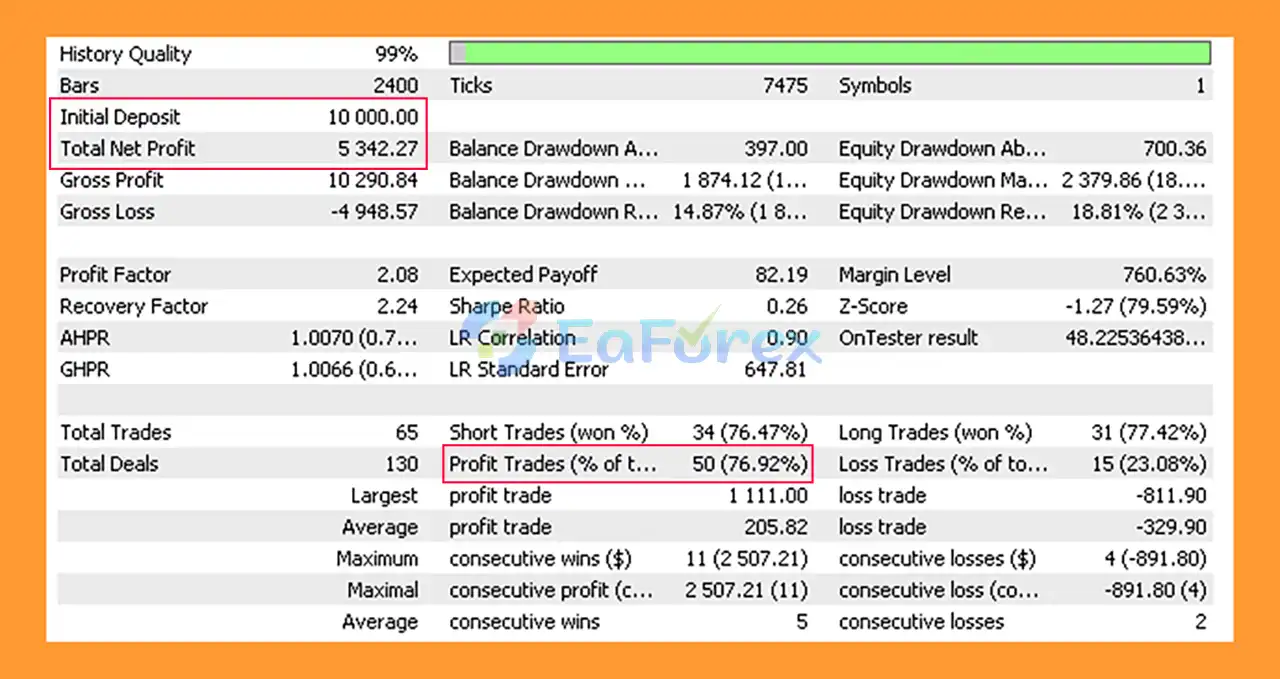
Neural EA Backtest
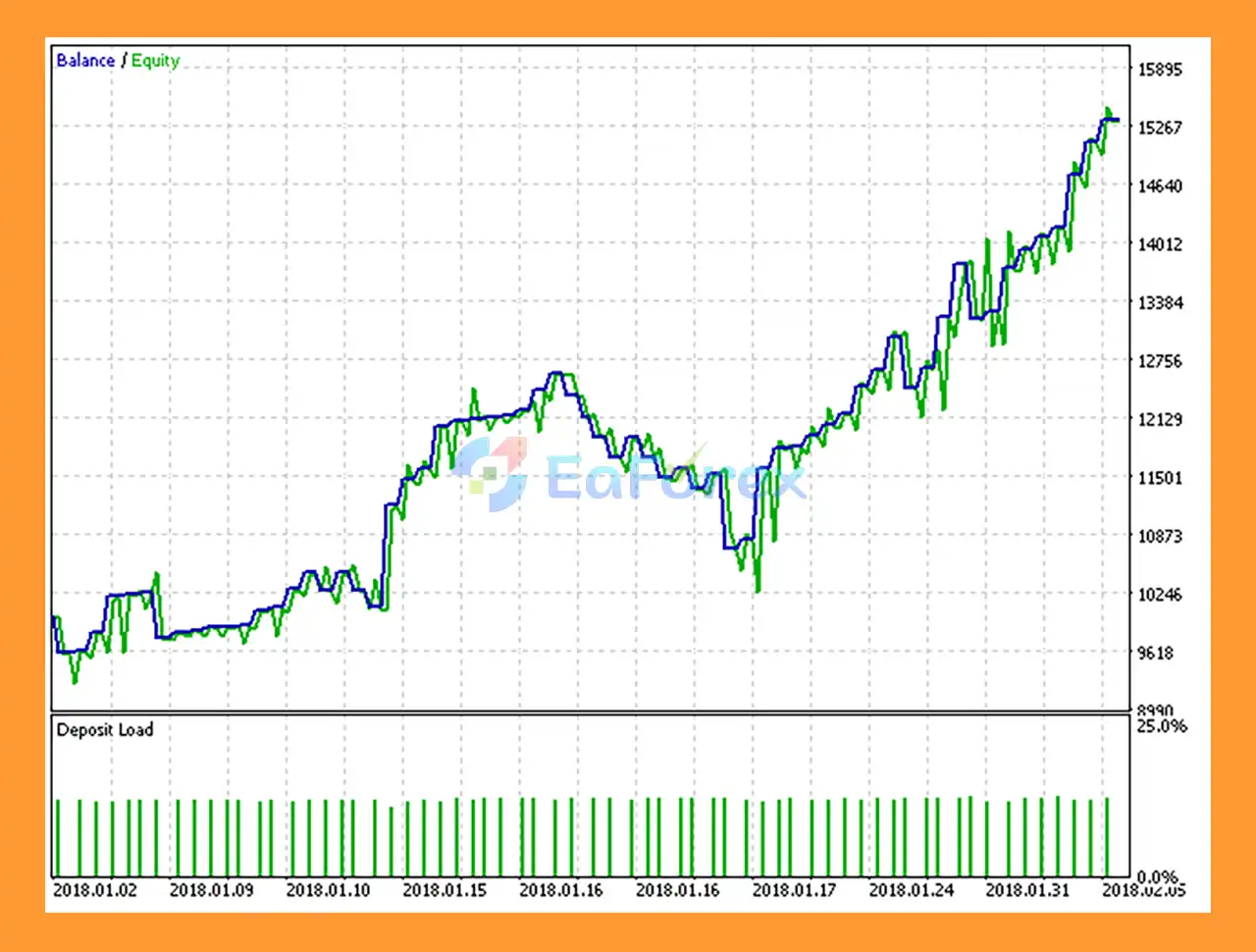
Neural EA MT5 Backtest
Performance and Risk Management
Neural EA MT5 includes multiple layers of trade and account management.
Risk-Based Lot Calculation
The Risk parameter can calculate position size according to the account deposit, providing an alternative to manually specifying a fixed lot through the Lot parameter.
Progressive Lot Management
LotExponent controls the ratio used for progressive lot-size changes within the configured trading system.
Because progressive sizing can increase exposure, this parameter should be configured carefully.
Grid Limitation
The EA includes LimitGrid to restrict the number of grid steps.
The kStepGrid parameter controls the spacing relationship between consecutive orders.
These controls are particularly important because multiple open positions can increase total market exposure.
Stop Loss and Take Profit
The kSL and kTP coefficients control the Stop Loss and Take Profit calculations according to the EA’s internal trading logic.
Drawdown Protection
The DrawDown parameter defines the maximum configured account drawdown at which closing action can occur.
This provides an additional account-level risk-management layer.
Profit Protection
The DrawUp parameter can define a maximum profit threshold at which the EA closes positions according to the configured rules.
Spread Filter
LimitSpread prevents new entries when the current spread exceeds the configured maximum.
This can be useful when trading conditions deteriorate because of temporary spread expansion.
Trading-Time Protection
The EA allows users to define specific operating hours using the server-time filter.
This can help prevent trading outside the selected session.
Weaknesses and Risk Warnings
Neural Networks Do Not Guarantee Predictive Accuracy
Neural networks identify statistical relationships in data, but financial markets are dynamic. A pattern that appeared in historical data may not continue to behave the same way in the future.
Retraining Does Not Eliminate Market Risk
Periodic re-optimization can update the model with newer information, but it cannot guarantee that the newly trained model will accurately predict future market behavior.
Risk of Overfitting
Increasing neural-network complexity or optimizing extensively on historical data can create overfitting, where the model performs well on historical data but behaves differently in live trading.
Testing Can Be Difficult
The developer notes that testing is computationally demanding because the neural network may be retrained periodically.
As a result, standard historical backtesting may only provide an approximation of the system’s complete adaptive behavior.
Default Settings Are for Demonstration
The default settings are provided primarily to demonstrate the EA’s general operating principles.
The recommended live-trading parameters use a larger historical sample and more extensive neural-network learning, which can take significantly longer during testing.
Grid Parameters Can Increase Exposure
The EA includes grid-related parameters. Multiple positions can increase total exposure, especially when the market moves strongly in one direction.
Progressive Lot Sizing Increases Risk
The LotExponent feature can increase position size according to the configured logic. Traders should understand its effect on margin and drawdown before enabling aggressive settings.
CPU Performance Matters
Neural-network training time depends on CPU performance. More complex models and larger historical samples can require significantly more computational resources.
Historical Performance Is Not a Guarantee
Backtest or optimized results do not guarantee future profitability. Live performance can differ because of spread, slippage, liquidity, execution, market regime changes, and other trading conditions.
Pros and Cons
Pros
- Professional Expert Advisor for MetaTrader 5
- Combines neural networks and genetic algorithms
- Adaptive neural-network re-optimization
- Uses historical market data for model training
- Configurable neural-network complexity
- RSI, AD, and SAR inputs
- Adjustable historical training sample
- Configurable training epochs and steps
- Neural signal threshold control
- Flexible fixed-lot or risk-based position sizing
- Spread protection
- Drawdown protection
- Profit protection
- Trading-session filter
- Buy/Sell direction controls
- Configurable grid limitations
- Adjustable Stop Loss and Take Profit coefficients
- Suitable for experimentation with adaptive algorithmic trading
Cons
- Neural-network training can require significant CPU resources
- Backtesting the adaptive system can be time-consuming
- Historical optimization can produce overfitting
- Neural networks cannot guarantee accurate future predictions
- Grid and progressive lot parameters can increase exposure
- Higher model complexity requires more computing power
- Live behavior may differ from optimized historical results
- Requires careful parameter configuration
- More complex than conventional rule-based Expert Advisors
How to Install Neural EA MT5
Step 1: Install MetaTrader 5
Install MetaTrader 5 through your preferred broker and log in to your trading account.
Step 2: Copy the EA File
Open MetaTrader 5 and select:
File → Open Data Folder → MQL5 → Experts
Copy the Neural EA MT5 (.ex5) file into the Experts folder.
Restart MetaTrader 5 or refresh the Expert Advisors section in the Navigator.
Step 3: Open a Trading Chart
The EA can be attached to a suitable chart according to your intended trading configuration.
The developer notes that the robot can run on any chart using the recommended parameters.
For systems with sufficient CPU resources, higher timeframes than M5 can allow users to experiment with increased neural-network complexity and larger historical samples.
Step 4: Attach the EA
Open:
Navigator → Expert Advisors → Neural EA MT5
Drag the EA onto your selected chart.
Make sure Algo Trading is enabled.
Step 5: Configure the Neural Network
Review the key neural-network parameters, including:
- HistoryNN
- InputNN
- StepNN
- EpochNN
- DeltaNN
- LevelSignal
- ReOptimizationNN
Start with the recommended parameters before experimenting with higher complexity.
Step 6: Configure Risk Management
Review:
- Lot
- Risk
- LotExponent
- LimitGrid
- kStepGrid
- kTP
- kSL
- DrawDown
- DrawUp
- LimitSpread
Avoid aggressive position sizing or grid configurations until you fully understand their effect on account exposure.
Step 7: Configure Trading Hours
If required, enable the server-time filter and configure:
- StartHour
- StartMin
- FinalHour
- FinalMin
- FridayOn
Step 8: Allow Neural Training
The neural network requires processing time to train using the selected historical sample.
With medium recommended parameters, training may take approximately 5–15 minutes, depending on CPU performance.
Larger history samples and higher neural-network complexity can require substantially more time.
Step 9: Test Before Live Trading
Because adaptive neural-network systems can be computationally intensive to backtest, historical testing should be interpreted carefully.
Use the provided demonstration and recommended live settings separately, and compare behavior across different market periods.
Before deploying the EA with real capital, consider running it on a demo account to verify its behavior under your broker’s spread, execution, and trading conditions.
What’s Included in the Download Package?
- Setting (If Any).docx
- Installation Guide.docx
>>> Join VIP Membership Now <<<
Final Thoughts
In summary, Neural EA MT5 is an adaptive MetaTrader 5 Expert Advisor that combines neural networks, machine-learning concepts, and genetic algorithms to analyze historical market data and periodically re-optimize its trading model. Instead of relying exclusively on a fixed set of trading rules, the EA is designed to update its internal parameters according to more recent market information.
One of its main characteristics is the flexibility of its neural-network architecture. Traders can adjust the historical training sample, neural-network inputs, training steps, epochs, signal threshold, and re-optimization period. The EA also provides conventional risk and trade-management controls, including risk-based lot sizing, spread filtering, drawdown protection, profit protection, trading-session controls, and configurable grid parameters.
The supplied backtest reports $5,342.27 total net profit, a 76.92% win rate, and 18.12% maximum drawdown from an initial deposit of $10,000. This historical result does not guarantee future performance. In addition, adaptive neural-network systems can be particularly sensitive to overfitting, changing market regimes, data quality, and optimization methodology.
Another important consideration is computational demand. Larger historical samples and more complex neural-network configurations can require substantially more CPU resources and longer training or testing times. Grid and progressive lot-sizing parameters can also increase overall exposure if configured aggressively.
Overall, Neural EA MT5 provides a flexible framework for traders interested in combining AI-style neural-network analysis, genetic optimization, and automated MetaTrader 5 trading. Thorough testing across different market periods, careful parameter validation, conservative risk settings, and extended demo forward testing are recommended before considering live deployment.


















 Unlimited Activations
 Instant delivery
 Easy to install
















 Automatic EA
 EA Best Seller
 Expert Advisor MT4
 Expert Advisor MT5
 HFT EA


Reviews
Clear filtersThere are no reviews yet.