Product Overview
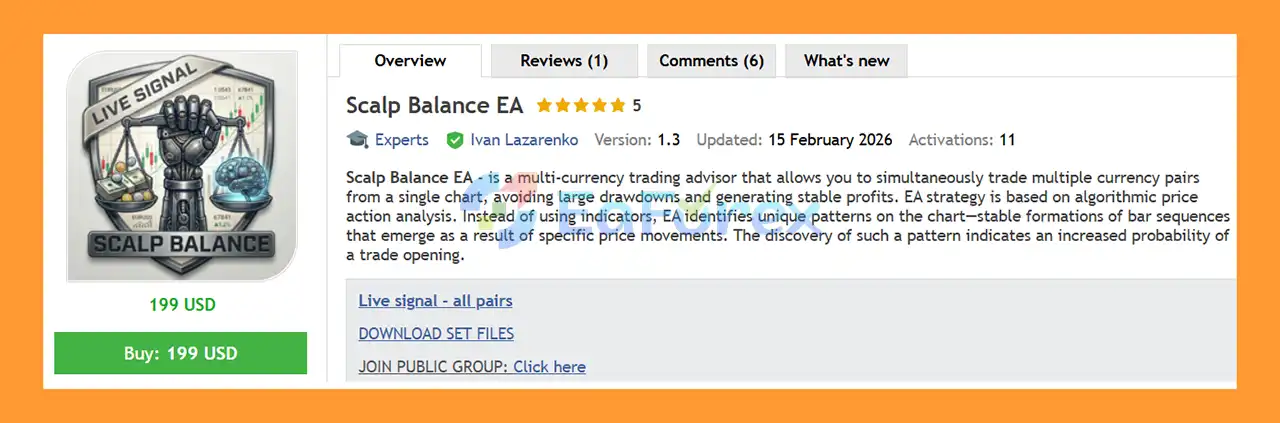
Scalp Balance EA MT5 is a fully automated multi-currency Expert Advisor for MetaTrader 5, designed to trade multiple currency pairs and Gold from a single chart.
The EA is based on an algorithmic price action strategy rather than conventional technical indicators. Instead of relying primarily on indicator signals, Scalp Balance analyzes sequences of price bars and identifies recurring chart formations that may indicate a potential trading opportunity.
A major characteristic of the system is its approach to risk management. The EA does not use Martingale, Grid, or Averaging strategies. Individual trades can be protected with Stop Loss and Take Profit, while additional trade-management functions include trailing stops, breakeven, and basket-level position-closing algorithms.
Scalp Balance EA can monitor up to 15 currency pairs plus Gold from one chart, with users able to select which instruments they want the EA to trade.
About the Developer
- Author: Ivan Lazarenko
- Experience: Over +1 years of experience on MQL5.
- Notable Products: Scalp Balance EA MT5, Scalp Balance EA MT4, TimeCome EA MT5 and other advisors.
- Flagship Product: Scalp Balance EA MT5 is rated as the best performing product of the year.
>> Delivery time 24h-48h after payment.
>>> Refund if not delivered.
>>> You will receive the latest version without any limitations (ID+Time).
>>Reviewed by Jason Stap <<
Key Features of Scalp Balance EA MT5
- Fully automated MT5 Expert Advisor
- Multi-currency trading from a single chart
- Supports up to 15 currency pairs plus Gold
- Algorithmic price action analysis
- Pattern recognition based on bar sequences
- No Martingale
- No Grid
- No Averaging
- Stop Loss and Take Profit
- Trailing Stop
- Breakeven functionality
- Basket-position management
- Multiple basket-closing algorithms
- Configurable maximum number of positions
- Option to limit positions per currency pair
- Multi-timeframe signal analysis
- Advanced graphical information panel
- Customizable currency-pair selection
- Flexible symbol and timeframe configuration
How Does Scalp Balance EA MT5 Work?
Scalp Balance EA MT5 uses algorithmic price action analysis to identify potential trading setups.
Rather than depending on conventional indicators, the EA analyzes sequences of price bars and searches for specific formations that have been programmed into its trading logic.
When a recognized pattern appears under the required conditions, the system evaluates whether the setup is suitable for a potential trade.
This approach is designed to allow the EA to respond directly to price behavior rather than relying exclusively on indicator calculations.
Price Action Pattern Recognition
The core strategy identifies recurring formations created by particular sequences of price bars.
These patterns are treated as potential signals rather than guarantees. The appearance of a recognized formation increases the probability targeted by the strategy, but no technical pattern can predict every future market movement.
Multi-Timeframe Analysis
Scalp Balance can generate trade signals using information from multiple timeframes while being attached to a single chart.
This allows the EA to incorporate broader market context into its trading decisions without requiring a separate EA installation for every timeframe.
Multi-Currency Trading From One Chart
One of the main features of Scalp Balance EA is its ability to manage a diversified group of instruments from a single chart.
The EA supports up to:
- 15 currency pairs
- Gold/XAUUSD
- Selectable instruments according to user preferences
Users can choose which pairs should be traded instead of being required to activate every available instrument.
This architecture can simplify multi-currency automated trading because the EA can monitor several markets without requiring multiple instances on separate charts.
However, trading more instruments also increases the potential for simultaneous exposure. The recommended capital allocation should therefore be considered on a per-pair basis as well as at the total-account level.
Risk Management
Scalp Balance EA MT5 is designed without several aggressive recovery techniques commonly used by automated trading systems.
The EA does not use:
- Martingale
- Grid trading
- Averaging down
Instead, its trade-management framework includes conventional risk-control mechanisms such as:
- Stop Loss
- Take Profit
- Trailing Stop
- Breakeven
- Basket-level profit management
- Configurable position limits
- Multiple algorithms for closing groups of positions
Each individual trade can therefore have predefined protective levels, while basket management can be used to manage multiple positions collectively.
No risk-management system can eliminate trading losses, so position size and maximum exposure should always be configured according to account capital and risk tolerance.
Basket Trading and Position Management
Scalp Balance supports basket trading, allowing traders to customize how many positions can be opened.
Depending on the selected configuration, users can control:
- Maximum number of open positions
- Number of positions permitted for each currency pair
- Basket-level closing conditions
- Individual trade protection
- Trailing and breakeven behavior
The basket-management algorithms are designed to close groups of positions when the required conditions are met.
This provides a different approach from systems that rely on progressively increasing lot sizes to recover losses.
Advanced Trading Dashboard
Scalp Balance EA MT5 includes a graphical panel directly on the MT5 chart.
The dashboard provides advanced trading statistics and helps users monitor the EA’s current activity from a single interface.
Depending on the configuration, the panel can be used to observe information related to positions, trading activity, and overall system status.
This is particularly useful for a multi-currency EA because multiple instruments may be managed simultaneously.
Recommended Settings
The general recommendations are:
| Parameter |
Recommendation |
| Platform |
MetaTrader 5 |
| Symbol |
Any supported symbol |
| Timeframe |
Any supported timeframe |
| Minimum Deposit |
$100 per currency pair |
| Multiple-Pair Configuration |
Around $500 for all supported pairs |
| Strategy |
Algorithmic Price Action |
| Martingale |
No |
| Grid |
No |
| Averaging |
No |
| Trading Mode |
Fully Automated |
The developer recommends a broker offering zero commissions and swap-free conditions for at least one week.
Broker conditions can materially affect the results of an automated strategy, so traders should verify the actual spread, commission, swap, and execution conditions offered by their broker.
Scalp Balance EA MT5 Signal Results
🔺For all currency pairs – 7 consecutive weeks.
- Initial Deposit: $1,000
- Growth Rate: +14%
- Win Rate (% of total): 78.3%
- Maximum Drawdown: 10.4%
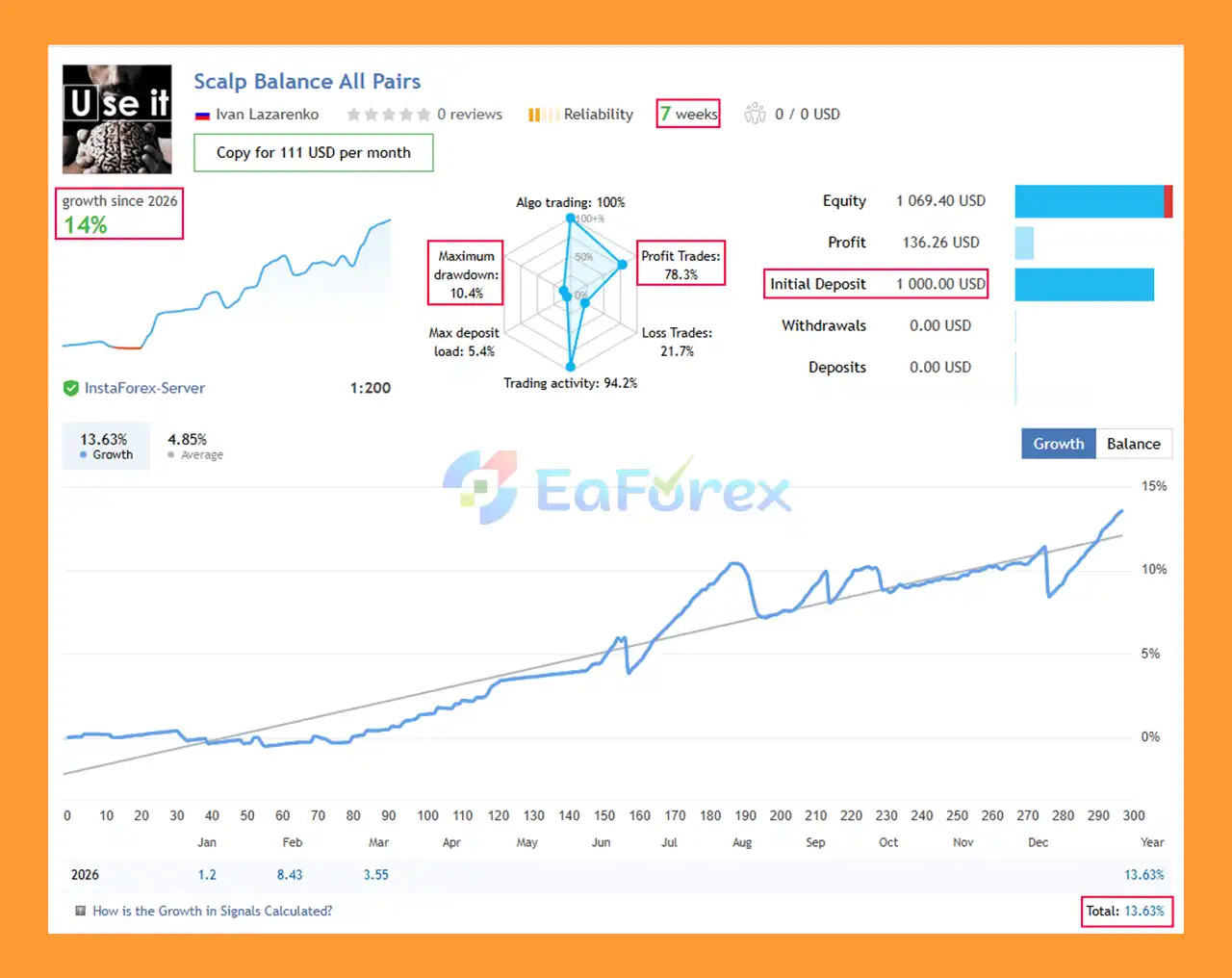
Scalp Balance EA MT5 Signal Results
Performance and Risk Management
The developer describes the EA as targeting approximately 3–10% profit per month under its intended configuration.
This figure should be treated as a target or reported expectation, not a guaranteed return. Monthly performance can vary considerably depending on market conditions, broker costs, account configuration, risk settings, and the number of traded instruments.
The EA allows traders to increase risk through its settings. Higher risk can potentially increase both gains and losses, and therefore should not be interpreted as a reliable method for producing higher returns.
The developer also states that they trade their own funds using the same EA and openly acknowledge that losses are part of the trading process.
A minimum evaluation period of 3–6 months is recommended to assess the system across different market conditions rather than judging it from a short period of trading.
Why Choose Scalp Balance EA MT5?
Scalp Balance EA MT5 may appeal to traders who prefer an automated system based on price action rather than conventional indicator combinations.
Its architecture focuses on:
- Multi-currency automation
- Price pattern recognition
- Individual trade protection
- Basket management
- No Martingale
- No Grid
- No Averaging
- Multi-timeframe analysis
- Centralized monitoring from one chart
The combination of these features provides a structured framework for automated multi-market trading while allowing users to control the number of instruments and positions.
Weaknesses and Risk Warnings
Despite its risk-management features, Scalp Balance EA MT5 is not risk-free.
Important considerations include:
- No trading strategy can guarantee profits.
- Price action patterns can fail.
- Market conditions can change over time.
- Multi-currency trading can create substantial simultaneous exposure.
- Trading more pairs increases overall account activity and risk.
- Higher risk settings can produce larger losses as well as potentially larger returns.
- Broker spreads, commissions, swaps, and execution can affect results.
- Basket management does not eliminate drawdown.
- Historical or reported monthly returns are not guarantees of future performance.
- A $100-per-pair guideline should not be interpreted as a guarantee of account protection.
- The recommended 3–6 month evaluation period is not a guarantee that the EA will be profitable over that period.
Before using real funds, test the EA on a demo account and evaluate the exact settings, broker conditions, and position limits you intend to use.
Broker and Symbol Compatibility
Scalp Balance EA MT5 can work with different brokers, but symbol naming must be configured correctly.
Some brokers add suffixes or prefixes to their instruments, such as modified versions of EURUSD or XAUUSD.
If the broker uses a different symbol name, the corresponding symbol information must be entered into the EA settings.
For example, if the broker uses a modified Gold symbol rather than the standard XAUUSD name, the EA should be configured accordingly.
How to Install Scalp Balance EA MT5
- Open MetaTrader 5.
- Select File → Open Data Folder.
- Open MQL5 → Experts.
- Copy the Scalp Balance EA
.ex5 file into the Experts folder.
- Restart MT5 or refresh the Navigator panel.
- Make sure all 16 supported instruments are visible in Market Watch.
- Open any chart and timeframe. The developer’s example uses EURUSD H1.
- Attach Scalp Balance EA MT5 to the chart.
- Enable Algo Trading.
- Load the recommended set file or configure the parameters manually.
- Check the currency-pair and Gold symbol names.
- If your broker uses suffixes or different symbol names, enter the correct names in the EA settings.
- Configure risk, maximum positions, and basket-management parameters.
- Backtest the selected configuration.
- Run the EA on a demo account before deploying it with real capital.
Pros and Cons
Pros
- Fully automated multi-currency trading
- Can manage multiple pairs from one chart
- Supports Gold trading
- Algorithmic price action approach
- No Martingale
- No Grid
- No Averaging
- Stop Loss and Take Profit
- Trailing Stop and breakeven
- Basket-level trade management
- Multi-timeframe analysis
- Customizable position limits
- Advanced graphical dashboard
- Flexible currency-pair selection
Cons
- Multi-currency trading can increase total exposure
- Results depend on broker conditions
- Symbol suffixes may require manual configuration
- Higher risk settings can increase losses
- Price action patterns do not always produce successful trades
- Monthly return targets are not guaranteed
- Basket management does not eliminate drawdown
- Requires several months of evaluation for a meaningful assessment
- Minimum capital requirements increase as more pairs are traded
Real User Reviews and Feedback
🔺Scalp Balance EA MT5 is highly appreciated by the MQL5 community for bringing stable and reliable profits. Below are 5 star reviews from users:
- Regina60 (2026.01.30): “I bought the EA one week ago. It made 3% with small drawdown. I’ve bought so many Expert Advisors (EAs) in the past, and they often made big promises of returns of 20%, 40%, or even 100% per month. Most were Martingale, scalp, or high-risk EAs that only worked in specific market conditions. I often let myself be misled and always ended up destroying my account. He acts immediately when I need another setfile for different account sizes. Fantastic!”
What’s Included in the Download Package?
- Experts:
- Setting (If Any).docx
- Installation Guide.docx
- SetFiles:
- SB_v1_1_All_Pairs_1000uhFILTRa.set
- SB_v1_1_GOLD_1000r2FILTRgTRAILu.set
- SB_v1_1_GOLD_100024FILTRt.set
- sb_v1_2__all_pairs_1000.set
- sb_v1_2_all_pairs_1000_aggressive.set
- SB_v1_2_gold_300.set
- SB_v1_2_GOLD_1000_FILTR.set
- SB_v1_2_GOLD_1000_FILTR_TRAIL.set
- sb_v1_2__all_pairs_1000_filtr.set
- Scalp_Balance_-XauUsd_-_for_3005_.set
- Scalp_Balance_-_All_pairs_-_for_10006.set
>>> Join VIP Membership Now <<<
Final Thoughts
In summary, Scalp Balance EA MT5 is a fully automated multi-currency Expert Advisor for MetaTrader 5 that combines algorithmic price action analysis, pattern recognition, multi-timeframe filtering, and centralized basket management. Designed to trade up to 15 currency pairs plus Gold from a single chart, the EA provides a flexible framework for traders who want to manage multiple markets without relying on conventional indicator-based strategies.
A key characteristic of Scalp Balance is its non-recovery-based architecture. The system does not use Martingale, Grid, or Averaging, while individual positions can be managed with Stop Loss, Take Profit, Trailing Stop, and Breakeven. Basket-level closing algorithms and configurable position limits provide additional control over overall exposure.
The supplied 7-week signal results across all supported currency pairs report +14% growth, a 78.3% win rate, and 10.4% maximum drawdown from a $1,000 initial deposit. The developer’s stated target of approximately 3–10% monthly profit should be treated as an expectation rather than a guaranteed return. These signal results and reported performance do not guarantee future results.
Actual performance can vary due to market conditions, spread, commissions, swaps, slippage, execution quality, broker specifications, symbol naming, leverage, and the number of simultaneously traded instruments. Multi-currency trading can also create significant combined exposure.
Overall, Scalp Balance EA MT5 offers a structured approach to automated Forex and Gold trading based on price action and centralized position management. Thorough backtesting, 3–6 months of demo or forward evaluation, correct symbol configuration, and conservative risk settings are recommended before deploying the EA with real capital.
































 Automatic EA
 EA Best Seller
 Expert Advisor MT4
 Expert Advisor MT5
 HFT EA


Reviews
Clear filtersThere are no reviews yet.