









-
 Unlimited Activations
-
 Instant delivery
-
 Easy to install







 Unlimited Activations
Instant delivery
Easy to install
Unlimited Activations
Instant delivery
Easy to install
 Free Update
 Free Install Support

PSAR Gold Matrix EA MT5 is an automated Gold scalping Expert Advisor for MetaTrader 5, designed exclusively for XAU/USD (Gold). The EA combines Parabolic SAR (PSAR) and Tick Volume to filter potential entries according to market direction and trading activity.
The strategy uses pending grid stop orders, placing staggered Buy Stop and Sell Stop levels around the current market price. Entries are filtered by the active PSAR direction and volume conditions before orders are placed.
Each position can be managed using a fixed Stop Loss, automatic profit closure, dynamic trailing stop, and Break Even protection. Additional controls for spread, trading sessions, lot sizing, and available margin provide users with configurable tools for managing automated Gold trading.
>> Delivery time 24h-48h after payment.
>>> Refund if not delivered.
>>> You will receive the latest version without any limitations (ID+Time).>>Reviewed by Jason Stap <<
Psar Gold Matrix EA MT5 Overview
The Parabolic SAR acts as the primary directional filter.
The EA continuously monitors PSAR conditions and can detect changes in the current directional bias.
This helps restrict pending-order placement according to the selected trend direction.
The Tick Volume Filter evaluates current market activity before allowing trading conditions.
The EA compares the current volume against the average volume of the previous N periods multiplied by a configurable factor.
Conceptually:
Current Volume > Average Volume × Volume Multiplier
This allows traders to require stronger-than-average market activity before the strategy becomes active.
PSAR Gold Matrix EA MT5 uses a configurable pending-order grid.
The EA can place multiple:
Orders are distributed according to the configured Entry Delta and maximum grid distance.
The maximum number of pending orders per direction can also be controlled, allowing users to limit the number of simultaneously active grid levels.
The trailing system automatically manages profitable positions after the configured activation threshold is reached.
The trailing distance can be adjusted using a configurable step, while the optional Aggressive Mode can tighten position protection as accumulated profit increases.
The EA can automatically move Stop Loss toward the entry level after the configured Break Even trigger is reached.
A safety buffer can be incorporated according to the selected settings.
Positions can be automatically closed after reaching the configured profit target in pips.
This provides a predefined exit mechanism without requiring the trader to manually monitor each position.
The built-in Time Filter allows the EA to operate only during selected trading hours.
This can be used to avoid periods that the user considers unsuitable, such as low-activity sessions or specific market hours.
Before placing new orders, the EA checks the current spread against the configured maximum.
When the spread exceeds the allowed threshold, new entries can be suspended until market conditions return within the selected limit.
The EA supports two primary position-sizing approaches:
Available margin is checked before order placement to help prevent trades from being opened when account resources are insufficient.
The trading process can be summarized in several stages.
The EA reads the current Parabolic SAR position relative to market price.
The EA compares current Tick Volume with the selected historical average and volume multiplier.
If the required volume condition is not satisfied, the trading setup can be rejected.
Before placing pending orders, the EA checks:
When the required conditions are satisfied, the EA places Buy Stop and/or Sell Stop orders according to the configured entry distance and grid limits.
When a pending order is triggered, the resulting position is managed automatically using the configured Stop Loss, profit target, trailing stop, and Break Even settings.
As the position moves into profit, the trailing system can progressively adjust the Stop Loss. Aggressive Mode can provide a more active trailing configuration.
The position can be closed when:
PSAR Gold Matrix EA MT5 brings trend filtering, volume validation, pending-grid execution, and automated position management into one MT5 system.
Key characteristics include:
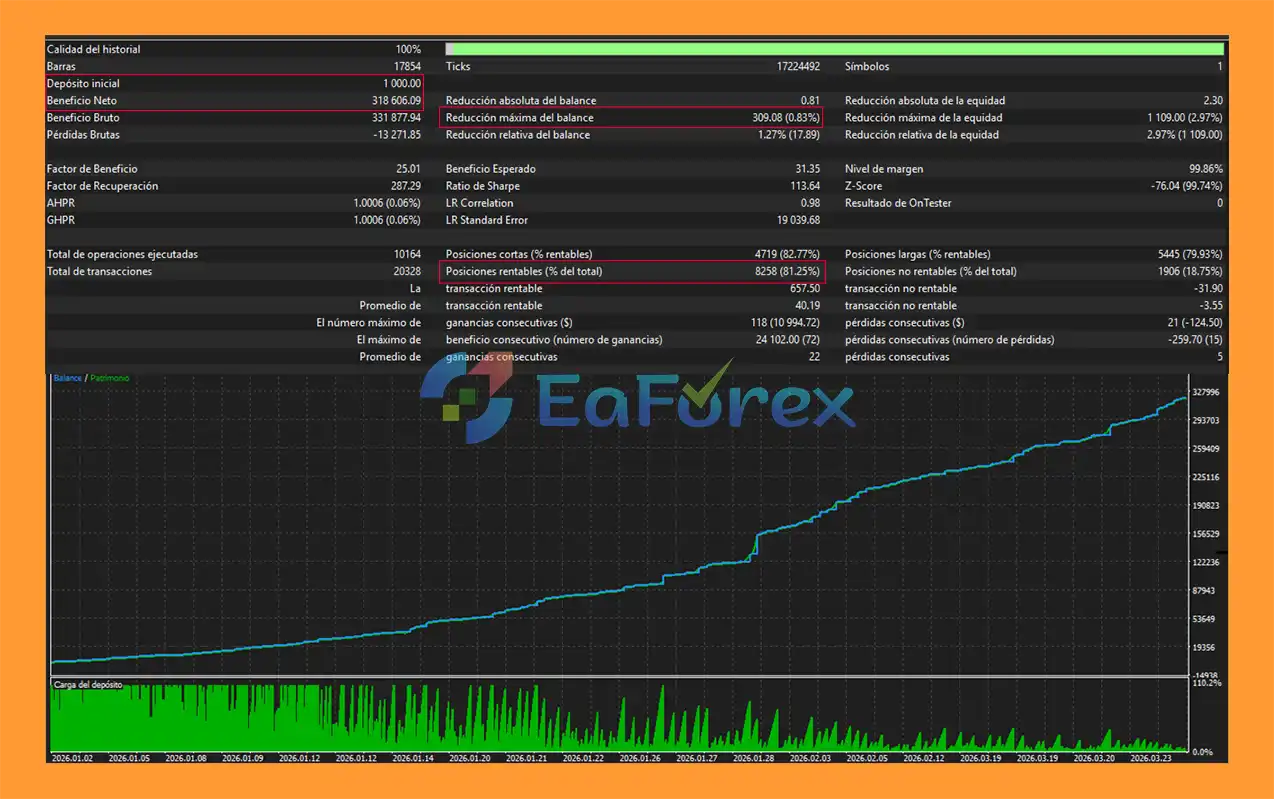
🔺Gold (XAUUSD) – over many years
Psar Gold Matrix EA MT5 Backtets
PSAR Gold Matrix EA MT5 provides several controls for managing trading exposure.
Users can choose between fixed lot sizing and percentage-based risk calculation.
Risk-based sizing can adjust the position size according to account balance and the configured risk percentage, subject to broker specifications and available margin.
Each position can use a configurable fixed Stop Loss measured in pips.
A Stop Loss can help define the maximum intended loss for an individual position, although actual execution can differ during fast-moving markets or abnormal liquidity conditions.
The trailing system activates after the selected profit threshold is reached and progressively follows the market.
The trailing Start and Step parameters can be configured according to the user’s preferred trading behavior.
The Break Even function can move Stop Loss toward the entry level after the configured activation target is reached.
The automatic pip-profit closure allows the EA to close positions after reaching a predefined profit level.
Before placing an order, the EA checks available margin to reduce the possibility of opening positions when insufficient account resources are available.
Because the strategy uses pending grid orders, controlling the number and distance of orders is important.
The EA provides parameters for:
These settings allow users to define the intended level of market exposure.
PSAR Gold Matrix EA MT5 includes a real-time dashboard integrated directly into the MT5 chart.
The Matrix-style interface provides a compact view of the EA’s current operating conditions.
The panel can display:
This allows traders to monitor the EA without continuously checking individual MT5 trade and account windows.
| Parameter | Description |
|---|---|
| Magic Number | Unique identifier for EA trades |
| Slippage | Maximum accepted execution deviation |
| Trading Hours | Start and end time for automated trading |
| Fixed Lot | Constant position size |
| Risk Percentage | Balance-based position sizing |
| Entry Delta | Distance between market price and grid entries |
| Maximum Grid Distance | Maximum allowed grid range |
| Stop Loss | Fixed SL distance in pips |
| Maximum Spread | Maximum permitted spread |
| Maximum Pending Orders | Limits pending orders per direction |
| Profit Close Activation | Enables automatic profit-based closure |
| Profit Target | Target profit in pips |
| Trailing Start | Profit threshold for trailing activation |
| Trailing Step | Trailing adjustment distance |
| Break Even | Break-even activation setting |
| Aggressive Trailing | Enables more active trailing behavior |
| Parabolic SAR | Enables PSAR filtering |
| PSAR Parameters | Configures PSAR calculation |
| Volume Filter | Enables Tick Volume confirmation |
| Volume Period | Average-volume calculation period |
| Volume Multiplier | Required volume relative to the average |
The supplied specifications recommend using PSAR Gold Matrix EA MT5 under the following conditions:
| Requirement | Recommendation |
|---|---|
| Platform | MetaTrader 5 |
| Symbol | XAU/USD |
| Timeframe | M5 / M15 |
| Account Type | ECN / Raw Spread |
| Execution | Fast execution preferred |
| Broker | IC Markets / Fusion Markets |
Low-spread trading conditions can be particularly relevant for a Gold scalping system because spread and execution costs can have a meaningful impact on short-term trading.
Broker conditions, commissions, spreads, execution quality, leverage, and account availability should always be verified directly with the broker before live deployment.
PSAR Gold Matrix EA MT5 is an automated Gold scalping system that uses pending grid orders, so users should understand the specific risks associated with this approach.
| Pros | Cons |
|---|---|
| Designed specifically for XAU/USD | Gold can be highly volatile |
| PSAR trend-direction filter | PSAR can produce frequent reversals in sideways markets |
| Tick Volume confirmation | Tick volume does not guarantee price continuation |
| Pending Buy Stop/Sell Stop grid | Multiple orders can increase exposure |
| Configurable grid distance | Wider grids can require more account capacity |
| Fixed lot and risk-based sizing | Risk sizing depends on broker specifications |
| Dynamic trailing stop | Aggressive trailing can exit during retracements |
| Automatic Break Even | Can reduce the room available for normal price fluctuations |
| Spread and margin controls | Cannot eliminate execution risk |
| Real-time Matrix dashboard | Requires careful configuration and testing |
In summary, PSAR Gold Matrix EA MT5 combines Parabolic SAR, Tick Volume, and pending grid execution into an automated Gold scalping system for MetaTrader 5. Its PSAR filter is designed to align trading activity with the current directional condition, while the volume filter adds an additional market-activity requirement.
The EA also provides configurable grid parameters, position sizing, Stop Loss, trailing management, Break Even, profit-based closure, spread protection, and a real-time Matrix dashboard. Because the strategy can use multiple pending orders, users should carefully evaluate grid exposure, margin requirements, drawdown behavior, and execution conditions through backtesting and forward testing before deploying it on a live XAU/USD account.
1. What is Psar Gold Matrix EA MT5?
Psar Gold Matrix EA MT5 is a fully automated scalping Expert Advisor for MetaTrader 5 designed exclusively for XAU/USD (Gold). It combines the Parabolic SAR trend indicator with a volume confirmation system to trade only when both trend direction and market liquidity are strong.
2. How does Psar Gold Matrix EA MT5 work?
The EA analyzes gold price movements using Parabolic SAR for trend direction and tick volume to confirm market participation. When both signals align, it places structured grid-based pending orders to capture fast scalping opportunities.
3. Is Psar Gold Matrix EA MT5 a scalping EA?
Yes. It is specifically designed as a high-speed scalping EA for gold trading, aiming to capture short-term price movements in volatile XAU/USD market conditions.
4. What indicators does Psar Gold Matrix EA MT5 use?
The EA uses two core components: the Parabolic SAR indicator for trend direction and a dynamic volume filter to confirm liquidity strength before executing any trade.
5. Does Psar Gold Matrix EA MT5 use a grid strategy?
Yes, but it uses a controlled grid system with structured Buy Stop and Sell Stop orders placed at predefined distances. This helps manage entries more systematically compared to traditional high-risk grid systems.
6. What risk management features are included?
Psar Gold Matrix EA MT5 includes advanced protection tools such as stop loss, take profit, trailing stop, aggressive trailing mode, break-even function, spread filter, time session filter, and margin safety checks.
7. Is Psar Gold Matrix EA MT5 suitable for beginners?
Yes, it is fully automated and beginner-friendly. However, users should still understand basic trading concepts such as lot sizing, drawdown, and broker conditions for safer usage.
8. What is the best timeframe for Psar Gold Matrix EA MT5?
The EA is optimized for fast gold movements and typically performs best on lower timeframes such as M1, M5, or M15, where scalping opportunities are more frequent.
In stock
In stock
In stock
In stock
In stock
Out of stock
No account yet?
Create an Account












 Automatic EA
 EA Best Seller
 Expert Advisor MT4
 Expert Advisor MT5
 HFT EA


Reviews
Clear filtersThere are no reviews yet.