


Product Overview
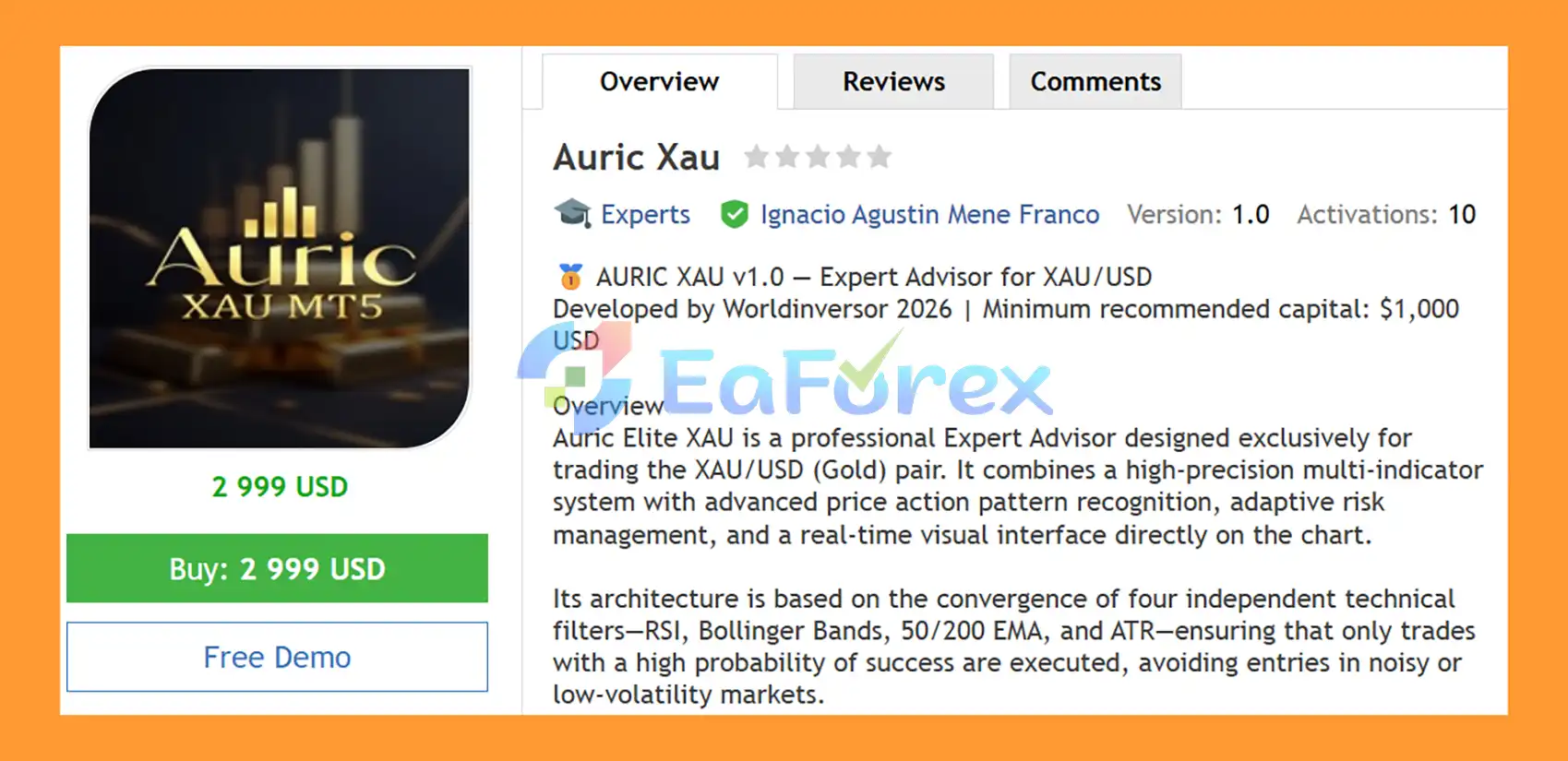
Auric XAU EA MT5 is a professional automated Gold trading Expert Advisor for MetaTrader 5, designed exclusively for XAU/USD. The EA combines multiple technical filters with automated Price Action recognition, adaptive position sizing, and real-time trade monitoring directly on the MT5 chart.
Its core architecture combines RSI, Bollinger Bands, EMA 50/200, and ATR to evaluate momentum, price location, trend direction, and market volatility. Additional confirmation comes from Engulfing Candles, Inside Bars, and Range Breakouts, providing another layer of market analysis before a trade is considered.
The EA also incorporates configurable Stop Loss and Take Profit, a minimum 1:3 Risk/Reward framework, Trailing Stop, Break Even, daily-loss protection, margin controls, spread filtering, and position limits.
About the Developer
- Author: Ignacio Agustin Mene Franco
- Experience: Over 3 years of experience on MQL5.
- Notable Products: Auric Xau EA MT5, Trader Gold EA MT5, Vwap Scalper XAU EA MT5, Alligator Gold Cyber EA MT5, Merket Structure Pro EA MT5, Harmonic Pro AI EA MT5, Volumen Scalper GOLD EA MT5, Storm Trader EA MT5, Ichimoku Scalper Gold EA MT4, Level Hard Xauusd, Danesha Xauusd, Power Fusion Xauusd, Level Slow Xauusd EA MT4 and other advisors.
- Flagship Product: Auric Xau EA MT5 is rated as the best performing product of the year.
>> Delivery time 24h-48h after payment.
>>> Refund if not delivered.
>>> You will receive the latest version without any limitations (ID+Time).>>Reviewed by Jason Stap <<
Key Features of Auric Xau EA MT5
RSI + Bollinger Bands Main Signal
The primary setup combines RSI with Bollinger Bands to identify potential reversal areas.
For Buy conditions:
- RSI is at or below 30
- Price touches or moves through the lower Bollinger Band
- Other required filters must confirm the setup
For Sell conditions:
- RSI is at or above 70
- Price touches or moves through the upper Bollinger Band
- Other required filters must confirm the setup
This combination is designed to identify situations where price reaches an extreme area while momentum conditions may support a potential reversal.
EMA 50/200 Trend Filter
The 50-period and 200-period Exponential Moving Averages provide the primary directional filter.
- EMA 50 > EMA 200: Bullish trend condition, allowing Buy setups
- EMA 50 < EMA 200: Bearish trend condition, allowing Sell setups
This filter is designed to prevent the EA from taking reversal signals against the broader directional condition defined by the moving averages.
ATR Volatility Filter
The Average True Range (ATR) is used to evaluate market volatility.
Auric XAU EA MT5 compares current ATR conditions with a longer-term average based on 50 periods.
The purpose is to avoid initiating trades when volatility is considered too low or market activity is insufficient for the selected strategy.
Automated Price Action Recognition
In addition to indicator-based confirmation, the EA recognizes three Price Action structures:
- Engulfing Candles
- Inside Bars
- Range Breakouts
These patterns are further validated against the EMA trend filter to maintain directional alignment.
How Does Auric XAU EA MT5 Work?
The EA follows a multi-stage confirmation process before opening a trade.
Step 1 – Analyze RSI Conditions
The EA checks whether RSI has reached the configured oversold or overbought area.
- RSI ≤ 30 → potential Buy condition
- RSI ≥ 70 → potential Sell condition
Step 2 – Check Bollinger Band Position
The EA evaluates the current price relative to the Bollinger Bands.
A Buy setup requires price interaction with the lower band, while a Sell setup requires interaction with the upper band.
Step 3 – Confirm the Major Trend
The EMA 50/200 filter determines the dominant directional condition.
The EA only considers Buy setups when EMA 50 is above EMA 200 and Sell setups when EMA 50 is below EMA 200.
Step 4 – Evaluate Volatility
ATR conditions are checked against the longer-term volatility reference.
If the market does not satisfy the required volatility condition, the setup can be rejected.
Step 5 – Evaluate Price Action
The EA can identify Engulfing Candles, Inside Bars, and Range Breakouts as additional market information.
These patterns are evaluated together with the EMA trend condition.
Step 6 – Apply Risk and Trading Filters
Before execution, the EA applies its account and trading restrictions, including:
- Maximum daily loss
- Maximum open positions
- Maximum total volume
- Maximum margin usage
- Minimum free margin
- Maximum spread
- Stop Loss / Take Profit
- Minimum Risk/Reward
Step 7 – Execute and Manage the Trade
When the configured conditions are satisfied, the EA opens a position and automatically manages it using Stop Loss, Take Profit, Trailing Stop, and Break Even rules.
Why Choose Auric XAU EA MT5?
Auric XAU EA MT5 brings several complementary technical concepts together into one automated Gold trading system.
Key characteristics include:
- Designed exclusively for XAU/USD
- RSI-based momentum conditions
- Bollinger Band price-location filter
- EMA 50/200 major trend filter
- ATR volatility analysis
- Engulfing Candle recognition
- Inside Bar detection
- Range Breakout detection
- Trend-aligned Price Action validation
- Fixed Lot position sizing
- Fixed percentage of Balance
- Dynamic percentage of Equity
- Daily-loss protection
- Maximum position control
- Maximum total-volume protection
- Margin usage control
- Minimum free-margin requirement
- Spread protection
- Automatic Stop Loss and Take Profit
- Minimum 1:3 Risk/Reward framework
- Automatic Trailing Stop
- Automatic Break Even
- Real-time trading dashboard
- Configurable Magic Number
Auric Xau EA MT5 Backtest Results
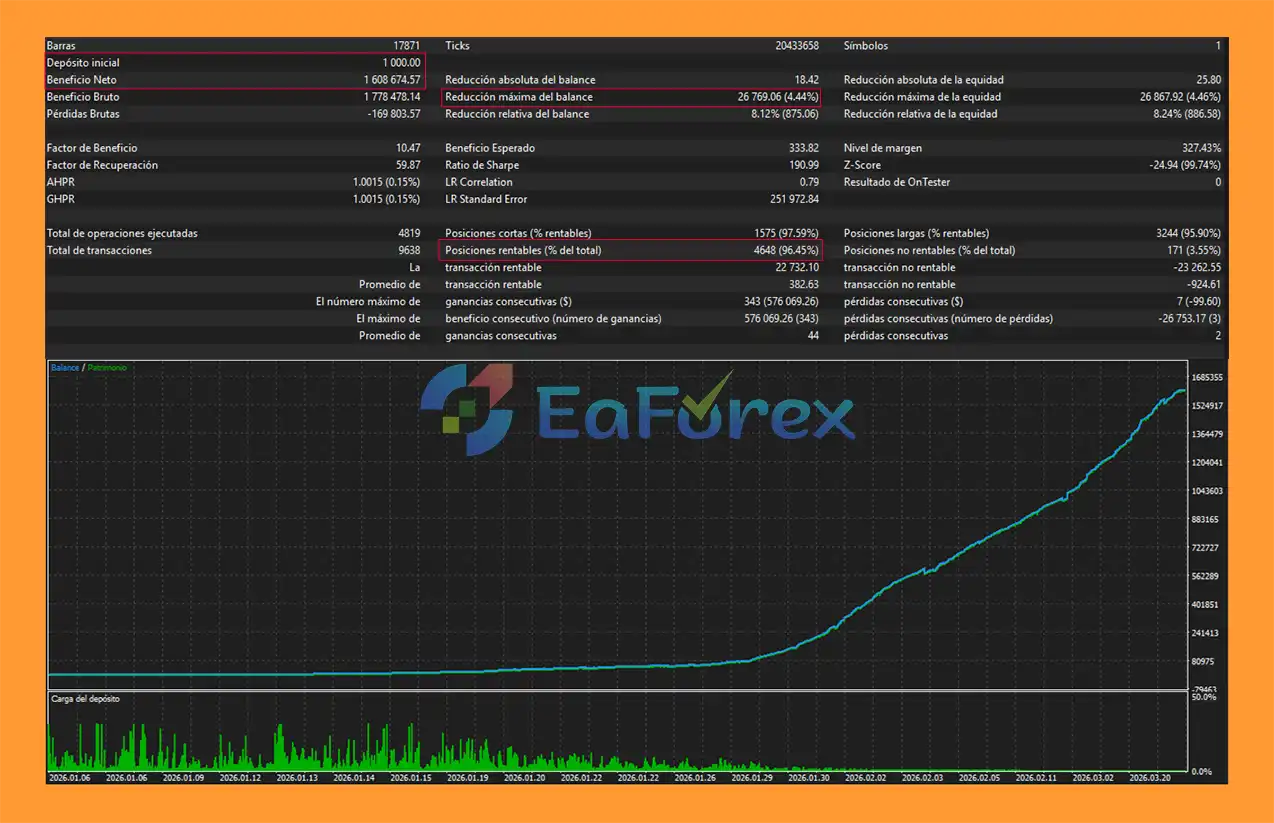
🔺Gold (XAUUSD) – over many years
- Initial Deposit: $1.000
- Total Net Profit: $1.608 Million
- Win Rate (% of total): 96,45%
- Maximum Drawdown: 4,44%
Performance and Risk Management
Risk management is an important component of Auric XAU EA MT5.
The EA supports three position-sizing modes.
Fixed Lot
The trader can define a constant position size.
The supplied default is 0.20 lot, although users can adjust the setting according to their account and risk requirements.
Fixed Percentage of Balance
The EA can calculate position size based on a selected percentage of account balance.
The supplied default is 1% per trade.
Dynamic Percentage of Equity
Position sizing can instead be calculated using current account equity, allowing the lot size to respond dynamically as equity changes.
Maximum Daily Loss
The EA includes a configurable daily-loss limit.
The supplied default is 10%.
When the configured threshold is reached, the EA can restrict further trading according to its protection logic.
Maximum Open Positions
The system limits simultaneous positions to a configured maximum.
The supplied default is 5 positions.
Maximum Total Volume
Total open volume can be limited to a maximum of 5 lots by default.
Margin Protection
The EA monitors account margin conditions using:
- Maximum margin usage: 30%
- Minimum free margin: 50%
These controls are intended to prevent new positions when account resources fall outside the configured limits.
Stop Loss and Take Profit
Auric XAU EA MT5 uses configurable Stop Loss and Take Profit levels with a minimum Risk/Reward framework.
The supplied default configuration is:
- Stop Loss: 20 pips
- Take Profit: 60 pips
- Risk/Reward: 1:3
The actual minimum Stop Loss distance can also be affected by the broker's symbol specifications and minimum stop-level requirements.
Open Trade Protection
Trailing Stop
The Trailing Stop activates after a position reaches 8 pips of profit and can adjust the protective Stop Loss in 4-pip increments.
This is designed to progressively protect an open position while allowing some room for normal price movement.
Break Even
The Break Even function activates after the trade reaches 10 pips of profit.
The EA can then move the Stop Loss toward the entry price according to its configured protection logic.
These features can help manage open positions automatically, but they cannot guarantee that a profitable trade will remain profitable or that the exact requested Stop Loss level will be executed during fast markets.
Real-Time Visual Dashboard
Auric XAU EA MT5 includes an integrated dashboard directly on the MetaTrader 5 chart.
The visual panel provides real-time information including:
- Account Balance
- Current Equity
- Open P/L
- Daily P/L
- Number of Trades
- Win Rate
- Current Drawdown
- Color-coded drawdown alerts
- RSI Status
- Oversold / Neutral / Overbought condition
- Current price position relative to Bollinger Bands
- EMA trend direction
- Bullish / Bearish status
This allows traders to monitor both account conditions and the EA's current market analysis without leaving the chart.
Technical Specifications
| Parameter | Value |
|---|---|
| Platform | MetaTrader 5 |
| Recommended Pair | XAU/USD (Gold) |
| Recommended Timeframe | M15 / H1 |
| Minimum Recommended Capital | $1,000 USD |
| Account Type | Standard / ECN |
| Minimum Lot Size | 0.01 |
| Default Fixed Lot | 0.20 |
| Default Risk | 1% per trade |
| Maximum Allowed Spread | 50 pips |
| Maximum Open Positions | 5 |
| Maximum Total Volume | 5 lots |
| Maximum Margin Usage | 30% |
| Minimum Free Margin | 50% |
| Default Stop Loss | 20 pips |
| Default Take Profit | 60 pips |
| Default Risk/Reward | 1:3 |
| Trailing Start | 8 pips |
| Trailing Step | 4 pips |
| Break Even Trigger | 10 pips |
| Magic Number | 999888, configurable |
Recommended Trading Environment
The supplied specifications recommend:
- Symbol: XAU/USD
- Timeframes: M15 / H1
- Account: Standard or ECN
- Suggested minimum capital: $1,000
- Maximum spread: 50 pips
For automated Gold trading, traders should consider brokers offering competitive spreads, stable execution, appropriate contract specifications, and sufficient available margin.
Broker conditions can vary over time, so spreads, commissions, leverage, execution quality, and account requirements should be verified before live deployment.
Weaknesses and Risk Warnings
Auric XAU EA MT5 uses multiple technical filters, but no combination of indicators can eliminate trading risk.
- RSI oversold or overbought conditions do not guarantee a price reversal.
- Bollinger Band touches can occur repeatedly during strong trends.
- EMA 50/200 signals can lag rapid market changes.
- ATR measures volatility rather than predicting price direction.
- Price Action patterns can produce false signals.
- Range breakouts can fail and reverse quickly.
- A multi-filter strategy may reduce the number of available trading opportunities.
- XAU/USD can experience significant volatility during economic news and major market events.
- Fixed-lot trading does not automatically adjust exposure when account equity changes.
- Dynamic risk calculations depend on broker contract specifications and execution conditions.
- Spread protection cannot eliminate slippage or execution delays.
- Stop Loss does not guarantee the exact execution price during extreme volatility.
- Multiple simultaneous positions can increase total account exposure.
- The $1,000 suggested capital level is a guideline, not a guarantee of sufficient risk capacity.
- Historical backtests or simulated results do not guarantee future live performance.
- Demo and forward testing are recommended before using the EA with real funds.
Pros and Cons
| Pros | Cons |
|---|---|
| Designed specifically for XAU/USD | Gold can experience sharp volatility |
| RSI + Bollinger Band signal | Reversal signals can fail during strong trends |
| EMA 50/200 trend filter | Moving averages can lag market changes |
| ATR volatility filter | ATR does not predict market direction |
| Automated Price Action recognition | Candlestick patterns can produce false signals |
| Multiple risk modes | Dynamic sizing depends on broker specifications |
| Daily-loss protection | Protection limits cannot eliminate market risk |
| Trailing Stop and Break Even | Tight protection can exit during retracements |
| 1:3 default Risk/Reward framework | Fixed targets may not adapt to all market conditions |
| Real-time visual dashboard | Requires proper testing and configuration |
How to Install Auric XAU EA MT5
- Download the Auric XAU EA MT5 file.
- Open MetaTrader 5.
- Select File → Open Data Folder.
- Navigate to MQL5 → Experts.
- Copy the EA file into the Experts folder.
- Restart MetaTrader 5 or refresh the Navigator panel.
- Open an XAU/USD chart.
- Select M15 or H1.
- Attach Auric XAU EA MT5 to the chart.
- Enable Algo Trading.
- Select the desired Fixed Lot, Balance Percentage, or Dynamic Equity risk mode.
- Configure RSI, Bollinger Bands, EMA, ATR, Stop Loss, Take Profit, and risk-management parameters.
- Review the maximum spread, position, volume, and margin settings.
- Test the EA using the MT5 Strategy Tester and a demo account before considering live deployment.
What’s Included in the Download Package?
- Setting (If Any).docx
- Installation Guide.docx
Final Thoughts
In summary, Auric XAU EA MT5 combines RSI, Bollinger Bands, EMA 50/200, ATR, and Price Action recognition into a multi-filter automated trading system designed specifically for XAU/USD. Its architecture evaluates momentum, price location, trend direction, and volatility before allowing a potential trade.
The EA also provides flexible position sizing, daily-loss protection, margin controls, a 1:3 default Risk/Reward framework, Trailing Stop, Break Even, and a real-time dashboard. As with any automated Gold strategy, traders should evaluate the interaction between its filters, position limits, and market volatility through realistic backtesting and forward testing before deploying it on a live account.



