


Product Overview
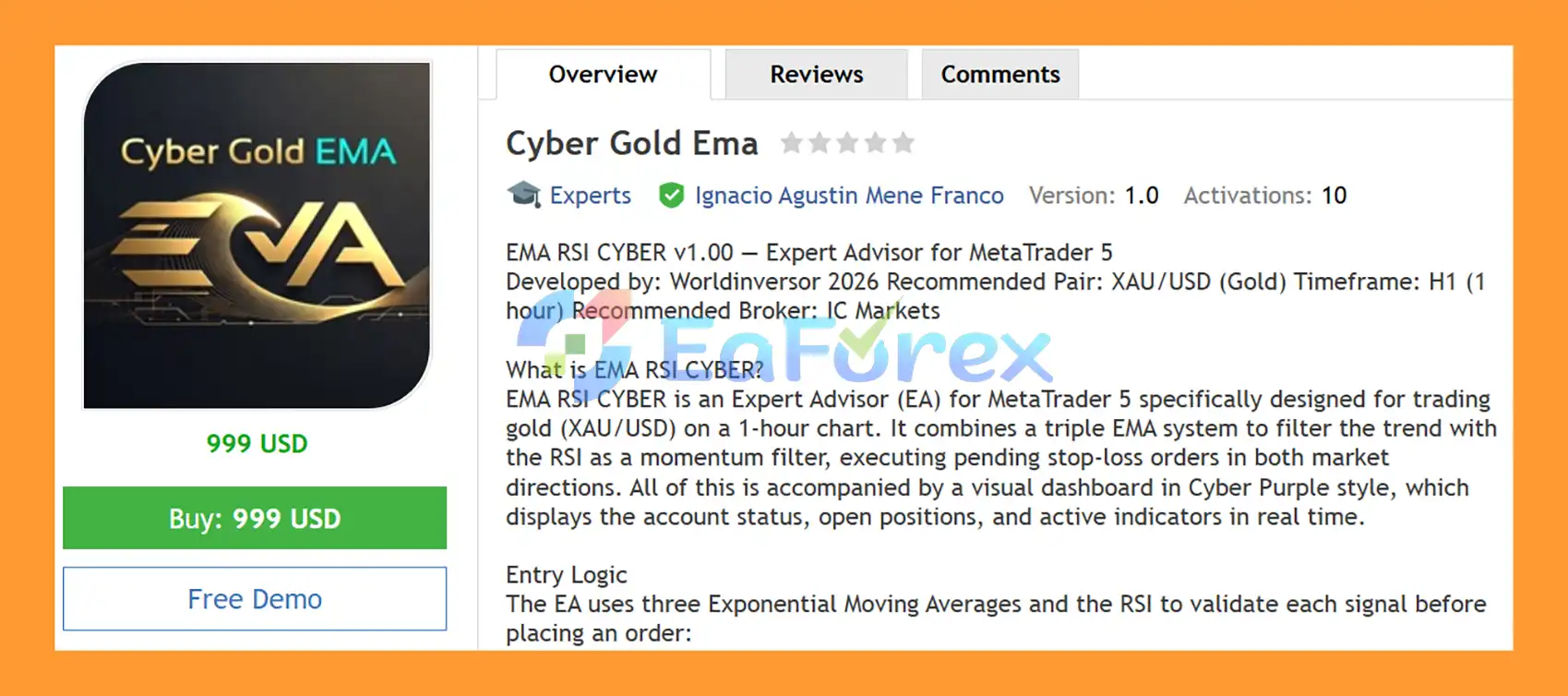
Cyber Gold EMA EA MT5 is an automated Gold trading Expert Advisor designed specifically for XAU/USD on the H1 timeframe. The EA combines a triple Exponential Moving Average (EMA) system with an RSI momentum filter to identify potential directional setups before placing pending Stop orders.
The strategy uses three EMAs with different roles. The 21 EMA acts as the fast entry trend indicator, the 50 EMA provides slower trend confirmation, and the 200 EMA defines the broader market direction. RSI is then used as an additional momentum filter to avoid buying when the market is already in an overbought condition or selling when it is deeply oversold.
Rather than entering immediately at market, Cyber Gold Ema EA MT5 places Buy Stop and Sell Stop pending orders at a configurable Delta distance from the current price. This approach is designed to require additional price movement before an order becomes active.
The EA also includes fixed or percentage-based money management, free-margin verification, Stop Loss, automatic profit closing, dynamic and aggressive trailing, break-even protection, spread and trading-time filters, and a real-time Cyber Purple dashboard.
About the Developer
- Author: Ignacio Agustin Mene Franco
- Experience: Over 3 years of experience on MQL5.
- Notable Products: Cyber Gold Ema EA MT5, Trader Gold EA MT5, Vwap Scalper XAU EA MT5, Alligator Gold Cyber EA MT5, Merket Structure Pro EA MT5, Harmonic Pro AI EA MT5, Volumen Scalper GOLD EA MT5, Storm Trader EA MT5, Ichimoku Scalper Gold EA MT4, Level Hard Xauusd, Danesha Xauusd, Power Fusion Xauusd, Level Slow Xauusd EA MT4 and other advisors.
- Flagship Product: Cyber Gold Ema EA MT5 is rated as the best performing product of the year.
>> Delivery time 24h-48h after payment.
>>> Refund if not delivered.
>>> You will receive the latest version without any limitations (ID+Time).>>Reviewed by Jason Stap <<
Key Features of Cyber Gold Ema EA MT5
Triple EMA Trend System
Cyber Gold Ema EA MT5 uses three Exponential Moving Averages:
- EMA 21 – Fast entry trend
- EMA 50 – Slow trend confirmation
- EMA 200 – Broader market direction
The relationship between these averages helps determine whether the market is displaying bullish, bearish, or neutral conditions.
RSI Momentum Filter
The Relative Strength Index (RSI) provides an additional momentum filter.
For Buy Stop conditions, RSI must remain below the configured overbought threshold of 65.
For Sell Stop conditions, RSI must remain above the configured oversold threshold of 35.
This prevents the EA from accepting certain setups when momentum has already reached an extreme zone.
Buy Stop Entry Logic
A Buy Stop setup is considered when:
- EMA 21 is above EMA 50.
- Current price is above EMA 200.
- RSI is below 65.
- The required trading filters are satisfied.
- The pending Buy Stop is placed at the configured Delta distance.
Sell Stop Entry Logic
A Sell Stop setup is considered when:
- EMA 21 is below EMA 50.
- Current price is below EMA 200.
- RSI is above 35.
- The required trading filters are satisfied.
- The pending Sell Stop is placed at the configured Delta distance.
Configurable Pending Order Distance
Pending orders are placed using an adjustable Delta distance from the current market price.
The EA also uses a Maximum Distance parameter to prevent pending-order placement when price has already moved too far from the intended entry area.
Flexible Money Management
Cyber Gold Ema EA MT5 provides two primary position-sizing modes:
Fixed Lot:
The default configuration uses 0.20 lots per trade, although this can be adjusted according to account size.
Percentage Risk:
The EA can calculate position size according to a selected percentage of account balance and the configured Stop Loss.
Free Margin Verification
Before placing an order, the EA checks available free margin.
If available margin is insufficient for the calculated position size, the system can reduce the lot size to fit the available margin within the configured trading conditions.
Fixed Stop Loss
Each trade can use a configurable Stop Loss.
The default value is 20 pips, providing a predefined loss boundary for individual positions.
Automatic Profit Close
The EA can automatically close positions after reaching the configured profit target.
The default Profit Target is 15 pips, suitable for the system's short-term position-management approach.
Dynamic Trailing Stop
The trailing system activates after a trade reaches the configured profit level.
Default settings include:
- Trailing Start: 5 pips
- Trailing Step: 2 pips
The Stop Loss can then progressively follow the market as the position moves into profit.
Aggressive Trailing Mode
Cyber Gold Ema EA MT5 also includes an aggressive trailing approach designed to tighten protection as a trade develops.
The supplied configuration references progressive trailing distances of 10, 15, and 20 pips, allowing profits to be protected more actively during favorable price movement.
Automatic Break-Even
When a position reaches more than 30 pips of profit, the EA can move the Stop Loss toward the entry price.
This is designed to remove the original trade risk after sufficient favorable movement.
Spread Filter
The EA blocks new trading activity when the spread exceeds the configured maximum.
The default maximum spread is 30 pips.
Trading-Time Filter
Cyber Gold Ema EA MT5 can operate within a defined server-time window.
The default trading period is:
01:00 AM – 11:00 PM server time
This provides a configurable way to restrict trading during selected periods.
Maximum Pending Orders
The EA supports up to 5 simultaneous pending orders per direction, helping control the number of Buy Stop and Sell Stop orders maintained in the market.
Cyber Purple Dashboard
The visual dashboard uses a Cyber Purple / neon-style interface and provides real-time information about the account and trading environment.
The dashboard can display:
- Balance
- Equity
- Free Margin
- Drawdown
- Open positions
- Pending Buy orders
- Pending Sell orders
- Total P&L in USD
- P&L in pips
- EMA 21
- EMA 50
- EMA 200
- Overall trend status
- RSI value
- RSI zone
- Current spread
- Server time
How Does Cyber Gold EMA EA MT5 Work?
Step 1 – Analyze the Three EMAs
The EA first evaluates EMA 21, EMA 50, and EMA 200 to establish the current directional structure.
A bullish configuration requires EMA 21 to be above EMA 50 and price to remain above EMA 200.
A bearish configuration requires EMA 21 to be below EMA 50 and price to remain below EMA 200.
Step 2 – Confirm RSI Conditions
RSI provides a momentum filter.
For Buy setups, RSI must remain below the 65 overbought threshold.
For Sell setups, RSI must remain above the 35 oversold threshold.
Step 3 – Check Trading Conditions
Before placing a pending order, the EA checks its operational filters, including:
- Maximum spread
- Trading hours
- Maximum pending orders
- Maximum distance
- Available free margin
Step 4 – Place a Pending Stop Order
If the conditions are aligned, the EA places a Buy Stop or Sell Stop at the configured Delta distance from the current price.
This allows the market to provide additional directional movement before the order is activated.
Step 5 – Verify Position Size
The EA calculates the lot size according to the selected money-management mode.
When Percentage Risk is selected, the lot size is calculated using the configured risk percentage and Stop Loss.
The system also checks free margin before order placement.
Step 6 – Manage the Active Trade
After a pending order becomes a live position, the EA applies:
- Stop Loss
- Profit Target
- Dynamic Trailing
- Aggressive Trailing
- Break-Even protection
Step 7 – Monitor the Account
The Cyber Purple dashboard continuously displays the account, indicator, position, and market information so traders can monitor the EA directly from the chart.
Why Choose Cyber Gold EMA EA MT5?
Cyber Gold Ema EA MT5 is designed for traders looking for a structured XAUUSD H1 trend-following EA based on multiple EMA confirmations and RSI momentum filtering.
Key characteristics include:
- Designed specifically for XAUUSD
- H1 timeframe
- EMA 21/50/200 trend structure
- RSI 14 momentum filter
- Buy Stop and Sell Stop execution
- Configurable pending-order Delta
- Maximum pending-order control
- Maximum distance protection
- Fixed-lot money management
- Percentage-risk money management
- Free-margin verification
- Fixed Stop Loss
- Automatic profit closing
- Dynamic trailing
- Aggressive trailing mode
- Automatic break-even
- Spread protection
- Trading-hour filter
- Real-time Cyber Purple dashboard
The combination of multiple trend indicators and RSI allows the EA to evaluate more than one market condition before placing a pending order.
Cyber Gold Ema EA MT5 Backtest Results
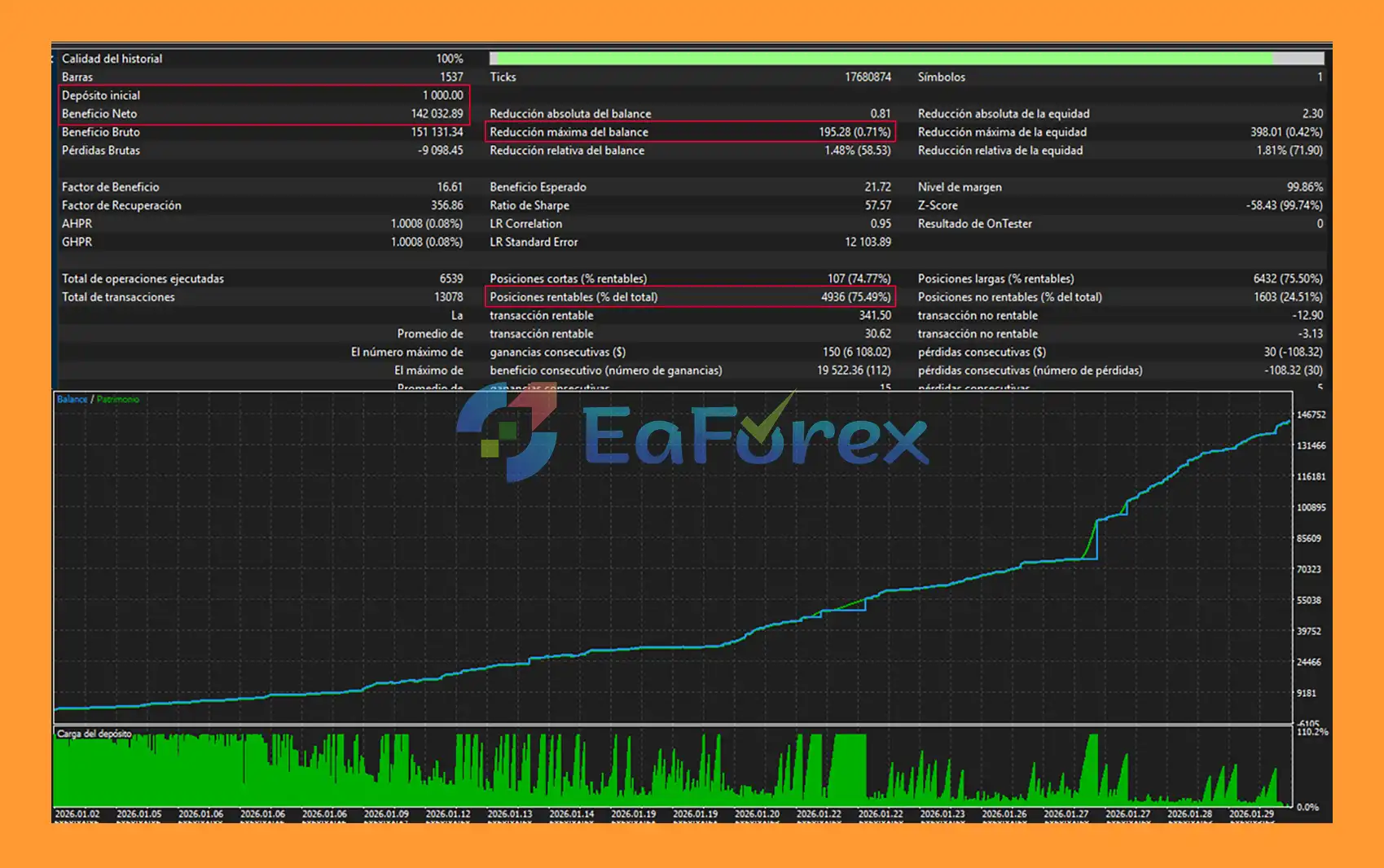
🔺Gold (XAUUSD) – over many years
- Initial Deposit: $1.000
- Total Net Profit: $142.032,89
- Win Rate (% of total): 75,49%
- Maximum Drawdown: 0,71%
Performance and Risk Management
Cyber Gold Ema EA MT5 includes several mechanisms designed to control position sizing and open-trade exposure.
Default Parameters
| Parameter | Default Value | Description |
|---|---|---|
| EMA Fast | 21 | Fast entry EMA |
| EMA Slow | 50 | Slow confirmation EMA |
| EMA Trend | 200 | General trend EMA |
| RSI Period | 14 | RSI calculation period |
| RSI Overbought | 65 | Buy momentum limit |
| RSI Oversold | 35 | Sell momentum limit |
| Stop Loss | 20 pips | Stop Loss per trade |
| Profit Target | 15 pips | Automatic profit close |
| Trailing Start | 5 pips | Trailing activation |
| Trailing Step | 2 pips | Trailing adjustment |
| Max Spread | 30 pips | Maximum permitted spread |
| Fixed Lot | 0.20 | Default position size |
| Max Pending Orders | 5/direction | Pending-order limit |
| Max Distance | 15 pips | Maximum pending distance |
The supplied specifications also recommend a 0.5% risk setting when percentage-based money management is used.
Actual position sizing should be adapted to account balance, leverage, broker contract specifications, spread, and acceptable overall exposure.
Recommended Trading Environment
| Setting | Recommendation |
|---|---|
| Platform | MetaTrader 5 |
| Symbol | XAUUSD |
| Timeframe | H1 |
| Strategy Type | Trend Following / Pending Stop |
| EMA Fast | 21 |
| EMA Slow | 50 |
| EMA Trend | 200 |
| RSI Period | 14 |
| RSI Levels | 65 / 35 |
| Stop Loss | 20 pips |
| Profit Target | 15 pips |
| Fixed Lot | 0.20 |
| Risk Example | 0.5% |
| Maximum Spread | 30 pips |
| Maximum Pending Orders | 5 per direction |
| Trading Hours | 01:00–23:00 server time |
| VPS | Recommended |
The specifications reference IC Markets as an example of a suitable low-spread XAUUSD trading environment. Actual spreads, commissions, execution quality, and liquidity depend on the broker, account type, and current market conditions.
Weaknesses and Risk Warnings
Trend Reversals
EMA-based systems are designed to identify directional conditions, but a trend can reverse quickly. A bullish EMA structure does not guarantee that price will continue higher.
RSI Limitations
RSI is a momentum filter rather than a standalone prediction tool. Gold can remain strongly directional while RSI stays near extreme levels for extended periods.
Pending-Order Execution
Buy Stop and Sell Stop orders may experience slippage during rapid XAUUSD movements, particularly around major economic announcements or periods of reduced liquidity.
Multiple Pending Orders
Allowing up to five pending orders per direction can increase potential exposure if several orders are triggered during a strong market movement. Traders should consider the combined exposure rather than evaluating only one position.
Low-Spread Requirement
Gold scalping and short-term trading can be sensitive to spread and commission costs. A broker's advertised spread does not necessarily represent the spread available at every moment.
Break-Even and Trailing
Trailing and break-even mechanisms can protect profits but may also close trades during temporary retracements before the broader trend resumes.
No Guaranteed Performance
Technical indicators and automated risk-management functions cannot eliminate market risk. Past backtests or favorable market conditions do not guarantee future profitability.
Demo testing and forward testing are recommended before live deployment.
Pros and Cons
| Pros | Cons |
|---|---|
| Designed specifically for XAUUSD | Focused on one instrument |
| H1 trend-following approach | May miss short-term opportunities |
| Triple EMA confirmation | Moving averages can lag reversals |
| RSI momentum filter | RSI can remain extreme during strong trends |
| Buy Stop and Sell Stop execution | Pending orders can experience slippage |
| Fixed or percentage-risk sizing | Requires proper account configuration |
| Free-margin verification | Cannot eliminate market risk |
| Fixed Stop Loss | Actual execution may differ under fast markets |
| Dynamic trailing | May exit during temporary retracements |
| Break-even protection | Protection activates only after sufficient movement |
| Spread and time filters | Does not prevent all unfavorable conditions |
| Cyber Purple real-time dashboard | Visual monitoring does not improve execution itself |
How to Install Cyber Gold EMA EA MT5
- Download the Cyber Gold EMA EA MT5 file.
- Open MetaTrader 5.
- Select File → Open Data Folder.
- Navigate to MQL5 → Experts.
- Copy the EA file into the Experts folder.
- Restart MT5 or refresh the Navigator window.
- Open an XAUUSD H1 chart.
- Attach Cyber Gold EMA EA MT5 to the chart.
- Enable Algo Trading.
- Select Fixed Lot or Percentage Risk mode.
- Configure EMA, RSI, Delta, Stop Loss, Profit Target, and trailing parameters.
- Set the maximum spread, trading hours, and pending-order limits.
- Check the Cyber Purple dashboard.
- Run a backtest and forward test on a demo account before live trading.
What’s Included in the Download Package?
- Setting (If Any).docx
- Installation Guide.docx
Final Thoughts
In summary, Cyber Gold EMA EA MT5 is an automated XAUUSD Gold trading Expert Advisor for MetaTrader 5 that uses a structured trend-following approach on the H1 timeframe. Its core strategy combines the EMA 21, EMA 50, and EMA 200 with an RSI momentum filter before placing Buy Stop or Sell Stop pending orders.
The triple-EMA structure provides multiple layers of trend confirmation, while RSI helps filter potential entries when momentum reaches predefined overbought or oversold conditions. Instead of entering directly at market, the EA uses configurable pending-order distances, allowing price to move further in the anticipated direction before activating a trade.
From a trade-management perspective, Cyber Gold EMA EA MT5 includes fixed or percentage-based position sizing, free-margin verification, Stop Loss, automatic profit closing, dynamic trailing, aggressive trailing, break-even protection, spread filtering, trading-hour controls, and pending-order limits. The Cyber Purple dashboard also provides real-time information about the account, EMA structure, RSI, pending orders, open positions, drawdown, and market conditions.
The supplied historical backtest reports $142,032.89 in net profit, a 75.49% win rate, and 0.71% maximum drawdown from a $1,000 initial deposit. These figures are historical testing results and should not be interpreted as a guarantee of future performance. Actual live results may vary due to market volatility, broker conditions, spreads, commissions, slippage, liquidity, execution speed, and parameter settings.
Overall, Cyber Gold EMA EA MT5 provides a systematic framework for automated H1 Gold trading by combining multi-EMA trend analysis, RSI confirmation, pending Stop orders, and structured risk-management tools. As with any automated trading system, traders should carefully evaluate position sizing and total exposure, perform thorough backtesting, and conduct demo forward testing under their intended broker conditions before considering live deployment.



