


Product Overview
Neural Ma AI EA MT5 is an advanced AI-powered Expert Advisor for MetaTrader 5, specifically designed for automated trading on XAU/USD (Gold) using the M5 timeframe. The system combines two proprietary artificial intelligence engines to analyze market direction and identify potential high-probability trading opportunities.
The core technology consists of the Neural MA Ensemble AI and RSI Machine Learning Predict AI. These two analytical engines evaluate price structure, moving-average behavior, momentum, RSI dynamics, divergence, projections, and multi-RSI alignment before generating a trading signal.
Instead of entering directly at the current market price, Neural Ma AI EA MT5 primarily uses Buy Stop and Sell Stop pending orders. This approach requires price to confirm the anticipated direction through a breakout before the entry is activated.
The EA recalculates its main trading signal once per new M5 candle, helping reduce unnecessary calculations while maintaining a structured signal-generation process.
Designed specifically for XAU/USD, the system combines AI-based market analysis with automated execution, trailing-stop management, break-even protection, spread filtering, margin verification, and configurable position sizing.
About the Developer
- Author: Ignacio Agustin Mene Franco
- Experience: Over 3 years of experience on MQL5.
- Notable Products: Neural Ma AI EA MT5, Trader Gold EA MT5, Vwap Scalper XAU EA MT5, Alligator Gold Cyber EA MT5, Merket Structure Pro EA MT5, Harmonic Pro AI EA MT5, Volumen Scalper GOLD EA MT5, Storm Trader EA MT5, Ichimoku Scalper Gold EA MT4, Level Hard Xauusd, Danesha Xauusd, Power Fusion Xauusd, Level Slow Xauusd EA MT4 and other advisors.
- Flagship Product: Neural Ma AI EA MT5 is rated as the best performing product of the year.
>> Delivery time 24h-48h after payment.
>>> Refund if not delivered.
>>> You will receive the latest version without any limitations (ID+Time).>>Reviewed by Jason Stap <<

Key Features of Neural Ma AI EA MT5
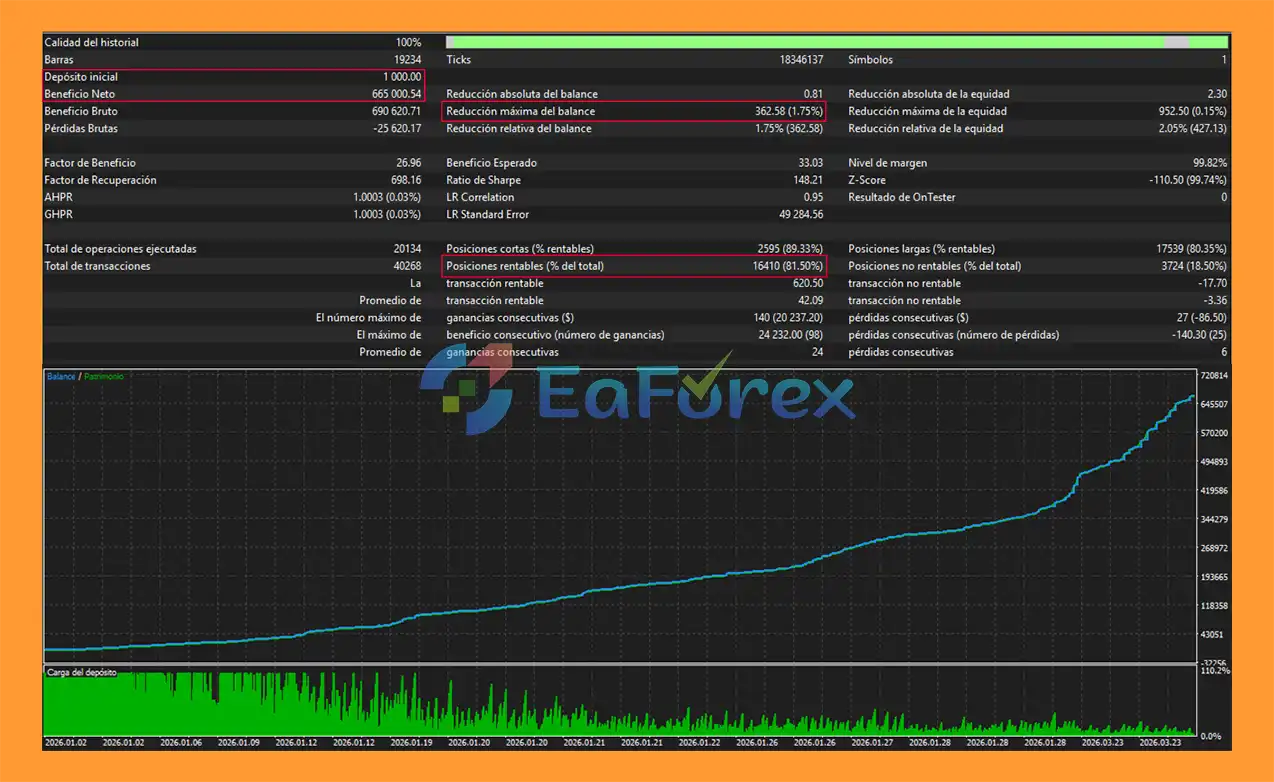
Neural Ma AI EA MT5 Backtest Results
🔺Gold (XAUUSD) – over many years
- Initial Deposit: $1.000
- Total Net Profit: $665.000,54
- Win Rate (% of total):81,50%
- Maximum Drawdown: 1,75%
Performance and Risk Management
Neural Ma AI EA MT5 incorporates several configurable controls designed to manage exposure during automated Gold trading.
Stop Loss
The default Stop Loss is 20 pips per trade. This parameter can be adjusted according to the user's risk settings and trading environment.
Automatic Profit Target
The EA can automatically close a position when the configured profit target is reached.
The default profit target is 15 pips.
Dynamic Trailing Stop
The trailing system progressively adjusts protection as a trade moves into profit.
- Trailing Activation: 5 pips.
- Trailing Step: 2 pips.
- Additional aggressive trailing adjustments occur around 10, 15, and 20 pips of profit.
- Break Even: activated at 30 pips of profit by default.
The aggressive trailing mechanism reduces the effective trailing step as profit increases, allowing the EA to tighten position protection progressively.
Spread Filter
The maximum permitted spread is set to 30 pips by default.
When the spread exceeds the configured threshold, the EA can prevent new trading activity.
This is particularly relevant to XAU/USD because Gold spreads can change significantly depending on market liquidity, broker conditions, trading sessions, and volatility.
Pending Order Limit
The EA supports a maximum of 5 simultaneous pending orders, helping control the number of untriggered entries in the market.
Position Sizing
Users can select between two position-sizing methods:
Fixed Lot:
The default example is 0.20 lots, with the ability to manually adjust the value.
Percentage Risk:
The EA can calculate position size based on a specified percentage of account capital. The default example is 0.5% risk per trade when this mode is selected.
Margin Verification
Before sending a new order, the EA checks available margin. If the account does not have sufficient available margin, the order is not opened.
Trading Session
The default trading session is:
01:00 – 23:00 server time
The trading schedule can be adjusted according to the user's requirements and broker server time.
Technical Requirements
| Specification | Details |
|---|---|
| Platform | MetaTrader 5 |
| Recommended Symbol | XAU/USD (Spot Gold) |
| Recommended Timeframe | M5 |
| Minimum Recommended Capital | $1,000 USD |
| Recommended Broker | IC Markets |
| Account Type | RAW Spread / ECN |
| Suggested Leverage | 1:100 or higher |
| Default Stop Loss | 20 pips |
| Default Profit Target | 15 pips |
| Maximum Spread | 30 pips |
| Maximum Pending Orders | 5 |
The supplied configuration recommends IC Markets because the EA is designed for short-term XAU/USD trading on M5 and therefore can be sensitive to spread, execution quality, and latency.
Actual spreads, execution conditions, and trading costs can vary over time and by account type. Traders should verify current broker conditions directly with the broker before using the EA on a live account.
Weaknesses and Risk Warnings
Although Neural Ma AI EA MT5 uses AI-style analytical models and multiple confirmation layers, it does not guarantee profitable trading results.
The EA is specifically optimized for XAU/USD on M5, so performance and behavior may differ significantly when used with other symbols or timeframes.
M5 Gold trading can be highly sensitive to:
- Spread expansion.
- Slippage.
- Market volatility.
- Execution latency.
- News events.
- Liquidity conditions.
- Broker execution policies.
The use of pending orders does not eliminate false breakouts. A Buy Stop or Sell Stop can still be triggered during a temporary price movement that subsequently reverses.
The maximum of five pending orders can also result in increased exposure when several setups are activated during a fast-moving market.
AI and machine-learning-style calculations are based on historical market information and predefined mathematical features. They cannot predict unexpected market events or guarantee the future behavior of XAU/USD.
The recommended $1,000 minimum capital, 0.20 fixed lot, 0.5% risk setting, 1:100 leverage, and other parameters should be treated as configuration references rather than guarantees of a specific risk level.
Always backtest and forward-test the EA on a demo account before using it with real money. Use conservative risk settings and never trade with capital you cannot afford to lose.
Pros and Cons
Pros
- Specifically designed for XAU/USD M5 trading.
- Combines two AI-style analytical engines.
- Uses multiple moving-average structures.
- Incorporates momentum and trend confirmation.
- Includes RSI slope, divergence, projection, and multi-RSI analysis.
- Supports dual AI confirmation.
- Uses pending Stop orders for breakout-based execution.
- Signal processing is recalculated once per new bar.
- Includes automatic profit closure.
- Dynamic and aggressive trailing-stop management.
- Break-even protection.
- Configurable spread filter.
- Maximum pending-order control.
- Fixed-lot and percentage-risk position sizing.
- Automatic margin verification.
- Configurable trading session.
- Suitable for MT5 RAW Spread / ECN-style trading environments.
Cons
- Primarily designed for XAU/USD, limiting its intended market scope.
- Specifically optimized for the M5 timeframe, which can involve significant short-term market noise.
- Gold trading can experience rapid volatility and spread expansion.
- Pending Stop orders remain exposed to false breakouts and slippage.
- Multiple pending orders can increase overall market exposure.
- AI-style models cannot predict unexpected economic or geopolitical events.
- Broker execution conditions can materially affect live trading results.
- Default settings may not be suitable for every account size or broker.
- There is no guarantee that historical or backtested performance will be repeated in live markets.
How to Install Neural Ma AI EA MT5
Step 1: Open MetaTrader 5
Launch MetaTrader 5 and log in to your trading account.
Step 2: Open the MT5 Data Folder
Go to:
File → Open Data Folder
Then open:
MQL5 → Experts
Step 3: Copy the EA File
Copy the Neural Ma AI EA MT5 .ex5 file into the Experts folder.
If you receive additional files such as .set, indicator, library, or configuration files, place them in their corresponding MT5 folders according to the supplied installation instructions.
Step 4: Restart MetaTrader 5
Restart MetaTrader 5 or refresh the Expert Advisors section in the Navigator window.
Step 5: Open the XAU/USD M5 Chart
Open your broker's XAU/USD or equivalent Gold symbol and select the M5 timeframe.
Step 6: Attach the EA
Navigate to:
Navigator → Expert Advisors
Find Neural Ma AI EA MT5 and drag it onto the XAU/USD M5 chart.
Step 7: Configure the Settings
Review the EA parameters and adjust settings such as:
- Fixed Lot
- Risk Percent
- Stop Loss
- Profit Target
- Trailing Start
- Trailing Step
- Break-Even
- Maximum Spread
- Maximum Pending Orders
- Trading Start/End Time
- DeMarker/AI-related parameters
- Moving-average settings
- RSI prediction parameters
Step 8: Enable Algo Trading
Make sure Algo Trading is enabled in MetaTrader 5 and verify that automated trading permissions are active for the EA.
Step 9: Test Before Live Trading
Run the EA through the MT5 Strategy Tester and then forward-test it on a demo account. Check its behavior under different Gold volatility, spread, and execution conditions before considering live deployment.
Important: Broker specifications such as Gold contract size, pip/point definition, minimum stop distance, spread, leverage, and margin requirements can vary. Always verify these conditions with your broker and adjust the EA parameters accordingly.
What’s Included in the Download Package?
- Setting (If Any).docx
- Installation Guide.docx
Final Thoughts
In summary, Neural Ma AI EA MT5 is a specialized AI-powered Expert Advisor for XAU/USD on the M5 timeframe, combining Neural MA Ensemble analysis with RSI Machine Learning Predict AI to generate multi-layered trading signals. Its dual-confirmation approach, pending breakout entries, dynamic trailing stop, break-even protection, spread filtering, margin verification, and flexible position sizing create a structured framework for automated Gold trading.
The reported backtest results of $665,000.54 net profit, an 81.50% win rate, and 1.75% maximum drawdown are historical test results and should not be interpreted as a guarantee of future live-market performance. Because M5 Gold trading can be highly sensitive to volatility, spreads, slippage, liquidity, and execution quality, traders should thoroughly backtest and forward-test the EA on a demo account before considering live use. Appropriate risk settings and broker conditions should also be carefully evaluated.
For traders seeking an automated XAU/USD M5 trading EA with AI-style market analysis, Neural Ma AI EA MT5 provides a feature-rich combination of signal analysis and automated trade management while retaining the importance of proper risk control and realistic performance expectations.



