









-
 Unlimited Activations
-
 Instant delivery
-
 Easy to install




 Unlimited Activations
Instant delivery
Easy to install
Unlimited Activations
Instant delivery
Easy to install
 Free Update
 Free Install Support

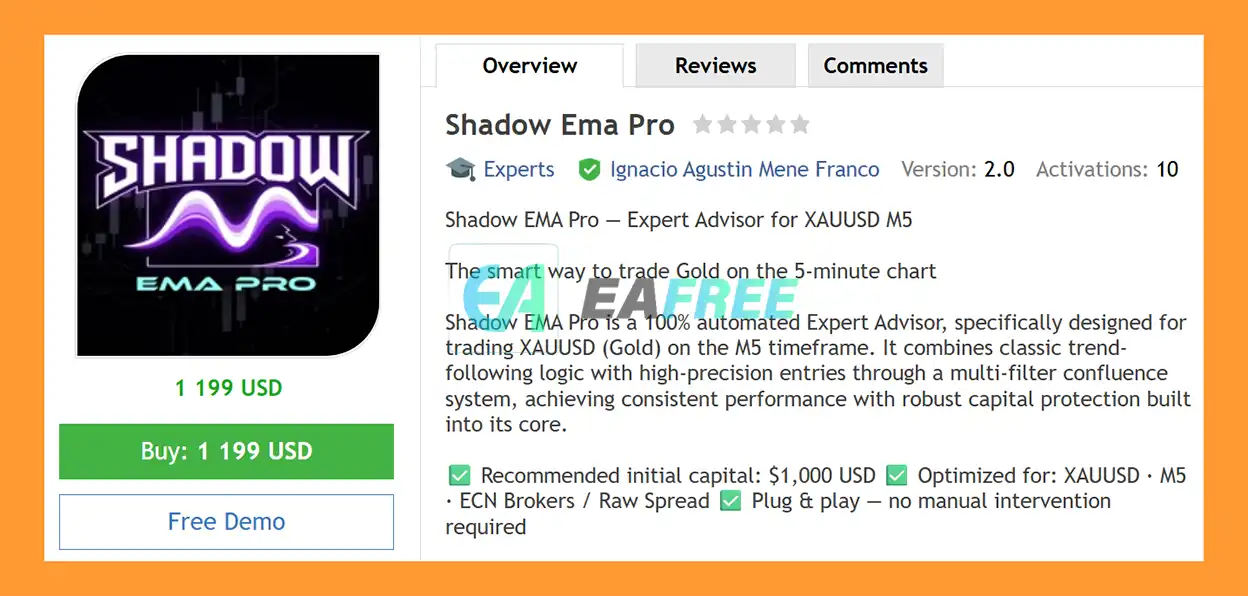
Shadow EMA Pro EA MT5 is a fully automated Expert Advisor for MetaTrader 5, specifically designed for trading XAUUSD (Gold) on the M5 timeframe. The system combines EMA pullback entries, MACD momentum confirmation, dual EMA trend filtering, and price action patterns to identify potential trading opportunities in the direction of the prevailing market trend.
The core strategy is based on EMA pullback trading. Instead of entering every market movement, the EA waits for price to retrace toward a dynamic EMA level and then evaluates additional confirmation conditions before opening a position.
Shadow EMA Pro uses a multi-filter confluence system that can combine MACD, EMA trend direction, candlestick structure, and configurable entry conditions. The MinFiltersToPass parameter allows traders to determine how many required filters must agree before a trade can be authorized.
The EA also includes automated Stop Loss, Take Profit, trailing stop, break-even, daily loss protection, position limits, margin controls, and dynamic position sizing.
The recommended initial capital is $1,000, with the system optimized for XAUUSD M5 and ECN/Raw Spread broker environments.
>> Delivery time 24h-48h after payment.
>>> Refund if not delivered.
>>> You will receive the latest version without any limitations (ID+Time).>>Reviewed by Jason Stap <<
Shadow Ema Pro EA MT5 Overview
The primary trading concept is based on EMA pullbacks.
The EA waits for price to retrace toward a relevant EMA level and then looks for confirmation that the market is continuing in the prevailing direction.
This approach is designed to avoid simply chasing price after an extended movement and instead identify potential entries during controlled retracements.
Shadow EMA Pro EA MT5 uses MACD 12/26/9 to evaluate momentum.
The system analyzes:
When momentum contradicts the required trend direction, the EA can reject the trading signal.
The EMA20 and EMA50 are used to identify the broader trend direction.
The basic logic is:
This filter is designed to reduce counter-trend entries.
The MinFiltersToPass parameter allows users to determine how many available confirmation filters must align before an entry is permitted.
This gives traders greater control over the balance between:
A higher confirmation requirement may reduce the number of trades, while a lower requirement may allow more signals.
Shadow EMA Pro EA MT5 does not rely exclusively on technical indicators. The EA also incorporates automated recognition of selected candlestick patterns.
The Harami pattern identifies a smaller candle forming within the range of a preceding larger candle and can provide additional context for potential reversal or continuation setups.
The EA can identify:
These patterns focus on areas where price forms closely matched lows or highs, with configurable pip accuracy.
Marubozu patterns represent candles with a dominant body and relatively limited wicks.
The EA can use these structures as potential confirmation of strong directional price movement.
Recognized patterns can be displayed directly on the chart using visual labels, allowing traders to see which price-action conditions have been detected.
Shadow EMA Pro EA MT5 uses a multi-stage signal confirmation process.
The EA continuously monitors the XAUUSD M5 chart for potential trading conditions.
The system looks for price retracement toward the relevant EMA structure.
The EMA20/EMA50 relationship is evaluated to establish the broader directional bias.
The MACD 12/26/9 filter evaluates whether current momentum supports the intended trade direction.
The EA checks for available candlestick confirmations, including:
The MinFiltersToPass parameter determines how many required conditions must agree before the setup can be approved.
Depending on the selected money-management mode, the EA determines the appropriate lot size.
Once the required conditions are satisfied, the EA can automatically open the position and manage it using:
🔺Gold (XAUUSD) – for many years
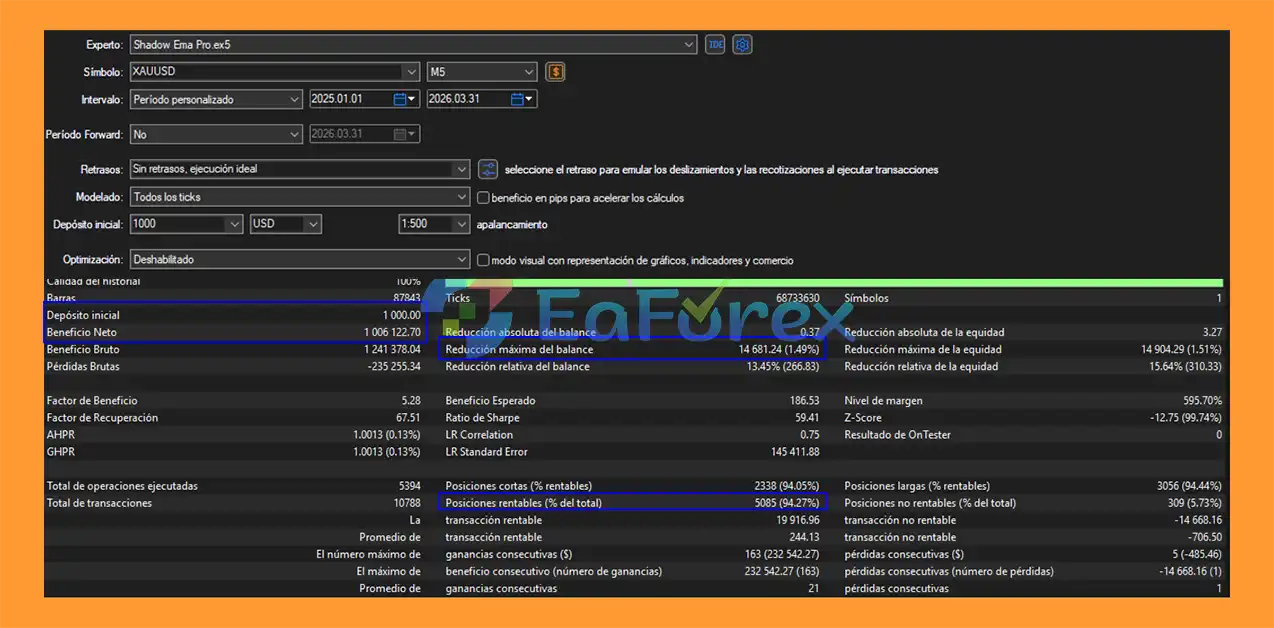
Shadow Ema Pro EA MT5 Backtets
Shadow EMA Pro EA MT5 includes three primary position-sizing modes.
The trader specifies a constant lot size that is used for each position.
This mode provides straightforward control but requires the user to ensure that the selected volume is appropriate for the account balance and market volatility.
The EA calculates position size according to a selected percentage of account balance.
The supplied default risk is:
1% per trade
The actual monetary risk can vary depending on stop-loss distance, contract specifications, broker conditions, and execution.
The Dynamic Equity mode adjusts position-size calculations according to the account’s current equity.
This can allow the position-sizing model to respond to changes in account equity rather than relying exclusively on the original balance.
Each trade can be managed using automatic Stop Loss and Take Profit levels.
The supplied default configuration is:
These values are configurable and should be tested according to the broker’s XAUUSD contract specifications and actual market conditions.
A 1:3 target does not guarantee that the trade will achieve the stated reward or that losses will remain exactly at the intended amount because slippage and execution conditions can affect results.
The EA can activate its trailing mechanism after the trade reaches the configured profit threshold.
The supplied default is:
Trailing activation: +8 pips
The trailing stop then follows price according to the configured rules to help manage unrealized profits.
Break-even protection activates once the defined profit threshold has been reached.
The supplied default is:
Break Even activation: +10 pips
This allows the EA to move the stop toward the entry level after sufficient price movement.
Shadow EMA Pro EA MT5 includes a maximum daily loss limit.
The supplied default is:
10% of account balance
When the configured daily loss threshold is reached, the EA can stop opening additional trades for the remainder of the relevant trading period.
Daily-loss protection can help limit exposure during unfavorable market conditions, but it does not guarantee that actual losses will remain below the configured percentage because spreads, slippage, gaps, and execution conditions can affect realized results.
The EA also provides controls for:
The supplied maximum number of simultaneous positions is: 5
These controls can help prevent the EA from continuously accumulating positions beyond the trader’s intended exposure.
Shadow EMA Pro EA MT5 includes a visual dashboard that provides real-time information about the trading environment.
The panel can display:
The dashboard is designed to provide a quick overview of the EA’s current operating state.
Its visual position and available display settings can be customized through the EA’s input parameters.
Turbo Mode is designed for traders who want a more aggressive configuration.
When enabled, Turbo Mode can extend the signal lookback period and apply a configurable lot multiplier.
This can potentially increase:
Because increasing trade frequency or lot size can also increase drawdown and overall risk, Turbo Mode should be thoroughly forward-tested before being used on a live account.
Turbo Mode does not eliminate the underlying risks of XAUUSD trading.
Shadow EMA Pro EA MT5 may be suitable for traders looking for an automated XAUUSD M5 Expert Advisor based on trend-following and pullback concepts.
Its main characteristics include:
Shadow EMA Pro EA MT5 is built around multiple layers of automated risk management rather than relying on a single protective mechanism.
The EA can combine trend, momentum, pullback, and price-action information before entering a trade.
The Fixed Percentage and Dynamic Equity modes provide alternatives to constant lot sizing.
Every trade can use a predefined Stop Loss to establish the intended risk boundary.
Trailing Stop and Break Even functions can automatically manage a position after it moves into profit.
The daily loss limit can suspend further trading after the configured loss threshold has been reached.
The maximum simultaneous-position setting helps control the number of open trades.
Margin usage controls provide another layer of account-level exposure management.
Gold on the M5 timeframe can react rapidly to market events. Results can be affected by:
A price retracement toward an EMA does not guarantee that the trend will resume. Strong reversals can invalidate a pullback setup.
MACD, EMA relationships, and candlestick patterns can provide structured trading conditions, but none can guarantee the direction of the next price movement.
Although the EA limits simultaneous positions, several open trades can still create meaningful exposure to XAUUSD.
Fixed-lot trading does not automatically adjust position size according to account equity or changing market conditions.
The configurable lot multiplier and extended signal lookback can increase trade frequency and/or position size. This can also increase potential losses.
The 10% daily-loss setting is a risk-control parameter, not a guaranteed maximum-loss figure.
The EA is recommended for ECN/Raw Spread environments, but actual execution quality varies between brokers.
Shadow EMA Pro EA MT5 is an automated trading system and does not guarantee profitability, a specific win rate, or a specific drawdown level.
| Pros | Cons |
|---|---|
| Fully automated MT5 Expert Advisor | XAUUSD M5 can be highly volatile |
| Designed specifically for Gold | Sensitive to spread and slippage |
| EMA pullback strategy | Pullbacks can fail during reversals |
| MACD momentum filter | Technical filters cannot guarantee outcomes |
| EMA20/EMA50 trend confirmation | Fixed Lot mode requires careful risk control |
| Configurable confluence | More permissive settings can increase trade frequency |
| Multiple candlestick patterns | Pattern recognition does not guarantee successful trades |
| Three position-sizing modes | Dynamic sizing can increase exposure as equity changes |
| Stop Loss and Take Profit | Actual execution may differ from theoretical levels |
| Trailing Stop and Break Even | Protection depends on correct EA operation |
| Daily loss protection | Does not eliminate market or execution risk |
| Maximum position and volume controls | Multiple trades can accumulate exposure |
| Real-time dashboard | Dashboard information does not improve execution by itself |
| Optional Turbo Mode | Turbo Mode can significantly increase risk |
The supplied recommended configuration is:
| Parameter | Recommended Setting |
|---|---|
| Symbol | XAUUSD |
| Timeframe | M5 |
| Minimum Recommended Capital | $1,000 |
| Risk per Trade | 1% |
| Default Stop Loss | 20 pips |
| Default Take Profit | 60 pips |
| Default Risk/Reward | 1:3 |
| Trailing Activation | +8 pips |
| Break Even Activation | +10 pips |
| Maximum Positions | 5 |
| Maximum Daily Loss | 10% of Balance |
| Recommended Broker | ECN / Raw Spread |
| VPS | Recommended |
These settings are starting points provided with the EA and should not be interpreted as universally optimal. Traders should evaluate them using their own broker, account size, and risk tolerance.
| Parameter | Specification |
|---|---|
| EA Name | Shadow EMA Pro EA MT5 |
| Platform | MetaTrader 5 |
| Symbol | XAUUSD / Gold |
| Timeframe | M5 |
| Strategy | EMA Pullback / Trend Following |
| MACD | 12 / 26 / 9 |
| Trend EMA | EMA20 / EMA50 |
| Price Action | Harami, Tweezer, Marubozu |
| Position Sizing | Fixed Lot / Fixed % Balance / Dynamic Equity |
| Default Risk | 1% |
| Default SL | 20 pips |
| Default TP | 60 pips |
| Default RR | 1:3 |
| Trailing Activation | 8 pips |
| Break Even | 10 pips |
| Maximum Positions | 5 |
| Maximum Daily Loss | 10% |
| Turbo Mode | Available |
| News Filter | Not specified in supplied specifications |
| Broker Type | ECN / Raw Spread recommended |
| VPS | Recommended |
Download the Shadow EMA Pro EA MT5 package and extract the files if necessary.
Launch MetaTrader 5 on your computer or VPS.
Go to:
File → Open Data Folder → MQL5 → Experts
Place the Shadow EMA Pro EA file inside the Experts folder.
Restart MT5 or right-click the Expert Advisors section in the Navigator and select Refresh.
Open your broker’s XAUUSD / Gold chart and select the M5 timeframe.
Drag Shadow EMA Pro EA MT5 onto the chart.
Make sure Algo Trading is enabled in MetaTrader 5.
Review and configure:
Run the EA on a demo account before using real funds. Test the system under your intended broker conditions and evaluate spread, slippage, execution, trade frequency, and drawdown.
In summary, Shadow EMA Pro EA MT5 is an automated XAUUSD M5 trading system built around EMA pullbacks, MACD momentum confirmation, dual-EMA trend filtering, and automated price-action recognition.
The EA combines these entry components with flexible money management, including Fixed Lot, Fixed Percentage of Balance, and Dynamic Equity modes. Automated Stop Loss, Take Profit, trailing stop, break-even, daily loss protection, position limits, and margin controls provide additional tools for managing trading exposure.
Its Turbo Mode offers another configuration for traders seeking increased market activity, but the resulting increase in trade frequency or position size can also increase risk.
For traders considering Shadow EMA Pro, the most important step is to test the EA with the intended XAUUSD broker, M5 execution conditions, account size, and risk settings before moving to live trading. Historical or simulated performance should not be treated as a guarantee of future results.
1. What is Shadow EMA Pro EA MT5 and how does it work?
Shadow EMA Pro EA MT5 is an automated trading system designed for XAUUSD (gold) on the M5 timeframe. It uses EMA-based pullback entries combined with MACD momentum and price action confirmation to trade in the direction of strong market trends.
2. Is Shadow EMA Pro EA MT5 fully automated?
Yes, Shadow EMA Pro EA MT5 is fully automated. After setup, it scans the market, identifies trend-based opportunities, executes trades, and manages positions without requiring manual intervention.
3. What trading strategy does Shadow EMA Pro EA MT5 use?
The EA is built on a trend-following strategy using EMA (20/50) alignment, MACD confirmation, and candlestick pattern recognition. It only enters trades when multiple conditions confirm strong directional momentum.
4. What makes Shadow EMA Pro EA MT5 different from other gold EAs?
Unlike many scalping or grid systems, Shadow EMA Pro EA MT5 focuses purely on trend continuation. It filters weak signals using multi-layer confluence, including EMA structure, MACD strength, and price action patterns.
5. What risk management features does Shadow EMA Pro EA MT5 include?
The EA includes dynamic lot sizing, fixed or percentage-based risk control, stop loss and take profit (1:3 risk-reward ratio), trailing stop, break-even protection, and daily drawdown limits to protect trading capital.
6. What are the backtest results of Shadow EMA Pro EA MT5?
Backtests show an initial $1,000 account growing to approximately $1,006,000, with a 94.27% win rate and a maximum drawdown of 1.49%. These results are historical and should not be considered a guarantee of future performance.
7. What timeframe and market is Shadow EMA Pro EA MT5 optimized for?
Shadow EMA Pro EA MT5 is optimized for XAUUSD (gold) on the M5 timeframe. It is designed to capture fast momentum moves within structured intraday trend conditions.
8. Is Shadow EMA Pro EA MT5 suitable for beginners or prop firm trading?
Yes, it is suitable for both beginners and prop firm traders. Its fully automated execution, strict risk controls, and trend-filtering system make it ideal for disciplined trading environments, including funded accounts.
In stock
In stock
In stock
In stock
In stock
Out of stock
No account yet?
Create an Account












 Automatic EA
 EA Best Seller
 Expert Advisor MT4
 Expert Advisor MT5
 HFT EA


Reviews
Clear filtersThere are no reviews yet.