









-
 Unlimited Activations
-
 Instant delivery
-
 Easy to install






 Unlimited Activations
Instant delivery
Easy to install
Unlimited Activations
Instant delivery
Easy to install
 Free Update
 Free Install Support

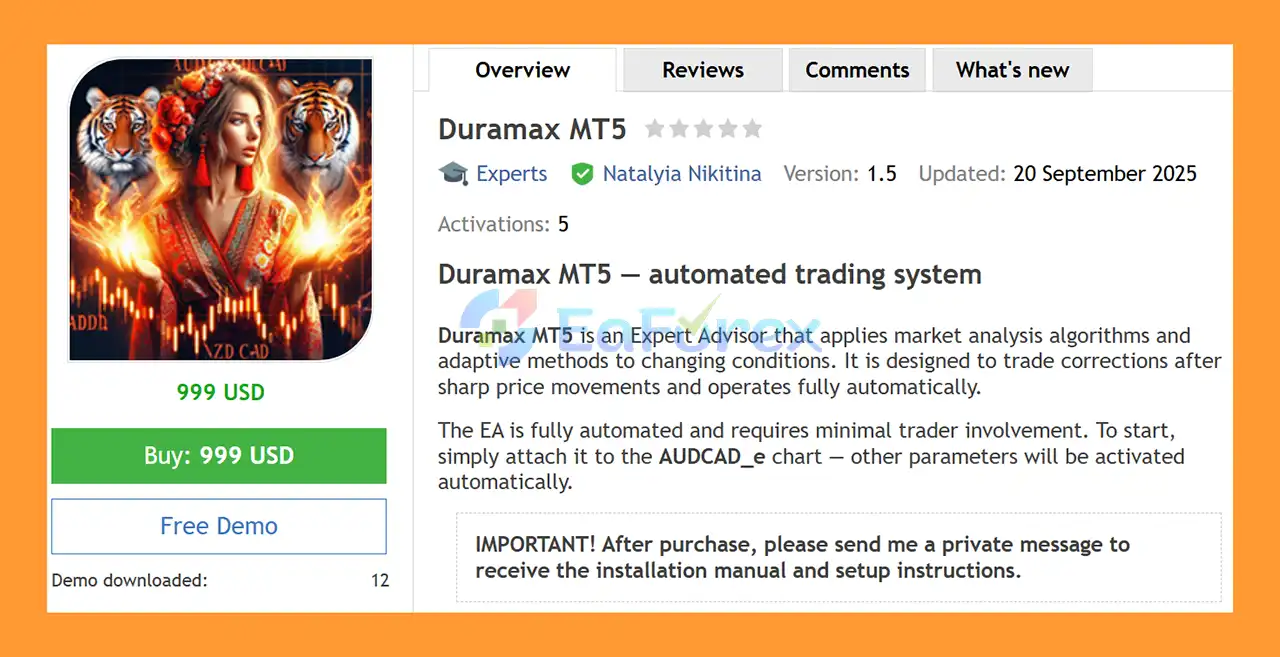
Duramax MT5 is a fully automated Expert Advisor for MetaTrader 5 designed to trade market corrections following sharp price movements.
The EA uses analytical algorithms and adaptive methods to evaluate changing market conditions and identify potential correction opportunities. Once installed and configured, Duramax MT5 is designed to operate with minimal manual intervention.
The current recommended configuration focuses on the AUDCAD currency pair using the M15 timeframe. The system is designed for an ECN account and the supplied configuration recommends leverage of up to 1:500.
Duramax MT5 also includes risk-based lot calculation, configurable risk percentage, Magic Number identification, trading-pair settings, and specialized Sniper Mode and Precision Sniper functionality.
According to the supplied setup instructions, users should attach the EA to the AUDCAD_e chart, after which the remaining parameters are activated automatically.
Important: After purchasing Duramax MT5, contact the developer to receive the required setup and installation instructions.
• Author: Natalyia Nikitina
• Experience: Over +5 years of experience on MQL5.
• Notable Products: Duramax MT5, Requiem MT5, Pelagia MT5, Solaris Imperium MT5, PropSurge One MT5, BaLLzProtector MT5, TradeRanger MT5, Winter MT5 , Ride the wind MT5, Force Strategy MT5 and other advisors.
• Flagship Product: Duramax MT5 is rated as the best performing product of the year.
>> Delivery time 24h-48h after payment.
>>> Refund if not delivered.
>>> You will receive the latest version without any limitations (ID+Time).>>Reviewed by Jason Stap <
Duramax MT5 is designed around a correction trading strategy.
The EA looks for opportunities following sharp price movements, with the underlying concept being that markets can sometimes retrace or correct after significant short-term moves.
Instead of continuously entering trades regardless of market structure, the system is specifically configured to identify potential correction conditions.
However, a sharp price movement does not guarantee a reversal. Strong trends can continue much further than expected, making risk management particularly important for correction-based strategies.
Once properly installed, Duramax MT5 can automatically handle the trading process.
The EA is designed to manage:
This allows the system to operate without requiring constant manual intervention.
The current recommended configuration is focused on:
The EA should be tested using the intended configuration rather than assuming that identical settings will produce the same behavior on other currency pairs or timeframes.
The supplied configuration includes:
Sniper Mode: true
This indicates that the EA’s specialized sniper functionality is enabled in the recommended setup.
The system is designed to use more selective trading conditions rather than simply generating trades continuously.
Because the precise internal algorithm is proprietary, traders should evaluate the actual entry frequency and behavior through Strategy Tester and demo trading rather than assuming that “Sniper” means higher accuracy or guaranteed performance.
Precision Sniper is also listed as active in the supplied configuration.
This feature forms part of the EA’s trade-selection framework and is intended to refine the conditions under which trades are considered.
The exact calculation methodology is determined by the developer’s proprietary algorithm.
Duramax MT5 provides a lot-sizing method based on the selected risk level.
The configuration includes:
Risk-based sizing can help establish a more systematic relationship between account equity and trade exposure.
However, actual risk can differ from the theoretical calculation when slippage, gaps, execution delays, or abnormal market conditions occur.
The EA includes a configurable Magic Number, which provides a unique identifier for positions generated by the Expert Advisor.
This can help distinguish Duramax trades from:
The Trade Comment parameter allows users to specify identifying text that can appear in the MT5 journal and account history.
This can make it easier to review and distinguish trades generated by the system.
The Trading Pairs M15 parameter allows the user to specify the active trading instruments.
The exact symbol configuration may depend on the broker’s suffix or naming convention.
For example, a broker may use:
Users should make sure the configured symbol corresponds to the broker’s actual instrument name.
The supplied configuration specifies:
Virtual TP: false
This means the recommended setup does not use the virtual Take Profit functionality.
Users should follow the developer’s supplied configuration rather than changing this setting without testing.
Duramax MT5 is based on the concept of trading corrections after sharp price movements.
The EA continuously evaluates market conditions through its internal analytical algorithms.
It looks for price behavior that corresponds to its predefined correction-trading logic.
When the market experiences a significant movement, the EA evaluates whether conditions indicate a potential correction opportunity.
The system does not simply assume that every sharp movement will reverse. Its internal filters and sniper logic determine whether the conditions meet the EA’s trading criteria.
When the required conditions are satisfied, the Sniper Mode and Precision Sniper components contribute to the trade-selection process according to the programmed strategy.
The EA then calculates the appropriate position size using its risk-management parameters.
Once a valid setup is identified, Duramax MT5 can automatically execute the trade through the connected MT5 broker.
The trade is assigned the configured Magic Number and trade comment for easier identification.
Position sizing is influenced by the selected risk percentage and deposit-load settings.
This allows traders to establish predefined exposure parameters rather than relying entirely on a fixed lot size.
Duramax MT5 is specifically designed to analyze potential corrections following sharp market movements.
This gives the EA a clearly defined trading concept rather than attempting to trade every type of market condition.
Once configured, the EA can operate automatically with minimal trader intervention.
The risk-based lot calculation allows traders to define exposure according to account risk parameters.
The supplied configuration enables both Sniper Mode and Precision Sniper, providing a more selective trading framework.
The EA is designed for the M15 timeframe, providing a relatively short-term environment for evaluating price corrections.
According to the supplied instructions, users can attach the EA to the AUDCAD_e chart and allow the configured parameters to activate automatically.
The recommended setup is designed for an ECN account, which can provide execution characteristics suitable for automated trading, depending on the broker.
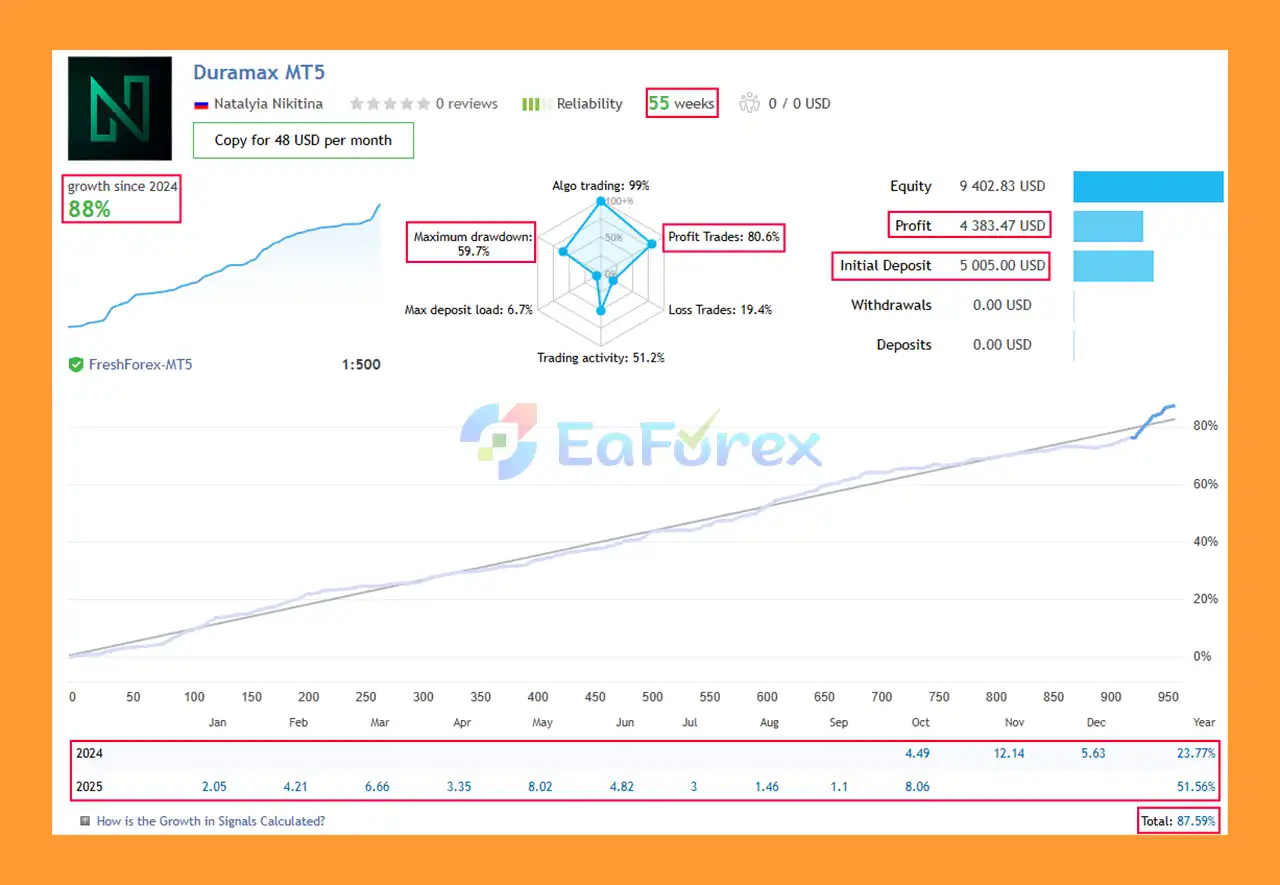
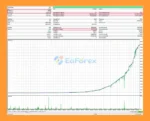
Duramax MT5 live Results
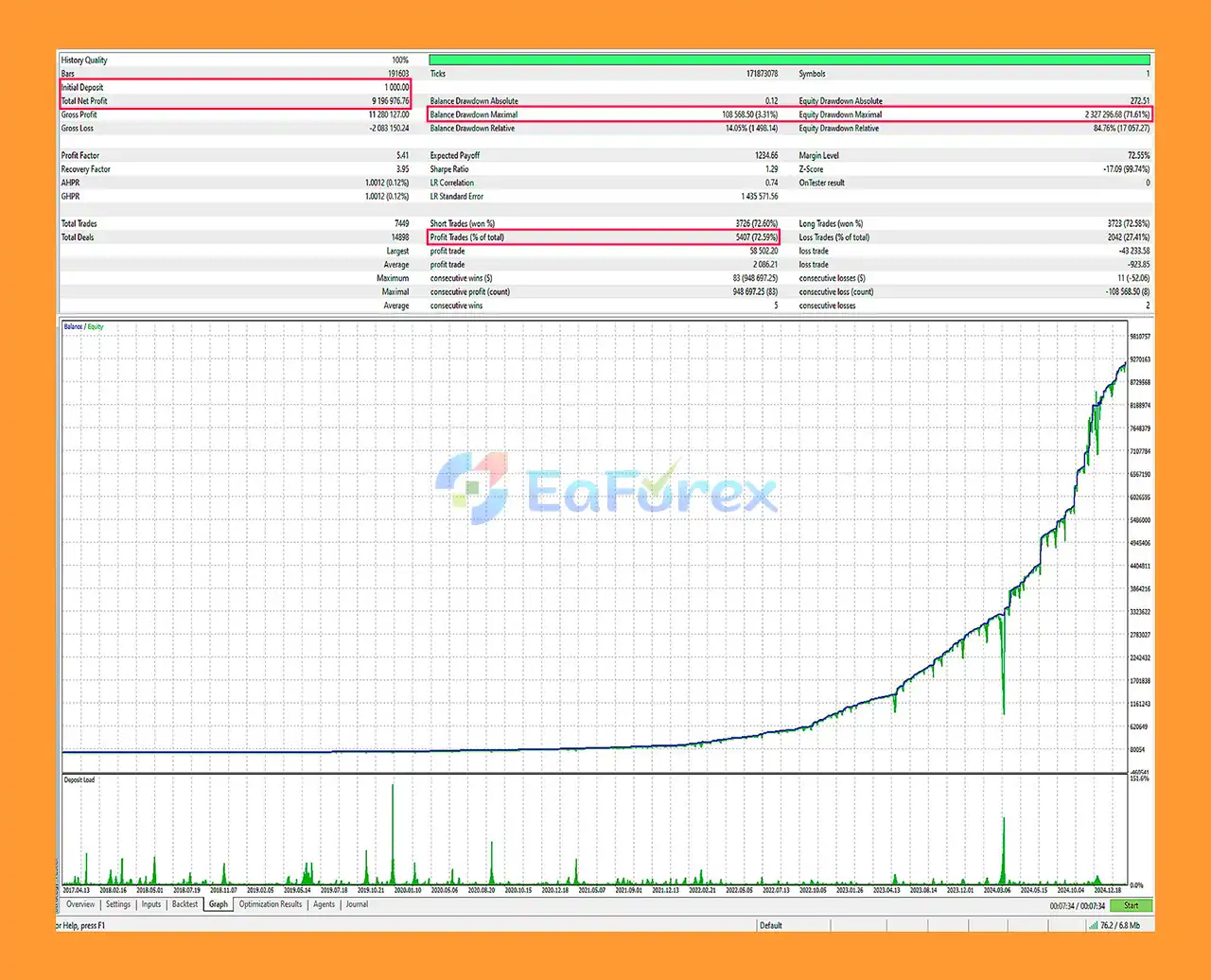
Duramax MT5 Backtest
Duramax MT5’s primary risk-management mechanism is its risk-based position sizing.
The EA includes a configurable Risk Percentage that determines the intended exposure per trade. It also includes a Deposit Load % parameter related to initial lot sizing.
This structure allows traders to control the amount of capital allocated to individual trades instead of relying solely on a fixed lot.
The recommended configuration includes:
Correction-based trading requires particular attention to risk because a market that has moved sharply may continue moving in the same direction rather than reversing.
For example, an AUDCAD price spike caused by unexpected economic news can potentially develop into a sustained trend. In such circumstances, a correction strategy may experience losses if the expected retracement does not occur.
The recommended 1:500 leverage can also substantially increase trading exposure. High leverage does not reduce market risk; instead, it allows a relatively small amount of account equity to control a larger position.
Users should therefore consider conservative risk settings and test the EA on a demo account before live deployment.
The central risk of a correction strategy is that price may continue moving instead of retracing.
A sharp movement can represent the beginning of a new trend rather than a temporary deviation.
The supplied configuration recommends leverage of 1:500.
High leverage can magnify both gains and losses and may increase the speed at which account equity is depleted during adverse movements.
The primary configuration is AUDCAD M15.
Performance on other currency pairs should not be assumed without separate testing and appropriate settings.
The recommended broker is FreshForex, but actual trading conditions can vary depending on:
Results obtained with one broker may therefore differ from results with another.
Broker-specific symbol suffixes can affect EA operation.
Users must ensure that the configured trading pair matches the exact symbol name used by the broker.
Sharp market movements can occur during economic releases or unexpected events.
These conditions can create:
Such events are particularly relevant to a strategy designed to trade corrections after strong movements.
The internal details of the analytical and sniper algorithms are not fully disclosed in the supplied description.
Users should therefore evaluate actual trading behavior through testing rather than relying solely on feature names or marketing terminology.
Historical tests, demonstrations, or previous trading results do not guarantee future performance.
Financial markets are unpredictable, and automated trading systems can experience periods of losses.
| Pros | Cons |
|---|---|
| Fully automated MT5 Expert Advisor | Correction trades can fail when trends continue |
| Designed specifically for market corrections | Strong trends can create adverse positions |
| AUDCAD M15 configuration | Current primary configuration is relatively focused |
| Risk-based lot calculation | Incorrect risk settings can increase losses |
| Configurable risk percentage | High leverage can amplify account exposure |
| Sniper Mode included | “Sniper” features do not guarantee higher accuracy |
| Precision Sniper available | Internal algorithm details are proprietary |
| Magic Number for trade identification | Broker symbol suffixes must be configured correctly |
| ECN account recommended | Execution conditions vary between brokers |
| Simple initial setup | Recommended settings still require testing |
| VPS-compatible automated operation | VPS and connectivity issues can interrupt trading |
Purchase Duramax MT5 and contact the developer immediately afterward to receive the required installation and setup instructions.
Open MetaTrader 5 and log into the account where you want to test the EA.
An ECN account is recommended according to the supplied requirements.
In MT5, select:
File → Open Data Folder
Then navigate to:
MQL5 → Experts
Place the supplied Duramax MT5 .ex5 file into the appropriate Experts folder.
Restart MetaTrader 5 or refresh the Expert Advisors section in the Navigator.
Open:
AUDCAD_e → M15
This is the primary configuration specified by the developer.
If your broker uses a different symbol suffix, use the corresponding AUDCAD symbol provided by the broker.
Drag Duramax MT5 onto the M15 chart.
Enable Algo Trading and allow the required automated-trading permissions.
Review the supplied settings, including:
The supplied configuration specifies:
Virtual TP = false
Sniper Mode = true
Precision Sniper = active
Run the EA on a demo account before committing real capital.
Monitor:
A VPS is recommended for stable automated operation.
Keeping MT5 continuously connected can help ensure that the EA remains active during the intended trading period.
🔺 Experts:
In summary, Duramax MT5 is a fully automated MetaTrader 5 Expert Advisor focused on correction trading after sharp price movements.
Its primary configuration is AUDCAD on M15, with an ECN account, risk-based lot calculation, configurable risk percentage, Sniper Mode, Precision Sniper, and automated position management.
The system is designed to require minimal manual intervention, while broker-specific symbol configuration and VPS hosting can help maintain stable operation.
The most important consideration is the strategy’s correction-based nature. A sharp market movement does not necessarily lead to a retracement; sometimes it marks the beginning of a much stronger trend. This makes appropriate position sizing and risk management particularly important.
The supplied configuration also mentions 1:500 leverage, which can significantly increase account exposure. Traders should therefore avoid treating high leverage as a performance advantage and should carefully evaluate the EA under realistic broker conditions.
For responsible use, start with the developer’s recommended configuration, test AUDCAD M15 on a demo account, monitor drawdown and execution, and only consider live deployment after understanding the system’s behavior.
Duramax MT5 is an automated trading tool, not a guarantee of profit. Trading involves substantial risk, and past performance does not guarantee future results.
1. What is Duramax MT5 and how does it work?
Duramax MT5 is a fully automated Expert Advisor (EA) developed for MetaTrader 5, designed specifically for the AUDCAD currency pair. It applies advanced market algorithms to identify price corrections after sharp market movements, allowing traders to profit from short-term reversals automatically—without manual intervention.
2. Which trading strategy does Duramax MT5 use?
Duramax MT5 uses a correction-based trading strategy, focusing on price retracements following rapid market movements. By analyzing volatility and momentum, it identifies optimal entry and exit points, aiming to capture high-accuracy trades even in changing market conditions.
3. What are the main features of Duramax MT5?
Key features of Duramax MT5 include fully automated operation, adaptive risk management, deposit-based lot sizing, and Precision Sniper Mode for improved entry timing. It also offers virtual take profit (TP), custom trade comments, and a magic number system for efficient trade tracking and management.
4. How much capital do I need to start trading with Duramax MT5?
The recommended minimum starting capital is $1,000 with 1:500 leverage on an ECN account. Using a VPS is highly advised to ensure 24/7 operation and stable connectivity, especially for automated strategies that depend on precise timing.
5. Is Duramax MT5 suitable for beginners?
Yes. Duramax MT5 is beginner-friendly while still offering the flexibility advanced traders need. It comes with a detailed installation guide and operates fully automatically—once installed on the chart, it manages trades, lot sizing, and risk settings on its own.
6. How effective is Duramax MT5 based on performance results?
According to live results, Duramax MT5 achieved an +87.59% growth rate, an 80.6% win rate, and a maximum drawdown of 59.7% over 55 weeks. Backtests also showed a 72.59% win rate with a 3.31% drawdown, proving its strong profitability and risk control under various market conditions.
In stock
In stock
In stock
In stock
In stock
Out of stock
No account yet?
Create an Account












 Automatic EA
 EA Best Seller
 Expert Advisor MT4
 Expert Advisor MT5
 HFT EA


Reviews
Clear filtersThere are no reviews yet.