









-
 Unlimited Activations
-
 Instant delivery
-
 Easy to install






 Unlimited Activations
Instant delivery
Easy to install
Unlimited Activations
Instant delivery
Easy to install
 Free Update
 Free Install Support

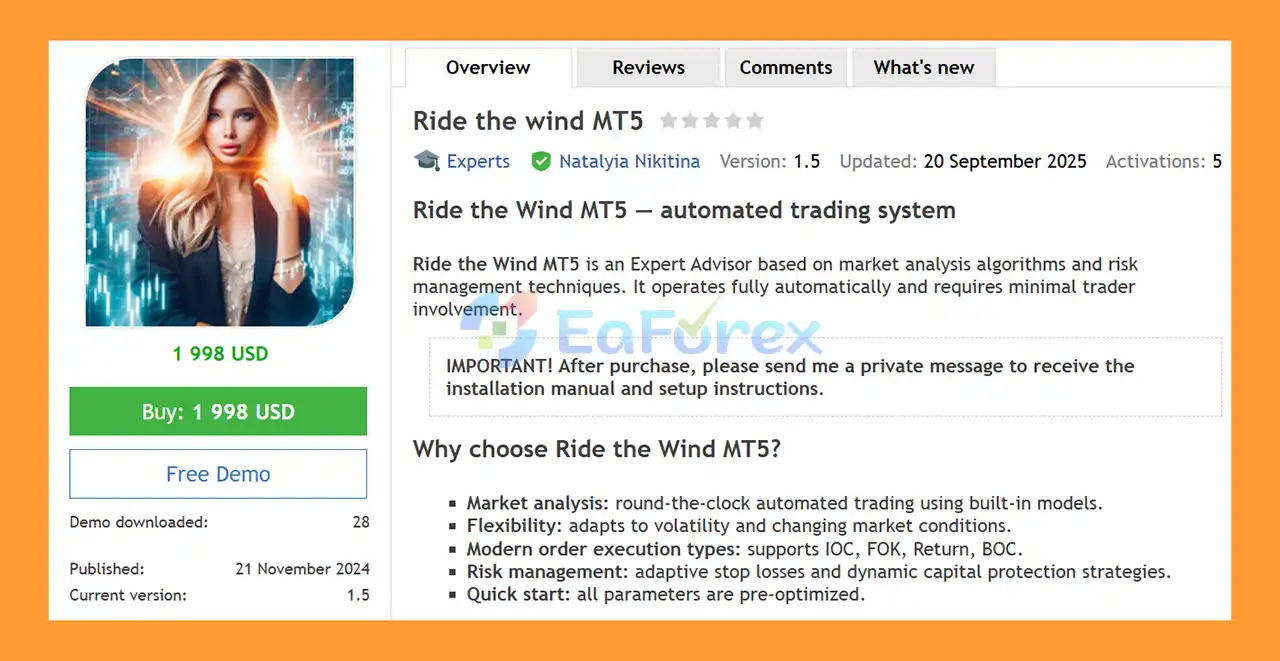
Ride the Wind MT5 is a fully automated Expert Advisor for MetaTrader 5 designed to analyze market conditions, identify trading opportunities, execute orders, and manage positions with minimal manual intervention.
The EA combines built-in market analysis algorithms with adaptive risk-management mechanisms. Its objective is to automatically respond to changing market conditions while maintaining predefined trading and capital-management rules.
Ride the Wind MT5 currently supports NZDCAD and AUDCAD, with NZDCAD recommended as the primary launch pair. The system is designed for the M15 timeframe and is recommended for an ECN trading account with leverage of up to 1:500 according to the supplied configuration.
The EA comes with pre-optimized parameters intended to simplify the initial setup. A VPS is recommended for traders who want the system to operate continuously without depending on a personal computer.
Important: After purchasing Ride the Wind MT5, contact the developer to receive the required setup instructions.
• Author: Natalyia Nikitina
• Experience: Over +5 years of experience on MQL5.
• Notable Products: Ride the wind MT5, Pelagia MT5, Winter MT5, Requiem MT5, Solaris Imperium MT5, PropSurge One MT5, BaLLzProtector MT5, TradeRanger MT5, Ride the wind MT5, Duramax MT5, Force Strategy MT5 and other advisors.
• Flagship Product: Ride the wind MT5 is rated as the best performing product of the year.
>> Delivery time 24h-48h after payment.
>>> Refund if not delivered.
>>> You will receive the latest version without any limitations (ID+Time).>>Reviewed by Jason Stap <<
Ride the wind MT5 Overview
Ride the Wind MT5 is designed to operate automatically once properly installed and configured.
The EA can handle:
This reduces the need for constant manual chart monitoring.
The system uses internal analysis algorithms to evaluate market conditions and identify potential trading opportunities.
Instead of requiring the trader to manually interpret every setup, the EA processes market information according to its programmed trading logic.
The exact signals and calculations are determined by the proprietary algorithm and configured parameters.
Ride the Wind MT5 is designed to adapt its trading behavior to changing volatility and market conditions.
This adaptive approach is intended to prevent the EA from relying on completely static parameters when market behavior changes.
However, adaptation does not mean the system can predict every market movement. Sudden volatility, unexpected news, liquidity changes, and abnormal price behavior can still affect performance.
The EA supports several MT5 order execution policies, including:
The availability and behavior of these execution modes depend on the broker and trading instrument.
Using appropriate execution policies can help the EA interact more effectively with different broker execution environments.
Ride the Wind MT5 incorporates adaptive Stop Loss mechanisms designed to respond to market conditions.
Rather than relying exclusively on a completely static risk-management structure, the EA can use its programmed logic to manage protective levels according to the trading environment.
Stop Loss settings remain essential because no adaptive system can eliminate the possibility of losses.
The EA also includes capital-management mechanisms intended to help control exposure while positions are active.
These features are designed to help the trading system operate within predefined risk parameters.
Proper risk configuration remains important because capital protection mechanisms cannot guarantee that losses will remain within a specific amount during extreme market conditions.
Ride the Wind MT5 is supplied with parameters described as pre-optimized, allowing users to begin testing without building an entire configuration from scratch.
Even when recommended settings are supplied, traders should validate them on their own broker because spread, commission, execution speed, leverage, and liquidity can vary significantly.
Ride the Wind MT5 follows an automated market-analysis and execution process.
The EA continuously evaluates market data using its internal trading algorithms.
The system looks for conditions that correspond to its predefined trading logic.
When the required conditions are detected, the EA evaluates whether a trade should be opened.
The decision is influenced by the programmed market-analysis and risk-management rules.
Once a valid trading condition is identified, the EA can automatically send the corresponding order to the broker.
Supported execution policies include IOC, FOK, Return, and BOC, subject to broker and symbol compatibility.
After a position is opened, Ride the Wind MT5 manages the trade according to its configured risk-management rules.
This includes adaptive Stop Loss and capital-protection mechanisms.
The purpose is to manage the position automatically instead of requiring the trader to manually adjust every trade.
The system is designed for automated operation and can run continuously during supported market hours.
For this reason, using a VPS can be beneficial because it allows MT5 and the EA to remain active even when the trader’s personal computer is turned off.
The EA is designed to handle the trading process automatically, reducing the amount of manual intervention required.
Ride the Wind MT5 currently focuses on NZDCAD and AUDCAD, with NZDCAD recommended as the primary launch pair.
A focused instrument configuration can make it easier to evaluate the EA under specific market conditions.
The system is designed for the 15-minute timeframe, providing a balance between short-term market analysis and avoiding some of the noise associated with extremely low timeframes.
Adaptive Stop Loss and dynamic capital-protection mechanisms are incorporated into the system’s trading framework.
Support for several MT5 execution policies gives the EA greater flexibility when operating with different broker environments.
The supplied parameters are intended to provide a starting configuration without requiring extensive manual optimization before the first test.
Ride the Wind MT5 is suitable for continuous automated operation on a VPS, which can help reduce interruptions caused by a local computer or unstable internet connection.
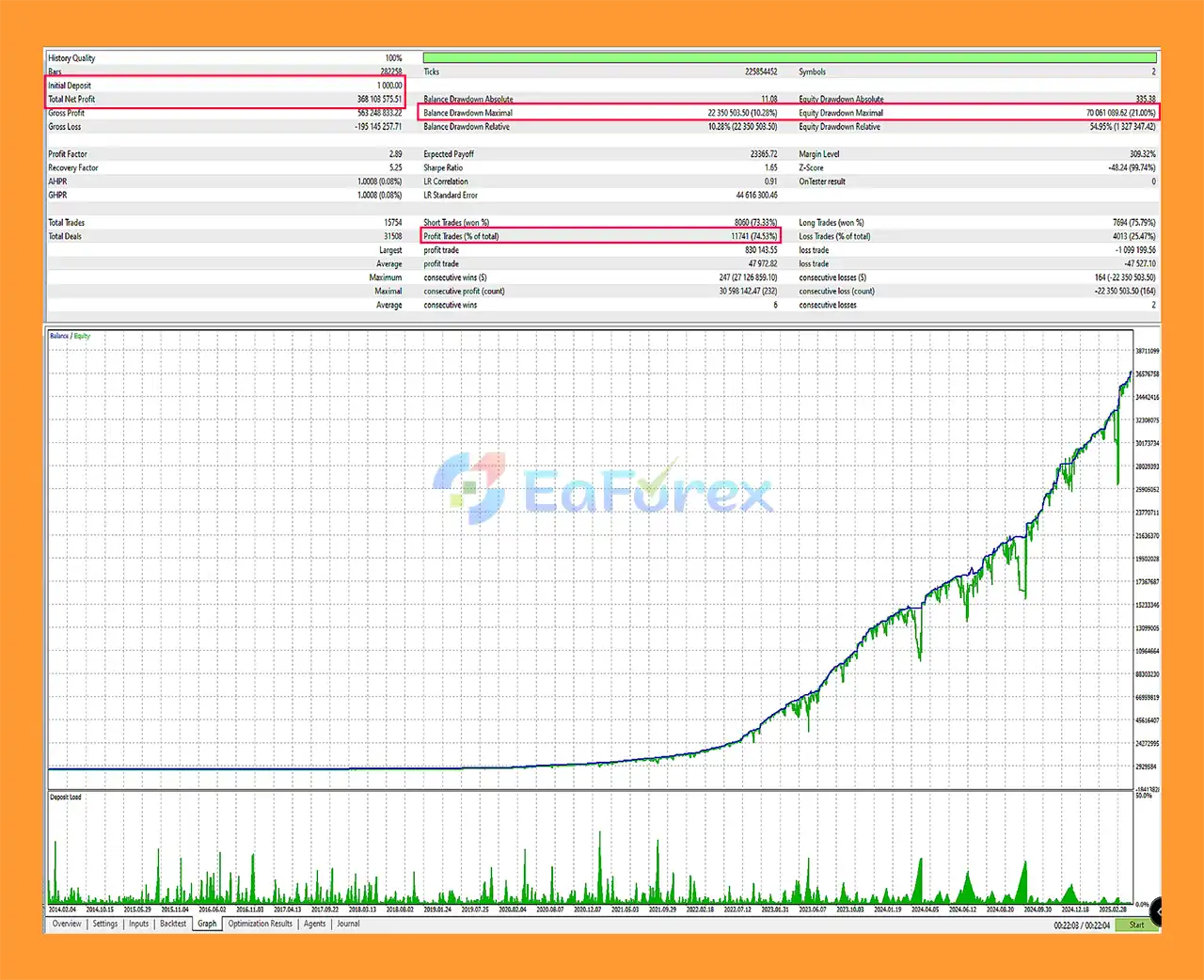
Ride the wind EA MT5 Backtests
Ride the Wind MT5 combines automated market analysis with several risk-management components.
The EA uses adaptive Stop Loss mechanisms and dynamic capital-protection strategies as part of its trading framework.
The recommended configuration includes:
The $1,000 recommendation should not be interpreted as a guarantee that this amount is sufficient for every trader. The appropriate account size depends on the selected risk settings, broker margin requirements, spread, leverage, and trading frequency.
The use of 1:500 leverage can significantly increase exposure relative to account equity. High leverage should therefore be approached cautiously because it can amplify both potential gains and losses.
The EA’s adaptive risk mechanisms can help structure exposure, but they cannot eliminate market risk. Unexpected news, spread widening, slippage, liquidity shortages, and rapid price movements may cause actual results to differ from backtests or expected execution.
Users should test the recommended configuration on a demo account first and evaluate results under their own broker conditions.
An automated strategy that performs under one market regime may behave differently when volatility, liquidity, or market structure changes.
Adaptive algorithms can respond to changing conditions, but they cannot guarantee successful adaptation to every environment.
The supplied configuration focuses on NZDCAD and AUDCAD.
Users should not assume that the EA will perform similarly on unrelated currency pairs unless those instruments are specifically supported and tested.
The recommended configuration mentions 1:500 leverage.
Such high leverage can substantially increase the size of positions relative to account equity and can accelerate losses when trades move against the account.
Trading performance can vary between brokers because of:
The supplied recommendation for RoboForex should therefore be considered part of the developer’s preferred configuration rather than a guarantee of superior performance.
Although the EA supports IOC, FOK, Return, and BOC, not every broker or symbol necessarily supports every execution mode in the same way.
Users should verify compatibility with their trading account.
Automated trading depends on the MT5 terminal remaining connected to the broker.
Connection interruptions, VPS problems, terminal shutdowns, or other technical issues can affect trade management.
The EA’s automated operation and pre-optimized parameters do not guarantee profitability.
Backtests, demonstrations, or previous results are historical observations and should not be interpreted as promises of future performance.
| Pros | Cons |
|---|---|
| Fully automated MT5 trading | Automated trading still carries market risk |
| Designed for NZDCAD and AUDCAD | Current instrument coverage is relatively focused |
| NZDCAD recommended as primary pair | Results may vary between brokers |
| M15 timeframe | Short-term trading can be affected by spread and execution costs |
| Built-in market-analysis algorithms | Exact algorithmic behavior may not be transparent to users |
| Adaptive Stop Loss | Adaptive risk controls cannot prevent all losses |
| Dynamic capital-protection mechanisms | Extreme market conditions can exceed normal assumptions |
| Supports multiple MT5 execution policies | Execution modes depend on broker compatibility |
| Pre-optimized parameters | Recommended settings may require adjustment for different brokers |
| VPS recommended for stable operation | VPS adds an additional operating cost |
| ECN account recommended | Commission and spread costs still affect results |
Purchase Ride the Wind MT5 and contact the developer immediately after purchase to receive the required installation and setup instructions.
Open your MetaTrader 5 platform and log into the trading account you want to use for testing.
An ECN account is recommended according to the supplied configuration.
In MetaTrader 5, select:
File → Open Data Folder
Navigate to:
MQL5 → Experts
Copy the supplied Ride the Wind MT5 Expert Advisor file into the appropriate Experts folder.
Restart MetaTrader 5 or refresh the Navigator window so that the EA becomes visible.
Open:
NZDCAD → M15
This is the primary recommended configuration.
AUDCAD can also be tested according to the supplied settings.
Drag Ride the Wind MT5 from the Navigator window onto the chart.
Enable automated trading and make sure the required permissions are active.
Load the setup parameters supplied by the developer.
Check important settings such as:
Before using real money, run the EA on a demo account.
Evaluate its behavior under your broker’s actual:
A VPS is recommended for continuous automated operation.
A stable VPS can keep MetaTrader 5 running even when your local computer is offline.
🔺 Experts:
In summary, Ride the Wind MT5 is a fully automated Expert Advisor designed for traders who want algorithmic market analysis and automated trade management on MetaTrader 5.
The system currently focuses on NZDCAD and AUDCAD, with NZDCAD M15 presented as the primary configuration. Its main features include built-in market-analysis algorithms, adaptive Stop Loss, dynamic capital protection, multiple MT5 execution modes, and pre-optimized settings.
The EA is intended for relatively hands-off operation, while a VPS can help maintain continuous connectivity to the broker.
At the same time, users should pay particular attention to the recommended 1:500 leverage, because high leverage can materially increase both position exposure and potential losses. Broker execution, spread, commission, slippage, liquidity, and changing market conditions can also affect real-world performance.
For a responsible evaluation, start with the recommended configuration, test it on a demo account, compare results across realistic market conditions, and only consider live trading after understanding the system’s risk characteristics.
Ride the Wind MT5 is an automated trading tool, not a guarantee of profit. Always use appropriate risk management and only trade with capital you can afford to lose.
1. What is Ride the Wind MT5?
Ride the Wind MT5 is a fully automated Expert Advisor (EA) that trades NZDCAD and AUDCAD pairs using advanced market analysis and adaptive risk management to deliver consistent trading performance.
2. How does Ride the Wind MT5 work?
The EA automatically identifies high-probability trade setups, adapts to market volatility, and executes trades using smart order types — all with minimal user intervention.
3. Which currency pairs and timeframe are best for Ride the Wind MT5?
Ride the Wind MT5 is optimized for NZDCAD and AUDCAD on the M15 timeframe, providing efficient short- to medium-term trading results.
4. Is Ride the Wind MT5 suitable for beginners?
Yes. The EA features pre-optimized settings, an easy installation guide, and requires no manual trading experience — ideal for both new and advanced traders.
5. What are the main benefits of using Ride the Wind MT5?
Key advantages include adaptive algorithms, dynamic risk control, high-precision trade execution, VPS compatibility, and 24/7 automated operation.
6. What setup is recommended for the best performance?
For optimal results, use an ECN broker with VPS hosting to ensure low latency, stable connectivity, and smooth round-the-clock trading.
In stock
In stock
In stock
In stock
In stock
Out of stock
No account yet?
Create an Account












 Automatic EA
 EA Best Seller
 Expert Advisor MT4
 Expert Advisor MT5
 HFT EA


Reviews
Clear filtersThere are no reviews yet.