









-
 Unlimited Activations
-
 Instant delivery
-
 Easy to install





 Unlimited Activations
Instant delivery
Easy to install
Unlimited Activations
Instant delivery
Easy to install
 Free Update
 Free Install Support

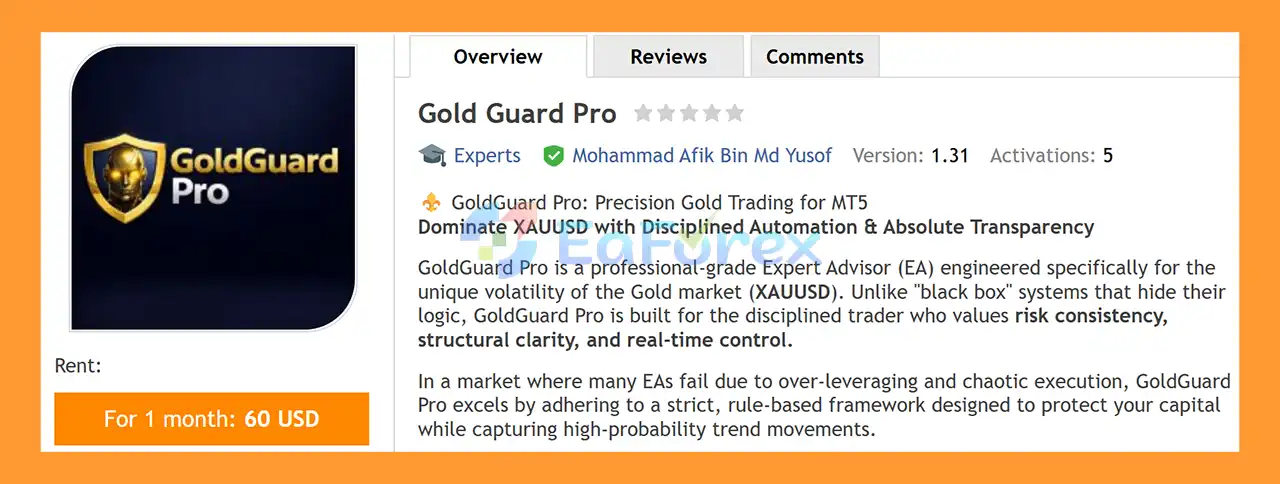
Gold Guard Pro EA MT5 is a professional MetaTrader 5 Expert Advisor specifically designed for trading XAUUSD (Gold). Built around disciplined automation, transparent trading logic, and structured risk management, this Gold trading EA is designed to help traders participate in market trends without relying on aggressive recovery techniques.
Unlike many automated trading systems that use Martingale, Grid, or averaging strategies, Gold Guard Pro EA MT5 follows a more controlled approach based on fixed lot sizing and single-position logic. The EA combines a multi-timeframe Triple-EMA trend engine, an optional RSI filter, spread protection, cooldown controls, and daily trade limits.
The EA is optimized for XAUUSD on the M15 timeframe and is particularly suitable for traders who prefer a rule-based approach with clearly defined risk controls.
An integrated on-chart dashboard provides useful market and trading information, while manual override functionality gives traders additional control during periods of unexpected volatility or major news events.
>> Delivery time 24h-48h after payment.
>>> Refund if not delivered.
>>> You will receive the latest version without any limitations (ID+Time).>>Reviewed by Jason Stap <<
Gold Guard Pro EA MT5 uses three configurable EMA levels to identify the broader market direction and filter potential trading opportunities. The combination of fast, slow, and trend EMAs helps the EA focus on trades that align with the prevailing momentum.
An optional RSI filter provides an additional confirmation layer. Traders can configure overbought and oversold thresholds to help prevent entries when price conditions appear excessively extended.
Gold Guard Pro EA MT5 supports fixed lot sizing, with 0.01 lot available as a starting configuration. This provides a straightforward position-sizing structure and avoids automatic lot multiplication associated with aggressive recovery systems.
The EA does not rely on Martingale, Grid, or recovery trading. This is an important characteristic for traders who prefer a more structured approach to managing exposure on XAUUSD.
Gold Guard Pro is designed around controlled position management rather than continuously adding multiple positions to the market. This can help keep exposure easier to monitor.
A configurable maximum daily trade limit allows users to control how frequently the EA can open trades. Once the daily limit is reached, the system stops looking for additional trades until the next trading day.
The integrated spread filter helps prevent the EA from entering trades when trading costs become unusually high. This can be particularly useful when trading Gold during volatile market conditions.
The cooldown mechanism introduces a waiting period between trades. This helps reduce excessive trade frequency and can prevent rapid consecutive entries in unstable market conditions.
The integrated HUD provides real-time information directly on the MT5 chart, including market conditions, trend direction, trading signals, and daily performance information.
Gold Guard Pro EA MT5 provides a convenient manual override using the ‘C’ hotkey, allowing traders to close all EA positions quickly when necessary.
The EA is designed to operate efficiently on an MQL5 VPS or other low-latency VPS environment, making it suitable for traders who want automated execution without keeping their personal computer running continuously.
Gold Guard Pro combines trend analysis, momentum confirmation, and execution filters to determine whether market conditions are suitable for a trade.
The basic trading process can be described in several stages.
The EA analyzes its configurable EMA structure to determine the prevailing direction of the XAUUSD market. The Triple-EMA system is designed to help distinguish bullish and bearish market conditions.
When enabled, the RSI filter evaluates market momentum and helps prevent potential entries when price conditions reach the configured overbought or oversold levels.
Before opening a position, Gold Guard Pro checks additional protection parameters such as:
If the required conditions are satisfied, the EA can automatically execute a trade according to the configured lot size and trading parameters.
The EA supports configurable hard Take Profit and Stop Loss levels in USD terms, allowing traders to define their intended profit and loss boundaries.
The EA continuously monitors its daily trading activity. Once the configured maximum number of trades has been reached, it stops opening new positions for the remainder of the trading day.
This structured process is designed to reduce unnecessary entries and maintain consistent trading behavior.
Gold Guard Pro EA MT5 may be suitable for traders looking for a disciplined XAUUSD Expert Advisor for MetaTrader 5 rather than an aggressive automated recovery system.
One of its main characteristics is its focus on controlled exposure. The EA avoids traditional Martingale and Grid techniques and instead uses fixed lot sizing and single-position logic.
The combination of Triple-EMA trend analysis, optional RSI confirmation, spread filtering, cooldown protection, and daily trade limits provides several layers of control over automated trading activity.
The visual dashboard is another useful feature for traders who want greater transparency. Instead of operating completely in the background, the EA displays important information directly on the MT5 chart.
Furthermore, the manual close-all function provides an additional layer of trader control. This can be useful when unexpected market events or major economic announcements create abnormal volatility in Gold.
For traders using VPS hosting, the lightweight design and MQL5 VPS compatibility also make Gold Guard Pro suitable for continuous automated operation.
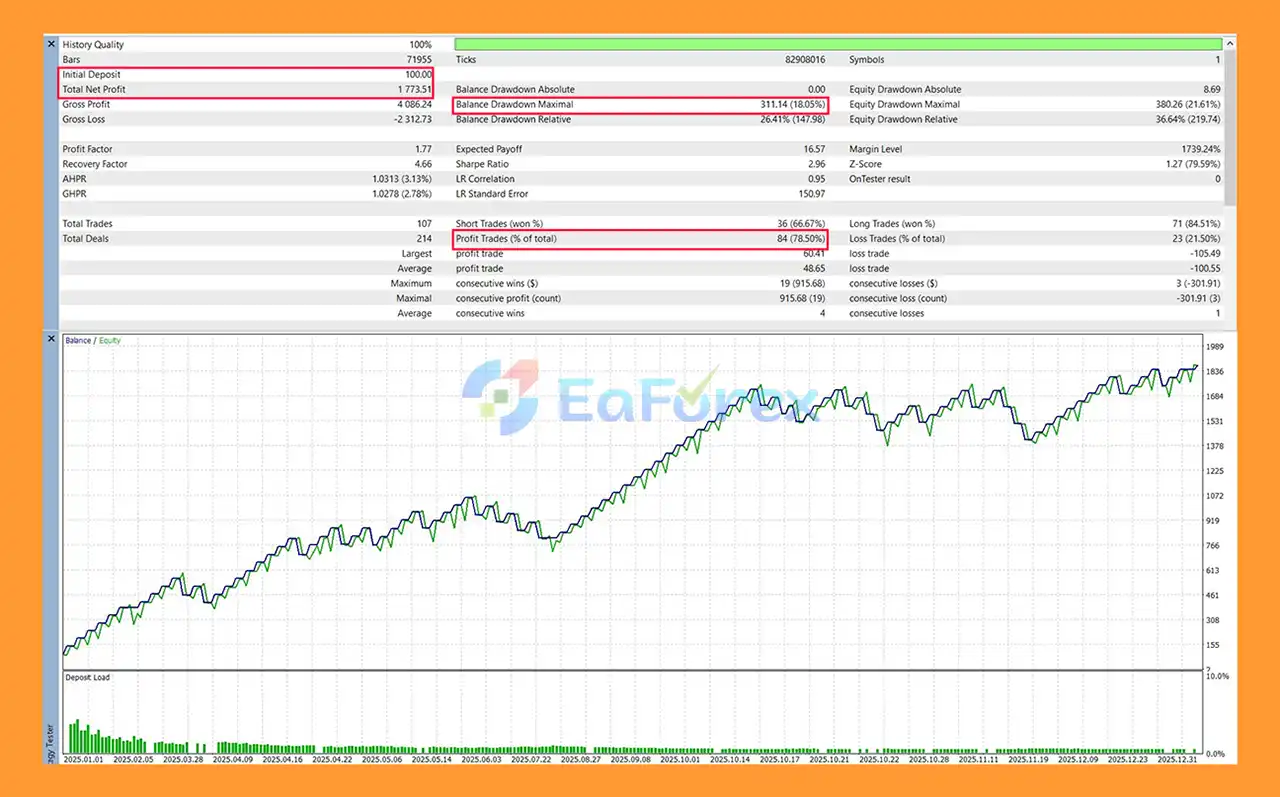
Gold Guard Pro EA MT5 Backtets
Gold trading can provide significant opportunities, but XAUUSD is also known for high volatility and rapid price movements. For this reason, risk management is an important part of any automated Gold trading strategy.
Gold Guard Pro EA MT5 incorporates several controls designed to help manage trading exposure.
Fixed lot sizing provides a consistent position size rather than automatically increasing exposure after losing trades.
The EA allows traders to configure hard Take Profit and Stop Loss levels using USD-based parameters. These settings can help establish predefined trade boundaries.
Limiting the number of trades per day helps prevent excessive trading activity and gives traders greater control over daily exposure.
The spread filter can prevent entries when the market’s trading cost exceeds the configured threshold.
The cooldown timer creates a predefined waiting period between trades, helping reduce rapid-fire entries.
Gold Guard Pro EA MT5 does not depend on Martingale position multiplication. This means the EA is not designed to increase lot sizes automatically simply because a previous trade was unsuccessful.
However, risk controls do not eliminate trading risk. Actual performance can vary depending on the broker, spread, liquidity, execution speed, account type, market conditions, and trading parameters.
For this reason, users should conduct their own backtesting and forward testing on a demo account before considering live deployment.
Although Gold Guard Pro EA MT5 includes several risk-management features, traders should understand its limitations.
Gold can experience sudden and substantial price movements, especially around major economic announcements. Even with spread and trend filters, unexpected market movements can result in losses.
No Expert Advisor can guarantee consistent profits. Historical backtests or previous trading results do not guarantee future performance.
Execution quality can vary between brokers. Differences in spread, commissions, slippage, liquidity, and server latency can affect actual results.
The EA is optimized for XAUUSD M15, meaning results can differ when used on other symbols or timeframes.
Although fixed lot sizing keeps the position size consistent, the monetary risk of a Gold trade can still be significant depending on the Stop Loss configuration and account balance.
High-impact economic events can create rapid price movements and wider spreads. Traders should carefully consider whether automated trading should remain active during major news releases.
Before using Gold Guard Pro EA MT5 on a live account, traders should test the EA under their specific broker conditions and verify that the settings match their risk tolerance.
Installing Gold Guard Pro EA MT5 on MetaTrader 5 is straightforward.
Obtain the Gold Guard Pro EA MT5 file from your authorized source.
Launch your MT5 trading platform and open the application menu.
Go to:
File → Open Data Folder
Then navigate to:
MQL5 → Experts
Copy the Gold Guard Pro EA MT5 file into the Experts folder.
Restart MT5 or refresh the Expert Advisors section in the Navigator panel.
Open a chart for XAUUSD and select the M15 timeframe, which is the recommended timeframe for Gold Guard Pro.
Find Gold Guard Pro in the Navigator window and drag it onto the XAUUSD chart.
Review the available settings, including:
Make sure Algo Trading is enabled in MetaTrader 5 and verify that the EA has permission to trade.
Run the EA on a demo account first. Monitor its behavior under your broker’s spread, execution, and liquidity conditions before considering a live account.
>>> Join VIP Membership Now <<<
In summary, Gold Guard Pro EA MT5 is a structured XAUUSD Gold trading Expert Advisor designed around disciplined automation rather than aggressive recovery techniques. Its combination of a Triple-EMA trend engine, optional RSI filter, fixed lot sizing, daily trade limits, spread protection, cooldown controls, and single-position logic provides a clearly defined framework for automated Gold trading.
One of the EA’s notable characteristics is its emphasis on transparency and trader control. The on-chart dashboard provides real-time trading information, while the manual close-all function allows users to intervene when market conditions change unexpectedly.
Gold Guard Pro is not presented as a guaranteed-profit solution, and traders should understand that Gold trading carries significant market risk. Proper lot sizing, Stop Loss configuration, broker selection, and thorough testing remain essential.
For traders looking for a disciplined MT5 Gold EA with transparent controls and no Martingale or Grid recovery strategy, Gold Guard Pro can be evaluated through backtesting and demo trading to determine whether its trading framework matches their individual strategy and risk-management requirements.
Always test Gold Guard Pro EA MT5 on a demo account before using it with real funds. Past performance does not guarantee future results.
1. What is Gold Guard Pro EA MT5?
Gold Guard Pro EA MT5 is a professional automated trading Expert Advisor for MetaTrader 5, designed exclusively for trading Gold (XAUUSD). It uses rule-based execution, trend-following logic, and strict risk control to deliver disciplined and transparent gold trading.
2. Is Gold Guard Pro EA MT5 specifically optimized for XAUUSD?
Yes. Gold Guard Pro EA MT5 is built only for the Gold (XAUUSD) market. Its trading logic is optimized to handle gold’s high volatility, sharp price movements, and unique market behavior, unlike generic multi-symbol EAs.
3. Does Gold Guard Pro EA MT5 use martingale, grid, or recovery strategies?
No. Gold Guard Pro EA MT5 strictly avoids martingale, grid, averaging, and recovery strategies. Each trade is independent, with fixed risk and predefined stop loss and take profit levels.
4. How does risk management work in Gold Guard Pro EA MT5?
The EA uses a fixed lot size risk model, single-position control, and daily trade limits. This ensures predictable drawdown behavior, stable risk exposure, and strong capital protection.
5. How many trades can Gold Guard Pro EA MT5 open at the same time?
Gold Guard Pro EA MT5 allows only one open position at a time. This single-position control keeps risk transparent, manageable, and easy to monitor for both beginners and professional traders.
6. What trading strategy does Gold Guard Pro EA MT5 use?
The EA follows a trend-following strategy powered by a Triple-EMA trend engine and an RSI volatility filter. This combination helps capture high-probability trend movements while avoiding late or overextended entries.
7. Is Gold Guard Pro EA MT5 suitable for beginners?
Yes. The EA is suitable for beginners because it is fully automated, uses fixed and predictable risk, and avoids aggressive trading techniques. Advanced traders can further customize parameters for precise control.
8. Does the EA support manual control or emergency trade closure?
Yes. Gold Guard Pro EA MT5 includes a manual override and one-key emergency close feature, allowing traders to instantly exit trades during unexpected news or extreme market volatility.
9. Can Gold Guard Pro EA MT5 run on a VPS?
Yes. The EA is VPS-optimized with lightweight MQL5 code, making it ideal for 24/7 automated trading on low-latency VPS environments with stable execution.
In stock
In stock
In stock
In stock
In stock
Out of stock
No account yet?
Create an Account












 Automatic EA
 EA Best Seller
 Expert Advisor MT4
 Expert Advisor MT5
 HFT EA


Reviews
Clear filtersThere are no reviews yet.