









-
 Unlimited Activations
-
 Instant delivery
-
 Easy to install



 Unlimited Activations
Instant delivery
Easy to install
Unlimited Activations
Instant delivery
Easy to install
 Free Update
 Free Install Support

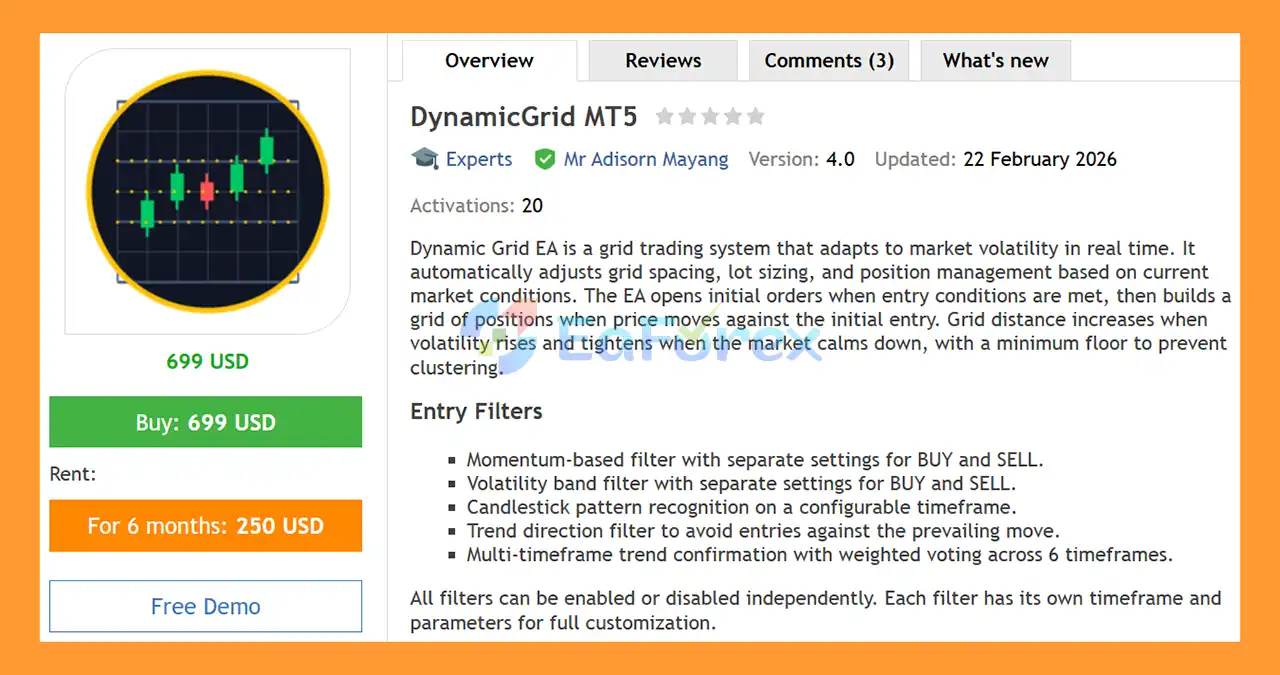
DynamicGrid MT5 is an advanced adaptive grid trading Expert Advisor for MetaTrader 5, designed to automatically adjust its trading behavior according to changing market volatility.
Unlike a traditional fixed-distance grid system, DynamicGrid uses real-time volatility analysis to dynamically adjust grid spacing, lot sizing, and position management. The system can widen grid distances when market volatility increases and tighten them when market conditions become calmer, while maintaining a configurable minimum distance to help prevent excessive position clustering.
The EA begins by opening an initial position when its entry conditions are satisfied. If price subsequently moves against the initial position, DynamicGrid can build additional positions according to its configured grid logic.
To improve entry selection, the system includes multiple configurable filters covering momentum, volatility, candlestick patterns, trend direction, and multi-timeframe confirmation.
DynamicGrid MT5 supports a wide range of markets, including Forex, Gold, Indices, and Cryptocurrencies, and works across all available timeframes.
It is compatible with both Hedging and Netting account types.
>> Delivery time 24h-48h after payment.
>>> Refund if not delivered.
>>> You will receive the latest version without any limitations (ID+Time).>>Reviewed by Jason Stap <<
DynamicGrid MT5 automatically adjusts its grid distance according to current market volatility.
This adaptive approach is designed to make the grid structure more responsive to changing market conditions than a conventional fixed-distance grid.
DynamicGrid MT5 includes several independent filters that can be enabled or disabled according to the user’s configuration.
Available filters include:
Each filter can have its own timeframe and parameters, providing extensive customization options.
The multi-timeframe trend confirmation system uses weighted voting across six timeframes.
This allows the EA to evaluate broader market direction before opening new positions and can be configured according to the trader’s preferred trading environment.
DynamicGrid provides seven different lot-sizing modes, ranging from conservative fixed-lot configurations to progressive scaling based on grid depth.
A configurable maximum lot cap can also be applied to help limit position size.
When the EA detects an abnormal price spike, the grid can automatically pause new grid entries.
This feature is designed to prevent the system from aggressively adding positions during unusually fast market movements.
DynamicGrid MT5 follows a structured multi-stage process.
The EA continuously evaluates the selected trading instrument using its configured market filters.
Depending on the setup, this can include:
When the required entry conditions are satisfied, DynamicGrid opens the initial BUY or SELL position.
The system can use separate configurations for BUY and SELL conditions, allowing traders to fine-tune each direction independently.
If the market moves against the initial position, the EA can add additional positions according to its grid parameters.
Instead of using a permanently fixed grid distance, DynamicGrid calculates grid spacing based on market volatility.
When volatility increases, grid spacing can expand. When market conditions become calmer, the distance can tighten, subject to the configured minimum grid-distance floor.
This helps the grid structure respond to changing market conditions.
The EA uses one of its seven available lot-scaling modes to determine position size.
A maximum lot limit can be applied to prevent position sizes from exceeding the configured cap.
DynamicGrid MT5 provides four different position-closing methods:
The selected exit method determines how the EA attempts to close individual positions or the overall basket.
DynamicGrid MT5 is designed for traders who want a flexible and volatility-aware grid trading system rather than a simple fixed-distance grid.
One of its defining features is its ability to adjust grid spacing according to market conditions. This allows the system to use different distances during periods of high and low volatility.
The EA also provides extensive control over entry conditions. Traders can independently enable or disable the momentum, volatility, candlestick, trend, and multi-timeframe filters.
Another important feature is the variety of lot management and position-closing methods. This allows DynamicGrid to be configured for different trading styles and risk preferences.
The system also includes several protective mechanisms, including:
DynamicGrid can therefore be configured across a broad range of trading environments, from Forex and Gold to Indices and Crypto.
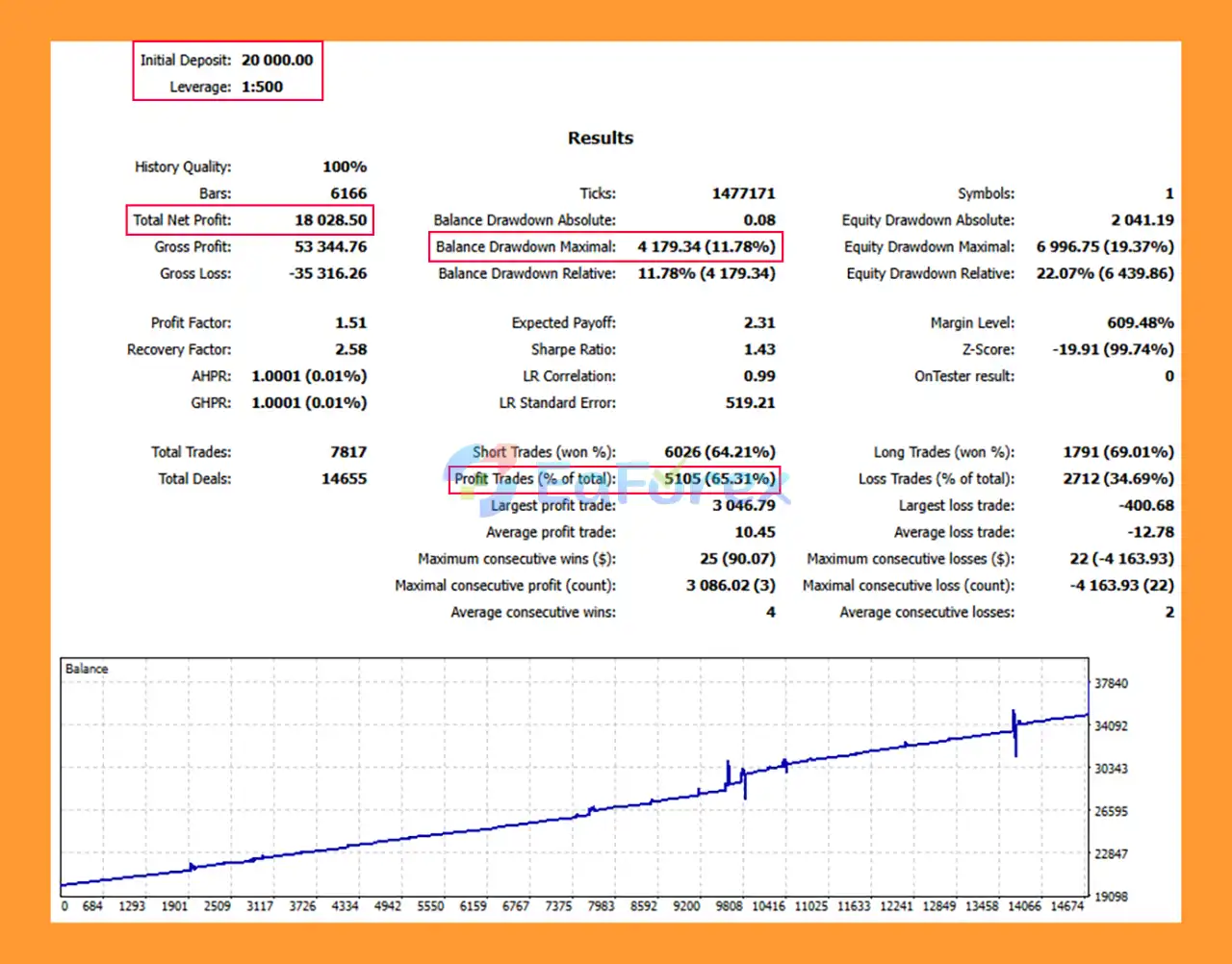
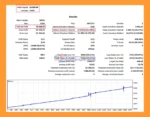
DynamicGrid MT5 Backtests
Because DynamicGrid MT5 is a grid-based trading system, risk management is a particularly important part of its operation.
The EA includes a drawdown-reduction mechanism designed to offset losing positions against profitable positions.
This can help manage an open portfolio when multiple positions are active.
DynamicGrid MT5 can use progressive hedging in up to four steps.
The hedge levels are configurable and can be triggered when account or portfolio drawdown reaches predefined thresholds.
A configurable daily profit target can automatically stop new trading activity once the target is reached.
This feature can help prevent the system from continuing to trade after a predefined daily objective has been achieved.
Users can define a maximum loss limit using either:
When the configured limit is reached, trading can be restricted according to the EA’s settings.
DynamicGrid MT5 includes spread-management functionality with:
This allows traders to prevent new entries when transaction costs become unfavorable.
Trading can be restricted to specific start and stop times.
This allows users to avoid selected market sessions or periods where liquidity and trading conditions may be less suitable.
The EA includes weekend protection that can prevent new entries before the Friday market close.
This is designed to reduce exposure to weekend gaps and changes in liquidity.
DynamicGrid MT5 can integrate with the economic calendar and pause trading around selected news events.
Users can configure the relevant currencies and impact levels according to their preferred news-filtering rules.
A configurable cooldown period helps prevent the EA from immediately re-entering the market after a previous trading event.
This can reduce rapid-fire entries in fast-changing market conditions.
DynamicGrid MT5 offers four position-management approaches.
The trailing-stop method dynamically adjusts the protective exit level as the position moves into profit.
Profit can be locked separately for BUY and SELL positions according to the configured parameters.
This method evaluates the combined result of the relevant positions and attempts to close the basket once the configured profit condition is reached.
Dynamic TP adjusts target levels according to the number of open positions.
The system can use:
This allows the take-profit logic to adapt to the changing structure of the grid.
DynamicGrid MT5 is designed to operate across a wide range of financial instruments.
The EA can be used with:
DynamicGrid supports all MetaTrader 5 timeframes, allowing traders to configure the system according to their preferred market and trading style.
The EA is compatible with:
However, the behavior of multiple positions and position management can differ between account types. Users should verify the EA configuration with their specific MT5 broker before deploying it on a live account.
DynamicGrid MT5 provides extensive risk-management functionality, but grid trading remains a high-risk trading methodology.
The ability to adapt grid spacing does not eliminate the fundamental risk associated with markets moving persistently against an open position.
Important risks include:
Users should avoid assuming that adaptive grid logic makes the system inherently safe. Proper position sizing, conservative lot settings, drawdown limits, and thorough testing are essential.
Demo testing and forward testing are recommended before using DynamicGrid with significant real capital.
Launch your MetaTrader 5 trading platform and log in to your trading account.
From the MT5 menu, select:
File → Open Data Folder
Then navigate to:
MQL5 → Experts
Place the DynamicGrid MT5 Expert Advisor file, normally supplied in .ex5 format, into the Experts folder.
Restart the MT5 terminal or refresh the Navigator window.
The EA should appear under:
Navigator → Expert Advisors
Open the desired chart, such as:
Select your preferred timeframe.
DynamicGrid supports all MT5 timeframes.
Drag DynamicGrid MT5 from the Navigator onto the selected chart.
Review the available filters and decide which components should be enabled:
Configure the relevant timeframes and parameters.
Set:
Use conservative settings when testing the system.
Review and configure:
Make sure Algo Trading is enabled in MetaTrader 5.
Then click OK to activate the Expert Advisor.
Before using DynamicGrid MT5 on a live account, conduct historical backtesting and forward testing using your intended:
Grid systems can behave very differently under different market and broker conditions, so testing is particularly important.
In summary, DynamicGrid MT5 is a feature-rich adaptive grid trading Expert Advisor designed to adjust its grid structure according to market volatility.
The EA combines dynamic grid spacing with multiple entry filters, seven lot-sizing modes, four position-closing methods, multi-timeframe trend confirmation, drawdown controls, progressive hedging, spread management, news filtering, and trading-session protection.
Its ability to operate across Forex, Gold, Indices, and Cryptocurrency markets and support both Hedging and Netting accounts provides substantial configuration flexibility.
However, DynamicGrid MT5 remains a grid-based trading system, and adaptive spacing does not remove the risks associated with prolonged adverse price movements or increasing position exposure. Traders should carefully configure lot sizing, grid depth, drawdown limits, and loss protection before using the EA with real funds.
For users considering an automated grid strategy, DynamicGrid MT5 provides a highly configurable framework where market filters, volatility adaptation, position management, and risk controls can be adjusted to match different trading environments.
1. What is DynamicGrid MT5 and how does it work?
DynamicGrid MT5 is an adaptive grid trading Expert Advisor (EA) designed for the MetaTrader 5 platform. Unlike traditional grid systems, it dynamically adjusts grid spacing, lot size, and position management in real time based on market volatility and trend conditions to optimize performance and control risk.
2. How is DynamicGrid MT5 different from traditional grid EAs?
Traditional grid EAs use fixed spacing and lot progression. DynamicGrid MT5 automatically widens grid distance during high volatility and tightens it in stable markets. It also applies volatility-based lot scaling, multi-timeframe confirmation, and advanced drawdown protection to prevent overexposure.
3. Does DynamicGrid MT5 use martingale strategy?
DynamicGrid MT5 uses adaptive lot scaling with seven configurable modes, but it is not a pure martingale system. The EA integrates risk controls such as progressive hedging, loss limit protection, and drawdown reduction mechanisms to manage exposure more intelligently.
4. What markets can DynamicGrid MT5 trade?
DynamicGrid MT5 is compatible with multiple markets, including:
Forex pairs
Gold (XAUUSD)
Indices
Cryptocurrency symbols
It works with both Hedging and Netting account types on MT5.
5. What risk management features are included in DynamicGrid MT5?
DynamicGrid MT5 includes several advanced risk control tools:
Drawdown Reduction Engine
Progressive Hedging (up to four levels)
Daily Profit Target
Fixed Loss Limit Protection
Spread Control System
Economic Calendar News Filter
These features help reduce risk during volatile market conditions.
6. What is the minimum deposit required for DynamicGrid MT5?
The provided backtest example used an initial deposit of $20,000. However, the required deposit depends on chosen lot size, grid settings, and risk configuration. Larger grid systems generally require higher capital to manage drawdowns safely.
7. What are the backtest results of DynamicGrid MT5?
Based on the provided backtest data:
Initial Deposit: $20,000
Total Net Profit: $18,028.50
Win Rate: 65.31%
Maximum Drawdown: 11.78%
Past backtest performance does not guarantee future results, as live market conditions may vary.
8. Does DynamicGrid MT5 include news and spike protection?
Yes. The EA integrates an Economic Calendar filter to pause trading around major news events. It also features Abnormal Spike Protection, which temporarily stops grid expansion during extreme price movements.
9. Can I customize the trading filters in DynamicGrid MT5?
Yes. All entry filters—including momentum, volatility bands, candlestick patterns, and trend filters—can be individually enabled, disabled, and configured. The system also uses weighted voting across six timeframes for enhanced trade confirmation.
10. Is DynamicGrid MT5 suitable for long-term trading?
DynamicGrid MT5 is designed for adaptive, long-term trading with built-in risk management layers. Its dynamic TP system, hedging structure, and volatility-based adjustments aim to balance profitability and drawdown control. However, like all grid systems, proper capital management is essential to ensure sustainability.
In stock
In stock
In stock
In stock
In stock
Out of stock
No account yet?
Create an Account












 Automatic EA
 EA Best Seller
 Expert Advisor MT4
 Expert Advisor MT5
 HFT EA


Reviews
Clear filtersThere are no reviews yet.