









-
 Unlimited Activations
-
 Instant delivery
-
 Easy to install









 Unlimited Activations
Instant delivery
Easy to install
Unlimited Activations
Instant delivery
Easy to install
 Free Update
 Free Install Support

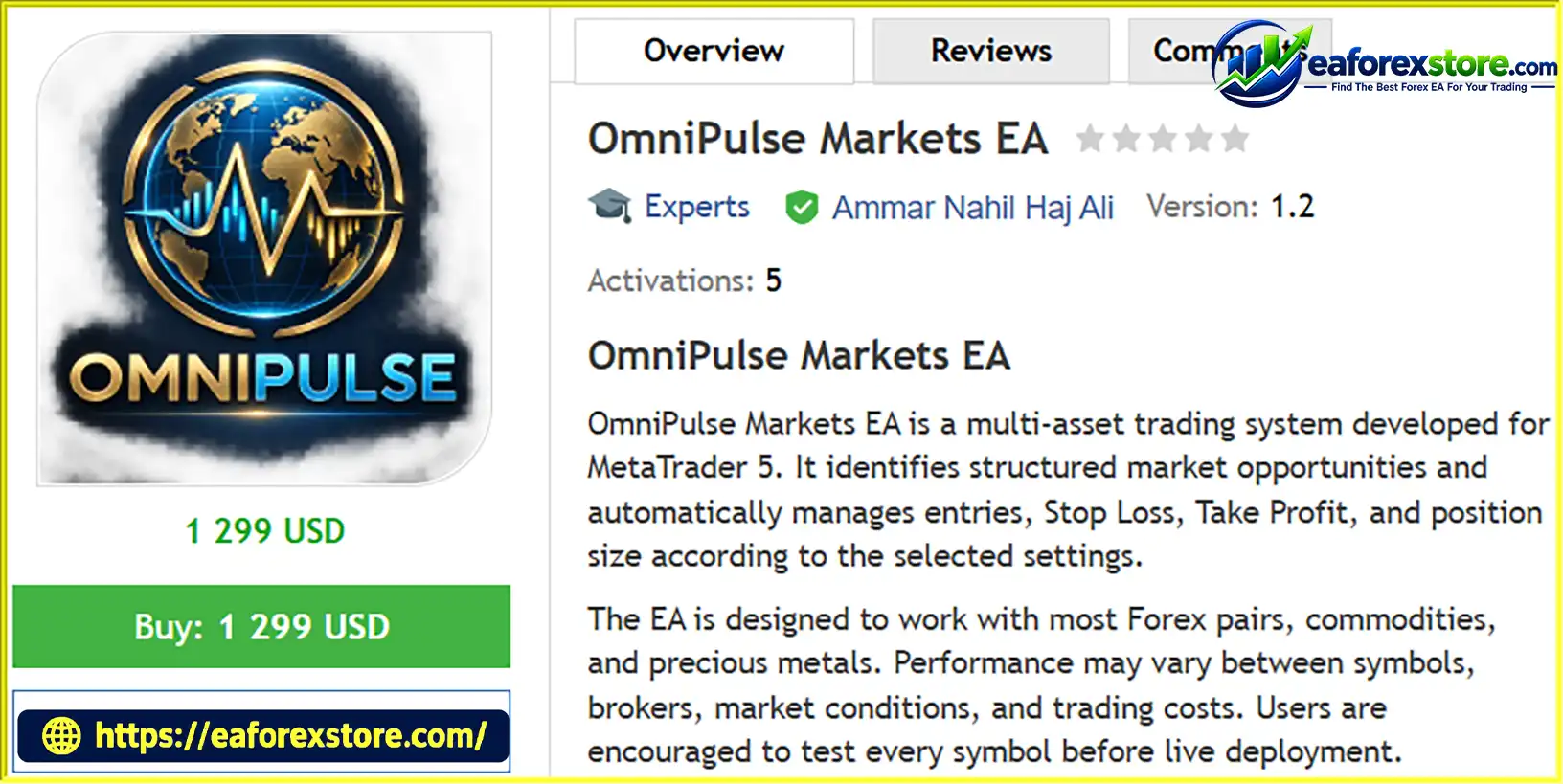
OmniPulse Markets EA MT5 is a multi-asset Expert Advisor (EA) for MetaTrader 5, designed to automate trade execution and risk-based position sizing across a range of financial markets. It supports most Forex pairs, commodities, and precious metals, allowing traders to evaluate different instruments using a configurable trading system.
The EA automatically manages trade entries, Stop Loss (SL), Take Profit (TP), and position volume according to the selected parameters. Its position-sizing mechanism calculates trade volume based on the specified monetary risk, entry price, and Stop Loss distance, helping traders establish a more structured approach to risk management.
OmniPulse Markets EA MT5 also features adjustable Reward-to-Risk ratios, multiple trading timeframes, GMT-based trading sessions, and available-margin checks before order submission. These functions provide flexibility for traders who want to test and configure an automated strategy according to their broker and preferred trading conditions.
With support for timeframes ranging from M1 to H4, OmniPulse Markets EA MT5 can be used for different testing and optimization approaches. However, results may vary significantly between instruments, brokers, spreads, commissions, and market environments.
> Delivery time 24h-48h after payment.
>>> Refund if not delivered.
>>> You will receive the latest version without any limitations (ID+Time).Reviewed by Jason Stap <<<
OmniPulse Markets EA MT5 Overview
OmniPulse Markets EA MT5 is designed to work with most Forex pairs, commodities, and precious metals supported by the broker.
This multi-asset compatibility allows traders to evaluate the EA across different instruments instead of limiting their testing to a single currency pair.
However, not every symbol will necessarily produce suitable results. Differences in volatility, spread, liquidity, contract specifications, and trading costs can affect the strategy’s effectiveness. Each instrument should be tested independently before live deployment.
The EA automates trade execution according to its programmed strategy and configured parameters.
Once installed and properly configured, it can manage the trading process without requiring the user to manually place every order. Traders should still monitor its operation, review trade history, and confirm that its behavior matches the intended configuration.
Automated execution does not guarantee that every signal will be profitable or that orders will always be filled at the expected price.
One of the central features of OmniPulse Markets EA MT5 is its monetary risk-based position-sizing mechanism.
The EA calculates trade volume using the selected risk amount, entry price, and Stop Loss distance. The risk amount is expressed in the account’s deposit currency.
This approach helps users define a planned monetary risk for individual trades rather than selecting lot sizes without reference to the Stop Loss distance.
However, actual losses may differ from the intended risk because of slippage, gaps, execution delays, or broker volume restrictions. If the calculated volume is below the broker’s minimum permitted lot size, the EA may use the minimum lot, potentially increasing the actual risk beyond the configured amount.
OmniPulse Markets EA MT5 automatically places Stop Loss and Take Profit levels according to its trading logic and selected settings.
These features help establish a consistent trade-management framework. Nevertheless, a Stop Loss does not guarantee an exact exit price during fast markets or gaps.
The EA allows users to configure the Reward-to-Risk ratio to suit their preferred trading approach.
The supplied default setting is 4:1, meaning the intended reward target is four times the planned monetary risk under the configured calculation.
A higher Reward-to-Risk ratio can require price to travel farther before reaching Take Profit, potentially reducing the percentage of trades that close at a profit. The ratio alone does not determine profitability; entry quality, win rate, execution costs, and actual exit behavior also matter.
OmniPulse Markets EA MT5 supports the following timeframes:
The default strategy timeframe is H4. Traders can evaluate alternative timeframes through independent testing and optimization.
Changing the timeframe may materially affect trade frequency, Stop Loss distance, market noise, and performance. The best timeframe should be determined through robust testing rather than assumptions based on historical results alone.
The EA includes a configurable trading session based on GMT.
Its default session is 07:00–17:59 GMT, allowing traders to define when the system is intended to operate.
A time-based filter can help restrict trading to selected hours, but users must ensure the configured schedule corresponds to their intended market session. Broker-server time and GMT are not necessarily the same, and daylight-saving changes can affect the relationship between them.
Before submitting a trade, OmniPulse Markets EA MT5 checks the available margin.
This function is intended to help prevent orders from being submitted when the account does not have sufficient available margin under the EA’s checks.
However, margin availability can change rapidly as prices move and other positions fluctuate. A margin check cannot eliminate the risk of margin calls or stop-out events.
The EA is designed to accommodate different symbol specifications and broker volume limits.
This is important because brokers may use different symbol names, minimum lot sizes, maximum volumes, volume increments, contract sizes, and other trading conditions.
Despite this compatibility objective, users should verify that each intended instrument is recognized correctly and that the EA’s calculated position size conforms to the broker’s specifications.
OmniPulse Markets EA MT5 is suitable for strategy testing and parameter optimization in MetaTrader 5.
Backtesting can help users evaluate historical trade behavior, compare timeframes, and assess how the EA performs under different settings.
Optimization should be conducted carefully. A configuration that performs well on historical data may simply be overfitted to the selected testing period. Independent out-of-sample testing and demo forward testing are important steps before considering live deployment.
OmniPulse Markets EA MT5 follows a configurable automated trading process that combines trade execution, monetary risk calculation, and predefined trade management.
Choose a supported instrument, such as a Forex pair, commodity, or precious metal, and configure the desired timeframe.
The supplied default timeframe is H4, but M1, M5, M15, M30, and H1 are also supported.
Set the desired trading hours using the EA’s GMT-based session parameters.
The default schedule is 07:00–17:59 GMT. Confirm that the selected schedule matches your intended trading period and account setup.
The EA evaluates market conditions according to its internal trading strategy and configured parameters.
The supplied description does not specify the complete entry-signal methodology. Therefore, the exact indicators, market structure rules, or signal-generation conditions should be verified in the official product documentation.
When a potential trade satisfies the EA’s entry conditions, the system calculates the trade volume using the configured monetary risk, entry price, and Stop Loss distance.
The objective is to align position size with the intended risk amount while accounting for the instrument’s trading specifications.
If the calculated volume falls below the broker’s minimum permitted size, the EA may use the minimum lot, which can result in greater potential risk than configured.
The EA places the configured Stop Loss and Take Profit levels for the trade.
The selected Reward-to-Risk ratio determines the intended relationship between the potential reward and the planned risk, subject to the EA’s implementation.
Before submitting an order, the EA checks whether sufficient margin is available under its programmed rules.
This helps incorporate account capacity into order submission, although available margin and execution conditions can change after the check.
If the trade satisfies the programmed conditions and the broker accepts the order, the EA manages the position according to its trade-management settings.
Actual results depend on price movement, spreads, commissions, swaps, slippage, and execution quality.
Traders can use the MetaTrader 5 Strategy Tester and demo trading to review results across different symbols, timeframes, and configurations.
Testing should include realistic trading costs and a variety of market conditions before the EA is considered for live use.
OmniPulse Markets EA MT5 supports a broad range of Forex pairs, commodities, and precious metals. This gives traders flexibility when evaluating the system across different markets.
Risk-based position sizing helps connect trade volume to a predefined monetary risk and Stop Loss distance. This provides a more systematic approach than using the same lot size regardless of trade conditions.
Automatic Stop Loss and Take Profit placement helps standardize trade management and reduce the need to enter these levels manually for every trade.
The configurable Reward-to-Risk ratio allows traders to test different target-to-risk relationships and assess their impact on overall strategy performance.
The GMT-based trading session allows users to define when the EA is intended to trade, supporting different testing schedules and trading preferences.
Support for M1 through H4 allows traders to evaluate the system under different chart intervals and determine which configurations perform most consistently.
The available-margin check adds an account-capacity check before order submission, helping users incorporate margin availability into the automated trading process.
The EA’s adjustable parameters make it possible to compare different settings in the Strategy Tester and evaluate whether historical performance remains consistent outside the optimization period.
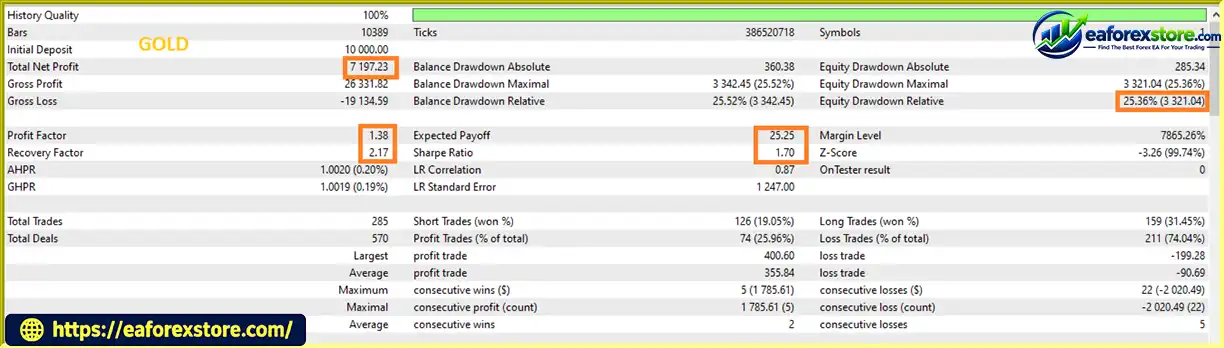
🔺XAUUSD (Gold)
OmniPulse Markets EA MT5 backtets
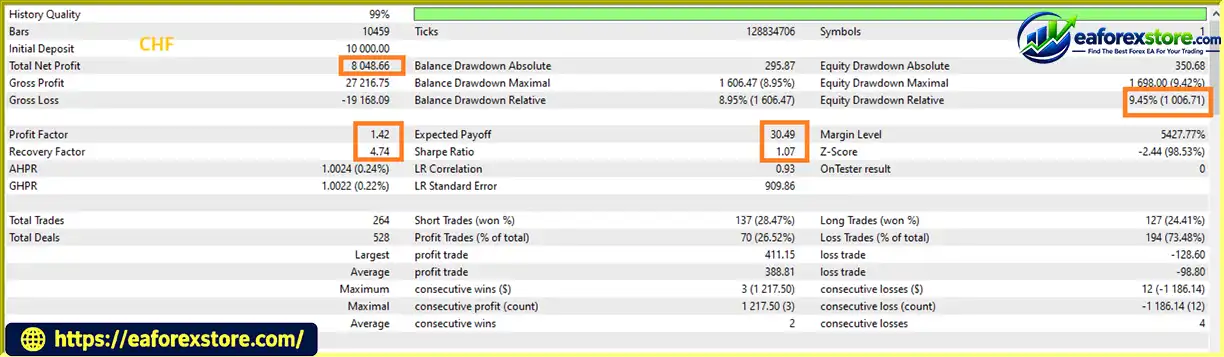
🔺CHF
OmniPulse Markets MT5 backtets
The effectiveness of OmniPulse Markets EA MT5 depends on its entry logic, selected instruments, timeframe, position-sizing settings, and trading conditions.
The supplied product description states that the default configuration produced balanced historical results across several Forex pairs and metals. However, no specific backtest figures, testing dates, profit factor, win rate, or maximum drawdown statistics were provided. These claims should therefore be independently verified.
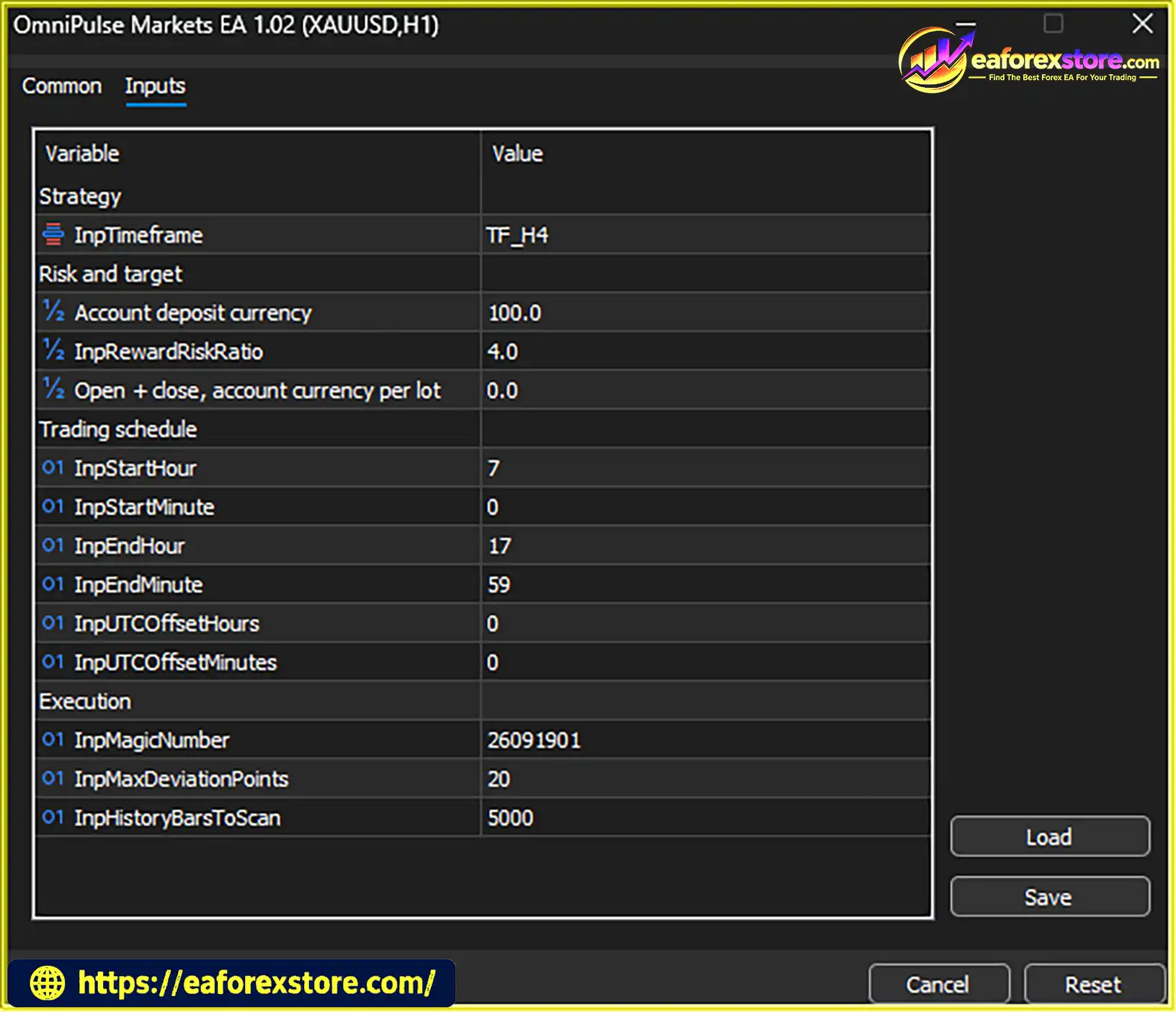
The developer provides the following default settings:
| Parameter | Default Setting |
|---|---|
| Strategy timeframe | H4 |
| Risk amount | 100 in the account deposit currency |
| Reward-to-Risk ratio | 4:1 |
| Trading session | 07:00–17:59 |
| Session reference | GMT |
| Round-turn commission | 0 by default |
Important: A default risk amount of 100 represents 100 units of the account’s deposit currency, not necessarily USD. For example, its monetary meaning depends on whether the account is denominated in USD, EUR, or another currency.
A risk amount of 100 may be excessive for a small account. Traders should adjust this parameter according to their account balance, financial circumstances, and acceptable loss level.
The EA calculates position size according to the selected monetary risk and Stop Loss distance.
However, broker restrictions can affect the final volume. If the required position size is smaller than the broker’s minimum lot, the EA may use the minimum permitted volume, potentially exceeding the intended monetary risk.
Users should test the smallest calculated lot sizes carefully and verify the actual risk for every supported instrument.
The optional round-turn commission parameter allows estimated opening and closing commissions to be included in the position-size calculation.
The supplied default is zero. If the broker charges commission, users should enter an appropriate value according to the EA’s parameter definition. An incorrect commission setting can cause the calculated risk to differ from the intended amount.
Spreads, swaps, slippage, and other trading costs may also affect the final result.
A 4:1 Reward-to-Risk ratio means the planned reward is four times the planned risk, based on the configured levels.
However, a high Reward-to-Risk ratio does not guarantee profitability. The strategy must generate enough successful trades to offset losses and trading costs. Actual results also depend on whether Take Profit and Stop Loss orders are executed at their intended prices.
Trading several symbols can diversify opportunities, but it can also create overlapping exposure. Multiple Forex pairs may share the same currency, while gold and other commodities can respond to common macroeconomic factors.
If multiple EA instances are running, traders should evaluate total account exposure rather than assessing each chart in isolation.
Before deploying OmniPulse Markets EA MT5 on a live account:
Historical performance does not guarantee future results, and backtest optimization cannot eliminate market risk.
The supplied description does not fully explain the EA’s signal-generation methodology. Traders should obtain the official documentation to understand the conditions that trigger entries and how the strategy responds to changing markets.
If the calculated volume is below the broker’s minimum permitted lot, the EA may use the minimum lot size. This can cause the actual potential loss to exceed the configured monetary risk.
Spreads, commissions, swaps, and slippage can reduce profitability. These factors differ between brokers and instruments, making independent testing essential.
The default risk amount is 100 units of the account deposit currency. This is not a universal risk recommendation and may be too large for smaller accounts.
The intended target-to-risk relationship is only one component of a trading strategy. Win rate, average realized profit and loss, execution costs, and the quality of entry signals also determine the outcome.
Running multiple EA instances can create correlated positions and overlapping currency exposure. Traders should monitor the combined account risk and margin usage.
Incorrect session settings can cause the EA to trade at unintended times. Users should confirm how the EA interprets GMT and whether its schedule requires adjustment during daylight-saving periods.
Market behavior changes over time. A timeframe or configuration that performed well historically may produce weaker results in the future.
Risk disclaimer: Forex, commodity, and precious-metal trading involves substantial risk and can result in the partial or complete loss of invested capital. No Expert Advisor can guarantee profits or eliminate trading risk. Always test on a demo account before committing real funds.
Follow these general steps to install OmniPulse Markets EA MT5 on MetaTrader 5.
setting
Download OmniPulse Markets EA MT5 from the provider or authorized marketplace. Confirm that the file is compatible with MetaTrader 5.
Launch MT5 and log in to your trading account.
In the terminal menu, select:
File → Open Data Folder
Navigate to:
MQL5 → Experts
Copy the supplied .ex5 file into the Experts folder. If the developer provides additional files, install them according to the official instructions.
Return to MetaTrader 5 and refresh the Expert Advisors list in the Navigator panel. Restart MT5 if necessary.
Open the chart for the Forex pair, commodity, or precious metal you want to test. Select your intended timeframe, such as H4, which is the supplied default.
Drag OmniPulse Markets EA MT5 onto the chart and review the available inputs.
Configure the risk amount, Reward-to-Risk ratio, trading timeframe, GMT session, and round-turn commission according to your broker and account conditions.
Enable Algo Trading in MT5 and confirm that the EA has the required permissions.
Check the Experts and Journal tabs for initialization messages, errors, or order-submission issues.
If you want to trade multiple instruments, attach a separate EA instance to each symbol as instructed by the developer.
Monitor combined portfolio exposure and avoid assuming that each instance operates with completely independent account risk.
Run backtests using realistic trading costs, then forward-test the EA on a demo account.
Confirm that position sizing, minimum lot handling, Stop Loss placement, Take Profit placement, trading sessions, and margin checks work as expected before using real funds.
A VPS may help maintain continuous operation, but it cannot guarantee profitable trading or eliminate execution risk.
>>> Join VIP Membership Now <<<
OmniPulse Markets EA MT5 is a configurable multi-asset Expert Advisor for MetaTrader 5 that combines automated execution, risk-based position sizing, automatic Stop Loss and Take Profit placement, and GMT-based trading sessions.
Its support for Forex pairs, commodities, and precious metals provides flexibility for traders who want to evaluate the strategy across different instruments. Additional features, including adjustable Reward-to-Risk ratios, multiple timeframes, commission inputs, and available-margin checks, help users tailor the configuration to their broker and trading preferences.
The default H4 timeframe and 4:1 Reward-to-Risk ratio offer a starting point for testing, not a guarantee of optimal performance. The default monetary risk amount of 100 may also be unsuitable for some accounts and should be reviewed carefully.
Before using OmniPulse Markets EA MT5 with real money, verify its entry logic, test each symbol independently, account for realistic trading costs, and confirm that position sizing respects your intended risk under the broker’s minimum-volume rules.
For traders seeking a multi-asset MT5 Expert Advisor with automated trade management and configurable monetary risk controls, OmniPulse Markets EA MT5 may be worth evaluating through disciplined backtesting and demo forward testing.
Trade responsibly. Past performance does not guarantee future results, and all automated trading involves financial risk.
1. What is OmniPulse Markets EA MT5?
OmniPulse Markets EA MT5 is an automated trading Expert Advisor for MetaTrader 5. It is designed to trade Forex pairs, commodities, and precious metals using configurable trade execution, monetary risk-based position sizing, automatic Stop Loss and Take Profit levels, and trading session controls.
2. Which trading instruments does OmniPulse Markets EA MT5 support?
OmniPulse Markets EA MT5 is designed to support most Forex pairs, commodities, and precious metals available through a broker. However, compatibility and performance may vary depending on symbol specifications, spreads, liquidity, contract sizes, and execution conditions. Each instrument should be tested independently before live trading.
3. Which timeframes are supported by OmniPulse Markets EA MT5?
The EA supports six timeframes: M1, M5, M15, M30, H1, and H4. The default strategy timeframe is H4. Traders can compare different timeframes using MetaTrader 5's Strategy Tester and demo forward testing to determine which configuration is most suitable for their chosen instrument.
4. How does OmniPulse Markets EA MT5 manage trading risk?
OmniPulse Markets EA MT5 calculates position size based on the configured monetary risk, entry price, and Stop Loss distance. It also supports automatic Stop Loss and Take Profit placement, adjustable Reward-to-Risk ratios, available-margin checks, and an optional round-turn commission input. Actual losses may exceed the intended risk because of slippage, price gaps, trading costs, or broker minimum-lot restrictions.
5. What is the default Reward-to-Risk ratio of OmniPulse Markets EA MT5?
The supplied default Reward-to-Risk ratio is 4:1, meaning the intended reward target is four times the planned risk under the configured calculation. However, this ratio does not guarantee profitability. Actual results depend on entry quality, win rate, execution costs, and whether trades close near their intended Stop Loss and Take Profit levels.
6. What are the default settings for OmniPulse Markets EA MT5?
The supplied default settings include the H4 strategy timeframe, a monetary risk amount of 100 units in the account's deposit currency, a 4:1 Reward-to-Risk ratio, a GMT trading session from 07:00 to 17:59, and a round-turn commission value of zero. Traders should review these settings carefully because the default risk amount may be unsuitable for smaller accounts, and commission settings should reflect actual broker costs.
7. Are the backtest results of OmniPulse Markets EA MT5 independently verified?
The supplied product information includes reported backtest figures for XAUUSD and CHF, but it does not provide enough information to independently verify the testing periods, methodology, trading costs, or complete performance records. The results should therefore be treated as reported historical performance rather than a guarantee of future returns. Traders should conduct their own tests using realistic spreads, commissions, swaps, and execution assumptions.
8. Is OmniPulse Markets EA MT5 suitable for beginners?
OmniPulse Markets EA MT5 may be considered by beginners who want to explore automated trading on MetaTrader 5, but users should understand position sizing, Stop Loss settings, trading costs, margin requirements, and drawdown before using it. Testing on a demo account is strongly recommended. The entry strategy is not fully explained in the supplied description, so users should consult the official documentation before committing real funds.
Risk Disclaimer: Forex, commodity, and precious-metal trading involves substantial financial risk and may result in the partial or complete loss of invested capital. Automated trading does not guarantee profits. Always test an Expert Advisor on a demo account and use risk settings appropriate to your financial circumstances.
In stock
In stock
In stock
In stock
In stock
Out of stock
No account yet?
Create an Account












 Automatic EA
 EA Best Seller
 Expert Advisor MT4
 Expert Advisor MT5
 HFT EA


Reviews
Clear filtersThere are no reviews yet.