









-
 Unlimited Activations
-
 Instant delivery
-
 Easy to install






 Unlimited Activations
Instant delivery
Easy to install
Unlimited Activations
Instant delivery
Easy to install
 Free Update
 Free Install Support

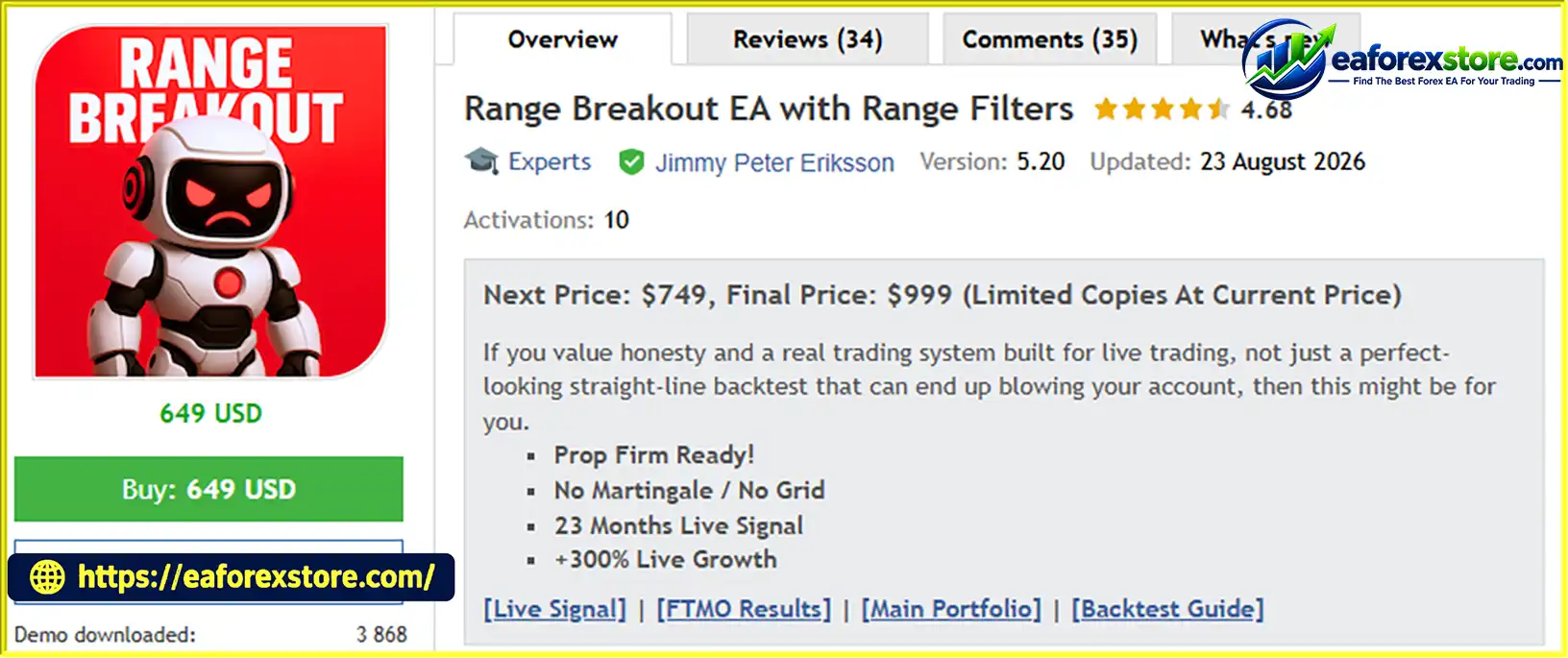
Range Breakout EA with Range Filters MQ5 is an automated trading system designed for MetaTrader 5 (MT5). It uses a session-based breakout strategy that focuses on changes in market volatility between the Asian and London trading sessions. The EA identifies a relatively narrow price range formed during quieter market conditions and looks for breakout opportunities when volatility increases.
The core concept is based on a common Forex market behavior: prices may consolidate during the Asian session before experiencing stronger directional movements around the London market opening. Instead of predicting the exact direction of the market, the EA aims to enter trades when price breaks out of the established range and meets its internal breakout-filter conditions.
According to its product description, the system does not rely on conventional technical indicators or fixed chart timeframes. It also includes risk-management options, spread filtering, daily drawdown protection, and adjustable position sizing. These features are intended to make the EA flexible across different markets and trading account configurations.
Range Breakout EA with Range Filters MQ5 supports five advertised markets: XAUUSD, USDJPY, BTCUSD, US30, and DE40. Its multi-market approach allows traders to explore opportunities across Forex, gold, cryptocurrency, and stock indices. However, diversification does not guarantee profitability or eliminate the possibility of correlated losses.
> Delivery time 24h-48h after payment.
>>> Refund if not delivered.
>>> You will receive the latest version without any limitations (ID+Time).Reviewed by Jason Stap <<<
Range Breakout EA with Range Filters MQ5 Overview
The EA identifies a price range during a quieter trading period and monitors the market for a breakout when volatility increases. This approach aims to capture directional price movements that may develop around the London session opening.
An internal breakout filter is designed to help avoid lower-quality entries. By applying additional conditions before entering a trade, the system aims to reduce exposure to false breakouts. The exact filtering logic should be verified through the official documentation or testing.
The EA includes optimized settings for five markets:
Trading multiple markets may create additional opportunities, but each instrument has different contract specifications, trading hours, spreads, and volatility characteristics.
The EA offers a single-chart mode designed to manage multiple supported markets from one chart. This can simplify configuration and monitoring without requiring a separate chart for every instrument.
Traders can also use individual chart mode, which provides live visualization of the trading range and breakout levels. This feature helps users monitor the EA’s interpretation of current market conditions.
The system advertises universal lot sizing designed to work across different brokers and account currencies without additional compatibility settings. Nevertheless, traders should verify the EA’s calculations against their broker’s minimum volume, volume step, contract size, margin requirements, and account currency.
The built-in daily drawdown protector is designed to limit trading activity when daily losses reach a configured threshold. This feature may be useful for traders following proprietary trading firm rules, including those associated with FTMO, The5ers, and FundedNext.
Actual compatibility depends on each firm’s current rules and the EA’s implementation. A daily drawdown protector cannot guarantee compliance or prevent losses from exceeding the intended limit during fast markets or execution failures.
The EA includes a trade randomizer advertised as a feature for prop firm trading. Its precise purpose and behavior should be checked in the documentation. Traders should ensure that any randomization feature complies with their broker’s terms and the applicable proprietary trading firm’s rules.
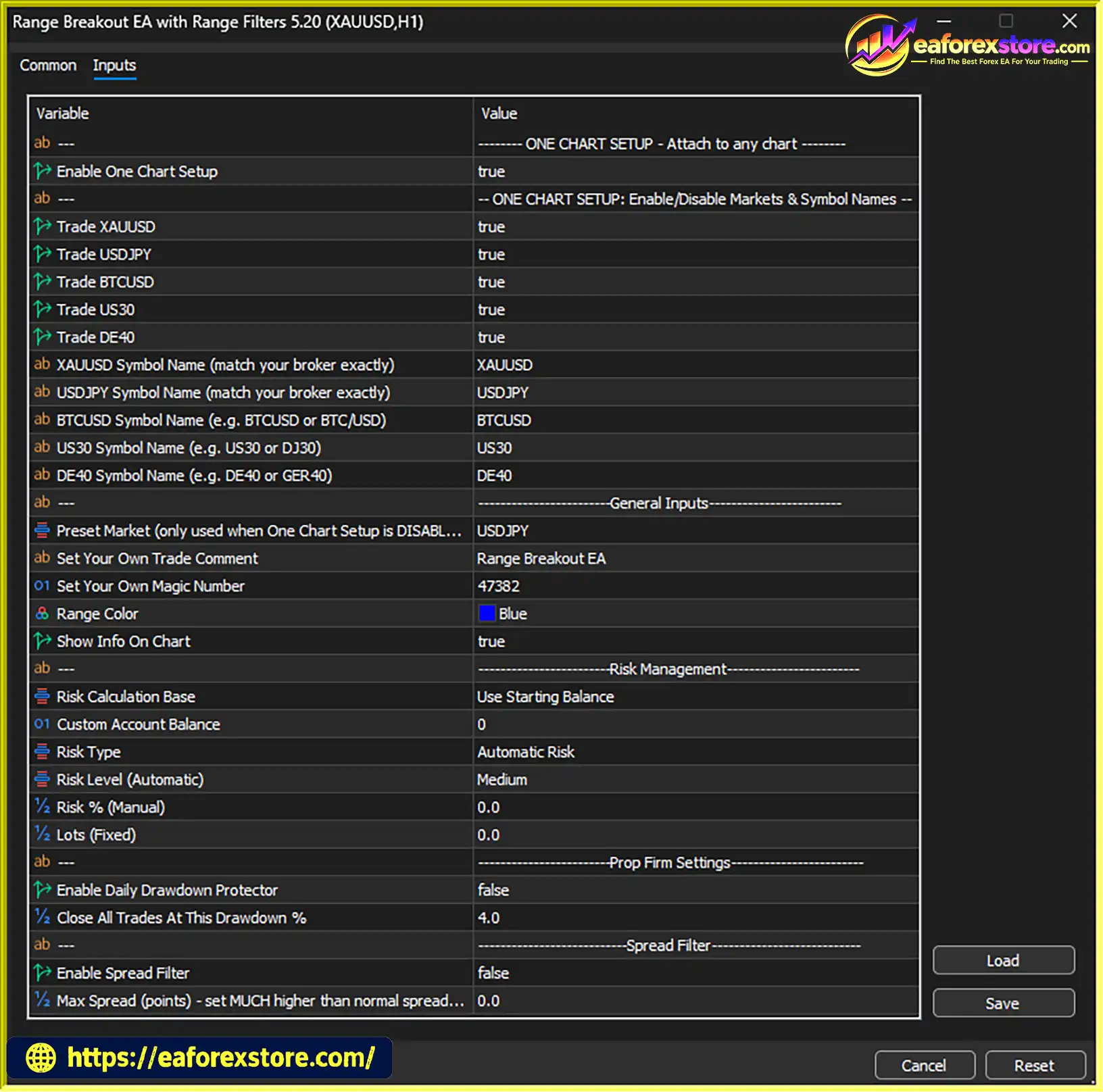
The EA provides several risk configuration options:
These settings give users control over position sizing, trade identification, and chart presentation.
When enabled, the chart information panel displays current daily profit and daily drawdown. This can help traders monitor the account’s daily performance without constantly checking the account history.
Range Breakout EA with Range Filters MQ5 follows a rule-based process designed to identify and trade potential breakouts between market sessions.
During quieter market conditions, the EA identifies the price range established within its configured observation period. The range serves as a reference for potential breakout entries.
As the London session approaches or opens, market participation and volatility may increase. The EA monitors price behavior around the established range to identify possible trading opportunities.
When price moves beyond the relevant range boundary, the EA evaluates whether the movement meets its internal breakout-filter conditions.
A qualifying upward breakout may create a buy opportunity, while a qualifying downward breakout may create a sell opportunity. The precise entry conditions depend on the programmed strategy.
Before executing a trade, the EA can apply its configured spread and risk-management rules. Position size is determined by the selected risk percentage, risk level, or fixed lot setting.
The daily drawdown protector is intended to restrict trading when the configured daily loss threshold is reached.
The system manages positions according to its programmed exit rules. The supplied description states that trades are closed later in the day as volatility begins to slow, although the exact closing time and exit logic should be confirmed in the official documentation.
Traders can use the single-chart setup or individual chart mode to monitor supported instruments. The displayed range, breakout levels, daily profit, and drawdown can help users understand the EA’s current activity.
The EA is based on session-based price behavior rather than relying on complicated indicator combinations. Its core idea—identifying a range and trading a potential breakout—is relatively easy to understand and evaluate.
Support for gold, major Forex pairs, Bitcoin, and stock indices gives traders the option to test different markets without necessarily purchasing a separate EA for every instrument.
The daily drawdown protector, spread filter, and configurable risk settings provide tools for controlling exposure. Their actual effectiveness depends on correct configuration and reliable execution.
The product description states that the EA does not use fixed chart timeframes. This may simplify chart selection, but traders should still follow the developer’s installation instructions and verify whether the selected chart affects signal timing or execution.
Single-chart operation, individual chart visualization, and optional daily performance information can make the system easier to monitor.
The daily drawdown and risk-management features may appeal to traders operating under proprietary trading firm restrictions. However, users must independently verify compliance with current daily loss limits, maximum drawdown rules, news restrictions, and other account conditions.
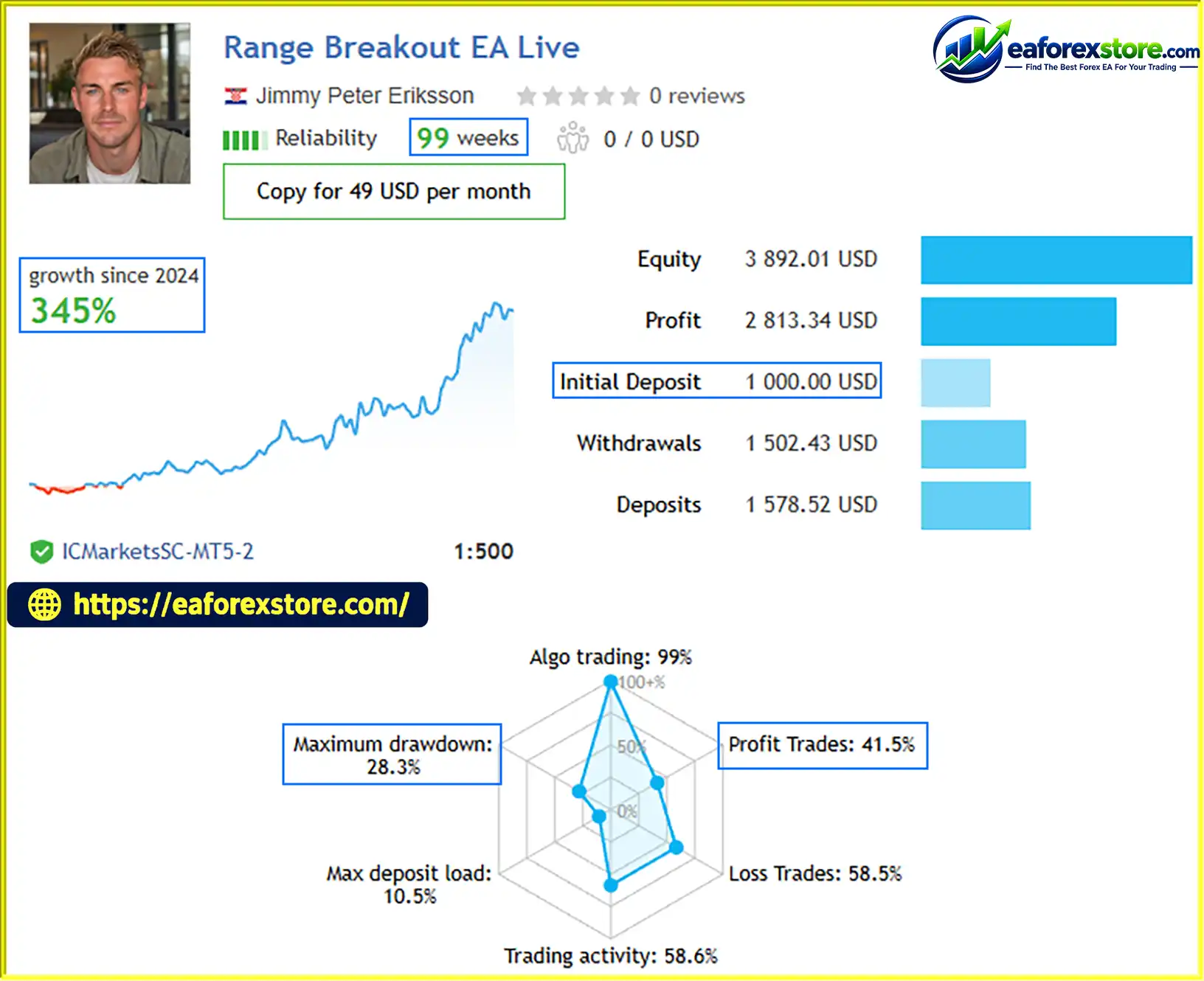
🔺Range Breakout EA Live– 99 consecutive weeks
Range Breakout EA with Range Filters MQ5 Live Signal
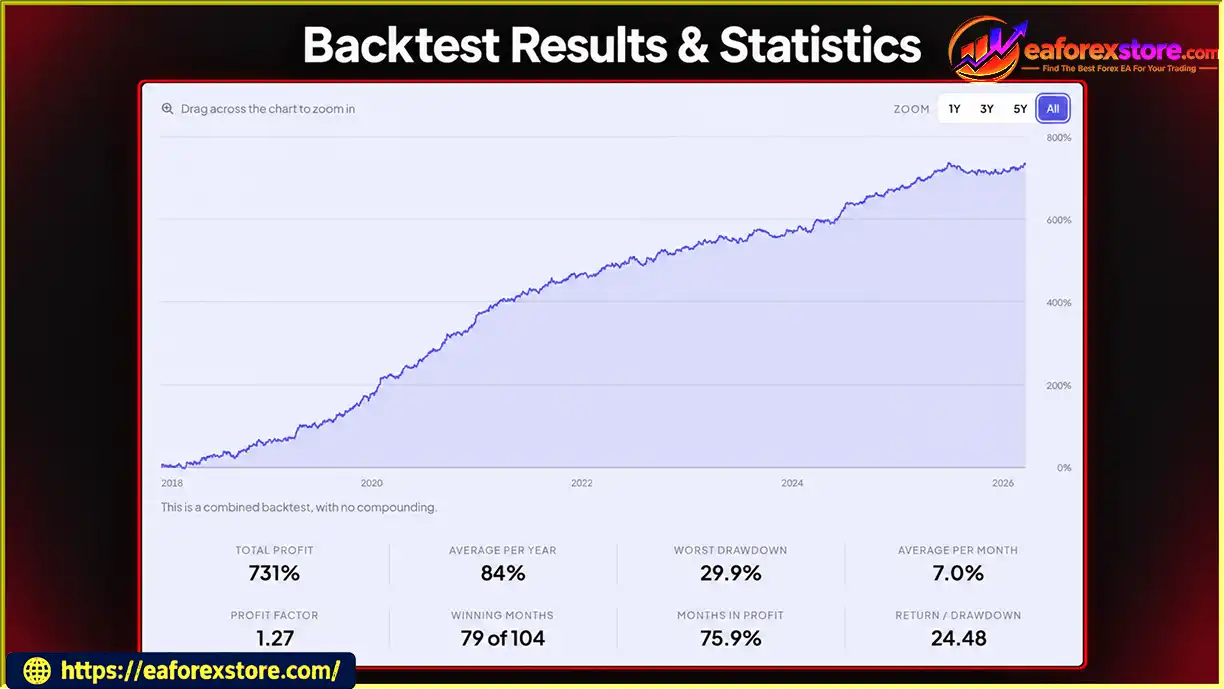
Range Breakout EA with Range Filters MT5 Backtest Results
The performance of Range Breakout EA with Range Filters MQ5 depends on market conditions, breakout quality, execution costs, position sizing, and the reliability of its programmed rules.
The supplied product description does not include verified backtest statistics, live trading statements, profit factor, or historical maximum drawdown. Therefore, its profitability cannot be established from the available information alone.
Risk percentage: Manual percentage-based risk settings may help standardize exposure, but the actual amount at risk depends on how the EA calculates stop-loss distance, position size, and account equity.
Daily drawdown protection: Confirm whether the limit is calculated from balance or equity, whether floating losses are included, and whether the EA closes open positions or simply blocks new entries.
Spread filtering: A spread filter can avoid some unfavorable execution conditions, but it cannot prevent all losses caused by slippage, market gaps, or sudden volatility.
False breakouts: Price can briefly move outside a range and then reverse. The internal breakout filter may help identify some weaker signals, but no filter eliminates false breakouts entirely.
Market-specific behavior: Gold, Bitcoin, Forex pairs, and stock indices have different trading schedules, spreads, and volatility profiles. Settings suitable for one market may not be appropriate for another.
Broker server time: The EA is described as designed for brokers using GMT+2/GMT+3 server time. Differences in server time, daylight saving adjustments, and trading-session definitions may affect range identification and entry timing.
Trading costs: Backtests should account for spreads, commissions, swaps where applicable, slippage, and realistic order execution.
Before using the EA on a live account:
Historical or simulated results do not guarantee future profitability.
A breakout beyond the Asian session range does not always lead to a sustained move. Price may reverse quickly, resulting in losing trades or repeated stop-outs.
The strategy relies on changes in volatility between trading sessions. Incorrect broker-time settings or daylight saving changes may cause the EA to identify the wrong range or trade at unintended times.
Although the EA advertises optimized settings for five instruments, their behavior can differ significantly. Bitcoin may trade continuously, while index CFDs and Forex instruments may follow different broker trading hours and liquidity conditions.
A daily drawdown protector and trade randomizer do not automatically make the EA compliant with every proprietary trading firm’s rules. Firm requirements can change, and some firms impose restrictions on automated trading methods or specific execution practices.
The product description explains the intended strategy and features but does not provide independently verified performance data. Traders should not assume that optimized settings guarantee a positive long-term trading edge.
Universal lot sizing is an advertised capability, not proof of compatibility with every broker. Symbol suffixes, contract specifications, volume limits, and account-currency conversions can affect trading behavior.
Risk warning: Trading Forex, gold, cryptocurrencies, and index CFDs involves significant financial risk. Leverage can magnify both profits and losses, and traders may lose some or all of their invested capital. Automated trading systems cannot guarantee profits or prevent all drawdowns.
Overall, the EA offers a structured approach to breakout trading, but its practical value depends on realistic testing and disciplined risk management.
Follow these general steps to install the Expert Advisor on MetaTrader 5.
setting
Obtain Range Breakout EA with Range Filters MQ5 from the official developer or an authorized source. Confirm that the files are compatible with MT5.
Launch MT5 and sign in to the trading account you intend to use for testing.
In MetaTrader 5, select File → Open Data Folder.
Navigate to:
MQL5 → Experts
Copy the supplied .mq5 or .ex5 file into this directory.
Return to MT5 and open the Navigator panel. Right-click Expert Advisors and select Refresh.
If the EA uses an .mq5 source file, it may need to be compiled in MetaEditor before it can run. Follow the developer’s instructions for any additional files.
Open the chart or use the chart configuration specified in the product documentation. Drag the EA onto the chart or double-click its name in the Navigator panel.
If using single-chart mode, confirm the correct configuration for managing multiple markets. If using individual chart mode, follow the developer’s instructions for each supported instrument.
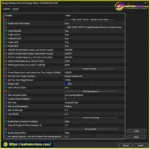
Review the available inputs, including:
Do not assume that default settings are appropriate for every account.
Check the trading server’s displayed time and confirm whether it aligns with the EA’s stated GMT+2/GMT+3 requirements. Verify the relevant session schedule and daylight saving adjustments before enabling trading.
Enable the platform’s Algo Trading function and allow automated trading in the EA’s properties if required.
Check the Experts and Journal tabs for errors and confirm that the EA is operating as expected.
Run the EA on a demo account before deploying it with real funds. Verify market selection, range visualization, breakout entries, position sizing, trade exits, and daily drawdown behavior.
For prop firm use, test the EA against the firm’s actual rules rather than relying solely on the product’s marketing claims.
Installation note: These are general MT5 installation steps. Exact settings and requirements may differ depending on the EA version and the developer’s documentation.
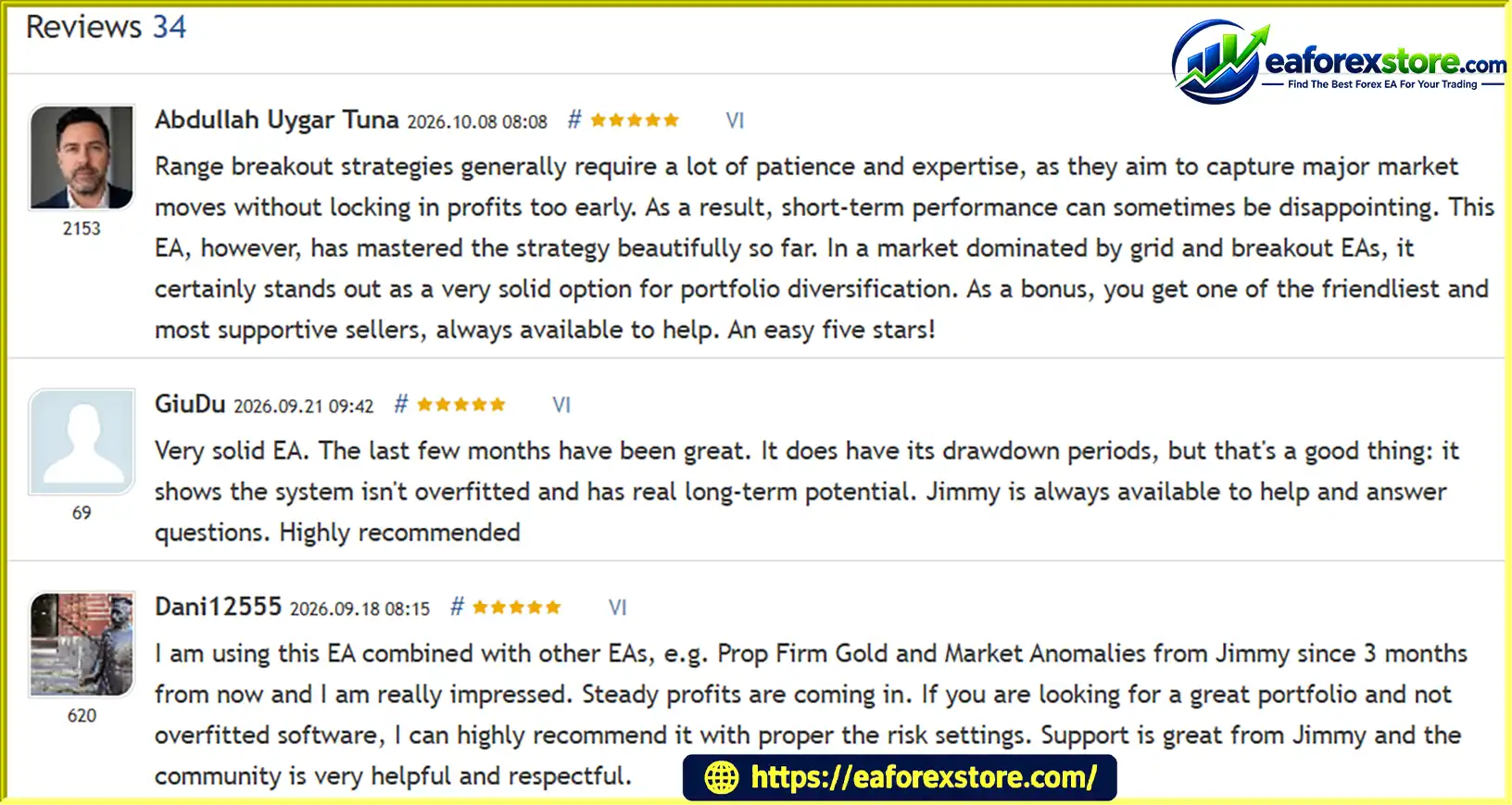
🔺Range Breakout EA with Range Filters MQ5 is highly appreciated by the MQL5 community for bringing stable and reliable profits. Below are 5 star reviews from users:
Reviews
>>> Join VIP Membership Now <<<
Range Breakout EA with Range Filters MQ5 is an automated trading system built around the relationship between Asian-session consolidation and potential volatility expansion during the London session. Its combination of breakout filtering, multi-market support, flexible position sizing, and daily drawdown monitoring may appeal to traders who prefer rule-based strategies.
The ability to trade XAUUSD, USDJPY, BTCUSD, US30, and DE40 from a single chart is a useful advertised feature, while individual chart mode offers additional visual monitoring. Nevertheless, trading multiple instruments does not guarantee diversification benefits, and each market requires realistic cost assumptions and appropriate risk settings.
The most important factors to evaluate are the quality of breakout signals, the handling of false breakouts, broker-time compatibility, and the effectiveness of the EA’s risk controls. Independent backtesting and forward testing are essential before live deployment.
Final verdict: Range Breakout EA with Range Filters MQ5 may be worth testing for traders interested in session-based breakout strategies on MetaTrader 5. Its long-term profitability and suitability for prop firm accounts remain unverified without reliable performance evidence. Use conservative risk settings, verify broker compatibility, and never risk capital you cannot afford to lose.
1. What Is Range Breakout EA with Range Filters MQ5?
Range Breakout EA with Range Filters MQ5 is an automated trading robot for MetaTrader 5 (MT5) that uses a session-based breakout strategy. It identifies a price range formed during quieter market conditions, typically during the Asian session, and looks for trading opportunities when price breaks out as volatility increases around the London session. The EA also includes an internal breakout filter and several risk-management options.
2. Which Markets Does Range Breakout EA with Range Filters MQ5 Support?
Range Breakout EA with Range Filters MQ5 supports five advertised markets: XAUUSD (Gold), USDJPY, BTCUSD (Bitcoin), US30, and DE40. It provides optimized settings for these instruments and supports both single-chart and individual-chart operating modes. Traders should verify symbol names, trading hours, spreads, and contract specifications with their brokers before using the EA.
3. Is Range Breakout EA with Range Filters MQ5 Profitable?
Range Breakout EA with Range Filters MQ5 supports five advertised markets: XAUUSD (Gold), USDJPY, BTCUSD (Bitcoin), US30, and DE40. It provides optimized settings for these instruments and supports both single-chart and individual-chart operating modes. Traders should verify symbol names, trading hours, spreads, and contract specifications with their brokers before using the EA.
4. What Risk Management Features Does Range Breakout EA with Range Filters MQ5 Offer?
The EA includes Low, Medium, and High risk levels, manual risk-percentage settings, fixed lot sizing, a spread filter, and a daily drawdown protector. It can also display daily profit and drawdown information on the chart. These features help traders configure and monitor their exposure, but users should verify how drawdown is calculated and whether the EA closes existing positions or only blocks new trades when a limit is reached.
5. Can Range Breakout EA with Range Filters MQ5 Be Used for Prop Firm Challenges?
The EA advertises a daily drawdown protector and a trade randomizer for traders considering prop firm challenges. The product description mentions FTMO, The5ers, and FundedNext as examples. However, these features do not guarantee compliance with any firm's rules. Before using the EA, check the firm's current requirements for daily losses, maximum drawdown, automated trading, news trading, and trade-management methods.
6. Does Range Breakout EA with Range Filters MQ5 Require a Specific Timeframe or Broker?
According to the product description, the EA does not rely on fixed chart timeframes or conventional technical indicators. However, it is designed for brokers using standard US trading server time, typically GMT+2 or GMT+3. Correct server-time alignment is important because the strategy depends on identifying trading-session ranges. Traders should confirm their broker's server time and follow the developer's setup instructions.
7. What Are the Main Risks of Using Range Breakout EA with Range Filters MQ5?
The main risks include false breakouts, sudden market reversals, slippage, high spreads, and differences in volatility across supported markets. The reported live results also show a maximum drawdown of 28.3%, while the backtest reports a worst drawdown of 29.9%, indicating that substantial account declines are possible. Traders should test the EA under realistic conditions, use conservative risk settings, and avoid risking money they cannot afford to lose.
8. How Do I Install Range Breakout EA with Range Filters MQ5 on MT5?
To install Range Breakout EA with Range Filters MQ5, open MetaTrader 5 and select File → Open Data Folder. Navigate to MQL5/Experts and copy the supplied EA file into that directory. Return to MT5, refresh the Navigator panel, and attach the EA to a chart. Configure the supported markets, risk settings, and other inputs according to the developer's instructions. Verify the broker server time and test the EA on a demo account before enabling live trading.
In stock
In stock
In stock
In stock
In stock
Out of stock
No account yet?
Create an Account












 Automatic EA
 EA Best Seller
 Expert Advisor MT4
 Expert Advisor MT5
 HFT EA


Reviews
Clear filtersThere are no reviews yet.