









-
 Unlimited Activations
-
 Instant delivery
-
 Easy to install






 Unlimited Activations
Instant delivery
Easy to install
Unlimited Activations
Instant delivery
Easy to install
 Free Update
 Free Install Support

Harvester EA Gold MT4 is an automated Gold trading Expert Advisor (EA) developed for the MetaTrader 4 platform. Designed primarily for XAUUSD, this trading robot monitors market conditions and manages trading operations according to its internal strategy logic, helping traders automate their trading process without manually placing every order.
One of the main characteristics of Harvester EA Gold MT4 is its straightforward configuration structure. Instead of exposing a large number of technical parameters, the EA focuses on essential settings related to money management, position sizing, and EA identification. This makes its main configuration options relatively easy to review and manage.
The EA supports two position-sizing approaches: automated lot calculation through its Money Management function and direct volume control using a fixed-lot setting. This flexibility allows users to choose a configuration that better suits their trading preferences and account management approach.
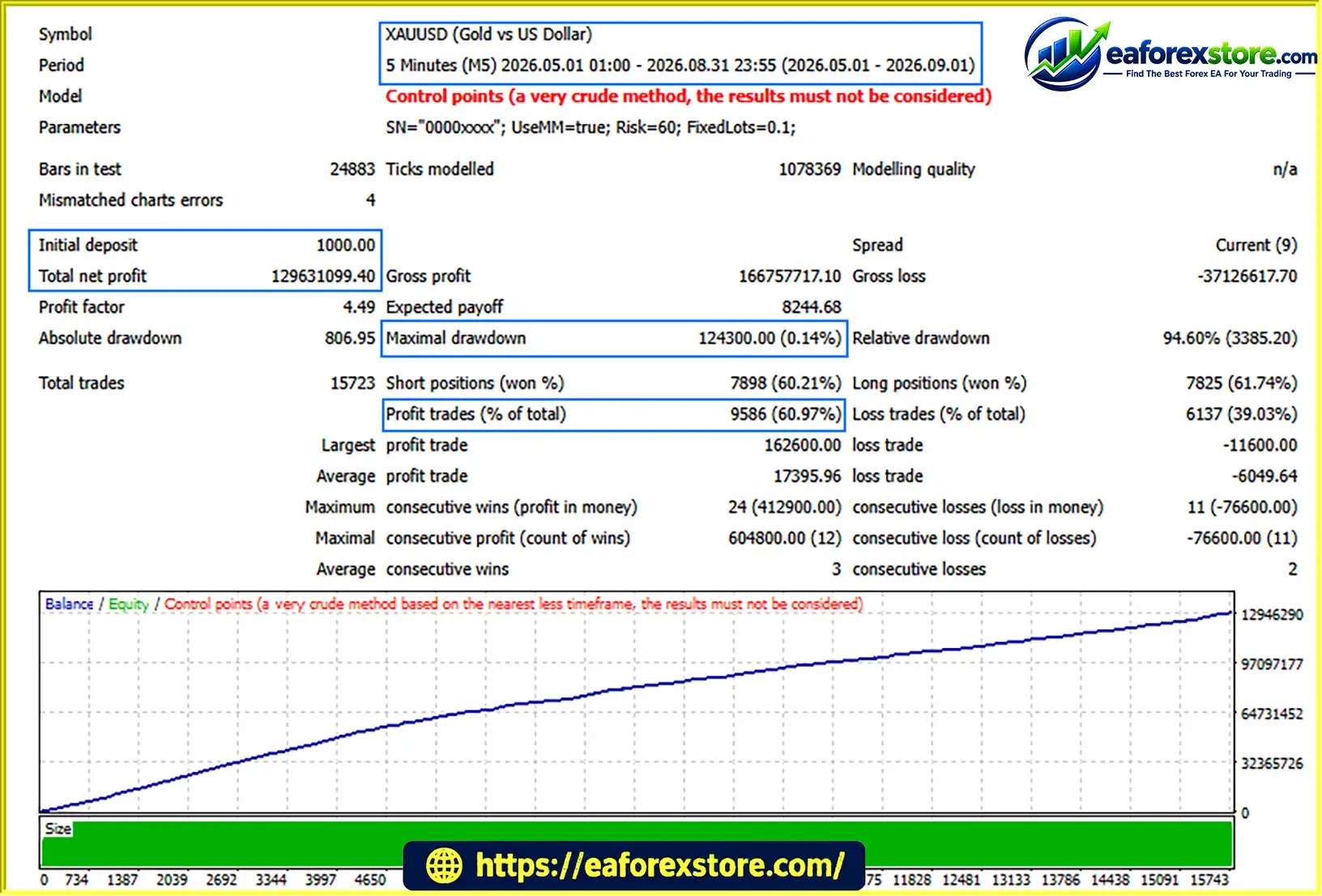
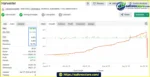
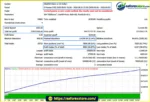
The available Myfxbook records and Strategy Tester reports provide additional historical information for evaluating the system. However, the supplied backtests use the Control Points modelling method and explicitly warn that the results should not be considered reliable performance evidence. Traders should therefore conduct independent testing before using Harvester EA Gold MT4 on a live account.
For traders looking for a Gold-focused MT4 trading robot with a compact settings panel and flexible lot-sizing options, Harvester EA Gold MT4 offers a simple starting point for evaluating automated XAUUSD trading.
Harvester EA Gold MT4 is designed to automate trading activity on MetaTrader 4. Once configured and attached to the appropriate chart, it can monitor market conditions and execute trades when its internal strategy identifies qualifying opportunities.
This automated approach reduces the need for continuous manual order placement, although the EA still requires proper configuration, monitoring, and risk oversight.
The EA includes a dedicated Money Management function that can determine trading volume through its internal position-sizing logic.
When the UseMM setting is enabled, the EA uses its money management mechanism to calculate lot size. This provides an alternative to manually assigning the same fixed volume to every trade.
The exact calculation formula is not documented in the supplied information, so users should verify how the Risk parameter affects position sizing before deploying the EA on a live account.
For traders who prefer direct control over trading volume, Harvester EA Gold MT4 provides a FixedLots parameter.
The supplied configuration shows a fixed lot value of 0.01. This option allows users to specify a consistent trade volume rather than relying entirely on automated lot calculation.
However, a fixed lot size does not guarantee consistent monetary risk because the actual exposure also depends on trade direction, entry price, stop-loss distance, and market movements.
The combination of Auto Lot Money Management and Fixed Lot Trading gives users two approaches to position sizing.
Traders can choose automated volume calculation or a predefined lot size according to their preferred configuration. The appropriate choice depends on account equity, risk tolerance, broker contract specifications, and the EA’s actual trading behaviour.
The EA uses a relatively compact Inputs panel focused on essential configuration options.
The visible parameters include UseMM, Risk, FixedLots, and Serial Number. This limited set of settings makes the main configuration easier to review without requiring users to navigate an extensive list of exposed technical inputs.
A simple interface does not necessarily mean the underlying strategy is simple, nor does it establish that the EA is suitable for beginners without testing.
The supplied Strategy Tester reports use XAUUSD, making Gold the clearest reference market for evaluating Harvester EA Gold MT4.
Gold can experience sharp price movements, changing spreads, and periods of elevated volatility. Traders should therefore evaluate the EA under realistic trading conditions and confirm that their broker’s XAUUSD symbol specifications are compatible with the system.
The available Myfxbook records and Strategy Tester reports offer additional material for examining the EA’s historical trading activity.
These records may help users understand how the system has behaved under particular testing or account conditions. Nevertheless, the supplied Strategy Tester modelling warning substantially limits the reliability of the reported backtest results.
Historical records should be treated as supporting information rather than proof of future profitability.
Harvester EA Gold MT4 is designed to automate the trading process through MetaTrader 4. Its visible configuration primarily controls position sizing and EA identification, while the complete entry and exit strategy remains undocumented in the supplied information.
After installation and configuration, the EA is designed to monitor market conditions on the selected MT4 chart.
Its internal strategy determines whether market conditions meet the requirements for a potential trading opportunity. The exact indicators, price-action rules, and entry filters have not been specified.
When the EA’s internal conditions are satisfied, it can proceed with its automated trading process.
The available documentation does not establish the precise entry signals, trading timeframe, or market filters used by the system. These details should be verified through the product documentation or controlled testing rather than assumed.
Before or during order processing, the EA applies its configured position-sizing approach.
UseMM is enabled, the EA uses its internal Money Management mechanism and the configured Risk value.FixedLots parameter provides a predefined trading volume, with the supplied example set to 0.01 lots.Users should confirm the EA’s actual behaviour when changing these settings, including whether the two modes are mutually exclusive and how the Risk value is interpreted.
The EA is designed to execute qualifying trades automatically through MT4, subject to broker conditions and platform availability.
The supplied information does not fully describe its exit rules, Stop Loss, Take Profit, trailing-stop logic, or other trade-management mechanisms. These features should not be assumed to exist without confirmation.
Once running, the EA should be monitored through the MT4 Terminal, account history, and available performance reports.
Traders should review order execution, lot sizes, floating drawdown, margin usage, and trading costs to determine whether the EA’s actual behaviour matches their expectations.
Harvester EA Gold MT4 keeps its visible configuration focused on a small number of essential settings. This can make it easier to review the main parameters before starting a test.
The availability of Auto Lot Money Management and Fixed Lot Trading provides flexibility for users who prefer different approaches to controlling trading volume.
The EA is designed to monitor the market and execute trades automatically, reducing the need for manual order placement whenever its trading conditions are met.
The supplied XAUUSD Strategy Tester reports provide a direct reference for evaluating the EA’s intended Gold trading application.
MetaTrader 4 provides a familiar environment for installing Expert Advisors, reviewing trade history, and monitoring account activity. Users should still verify that their broker supports the relevant EA configuration and XAUUSD trading specifications.
The available Myfxbook records and Strategy Tester reports offer additional material for investigating historical activity. However, the Control Points modelling warning means the supplied backtest results should not be used as dependable evidence of profitability.
Important consideration: Harvester EA Gold MT4 should be evaluated on the quality and consistency of independently verified results, not solely on its compact interface or historical profit figures.
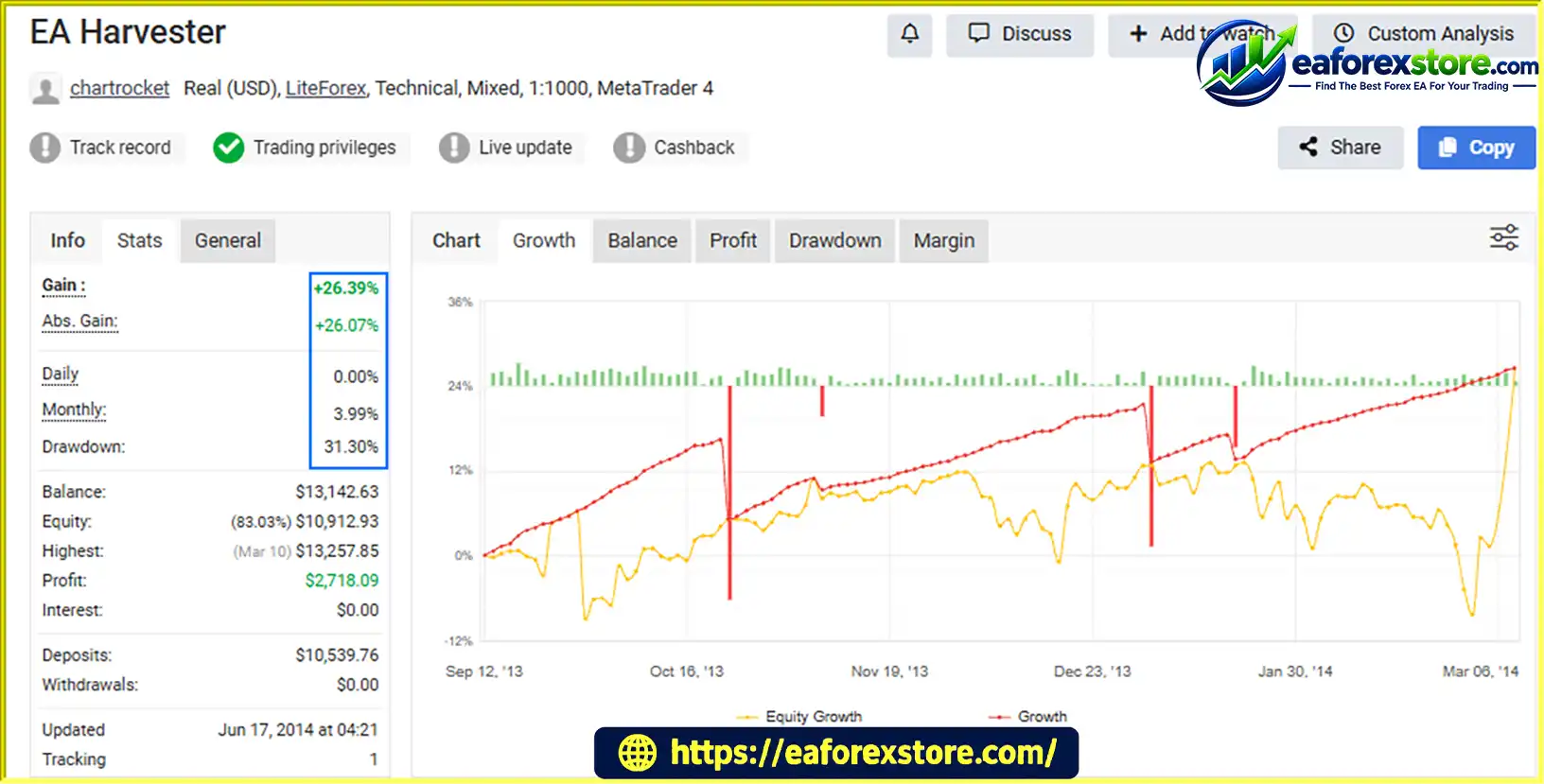
🔺EA Harvester
Harvester EA Gold MT4 MyFxBook
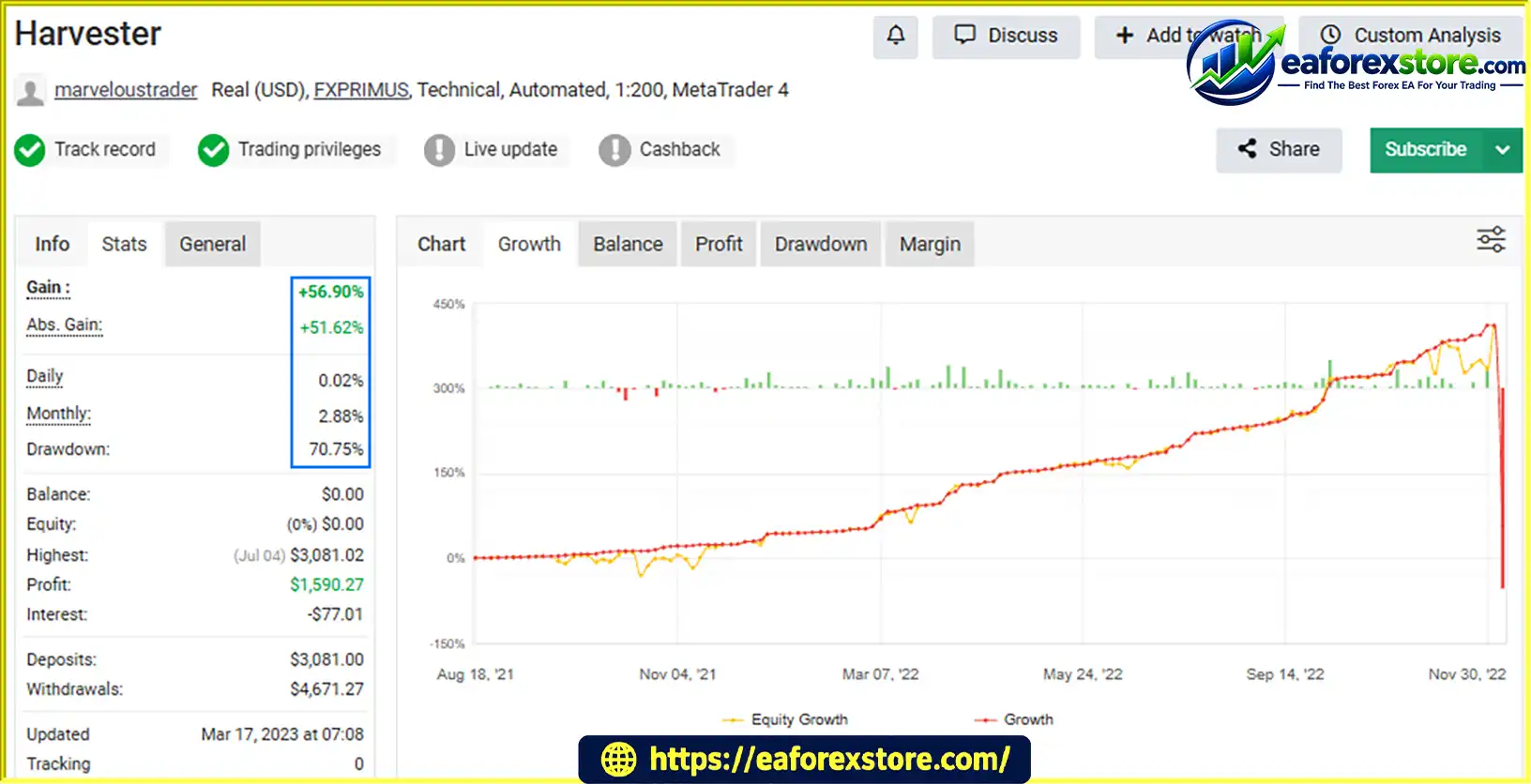
🔺Harvester
Harvester EA Gold MyFxBook
Harvester EA Gold MT4 backtets
Risk management is an essential consideration when using any automated Gold trading system. Harvester EA Gold MT4 provides visible position-sizing controls, but the complete risk-management and alert functionality has not been established by the supplied information.
The UseMM parameter controls the EA’s Money Management function. When enabled, the system uses its internal logic to determine trading volume.
The supplied configuration shows Risk = 2.0. However, the exact calculation formula and whether this value represents a percentage or another internal unit have not been documented. Users should not automatically interpret it as a guaranteed 2% risk per trade.
The FixedLots parameter allows users to specify a fixed trading volume. The supplied configuration uses 0.01 lots.
Although smaller position sizes may reduce exposure relative to larger positions, 0.01 lots should not automatically be considered safe for every account. Actual risk depends on contract specifications, leverage, price movements, and the EA’s trade-management rules.
XAUUSD can move sharply during economic announcements, changes in interest-rate expectations, and periods of market uncertainty.
Before live deployment, traders should evaluate spread sensitivity, slippage, execution quality, margin requirements, and the possibility of consecutive losing trades.
The supplied settings do not explain the EA’s complete Stop Loss or Take Profit methodology. Traders should verify whether protective exits are implemented and how open positions are managed during adverse market movements.
Do not assume that automated execution automatically includes effective downside protection.
The supplied information does not confirm whether Harvester EA Gold MT4 supports push notifications, email alerts, or custom warning messages.
Until these features are verified, users should monitor the EA through MT4 and their broker’s account interface. A stable VPS may help maintain platform availability, but it cannot eliminate trading risk or guarantee successful order execution.
Before using real funds:
FixedLots parameter allows users to specify a predefined trade volume.Risk parameter and actual monetary exposure is undocumented.Follow these steps to install and configure Harvester EA Gold MT4 on MetaTrader 4.
Obtain the Harvester EA Gold MT4 installation file from the product provider. Check the file format and any supplied installation instructions before proceeding.
Launch your MT4 trading platform and select File → Open Data Folder.
This opens the directory used by your MT4 installation.
Navigate to the MQL4/Experts folder and copy the Harvester EA Gold MT4 file into that directory.
If the provider supplies additional files or specific installation instructions, follow those instructions as required.
Return to MetaTrader 4 and locate the Navigator panel.
Right-click Expert Advisors and select Refresh. Alternatively, restart MT4 if the EA does not appear in the list.
Open a Gold chart using your broker’s supported XAUUSD symbol.
Select the timeframe specified by the product provider. If the recommended timeframe is not documented, verify it before proceeding rather than assuming a particular setting.
Drag Harvester EA Gold MT4 from the Navigator panel onto the selected chart.
Review the available configuration options, including:
UseMM: Enables or disables the Money Management function.Risk: Provides the value used by the internal Money Management system.FixedLots: Specifies the fixed trading volume.Serial Number: Provides an identification or reference field.Use the values recommended by the provider where available. Confirm the EA’s licensing requirements and the interaction between its lot-sizing settings before trading.
Review the EA’s settings and ensure that automated trading is permitted in MT4, where required.
Check the platform’s AutoTrading control and the EA’s Common tab. Enable only the permissions necessary for the EA to operate as intended.
Run Harvester EA Gold MT4 on a demo account and monitor its behaviour under your intended broker’s conditions.
Because the supplied backtests carry a significant modelling warning, do not rely on their reported profits as a basis for live deployment. Conduct independent forward testing and assess the actual drawdown, execution quality, and risk exposure first.
>>> Join VIP Membership Now <<<
Harvester EA Gold MT4 is an automated Gold trading Expert Advisor for MetaTrader 4 with a compact configuration structure and two visible approaches to position sizing: Auto Lot Money Management and Fixed Lot Trading.
Its main practical advantages are the straightforward Inputs panel, direct lot-size control, and automated trading workflow. These characteristics may appeal to traders who prefer a relatively simple configuration rather than an extensive list of exposed parameters.
However, the available information leaves important questions about the underlying trading strategy, risk calculation, protective exits, and alert functionality unanswered. More importantly, the supplied Strategy Tester reports use the Control Points modelling method and explicitly state that their results should not be considered reliable evidence of performance.
For these reasons, Harvester EA Gold MT4 is best approached as a system that requires further independent evaluation rather than one whose profitability can be established from the available backtests. Demo testing, realistic forward testing, and careful monitoring of position sizing are essential before considering live deployment.
Ultimately, the value of Harvester EA Gold MT4 depends on its verified behaviour under realistic market conditions, the transparency of its trade management, and whether its risk profile is appropriate for the trader’s account and objectives. Automated trading can improve execution consistency, but it does not remove market risk or guarantee profits.
1. What Is Harvester EA Gold MT4?
Harvester EA Gold MT4 is an automated Gold trading Expert Advisor designed for the MetaTrader 4 platform. It is intended primarily for XAUUSD trading and automates trade execution according to its internal strategy. The EA features a compact configuration panel with money management, fixed lot sizing, and EA identification settings, allowing traders to configure its basic operating parameters.
2. Is Harvester EA Gold MT4 Profitable?
Harvester EA Gold MT4 has published Myfxbook records and historical Strategy Tester results for performance evaluation. However, its supplied backtests use the Control Points modelling method and include a warning that the results should not be considered reliable performance evidence. The reported live-account statistics also show maximum drawdowns of 31.30% and 70.75%, respectively. Traders should independently verify the records and conduct realistic forward testing before using real capital. Past performance does not guarantee future results.
3. Which Trading Strategy Does Harvester EA Gold MT4 Use?
Harvester EA Gold MT4 uses an internal automated trading strategy to monitor market conditions and execute qualifying trades. The complete entry and exit methodology, including its indicators and trading signals, is not documented in the available product information. Traders should consult the provider's documentation and evaluate the EA's actual trading behaviour rather than assume a specific strategy based on its visible settings.
4. Does Harvester EA Gold MT4 Support Automatic Lot Sizing?
Yes. Harvester EA Gold MT4 includes a Money Management function controlled by the UseMM parameter. When enabled, the EA uses its internal logic to calculate trading volume based on its configured parameters. The Risk setting is listed as 2.0 in the supplied configuration, but its exact calculation formula is not documented. Users should verify how this parameter affects position sizing before enabling automated money management on a live account.
5. Can I Use Fixed Lot Sizing with Harvester EA Gold MT4?
Yes. Harvester EA Gold MT4 provides a FixedLots parameter that allows users to specify a predefined trading volume. The supplied configuration shows a value of 0.01 lots. This option may suit traders who prefer direct control over position size instead of relying on automatic lot calculation. However, fixed lot sizing does not guarantee a fixed monetary risk, and the appropriate volume depends on account equity, broker specifications, market volatility, and the EA's trade-management logic.
6. Is Harvester EA Gold MT4 Suitable for Beginners?
Harvester EA Gold MT4 may appeal to beginners because its visible configuration focuses on a small number of settings, including UseMM, Risk, and FixedLots. Nevertheless, a simple interface does not necessarily mean the trading strategy is easy to understand or low risk. Beginners should learn the basics of position sizing, margin requirements, and drawdown, then test the EA on a demo account before considering live trading.
7. What Are the Main Risks of Using Harvester EA Gold MT4?
The main risks include unreliable historical backtest evidence, exposure to Gold price volatility, and uncertainty about the EA's complete trade-management and protective mechanisms. The available information does not confirm the exact Stop Loss, Take Profit, or trailing-stop logic. Traders should verify these features, monitor floating drawdown and margin usage, and test the EA with realistic spreads and execution conditions. Automated trading can result in substantial financial losses.
8. How Do I Install Harvester EA Gold MT4 on MetaTrader 4?
To install Harvester EA Gold MT4, download the authorized EA file and open MetaTrader 4. Select File → Open Data Folder, navigate to MQL4/Experts, and copy the EA file into that folder. Refresh the Navigator panel or restart MT4, then attach the EA to the appropriate XAUUSD chart. Configure the available money management and lot-sizing settings, enable automated trading, and test the EA on a demo account before using real funds. Follow the provider's instructions for any additional licensing or configuration requirements.
In stock
In stock
In stock
In stock
In stock
Out of stock
No account yet?
Create an Account












 Automatic EA
 EA Best Seller
 Expert Advisor MT4
 Expert Advisor MT5
 HFT EA


Reviews
Clear filtersThere are no reviews yet.