









-
 Unlimited Activations
-
 Instant delivery
-
 Easy to install






 Unlimited Activations
Instant delivery
Easy to install
Unlimited Activations
Instant delivery
Easy to install
 Free Update
 Free Install Support

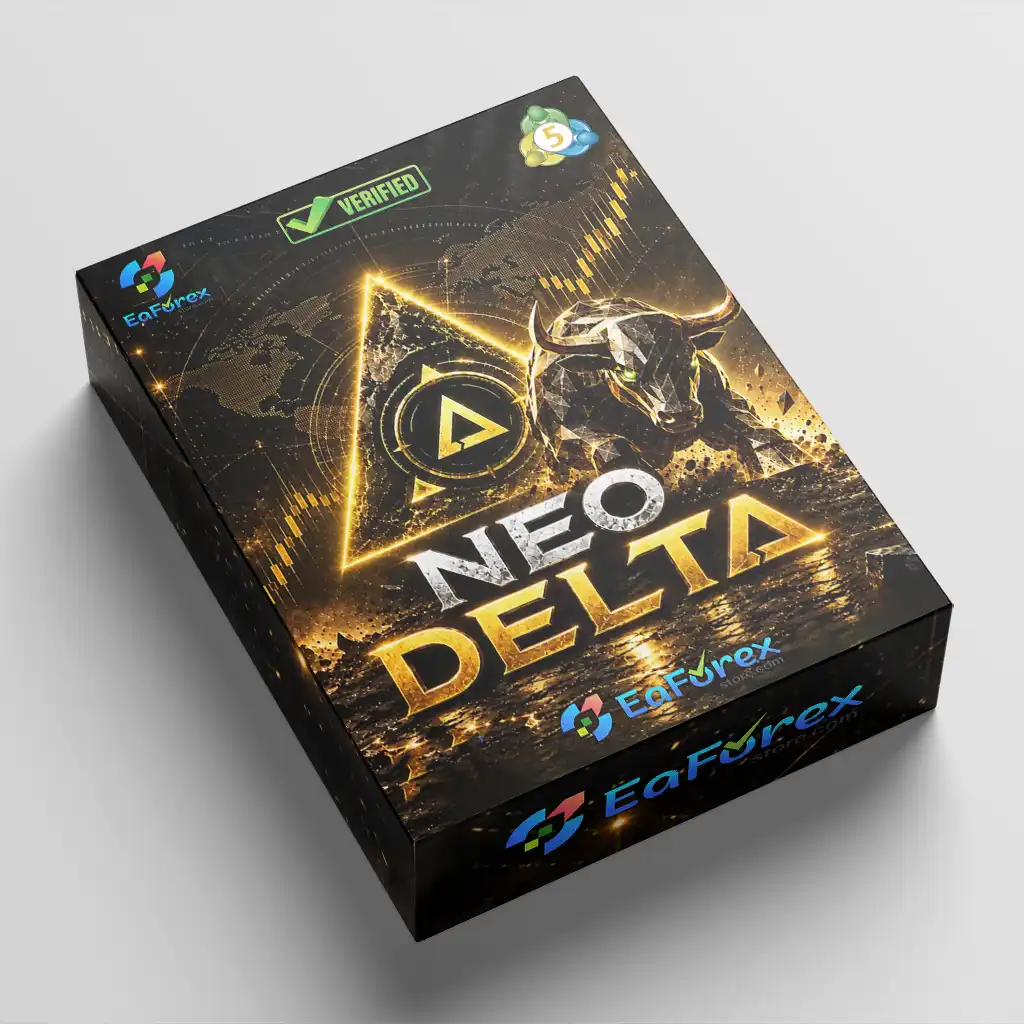
Neo Delta EA MT5 is an automated Expert Advisor developed exclusively for trading Gold (XAUUSD) on the MetaTrader 5 platform. It uses volume-delta momentum analysis to evaluate the balance between buying and selling pressure within individual candles, helping identify potential trading opportunities in the gold market.
Unlike conventional trading robots that rely on a single entry signal, Neo Delta combines four independently configurable trading modules with a machine-learning entry filter. Each potential trade is evaluated before execution, adding an additional layer of analysis to the entry process.
The EA offers four trading strategies covering short-term and swing-style opportunities: 5-minute long, 20-minute long, 5-minute short, and 20-minute short. Traders can activate or deactivate each module according to their preferred trading approach and risk tolerance.
Neo Delta EA MT5 also includes automated stop-loss management, take-profit levels, adjustable trailing stops, and a high-impact USD news filter. Its integrated on-chart dashboard provides an overview of trading activity, open positions, realised performance, and upcoming economic events.
Designed specifically for XAUUSD, Neo Delta combines momentum-based analysis, machine-learning filtering, and configurable risk controls in one automated gold trading system.
>>> Delivery time 24h-48h after payment.
>>> Refund if not delivered.
>>> You will receive the latest version without any limitations (ID+Time).Reviewed by Jason Stap <<<
Neo Delta EA MT5 follows a structured trading process that combines momentum analysis, entry filtering, automated execution, and position management.
The EA evaluates volume-delta momentum to assess the balance between buying and selling pressure within each candle. This analysis helps identify potential opportunities when market momentum aligns with the conditions required by an active trading module.
Neo Delta provides four independently configurable modules:
Traders can enable the modules that match their strategy preferences rather than running all four simultaneously.
Before a potential trade is executed, the machine-learning filter reviews the entry according to the EA’s programmed evaluation process. This additional filtering stage is designed to screen potential setups before an order is opened. It does not guarantee that every accepted signal will be profitable.
When the relevant trading conditions and entry filter requirements are satisfied, the EA can open a position automatically. Trade direction depends on the active module and the detected market opportunity.
After a position is opened, Neo Delta manages it using the configured stop-loss, take-profit, and trailing-stop settings. Traders can choose between fixed and Bollinger-based dynamic stop-loss methods and adjust trailing parameters for the relevant timeframe.
The built-in economic news filter can pause trading around high-impact USD events. Meanwhile, the on-chart dashboard displays important information about the EA’s current status, open positions, realised performance, and upcoming economic news.
This integrated workflow allows Neo Delta EA MT5 to automate both trade entry and ongoing position management while keeping the trader informed.
Gold can experience rapid price movements, changing volatility, and sudden reactions to economic announcements. Neo Delta focuses exclusively on XAUUSD, allowing its trading modules and risk settings to be configured for this particular market rather than a broad range of unrelated currency pairs.
The combination of short-term and swing-style modules gives traders greater flexibility. The ability to activate long and short strategies independently also makes it possible to configure the EA according to individual trading preferences and market conditions.
The machine-learning filter adds an evaluation stage before trade execution. Combined with volume-delta momentum analysis, it provides a multi-stage approach to identifying potential entries rather than relying solely on a basic directional signal.
Neo Delta supports multiple position-sizing methods, adjustable stop-loss settings, trailing stops, and optional drawdown limits. These controls help traders configure the system around their account size and risk preferences, although they cannot eliminate trading risk.
The high-impact USD news filter is designed to pause trading around important scheduled announcements. This feature is particularly relevant to gold traders because US economic releases and dollar-related developments can contribute to sudden price fluctuations.
The integrated dashboard provides a convenient way to monitor trading status and performance information without relying entirely on external tracking tools.
Overall, Neo Delta EA MT5 may appeal to traders seeking an automated gold trading system that combines multiple trading modules, momentum analysis, machine-learning filtering, and configurable risk management.
Neo Delta EA Backtets
Neo Delta EA MT5 Backtets
Risk management is an essential part of operating Neo Delta EA MT5, particularly because gold prices can move rapidly during periods of high volatility.
The EA provides three risk configuration methods:
Traders should verify how each mode calculates lot size and risk exposure before deploying the EA on a live account.
Users can select fixed or Bollinger-based dynamic stop-loss settings and configure take-profit targets. A trailing stop can also be used to adjust the protective stop as a position develops.
Stop-loss orders may not always execute at the requested price during market gaps or periods of reduced liquidity.
Neo Delta supports an optional drawdown limit expressed as a percentage or monetary amount. Traders should configure this setting carefully and confirm whether the selected limit applies to account equity, balance, or another measure defined by the EA.
The built-in news filter uses the weekly economic calendar to pause trading around high-impact USD announcements. Correct operation depends on the required URL permissions, calendar data availability, and the EA’s configured news-filter settings.
The recovery module is disabled by default and must be enabled manually.
When enabled, if the initial position reaches a loss beyond the configured threshold, the EA opens one additional position in the same direction with double the original lot size. Both positions share the same stop-loss.
The module permits only one recovery position per trading module. It does not create a grid or a continuing martingale chain. However, averaging into a losing position increases exposure and can magnify losses if the market continues moving against the trade.
For this reason, traders should test the recovery feature independently and carefully evaluate its impact on total account risk before enabling it.
The on-chart dashboard displays the EA’s current status, open and realised performance, and upcoming news events. Traders should review these details regularly and verify that the EA, news filter, and automated trading permissions are functioning correctly.
Recommended precautions:
Forex and CFD trading involves significant risk. Past performance and backtest results do not guarantee future results.
Follow these steps to configure Neo Delta EA MT5 on your MetaTrader 5 platform.
Install MetaTrader 5 and log in to your trading account. Confirm that your broker provides access to XAUUSD and that automated trading is permitted.
Obtain the Neo Delta EA MT5 installation files from the official provider.
Open MetaTrader 5 and navigate to File → Open Data Folder. Locate the MQL5 directory and copy the EA files into the appropriate folder, typically Experts.
Restart MetaTrader 5 or refresh the Expert Advisors section in the Navigator panel so the platform can detect the EA.
Open the Gold (XAUUSD) chart and select the timeframe required by your intended trading configuration. Configure the chart and module settings according to the EA’s documentation.
Check your broker’s symbol specifications, including any suffixes such as XAUUSD.a or XAUUSDm. Ensure that the EA supports the exact symbol used by your broker.
Find Neo Delta EA MT5 in the Navigator panel and drag it onto the XAUUSD chart.
Review the EA’s input settings, including enabled trading modules, lot sizing, stop-loss method, take-profit, trailing stop, and drawdown limits.
If you intend to use the news filter, open Tools → Options → Expert Advisors in MetaTrader 5.
Add the required URL to the allowed WebRequest list, using the exact address specified in the EA’s official documentation. Save the settings and confirm that the news calendar can be accessed correctly.
Enable the platform’s Algo Trading function and check that automated trading is permitted in the EA’s individual settings.
Verify that the EA is running correctly and that no configuration or connection errors appear in the Experts and Journal tabs.
Select a suitable position-sizing mode and configure the risk parameters according to your account balance, leverage, and risk tolerance.
Neo Delta’s suggested starting capital is from $250, but this is not a guarantee that the account will have sufficient margin or that the strategy will be suitable for every broker. Lower leverage, larger contract specifications, and volatile market conditions may require more capital.
The EA can also operate with 1:20 leverage when capital and position sizing are adjusted appropriately.
Run the EA on a demo account first. Evaluate its behaviour under different market conditions, verify news-filter operation, and review drawdown and execution quality.
A VPS is recommended for traders who require continuous operation. Suggested brokers include Ultima Markets, TMGM, and VT Markets, subject to your jurisdiction, account eligibility, trading conditions, and independent verification of broker suitability.
Important: Use the recovery module only if you understand its additional exposure and have tested its behaviour thoroughly. It is disabled by default.
🔺Neo Delta EA MT5 is highly appreciated by the MQL5 community for bringing stable and reliable profits. Below are 5 star reviews from users:
Reviews
>>> Join VIP Membership Now <<<
Neo Delta EA MT5 is an automated XAUUSD trading robot designed to combine volume-delta momentum analysis, machine-learning entry filtering, and multiple trading modules within a single MetaTrader 5 Expert Advisor.
Its four independently configurable strategies provide flexibility across short-term and swing-style trading approaches. Additional features, including automated stop-loss and take-profit management, trailing stops, a high-impact USD news filter, multiple risk modes, and an on-chart dashboard, help create a structured automated trading workflow.
The optional recovery module offers another configuration choice, but its increased position size introduces additional risk and should be approached cautiously.
Neo Delta may be worth evaluating for traders looking for a dedicated Gold EA with configurable entries and integrated trade management. However, its suitability depends on verified testing results, broker execution conditions, account size, and the trader’s risk tolerance.
Before using Neo Delta EA MT5 on a live account, test it on a demo account, examine its drawdown behaviour, and select conservative risk settings. No automated trading system guarantees profits, and traders should only allocate capital they can afford to lose.
1. What Is Neo Delta EA MT5?
Neo Delta EA MT5 is an automated Expert Advisor designed exclusively for trading Gold (XAUUSD) on MetaTrader 5. It combines volume-delta momentum analysis, a machine-learning entry filter, and four configurable trading modules to identify potential trading opportunities and manage positions automatically.
2. How Does Neo Delta EA MT5 Work?
Neo Delta EA MT5 analyzes buying and selling pressure within individual candles using volume-delta momentum analysis. It then applies its machine-learning entry filter before executing trades that meet the conditions of the enabled strategy modules. The EA also manages stop-loss, take-profit, trailing-stop, and news-filter settings according to the user's configuration.
3. Which Trading Strategies Does Neo Delta EA MT5 Offer?
Neo Delta EA MT5 includes four independently configurable trading modules: 5-minute long, 20-minute long, 5-minute short, and 20-minute short. Traders can enable or disable individual modules to customize their approach to short-term bullish, longer-duration bullish, short-term bearish, and longer-duration bearish opportunities.
4. Does Neo Delta EA MT5 Use Machine Learning?
Yes. Neo Delta EA MT5 includes a machine-learning entry filter that evaluates potential trade setups before execution. This filter works alongside volume-delta momentum analysis to provide an additional layer of entry evaluation. However, machine learning does not guarantee accurate predictions or profitable trades.
5. What Risk Management Features Does Neo Delta EA MT5 Include?
Neo Delta EA MT5 supports fixed-lot sizing, monetary-amount-based position sizing, and percentage-based risk settings. It also offers fixed or Bollinger-based dynamic stop-loss options, take-profit targets, adjustable trailing stops, and an optional drawdown limit. Traders should verify how each setting calculates exposure before using the EA on a live account.
6. Does Neo Delta EA MT5 Have a News Filter?
Yes. Neo Delta EA MT5 includes a high-impact USD news filter designed to pause trading around important US dollar economic announcements. The filter relies on access to the required economic calendar data and correct configuration, including any necessary WebRequest permissions in MetaTrader 5.
7. What Are the Backtest Results of Neo Delta EA MT5?
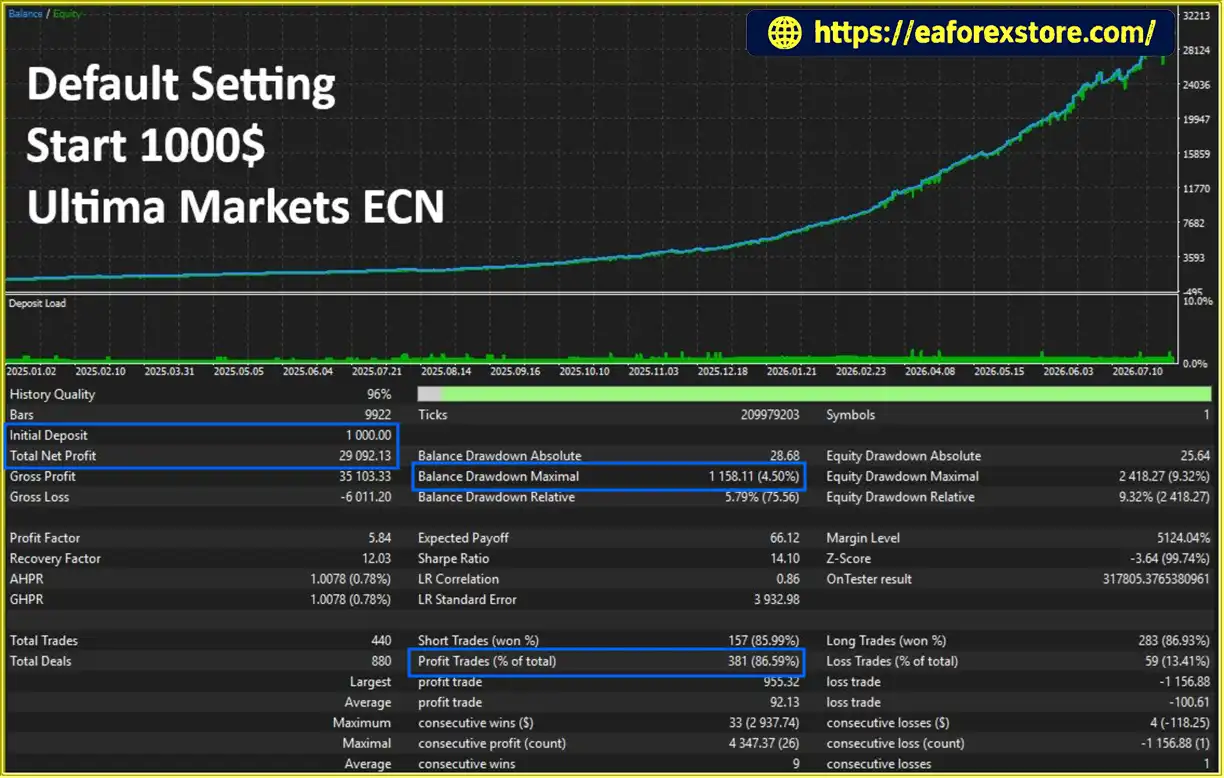
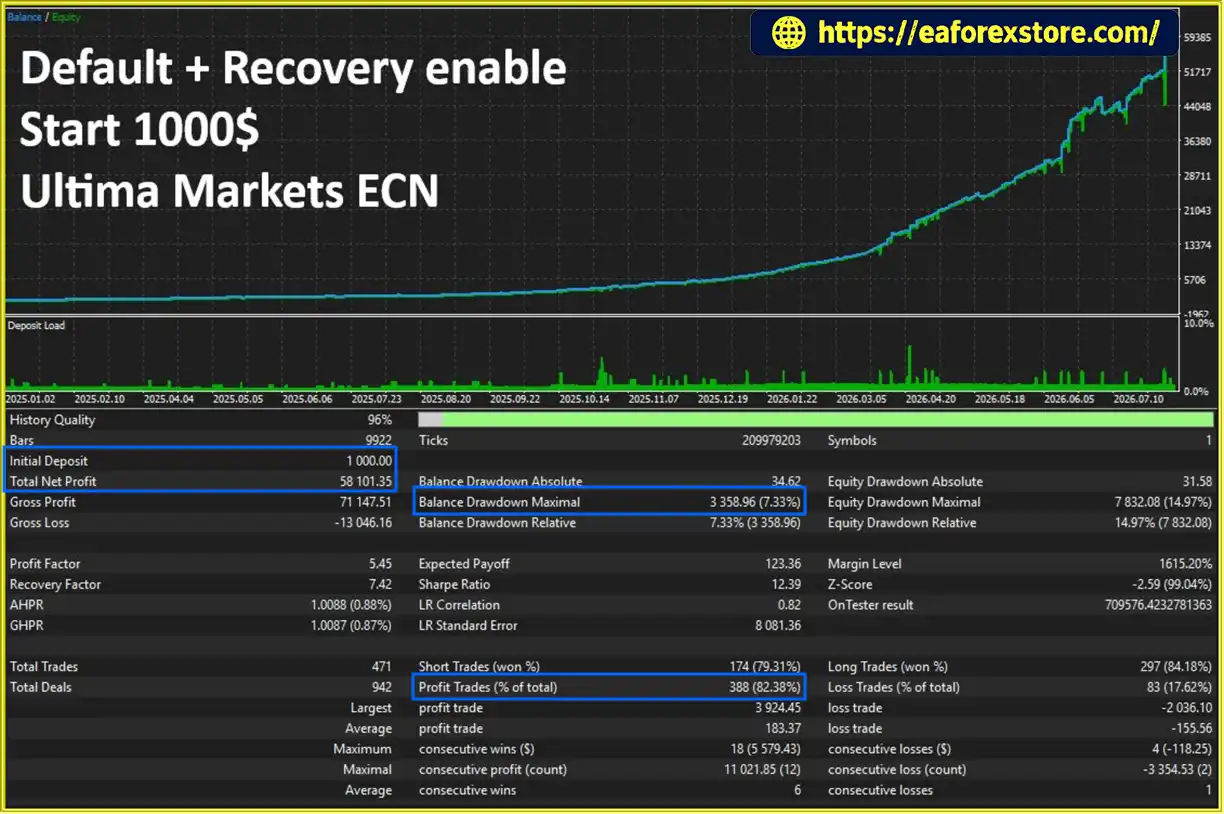
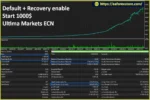
The supplied backtest figures report the following results for an initial deposit of $1,000:
Default Setting: Net profit of $29,092.13, win rate of 86.59%, and maximum drawdown of 4.50%.
Default + Recovery Enabled: Net profit of $58,101.35, win rate of 82.38%, and maximum drawdown of 7.33%.
These figures are reported backtest results, not guarantees of future performance. The recovery-enabled configuration shows higher reported profit but also a lower win rate and greater maximum drawdown. Traders should independently verify the testing period, account conditions, and underlying reports before relying on these results.
8. Is Neo Delta EA MT5 Suitable for Beginners?
Neo Delta EA MT5 may be considered by traders who want automated Gold trading with configurable strategies and integrated risk-management tools. However, beginners should first learn how position sizing, leverage, drawdown, and stop-loss execution affect trading risk. Testing on a demo account with conservative settings is recommended before considering live deployment. The optional recovery module should be evaluated carefully because it increases position size and potential losses.
In stock
In stock
In stock
In stock
In stock
Out of stock
No account yet?
Create an Account












 Automatic EA
 EA Best Seller
 Expert Advisor MT4
 Expert Advisor MT5
 HFT EA


Reviews
Clear filtersThere are no reviews yet.