









-
 Unlimited Activations
-
 Instant delivery
-
 Easy to install





 Unlimited Activations
Instant delivery
Easy to install
Unlimited Activations
Instant delivery
Easy to install
 Free Update
 Free Install Support

OrionMT5 EA is an automated Expert Advisor designed to trade the Forex market by analyzing price consolidation zones and identifying potential price movement scenarios. It uses a method of detecting recent candlestick patterns to adapt its trading decisions to changing market conditions.
Designed for MetaTrader, OrionMT5 EA combines price action analysis with configurable money management, Stop Loss, Take Profit, and trailing stop functionality. These features allow traders to define trade protection parameters and adjust the EA’s behavior according to their trading preferences.
The developer states that OrionMT5 EA was developed with real spread conditions and variable delays in trade order execution in mind. This may be relevant for traders who want to evaluate the EA under conditions that more closely resemble live trading, although actual execution quality will still depend on the broker, liquidity, and market volatility.
One notable feature is that OrionMT5 EA does not use averaging or increasing lot sizes. Instead, each position has its own Stop Loss and Take Profit, with an optional built-in trailing stop to manage individual trades.
The recommended instruments are GBPUSD, EURUSD, and USDCAD on the M15 (15-minute) timeframe. With adjustable risk, trading hours, spread limits, and execution settings, OrionMT5 EA provides a configurable approach to automated Forex trading.
>>> Delivery time 24h-48h after payment.
>>> Refund if not delivered.
>>> You will receive the latest version without any limitations (ID+Time).Reviewed by Jason Stap <<<
OrionMT5 EA Overview
OrionMT5 EA analyzes price consolidation zones to identify potential market movement scenarios. Consolidation occurs when the market trades within a relatively limited price range before a possible breakout or directional move.
By evaluating these zones, the EA aims to identify potential trading opportunities based on recent market behavior. However, consolidation analysis cannot predict every breakout correctly, and price may move in an unexpected direction.
The EA uses a method for identifying candlestick patterns from recent price action. According to the developer, this approach helps the trading algorithm adapt to changing market conditions with minimal delay.
Candlestick patterns can provide information about market momentum and potential changes in direction. Their reliability depends on the broader market context, timeframe, and price behavior, so performance should be assessed through backtesting and forward testing.
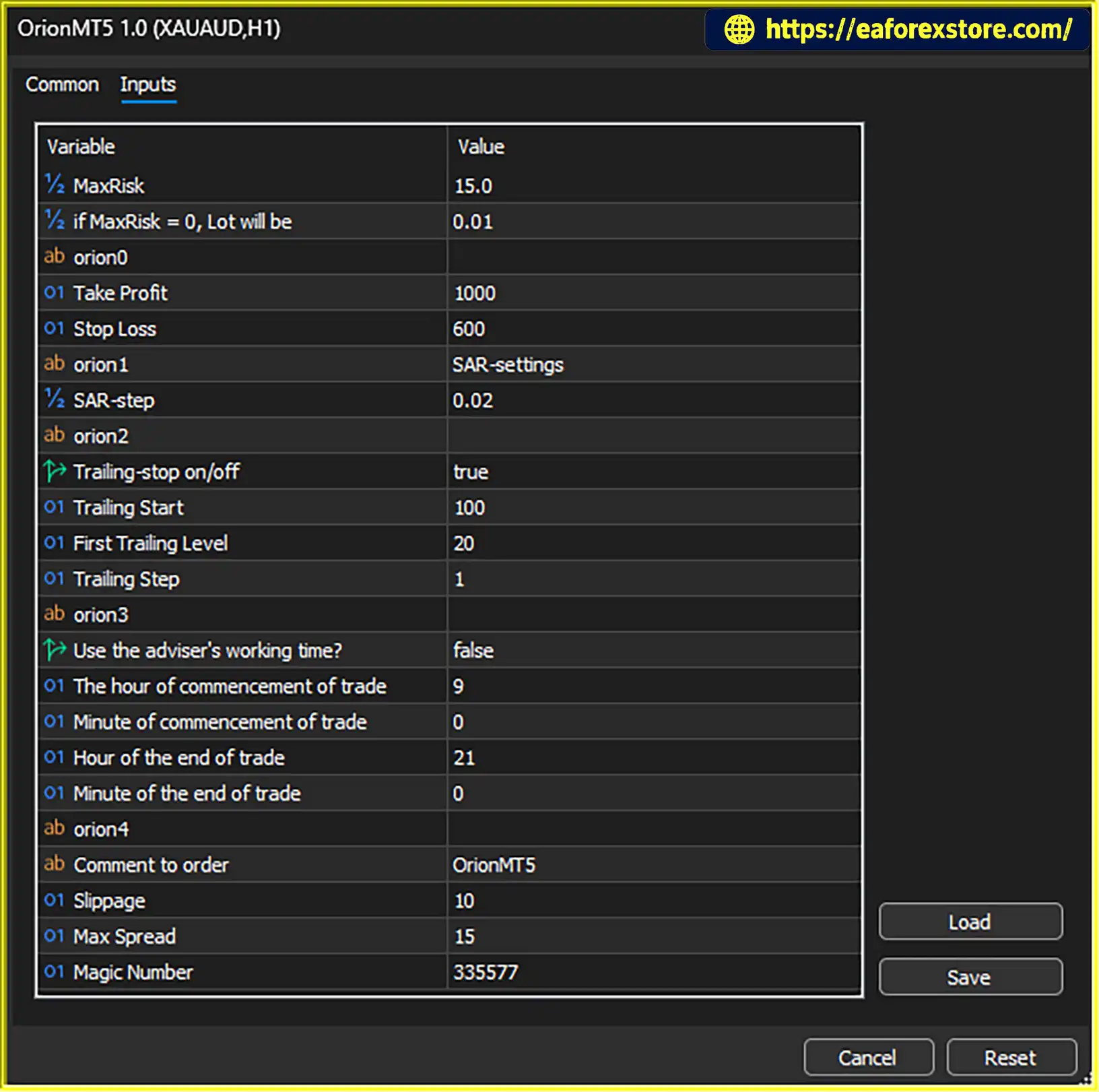
OrionMT5 EA includes a MaxRisk parameter for calculating trading lot size. This setting is intended to control position sizing according to the EA’s money management logic.
The EA also provides an alternative lot setting for use when MaxRisk is set to zero. Traders should confirm the exact relationship between these parameters in the EA’s documentation or through demo testing.
Appropriate position sizing is important because even a strategy with defined Stop Loss levels can experience significant losses if trading volume is too large relative to account equity.
Each position opened by OrionMT5 EA has a Stop Loss (SL) and Take Profit (TP).
Using predefined exit levels helps establish a structured trading plan. However, actual execution may differ from the requested price during periods of high volatility, gaps, or insufficient liquidity.
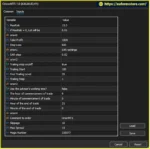
OrionMT5 EA includes a trailing stop that manages each position individually. Traders can enable or disable this feature and adjust several related parameters.
Available settings include:
A trailing stop can help protect favorable price movements while allowing a position to remain open if the market continues in the intended direction. However, a tight trailing stop may close trades during ordinary market fluctuations.
According to the developer, OrionMT5 EA does not use averaging or increase lot sizes as part of its trading method.
This is an important distinction for traders who prefer to avoid strategies that add positions to losing trades or increase exposure through progressively larger lots.
Nevertheless, the absence of averaging and lot increases does not eliminate trading risk. Individual trades can still lose money, and multiple losing trades can reduce account equity.
The EA includes an optional trading-time filter that allows users to specify when trading should begin and end.
The available settings include the start hour and minute, end hour and minute, and a switch to enable or disable the trading schedule.
This functionality can help traders limit activity to selected market sessions. Users should confirm the broker’s server time before configuring the schedule, since it may differ from their local time.
OrionMT5 EA provides a Max Spread setting to restrict trading when the spread exceeds a chosen limit.
The spread is the difference between the bid and ask prices. High spreads can increase trading costs, especially for strategies that enter and exit positions frequently.
A maximum spread filter can help avoid some unfavorable execution conditions, but it cannot guarantee low transaction costs or prevent slippage.
The EA includes a Slippage parameter that defines the maximum permitted deviation between the requested and executed trade price, subject to the trading platform and broker’s execution rules.
This setting provides an additional way to manage order execution. Its actual effect depends on the broker’s execution model and how the EA implements the parameter.
OrionMT5 EA includes a SAR-step setting associated with the Parabolic SAR indicator.
The parameter allows traders to adjust the indicator’s step value. However, the supplied description does not explain precisely how SAR-step interacts with the EA’s entry conditions, so its role should be confirmed before changing the default setting.
The EA supports a configurable Magic Number and order comment.
The Magic Number helps identify positions and orders associated with a particular EA instance. The order comment provides an additional label that can make trade activity easier to review in the MetaTrader terminal and account history.
These settings are particularly useful when several automated systems or manual trades operate on the same trading account.
OrionMT5 EA follows an automated trading process based on price consolidation analysis, recent candlestick patterns, and configurable trade management settings.
Step 1: Analyze recent price action
The EA evaluates market behavior to identify consolidation zones and potential price movement scenarios.
Step 2: Detect recent candlestick patterns
Its candlestick detection method assesses recent price patterns to help identify potential trading opportunities as market conditions change.
Step 3: Apply the trading configuration
The EA operates according to the configured money management, SAR-step, trading-hour, and maximum spread settings. The exact entry conditions and the interaction between these parameters depend on the EA’s internal algorithm.
Step 4: Calculate position size
The MaxRisk setting is used for the EA’s lot calculation logic. If MaxRisk is zero, the alternative lot setting applies according to the EA’s configuration.
Step 5: Place and manage trades
When a trade is opened, the EA assigns a Stop Loss and Take Profit. If trailing stop management is enabled, it adjusts the stop-loss level according to the configured trailing parameters.
Step 6: Apply execution controls
The EA uses its slippage and maximum spread settings to help manage trade execution conditions. Actual fills and trading costs remain dependent on the broker and market environment.
The developer describes OrionMT5 EA as suitable for extended operation without frequent monitoring. However, automated trading still requires periodic supervision, platform availability, and checks of execution and risk settings.
OrionMT5 EA may appeal to Forex traders who want a price-action-oriented Expert Advisor with individual trade protection and configurable execution controls.
The recommended starting point for evaluation is the M15 timeframe on GBPUSD, EURUSD, or USDCAD. Traders should test each instrument separately because its volatility, spread, and price behavior may produce different results.
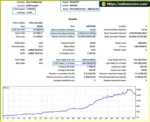
OrionMT5 EA backtets
Although OrionMT5 EA includes several risk management settings, traders should understand their limitations before running the EA on a live account.
The MaxRisk parameter influences the EA’s lot calculation. Before live trading, verify how this setting translates into actual position volume and what happens when MaxRisk is set to zero.
Do not assume that a particular MaxRisk value corresponds to a guaranteed maximum monetary loss unless the calculation method has been confirmed.
Every position is configured with a Stop Loss and Take Profit. These levels help define the intended exit conditions, but they do not guarantee the exact execution price or final monetary result.
Gaps, slippage, spreads, and broker execution conditions can cause actual results to differ from expectations.
The trailing stop can be disabled or adjusted using the available start, first-level, and step parameters.
Traders should test these values on the selected instrument and timeframe. A trailing stop that is too tight may close positions prematurely, while a wider setting may allow more price movement against unrealized gains.
The Max Spread and Slippage settings can help manage some execution risks, but neither removes all market execution uncertainty.
Before trading, check typical spreads on the intended broker and monitor conditions around news releases, market openings, and periods of reduced liquidity.
If the trading-time filter is enabled, confirm the start and end times using the broker’s server clock. Incorrect time settings can cause the EA to trade outside the intended period or miss planned trading opportunities.
Before using real money, conduct a backtest with appropriate historical data and forward-test the EA on a demo account. Review its trade frequency, drawdown, average loss, spread sensitivity, and behavior during different market conditions.
The absence of averaging and lot increases may reduce certain forms of exposure escalation, but it does not make the EA risk-free. No automated trading system can guarantee profits.
Follow these general steps to install OrionMT5 EA in MetaTrader.
setting
.ex5 file in MQL5/Experts. If the provider supplies an .mq5 source file, compile it according to the developer’s instructions.The exact installation procedure may vary depending on the file supplied and the supported MetaTrader version. Confirm platform compatibility with the provider before installation.
>>> Join VIP Membership Now <<<
OrionMT5 EA is an automated Forex trading Expert Advisor built around price consolidation analysis and recent candlestick pattern detection. It combines configurable money management with individual Stop Loss and Take Profit levels, an optional trailing stop, and execution filters for spread, slippage, and trading hours.
One of its notable characteristics is the stated absence of averaging and increasing lot sizes. This may appeal to traders who prefer a strategy that does not rely on progressively increasing exposure to manage losing positions.
The developer recommends GBPUSD, EURUSD, and USDCAD on the M15 timeframe. Nevertheless, traders should verify the EA’s performance on each instrument independently and confirm the behavior of the MaxRisk, SAR-step, and trailing stop settings before live deployment.
Overall, OrionMT5 EA offers several configurable features for automated Forex trading, but its profitability cannot be established from the feature description alone. Backtesting, demo testing, appropriate position sizing, and ongoing monitoring remain essential.
1. What is OrionMT5 EA MT5?
OrionMT5 EA is an automated Forex trading Expert Advisor designed for the MetaTrader platform. It analyzes price consolidation zones and recent candlestick patterns to identify potential trading opportunities. The EA also includes configurable money management, individual Stop Loss and Take Profit levels, an optional trailing stop, and execution filters.
2. Which currency pairs and timeframe are recommended for OrionMT5 EA?
According to the developer, OrionMT5 EA is recommended for GBPUSD, EURUSD, and USDCAD on the M15 (15-minute) timeframe. Traders should test each currency pair separately because spreads, volatility, and market behavior can affect trading performance.
3. How does OrionMT5 EA identify trading opportunities?
OrionMT5 EA evaluates recent price action to identify consolidation zones and potential market movements. It also uses recent candlestick pattern detection to help adapt its trading decisions to changing conditions. The supplied description does not disclose the complete entry algorithm, so traders should verify its behavior through backtesting and demo trading.
4. Does OrionMT5 EA use Martingale or averaging?
According to the developer, OrionMT5 EA does not use averaging or progressively increasing lot sizes. Instead, each position has its own Stop Loss and Take Profit. Although this avoids the specific exposure-escalation methods mentioned above, consecutive losing trades can still cause significant account losses.
5. Does OrionMT5 EA include Stop Loss, Take Profit, and trailing stop features?
Yes. Each position opened by OrionMT5 EA has an individual Stop Loss and Take Profit. The EA also provides an optional trailing stop with configurable parameters, including Trailing Start, First Trailing Level, and Trailing Step. These settings should be tested carefully because tight trailing stops may close trades during normal market fluctuations.
6. How does OrionMT5 EA manage trading risk and order execution?
OrionMT5 EA includes a MaxRisk parameter for position sizing, an alternative lot setting, a maximum spread filter, a slippage parameter, and an optional trading-hours filter. Traders should verify how MaxRisk calculates lot sizes and confirm their broker's server time before configuring the schedule. These controls can help manage certain risks but cannot eliminate losses, slippage, or unfavorable market conditions.
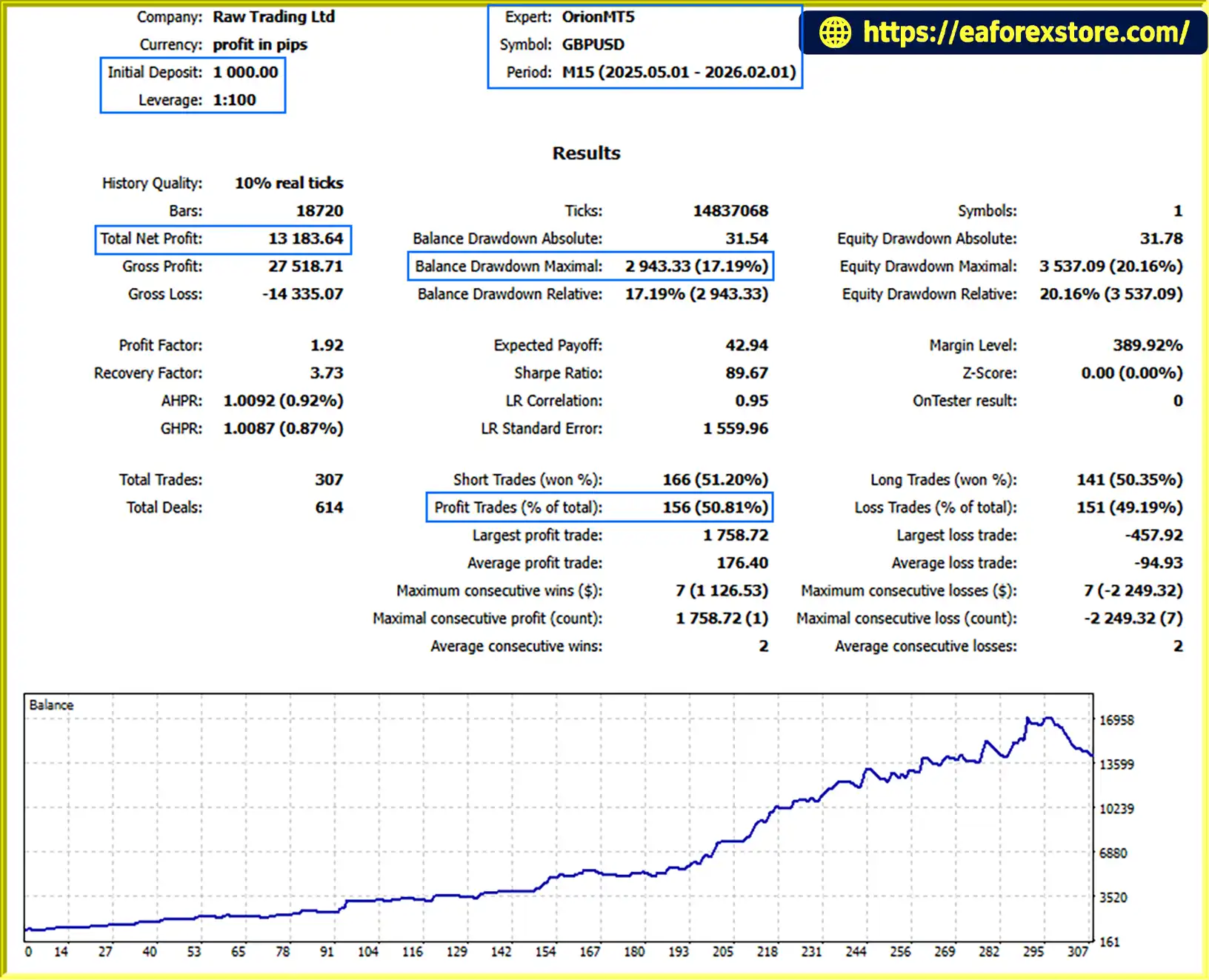
7. What are the reported backtest results for OrionMT5 EA?
The supplied product description reports the following backtest figures for GBPUSD over nine months:
Initial deposit: $1,000
Total net profit: $13,183.64
Reported win rate: 50.81%
Maximum drawdown: 17.19%
These figures are reported results, not a guarantee of future performance. The original Strategy Tester report, testing dates, modeling quality, commission, and spread assumptions should be checked before relying on the results.
8. Is OrionMT5 EA suitable for beginners, and can it guarantee profits?
OrionMT5 EA may appeal to traders who want automated Forex trading with configurable risk and trade-management settings. However, beginners should first learn how position sizing, Stop Loss, drawdown, and execution costs work. Test the EA on a demo account before considering live trading, and monitor its performance regularly. OrionMT5 EA does not guarantee profits, and real trading results may differ from backtests.
In stock
In stock
In stock
In stock
In stock
Out of stock
No account yet?
Create an Account












 Automatic EA
 EA Best Seller
 Expert Advisor MT4
 Expert Advisor MT5
 HFT EA


Reviews
Clear filtersThere are no reviews yet.