









-
 Unlimited Activations
-
 Instant delivery
-
 Easy to install






 Unlimited Activations
Instant delivery
Easy to install
Unlimited Activations
Instant delivery
Easy to install
 Free Update
 Free Install Support

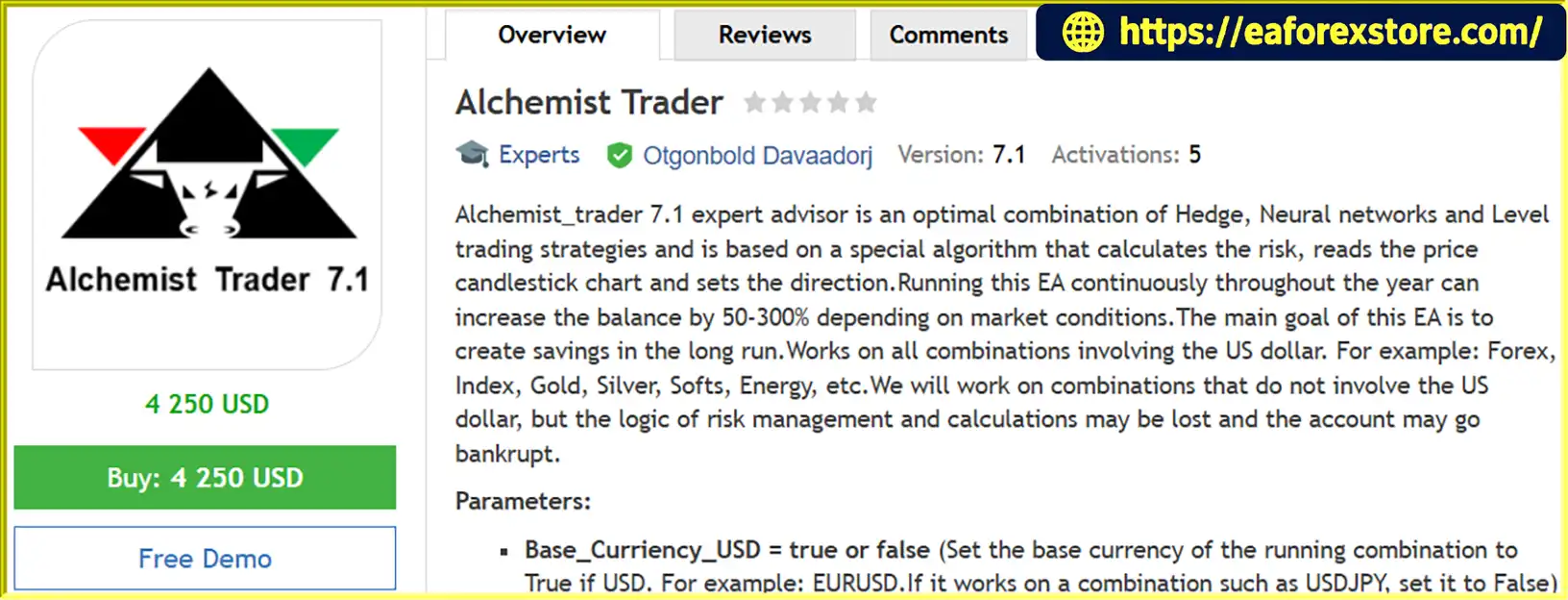
Alchemist Trader EA MT4 is an automated trading Expert Advisor developed for the MetaTrader 4 platform. The trading system combines three strategic approaches: hedging, neural network-based analysis, and price-level trading. Together, these methods are designed to identify potential trading opportunities, manage positions, and adapt trading exposure to changing market conditions.
The EA uses a specialized algorithm that evaluates candlestick price charts, determines potential market direction, and calculates trading risk before managing orders. Its approach emphasizes automated risk calculations, dynamic lot sizing, and position management rather than relying exclusively on individual buy and sell signals.
One of the main objectives of Alchemist Trader EA MT4 is to support long-term account growth through systematic trading. According to the developer’s description, the robot targets annual balance increases of 50% to 300%, depending on market conditions. However, these figures are promotional performance claims rather than verified or guaranteed returns.
Alchemist Trader EA MT4 is designed primarily for instruments involving the US dollar, including Forex currency pairs, gold, silver, indices, energy products, and certain commodity markets. The developer specifically warns that using the software on instruments without a USD component may interfere with its risk calculations and potentially lead to severe account losses.
With customizable trading parameters, automatic position sizing, balance-based profit targets, and alternative trading modes, Alchemist Trader EA MT4 offers a complex automated trading framework for traders who want to explore multi-strategy trading systems.
>>> Delivery time 24h-48h after payment.
>>> Refund if not delivered.
>>> You will receive the latest version without any limitations (ID+Time).Reviewed by Jason Stap <<<
Alchemist Trader EA MT4 Overview
Alchemist Trader EA MT4 combines hedging, neural network-based analysis, and level trading into a single automated trading system.
These components are intended to work together to evaluate market conditions, determine trading direction, and manage open positions.
The EA is described as incorporating neural network technology into its trading calculations.
This component is intended to support market analysis and trading decisions, although the developer does not provide technical details about the neural network architecture, training process, or validation methodology.
Hedging is one of the primary trading concepts used by Alchemist Trader EA.
The system can manage opposing positions through its Counter_Position parameter, which allows users to configure the number of counter-directional positions.
Hedging may help offset certain market movements, but it does not eliminate trading risk and can increase margin requirements and transaction costs.
The robot incorporates price-level analysis to support its order management decisions.
By monitoring candlestick formations and price relationships, the EA attempts to identify relevant trading levels and determine how positions should be managed.
Alchemist Trader EA features an internal risk management algorithm that calculates position sizes according to configured trading parameters.
The system considers settings such as margin thresholds, Moving Average periods, minimum lot sizes, and the number of simultaneously traded instruments.
Unlike trading robots that exclusively use fixed lots, Alchemist Trader EA can automatically adjust trading volume.
The MAPeriod parameter plays an important role in this process. According to the developer, lower MAPeriod values generally result in larger lot sizes.
The EA is designed to trade a range of USD-related financial instruments, subject to broker availability and compatible contract specifications.
Supported market categories described by the developer include:
Users should verify each symbol’s configuration before enabling automated trading.
The Profit_Procent_Of_Balance parameter allows the robot to close positions when the combined profit for a trading instrument reaches a specified percentage of its allocated account balance.
This feature provides an account-allocation-based profit objective instead of relying exclusively on fixed take-profit distances.
Alchemist Trader EA allows users to configure the number of simultaneously traded instruments through the Symbol_Type parameter.
This setting is used in the EA’s balance allocation calculations and can influence how trading capital is divided across different instruments.
The Trading_Mode parameter offers two different operational approaches.
Normal mode allows the EA to follow its standard position management logic, while a nonzero mode activates automatic Take Profit and Stop Loss settings and prevents the addition of further positions.
This provides flexibility for traders who want to test a more restricted trade management approach.
Alchemist Trader EA MT4 follows a systematic trading process that combines market analysis, automatic risk calculations, and position management.
The Expert Advisor analyzes candlestick price charts to evaluate market behavior.
Its algorithm processes price information and trading levels to identify potential market direction.
The EA combines its described neural network component with hedging and level-trading logic.
These elements are intended to support the decision-making process before opening or managing positions.
The exact internal calculations are proprietary and are not fully documented in the available product description.
Before executing trades, Alchemist Trader EA calculates trading volume using its configured parameters.
Settings such as MAPeriod, Min_Lots, Margin_Call_Level, and Symbol_Type influence its risk and capital allocation calculations.
For example, the default MAPeriod is 13, and decreasing this value may increase the trading lot size and associated financial exposure.
After evaluating market conditions and calculating position size, the EA may open positions according to its internal trading algorithm.
The software is designed to work primarily with USD-related instruments because its risk management calculations depend on the selected market configuration.
The Counter_Position parameter controls the number of opposing positions used by the system.
Its default value is 1, while the configurable range extends from 1 to 7.
The developer recommends retaining the default setting unless the trader understands the implications of changing it.
Alchemist Trader EA evaluates the combined profit of open positions associated with a trading instrument.
When the profit reaches the configured Profit_Procent_Of_Balance threshold, the EA is designed to close the relevant positions.
The default value is 1%, calculated against the portion of account balance allocated to that instrument according to the EA’s internal logic.
If Trading_Mode is set to any value other than 0, the robot changes its position management behavior.
In this mode, the EA automatically assigns Take Profit and Stop Loss levels to open positions and does not add further positions.
This can provide an alternative configuration for traders who want to test more limited position accumulation.
While MetaTrader 4 remains operational and connected, the EA can continue analyzing price movements, checking trade conditions, and managing open orders.
However, the system’s ability to operate automatically does not remove the need for regular monitoring of margin usage, account exposure, and execution conditions.
Alchemist Trader EA MT4 offers several characteristics that distinguish it from simpler indicator-based trading robots.
Combination of Multiple Trading Techniques
The integration of hedging, neural network-based analysis, and price-level trading provides a multi-component approach to automated trading decisions.
Automated Position Size Management
The EA uses internal calculations to adjust trade volumes according to configured parameters, reducing the need to manually select a lot size for every position.
Balance-Based Profit Targets
Rather than depending only on individual trade targets, the system can close positions based on the combined profit of trades associated with an instrument.
Support for Different USD-Related Markets
Alchemist Trader EA MT4 is designed for more than traditional Forex currency pairs, offering configuration options for metals, energy, indices, and other supported instruments.
Flexible Capital Allocation
The Symbol_Type setting allows traders to configure how the EA accounts for multiple simultaneously traded instruments.
Configurable Hedging Exposure
The Counter_Position parameter offers control over the number of opposing positions used by the strategy.
Alternative Trading Mode
Users can switch to a mode that applies Take Profit and Stop Loss settings while preventing the addition of further positions.
Despite these features, traders should not assume that a complex algorithm or dynamic risk model automatically produces better results. The effectiveness of the EA depends on its implementation, broker compatibility, market conditions, and trading settings.
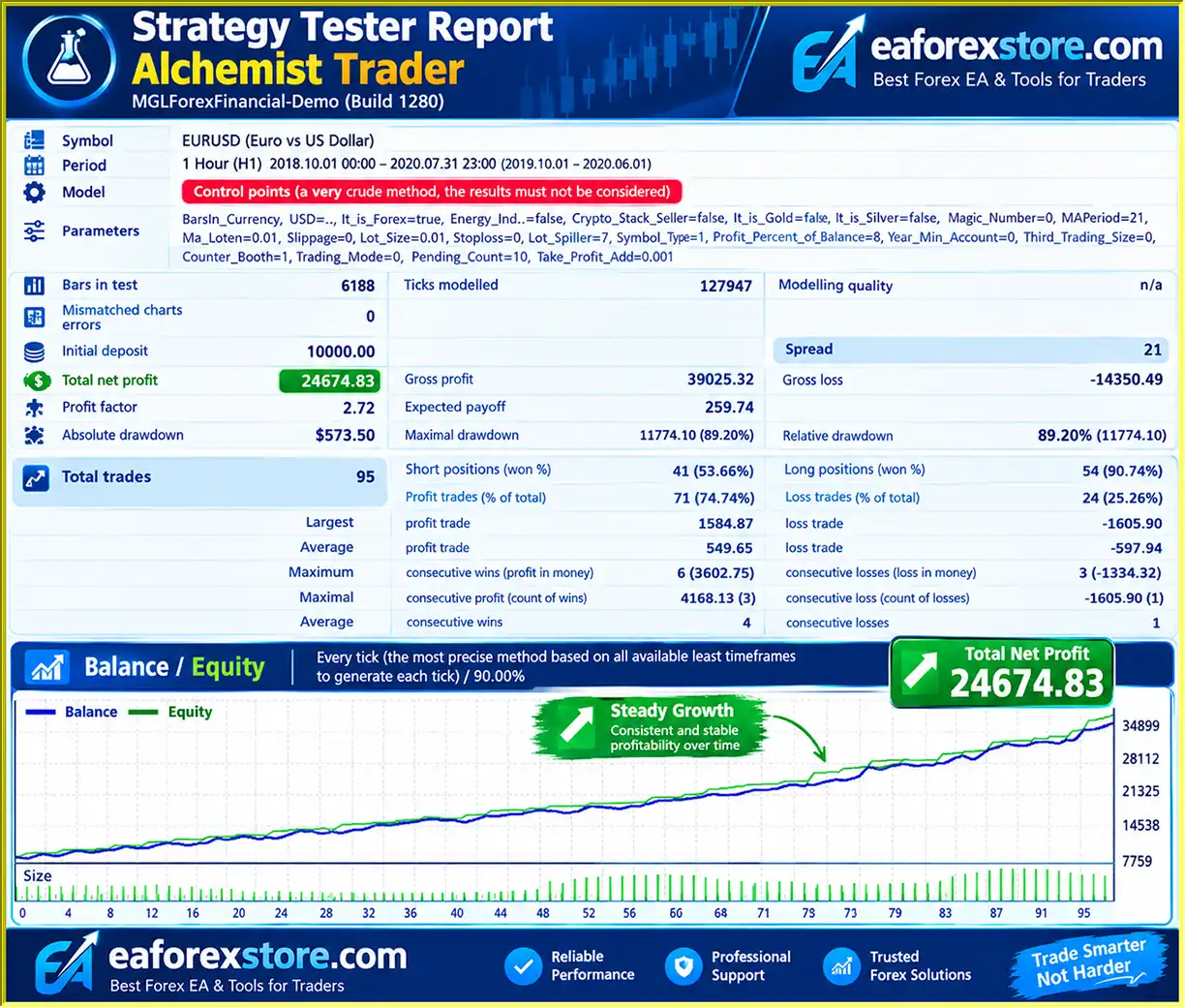
🔺EURUSD pair – Oct 1, 2019 – Jul 31, 2020 – H1
Alchemist Trader EA MT4 Backtets
Risk management is one of the central components of Alchemist Trader EA MT4, particularly because its strategy incorporates hedging and adjustable position sizing.
However, certain settings can significantly increase trading exposure, and users should carefully evaluate the system before deploying it with real capital.
The Margin_Call_Level parameter has a default value of 1.00.
According to the developer, this setting relates to the margin level used by the EA’s risk calculations. A value of 1 corresponds to 100%, while a value of 2 corresponds to 200%.
It should not be confused with a guaranteed maximum loss percentage or a universal broker margin-call threshold.
Because the exact internal calculation is not disclosed, traders should test how different values affect the EA’s position sizing and margin requirements.
The MAPeriod setting influences risk management and trading volume calculations.
Its configurable range is 2 to 13, with a default value of 13.
According to the developer, smaller values increase lot sizes, which may substantially increase both potential profits and losses.
The Min_Lots parameter defaults to 0.01.
This establishes the minimum trading volume used by the EA, although its internal risk calculation may select a larger position.
Users should verify that the resulting trade volume is appropriate for their account balance and leverage.
Counter_Position controls the number of opposing positions, with a supported range from 1 to 7.
The recommended default is 1.
Increasing the number of opposing positions may increase transaction costs, margin requirements, and the complexity of position management.
Profit_Procent_Of_Balance defaults to 1.00.
This parameter defines a combined profit threshold for positions associated with an instrument, calculated using the allocated balance.
It can help automate profit realization, but it does not guarantee that profitable exits will consistently occur.
The standard Trading_Mode value is 0.
When a nonzero value is selected, the EA is described as automatically setting Take Profit and Stop Loss levels and avoiding additional positions.
The Take_Profit_Add parameter can modify the additional distance used by this mechanism.
This mode may change the EA’s exposure profile, but its actual protective effectiveness must be evaluated through testing.
The developer explicitly warns against using Alchemist Trader EA MT4 on instruments without a US dollar component unless the trader fully understands the necessary configuration.
Incorrect instrument settings may interfere with the EA’s risk calculations and could lead to significant losses or account liquidation.
The supplied product description does not specify dedicated email alerts, push notifications, or custom warning functions.
Traders can monitor order execution, open positions, margin levels, and account history using MetaTrader 4’s standard monitoring tools.
Alchemist Trader EA involves strategies and settings that may generate substantial trading exposure.
Hedging does not guarantee loss protection, and dynamic lot sizing may amplify losses when account conditions deteriorate.
The developer’s stated annual return range of 50% to 300% is not supported by independently verified performance information in the supplied description and should not be treated as an expected investment outcome.
Installing Alchemist Trader EA MT4 follows the standard procedure for adding an Expert Advisor to the MetaTrader 4 trading platform.
Download and install MetaTrader 4 from a trusted Forex broker.
Launch the platform and log in to your trading account.
For initial testing, use a demo account rather than real funds.
In MetaTrader 4, select:
File → Open Data Folder → MQL4 → Experts
This directory is where Expert Advisor files are stored.
Copy the Alchemist Trader EA file, typically supplied in EX4 or MQ4 format, into the Experts folder.
Restart MetaTrader 4 or refresh the Expert Advisors section in the Navigator panel.
Open a chart for a USD-related instrument supported by your broker.
Examples include:
Other USD-related markets may be supported if their contract specifications are compatible with the EA.
The developer does not specify a universally recommended chart timeframe, so users should consult the EA’s original documentation or test different chart periods.
Find Alchemist Trader EA in the MT4 Navigator under Expert Advisors.
Drag it onto the selected chart and open the Inputs tab.
The EA offers several adjustable settings that affect instrument classification, position sizing, margin calculations, and trade management.
| Parameter | Default | Description |
|---|---|---|
| Base_Curriency_USD | Not specified | Identifies whether USD is the base currency |
| It_is_Forex | Not specified | Enables Forex instrument classification |
| Energy_Index | Not specified | Identifies energy or index instruments |
| Crypto_Stock_Softs | Not specified | Identifies cryptocurrencies, stocks, and soft commodities |
| It_is_Gold | Not specified | Identifies gold trading instruments |
| It_is_Silver | Not specified | Identifies silver trading instruments |
| Margin_Call_Level | 1.00 | Configures the EA’s margin-related risk threshold |
| MAPeriod | 13 | Influences risk calculations and lot sizing |
| Min_Lots | 0.01 | Sets the minimum trading lot |
| Lot_Split | 7 | Controls an internal lot-related calculation |
| Symbol_Type | 1 | Configures the number of instruments for balance allocation |
| Profit_Procent_Of_Balance | 1.00 | Sets the combined profit target as a percentage of allocated balance |
| Year_Min_Procent | 15.00 | Developer-defined annual percentage parameter |
| Counter_Position | 1 | Sets the number of opposing positions |
| Trading_Mode | 0 | Selects normal or alternative trading behavior |
| Pending_Coef | 2 | Configures the pending-order distance multiplier |
| Take_Profit_Add | 0.001 | Adjusts TP/SL distance in alternative trading mode |
Correctly identifying the trading instrument is particularly important for this EA because its internal risk calculations depend on market classification.
For example:
EURUSD
USDJPY
XAUUSD
XAGUSD
Oil or Energy Instruments
Stocks, Crypto, or Soft Commodities
Important: The source description gives the opposite examples for Base_Curriency_USD, indicating true for EURUSD and false for USDJPY. Those examples conflict with the usual Forex definition of a base currency. The settings above follow standard Forex terminology, but users must verify the EA’s actual internal parameter convention with its developer before running it. Do not assume the conventional interpretation matches its code.
Review the parameters that influence trade size and account exposure.
The developer recommends retaining Lot_Split at 7 and Counter_Position at 1.
MAPeriod defaults to 13, while Min_Lots defaults to 0.01.
Remember that lowering MAPeriod may increase position size and trading risk.
Trading_Mode = 0 enables the normal operating mode.
Setting Trading_Mode to a nonzero value activates an alternative mode that automatically assigns Take Profit and Stop Loss levels to open positions and prevents additional entries.
Review the Take_Profit_Add setting if using the alternative mode.
Enable automated trading in MetaTrader 4 and confirm that the EA has permission to execute trades.
Check the Experts and Journal tabs for initialization errors or configuration warnings.
Open the MT4 Strategy Tester and evaluate Alchemist Trader EA across different historical periods.
Pay particular attention to:
Because the EA uses dynamic lot calculations and hedging, traders should examine the complete trade history rather than focusing only on final account balance.
Before using real capital, test the Expert Advisor on a demo account with the same broker conditions intended for live trading.
Verify the correct operation of instrument classification, position sizing, counter-positions, margin calculations, and profit-based exit management.
Only consider live deployment after understanding the potential drawdowns and account risks involved.
>> Join VIP Membership Now <<<
Alchemist Trader EA MT4 is a multi-strategy automated trading robot that combines hedging, neural network-based analysis, and price-level trading into a single MetaTrader 4 Expert Advisor.
Its primary strengths lie in its configurable risk calculations, dynamic position sizing, instrument-specific settings, and balance-based profit management features.
The ability to trade different USD-related markets and configure opposing positions may appeal to experienced traders who want to experiment with automated strategies beyond conventional indicator-based entry systems.
However, the robot’s complexity also introduces important risks. Dynamic lot sizing, hedging exposure, and margin-sensitive calculations require careful configuration and ongoing monitoring.
The developer’s claim that the EA may generate annual balance growth of 50% to 300% has not been substantiated by independently verified trading records in the supplied information. Such figures should therefore be treated as unverified promotional claims rather than realistic or guaranteed return expectations.
Additionally, the warning about non-USD instruments highlights the importance of selecting compatible markets and configuring the correct instrument settings.
Overall, Alchemist Trader EA MT4 may be worth evaluating for experienced traders interested in automated hedging and multi-strategy trading systems. Its features offer flexibility, but its effectiveness and reliability must be established through thorough backtesting, forward testing, and independent performance evaluation.
For a safer evaluation, begin with a demo account, verify the instrument settings, use conservative position sizing, and monitor margin exposure carefully before considering live trading.
*Risk Disclaimer: Forex, CFDs, cryptocurrencies, commodities, and other leveraged financial instruments involve substantial financial risk. Automated trading systems, hedging strategies, and neural network-based algorithms cannot guarantee profits or prevent losses. Trading performance claims should be independently verified. Never invest mon
1. What is Alchemist Trader EA MT4 and how does it work?
Alchemist Trader EA MT4 is an automated Forex trading robot designed for the MetaTrader 4 platform. It combines hedging strategies, neural network-based market analysis, and price-level trading to identify potential opportunities and manage positions automatically. The Expert Advisor uses candlestick analysis, dynamic lot sizing, and balance-based profit targets to execute trades according to its configured trading algorithm.
2. Is Alchemist Trader EA MT4 profitable?
Alchemist Trader EA MT4 has reported positive historical backtesting results. In an EUR/USD H1 backtest conducted from October 2019 to July 2020, the EA generated $24,674.83 in net profit from a $10,000 initial deposit, with a 74.74% win rate across 95 trades. The developer also claims potential annual returns of 50% to 300%, but these figures are not independently verified. Historical performance does not guarantee future profitability.
3. Does Alchemist Trader EA MT4 use AI and neural network technology?
Alchemist Trader EA MT4 is described as using neural network-based analysis alongside hedging and price-level trading strategies. Its algorithm evaluates candlestick patterns, market direction, and trading conditions to support automated trading decisions. However, the developer has not disclosed detailed information about the neural network architecture, training process, or validation methods. Therefore, its AI capabilities cannot be independently confirmed from the available specifications.
4. Which currency pairs and markets does Alchemist Trader EA MT4 support?
Alchemist Trader EA MT4 is primarily designed for USD-related trading instruments, including Forex pairs such as EURUSD, GBPUSD, and USDJPY, as well as gold (XAUUSD), silver (XAGUSD), energy products, indices, and selected commodities. The developer warns against using the EA on instruments without a USD component because incorrect instrument classification may interfere with its risk calculations and potentially cause substantial trading losses.
5. What is the minimum deposit required for Alchemist Trader EA MT4?
The official minimum deposit requirement for Alchemist Trader EA MT4 is not specified in the available product documentation. However, its reported EUR/USD backtest used an initial deposit of $10,000. The EA supports dynamic lot sizing, with a default minimum lot parameter of 0.01. The appropriate starting capital depends on broker leverage, margin requirements, trading instruments, and configured risk settings.
6. Does Alchemist Trader EA MT4 use a hedging strategy?
Yes. Alchemist Trader EA MT4 incorporates hedging as one of its three primary trading strategies. The Counter_Position parameter allows traders to configure the number of opposing positions, with a default value of 1 and a supported range from 1 to 7. While hedging may help offset certain market movements, it can also increase transaction costs, margin requirements, and overall account exposure.
7. How does Alchemist Trader EA MT4 manage risk and trading positions?
Alchemist Trader EA MT4 uses automatic risk calculations, dynamic lot sizing, margin-related parameters, and balance-based profit management. The MAPeriod setting influences position size, while Profit_Procent_Of_Balance controls combined profit targets. Traders can also activate an alternative Trading_Mode that applies automatic Stop Loss and Take Profit levels without adding further positions. However, these features do not eliminate drawdown or liquidation risks.
8. How do I install Alchemist Trader EA MT4 on MetaTrader 4?
To install Alchemist Trader EA MT4, copy the Expert Advisor file into the MQL4/Experts folder in your MetaTrader 4 data directory. Restart MT4, open a compatible USD-related trading instrument such as EURUSD or XAUUSD, and attach the EA to the chart. Configure instrument classification, lot sizing, margin settings, hedging parameters, and trading mode before enabling AutoTrading. Always verify the developer's instrument-specific settings and test the EA on a demo account before trading live.
In stock
In stock
In stock
In stock
In stock
Out of stock
No account yet?
Create an Account












 Automatic EA
 EA Best Seller
 Expert Advisor MT4
 Expert Advisor MT5
 HFT EA


Reviews
Clear filtersThere are no reviews yet.