





-
 Unlimited Activations
-
 Instant delivery
-
 Easy to install






 Unlimited Activations
Instant delivery
Easy to install
 Free Update
 Free Install Support

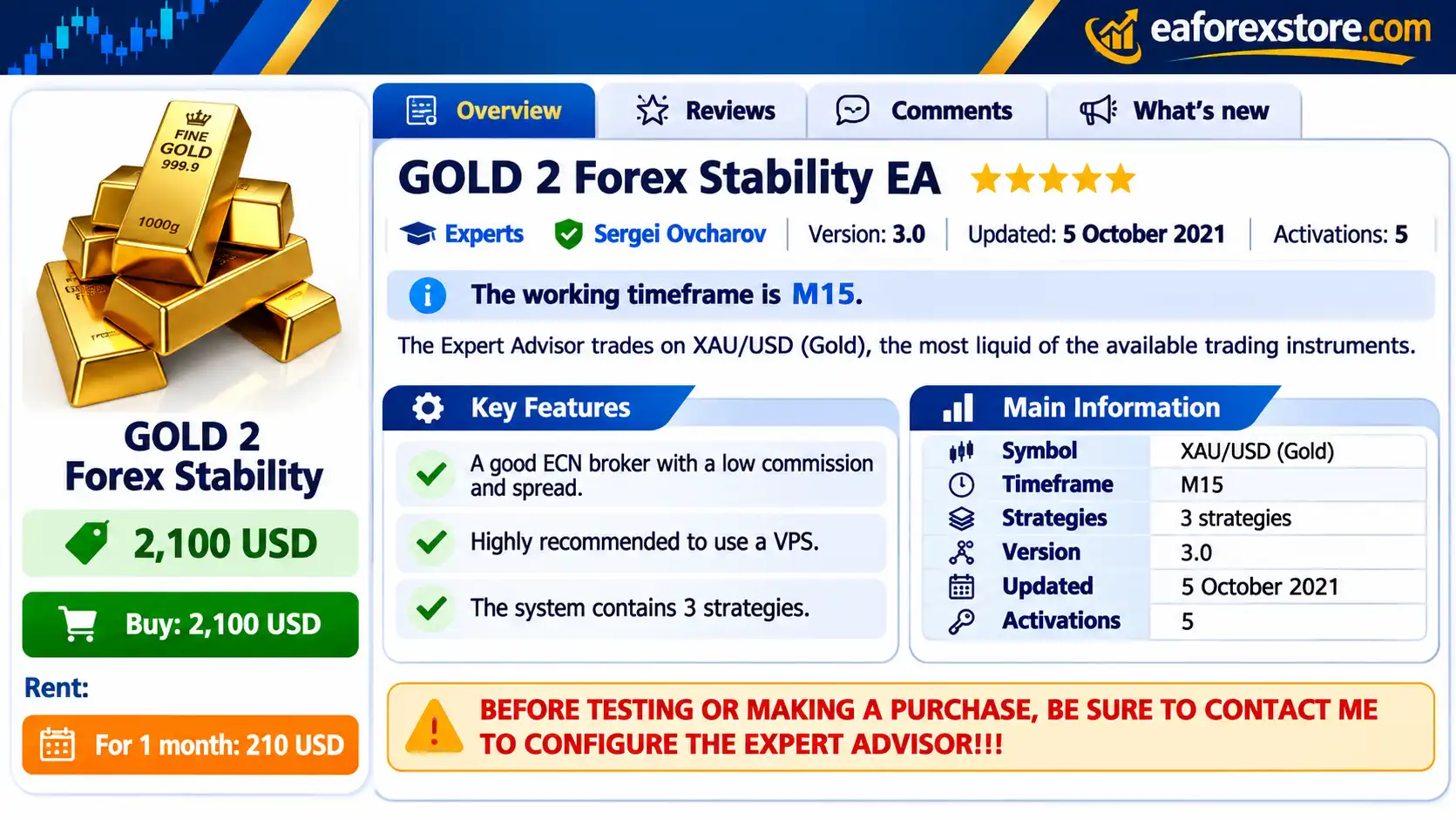
GOLD 2 Forex Stability EA MT4 is an automated gold trading Expert Advisor designed for the MetaTrader 4 platform. Developed specifically for XAUUSD (Gold), the trading robot operates on the M15 timeframe and incorporates three trading strategies within a single automated trading system.
The Expert Advisor is designed to perform trading operations according to its programmed algorithms, allowing traders to automate aspects of gold market analysis, trade execution, and position management.
Unlike general-purpose Forex trading robots that support numerous currency pairs, GOLD 2 Forex Stability EA MT4 focuses on XAUUSD, an actively traded precious metals instrument known for its substantial trading volume and frequent price movements.
The developer recommends using a reliable ECN broker with low trading spreads and commissions. A Virtual Private Server (VPS) is also strongly recommended to support continuous operation and stable connectivity.
One important aspect of this EA is its requirement for individual configuration and developer consultation before testing or purchasing. The developer offers assistance with configuring the Expert Advisor and can connect to a demo account to evaluate system behavior under the selected trading conditions.
For traders interested in an automated XAUUSD trading robot with multiple strategies and personalized setup support, GOLD 2 Forex Stability EA MT4 offers a specialized solution for MetaTrader 4.
>>> Delivery time 24h-48h after payment.
>>> Refund if not delivered.
>>> You will receive the latest version without any limitations (ID+Time).> Reviewed by Jason Stap <<<
GOLD 2 Forex Stability EA MT4 Overview
GOLD 2 Forex Stability EA MT4 is developed specifically for trading gold against the US dollar.
The Expert Advisor is intended to automate trading operations on XAUUSD according to its programmed strategy rules.
This allows users to participate in automated gold trading without manually executing every order.
One of the main features of GOLD 2 Forex Stability EA MT4 is the inclusion of three trading strategies.
The system combines these strategies within a single Expert Advisor to support its automated trading activity.
However, the developer has not disclosed the exact entry conditions, indicators, or algorithms used by the three strategies.
The recommended trading timeframe is M15.
This means the EA is designed to operate on 15-minute price charts, providing its specified environment for evaluating trading opportunities.
GOLD 2 Forex Stability EA MT4 is presented as an automated trading system developed using MetaTrader’s MQL programming environment.
Automated Expert Advisors can execute predefined trading operations when their programmed conditions are satisfied.
The exact degree of automation for individual risk-management and trade-management functions should be verified with the developer.
The developer recommends using an ECN broker offering competitive spreads, low commissions, and reliable execution.
Broker conditions can influence automated trading performance, particularly when transaction costs and execution speed affect trade outcomes.
A VPS is highly recommended for running GOLD 2 Forex Stability EA MT4.
A reliable VPS can help keep MetaTrader 4 operating continuously without depending on a local computer remaining powered on.
The developer emphasizes the importance of configuring the Expert Advisor before testing or purchasing.
This requirement suggests that users should verify their broker conditions, trading environment, and EA settings before evaluating performance.
The developer offers to connect the Expert Advisor to a buyer’s demo account to check its operation and stability.
This allows prospective users to observe how the system behaves in a simulated trading environment before considering live deployment.
Demo trading results do not guarantee equivalent live-account performance.
GOLD 2 Forex Stability EA MT4 is designed for the MetaTrader 4 trading environment, which supports automated strategies developed using the MQL4 programming language.
This enables automated market monitoring, order execution, and trade-management functionality according to the EA’s implemented features.
GOLD 2 Forex Stability EA MT4 operates as an automated trading system designed to evaluate XAUUSD market conditions and execute trades using its three integrated strategies.
The Expert Advisor operates on the XAUUSD chart using the recommended M15 timeframe.
It monitors market data according to the trading conditions programmed into its algorithms.
The EA incorporates three separate trading strategies.
These strategies are used within the automated system to identify potential trading opportunities.
The exact method of combining or selecting between the three strategies is not disclosed in the supplied product documentation.
When the system identifies conditions that satisfy its programmed rules, it can generate trading signals for potential positions.
The Expert Advisor can execute trading instructions through MetaTrader 4, subject to broker execution conditions, available margin, and its configured permissions.
Automated trading systems can use programmed rules to maintain and close positions.
However, the available description does not specify the exact stop-loss, take-profit, trailing-stop, or lot-sizing mechanisms implemented in GOLD 2 Forex Stability EA MT4.
These details should be confirmed with the developer before live trading.
For continuous automated trading, MetaTrader 4 must remain active and connected to the broker.
A VPS can help maintain platform availability and reduce interruptions caused by local computer shutdowns or internet instability.
The developer recommends contacting them before testing the Expert Advisor.
Users can request help configuring the EA and evaluating its operation on a demo account.
GOLD 2 Forex Stability EA MT4 offers a focused automated trading solution for traders interested in the gold market.
Dedicated Gold Trading System
The Expert Advisor is designed specifically for XAUUSD rather than being presented as a universal multi-currency trading robot.
Three Trading Strategies
The EA incorporates three strategies within one trading system, providing a multi-strategy architecture for automated trading.
M15 Trading Environment
The recommended 15-minute timeframe provides a defined starting point for installation and performance evaluation.
Automated Execution
The system can reduce repetitive manual order-placement tasks by executing trades according to its programmed rules.
ECN Broker Focus
The developer recommends low-spread, low-commission ECN trading conditions to support the EA’s operation.
VPS-Based Operation
The recommended VPS setup can help maintain MetaTrader connectivity for continuous automated trading.
Developer Configuration Support
The ability to request setup assistance can be useful for traders who are unfamiliar with the EA’s configuration requirements.
Demo Account Evaluation
The developer offers to help connect the EA to a demo account, allowing users to evaluate its functionality before using real capital.
These features may appeal to traders seeking a dedicated XAUUSD Expert Advisor with multiple trading strategies and access to developer setup assistance.
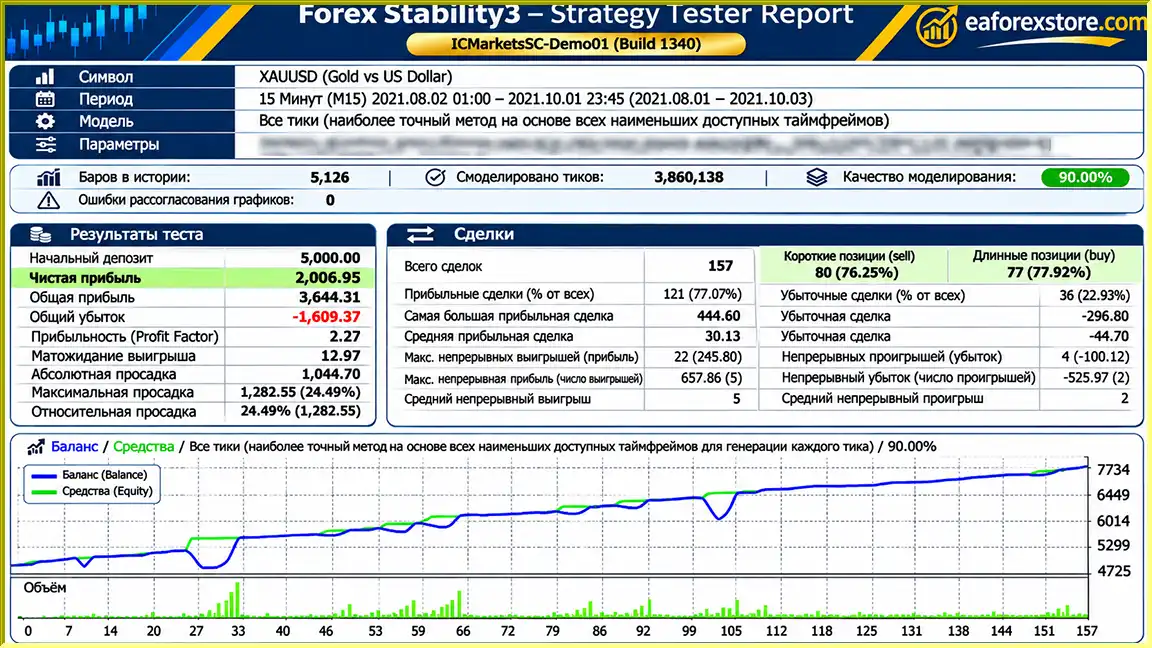
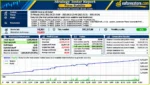
🔺XAUUSD – August 2 to October 1, 2021
GOLD 2 Forex Stability EA backtets
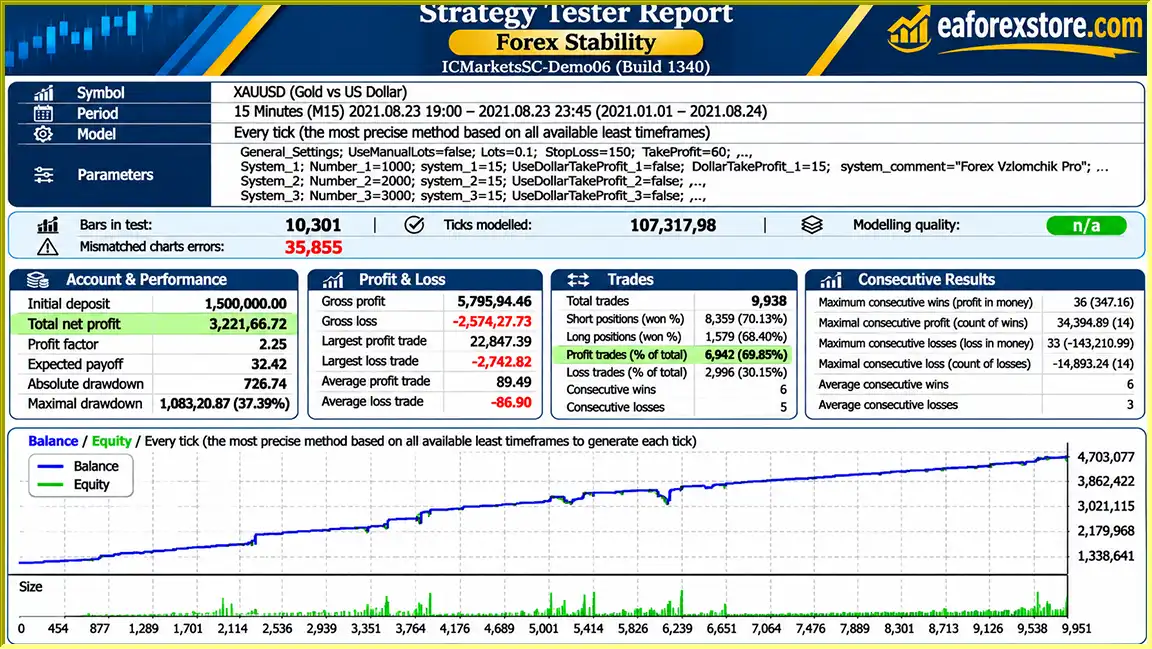
🔺XAUUSD – March 19 to August 23, 2021
GOLD 2 Forex Stability EA MT4 backtets
Risk management is particularly important when using GOLD 2 Forex Stability EA MT4, as XAUUSD can experience rapid price changes during economic announcements, shifts in monetary policy expectations, and periods of market volatility.
| Parameter | Developer’s Recommendation |
|---|---|
| Trading Platform | MetaTrader 4 |
| Trading Instrument | XAUUSD (Gold) |
| Timeframe | M15 |
| Number of Strategies | 3 |
| Broker Type | ECN |
| Spread | Low |
| Commission | Low |
| VPS | Highly Recommended |
| Initial Configuration | Contact Developer |
| Demo Testing | Developer Assistance Available |
| Minimum Deposit | Not Specified |
| Recommended Leverage | Not Specified |
Gold prices can move rapidly in response to macroeconomic developments, including interest rate expectations, inflation data, US dollar movements, and geopolitical events.
These conditions may create trading opportunities but also increase downside risk.
The developer recommends low-spread and low-commission ECN brokers.
Trading costs are especially relevant when an automated system executes multiple transactions, as spreads and commissions can reduce net profitability.
During periods of high volatility, trading orders may execute at prices different from those expected.
A low-spread broker cannot guarantee that slippage will never occur.
A VPS can help maintain uninterrupted access to the MetaTrader platform.
However, VPS operation does not eliminate trading risk, prevent broker outages, or guarantee successful order execution.
The provided product description does not disclose specific stop-loss rules, maximum drawdown limits, lot-sizing formulas, or equity protection parameters.
Traders should confirm these features with the developer before using the EA on a live account.
The developer offers demo account setup assistance.
Before live deployment, users should evaluate:
The supplied documentation does not specify dedicated pop-up, email, mobile push, or sound-alert functionality within the EA.
Traders can use MetaTrader 4’s available monitoring and notification tools where supported.
Risk Warning: Gold trading involves substantial financial risk. Automated trading strategies, low spreads, and VPS connectivity cannot guarantee profits or prevent trading losses.
Installing GOLD 2 Forex Stability EA MT4 requires MetaTrader 4, a compatible trading account, and the Expert Advisor installation file.
Before testing or purchasing the Expert Advisor, contact the developer as instructed in the product description.
Request information about the recommended configuration, supported broker conditions, and the three integrated trading strategies.
Select a broker offering XAUUSD trading through MetaTrader 4.
The developer recommends an ECN account with competitive spreads, low commissions, and reliable execution.
Obtain GOLD 2 Forex Stability EA MT4 from the authorized product provider.
Verify that the installation file is compatible with MetaTrader 4.
If the EA is supplied as an EX4 file:
If the product is distributed through the MQL5 marketplace, use its official installation procedure.
Locate XAUUSD in the Market Watch panel.
Open the gold trading chart and select the M15 timeframe.
Find the Expert Advisor in the Navigator panel and drag it onto the XAUUSD M15 chart.
Open the input settings window to review the configuration options.
Follow the developer’s recommended configuration instructions.
Because the supplied description does not include detailed input parameters, avoid changing unfamiliar settings without understanding their effects.
For continuous operation, consider installing MetaTrader 4 on a reliable VPS.
Choose a VPS with stable connectivity to your broker’s trading infrastructure.
Enable automated trading in MetaTrader 4.
Verify that the EA is correctly initialized and check the Experts and Journal tabs for errors.
The developer offers assistance with connecting the EA to a demo account.
Use this opportunity to evaluate trading behavior under the intended broker conditions.
Monitor relevant metrics such as:
Before considering live deployment, confirm the EA’s risk-management functionality and verify that its trading behavior is consistent with your risk tolerance.
>> Join VIP Membership Now <<<
GOLD 2 Forex Stability EA MT4 is an automated gold trading Expert Advisor developed for XAUUSD on the MetaTrader 4 platform.
Its primary characteristics include three integrated trading strategies, a recommended M15 timeframe, compatibility with low-cost ECN trading environments, and support for continuous VPS-based operation.
The developer also emphasizes personalized configuration and offers assistance with demo account testing before purchase or live deployment.
However, the supplied product description does not disclose the internal strategy algorithms, detailed risk-management settings, minimum deposit requirements, or independently verified performance statistics.
As a result, claims of trading stability or consistent profitability should not be treated as established facts without supporting evidence.
For traders interested in a dedicated automated gold trading system, GOLD 2 Forex Stability EA MT4 may be worth evaluating through careful demo testing and consultation with the developer.
Before purchasing GOLD 2 Forex Stability EA MT4, contact the developer to confirm its configuration requirements, evaluate its trading behavior, and understand the risks associated with automated XAUUSD trading.
1. What is GOLD 2 Forex Stability EA MT4, and how does it work?
GOLD 2 Forex Stability EA MT4 is an automated gold trading robot designed specifically for XAUUSD on the MetaTrader 4 platform. It combines three integrated trading strategies to analyze gold market conditions, identify potential trading opportunities, and execute trades automatically. The Expert Advisor operates on the M15 (15-minute) timeframe and is intended for traders seeking an automated approach to gold trading.
2. What trading strategies does GOLD 2 Forex Stability EA MT4 use?
GOLD 2 Forex Stability EA MT4 incorporates three trading strategies within a single automated trading system. These strategies work according to the EA's programmed algorithms to identify potential XAUUSD trading opportunities. However, the developer has not publicly disclosed the specific technical indicators, entry conditions, or trading logic behind each strategy. Traders should contact the developer for further details before purchasing or configuring the EA.
3. What are the recommended settings for GOLD 2 Forex Stability EA MT4?
The developer recommends running GOLD 2 Forex Stability EA MT4 exclusively on XAUUSD using the M15 timeframe. An ECN trading account with low spreads, competitive commissions, and reliable order execution is preferred. A stable VPS is also strongly recommended. Since the EA requires individual configuration, users should contact the developer to obtain appropriate settings for their broker and trading environment.
4. What is the minimum deposit required for GOLD 2 Forex Stability EA MT4?
The developer has not specified an official minimum deposit requirement for GOLD 2 Forex Stability EA MT4. The appropriate starting balance depends on the broker's XAUUSD contract specifications, available leverage, trading volume, margin requirements, and the EA's position management rules. Traders should confirm the recommended account balance and lot-sizing configuration with the developer before using real funds.
5. Is GOLD 2 Forex Stability EA MT4 profitable, and what are its backtest results?
The supplied GOLD 2 Forex Stability EA MT4 backtest reports show two historical XAUUSD testing periods. The first, from August 2 to October 1, 2021, reports a $5,000 initial deposit, $2,036.95 net profit, a 77.07% win rate, and 24.49% maximum drawdown. The second, from March 19 to August 23, 2021, reports $322,166.72 net profit from a $150,000 initial deposit, with a 69.85% win rate and 37.39% maximum drawdown. These results are not independently verified and do not guarantee future profitability.
6. Which Forex brokers are best suited for GOLD 2 Forex Stability EA MT4?
GOLD 2 Forex Stability EA MT4 is designed for brokers that support XAUUSD trading through MetaTrader 4. The developer recommends ECN brokers offering tight gold spreads, low commissions, reliable execution, and stable trading conditions. Broker selection is important because transaction costs, slippage, and execution speed can significantly affect automated gold trading performance. Users should verify broker compatibility with the developer before live deployment.
7. Do I need a VPS to run GOLD 2 Forex Stability EA MT4?
A VPS (Virtual Private Server) is not mandatory, but the developer strongly recommends using one for GOLD 2 Forex Stability EA MT4. A reliable Forex VPS allows MetaTrader 4 to operate continuously without requiring a personal computer to remain switched on. It can also reduce interruptions caused by local internet disconnections or power outages. However, VPS hosting cannot eliminate market risk, prevent slippage, or guarantee profitable trading results.
8. How do I install and configure GOLD 2 Forex Stability EA MT4?
To install GOLD 2 Forex Stability EA MT4, first contact the developer for configuration guidance and obtain the Expert Advisor installation file. Open MetaTrader 4, navigate to File → Open Data Folder → MQL4 → Experts, and copy the EA's EX4 file into the Experts folder. Restart or refresh MetaTrader 4, open the XAUUSD chart, and select the M15 timeframe. Attach the Expert Advisor, apply the developer-recommended settings, and enable AutoTrading. Test the system on a demo account before considering live gold trading.
In stock
In stock
In stock
In stock
In stock
Out of stock
No account yet?
Create an Account












 Automatic EA
 EA Best Seller
 Expert Advisor MT4
 Expert Advisor MT5
 HFT EA



Reviews
Clear filtersThere are no reviews yet.