





-
 Unlimited Activations
-
 Instant delivery
-
 Easy to install







 Unlimited Activations
Instant delivery
Easy to install
 Free Update
 Free Install Support

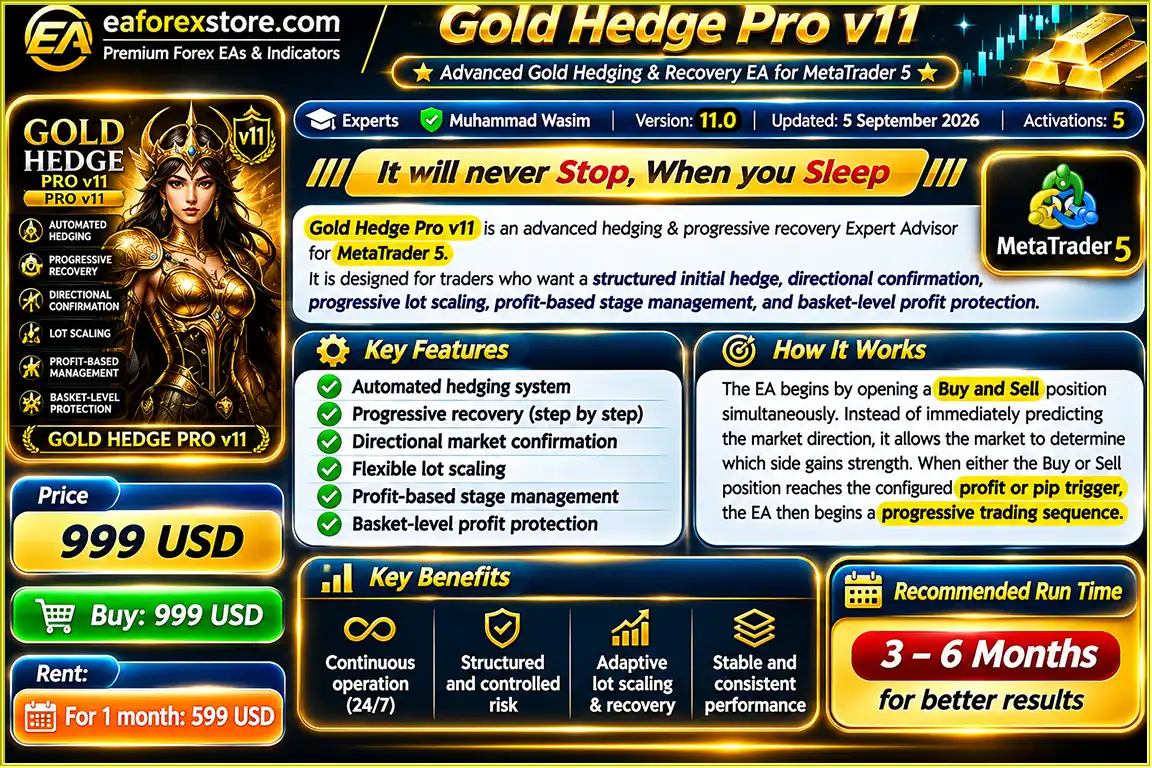
Gold Hedge Pro v11 EA MT5 is a fully automated gold trading robot for MetaTrader 5, designed to trade XAUUSD using an initial Buy and Sell hedge strategy, automatic direction confirmation, and progressive lot management.
The EA starts by opening Buy and Sell positions simultaneously, then selects the profitable direction when a configured profit or pip target is reached. It automatically manages additional positions, increases lot sizes, adjusts Stop Loss levels, and closes the opposite hedge position.
Gold Hedge Pro v11 EA MT5 also includes basket profit targets, maximum progression stages, margin protection, and automatic restart, helping traders manage their automated gold trading strategy through configurable settings.
The developer recommends evaluating the EA over a 3–6 month period to better understand its performance under different market conditions. This does not guarantee profitable results.
>>> Delivery time 24h-48h after payment.
>>> Refund if not delivered.
>>> You will receive the latest version without any limitations (ID+Time).Reviewed by Jason Stap <<<
Gold Hedge Pro v11 EA MT5 Overview
Gold Hedge Pro v11 EA MT5 starts each trading cycle by opening two opposite positions simultaneously.
For example:
Instead of predicting whether gold prices will rise or fall, the EA monitors both positions and waits for the market to demonstrate directional strength.
Once either position reaches the configured trigger, the EA selects that direction for the next trading stage.
The EA automatically identifies the profitable trading direction based on the initial hedge positions.
If the Buy position reaches the configured trigger first, the system begins a Buy progression.
If the Sell position reaches the trigger first, it begins a Sell progression.
The opposite hedge position is automatically closed once the winning direction has been confirmed.
Gold Hedge Pro v11 EA MT5 supports flexible directional confirmation using two trigger methods:
Traders can enable either trigger method or use both according to their preferred strategy settings.
After confirming the trading direction, Gold Hedge Pro v11 automatically opens additional positions as the selected direction continues moving favorably.
Position sizes increase according to the configured Lot Multiplier.
This allows the EA to build a progressive trading sequence rather than using a constant lot size for every stage.
Because increasing lot sizes can substantially increase exposure, traders should select conservative multipliers and progression limits.
Each new trading stage can require a higher profit level before another position is opened.
These configurable stage requirements help control when the EA adds positions to the active trading sequence.
Instead of opening additional trades randomly, the EA follows predefined profit conditions.
Gold Hedge Pro v11 EA MT5 includes an automatic Stop Loss management system for progressive trading stages.
When a new position is opened, the EA uses previous protection levels and adjusts the preceding stage’s Stop Loss toward the next stage’s entry.
This creates a structured mechanism for protecting earlier positions as the trading sequence develops.
However, Stop Loss execution may be affected by market gaps, slippage, and broker conditions.
The EA includes an optional Total Profit Target that monitors the combined floating profit of positions managed by the Expert Advisor.
When the configured profit target is reached, the EA automatically closes its managed positions.
For example:
This feature helps traders define a profit objective for the complete trading cycle.
Traders can configure the maximum number of additional trading stages allowed during a progression.
Once the selected limit is reached, the EA prevents further progression beyond that configured stage count.
This provides an important control over the number of progressive entries.
After all managed positions are closed, Gold Hedge Pro v11 EA MT5 can automatically reset its trading sequence.
The EA then prepares to begin a new cycle using the initial Buy and Sell hedge strategy.
This allows continuous automated operation without manually restarting the Expert Advisor after every completed cycle.
Before opening an additional position, Gold Hedge Pro v11 EA MT5 checks the account’s available free margin.
If the available margin is insufficient, the EA pauses further progression rather than submitting another order.
This helps reduce avoidable margin-related order failures, although it does not eliminate the possibility of margin calls or liquidation.
Gold Hedge Pro v11 EA MT5 automatically adjusts requested lot sizes to match the broker’s trading specifications.
These include:
This feature helps maintain compatibility with different broker trading environments.
Gold Hedge Pro v11 EA MT5 follows a structured automated trading process based on initial hedging, direction confirmation, progressive position management, and basket profit control.
At the beginning of a trading cycle, the EA opens a Buy and Sell position simultaneously on XAUUSD.
For example, both positions may use an initial volume of 0.01 lot.
This initial hedge allows the system to monitor price movement in both directions.
The EA continuously tracks the profit and price movement of both initial positions.
It waits until either the Buy or Sell side reaches the configured Dollar Profit Trigger or Pip Distance Trigger.
When one side reaches the selected trigger, the EA identifies that direction as the active trading progression.
If the Buy side reaches its trigger first, the EA follows the Buy direction.
If the Sell side reaches its trigger first, it follows the Sell direction.
After confirming the trading direction, the EA closes the opposite hedge position.
This allows the system to concentrate its progression on the selected direction.
As the active direction continues moving favorably and the configured stage conditions are met, Gold Hedge Pro v11 opens additional positions.
Each new position is sized according to the selected Lot Multiplier.
When new stages are added, the EA updates protective Stop Loss levels for previous positions according to its programmed stage-management rules.
This helps establish progressive protection as the sequence develops.
The EA continuously calculates the combined floating profit of its managed positions.
If the optional Total Profit Target is enabled, the system monitors whether the combined profit reaches the configured dollar amount.
When the basket reaches the specified Total Profit Target, the EA automatically closes the managed positions.
For example, if the profit target is $50, the EA attempts to close the basket once the combined floating profit reaches that value.
Actual realized profit may differ because of execution conditions and trading costs.
After all managed positions have closed, the EA can automatically reset and prepare a new Buy and Sell hedge cycle.
This process allows Gold Hedge Pro v11 to operate continuously while automated trading remains enabled.
Gold Hedge Pro v11 EA MT5 begins by opening Buy and Sell positions simultaneously.
This allows the EA to observe which direction meets its configured profit or pip requirements before starting a progressive sequence.
The EA automatically identifies the direction that reaches the selected trigger first.
This removes the need for manual intervention when selecting the initial trading direction.
Gold Hedge Pro v11 manages initial hedges, directional confirmation, additional entries, lot scaling, Stop Loss adjustments, and opposite-position closure automatically.
Traders can choose Dollar Profit Triggers, Pip Distance Triggers, or both.
This flexibility allows the system to be configured for different trading preferences.
The EA allows users to adjust initial lot size, Lot Multiplier, profit requirements, and maximum progression stages.
This gives traders greater control over the structure and exposure of each trading sequence.
Instead of managing only individual positions, Gold Hedge Pro v11 can monitor the combined floating profit of the entire trading cycle.
The optional Total Profit Target allows the EA to close all managed positions when the selected basket profit is reached.
The EA progressively updates Stop Loss levels as additional positions are opened.
This feature provides a structured approach to managing previously opened stages.
Before adding a position, Gold Hedge Pro v11 EA MT5 verifies available free margin.
If margin is insufficient, the EA pauses new progression entries.
Once a trading cycle finishes, the system can automatically prepare a new initial hedge sequence.
This supports continuous automated gold trading without manually restarting the EA after each completed cycle.
Gold Hedge Pro v11 EA MT5 Backtets
Gold Hedge Pro v11 EA MT5 includes several trading controls designed to manage progressive position exposure and monitor account conditions.
Traders can choose the starting lot size for the initial Buy and Sell hedge positions.
Using a smaller initial lot size can reduce starting exposure, although subsequent progressive entries may increase total risk.
The Lot Multiplier controls how much position volume increases during additional trading stages.
Higher multipliers increase market exposure more rapidly and may lead to larger profits or losses.
Traders can define the maximum number of progressive stages.
This prevents the EA from continuing to add positions beyond the configured progression limit.
The EA adjusts Stop Loss levels on earlier positions as new stages are opened.
These adjustments are designed to protect previously established positions as the trading sequence advances.
However, Stop Loss orders do not guarantee execution at the exact requested price.
An optional Total Profit Target closes all positions managed by the EA when their combined floating profit reaches the selected amount.
For example, setting the target to $50 instructs the EA to attempt basket closure when the combined profit reaches $50.
Before each new progressive entry, the system checks available free margin.
If there is insufficient margin, additional progression is paused.
The EA normalizes trade volumes according to the broker’s minimum lot, maximum lot, and lot step specifications.
This helps prevent invalid order volumes.
After directional confirmation, the EA closes the opposite initial hedge position.
This removes the opposing position but also leaves the account exposed to the chosen direction.
Specific built-in Telegram alerts, mobile push notifications, and email alerts have not been confirmed in the supplied product information.
Traders can monitor the EA’s positions, profit and loss, and trade history using MetaTrader 5.
Installing Gold Hedge Pro v11 EA MT5 is straightforward, but correct configuration of lot sizes, triggers, and progression settings is important before starting automated trading.
Download and install MetaTrader 5 from your broker or the official MetaTrader website.
Log in to a trading account that supports XAUUSD and hedging.
Open MetaTrader 5 and navigate to:
File → Open Data Folder → MQL5 → Experts
Copy the Gold Hedge Pro v11 EA file into the Experts folder.
Restart MetaTrader 5 or refresh the Expert Advisors list in the Navigator panel.
Open the gold trading symbol provided by your broker.
Ensure the chart is active and market data is updating correctly.
The supplied product information does not specify a required timeframe, so confirm the recommended timeframe with the developer before live trading.
Locate Gold Hedge Pro v11 in the Navigator panel and attach it to the XAUUSD chart.
Enable the required automated trading permissions.
Set the initial trading lot size.
For example:
Confirm that your trading account supports simultaneous Buy and Sell positions on the same symbol.
Choose your preferred direction confirmation method:
Enter the appropriate trigger values according to your trading preferences.
Adjust the Lot Multiplier and profit-based stage triggers.
Set the maximum number of progression stages to define how many additional positions the EA can open.
Enable the optional Total Profit Target if you want the EA to close all managed positions after reaching a selected combined floating profit.
For example:
Total Profit Target = $50
The EA will attempt to close its managed positions when the combined floating profit reaches $50.
Before enabling live trading, review your account balance, leverage, available margin, and maximum potential exposure.
Progressive lot scaling can significantly increase margin requirements during multiple trading stages.
Enable automated trading in MetaTrader 5.
Confirm that Gold Hedge Pro v11 is active and has permission to manage positions.
Test the EA on a demo account before using real capital.
The developer recommends running or evaluating Gold Hedge Pro v11 over 3–6 months to observe its behavior under different gold market conditions.
This evaluation period should be used to assess drawdowns, progression behavior, trade execution, and overall risk rather than assuming profitable performance.
Review the account’s open positions, margin level, lot progression, and trading history regularly.
A reliable VPS can help maintain continuous MetaTrader 5 operation when the EA is intended to run without interruption.
| Parameter | Configuration |
|---|---|
| Expert Advisor | Gold Hedge Pro v11 EA MT5 |
| Trading Platform | MetaTrader 5 |
| Trading Symbol | XAUUSD |
| Trading Strategy | Hedge + Progressive Lot Scaling |
| Initial Positions | Buy + Sell |
| Example Initial Lot | 0.01 |
| Direction Trigger | Dollar Profit / Pip Distance |
| Lot Multiplier | Configurable |
| Progressive Stages | Configurable |
| Maximum Stages | Configurable |
| Stop Loss | Progressive Stage Protection |
| Opposite Hedge Closure | Automatic |
| Basket Profit Target | Optional |
| Automatic Restart | Supported |
| Margin Protection | Included |
| Broker Lot Normalization | Supported |
| Recommended Account | Hedging |
| Suggested Evaluation Period | 3–6 Months |
| VPS | Recommended for Continuous Operation |
>>> Join VIP Membership Now <<<
Gold Hedge Pro v11 EA MT5 is an automated gold trading robot that combines initial Buy and Sell hedging, automatic direction confirmation, progressive lot scaling, and basket-level profit management.
Instead of selecting a market direction immediately, the EA begins with opposite positions and waits for one side to reach a configured profit or pip trigger.
Once the direction is confirmed, the system automatically manages the trading progression, adjusts Stop Loss levels, and closes the opposite hedge position.
Features such as configurable Lot Multipliers, maximum progression stages, Total Profit Target, margin verification, and automatic restart provide flexibility for traders who want to customize their automated gold trading strategy.
However, progressive lot scaling can create significant exposure, especially during sharp market reversals or extended trading sequences. Traders should carefully configure their risk settings, test the EA on a demo account, and monitor overall account margin.
The developer recommends evaluating Gold Hedge Pro v11 over a 3–6 month period to better understand its behavior in different market environments.
For traders looking for an MT5 gold hedging Expert Advisor with automatic progression and basket profit management, Gold Hedge Pro v11 offers a customizable automated trading framework.
Gold Hedge Pro v11 EA MT5 – Hedge First, Confirm Direction, Manage Progression Automatically.
Risk Disclaimer: Gold trading involves substantial financial risk. Hedging and progressive lot scaling do not guarantee profits or prevent losses. Increasing position sizes can create significant drawdowns, especially during market reversals. Stop Loss orders, profit targets, and margin checks cannot guarantee a fixed maximum loss. Always test the EA on a demo account before trading with real money.
1. What is Gold Hedge Pro v11 EA MT5, and how does it work?
Gold Hedge Pro v11 EA MT5 is a fully automated gold trading robot designed for MetaTrader 5. It uses an initial Buy and Sell hedging strategy to trade XAUUSD without predicting the market's direction in advance. Once either position reaches a predefined profit or pip target, the Expert Advisor confirms that direction, closes the opposite hedge, and opens additional positions using progressive lot sizing. It also manages Stop Loss adjustments, basket profit targets, and automatic trading cycle restarts.
2. How does the Buy and Sell hedging strategy work in Gold Hedge Pro v11?
Gold Hedge Pro v11 begins each trading cycle by simultaneously opening a Buy and Sell position on XAUUSD, typically starting with 0.01 lot per position. The EA monitors both trades until one reaches the configured Dollar Profit Trigger or Pip Distance Trigger. It then selects the profitable direction, closes the opposite position, and begins a progressive trading sequence. This approach allows the system to respond to market movement rather than relying on an initial directional prediction. However, closing the opposite hedge may realize a loss.
3. Does Gold Hedge Pro v11 use Martingale or progressive lot sizing?
Gold Hedge Pro v11 uses progressive lot scaling, allowing the EA to increase position sizes as additional trading stages are triggered. Traders can customize the Lot Multiplier, profit-based entry conditions, and maximum progression stages. Unlike a fixed-lot trading system, this approach can increase exposure as a trading sequence develops. Although progressive lot management may create opportunities for larger gains during favorable trends, it also increases potential losses, margin requirements, and drawdown risk during unexpected market reversals.
4. What is the minimum deposit required to run Gold Hedge Pro v11 EA MT5?
The developer has not specified an official minimum deposit for Gold Hedge Pro v11 EA MT5. The required trading capital depends on the initial lot size, Lot Multiplier, maximum progression stages, broker leverage, and margin requirements. For example, the EA can begin with 0.01 lot Buy and Sell positions, but additional progressive trades may significantly increase total exposure. Traders should evaluate their broker's margin requirements and test different settings on a demo account before using real money.
5. How profitable is Gold Hedge Pro v11 EA MT5, and what are its backtest results?
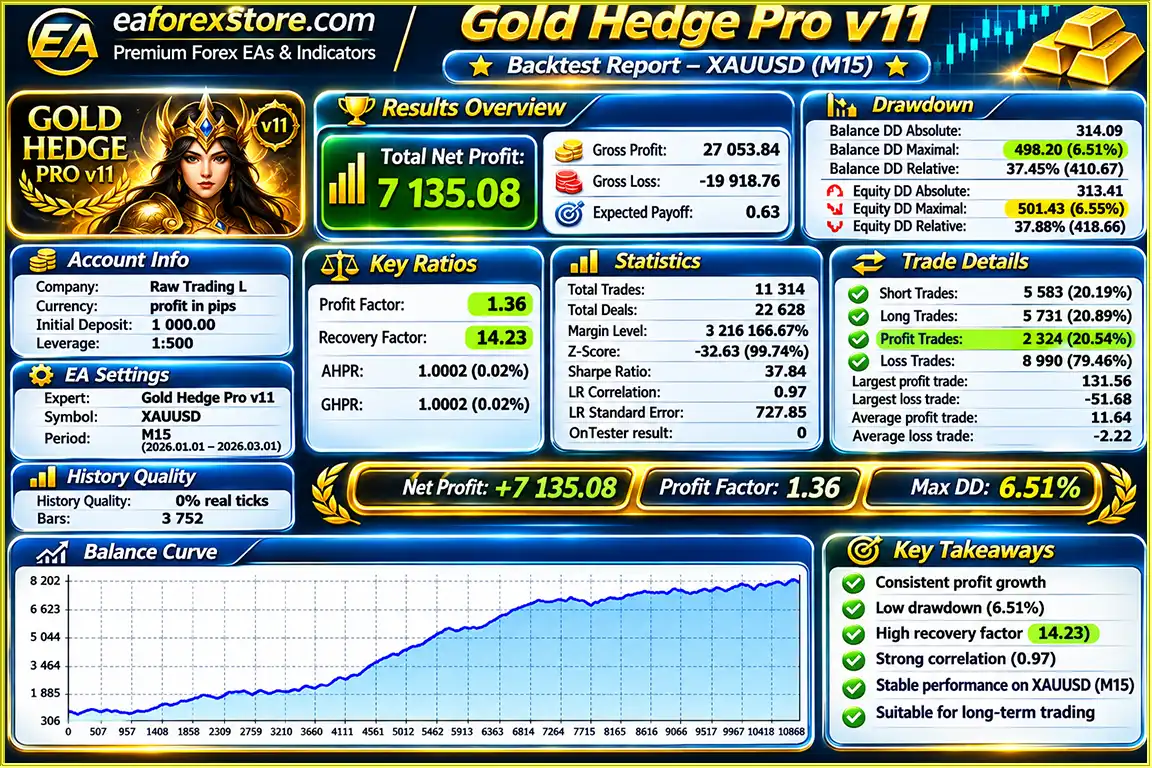
According to the supplied two-month XAUUSD backtest, Gold Hedge Pro v11 EA MT5 generated a reported net profit of $7,135.08 from an initial deposit of $1,000. The reported win rate was 20.54%, with a maximum drawdown of 6.51%. These results are based on historical simulated trading and have not been independently verified. Live performance may differ substantially due to market volatility, spreads, slippage, broker execution, and progressive position exposure. The developer recommends evaluating the EA over 3–6 months to better understand its trading behavior.
6. What risk management features does Gold Hedge Pro v11 EA MT5 offer?
Gold Hedge Pro v11 EA MT5 includes configurable initial lot sizes, adjustable Lot Multipliers, maximum progression stage limits, progressive Stop Loss management, and an optional Total Basket Profit Target. The EA also checks available free margin before opening additional positions and automatically adjusts trading volumes to comply with broker lot requirements. These features help manage automated trading activity, but they cannot eliminate risk. Sharp gold price reversals, slippage, and increasing position sizes can still cause substantial losses.
7. Can Gold Hedge Pro v11 automatically close trades and restart a new trading cycle?
Yes, Gold Hedge Pro v11 EA MT5 supports automatic basket closure and trading cycle restarts. Traders can enable an optional Total Profit Target to close all positions managed by the EA when their combined floating profit reaches a specified amount. For example, setting a $50 basket profit target instructs the EA to attempt to close its managed positions when total floating profit reaches $50. Once all managed positions are closed, the EA can automatically reset and begin a new Buy and Sell hedging cycle without manual intervention.
8. How do I install Gold Hedge Pro v11 EA MT5, and what trading account is required?
To install Gold Hedge Pro v11 EA MT5, open MetaTrader 5 and navigate to File → Open Data Folder → MQL5 → Experts. Copy the Gold Hedge Pro v11.ex5 file into the Experts folder, then restart or refresh MetaTrader 5. Open an XAUUSD chart, attach the Expert Advisor, and configure the initial lot size, direction triggers, Lot Multiplier, progression stages, and optional basket profit target. A hedging account is required to maintain simultaneous Buy and Sell positions on the same symbol. The recommended chart timeframe is not specified in the product information and should be confirmed with the developer. Test the EA on a demo account before enabling live automated trading.
In stock
In stock
In stock
In stock
In stock
Out of stock
No account yet?
Create an Account












 Automatic EA
 EA Best Seller
 Expert Advisor MT4
 Expert Advisor MT5
 HFT EA



Reviews
Clear filtersThere are no reviews yet.