









-
 Unlimited Activations
-
 Instant delivery
-
 Easy to install






 Unlimited Activations
Instant delivery
Easy to install
Unlimited Activations
Instant delivery
Easy to install
 Free Update
 Free Install Support

ENZA EA MT5 is a fully automated and open-parameter Expert Advisor for MetaTrader 5, designed around a market mean-reversion strategy with built-in Drawdown Protection, Fixed Stop Loss, Market Volatility Filtering, and strong-news filtering.
ENZA EA is designed to provide automated trading without relying on traditional simple Grid systems, Martingale, AI, or Neural Network technology. Its default configuration is intended for AUDCAD on the M15 timeframe, while the open parameter structure allows experienced users to optimize the system for other currency pairs and trading conditions.
The EA uses a structured approach to position management. It can maintain a common Stop Loss while allowing additional positions to be opened during a drawdown according to the configured trading logic.
ENZA EA also incorporates Adaptive Broker Real-Time Technology (ABRT), which is designed to adapt the algorithm to changing broker conditions. A built-in FOMC and NonFarm Payroll Strong News Filter (SNF) helps control exposure around selected high-impact economic events.
For users with less powerful computers, ENZA EA provides 1OHLC mode, which reduces processing requirements and allows faster testing, although the product information notes that this mode is less accurate than the full calculation mode.
• Author: Anton Kondratev.
• Experience: Over +4 years of experience on MQL5.
• Notable Products: Enza EA MT5, Razor MT5, Aurum MT5, Nova EA, DOW King EA and other advisors.
• Flagship Product: Enza EA MT5 is rated as the best performing product of the year.
>> Delivery time 24h-48h after payment.
>>> Refund if not delivered.
>>> You will receive the latest version without any limitations (ID+Time).>>Reviewed by Jason Stap <<
ENZA EA MT5 can analyze market conditions, identify potential trading opportunities, execute orders, and manage open positions automatically.
This allows traders to operate a systematic strategy without continuously monitoring the market manually.
Unlike a completely closed trading system, ENZA EA provides access to its parameters, allowing experienced users to study, optimize, and create customized configurations.
This can be useful for traders who want to adapt the strategy to different currency pairs, broker conditions, or risk preferences.
The core methodology is based on market mean reversion, seeking trading opportunities when price behavior meets the system’s predefined conditions for a potential return toward a mean or equilibrium area.
Mean-reversion strategies can behave differently in strongly trending markets, making the EA’s market filters an important part of its overall design.
ENZA EA includes a Drawdown Protection mechanism designed to control trading exposure during unfavorable market movements.
The system uses a common Stop Loss structure and can allow additional trades during drawdown according to the configured parameters.
The EA uses a Fixed Stop Loss, providing predefined downside protection for the trading strategy.
A fixed Stop Loss does not eliminate losses, but it establishes a clearly defined exit condition when the market moves against a position.
According to the product specifications, the system can add up to six additional trades during a drawdown.
This feature should be evaluated carefully because adding positions while a trade is losing increases overall exposure and can increase the potential drawdown of the account.
ENZA EA includes a Market Volatility Filter designed to identify market conditions that meet the strategy’s requirements before entering a position.
The purpose is to avoid taking trades indiscriminately and focus on conditions considered more suitable by the algorithm.
The built-in Strong News Filter (SNF) is designed to filter selected high-impact events, including:
This can help reduce exposure to sudden volatility surrounding major economic releases.
The ABRT mechanism is designed to monitor broker-related market conditions and adapt the algorithm in real time.
This feature is intended to improve the EA’s adaptability across different execution environments.
ENZA EA uses adaptive lot-size calculation, allowing position sizing to respond to account conditions and the configured risk parameters.
However, traders should still verify margin requirements, especially when using low leverage.
The system can be configured for Prop Firm and FTMO-style MT5 environments, with special settings available for these trading conditions.
Users should always verify the specific rules of their prop firm because trading restrictions can vary between firms and account programs.
For computers with limited processing power, ENZA EA supports 1OHLC mode.
This mode is designed for faster testing with lower computational requirements. According to the product information, it provides a quicker but less accurate calculation compared with the full mode.
Special Q KING algorithm settings are available separately, and free bonus Q KING settings may also be available from the product provider.
ENZA EA MT5 follows a systematic process to identify and manage potential trades.
The EA continuously monitors the selected trading instrument and evaluates available market information.
The default setup is:
AUDCAD → M15
The algorithm analyzes market behavior using its mean-reversion methodology and additional market conditions.
Rather than relying on AI or neural-network predictions, the system uses predefined trading rules and filters.
The Market Volatility Filter evaluates whether current market conditions are suitable for the strategy.
This filtering process is intended to avoid entering trades when market conditions do not meet the system’s requirements.
The Strong News Filter monitors selected high-impact economic events such as FOMC and NFP.
Depending on the configured settings, the EA can restrict or modify trading activity around major news releases.
When the required conditions are satisfied, ENZA EA can automatically execute the trade.
The system uses a common Fixed Stop Loss structure for its trading logic.
If market conditions move against an open position, the EA manages the position according to its configured drawdown and Stop Loss rules.
The system can add additional trades during drawdown, with the product description specifying support for up to six additional trades.
This mechanism is an important part of the strategy and should be tested carefully because additional positions increase market exposure.
The ABRT mechanism is designed to account for changing broker conditions in real time, helping the EA adapt its operation to the trading environment.
ENZA EA MT5 may appeal to traders who prefer an open and configurable automated trading system rather than a strategy based on AI or Neural Network marketing.
Some of its main characteristics include:
The open parameter structure can also be useful for experienced traders who want to research and optimize the strategy for different market environments.
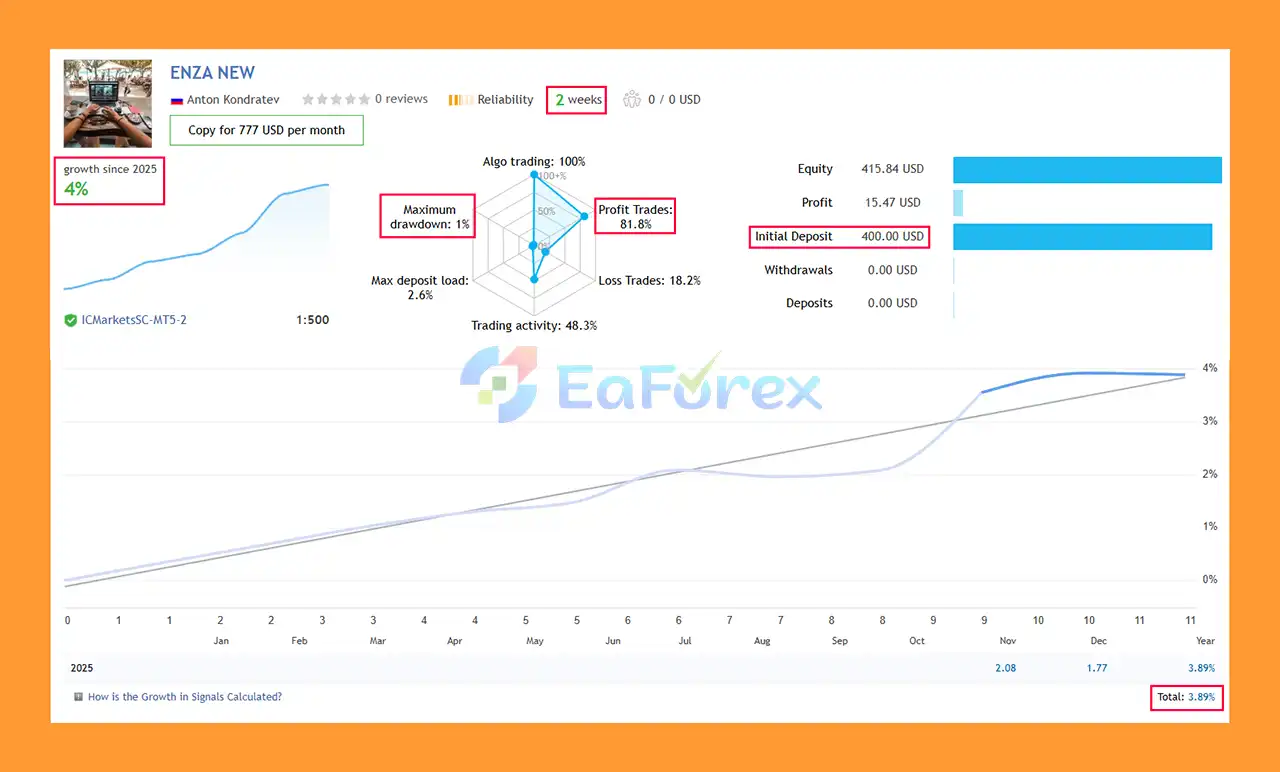
🔺AUDCAD – 2 consecutive weeks
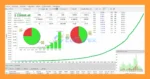
Enza EA MT5 Signal Result
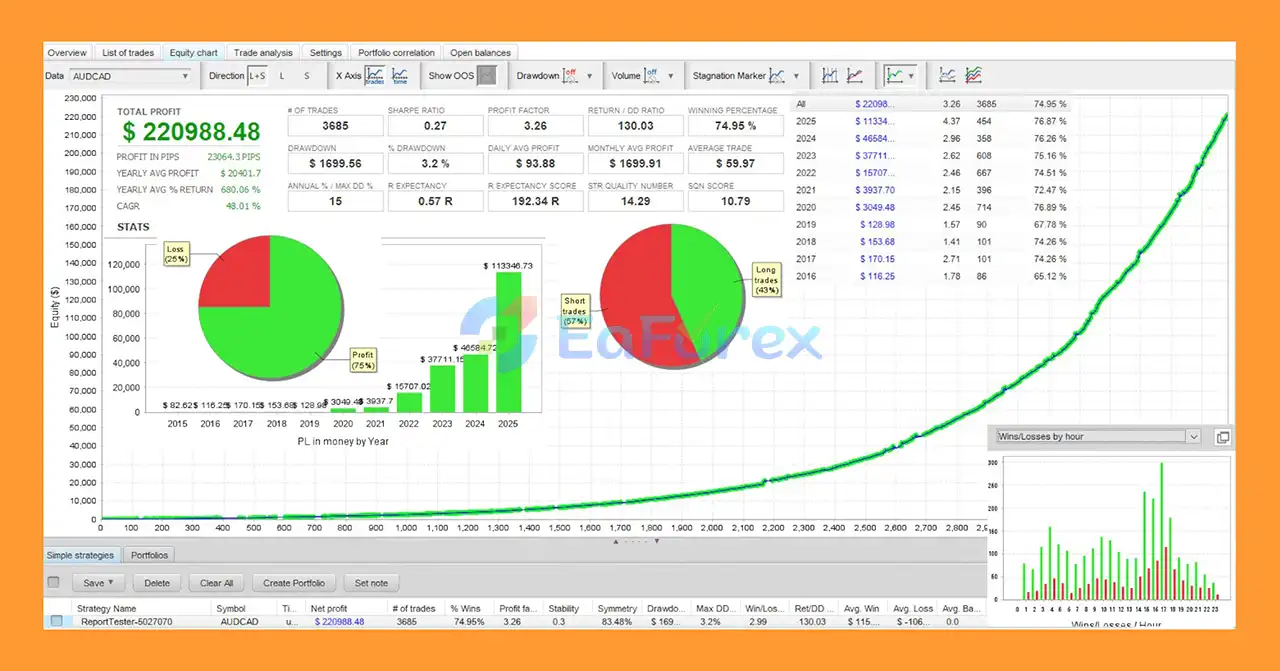
🔺AUDCAD – 12 months
Enza MT5 Backtest
ENZA EA MT5 is designed with several components intended to manage trading risk, including Fixed Stop Loss, Drawdown Protection, Market Volatility Filtering, News Filtering, and adaptive position sizing.
The product information states that the algorithm has been tested using Real Quotes MT5 data covering approximately 10 years. Historical testing can provide useful information about how a strategy behaved under previous market conditions, but it should not be interpreted as a guarantee of future results.
One important characteristic of the system is its ability to add additional positions during drawdown. While this can potentially improve the recovery of certain market situations, it also increases the number of open positions and therefore increases total market exposure.
Live performance can differ from historical tests because of:
The recommended minimum deposit is $200, while $500 or more is recommended according to the product information.
Traders using leverage of 1:100 or below should pay particular attention to margin requirements because adaptive lot sizing may require more available capital than expected on smaller accounts.
For continuous automated trading, using a reliable VPS 24/7 is recommended.
One of the most important characteristics to understand is the ability to open additional positions during a drawdown.
Although this can be part of the strategy’s recovery mechanism, additional positions increase exposure and can amplify losses if the market continues moving against the strategy.
The product documentation specifically notes that ENZA EA may be sensitive to spread and slippage.
A broker with competitive execution conditions, such as a suitable RAW, Pro, or ECN account, may therefore be preferable for testing the system.
Mean-reversion strategies may behave differently when markets move from ranging conditions into strong directional trends.
A strategy that performs well under historical conditions may experience different results when future market structures change.
The built-in news filter can reduce exposure to selected high-impact events, but no news filter can guarantee protection from every sudden market movement.
Unexpected announcements, geopolitical events, or rapid liquidity changes can still affect open positions.
Low leverage can create additional margin constraints, particularly on smaller accounts. Traders should verify their broker’s margin requirements before using adaptive lot sizing.
A long historical test can be useful for evaluating a strategy, but backtests do not perfectly reproduce live trading.
Real trading includes execution delays, spread changes, slippage, liquidity limitations, and other factors that may not be fully represented in historical testing.
Risk Warning: Forex and CFD trading involves substantial financial risk. Past backtest performance does not guarantee future results. Traders should test the EA on a demo account and use risk settings appropriate for their available capital.
Obtain the ENZA EA MT5 files from the official product source.
Launch MetaTrader 5 and log in to your trading account.
In MT5, select:
File → Open Data Folder
Then navigate to:
MQL5 → Experts
Copy the ENZA EA files into the appropriate folder.
Restart MetaTrader 5 or refresh the Expert Advisors section in the Navigator window.
For the default configuration, open:
Symbol: AUDCAD
Timeframe: M15
Find ENZA EA MT5 under:
Navigator → Expert Advisors
Drag the EA onto the AUDCAD M15 chart.
Make sure Algo Trading is enabled and that the EA has permission to execute trades.
ENZA EA provides open parameters, allowing users to review and adjust the available settings.
For beginners, it is generally preferable to start with the recommended configuration rather than immediately optimizing numerous parameters.
Before using real capital, run the EA through the MT5 Strategy Tester and a demo account.
For weaker computers, the 1OHLC mode can be used for faster testing, keeping in mind that it is described as less accurate.
For continuous automated operation, a stable 24/7 VPS is recommended.
This helps keep MetaTrader 5 running even when the trader’s personal computer is switched off.
The default recommended configuration is:
Special settings are also available for Q KING and certain Prop Firm/FTMO MT5 environments.
In summary, ENZA EA MT5 is a fully automated and open-parameter Expert Advisor designed around a market mean-reversion strategy rather than traditional simple Grid, Martingale, AI, or Neural Network systems.
Its feature set combines Fixed Stop Loss, Drawdown Protection, Market Volatility Filtering, Strong News Filtering, Adaptive Broker Real-Time Technology, adaptive lot sizing, and Prop Firm support. The default configuration is designed for AUDCAD on the M15 timeframe, while its open parameters provide experienced users with the flexibility to research other configurations.
One of the most important aspects to understand is the EA’s ability to add additional positions during drawdown. This is part of its trading mechanism, but it also means that exposure can increase when the market moves against the strategy. Proper testing and position sizing are therefore essential.
The reported long-term historical testing provides a useful starting point for evaluating the system, but historical performance should always be separated from expectations about future live trading results.
For traders considering ENZA EA MT5, a practical approach is to begin with the recommended AUDCAD M15 setup, test it under real broker conditions, evaluate drawdown and margin requirements, and only then consider customization or deployment on a live account.
1. What is Enza EA MT5 and how does it work?
Enza EA MT5 is a fully automated, open-parameter trading system designed for consistent long-term performance with strict drawdown protection. It uses a reliable mean-reversion strategy powered by the Q KING Algo, based on over 10 years of real MT5 market data. It is not a grid, martingale, or AI-based robot.
2. Which trading pair and timeframe is Enza EA MT5 optimized for?
The EA is optimized by default for AUDCAD on the M15 timeframe, offering stable and accurate performance. It also includes a 1OHLC mode for lightweight backtesting on low-performance computers.
3. Does Enza EA MT5 use martingale, grid, averaging, or AI trading?
No. Enza EA MT5 strictly avoids martingale, grid, AI, or neural-network methods. It uses a controlled mean-reversion strategy with a fixed stop-loss, making it safer and more predictable for long-term trading.
4. How does Enza EA MT5 protect against drawdowns?
The EA includes multiple built-in safety mechanisms:
Unified stop-loss for all trades
Support for up to 6 recovery positions
Strong News Filter (FOMC/NonFarm)
Market Volatility Filter
These features allow the system to manage risk effectively during market spikes and high-impact events.
5. Is Enza EA MT5 suitable for prop firms like FTMO?
Yes. Enza EA MT5 supports FTMO, MyFundedFX, The5ers, and other prop-firm MT5 rules. Dedicated low-risk presets are available upon request, making it ideal for challenge accounts.
6. Can traders customize or optimize Enza EA MT5 settings?
Absolutely. All parameters are fully open, allowing traders to:
Create custom presets
Optimize for other currency pairs
Adjust risk levels
Tailor configurations for low leverage or RAW/ECN accounts
This flexibility makes it suitable for both beginners and advanced users.
7. How accurate and reliable is Enza EA MT5 in backtesting?
Backtests using real MT5 quotes show:
AUDCAD 12-month profit: $220,988.48
Win rate: 74.95%
Max drawdown: 3.20%
The EA has also passed long-term 10-year backtests, demonstrating stability and robustness.
8. Which brokers and account types does Enza EA MT5 support?
Enza EA MT5 works on:
RAW / ECN / Pro accounts
Low-leverage accounts
All major MT5 brokers
Its ABRT mechanism automatically adapts to different spreads and execution conditions.
In stock
In stock
In stock
In stock
In stock
Out of stock
No account yet?
Create an Account












 Automatic EA
 EA Best Seller
 Expert Advisor MT4
 Expert Advisor MT5
 HFT EA


Reviews
Clear filtersThere are no reviews yet.