


Product Overview
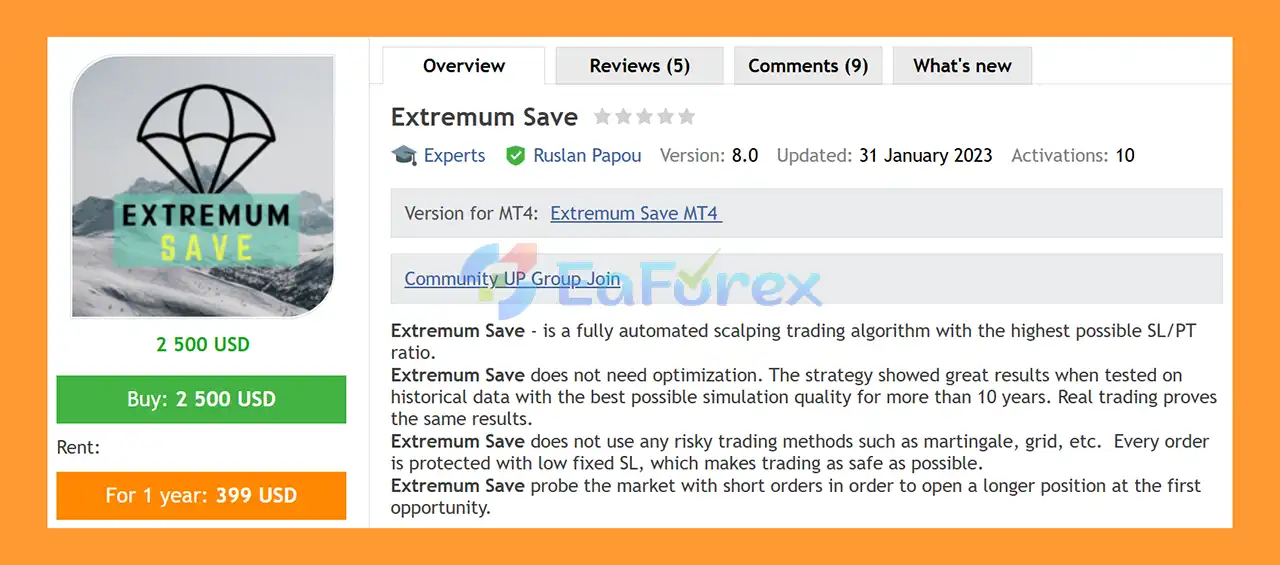
Extremum Save EA MT5 is a fully automated Forex trading Expert Advisor designed around a scalping algorithm that focuses on short Stop Loss levels and structured trade management. The EA is developed to identify potential market opportunities through short exploratory orders before attempting to open a longer-duration position.
According to the developer, Extremum Save EA MT5 does not require traditional optimization. The strategy has reportedly been tested on more than 10 years of historical data using high-quality simulation settings, with additional testing in real trading conditions.
The EA does not use traditional high-risk techniques such as Grid or Martingale trading. Each order is protected by its own fixed Stop Loss, while the available parameters are kept relatively simple to make the system easier to configure.
Extremum Save can be used on standard accounts or cent accounts, with the developer stating that trading can begin from approximately $1 on a cent account, depending on broker conditions and minimum lot requirements.
About the Developer
- Author: Ruslan Papou.
- Experience: Over +4 years of experience on MQL5.
- Notable Products: Extremum Save EA MT5, Legend Comeback MT5, Smart Start MT4, Artificial Intelligence MT4, Legend Comeback MT4 and other advisors.
- Flagship Product: Extremum Save EA MT5 is rated as the best performing product of the year.
>> Delivery time 24h-48h after payment.
>>> Refund if not delivered.
>>> You will receive the latest version without any limitations (ID+Time).>>Reviewed by Jason Stap <<
Main Features of Extremum Save EA MT5
🔺Fully Automated Scalping Algorithm
Extremum Save EA MT5 is designed to operate automatically, monitoring the market and managing trades without requiring constant manual intervention.
The EA focuses on short-term trading opportunities while using predefined trade-management rules.
🔺Fixed Stop Loss for Every Order
Each order has its own fixed Stop Loss.
This means that every trade is opened with a predefined protective exit level rather than being left without a loss-control mechanism.
A fixed Stop Loss can help define individual trade risk, although the actual loss may differ because of slippage, gaps, or execution conditions.
🔺No Grid or Martingale
Extremum Save EA MT5 does not use traditional:
-
Grid trading
-
Martingale position multiplication
-
Aggressive recovery systems
This may appeal to traders who prefer to avoid strategies that intentionally increase exposure after losing trades.
🔺Market-Probing Orders
The EA can use short exploratory orders to assess market conditions.
According to the developer, these initial orders are intended to help the system identify an opportunity to open a longer-duration position when suitable conditions appear.
🔺Simple Configuration
Extremum Save EA MT5 provides a limited number of main parameters, including:
-
Lot Selection
-
Stop Loss
-
Trailing
-
TrallStep
-
Spread
-
Magic Number
This relatively compact configuration may make the EA easier to set up compared with systems that require extensive optimization.
🔺Fixed or Dynamic Lot Selection
The EA supports two lot-selection modes:
-
Fix_Lot
-
Dynamic_Lot
This allows traders to choose between a fixed trading volume and a dynamic lot-sizing approach.
🔺Historical and Real-Condition Testing
The developer states that Extremum Save has been tested using high-quality historical data for more than 10 years and has also been evaluated in real trading conditions.
These claims should still be independently reviewed, and traders should not assume that historical or reported live performance will necessarily continue in the future.
🔺Cent Account Compatibility
Extremum Save EA MT5 can reportedly be used with very small starting balances on cent accounts.
However, the minimum deposit required in practice depends on the broker's minimum lot size, margin requirements, spread, and the selected risk configuration.
How Does Extremum Save EA MT5 Work?
Extremum Save EA MT5 uses a short-term trading approach combined with fixed Stop Loss protection and automated position management.
Step 1: Monitor Market Conditions
The EA analyzes the selected market to identify potential trading opportunities.
The developer recommends EURUSD on the H1 timeframe as the primary configuration.
Step 2: Open an Exploratory Order
The algorithm may initially open a short-duration or exploratory order to evaluate market behavior.
These orders are intended to help the system identify whether conditions may support a longer position.
Step 3: Apply Fixed Stop Loss
Every order receives its own fixed Stop Loss.
The Stop Loss level is configured through the Stop Loss parameter and is expressed in points.
Step 4: Evaluate the Market
After the initial order, the EA continues monitoring market conditions.
If the algorithm identifies a suitable opportunity, it may open a longer-duration position according to its programmed trading logic.
Step 5: Manage the Position
The EA can use trailing-stop functionality to manage an open trade after the required conditions are met.
The trailing process is controlled through the Trailing and TrallStep parameters.
Step 6: Close the Trade
Positions are closed when their Stop Loss, trailing-stop rules, or other programmed exit conditions are triggered.
The exact outcome depends on market movement, spread, execution quality, and the selected settings.
Why Choose Extremum Save EA MT5?
No Traditional Grid or Martingale
Extremum Save EA MT5 is designed without conventional Grid or Martingale recovery techniques. This may be suitable for traders who prefer not to increase position sizes as part of a loss-recovery sequence.
Individual Stop Loss Protection
Each order has its own fixed Stop Loss, providing a clearly defined protective level for every trade.
Minimal Parameters
The EA uses a relatively small number of settings, which can make installation and configuration more accessible to newer automated-trading users.
Fixed and Dynamic Lot Options
Traders can select either fixed-lot or dynamic-lot trading, depending on their account structure and risk-management preferences.
No Traditional Optimization Requirement
The developer states that the EA does not require optimization. Nevertheless, traders should still test the recommended configuration on their own broker before using real funds.
Cent Account Support
The possibility of using a cent account may allow traders to experiment with the EA using a smaller nominal balance.
VPS Compatibility
A VPS is recommended to support continuous operation and faster, more consistent order execution.
Extremum Save EA MT5 Backtest Results
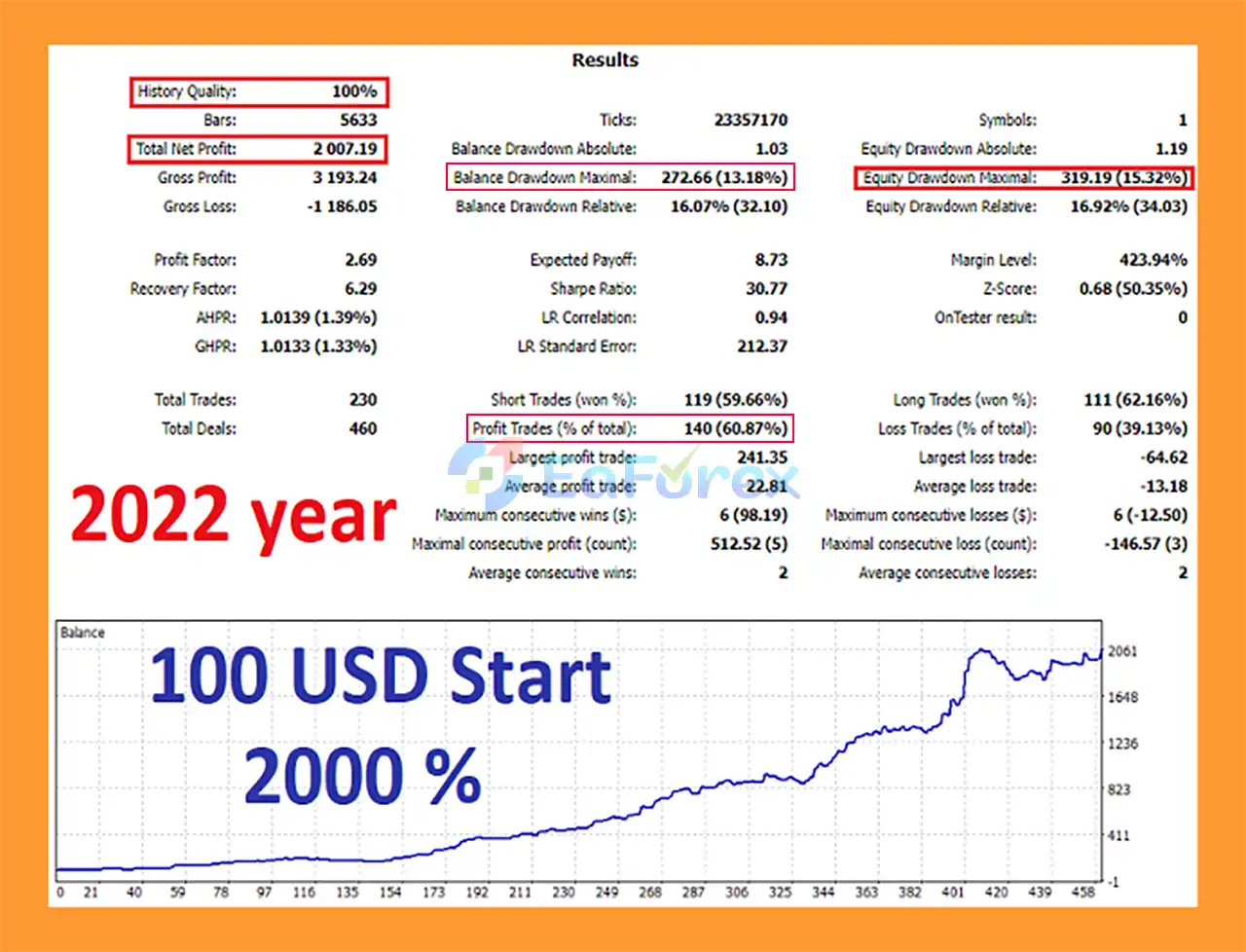
🔺EURUSD – For many years
- Initial Deposit: $100
- Total Net Profit: $2,007.19
- Win Rate (% of total): 60.87%
- Maximum Drawdown: 13.18%
Performance and Risk Management
Stop Loss Settings
The Stop Loss parameter defines the fixed SL level in points.
Although the developer describes the system as using short Stop Loss levels, traders should verify the actual distance for their broker's symbol specifications.
Trailing Stop
The Trailing parameter enables or disables trailing-stop functionality.
Trailing can help manage profitable trades, but it may also close positions prematurely during temporary price retracements.
TrallStep
TrallStep defines the distance after which the trailing-stop mechanism is activated or adjusted.
The appropriate value depends on the trading symbol, broker's point structure, and market volatility.
Lot Selection
The EA offers:
-
Fix_Lot: Uses a fixed trading volume.
-
Dynamic_Lot: Uses a dynamic lot-selection method.
Fixed-lot trading can make exposure easier to estimate, while dynamic lot sizing may change the position size according to the EA's internal calculations.
Spread Filter
The Spread parameter is used to configure spread-related trading conditions.
Even though the EA is designed for accounts with low spreads, traders should monitor the actual spread during volatile periods.
Magic Number
The Magic parameter identifies trades opened by Extremum Save.
This is useful when multiple EAs or manual trades are running on the same MT5 account.
Recommended Trading Setup
According to the provided recommendations, the suggested setup is:
|
Parameter |
Recommendation |
|---|---|
|
Expert Advisor |
Extremum Save EA MT5 |
|
Preferred Symbol |
EURUSD |
|
Preferred Timeframe |
H1 |
|
Suggested Deposit |
$100 or more |
|
Cent Account |
Supported according to the developer |
|
Broker Type |
ECN or another low-spread account |
|
Trading Conditions |
Low spreads and low Stop Levels |
|
VPS |
Recommended |
|
Lot Mode |
Fixed or Dynamic |
|
Stop Loss |
Configurable |
|
Trailing Stop |
Configurable |
The developer also indicates that the EA may be used with a cent account from approximately $1. This depends on the broker's minimum lot size, margin requirements, and account conditions.
Extremum Save EA MT5 Parameters
Lot Selection
Determines the lot-sizing method.
Available options include:
-
Fix_Lot
-
Dynamic_Lot
Stop Loss
Defines the fixed Stop Loss level in points.
Trailing
Enables or disables the trailing-stop function.
TrallStep
Specifies the distance used to activate or adjust the trailing-stop mechanism.
Spread
Controls the spread-related setting used by the EA.
Magic
Defines the Magic Number used to identify Extremum Save's trades.
Weaknesses and Risk Warnings
Scalping Can Be Sensitive to Execution
Short-term trading strategies can be affected by:
-
Spread
-
Slippage
-
Commission
-
Execution delay
-
Liquidity
-
Broker server performance
Even a strategy with a short fixed Stop Loss can experience different results between backtesting and live trading.
A Short Stop Loss Does Not Mean Low Overall Risk
A small Stop Loss limits the intended distance of an individual trade, but frequent losses or a high trading frequency can still create substantial cumulative drawdown.
Market Noise Can Trigger Stop Losses
Short-term price fluctuations may activate Stop Loss levels before the market moves in the expected direction.
Trailing Stops Can Reduce Potential Profit
Trailing-stop management can protect part of an open profit, but it may also close trades during normal market retracements.
Dynamic Lot Sizing Requires Monitoring
If Dynamic_Lot is selected, position sizes may change over time. Traders should understand how the EA calculates exposure before using this mode on a live account.
Historical Testing Is Not a Guarantee
Even if the EA has been tested over more than 10 years, historical results do not guarantee future performance.
Market conditions, spreads, liquidity, execution quality, and broker specifications can change.
Cent Accounts Still Carry Real Risk
A cent account allows smaller nominal trade sizes, but losses are still real. Traders should avoid increasing risk simply because the account balance is displayed in cents.
No EA Is Completely Safe
The absence of Grid and Martingale techniques reduces certain types of exposure, but it does not eliminate trading risk or guarantee stable returns.
Pros and Cons
Pros
-
Fully automated MT5 trading system
-
Designed for short-term trading
-
Uses a fixed Stop Loss on every order
-
No traditional Grid system
-
No traditional Martingale system
-
Market-probing order concept
-
Fixed-lot and dynamic-lot options
-
Trailing-stop functionality
-
Spread-related configuration
-
Relatively few parameters
-
Developer states that optimization is not required
-
Reported historical testing of more than 10 years
-
Reported testing in real trading conditions
-
Can be used with cent accounts
-
EURUSD H1 recommended
-
VPS recommended for stable operation
Cons
-
Scalping can be sensitive to spread and execution quality
-
Short Stop Loss levels may lead to frequent stop-outs
-
High trading frequency can increase transaction costs
-
Dynamic lot sizing can change overall exposure
-
Trailing stops may close trades during normal retracements
-
Historical results may not be repeated
-
Cent-account compatibility does not eliminate financial risk
-
Broker conditions can influence live performance
-
No automated trading system can guarantee profits
What’s Included in the Download Package?
- Setting (If Any).docx
- Installation Guide.docx



