









-
 Unlimited Activations
-
 Instant delivery
-
 Easy to install


 Unlimited Activations
Instant delivery
Easy to install
Unlimited Activations
Instant delivery
Easy to install
 Free Update
 Free Install Support

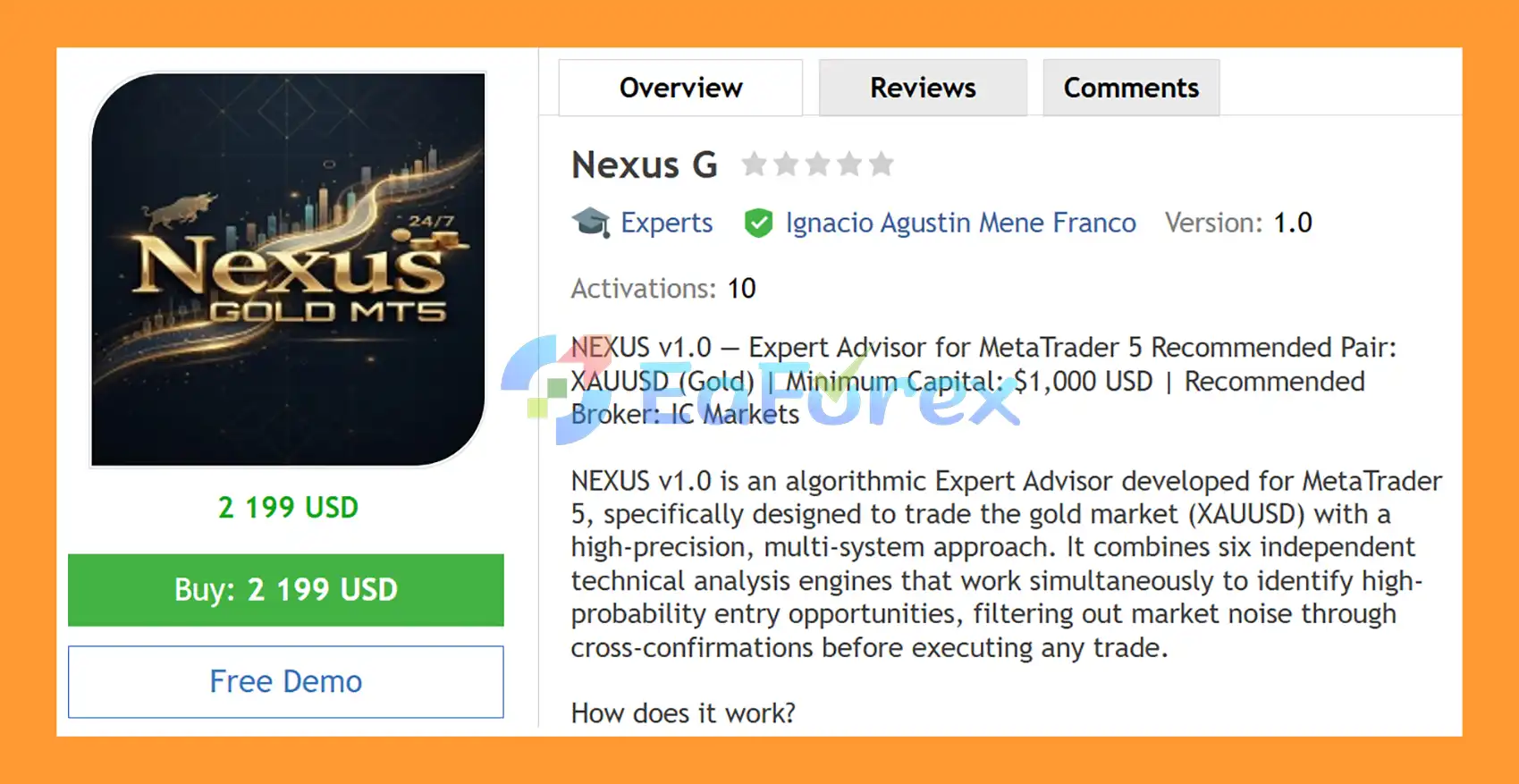
Nexus G EA MT5 is an algorithmic Expert Advisor for MetaTrader 5, specifically designed for automated trading on XAUUSD (Gold). The EA uses a multi-system technical analysis architecture that combines six independent signal engines to evaluate potential trading opportunities from different market perspectives.
The six analytical systems include Dynamic Support and Resistance, Keltner Channels, Fractal Pivots, RSI Divergences, MACD Divergences, and Bollinger Band Breakouts. Instead of relying on a single indicator, Nexus G evaluates these systems simultaneously and applies additional CCI and MACD momentum filters before validating an entry.
The EA analyzes the market on each new candlestick and only executes a trade when the combined signal conditions meet the configured minimum confidence threshold. This multi-layer confirmation approach is designed to reduce exposure to isolated signals and short-term market noise.
Nexus G EA MT5 also includes comprehensive automated risk management, including ATR-based Stop Loss and Take Profit, trailing stop, break-even, daily loss protection, maximum spread control, simultaneous-position limits, and free-margin protection.
>> Delivery time 24h-48h after payment.
>>> Refund if not delivered.
>>> You will receive the latest version without any limitations (ID+Time).>>Reviewed by Jason Stap <<
Nexus G EA MT5 Overview
Nexus G EA MT5 combines six technical analysis systems that operate in parallel:
Each system provides its own market signal, allowing the EA to evaluate price action from multiple technical perspectives.
Every potential entry must pass additional momentum validation using CCI and MACD.
These filters act as an additional confirmation layer before a trade is considered valid.
Rather than executing every individual indicator signal, Nexus G evaluates the combined confluence of its systems.
A trade is considered only when the resulting signal strength reaches the configured minimum confidence threshold.
The EA uses Average True Range (ATR) to adapt Stop Loss and Take Profit calculations to changing Gold market volatility.
This allows trade-management parameters to respond dynamically rather than relying exclusively on a fixed pip distance.
Nexus G EA MT5 provides three money-management options:
This gives traders flexibility when adapting the EA to different account sizes and risk-management approaches.
The EA can automatically calculate and apply Stop Loss and Take Profit according to the configured ATR-based parameters.
The built-in trailing-stop system can dynamically adjust protection as a position moves into profit.
Nexus G EA MT5 can automatically move a position’s protection toward the break-even level after the configured conditions are reached.
A configurable daily loss limit can restrict further trading once the selected daily-loss threshold has been reached.
The EA can monitor the current spread and prevent new entries when the spread exceeds the configured maximum level.
Users can configure the maximum number of positions that may remain active at the same time, helping control total market exposure.
Before executing trades, the EA can check available free margin to help prevent new positions from being opened when account margin conditions are insufficient.
Turbo Mode is designed for markets experiencing stronger momentum. It provides an alternative operating mode intended to respond more actively when market conditions show increased directional movement.
Because Turbo Mode can potentially increase trading activity or exposure, it should be evaluated carefully through backtesting and demo forward testing.
Nexus G EA MT5 includes a visual information panel displaying account and trading statistics such as:
This allows users to monitor the EA’s activity directly from the MT5 chart.
The EA can display Profit/Loss labels for closed trades directly on the chart, making it easier to visually review historical trade outcomes.
Nexus G EA MT5 is designed to support both:
Nexus G EA MT5 follows a multi-stage signal-validation and risk-management process.
The EA evaluates XAUUSD when a new candlestick forms and updates its technical analysis.
The system does not depend on a single indicator. Instead, it processes multiple independent analytical engines simultaneously.
The six signal engines evaluate different market characteristics:
Potential signals then pass through the CCI + MACD momentum filter.
This additional layer is designed to eliminate some signals that do not have sufficient momentum confirmation.
The EA evaluates the combined signal information and compares it with the configured minimum confidence threshold.
Only setups satisfying the required conditions can proceed to the execution stage.
Depending on the selected risk mode, Nexus G determines the appropriate position size using:
ATR-based calculations can also adapt the trade parameters to current Gold volatility.
Before opening a position, the EA can check:
If all required conditions are satisfied, the EA automatically executes the corresponding market order.
After entry, Nexus G EA MT5 manages the position using:
Once the trade closes, the EA can display the corresponding Profit/Loss information directly on the chart.
Nexus G combines six independent technical systems instead of depending on a single entry indicator.
The combination of six signal engines with CCI and MACD momentum filters creates a structured validation process before trade execution.
The EA is specifically designed for Gold/XAUUSD, with ATR-based calculations intended to adapt trade parameters to Gold’s changing volatility.
Three position-sizing modes allow users to select between fixed lots, balance-based sizing, and dynamic equity-based sizing.
Stop Loss, Take Profit, trailing stop, break-even, daily loss limits, spread controls, and free-margin checks are integrated into the EA.
The visual dashboard provides information about P&L, win rate, and account statistics without requiring the trader to inspect individual orders manually.
The main trading and risk-management parameters can be adjusted directly through the EA’s input settings without modifying the source code.
Support for both account structures provides additional flexibility when selecting an MT5 trading environment.
🔺Gold (XAUUSD) – for many years
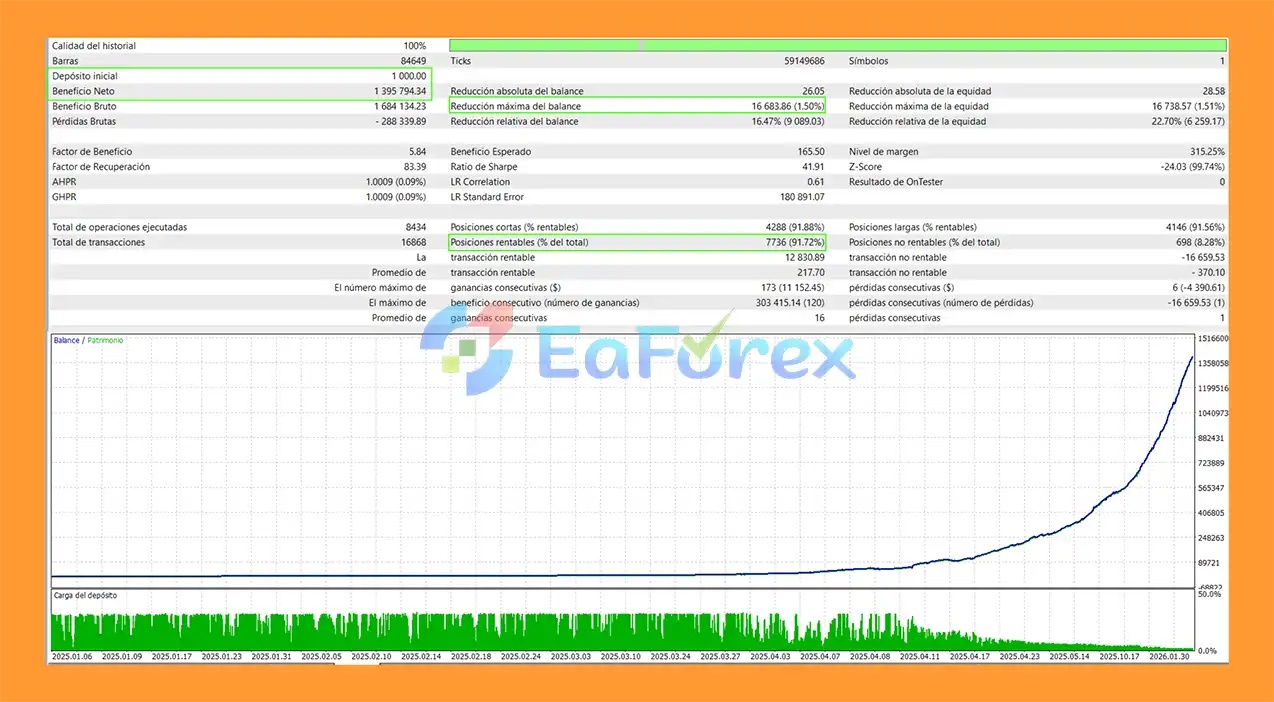
Nexus G EA MT5 Backtets
Nexus G EA MT5 is designed with multiple layers of automated risk control. However, these features are risk-management mechanisms, not guarantees against losses.
| Parameter | Recommended Setting |
|---|---|
| Platform | MetaTrader 5 |
| Symbol | XAUUSD / Gold |
| Timeframe | H1 |
| Minimum Capital | $1,000 |
| Risk Per Trade | 1% of Balance |
| Risk Mode | Fixed Percentage of Balance |
| Broker Example | IC Markets |
| Account Type | Raw Spread / ECN |
ATR is used to account for changing market volatility. Because Gold can transition between low- and high-volatility conditions, an ATR-based approach can adjust the distance of trade-management levels according to the current market environment.
However, an ATR-based Stop Loss does not guarantee a fixed percentage loss. Actual losses can differ because of:
The EA includes:
The supplied recommendation of 1% risk per trade should be treated as a starting configuration for testing rather than a guarantee of a specific realized loss on every position.
Before live deployment, traders should conduct both historical backtesting and forward testing on a demo account.
Testing should ideally use the same broker, account type, spread conditions, commission structure, and execution environment intended for live trading.
No combination of technical indicators or automated risk controls can guarantee future profitability.
Although six systems and two momentum filters are used, technical confluence does not guarantee that a trade will move in the expected direction.
XAUUSD can experience rapid price movements, especially during major economic announcements and periods of elevated market volatility.
Nexus G EA MT5 relies on technical indicators and calculated market structures. Indicators are derived from historical price information and cannot predict future prices with certainty.
RSI and MACD divergences can persist while price continues moving in the original direction. A divergence should therefore not be interpreted as a guaranteed reversal.
Bollinger Band breakouts can sometimes result in temporary price expansions followed by reversals or consolidation.
Turbo Mode is intended for stronger momentum conditions. Depending on its configuration, increased responsiveness can also increase trading frequency or exposure.
ATR adapts trade-management distances to volatility, but it cannot prevent losses during sudden market movements or abnormal conditions.
Spread, commission, slippage, liquidity, and execution speed can affect live results. Different brokers may produce different trading outcomes even with identical EA settings.
Backtest results depend on the quality of historical data and testing assumptions. Live performance may differ materially from historical simulations.
| Pros | Cons |
|---|---|
| Six independent technical analysis engines | More complex than a single-indicator EA |
| CCI + MACD confirmation filters | Technical signals can still fail |
| Designed specifically for XAUUSD | Gold can experience high volatility |
| ATR-based trade management | ATR cannot eliminate sudden-market risk |
| Three position-sizing modes | Incorrect sizing can increase account exposure |
| Automatic Stop Loss and Take Profit | Slippage can affect actual exits |
| Trailing Stop and Break-Even | Trailing may close positions during temporary pullbacks |
| Daily loss protection | Does not guarantee a maximum realized daily loss |
| Maximum spread control | Spreads can change rapidly |
| Free-margin protection | Margin conditions vary by broker |
| Turbo Mode | May increase trading activity/exposure |
| Real-time dashboard | Dashboard statistics do not predict future performance |
| Netting and Hedging compatible | Requires appropriate broker/account configuration |
| Requirement | Specification |
|---|---|
| Platform | MetaTrader 5 |
| Expert Advisor | Nexus G EA MT5 |
| Trading Symbol | XAUUSD / Gold |
| Recommended Timeframe | H1 |
| Minimum Capital | $1,000 |
| Recommended Risk | 1% per trade |
| Risk Mode | Fixed Percentage of Balance |
| Account Type | Netting or Hedging |
| Broker Example | IC Markets |
| Account Environment | Raw Spread / ECN recommended |
| Position Sizing | Fixed Lot / Balance % / Equity % |
| Risk Management | ATR SL/TP, Trailing, Break-Even |
| Spread Control | Available |
| Daily Loss Limit | Available |
| Free Margin Control | Available |
| VPS | Recommended for continuous automated trading |
Download the Nexus G EA MT5 package and extract the files if they are provided in a compressed folder.
Launch MetaTrader 5 and log in to your trading account.
From the MetaTrader 5 menu, select:
File → Open Data Folder
Then navigate to:
MQL5 → Experts
Copy the Nexus G EA file into the Experts folder.
Restart MetaTrader 5 or refresh the Expert Advisors section in the Navigator window.
Open an XAUUSD / Gold chart and select the recommended H1 timeframe.
In the Navigator panel, locate:
Expert Advisors → Nexus G EA MT5
Drag the EA onto the XAUUSD H1 chart.
Make sure Algo Trading is enabled in MetaTrader 5.
Review and configure the available inputs, including:
For the supplied $1,000 configuration, the recommended starting risk is 1% of balance per trade.
Before using the EA on a live account, perform historical backtesting and forward testing on a demo account.
Test the system under the actual broker conditions you intend to use, paying attention to spread, commission, slippage, margin requirements, and XAUUSD volatility.
In summary, Nexus G EA MT5 is a feature-rich XAUUSD Gold trading Expert Advisor for MetaTrader 5, built around a multi-system technical analysis approach. By combining six independent signal engines with CCI and MACD confirmation filters, the EA is designed to evaluate market conditions from multiple perspectives before executing a trade.
Its ATR-based Stop Loss and Take Profit, trailing stop, break-even, daily loss protection, spread filter, position limits, and free-margin control provide a structured framework for automated risk management. The availability of fixed-lot, balance-percentage, and equity-based position sizing also gives traders flexibility when adapting the EA to different account sizes and risk preferences.
The supplied backtest shows strong historical results, including a $1.395 million net profit, 91.72% win rate, and 1.50% maximum drawdown from a $1,000 initial deposit. However, these figures are based on historical testing and should not be interpreted as a guarantee of future performance. Actual results can vary depending on broker conditions, spreads, commissions, slippage, liquidity, market volatility, and trading settings.
Overall, Nexus G EA MT5 provides a comprehensive automated trading framework for traders looking to explore Gold/XAUUSD trading on MetaTrader 5 with multi-layer signal confirmation and integrated risk-management tools. As with any automated trading system, thorough backtesting and demo forward testing are recommended before considering live deployment.
1. What is Nexus G EA MT5 and how does it work?
Nexus G EA MT5 is an automated trading Expert Advisor designed for MetaTrader 5, specifically optimized for XAUUSD (gold). It uses a multi-system architecture with six independent trading engines that analyze the market simultaneously to identify high-probability trade setups based on confluence rules and technical indicators.
2. Is Nexus G EA MT5 fully automated?
Yes, Nexus G EA MT5 is fully automated. Once installed and configured, it executes trades automatically based on predefined strategies, eliminating the need for manual trading and emotional decision-making.
3. What makes Nexus G EA MT5 different from other gold trading robots?
Nexus G EA MT5 stands out due to its six-layer trading engine system, strict confluence logic, and noise-filtering mechanism. It only executes trades when multiple strategies align, significantly reducing low-quality and false signals compared to typical EAs.
4. Can Nexus G EA MT5 trade in all market conditions?
Yes, Nexus G EA MT5 is designed to adapt to both trending and ranging markets. It uses volatility-based strategies, breakout systems, and market structure analysis to adjust its trading logic according to current market behavior.
5. What risk management features does Nexus G EA MT5 include?
The EA includes advanced risk management tools such as ATR-based stop loss and take profit, dynamic lot sizing, trailing stop protection, break-even automation, daily loss limits, and spread/margin control to help protect trading capital
6. What are the backtest results of Nexus G EA MT5?
Backtesting results show strong performance on XAUUSD over multiple years, with a reported net profit of $1.395 million from a $1,000 deposit, a win rate of 91.72%, and a maximum drawdown of 1.50%. These results reflect historical performance only and are not guarantees of future results.
7. What broker is recommended for Nexus G EA MT5?
For optimal performance, it is recommended to use ECN brokers with low spreads and fast execution, such as IC Markets. This ensures the EA can execute trades efficiently and reduce slippage during volatile market conditions.
8. Is Nexus G EA MT5 suitable for beginners?
Yes, Nexus G EA MT5 is suitable for beginners because it is fully automated and includes easy setup instructions. However, users are still advised to understand basic risk management and properly configure settings before live trading.
In stock
In stock
In stock
In stock
In stock
Out of stock
No account yet?
Create an Account












 Automatic EA
 EA Best Seller
 Expert Advisor MT4
 Expert Advisor MT5
 HFT EA


Reviews
Clear filtersThere are no reviews yet.