









-
 Unlimited Activations
-
 Instant delivery
-
 Easy to install






 Unlimited Activations
Instant delivery
Easy to install
Unlimited Activations
Instant delivery
Easy to install
 Free Update
 Free Install Support

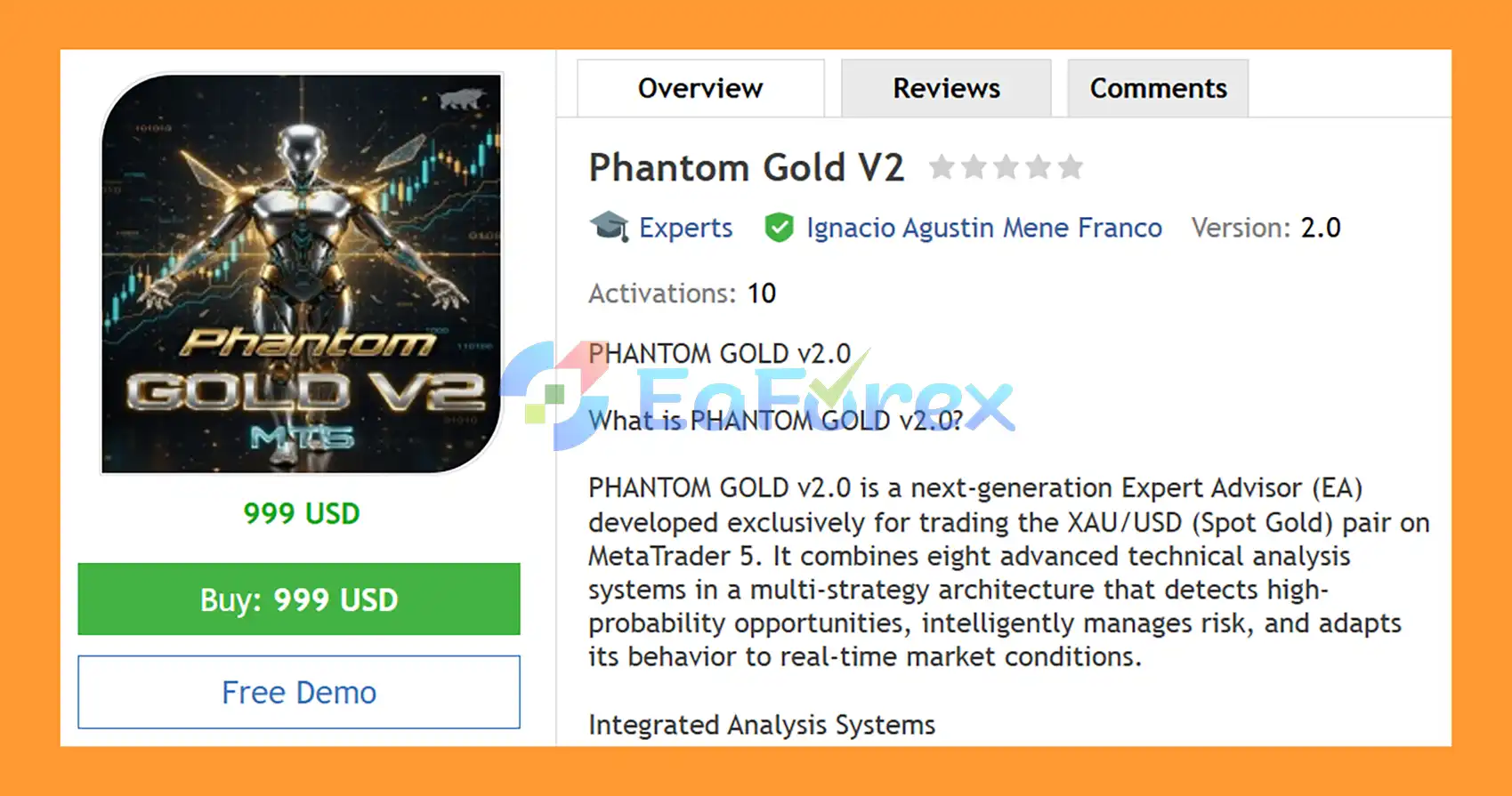
Phantom Gold V2 EA MT5 is a next-generation Expert Advisor for MetaTrader 5, developed specifically for trading XAU/USD (Spot Gold). The EA combines eight technical analysis systems within a multi-strategy architecture designed to evaluate market structure, momentum, volatility, price action, and key technical levels before considering a trade.
Rather than relying on a single indicator, Phantom Gold V2 EA MT5 evaluates multiple independent market conditions, including Dynamic Support & Resistance, Smart Money Concepts Order Blocks, Bollinger Squeeze, Fibonacci retracements, Price Action, MACD, CCI, and ATR volatility analysis.
The EA also includes professional risk-management features such as percentage-based position sizing, maximum daily loss protection, margin controls, automatic lot reduction, trailing stop, break-even, and minimum risk/reward validation.
For traders who want greater flexibility, Turbo Mode can increase trading activity by extending the market lookback, applying a lot multiplier, and lowering the minimum confidence threshold when momentum conditions are present.
>> Delivery time 24h-48h after payment.
>>> Refund if not delivered.
>>> You will receive the latest version without any limitations (ID+Time).>>Reviewed by Jason Stap <<
Phantom Gold V2 EA MT5 Overview
Phantom Gold V2 EA MT5 identifies important Support and Resistance (SR) levels dynamically.
The system validates levels based on factors such as:
These levels can be used as potential areas for market reactions and trade confirmation.
The EA incorporates Order Block detection based on Smart Money Concepts (SMC).
It identifies potential:
Order Blocks are used as part of the broader confluence system rather than as a standalone entry signal.
The Bollinger Squeeze module looks for periods of reduced volatility followed by potential expansion.
When the required conditions are present, the EA can use the resulting breakout as part of its entry confirmation process.
This allows the system to adapt its analysis to changes in market volatility.
Phantom Gold V2 EA MT5 automatically calculates Fibonacci retracement levels from recent market swings.
The primary levels include:
The EA can identify potential bounce opportunities when Fibonacci levels align with other technical factors, creating a confluence zone.
The Price Action module recognizes several classic formations:
Configurable body and shadow filters allow traders to control how strictly these patterns are evaluated.
The MACD filter evaluates momentum direction before an entry.
Users can configure the system to require a MACD signal crossover, adding another layer of confirmation before a position is opened.
The Commodity Channel Index (CCI) is used to validate market conditions and filter potential entries.
The module can also block trades when the market reaches configurable overbought or oversold zones.
The ATR volatility filter evaluates the current market range and can exclude excessively volatile conditions.
ATR is also used to calculate dynamic:
This allows trade-management distances to adjust according to current market volatility.
The EA first evaluates important price areas using Dynamic Support & Resistance and SMC Order Blocks.
These zones help determine where price is interacting with potentially significant market levels.
The Bollinger Squeeze and ATR Filter evaluate the current volatility environment.
The EA can avoid conditions that exceed its configured volatility limits and identify potential volatility-expansion opportunities.
The system analyzes recent swings and calculates the 38.2%, 50%, and 61.8% Fibonacci retracement levels.
When Fibonacci levels overlap with other technical zones, they can provide additional confirmation.
The MACD and CCI filters evaluate momentum and directional conditions.
Depending on the selected configuration, MACD crossover confirmation can be required before a trade is considered.
The EA evaluates candlestick and breakout formations such as Engulfing, Inside Bars, Hammer, Shooting Star, and Breakouts.
These patterns provide another layer of entry validation.
Before placing an order, the EA checks its configured requirements, including:
If the required conditions are satisfied, Phantom Gold V2 EA MT5 can automatically execute the trade.
Once active, the position can be managed using ATR-based SL/TP, trailing stop, break-even, and dynamic risk controls.
The EA combines eight analytical modules covering different aspects of market behavior:
This multi-system structure allows several forms of market information to be evaluated together.
Phantom Gold V2 EA MT5 is designed to use multiple analytical approaches rather than depending entirely on one trading methodology.
This can provide greater flexibility when market conditions change, although no combination of indicators can guarantee profitable trades.
Users can select between:
This provides flexibility for different account sizes and risk-management approaches.
The EA monitors account conditions through:
These controls are designed to help manage exposure when available margin becomes limited.
Open positions can be managed with:
The visual panel provides an overview of the EA’s current operating conditions, including:
The chart can also display automatically detected Support/Resistance zones, Order Blocks, Fibonacci levels, and profit/loss labels for closed trades.
🔺Gold (XAUUSD) – 3Months
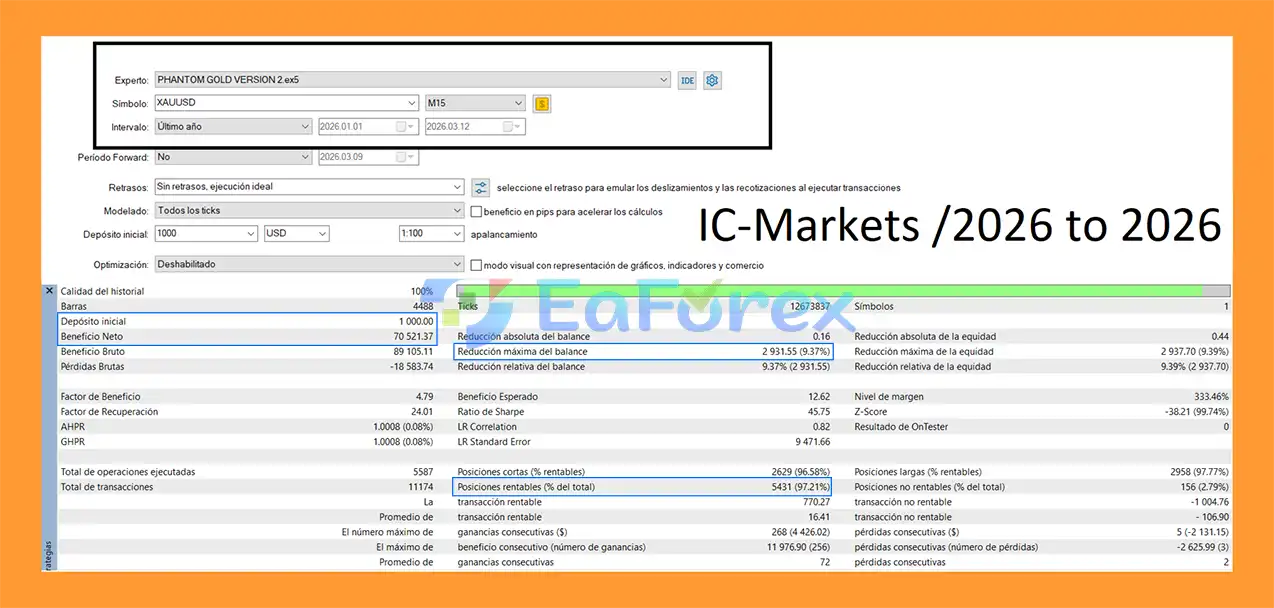
Phantom Gold V2 EA MT5 Backtets
Phantom Gold V2 EA MT5 places significant emphasis on configurable risk and exposure management.
| Risk Management Feature | Function |
|---|---|
| Fixed Lot | Uses a predefined trading volume |
| Balance % | Calculates position size according to account balance |
| Dynamic Equity % | Adjusts position sizing according to equity |
| ATR Stop Loss | Dynamically calculates SL based on market volatility |
| ATR Take Profit | Dynamically calculates TP based on market volatility |
| Trailing Stop | Protects open profit as price moves favorably |
| Break Even | Reduces open-position risk after sufficient movement |
| Daily Loss Limit | Stops or restricts trading after the configured loss threshold |
| Free Margin Control | Checks available margin before trading |
| Maximum Margin Usage | Limits account margin exposure |
| Total Volume Control | Controls cumulative simultaneous trading volume |
| Automatic Lot Reduction | Reduces position size under tight margin conditions |
| Risk/Reward Validation | Checks the minimum configured R before an order |
Before an order is opened, the EA can verify that the setup meets the configured minimum risk/reward ratio.
This helps prevent trades from being opened when the potential target does not satisfy the selected risk/reward requirement.
However, a favorable risk/reward ratio does not guarantee that the Take Profit will be reached.
TurboMode is an optional high-frequency configuration designed for markets showing defined momentum.
When enabled, the EA can:
Turbo Mode may increase the number and/or size of trades. As a result, it can also increase account exposure and potential drawdown.
Users should test TurboMode separately and ensure that the resulting position frequency and risk remain appropriate for their account.
Phantom Gold V2 EA MT5 provides an on-chart monitoring interface designed to make the EA’s current market analysis easier to follow.
The panel can display:
This visual information can help users monitor how the different modules are behaving without manually checking every indicator.
XAU/USD can experience rapid price movements during major economic events, market openings, liquidity changes, and unexpected news. This can result in slippage and execution differences.
Even when Support/Resistance, Order Blocks, Fibonacci, MACD, CCI, Bollinger Bands, ATR, and Price Action appear aligned, the market can move in the opposite direction.
Technical confluence reduces reliance on individual signals but does not guarantee successful trades.
The higher trading frequency and lot multiplier available in TurboMode can increase overall exposure. It should therefore be evaluated carefully before live deployment.
Automatic lot reduction can help respond to limited margin, but it does not eliminate the possibility of margin-related losses during extreme market movements.
Spread, slippage, execution speed, contract specifications, and trading conditions can affect the actual results of an EA.
Backtests performed under one broker’s conditions may not reproduce the same results on another account.
Any backtest or historical performance should be treated as a reference rather than a guarantee of future results. Forward testing on a demo account is recommended before using the EA with significant capital.
| Pros | Cons |
|---|---|
| Eight integrated technical analysis systems | Complex multi-filter architecture requires proper configuration |
| Dynamic Support & Resistance | Technical zones can fail during strong market moves |
| SMC Order Block detection | Order Blocks are not guaranteed reversal areas |
| Bollinger Squeeze breakout analysis | Breakouts can produce false signals |
| Dynamic Fibonacci confluence | Fibonacci levels are subjective market reference points |
| Price Action pattern recognition | Candlestick patterns can fail in volatile conditions |
| MACD and CCI confirmation | Multiple filters may reduce trading frequency |
| ATR-based SL/TP | ATR distances change with market volatility |
| Fixed, balance %, and equity risk modes | Higher risk settings increase potential losses |
| Trailing Stop and Break Even | Cannot eliminate slippage or gap risk |
| Automatic lot reduction | Does not guarantee sufficient margin during extreme moves |
| TurboMode available | TurboMode can increase trading frequency and exposure |
| Real-time visual dashboard | Live results can differ from backtests |
| Net/hedging-independent MT5 account compatibility | Broker execution conditions still matter |
| Parameter | Specification |
|---|---|
| Platform | MetaTrader 5 |
| Expert Advisor | Phantom Gold V2 EA MT5 |
| Recommended Symbol | XAU/USD / Spot Gold |
| Timeframe | Any |
| Recommended Timeframes | M15–H1 |
| Account Type | ECN, STP, Standard, or other supported MT5 accounts |
| Backtesting | MT5 Strategy Tester compatible |
| Risk Modes | Fixed Lot / Balance % / Equity % |
| Stop Loss | ATR-based |
| Take Profit | ATR-based |
| Trade Protection | Trailing Stop + Break Even |
| Turbo Mode | Available |
| Support/Resistance | Dynamic |
| Order Blocks | SMC-based |
| Fibonacci | 38.2% / 50% / 61.8% |
| Momentum Filters | MACD + CCI |
| Volatility Filter | ATR |
| Trading Session | Configurable according to EA settings |
For multiple independent EA instances, use separate chart configurations and unique Magic Numbers where available.
In summary, Phantom Gold V2 EA MT5 brings together eight technical analysis systems into a multi-strategy framework for automated XAU/USD trading on MetaTrader 5. Its combination of Support & Resistance, SMC Order Blocks, Bollinger Squeeze, Fibonacci, Price Action, MACD, CCI, and ATR allows the EA to evaluate market structure, momentum, volatility, and price behavior from multiple perspectives.
The system also provides a comprehensive set of risk-management tools, including ATR-based SL/TP, trailing stop, break-even, flexible lot sizing, daily loss protection, margin controls, and automatic lot reduction. The real-time dashboard and chart-based market annotations provide additional visibility into the EA’s operating conditions.
However, the complexity of a multi-strategy EA does not remove market risk. XAU/USD can move rapidly, technical confirmations can fail, and live execution can differ from backtesting. Proper backtesting, demo forward testing, broker evaluation, and conservative risk configuration remain important before using Phantom Gold V2 EA MT5 with real capital.
1. What is Phantom Gold V2 EA MT5?
Phantom Gold V2 EA MT5 is an advanced automated trading Expert Advisor for MetaTrader 5, specifically designed to trade XAU/USD (gold). It uses a multi-strategy system that combines eight technical analysis methods to identify high-probability trading opportunities and adapt to changing market conditions.
2. How does Phantom Gold V2 EA MT5 work?
Phantom Gold V2 EA MT5 operates by integrating multiple strategies, including support and resistance detection, Smart Money order blocks, Bollinger squeeze breakouts, and Fibonacci retracements. It confirms trades using momentum indicators like MACD and CCI before executing positions automatically.
3. What strategies are included in Phantom Gold V2 EA MT5?
The EA combines eight strategies, such as dynamic support and resistance, order block trading, Bollinger Band breakouts, Fibonacci retracement trading, and advanced price action patterns like engulfing and pin bars. This multi-strategy approach increases trade accuracy and adaptability.
4. Is Phantom Gold V2 EA MT5 suitable for beginners?
Phantom Gold V2 EA MT5 is suitable for both intermediate and advanced traders. While it offers full automation and a user-friendly interface, beginners should still understand basic trading concepts and risk management to use it effectively.
5. What makes Phantom Gold V2 EA MT5 different from other gold EAs?
Unlike many single-strategy EAs, Phantom Gold V2 EA MT5 integrates eight trading systems into one platform. It also features adaptive market behavior, real-time dashboards, and dynamic risk management, making it more flexible and responsive to market changes.
6. Does Phantom Gold V2 EA MT5 include risk management features?
Yes, it includes a professional risk management system with daily loss limits, margin control, automatic lot reduction, break-even protection, and trailing stop functionality. These features help minimize risk and protect trading capital.
7. What are the backtest results of Phantom Gold V2 EA MT5?
Based on reported data, the EA achieved a total net profit of $70,521.37 from an initial deposit of $1,000 over three months, with a win rate of 97.21% and a maximum drawdown of 9.37%. These results demonstrate strong performance under test conditions.
8. Which markets and timeframes does Phantom Gold V2 EA MT5 support?
Phantom Gold V2 EA MT5 is optimized for trading XAU/USD (gold) and is flexible across multiple timeframes. This allows traders to customize the EA based on their preferred trading style and market conditions.
In stock
In stock
In stock
In stock
In stock
Out of stock
No account yet?
Create an Account












 Automatic EA
 EA Best Seller
 Expert Advisor MT4
 Expert Advisor MT5
 HFT EA


Reviews
Clear filtersThere are no reviews yet.