Product Overview
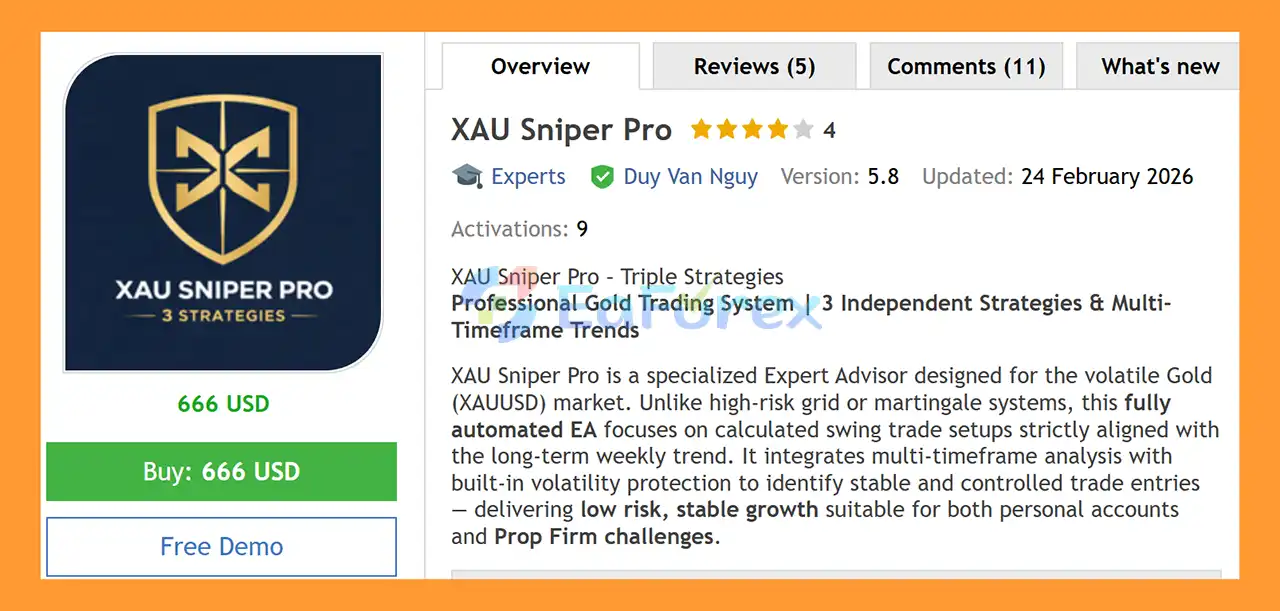
XAU Sniper Pro EA MT5 is a fully automated MetaTrader 5 Expert Advisor developed exclusively for XAUUSD (Gold). The EA is built around a liquidity sweep reversal strategy, designed to identify situations where price temporarily breaks above a significant swing high or below a swing low before reversing back into the previous price structure.
Instead of relying exclusively on lagging indicators after a major price movement has already occurred, XAU Sniper Pro EA MT5 focuses on liquidity behavior, swing structures, rejection candles, and market direction to identify potential reversal opportunities.
Version 6.1 introduces a redesigned multi-timeframe trading architecture with three independent strategies operating simultaneously on M30, H1, and H2. Each strategy has its own parameters and Magic Number, allowing the strategies to operate independently without interfering with one another.
The EA also incorporates a Weekly EMA trend filter, economic calendar protection, spread filtering, configurable trading sessions, automatic risk-based lot sizing, prop-firm-oriented execution controls, Telegram notifications, and an interactive on-chart dashboard.
Importantly, XAU Sniper Pro EA MT5 does not use Martingale or Grid trading. Each position is managed independently with a predefined Stop Loss, helping maintain a clearly defined risk structure for individual trades.
About the Developer
>> Delivery time 24h-48h after payment.
>>> Refund if not delivered.
>>> You will receive the latest version without any limitations (ID+Time).
>>Reviewed by Jason Stap <<
Key Features of XAU Sniper Pro EA MT5
Triple-Timeframe Trading Architecture
XAU Sniper Pro EA MT5 runs three independent trading strategies simultaneously:
- Strategy 1 – M30: Shorter-term liquidity sweep setups
- Strategy 2 – H1: Medium-term reversal opportunities
- Strategy 3 – H2: Longer-duration setups
Each strategy has its own:
- Trading timeframe
- Entry parameters
- Stop Loss
- Take Profit
- Magic Number
- Position management
The three strategies can operate simultaneously or be selectively enabled according to the trader’s preferred configuration.
Liquidity Sweep Reversal Strategy
The core of XAU Sniper Pro EA MT5 is its liquidity sweep detection system.
For a potential Buy setup, the EA identifies a significant swing low and monitors whether price temporarily breaks below that level. If the candle subsequently closes back above the previous structure, the movement can be interpreted by the strategy as a potential liquidity sweep and rejection.
The reverse process is applied to potential Sell setups when price moves above a significant swing high and then closes back below the previous structure.
This allows the EA to focus on false-breakout and liquidity-rejection behavior rather than simply entering after a conventional breakout.
Weekly EMA Trend Filter
To reduce trades that move against the broader market direction, XAU Sniper Pro uses a configurable Weekly EMA trend filter.
The system can apply the following directional conditions:
- Buy setups when the H1 close is above the Weekly EMA
- Sell setups when the H1 close is below the Weekly EMA
This filter is designed to align trade direction with the broader market bias.
No Martingale and No Grid
XAU Sniper Pro EA MT5 is designed without traditional Martingale or Grid logic.
The EA does not continuously increase position size simply because a previous trade is losing. Each trade is opened with its own predefined risk parameters.
This provides a different risk structure from grid or recovery-based trading systems.
Dual Lot Sizing
The EA provides two primary position-sizing options:
Fixed Lot Mode
Traders can specify a fixed lot size such as 0.01 lots.
Risk-Based Mode
Position size can be calculated according to a selected percentage of account equity per trade.
This allows traders to adapt position sizing as account equity changes.
Market & Limit Order Execution
XAU Sniper Pro EA MT5 can automatically select between market and limit order execution.
If the current price is already close to the calculated entry zone, the EA can execute a market order.
If price has moved away from the desired entry level, the system can place a Buy Limit or Sell Limit order at the calculated price.
Prop Firm Protection
Version 6.1 includes a configurable random entry delay between 2 and 45 seconds.
The purpose of this feature is to vary execution timing rather than always entering at an identical delay.
Prop firm users should still review their firm’s specific trading rules because policies regarding automated trading and execution behavior can differ between providers.
Economic Calendar Filter
The EA connects to the MetaTrader 5 economic calendar to monitor scheduled economic events.
Trading can be paused before and after high-impact news events. Depending on the configuration, medium-impact events can also be included.
The filter can be configured for relevant currencies.
Session & Time Filters
Traders can configure when the EA is allowed to operate.
Available options include:
- 24/7 trading
- Custom trading hours
- Asian session
- London session
- New York session
This allows users to restrict trading to specific market periods.
Spread Protection
An optional maximum spread filter can prevent new trades when the spread becomes too wide.
This is particularly relevant for XAUUSD because Gold spreads can change significantly around market opens, rollover periods, and major economic events.
Telegram Notifications
The EA can send real-time notifications through Telegram.
Notifications can include:
- EA startup confirmation
- Trade opened
- Trade closed
- Profit or loss information
- Trading activity alerts
Interactive Trading Dashboard
XAU Sniper Pro EA MT5 includes a real-time on-chart dashboard displaying important account and EA information, including:
- Balance
- Equity
- Profit & Loss
- Maximum Drawdown
- Current Spread
- News status
- Strategy status
- Equity curve history
The dashboard also includes interactive controls such as:
These controls allow traders to manually intervene when necessary.
How Does XAU Sniper Pro EA MT5 Work?
The trading process is based on several stages designed to identify potential liquidity sweep reversals.
Step 1 – Identify Market Structure
The EA monitors XAUUSD and identifies relevant swing highs and swing lows.
These levels are used as potential liquidity areas where stop orders and breakout orders may be concentrated.
Step 2 – Detect a Liquidity Sweep
For a potential Buy setup, price must move below a relevant swing low and then demonstrate rejection by closing back above the previous structure.
For a potential Sell setup, price must move above a relevant swing high and then close back below the previous structure.
The purpose of this logic is to identify potential false breakouts.
Step 3 – Apply the Weekly Trend Filter
Before considering the trade, the EA checks the Weekly EMA directional filter.
Buy and Sell conditions are filtered according to the configured broader market bias.
Step 4 – Check Trading Conditions
Additional filters are evaluated, including:
- Current spread
- Trading session
- Economic news
- Strategy status
- Entry conditions
- Account risk parameters
If the required conditions are not satisfied, the EA does not open the trade.
Step 5 – Determine Entry Execution
Depending on the relationship between the current market price and the calculated entry zone, the EA can use:
- Market Order
- Buy Limit
- Sell Limit
This allows the entry mechanism to adapt to the current price location.
Step 6 – Calculate Position Size
The trader can use either:
- Fixed lot sizing
- Percentage-based equity risk sizing
The selected method determines the position size for the trade.
Step 7 – Apply Stop Loss and Take Profit
Each strategy uses predefined Stop Loss and Take Profit parameters.
The default strategy configurations are:
| Strategy |
Timeframe |
Stop Loss |
Take Profit |
Approx. Reward/Risk |
| Strategy 1 |
M30 |
15 points |
49 points |
~3.3:1 |
| Strategy 2 |
H1 |
16 points |
29 points |
~1.8:1 |
| Strategy 3 |
H2 |
30 points |
43 points |
~1.4:1 |
These values are configuration parameters and should not be interpreted as guaranteed trade outcomes.
Step 8 – Manage the Trade
Once a position is opened, the EA manages it according to the selected strategy’s predefined rules.
The three strategies use separate Magic Numbers so that their trades can be identified and managed independently.
Why Choose XAU Sniper Pro EA MT5?
XAU Sniper Pro EA MT5 is designed for traders who want an automated Gold trading system based on liquidity sweep and reversal concepts rather than a conventional indicator-only approach.
The EA combines three independent timeframes, allowing different trading horizons to operate simultaneously.
Another important characteristic is the absence of traditional Martingale and Grid mechanisms. Each trade is independently managed with a predefined Stop Loss and Take Profit.
The system also provides a broad range of practical controls for live trading, including:
- Economic news filtering
- Spread protection
- Session filtering
- Weekly trend filtering
- Risk-based lot sizing
- Fixed lot sizing
- Entry delay
- Telegram alerts
- Interactive dashboard
- Manual pause function
- Close-all function
This combination makes the EA highly configurable for traders who want more control over when and how automated Gold trading is allowed to operate.
XAU Sniper Pro EA MT5 Performance Review
🟢Signal Results
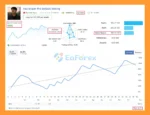
🔺XAUUSD (Gold) pair – 3 consecutive weeks of trading
- Initial Deposit: $1500
- Growth Rate: +128%
- Win Rate (% of total): 66.7%
- Maximum Drawdown: 19.8%
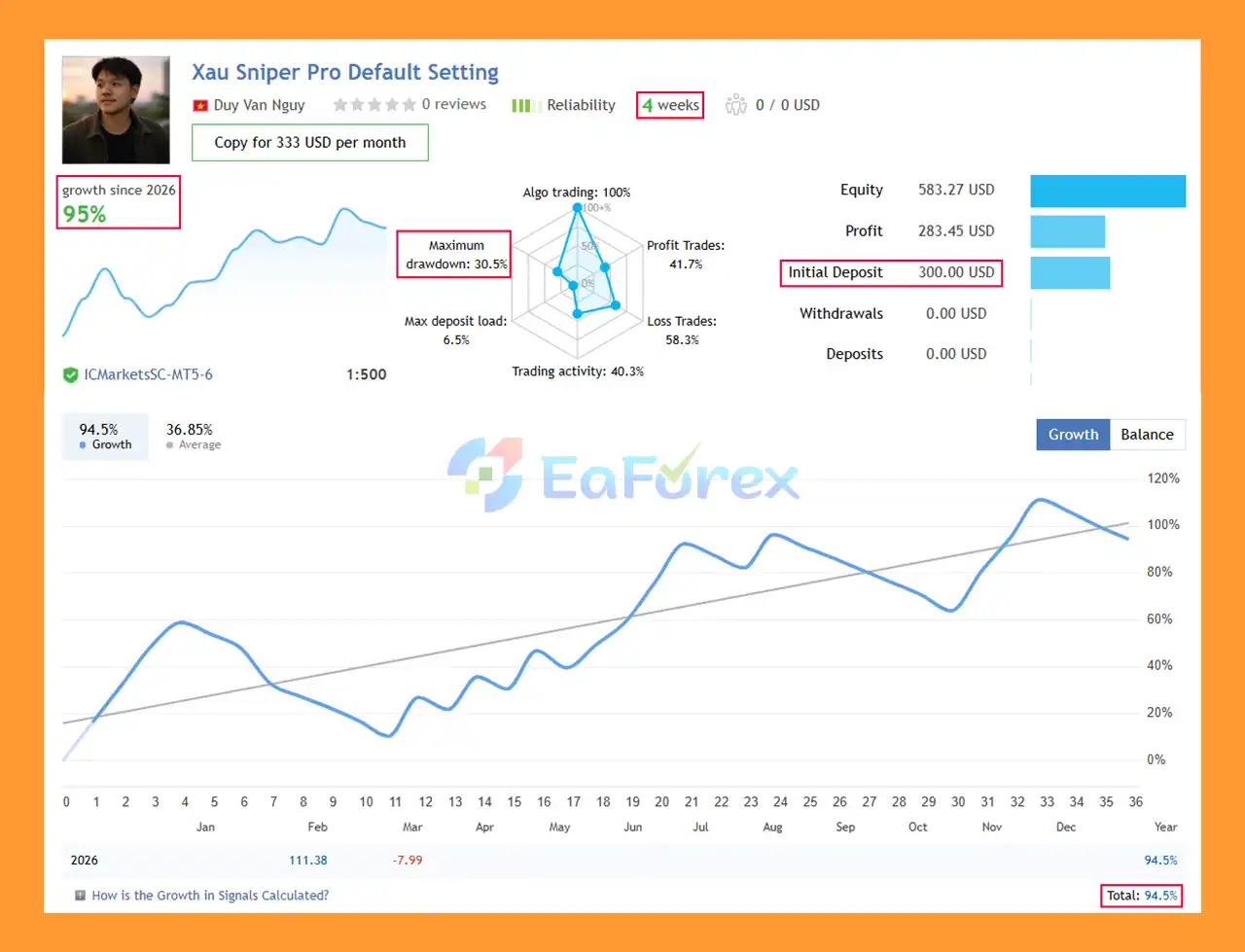
XAU Sniper Pro EA MT5 Signal Results
🟢Backtest Results
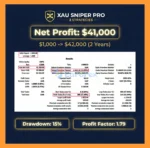
🔺XAUUSD (Gold) pair – 2 years
- Initial Deposit: $1,000
- Total Net Profit: $41,359.90%
- Maximum Drawdown: 13.09%
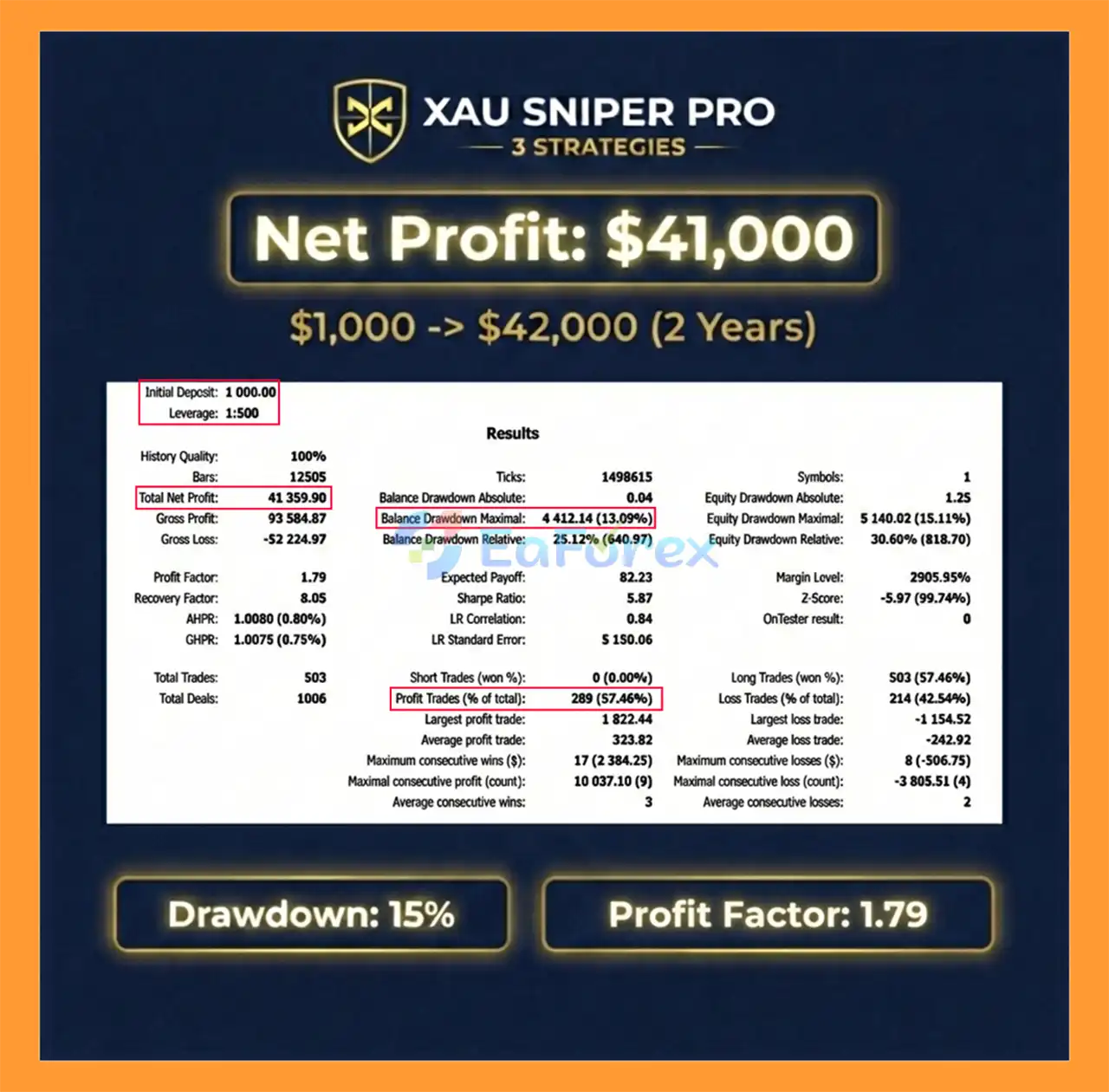
XAU Sniper Pro EA MT5 Backtests
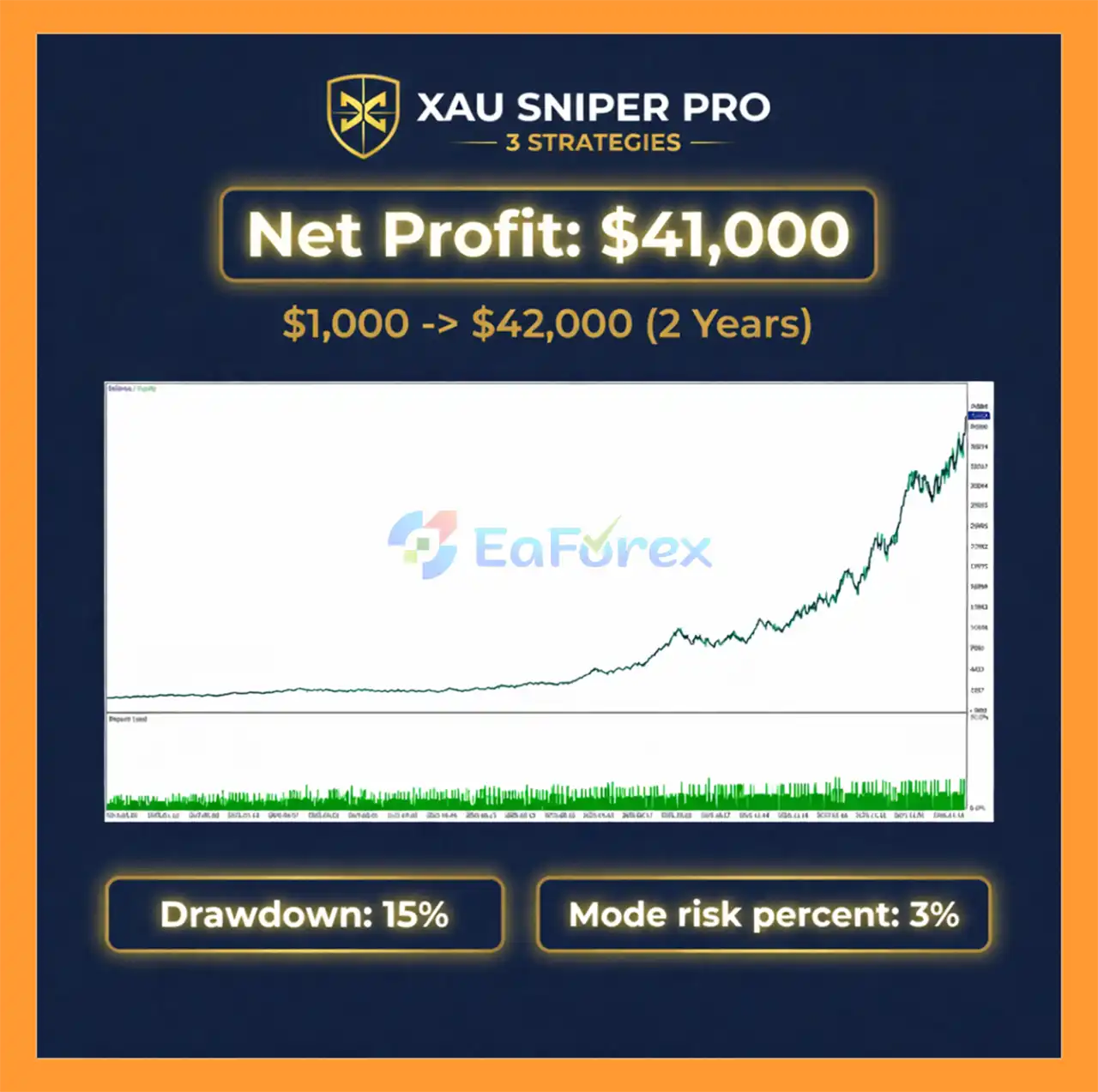
XAU Sniper Pro EA MT5 Backtest
Performance and Risk Management
XAU Sniper Pro EA MT5 is designed specifically for XAUUSD (Gold) and uses three independent trading strategies operating on M30, H1, and H2.
Reported Signal Results
The supplied signal results cover approximately three consecutive weeks of XAUUSD trading:
- Initial Deposit: $1,500
- Reported Growth: +128%
- Win Rate: 66.7%
- Maximum Drawdown: 19.8%
These figures represent a specific historical trading period and should not be interpreted as a prediction of future performance.
Reported Backtest Results
The supplied backtest covers approximately two years of XAUUSD historical data:
- Initial Deposit: $1,000
- Reported Total Net Profit: $41,359.90%
- Maximum Drawdown: 13.09%
The reported percentage should be checked against the original backtest report before publication, particularly because the wording “Total Net Profit: $41,359.90%” may represent a formatting or unit error in the supplied source data.
Backtest results can differ substantially from live trading because of spreads, commissions, slippage, execution quality, liquidity, data quality, and other market conditions.
Recommended Trading Setup
| Parameter |
Recommended Setting |
| Symbol |
XAUUSD |
| Chart Timeframe |
H1 |
| Internal Timeframes |
M30 / H1 / H2 |
| Broker Type |
ECN or STP |
| Spread |
20–30 points or lower recommended |
| Minimum Deposit |
$300 with 0.01 fixed lot |
| Recommended Deposit |
$500+ for risk-based mode |
| Account Type |
Hedging |
| Leverage |
1:100 minimum; 1:200+ preferred |
| VPS |
Strongly recommended |
| Trading Hours |
24/7 or selected sessions |
| GMT Offset |
Match broker server time |
The minimum deposit figures are configuration guidelines and should be adjusted according to account leverage, margin requirements, position sizing, and individual risk tolerance.
Weaknesses and Risk Warnings
XAUUSD Is Highly Volatile
Gold can experience rapid price movements, especially during major economic announcements, geopolitical developments, market opens, and periods of abnormal liquidity.
A liquidity-sweep strategy cannot eliminate the risk associated with sudden market movements.
Drawdown Can Occur
The supplied signal results report a maximum drawdown of 19.8%, while the supplied two-year backtest reports a maximum drawdown of 13.09%.
Actual live drawdown can be higher or lower depending on market conditions, execution, broker pricing, and account settings.
Backtests Are Not Guarantees
Historical backtests demonstrate how the strategy behaved under a particular set of historical conditions. They do not guarantee equivalent performance in the future.
Broker Execution Matters
The EA is intended for brokers offering competitive XAUUSD spreads and fast execution.
High spreads, slippage, delayed execution, restrictive minimum stop levels, or poor liquidity can affect trade entries and exits.
VPS Is Important
A reliable VPS is strongly recommended for continuous automated trading.
If MetaTrader 5 loses its connection or the VPS experiences downtime, the EA may miss trading opportunities or fail to receive new market ticks during the interruption.
News Events Can Create Abnormal Conditions
Although XAU Sniper Pro includes an economic calendar filter, no news filter can eliminate all event-related market risk.
Unexpected announcements, rapid price movements, or differences between scheduled and actual market reactions can still result in losses.
Prop Firm Rules Differ
The random entry-delay feature is designed to vary execution timing, but it does not guarantee compatibility with every prop firm.
Users should verify the specific rules of their prop firm regarding:
- Expert Advisors
- Automated trading
- News trading
- Execution methods
- Holding periods
- Maximum drawdown
- Daily drawdown
- Weekend positions
Trading Hours Must Match Broker Time
If session-based trading is enabled, the configured GMT offset must correspond correctly to the broker’s server time.
Incorrect time-zone settings can cause the EA to trade outside the intended session.
Minimum Stop-Level Restrictions
Some brokers impose minimum Stop Loss and Take Profit distances.
If these restrictions are incompatible with the EA’s configured parameters, trade execution may be affected.
Pros and Cons
Pros
- Designed exclusively for XAUUSD
- Fully automated MetaTrader 5 Expert Advisor
- Three independent trading strategies
- M30, H1, and H2 timeframes
- Liquidity sweep reversal strategy
- Weekly EMA trend filter
- No traditional Martingale
- No Grid trading
- Fixed lot and risk-based lot sizing
- Market and limit order execution
- Configurable entry delay
- Built-in economic calendar filter
- High-impact and optional medium-impact news filtering
- Session and custom time filters
- Maximum spread protection
- Telegram trade notifications
- Interactive real-time dashboard
- Manual Pause Trading function
- Close All function
- Separate Magic Numbers for each strategy
- Prop-firm-oriented risk and execution controls
Cons
- Designed specifically for XAUUSD
- Gold volatility can result in substantial drawdown
- Requires competitive spreads and fast execution
- VPS is strongly recommended for continuous operation
- Broker minimum stop-level restrictions may affect execution
- Incorrect GMT settings can affect session filtering
- News filters cannot eliminate all event-related risk
- Prop firm compatibility depends on individual firm rules
- Historical backtest and signal results do not guarantee future performance
- Risk-based lot sizing can increase position size as account equity changes
- Actual live results can differ from backtests because of spread, slippage, commissions, and execution conditions
How to Install XAU Sniper Pro EA MT5
Step 1 – Install MetaTrader 5
Install MetaTrader 5 through your broker or the official MetaTrader platform.
Step 2 – Obtain the EA
After purchasing XAU Sniper Pro EA MT5, obtain the EA installation files and any accompanying license or setup instructions.
Step 3 – Open the MT5 Data Folder
In MetaTrader 5, select:
File → Open Data Folder → MQL5 → Experts
Copy the XAU Sniper Pro EA file into the Experts folder.
Step 4 – Restart MetaTrader 5
Restart MT5 or refresh the Expert Advisors section in the Navigator window.
Step 5 – Open XAUUSD
Open an XAUUSD chart and set the chart timeframe to H1.
Although the EA uses M30, H1, and H2 internally, the recommended chart timeframe for attaching the EA is H1.
Step 6 – Attach the EA
Drag XAU Sniper Pro EA MT5 from the Navigator window onto the XAUUSD H1 chart.
Enable Algo Trading / AutoTrading when prompted.
Step 7 – Configure Risk Settings
Choose the preferred position-sizing method:
- Fixed lot
- Risk percentage based on account equity
Review the Stop Loss, Take Profit, spread limit, entry delay, and other risk parameters before starting the EA.
Step 8 – Configure the Strategies
Enable or disable the individual strategies according to your preferred configuration:
- M30 Strategy
- H1 Strategy
- H2 Strategy
Each strategy operates independently and uses its own Magic Number.
Step 9 – Configure News & Trading Sessions
Configure:
- Economic calendar filter
- High-impact news protection
- Optional medium-impact news protection
- Asian session
- London session
- New York session
- Custom trading hours
If using session filters, ensure that the GMT offset matches your broker’s server time.
Step 10 – Configure Telegram
If Telegram notifications are required, enter the appropriate bot integration details and test the notification system before relying on it for live alerts.
Step 11 – Use a VPS
A reliable Forex VPS is strongly recommended for continuous operation.
Gold markets can remain active for most of the trading week, so keeping MT5 connected allows the EA to monitor prices and execute its strategy without interruptions caused by a local computer being switched off.
Step 12 – Test Before Live Trading
Before deploying the EA on a live account, test it using the MetaTrader 5 Strategy Tester and a demo account.
For cleaner analysis, each of the three strategies can be tested separately by enabling only one strategy at a time.
Remember that economic news filtering and Telegram notifications are disabled during Strategy Tester backtesting, according to the supplied product information.
Real User Reviews and Feedback
🔺 XAU Sniper Pro EA MT5 is highly appreciated by the MQL5 community for bringing stable and reliable profits. Below are 5 star reviews from users:
- Stephen J Martret (2026.01.28): “Very safe, no dangerous grids or martingale and most trades close over 1:1 RR all excellent signs for long term profits, highly recommend.”
- JiangGui (2026.03.01): “I’ve been using this product for almost a month now. Initially, I lost a lot of money, but I eventually made back my losses and even turned a profit. The long-term effects are quite good.”
What’s Included in the Download Package?
- Experts:
- Setting (If Any).docx
- Installation Guide.docx
- SetFiles:
- xau_sniper_pro_strategy_1.set
- xau_sniper_pro_strategy_2.set
- xau_sniper_pro_strategy_3.set
- xau_sniper_pro_combo_3_strategies.set
>>> Join VIP Membership Now <<<
Final Thoughts
In summary, XAU Sniper Pro EA MT5 is a specialized XAUUSD Gold Trading Expert Advisor for MetaTrader 5, built around liquidity sweep reversal concepts and a multi-timeframe architecture covering M30, H1, and H2. The strategy focuses on potential false breakouts around significant swing highs and lows, then applies a Weekly EMA trend filter and additional spread, session, and news conditions before allowing a trade.
A notable characteristic is its non-Martingale and non-Grid structure. Each position is managed independently with predefined Stop Loss and Take Profit, while fixed-lot and risk-based position sizing provide flexibility for different account configurations. The separate Magic Numbers also allow the three strategies to operate independently.
The supplied 3-week XAUUSD signal reports +128% growth, a 66.7% win rate, and 19.8% maximum drawdown from a $1,500 initial deposit. The supplied 2-year backtest reports $41,359.90% total net profit and 13.09% maximum drawdown from $1,000. Because the net-profit figure includes a percentage sign after a dollar amount, it should be verified against the original report before being treated as a precise performance metric. In any case, historical signal and backtest results do not guarantee future performance.
Gold remains highly volatile, and live results can differ because of spread, slippage, execution speed, liquidity, broker conditions, leverage, and news events. Prop-firm users should also verify compatibility with their firm’s current rules.
Overall, XAU Sniper Pro EA MT5 offers a structured liquidity-based approach to automated Gold trading without traditional recovery systems. Thorough Strategy Tester evaluation, extended demo forward testing, a reliable VPS, and conservative risk settings are recommended before live deployment.

















 Unlimited Activations
 Instant delivery
 Easy to install
















 Automatic EA
 EA Best Seller
 Expert Advisor MT4
 Expert Advisor MT5
 HFT EA


Reviews
Clear filtersThere are no reviews yet.