









-
 Unlimited Activations
-
 Instant delivery
-
 Easy to install




 Unlimited Activations
Instant delivery
Easy to install
Unlimited Activations
Instant delivery
Easy to install
 Free Update
 Free Install Support

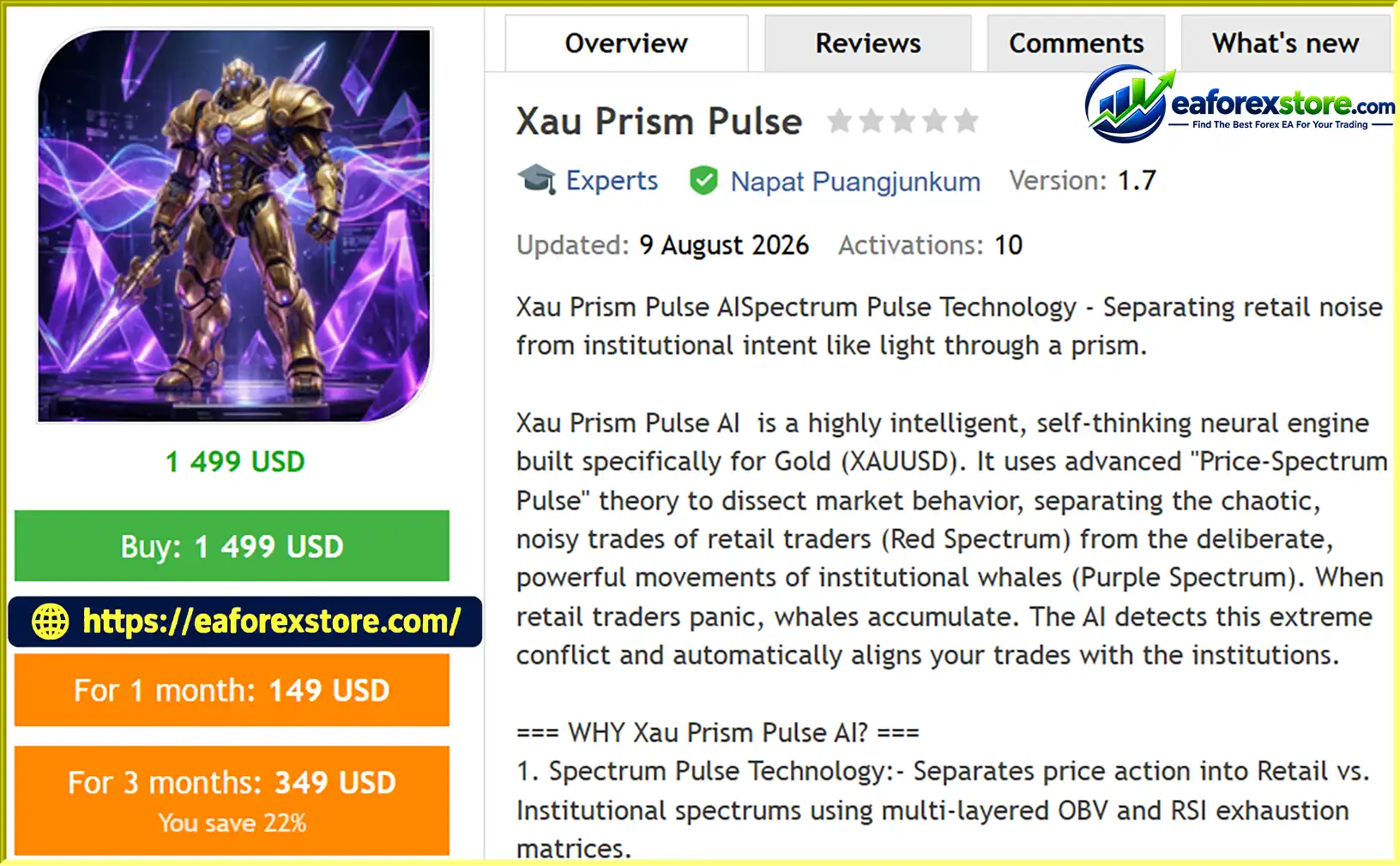
Xau Prism Pulse EA MT5 is an automated Expert Advisor designed specifically for Gold (XAUUSD) trading on the MetaTrader 5 platform. It combines price-action analysis, technical indicators, volume-based calculations, and configurable risk management to identify potential trading opportunities in the gold market.
Built around its proprietary-sounding “Price-Spectrum Pulse” concept, Xau Prism Pulse AI aims to distinguish between retail-driven price movements and potential institutional activity. Its analytical framework combines On-Balance Volume (OBV), Relative Strength Index (RSI), and a moving-average-based trend component to evaluate market momentum, volume behavior, and potential exhaustion signals.
The EA’s primary objective is to identify situations where short-term retail trading pressure may conflict with a stronger directional market movement. By analyzing these conditions, the system seeks to identify potential opportunities aligned with the prevailing trend.
One of its main features is the Aegis Shield, a three-stage drawdown protection mechanism designed to reduce trading exposure as account losses increase. Depending on the configured thresholds, the system can reduce lot size, restrict trading to selected setups, and eventually halt new trading activity.
Xau Prism Pulse EA MT5 also includes an on-chart Heads-Up Display (HUD) that presents important account and trading information, including balance, equity, spread, daily drawdown, and the current protection status. Integrated BUY and SELL buttons provide an additional level of manual control, while automatic Stop Loss and Take Profit placement supports more structured trade execution.
Another distinctive feature is Ghost Protocol V3, which is described as providing virtual Stop Loss, Take Profit, and automatic breakeven management. These functions are intended to manage exits internally rather than exposing every exit level directly to the broker. However, virtual protection depends on the EA remaining operational and connected to the trading account.
With four configurable presets ranging from conservative risk settings to aggressive trading and small-account configurations, Xau Prism Pulse EA MT5 offers flexibility for traders with different risk preferences.
Designed for the XAUUSD M15 chart, the EA combines automated trade analysis, account monitoring, manual intervention, and multi-stage drawdown controls in one MT5 trading interface.
>>> Delivery time 24h-48h after payment.
>>> Refund if not delivered.
>>> You will receive the latest version without any limitations (ID+Time).Reviewed by Jason Stap <<<
Xau Prism Pulse EA MT5 Overview
Xau Prism Pulse AI uses a proprietary-described Price-Spectrum Pulse framework to analyze potential differences between retail trading pressure and stronger directional market activity.
Its Red Spectrum concept represents retail-side momentum and potential exhaustion, while the Purple Spectrum represents the trend or directional component associated with larger market participants.
The system combines OBV-based volume analysis, RSI readings, and moving-average calculations to evaluate these conditions. Although these indicators can help identify momentum changes and possible trend continuation, they cannot reliably identify institutional orders or confirm the intentions of specific market participants on their own.
The EA uses two important technical components:
These calculations are intended to help the EA assess whether current price movement is supported by its underlying momentum and volume characteristics.
The Purple Spectrum component uses a configurable moving-average period, with a default value of 50 for the Whale EMA parameter.
This setting provides a trend reference for evaluating potential trade direction. Combined with the other analytical components, it aims to filter market conditions and identify setups that meet the EA’s trading criteria.
The Aegis Shield is one of the EA’s central risk management features. It uses three drawdown stages to adjust trading behavior when losses reach predefined thresholds.
The default thresholds are described as 5%, 10%, and 20%, respectively. Traders should verify whether these thresholds are calculated from balance, equity, a daily reference point, or another measure before using the EA with real funds.
The protection system is designed to limit additional exposure during adverse conditions, but it cannot guarantee that drawdown will remain within a specific percentage.
Xau Prism Pulse EA MT5 includes an on-chart Heads-Up Display designed to provide an overview of account conditions and EA status.
The HUD displays key information such as:
This dashboard helps traders monitor the EA’s activity without constantly switching between different MT5 terminal windows.
The EA includes on-chart BUY and SELL buttons for manual trading intervention.
These controls allow traders to initiate trades directly from the chart, with automatic Stop Loss and Take Profit placement according to the applicable EA settings.
The exact behavior of manual orders, including whether all automated filters apply to them, should be verified in the EA documentation before live use.
Ghost Protocol V3 is described as supporting virtual Stop Loss, virtual Take Profit, and automatic breakeven management.
Instead of necessarily placing every exit level with the broker, the EA monitors the relevant price conditions internally and attempts to close or manage the position when its configured exit criteria are met.
This approach may keep certain exit levels hidden from the broker, but it introduces operational considerations. If the terminal disconnects, the EA stops running, or the market gaps through a virtual exit level, the position may remain exposed longer than intended.
Traders should understand how the feature works and whether any emergency server-side protection is available.
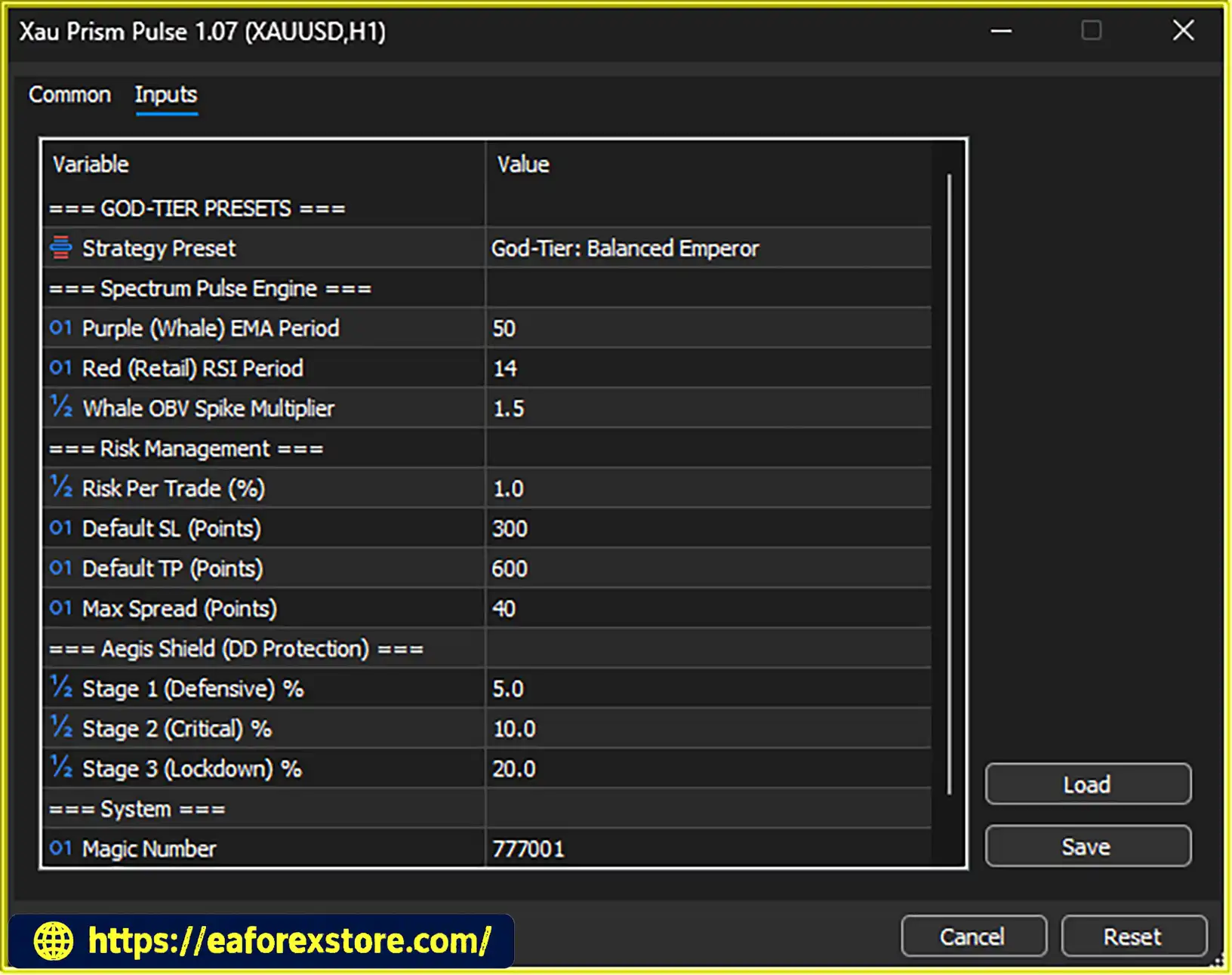
Xau Prism Pulse EA MT5 provides four presets to accommodate different account sizes and risk preferences.
Setup 1: Conservative – The Fortress
Setup 2: Balanced – The Emperor
Setup 3: Aggressive – The Conqueror
Setup 4: Micro $100 Capital Mode – The Vanguard
These presets represent the developer’s stated configurations rather than independently verified performance profiles. Traders should confirm the actual lot-sizing, Stop Loss, Take Profit, and drawdown parameters loaded by each preset.
Traders can adjust selected parameters to suit their broker and account conditions.
The custom risk option allows the user to specify a risk percentage, while the maximum spread parameter helps prevent new trades from being opened when spreads exceed the configured limit.
These settings can improve control over trade exposure and execution conditions, but they do not eliminate slippage, requotes, or unexpected volatility.
Xau Prism Pulse EA MT5 combines technical analysis, trade filtering, risk-based position sizing, and automated trade management in a structured workflow.
The EA operates on the XAUUSD M15 chart, evaluating price behavior using its configured technical parameters.
Its analytical framework incorporates a moving average, RSI, and OBV-based calculations to assess trend direction, momentum, and potential changes in buying or selling pressure.
The system compares the components of its Price-Spectrum Pulse framework to identify potential differences between short-term momentum and the broader directional trend.
For example, a potential setup may be considered when momentum appears exhausted while the trend component continues to support a particular direction. The precise entry conditions depend on the EA’s internal rules.
This process is intended to filter potential opportunities rather than trade every short-term price fluctuation.
Before opening an automated trade, the EA can evaluate its configured entry conditions and maximum spread parameter.
The purpose is to avoid entering when the spread exceeds the permitted threshold or when the required setup conditions are not satisfied.
The effectiveness of these filters depends on the implementation and the quality of the underlying market data.
Once a potential entry meets the EA’s conditions, the selected preset determines the applicable risk configuration.
Depending on the selected setup, the EA uses the associated risk percentage and trade parameters to establish position size and protective exit levels.
Conservative, Balanced, Aggressive, and Micro modes provide different starting configurations. Traders should verify how the EA calculates monetary risk, particularly when using virtual Stop Loss settings.
The EA executes eligible trades and manages them according to its configured Stop Loss, Take Profit, and breakeven rules.
Traders can also use the on-chart BUY and SELL buttons for manual intervention. Ghost Protocol V3 is designed to manage selected exit conditions internally when virtual protection is enabled.
As account drawdown increases, the Aegis Shield adjusts the system’s trading behavior according to its configured stages.
At the first threshold, exposure is reduced. At the second threshold, the EA applies stricter setup selection. At the third threshold, it halts further trading.
The system’s ability to respond correctly depends on its drawdown calculation, execution state, and configuration.
The HUD displays important information such as balance, equity, spread, and protection status.
This allows traders to check current account conditions and identify when the EA has reduced activity or reached a trading halt threshold.
Regular supervision remains important, particularly when the EA uses virtual exits or automated drawdown controls.
Gold has distinctive volatility patterns and can experience rapid price changes during economic announcements, changes in interest-rate expectations, and geopolitical events.
Xau Prism Pulse EA MT5 is built specifically for XAUUSD, allowing its settings and trading logic to focus on the characteristics of this market rather than attempting to trade multiple unrelated instruments.
The combination of moving-average trend analysis, RSI momentum readings, and OBV calculations provides a multi-component approach to evaluating potential trade opportunities.
Rather than relying exclusively on one indicator, the system attempts to evaluate trend and momentum conditions together.
The Aegis Shield offers a structured response to adverse account conditions. Its staged approach is intended to reduce exposure, restrict entries, and eventually stop trading as drawdown increases.
This provides more configurable risk controls than a system that continues trading without changing its behavior during losses.
Four presets allow traders to begin with configurations designed for different risk preferences and account sizes.
The Conservative and Balanced options provide lower nominal risk allocations than the Aggressive preset, while the Micro mode is designed for smaller accounts.
Choosing a preset should still involve checking actual lot sizes, margin requirements, Stop Loss distances, and potential loss under realistic execution conditions.
The on-chart BUY and SELL buttons provide direct access to manual order entry, while the EA’s automated functions handle its programmed trading conditions.
This combination can be useful for traders who want automated analysis but prefer to retain some control over order initiation.
The integrated HUD presents key account metrics and protection status on the chart.
Having balance, equity, spread, and daily drawdown information readily available can help traders monitor account exposure and understand the EA’s current operating state.
Parameters such as the Whale EMA period, Retail RSI period, OBV volume multiplier, risk percentage, maximum spread, and drawdown thresholds allow traders to adjust selected aspects of the system.
Customization can help align the EA with different broker conditions, but extensive optimization against historical data can also increase the risk of overfitting.
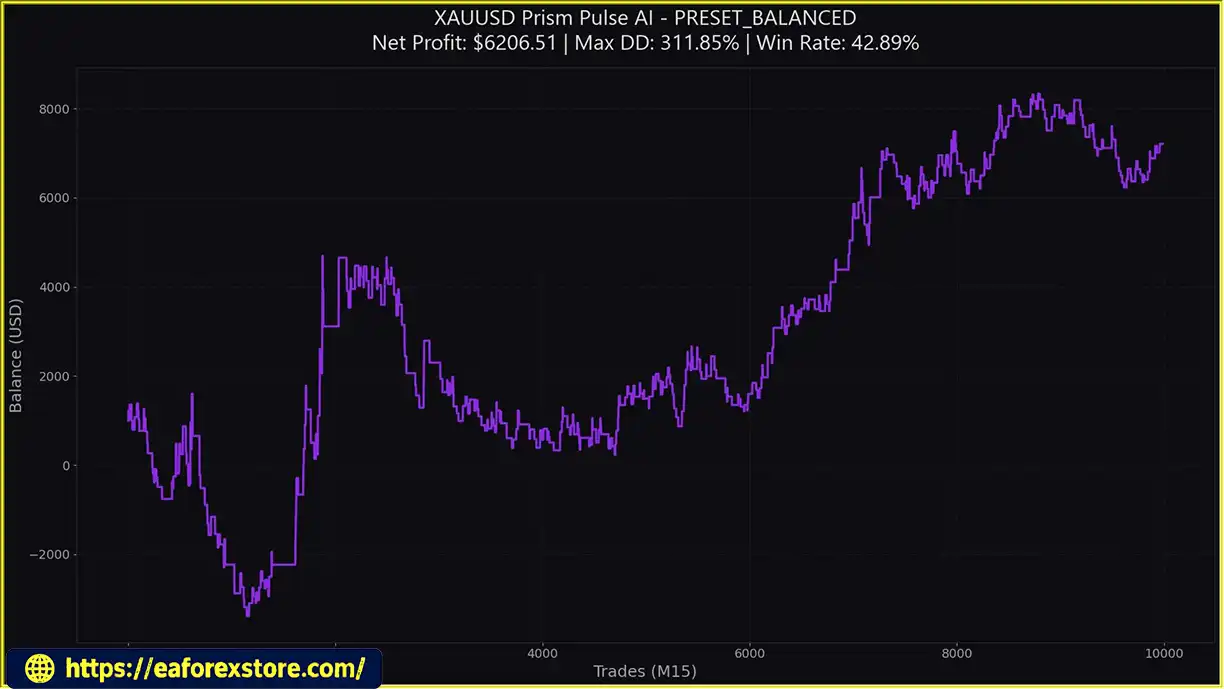
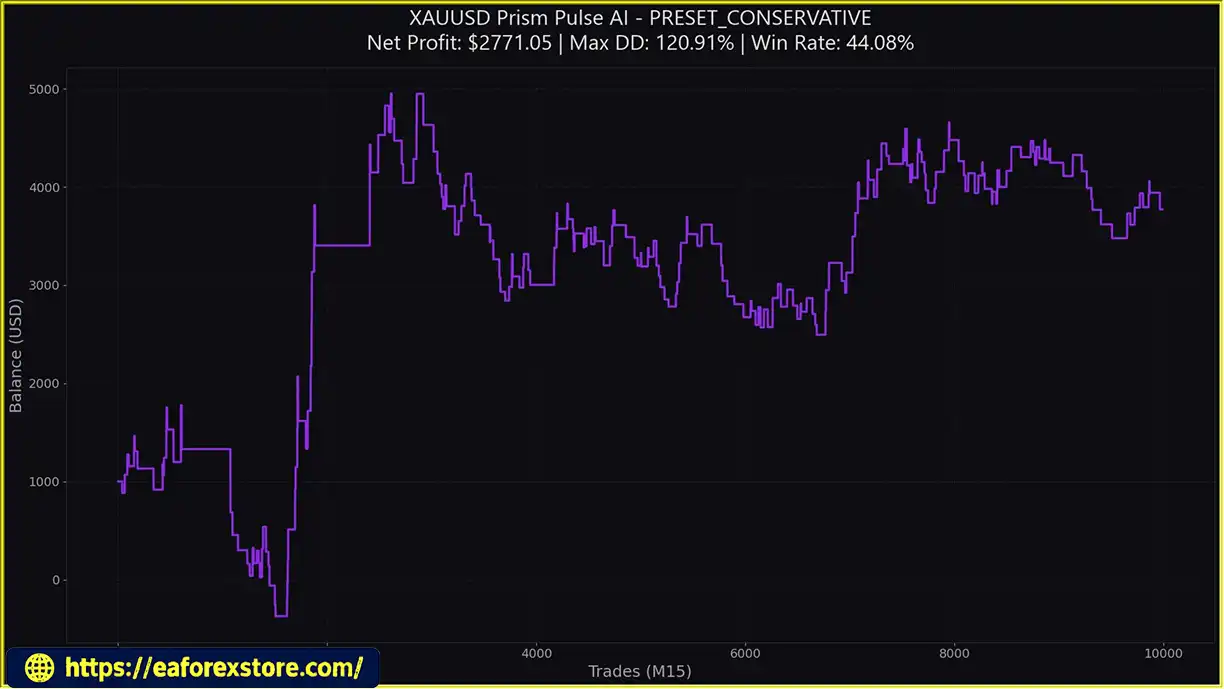
Xau Prism Pulse EA Results
Xau Prism Pulse EA MT5 backtets Results
Risk management is a major component of Xau Prism Pulse EA MT5. Its preset configurations, drawdown protection stages, spread filter, and virtual exit functionality are intended to help traders manage exposure in a structured way.
However, no automated protection system can eliminate market risk or guarantee a maximum loss under all conditions.
The default Aegis Shield thresholds are described as follows:
These thresholds should be confirmed in the EA’s input settings. Traders should also determine whether drawdown is measured from the start-of-day balance, account equity peak, initial deposit, or another reference value.
A trading halt may prevent new entries without automatically closing existing positions. Confirm the EA’s exact behavior at DD3 and maintain separate safeguards where appropriate.
The stated risk allocations are:
Higher risk percentages can increase both potential returns and potential losses. Traders should consider starting with a lower-risk configuration and testing the system before increasing exposure.
The InpMaxSpread parameter has a stated default value of 40.
The interpretation of this value depends on the EA’s implementation and the broker’s symbol pricing conventions. Verify whether it is expressed in points or another unit and check how it behaves with your broker’s XAUUSD symbol.
A spread filter can prevent some unfavorable entries, but it does not protect against all execution costs.
Ghost Protocol V3 is designed to manage selected exits internally.
Virtual Stop Loss and Take Profit levels are not necessarily held by the broker as server-side orders. If the terminal shuts down, internet connectivity fails, or the EA stops executing, virtual exit management may become unavailable.
For this reason, traders should establish what protection remains active during disconnections and consider whether server-side emergency stops are necessary for their risk tolerance.
The automatic breakeven feature is designed to move trade protection toward the entry price once the relevant conditions are met.
Although breakeven management may help protect an unrealized gain, execution costs and slippage can still result in a small net loss. The exact activation and exit behavior should be verified in testing.
The BUY and SELL buttons provide convenient chart-based order entry, but manual trades can still lose money.
Before using these controls, confirm whether manual orders are subject to the EA’s normal filters, position-sizing rules, and Aegis Shield restrictions.
The supplied specifications describe a HUD for real-time account information and protection status but do not confirm support for push notifications, email alerts, or other external notification channels.
Traders should check the EA documentation for available alert options and monitor the MT5 Experts and Journal tabs for execution errors or connectivity problems.
Recommended risk management practices:
Follow these steps to install and configure Xau Prism Pulse EA MT5 on MetaTrader 5.
Obtain the official EA package and any accompanying documentation or preset files from the developer.
Verify that the files are intended for MetaTrader 5 and review the installation requirements before copying them into your platform.
Launch MT5 and log in to your broker account. Ensure that the platform is connected and that the Gold trading symbol is available.
Depending on the broker, the symbol may appear as XAUUSD, GOLD, or another variation.
If the developer supplies a compiled .ex5 file, install it as provided. If additional indicators or libraries are included, follow the official installation instructions.
Open the Gold chart and select the M15 timeframe.
The EA is designed to operate on this timeframe, so verify that the chart uses the correct symbol and that sufficient historical price data is available.
Locate Xau Prism Pulse EA MT5 in the Navigator panel and drag it onto the XAUUSD M15 chart.
Review the EA properties and enable algorithmic trading in the terminal. Ensure that any required permissions are enabled only when they are genuinely needed and trusted.
The supplied instructions mention enabling Allow WebRequest if required. WebRequest access should only be configured if the EA actually needs to communicate with a documented external service. If required, authorize only the appropriate trusted URL.
Open the EA’s Inputs tab and select the preferred InpPreset option.
Choose from the following configurations:
After selecting a preset, inspect the loaded values to confirm the actual risk, Stop Loss, Take Profit, and drawdown thresholds.
The main parameters described for Xau Prism Pulse EA MT5 include:
The exact effect of each parameter depends on the EA’s implementation. Avoid changing multiple settings simultaneously before establishing a reliable baseline.
Confirm that the on-chart HUD displays the expected account information and Aegis Shield status.
Check that algorithmic trading is enabled and review the Experts and Journal tabs for initialization messages or errors.
Before allowing automated entries, confirm the current spread, account balance, equity, and selected risk configuration.
Use the MT5 Strategy Tester to evaluate the EA with historical XAUUSD data.
Where available, use real tick data and realistic spread, commission, and execution assumptions. Examine profitability alongside maximum drawdown, consecutive losses, average trade duration, and sensitivity to the selected parameters.
Follow this with demo forward testing to verify that entries, virtual exits, breakeven management, and drawdown protection behave as expected in live market conditions.
Only consider live deployment after testing the EA and confirming that its risk settings are suitable for your account.
Start with conservative exposure, monitor the EA regularly, and avoid relying exclusively on the HUD or automated protections as substitutes for independent risk management.
>>> Join VIP Membership Now <<<
Xau Prism Pulse EA MT5 combines automated Gold trading, multi-indicator analysis, configurable risk presets, and three-stage drawdown protection in a single MetaTrader 5 solution.
Its main appeal lies in the combination of trend and momentum analysis with the Aegis Shield risk framework. The ability to reduce lot size, restrict trading activity, and halt new entries as drawdown increases offers a structured approach to managing adverse trading conditions.
The four presets provide flexibility for traders who prefer different risk levels, while the on-chart HUD and manual BUY and SELL controls offer convenient monitoring and intervention. Ghost Protocol V3 adds another layer of trade management through virtual exits and automatic breakeven functionality, although these features require particular attention to terminal availability and execution reliability.
However, the EA’s proprietary Price-Spectrum Pulse terminology should not be interpreted as proof that it can identify institutional orders or predict market direction reliably. OBV, RSI, and moving averages are analytical tools, not direct measurements of institutional intent. Likewise, drawdown protection can reduce exposure without guaranteeing that losses remain within predefined limits.
For traders evaluating an automated XAUUSD strategy, Xau Prism Pulse EA MT5 may be worth testing for its configurable trading approach and integrated risk controls. The most appropriate preset will depend on account size, broker conditions, execution costs, and individual risk tolerance.
Ultimately, successful automated trading requires realistic testing, disciplined position sizing, reliable execution, and ongoing supervision. Treat the EA’s advertised features as capabilities to verify rather than guarantees of performance, and assess its results independently before committing real capital.
1. What Is Xau Prism Pulse EA MT5?
Xau Prism Pulse EA MT5 is an automated Expert Advisor designed for trading Gold (XAUUSD) on the MetaTrader 5 platform. It combines moving-average trend analysis, Relative Strength Index (RSI), and On-Balance Volume (OBV) calculations to evaluate market momentum and identify potential trading opportunities. It also features the Aegis Shield drawdown protection system, an on-chart monitoring dashboard, and configurable risk settings.
2. Which Trading Platform and Timeframe Does Xau Prism Pulse EA MT5 Support?
Xau Prism Pulse EA MT5 is developed for MetaTrader 5 (MT5) and is designed to operate on the XAUUSD M15 chart. Traders should confirm that their broker supports the required Gold symbol and check its contract specifications, spreads, and minimum trading volume before installation.
3. How Does the Aegis Shield Drawdown Protection System Work?
The Aegis Shield is designed to adjust trading activity through three drawdown stages. At the default 5% threshold, it reduces lot size by 50%; at 10%, it restricts trading to more selective setups; and at 20%, it halts further trading. These thresholds and their calculation methods should be verified in the EA's input settings. The system does not guarantee that account losses will remain within these percentages.
4. What Are the Four Trading Presets Available in Xau Prism Pulse EA MT5?
Xau Prism Pulse EA MT5 offers four configurable presets: Conservative (The Fortress), with a stated risk of 0.5% per trade; Balanced (The Emperor), with 1.0% risk; Aggressive (The Conqueror), with 2.0% risk; and Micro $100 Capital Mode (The Vanguard), designed for smaller accounts using minimum lot sizing where supported. These are the developer's stated configurations, not independently verified performance levels. Traders should inspect the actual settings and confirm that their account meets the broker's margin and volume requirements.
5. What Is Ghost Protocol V3 in Xau Prism Pulse EA MT5?
Ghost Protocol V3 is a trade-management feature designed to support virtual Stop Loss, virtual Take Profit, and automatic breakeven functionality. Depending on its configuration, the EA monitors exit conditions internally rather than placing every exit level directly with the broker. Because virtual exits depend on the EA running correctly, terminal shutdowns, connection failures, or sudden market gaps can leave positions exposed. Traders should verify whether server-side emergency protection is available.
6. Can Xau Prism Pulse EA MT5 Identify Institutional Traders or Guarantee Profitable Trades?
No. The EA's Price-Spectrum Pulse framework uses indicators such as OBV, RSI, and moving averages to evaluate volume behavior, momentum, and trend conditions. These tools may help identify potential trading setups, but they cannot independently confirm institutional orders or reveal the intentions of specific market participants. Like other automated trading systems, Xau Prism Pulse EA MT5 cannot guarantee profits or eliminate losses. Historical backtesting and demo forward testing are important before live deployment.
7. Is Xau Prism Pulse EA MT5 Suitable for Beginners and Small Accounts?
The EA may appeal to traders who want automated Gold analysis, configurable risk presets, and on-chart account monitoring. Its Micro $100 Capital Mode is intended for smaller accounts, but suitability depends on the broker's minimum lot size, margin requirements, trading costs, and the EA's actual position-sizing behavior. Beginners should start with a demo account, understand the drawdown controls, and avoid using the aggressive preset until they have evaluated the strategy's risks.
8. How Do You Install and Configure Xau Prism Pulse EA MT5?
To install Xau Prism Pulse EA MT5, download the official package, open MetaTrader 5, and select File → Open Data Folder → MQL5 → Experts. Copy the supplied .ex5 file into that folder, refresh the Navigator panel, and attach the EA to an XAUUSD M15 chart. Enable algorithmic trading, select a preset, and verify the risk percentage, spread limit, and Aegis Shield thresholds. Finally, backtest the EA in the MT5 Strategy Tester and forward-test it on a demo account before considering live trading.
In stock
In stock
In stock
In stock
In stock
Out of stock
No account yet?
Create an Account












 Automatic EA
 EA Best Seller
 Expert Advisor MT4
 Expert Advisor MT5
 HFT EA


Reviews
Clear filtersThere are no reviews yet.