









-
 Unlimited Activations
-
 Instant delivery
-
 Easy to install






 Unlimited Activations
Instant delivery
Easy to install
Unlimited Activations
Instant delivery
Easy to install
 Free Update
 Free Install Support

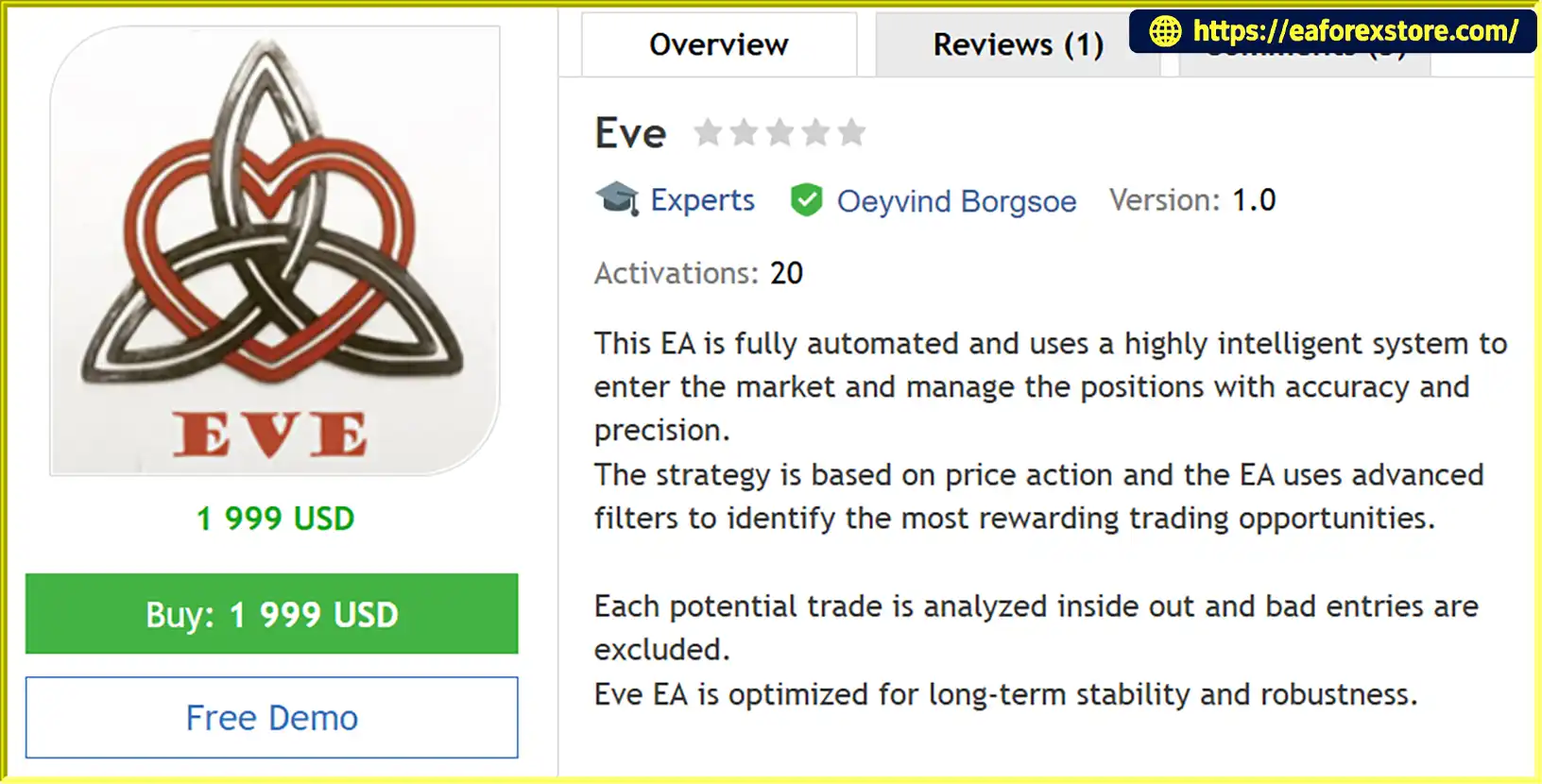
Eve EA MT4 is a fully automated Forex trading Expert Advisor designed for MetaTrader 4 (MT4), combining intelligent Price Action analysis with advanced market filters and automated position management.
The EA analyzes market conditions to identify potentially rewarding trading opportunities while filtering out unfavorable entry signals. Its internal trading logic evaluates each potential setup before executing trades, helping reduce unnecessary market exposure.
Designed with a focus on long-term stability and strategy robustness, Eve EA MT4 incorporates several advanced trading technologies, including High Spread Protection, Two-Level Trailing Stop, FIFO Compatibility, and an integrated Smart Recovery Module.
One of its key features is the Smart Recovery Module, which provides an alternative position management mechanism during sudden and short-term market movements. Instead of relying exclusively on a conventional visual Stop Loss, the EA can activate its recovery logic to manage positions using additional orders in the same direction with a moderate lot multiplier.
With flexible trading filters, pending order execution, and customizable money management, Eve EA MT4 offers a comprehensive automated Forex trading solution for traders seeking intelligent trade selection and dynamic position management.
>>> Delivery time 24h-48h after payment.
>>> Refund if not delivered.
>>> You will receive the latest version without any limitations (ID+Time).Reviewed by Jason Stap <<<
Eve EA MT4 Overview
Eve EA MT4 uses a Price Action-based trading strategy to analyze market behavior and identify potential trading opportunities.
Its advanced internal filters evaluate market conditions before entering trades, helping exclude unfavorable setups and focus on higher-quality trading signals.
The EA incorporates flexible trading filters to evaluate potential entries and avoid unsuitable market conditions.
Each trading opportunity is analyzed before execution, allowing the system to operate selectively rather than opening positions continuously.
The Smart Recovery Module is one of the distinctive features of Eve EA MT4.
When necessary, the EA can activate this secondary management system instead of relying on the conventional visual Stop Loss.
The module opens additional orders in the same direction using a soft lot multiplier, with individual currency pair multipliers generally ranging from 1.1 to 1.2.
This mechanism is designed to manage positions during sudden and short-term market fluctuations.
Traders can configure the maximum number of trades according to their preferences.
The Smart Recovery Module can also be disabled by setting the MaxTrades parameter to 0 in the EA Inputs. When disabled, the EA uses its visual Stop Loss mechanism.
The Smart Recovery Module can increase total market exposure because it adds positions during unfavorable market movements. It should not be considered a guaranteed loss-recovery or capital-protection mechanism.
Eve EA MT4 features a Two-Level Trailing Stop system designed to manage open positions dynamically.
The system uses two trailing stages to adjust Stop Loss levels as the market moves in a favorable direction.
This helps manage accumulated profits while allowing trades to remain open when market conditions support further movement.
The built-in High Spread Protection monitors current trading spreads and helps prevent trade execution when spread conditions exceed the configured limits.
This feature is particularly useful during periods of low liquidity, market openings, or sudden volatility.
Instead of relying exclusively on immediate market execution, Eve EA MT4 uses pending orders for trade entries.
This approach is designed to improve entry precision and reduce exposure to certain forms of execution slippage.
However, pending orders do not eliminate slippage, gaps, or execution differences.
Eve EA MT4 supports FIFO-compatible trading logic, making it suitable for accounts operating under First In, First Out execution requirements.
Actual compatibility should still be verified with the broker’s account rules and execution environment.
The integrated Money Management module allows traders to configure position sizing according to their preferred risk level and account balance.
Combined with flexible trading filters, the EA offers customizable settings for different trading preferences.
Eve EA MT4 follows an automated trading process based on Price Action analysis, entry filtering, and dynamic position management.
Step 1: Analyze Market Conditions
The EA continuously monitors the selected currency pair and evaluates price movements using its internal Price Action strategy.
Step 2: Evaluate Trading Opportunities
Advanced filters analyze potential trading setups and exclude entries that do not meet the EA’s internal conditions.
Step 3: Place Pending Orders
When a valid setup is identified, the EA places pending orders according to its predefined entry logic.
Step 4: Execute and Manage Positions
Once a pending order is triggered, the EA automatically manages the position using its internal trade management system.
Step 5: Apply Trailing Stop Protection
The Two-Level Trailing Stop adjusts Stop Loss levels according to predefined trading conditions as the position moves into profit.
Step 6: Activate Smart Recovery When Necessary
During certain sudden or short-term market movements, the Smart Recovery Module may activate additional orders in the same direction using the configured soft lot multiplier.
Step 7: Apply Risk and Spread Controls
The EA continuously applies its configured trading filters, spread protection, and money management parameters.
This automated process is designed to maintain structured trade execution while adapting position management to changing market conditions.
Selecting a Forex Expert Advisor requires considering its entry strategy, execution method, and ability to manage open positions.
Eve EA MT4 combines several trading and management technologies in one automated system.
Key advantages include:
Intelligent Price Action Trading: Analyzes market behavior to identify potential trading opportunities.
Advanced Entry Filters: Evaluates setups and filters out unfavorable entries.
Smart Recovery Technology: Includes a secondary position management module for certain market conditions.
Two-Level Trailing Stop: Provides two stages of automated Stop Loss adjustment.
High Spread Protection: Helps avoid unfavorable spread conditions.
Pending Order Execution: Uses pending orders for structured trade entries.
FIFO Compatibility: Supports FIFO-compatible trading requirements.
Flexible Money Management: Allows traders to configure position sizing and risk preferences.
Customizable Trading Filters: Offers flexibility when adapting the EA to different trading conditions.
MT4 Compatibility: Runs directly on the MetaTrader 4 platform.
Eve EA MT4 is designed for traders who value automated Price Action analysis combined with flexible trade management and additional recovery functionality.
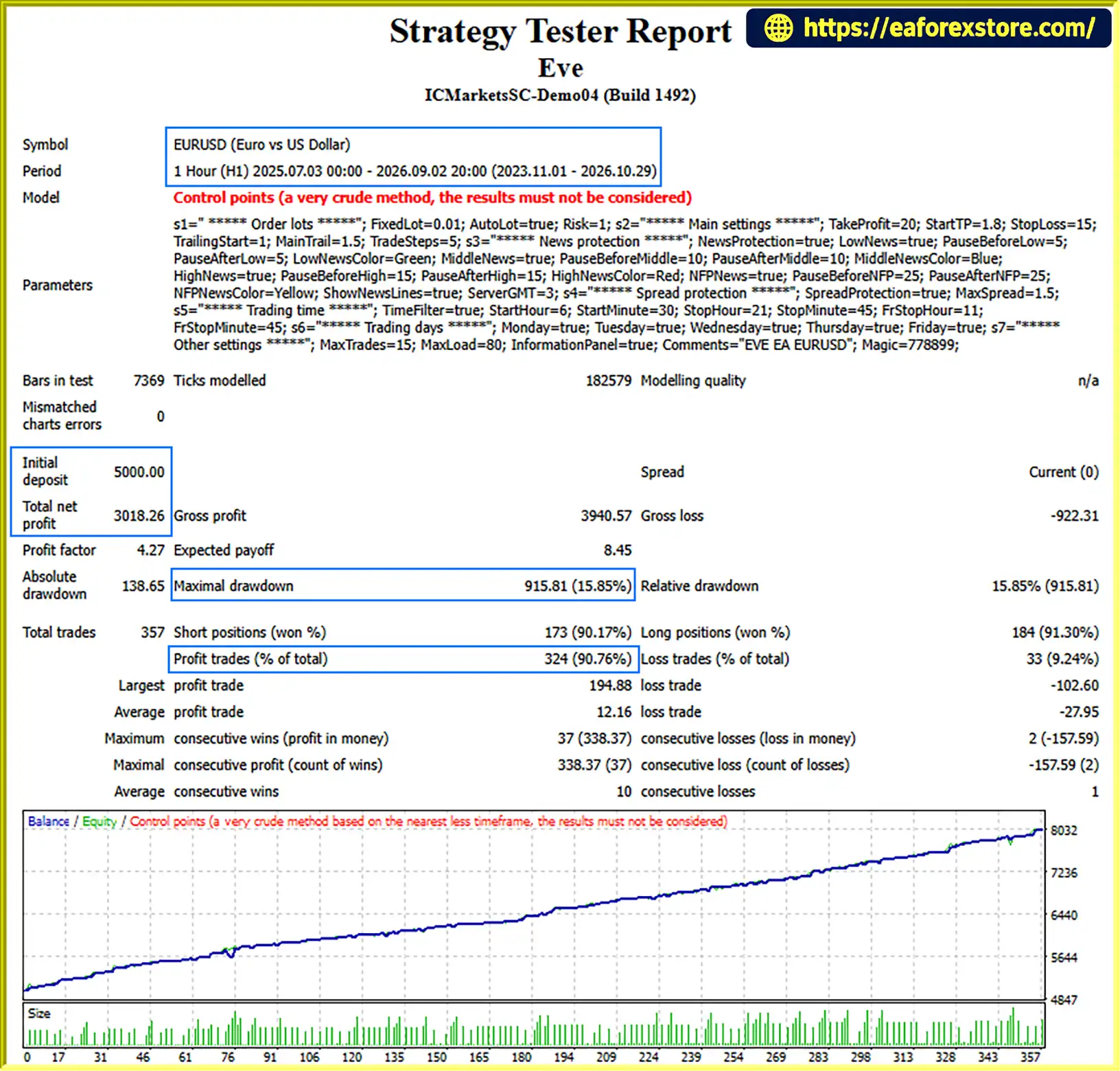
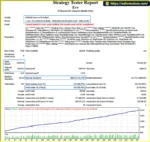
🔺EURUSD – 3Year
Eve EA Backtets
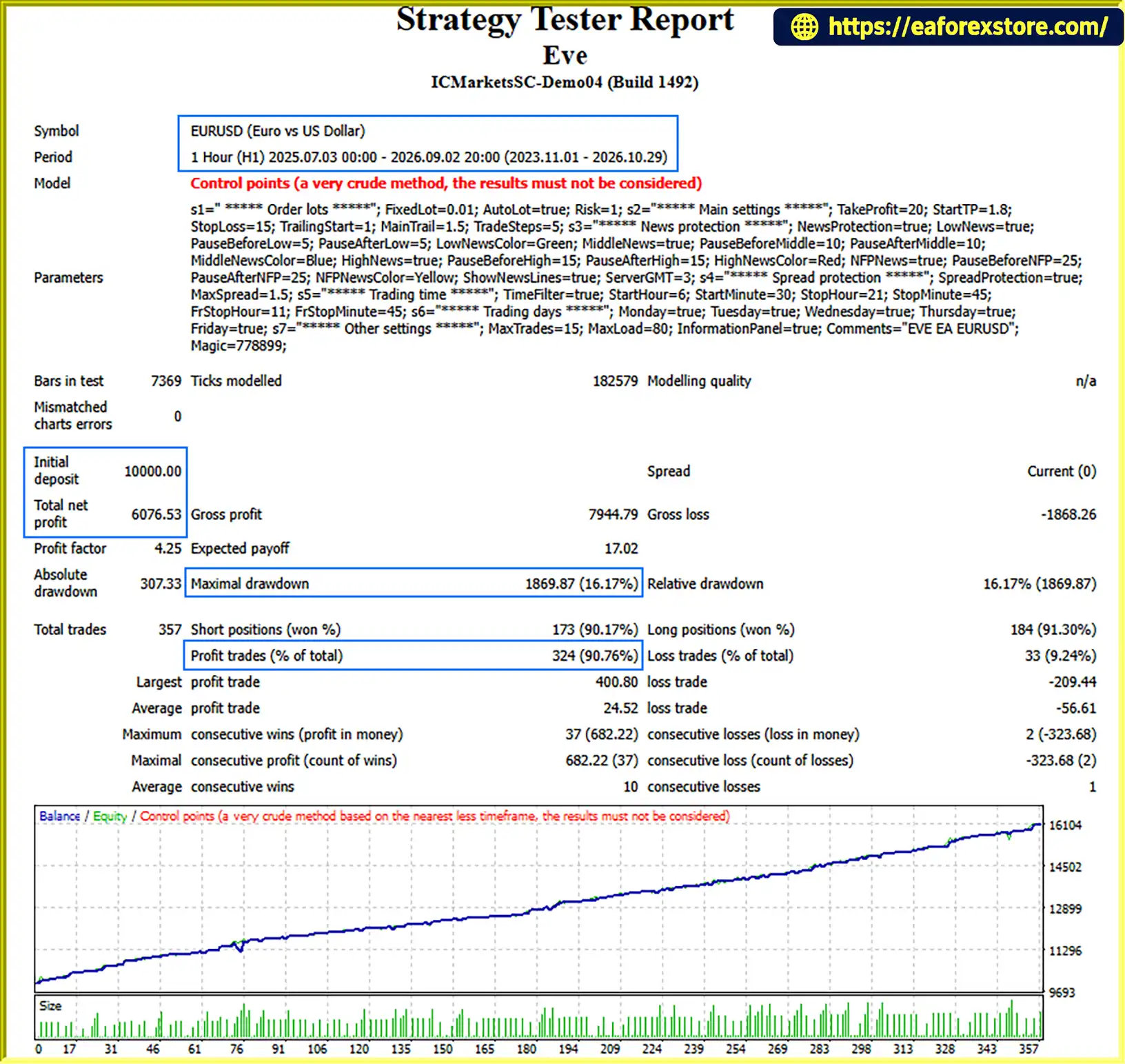
🔺EURUSD – 3Year
Eve EA MT4 Backtets
Risk management is an essential part of operating Eve EA MT4, particularly because the Smart Recovery Module can increase exposure through additional positions.
The EA provides configurable money management and recovery parameters to help traders control their trading settings.
| Parameter | Recommended Setting |
|---|---|
| Expert Advisor | Eve EA MT4 |
| Trading Platform | MetaTrader 4 |
| Recommended Currency Pair | EURUSD |
| Recommended Timeframe | H1 |
| Minimum Deposit | $100 per pair |
| Recommended Leverage | Above 1:100 |
| Execution Method | Pending Orders |
| Trading Strategy | Price Action |
| Position Management | Smart Recovery and Two-Level Trailing Stop |
| Risk Profile | Risk Percentage |
|---|---|
| Low Risk | Below 1% |
| Medium Risk | 1%–2% |
| High Risk | Above 2% |
Risk percentages are suggested classifications, not guaranteed maximum drawdown limits. Actual exposure may be higher when the Smart Recovery Module opens additional positions.
The Smart Recovery Module uses a soft lot multiplier to manage additional positions.
| Parameter | Description |
|---|---|
| Recovery Multiplier | Generally 1.1–1.2 |
| Recovery Direction | Same direction as the existing position |
| Maximum Trades | Configurable through EA Inputs |
| Recovery Module | Can be disabled |
| Disable Recovery | Set MaxTrades = 0 |
| Alternative Management | Visual Stop Loss |
1. Smart Recovery Exposure
The Recovery Module can increase the total number of open positions and overall account exposure. A sequence of unfavorable market movements may result in substantial drawdown.
2. Risk Percentage
High-risk settings above 2% can significantly increase potential losses. Conservative settings are preferable when initially testing the EA.
3. Spread and Slippage
Although High Spread Protection is included, spreads can change rapidly, and pending orders may still experience execution slippage.
4. Market News and Volatility
Unexpected economic announcements can cause sharp price movements and affect both pending order execution and recovery positions.
5. Maximum Trades Configuration
Traders should carefully configure the MaxTrades parameter to avoid excessive position accumulation.
6. Visual Stop Loss
When the Recovery Module is disabled by setting MaxTrades to zero, the EA uses the visual Stop Loss mechanism. Traders should verify how this mechanism operates under their broker’s execution conditions.
Eve EA MT4 also offers the possibility of using a news protection filter.
Traders who require this functionality should contact the developer after purchase for assistance and configuration information.
Risk Disclaimer: Eve EA MT4 does not guarantee profits or eliminate trading risks. Always test the default settings on a demo account before using real capital. Never assume that a recovery strategy can guarantee the recovery of previous losses.
| Pros | Cons |
|---|---|
| Intelligent Price Action strategy | Primarily recommended for EURUSD |
| Advanced entry filters | Requires appropriate parameter configuration |
| Smart Recovery Module | Recovery positions can increase drawdown |
| Two-Level Trailing Stop | Trailing settings may require testing |
| High Spread Protection | Cannot eliminate spread fluctuations |
| Pending order execution | Pending orders can still experience slippage |
| FIFO-compatible trading logic | Broker compatibility should be verified |
| Flexible Money Management | Incorrect risk settings can increase losses |
| Customizable trading filters | News protection requires developer assistance |
| H1 timeframe | Requires MT4 to remain operational |
Overall, Eve EA MT4 offers a combination of intelligent trade selection and dynamic position management. Its Smart Recovery functionality provides additional flexibility but requires careful risk configuration.
Installing Eve EA MT4 on MetaTrader 4 is simple. Follow the steps below to get started.
Download the Eve EA MT4 file provided by the developer.
The file should normally have an .ex4 extension.
Launch MetaTrader 4 and log in to your trading account.
Navigate to:
File → Open Data Folder
Open the following directory:
MQL4 → Experts
Copy the downloaded .ex4 file into the Experts folder.
Return to MT4, open the Navigator panel, right-click on Expert Advisors, and select Refresh.
Eve EA MT4 should now appear in your Expert Advisors list.
Open the EURUSD chart and set the timeframe to H1.
EURUSD is the recommended trading pair and H1 is the recommended timeframe.
Drag Eve EA MT4 onto the EURUSD H1 chart.
Review the available Inputs and configure:
Money Management parameters.
Risk settings.
Smart Recovery Module.
Maximum Trades (MaxTrades).
Trading filters.
Trailing Stop parameters.
Spread protection settings.
You may use the default settings or adjust the parameters according to your trading preferences.
Make sure the following settings are enabled:
Allow live trading in the EA settings.
Enable AutoTrading on the MT4 toolbar.
Confirm that automated trading permissions are correctly configured.
Check the Experts and Journal tabs to confirm that Eve EA MT4 is operating correctly.
For continuous automated trading, a reliable VPS is recommended.
Additional Support: If you need assistance with recommended brokers, VPS services, installation, or configuration, contact the developer.
>> Join VIP Membership Now <<<
Eve EA MT4 is an intelligent automated Forex trading system that combines Price Action analysis, advanced entry filters, and dynamic position management within the MetaTrader 4 platform.
Its Two-Level Trailing Stop, High Spread Protection, FIFO compatibility, and flexible Money Management module provide a comprehensive set of automated trading features.
One of its most distinctive components is the Smart Recovery Module, which introduces an alternative approach to managing positions during sudden and short-term market fluctuations.
However, traders should understand that recovery-based position management can increase exposure and does not guarantee the recovery of losses. Proper configuration of risk settings and maximum trade limits is therefore essential.
For traders looking for an automated EURUSD trading solution with intelligent entry filtering and customizable position management, Eve EA MT4 is a system worth evaluating through careful demo testing.
Smart Entries. Dynamic Management. Flexible Risk Control.
1. What Is Eve EA MT4 and How Does It Work?
Eve EA MT4 is a fully automated Forex trading Expert Advisor designed for MetaTrader 4. It uses an intelligent Price Action strategy combined with advanced market filters to identify potential trading opportunities. The EA automatically places pending orders, executes trades, and manages open positions using features such as Smart Recovery and Two-Level Trailing Stop.
2. What Is the Smart Recovery Module in Eve EA MT4?
The Smart Recovery Module is an advanced position management feature designed to handle certain sudden and short-term market movements. When activated, it can open additional orders in the same direction using a moderate lot multiplier, generally between 1.1 and 1.2. Traders can configure the maximum number of trades through the MaxTrades parameter. However, this feature can increase total market exposure and does not guarantee the recovery of losses.
3. Can I Disable the Smart Recovery Module in Eve EA MT4?
Yes. Traders can disable the Smart Recovery Module by setting the MaxTrades parameter to 0 in the EA Inputs. When the recovery module is disabled, Eve EA MT4 uses its visual Stop Loss mechanism instead. Users should review and test the Stop Loss behavior under their broker's execution conditions before trading with real money.
4. What Is the Minimum Deposit Required for Eve EA MT4?
The recommended minimum deposit is approximately $100 per currency pair. Eve EA MT4 is primarily recommended for EURUSD trading, with an H1 timeframe and leverage above 1:100 suggested in the product settings. The actual capital requirement depends on the broker, margin conditions, position sizing, and Smart Recovery configuration.
5. Which Currency Pair and Timeframe Are Recommended for Eve EA MT4?
The recommended trading instrument is EURUSD, and the suggested timeframe is H1 (1-hour chart). The EA uses Price Action analysis and pending order execution to identify potential entries. Traders should initially evaluate the recommended settings on a demo account before considering other trading conditions.
6. What Are the Backtest Results of Eve EA MT4?
According to the provided backtest reports, Eve EA MT4 achieved the following results on EURUSD over a three-year testing period:
Backtest 1:
Initial Deposit: $5,000
Total Net Profit: $3,018.26
Win Rate: 97.76%
Maximum Drawdown: 15.85%
Backtest 2:
Initial Deposit: $10,000
Total Net Profit: $6,076.53
Win Rate: 90.76%
Maximum Drawdown: 16.17%
These are historical backtest figures and do not guarantee future trading performance. Actual results may vary depending on market conditions, broker execution, spreads, slippage, and trading parameters.
7. Does Eve EA MT4 Have Automatic Stop Loss and Trailing Stop Protection?
Yes. Eve EA MT4 includes a Two-Level Trailing Stop system that automatically adjusts Stop Loss levels as the market moves in a favorable direction. It also features High Spread Protection to help prevent trade execution under unfavorable spread conditions. The EA's position management can additionally use the Smart Recovery Module, depending on the configured settings.
8. How Do I Install and Set Up Eve EA MT4?
To install Eve EA MT4, follow these steps:
Download the Eve EA MT4 .ex4 file.
Open MetaTrader 4 and select File → Open Data Folder.
Navigate to MQL4 → Experts.
Copy the EA file into the Experts folder.
Return to MT4 and refresh the Expert Advisors list in Navigator.
Open an EURUSD chart and select the H1 timeframe.
Attach Eve EA MT4 to the chart.
Configure Money Management, risk settings, MaxTrades, Smart Recovery, Trailing Stop, and spread protection.
Enable Allow live trading and the AutoTrading button.
For continuous automated trading, using a reliable VPS is recommended. Always test the EA on a demo account before using real capital.
In stock
In stock
In stock
In stock
In stock
Out of stock
No account yet?
Create an Account












 Automatic EA
 EA Best Seller
 Expert Advisor MT4
 Expert Advisor MT5
 HFT EA


Reviews
Clear filtersThere are no reviews yet.