





-
 Unlimited Activations
-
 Instant delivery
-
 Easy to install





 Unlimited Activations
Instant delivery
Easy to install
 Free Update
 Free Install Support

Ultra Pure EA MT5 is an automated Forex trading robot developed for MetaTrader 5, designed to provide systematic trade execution, multi-currency market monitoring, and flexible risk management within a streamlined trading environment.
Built around a Volume Acceleration trading strategy, Ultra Pure EA MT5 analyzes changes in market volume behavior to identify potential breakout opportunities across multiple Forex currency pairs.
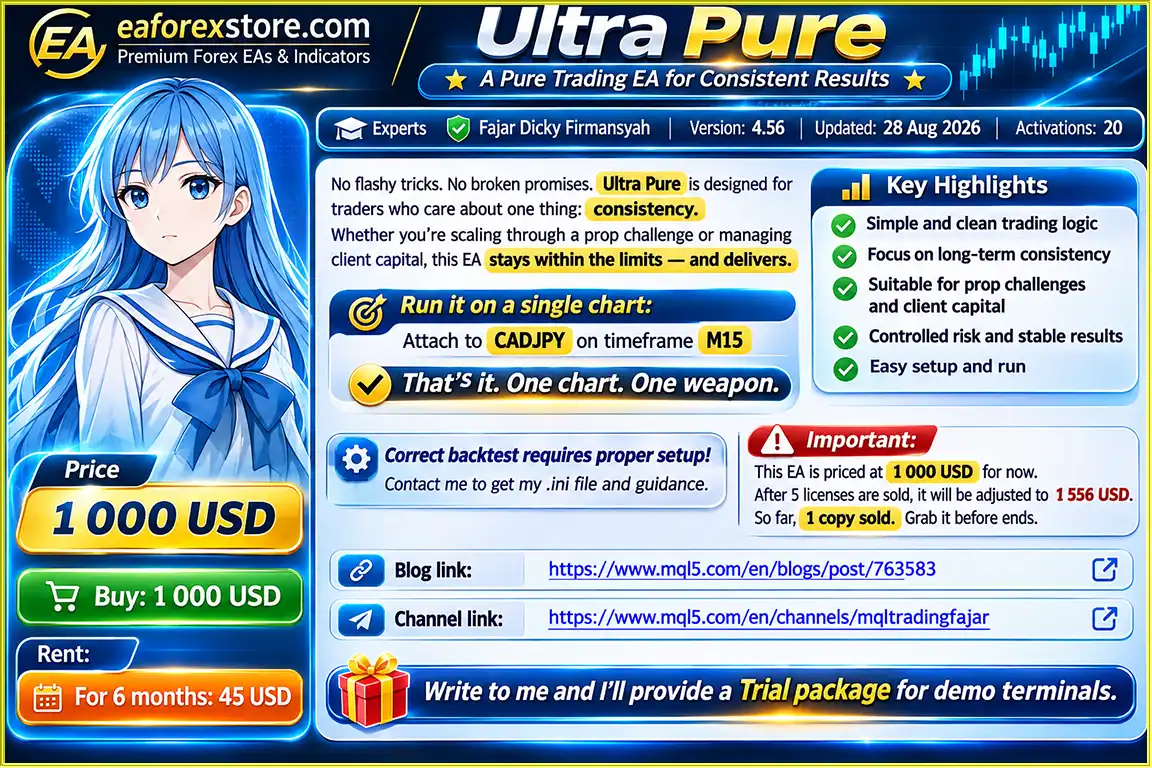
Unlike traditional Expert Advisors that require multiple chart windows, Ultra Pure EA operates from a single CADJPY M15 chart while internally managing up to 15 supported currency pairs. This efficient configuration helps traders maintain a clean trading workspace without sacrificing multi-market coverage.
The EA includes automatic lot size calculation, fixed lot trading options, and a configurable drawdown protection mechanism, making it suitable for traders seeking rule-based automation with defined risk controls.
Whether you are exploring automated Forex strategies, evaluating an EA for prop firm trading conditions, or managing your own trading account, Ultra Pure EA MT5 offers a structured approach to algorithmic trading.
>>> Delivery time 24h-48h after payment.
>>> Refund if not delivered.
>>> You will receive the latest version without any limitations (ID+Time).Reviewed by Jason Stap <<<
Ultra Pure EA MT5 Overview
Ultra Pure EA MT5 can monitor and manage trading opportunities across 15 Forex currency pairs while running on a single CADJPY M15 chart.
This one-chart architecture simplifies installation, reduces chart clutter, and allows traders to manage a diversified group of currency pairs through one Expert Advisor instance.
The EA uses volume acceleration analysis to detect notable changes in market activity that may precede price breakouts.
By focusing on shifts in volume behavior, the strategy seeks to identify potential trading opportunities under its programmed market conditions.
Ultra Pure EA MT5 features automatic lot size calculation based on account size and stop-loss distance.
This functionality helps traders apply position-sizing rules more consistently without manually calculating trade volume for every position.
Traders can choose between automatic risk-based position sizing and fixed lot trading, depending on their account requirements and risk preferences.
An integrated drawdown guard is designed to stop automated trading activity when floating losses exceed a predefined percentage threshold.
This feature provides an additional layer of risk control during unfavorable market conditions.
The EA requires only one chart for operation. Attach Ultra Pure EA MT5 to CADJPY on the M15 timeframe, configure the recommended settings, and enable automated trading.
Ultra Pure EA MT5 may be evaluated by traders participating in prop firm challenges or funded account programs.
Its position-sizing and drawdown controls can help support rule-based trading, although compliance with specific prop firm requirements is not guaranteed.
Verified customers can request access to a private Telegram channel for EA updates, configuration files, and trading guidance.
A promotional bonus Expert Advisor is also available upon request after purchase, subject to confirmation of the current offer.
Ultra Pure EA MT5 follows a systematic automated trading process using market volume behavior, predefined trade conditions, and integrated risk management.
The EA continuously monitors supported currency pairs for market conditions relevant to its programmed trading strategy.
The trading algorithm identifies significant changes in volume behavior that may indicate increasing market activity and potential breakout conditions.
When the programmed market conditions are satisfied, the EA determines whether a potential trading opportunity meets its internal execution rules.
Depending on the selected money management mode, the EA calculates trade volume using account size and stop-loss distance or applies a predefined fixed lot size.
Once an eligible setup is identified, Ultra Pure EA MT5 can execute trades automatically through the MetaTrader 5 platform.
The integrated drawdown guard monitors floating losses against the configured protection threshold and is designed to restrict trading activity when that threshold is exceeded.
The EA continues monitoring its supported instruments through one chart, removing the need to attach separate Expert Advisor instances to every currency pair.
Note: Exact entry conditions, exit logic, and order-management behavior depend on the EA’s programmed rules and configuration.
Choosing the right MT5 Forex Expert Advisor requires more than searching for aggressive profit targets. A practical automated trading system should offer clear configuration requirements, consistent rule execution, and useful risk management features.
Ultra Pure EA MT5 emphasizes these essential elements.
The EA operates according to predefined trading conditions, helping reduce the need for discretionary intervention in routine trade execution.
Monitor 15 Forex currency pairs from a single CADJPY M15 chart rather than managing multiple EA installations across numerous chart windows.
Automatic risk-based lot sizing and fixed lot options allow traders to adjust position sizing to their capital and preferred risk approach.
A configurable floating drawdown threshold provides an additional mechanism for controlling exposure during adverse market conditions.
Ultra Pure EA MT5 can be assessed on demo accounts and tested against the specific trading requirements of personal or prop firm accounts.
Verified buyers can request configuration files, product updates, and additional guidance through the private customer Telegram channel.
For traders looking for a multi-currency Forex robot for MetaTrader 5, Ultra Pure EA provides an automated trading framework that combines volume-based market analysis with configurable risk controls.
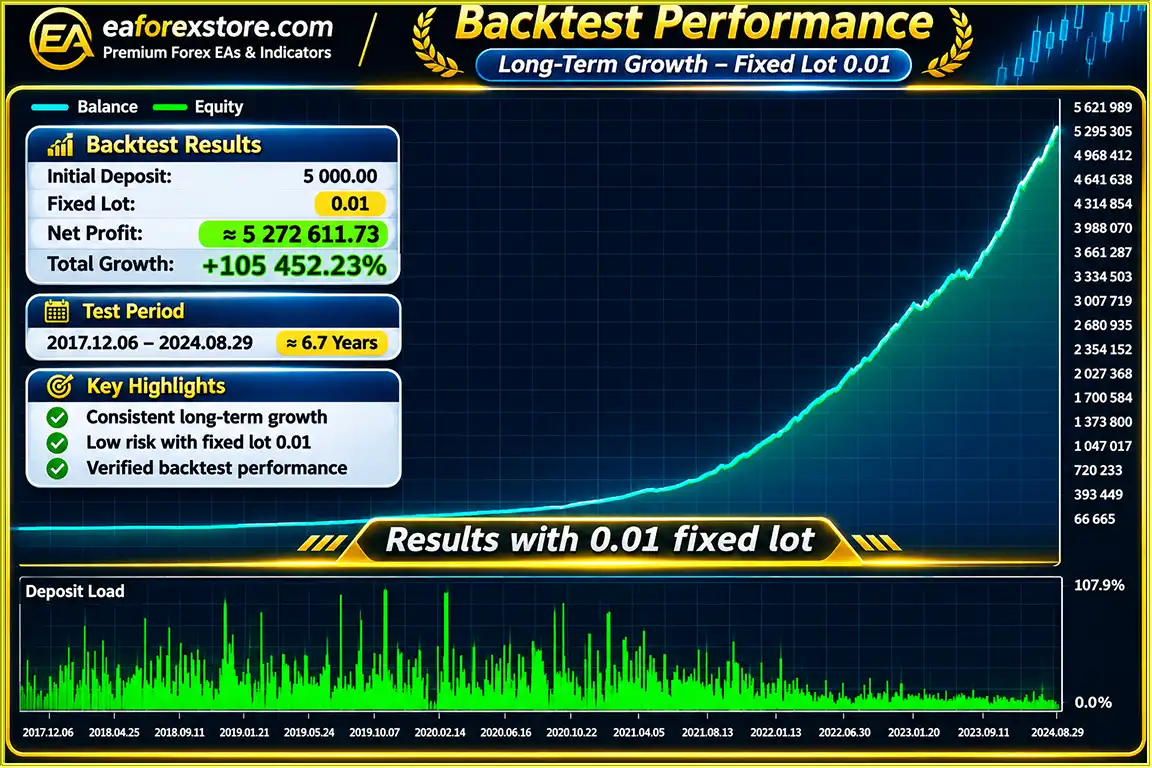
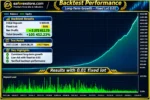
🔺Test Period: 06/12/2017 – 29/08/2024 (6,7 Year)
Ultra Pure EA MT5 Backtets
Ultra Pure EA Backtets
Risk management is an important component of Ultra Pure EA MT5. The Expert Advisor includes several features intended to help traders control position sizing and limit automated trading exposure.
The automatic lot calculation feature uses account size and stop-loss distance to determine trading volume according to the selected risk settings.
Traders who prefer predefined position sizes can use the fixed lot option instead of automatic lot calculation.
The EA includes a configurable drawdown threshold intended to stop trading activity when floating losses exceed the specified account percentage.
Because Ultra Pure EA MT5 can trade multiple Forex pairs, traders should consider combined exposure, correlated currency movements, and the potential for simultaneous losses.
Alert Availability: Specific Telegram trade alerts, mobile push notifications, and email notifications have not been confirmed as built-in EA features. Private Telegram access is provided for customer updates and support, not necessarily real-time trade signals.
Installing Ultra Pure EA MT5 is straightforward when the correct chart, timeframe, and configuration are used.
Download and install the MetaTrader 5 trading platform from your broker or the official MetaTrader website.
Open MetaTrader 5 and navigate to:
File → Open Data Folder → MQL5 → Experts
Copy the Ultra Pure EA file into the Experts folder, then refresh the Navigator panel or restart MetaTrader 5.
Open the CADJPY currency pair and set the chart timeframe to M15 (15 minutes).
This is the primary chart required for Ultra Pure EA MT5.
Find Ultra Pure EA in the Navigator panel and attach it to the CADJPY M15 chart.
Load the recommended preset file, if provided, and review the available settings, including lot sizing, drawdown protection, and trading permissions.
For accurate strategy testing, contact the developer to obtain the recommended .ini configuration file and setup instructions.
Enable automated trading in MetaTrader 5 and confirm that the EA has the necessary permissions to operate.
Ensure that all supported currency symbols are available through your broker.
Run a backtest using appropriate historical data and broker settings, followed by forward testing on a demo account.
Contact the developer if you would like to request the available trial package for demo terminals.
After completing testing and configuration, the EA can operate from the CADJPY M15 chart while managing its supported currency pairs internally.
For uninterrupted operation, consider using a stable Forex VPS.
| Parameter | Required Configuration |
|---|---|
| Trading Platform | MetaTrader 5 |
| Expert Advisor | Ultra Pure EA MT5 |
| Primary Currency Pair | CADJPY |
| Chart Timeframe | M15 |
| Trading Strategy | Volume Acceleration |
| Number of Supported Pairs | 15 |
| Lot Sizing | Automatic or Fixed Lot |
| Drawdown Protection | Configurable |
| Installation | Single Chart |
Supported Forex Pairs:
CADJPY, NZDCAD, EURNZD, AUDNZD, GBPNZD, EURCHF, AUDCHF, CHFJPY, AUDJPY, EURCAD, GBPAUD, EURAUD, GBPCHF, NZDCHF, CADCHF.
Important: Correct backtesting requires the recommended setup. Contact the developer for the appropriate configuration file and instructions before evaluating historical performance.
>>> Join VIP Membership Now <<<
Ultra Pure EA MT5 is a multi-currency automated Forex trading robot designed for traders who value structured execution, streamlined configuration, and adjustable risk management.
Its combination of volume acceleration analysis, automatic lot sizing, fixed lot options, and floating drawdown protection creates a practical framework for evaluating automated trading strategies on MetaTrader 5.
One of its most distinctive features is the ability to monitor 15 currency pairs from a single CADJPY M15 chart, simplifying the trading workspace while maintaining multi-market coverage.
Although no Expert Advisor can guarantee consistent profits or eliminate market risk, Ultra Pure EA MT5 provides tools that may help traders implement their chosen risk parameters more systematically.
1. What is Ultra Pure EA MT5, and how does it work?
Ultra Pure EA MT5 is an automated Forex trading robot designed for the MetaTrader 5 platform. It uses a Volume Acceleration trading strategy to analyze changes in market activity and identify potential breakout opportunities. The Expert Advisor automatically monitors trading conditions, calculates position sizes, and executes trades based on predefined rules. It supports 15 Forex currency pairs while operating from a single CADJPY M15 chart.
2. Is Ultra Pure EA MT5 suitable for beginners?
Yes, Ultra Pure EA MT5 offers a simplified setup that may appeal to beginners interested in automated Forex trading. Traders only need to install the Expert Advisor on a CADJPY M15 chart, configure the recommended settings, and enable algorithmic trading in MetaTrader 5. However, beginners should understand basic Forex trading principles, risk management, and EA configuration before using real money. Testing on a demo account is strongly recommended.
3. Can Ultra Pure EA MT5 be used for prop firm challenges and funded accounts?
Ultra Pure EA MT5 may be suitable for evaluating automated trading strategies in prop firm challenges and funded trading accounts. Its automatic lot sizing and configurable drawdown protection features can help traders manage risk according to their preferred settings. However, prop firm compatibility is not guaranteed. Traders should verify the specific firm's rules regarding Expert Advisors, maximum drawdown, position sizing, and automated trading before using the EA.
4. Which Forex currency pairs and timeframes does Ultra Pure EA MT5 support?
Ultra Pure EA MT5 supports 15 Forex currency pairs: CADJPY, NZDCAD, EURNZD, AUDNZD, GBPNZD, EURCHF, AUDCHF, CHFJPY, AUDJPY, EURCAD, GBPAUD, EURAUD, GBPCHF, NZDCHF, and CADCHF. The EA must be attached to the CADJPY chart on the M15 (15-minute) timeframe. From this single chart, it can monitor and manage trading opportunities across all supported currency pairs without requiring multiple EA installations.
5. How profitable is Ultra Pure EA MT5, and what are its backtest results?
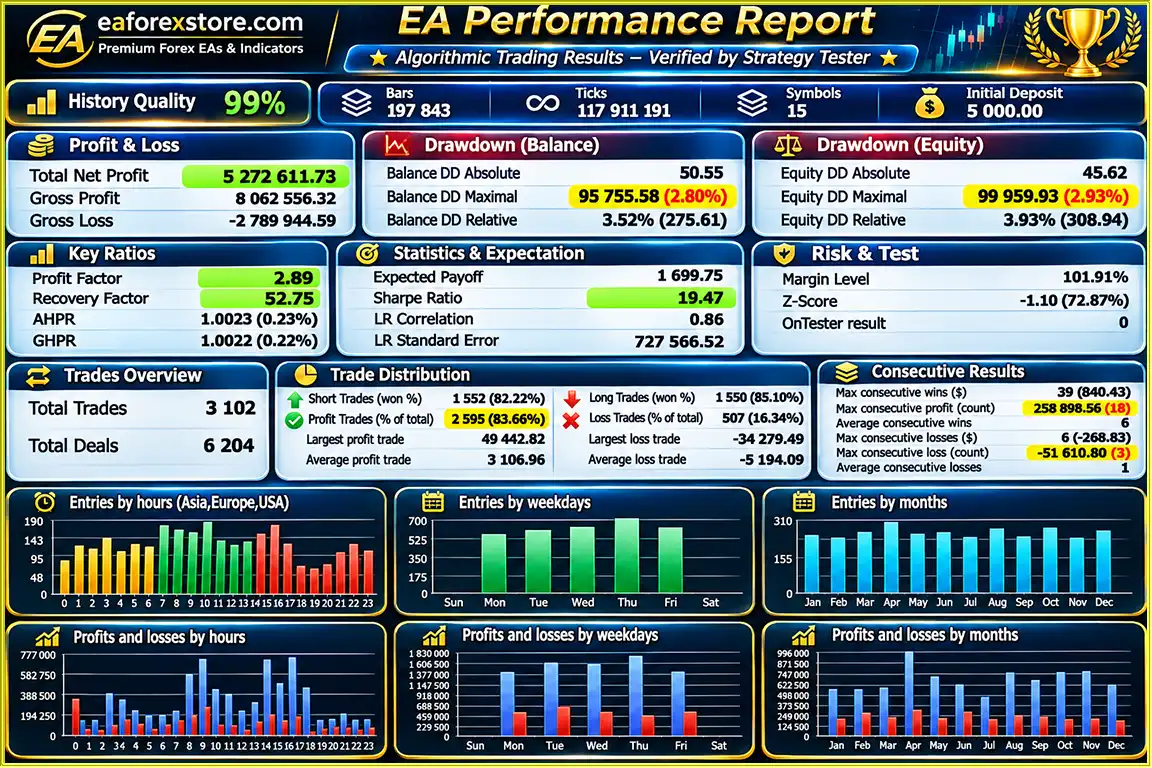
According to the published backtest information, Ultra Pure EA MT5 recorded an 83.66% win rate, a maximum drawdown of 2.80%, and a reported total net profit of $5,272,611.73 from an initial deposit of $5,000. The testing period covered December 6, 2017, to August 29, 2024. However, these figures have not been independently verified, and historical backtest results do not guarantee future profitability. Live trading performance may differ because of market volatility, spreads, slippage, broker execution, and account settings.
6. Does Ultra Pure EA MT5 have automatic risk management and drawdown protection?
Yes, Ultra Pure EA MT5 includes several risk management features, including automatic risk-based lot sizing, fixed lot trading options, and configurable floating drawdown protection. The drawdown guard is designed to stop automated trading activity when floating losses exceed a predefined percentage threshold. These features can help traders manage trading exposure more systematically, but they cannot eliminate financial risk or guarantee protection against unexpected market movements.
7. How do I install and configure Ultra Pure EA MT5 correctly?
To install Ultra Pure EA MT5, download and open MetaTrader 5, then navigate to File → Open Data Folder → MQL5 → Experts and copy the EA file into the Experts folder. Restart or refresh MetaTrader 5, open a CADJPY chart, and select the M15 timeframe. Attach Ultra Pure EA to the chart, load the recommended configuration, and enable algorithmic trading. For accurate backtesting, contact the developer to obtain the recommended .ini settings file and installation guidance. A stable Forex VPS is also recommended for continuous automated trading.
8. Can I try Ultra Pure EA MT5 before buying, and what support is included after purchase?
Yes, traders can contact the developer to request a trial package for demo terminals before purchasing Ultra Pure EA MT5. According to the product information, delivery typically takes 24–48 hours after payment, with a refund offered if the product is not delivered. Customers receive the latest EA version and can request access to a private Telegram channel for configuration files, product updates, and technical guidance. A promotional bonus Expert Advisor may also be available after purchase, subject to confirmation of the current offer.
In stock
In stock
In stock
In stock
In stock
Out of stock
No account yet?
Create an Account












 Automatic EA
 EA Best Seller
 Expert Advisor MT4
 Expert Advisor MT5
 HFT EA



Reviews
Clear filtersThere are no reviews yet.