





-
 Unlimited Activations
-
 Instant delivery
-
 Easy to install






 Unlimited Activations
Instant delivery
Easy to install
 Free Update
 Free Install Support

Gold Martingale Hedge X EA MT5 is a fully automated gold trading robot for MetaTrader 5, combining two independent grid–martingale trading engines: V190 and HedgePro. Designed for XAUUSD trading, the EA offers flexible trading strategies, automated hedge management, and advanced risk protection tools.
The V190 engine uses signal-based grid trading, while HedgePro manages dual-direction hedge positions with separate basket profit targets. Both engines can operate independently, simultaneously, or through a custom trading sequence.
The EA includes six risk modes, automatic lot sizing, basket Take Profit management, news filtering, drawdown protection, and Telegram alerts. Traders can monitor and control both engines through a convenient on-chart dashboard.
Gold Martingale Hedge X EA MT5 is designed for traders seeking a customizable automated gold trading system with multiple strategy options and integrated risk controls. Because it uses grid and martingale techniques, significant drawdowns and account losses remain possible.
>>> Delivery time 24h-48h after payment.
>>> Refund if not delivered.
>>> You will receive the latest version without any limitations (ID+Time).Reviewed by Jason Stap <<<
Gold Martingale Hedge X EA MT5 Overview
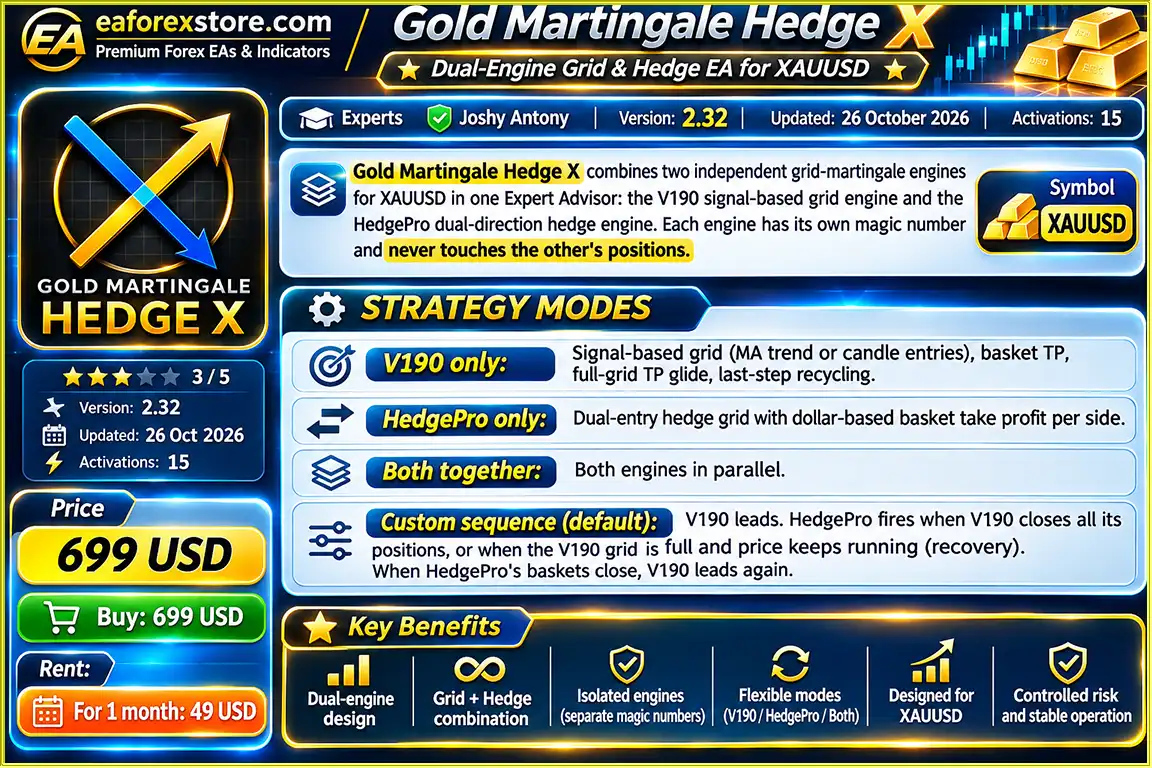
Gold Martingale Hedge X EA MT5 combines two automated trading engines within one Expert Advisor.
V190 Engine: A signal-based grid trading system using Moving Average trends or candlestick entry signals. It includes basket Take Profit, full-grid TP glide, and last-step recycling.
HedgePro Engine: A dual-direction hedge grid system that manages buy and sell baskets independently, with dollar-based Take Profit targets for each side.
Each engine has its own magic number and manages only its own positions, preventing interference between the two systems.
The EA allows traders to select the trading behavior that best matches their strategy preferences.
The Custom Sequence mode coordinates the two engines to provide automated strategy transitions.
Gold Martingale Hedge X EA MT5 includes six selectable risk configurations.
Custom (Default): Uses every parameter exactly as configured, with default fixed 0.01 lots.
Conservative: A preset designed for comparatively lower exposure.
Balanced: A preset offering an intermediate risk configuration.
Aggressive: A preset configured for higher trading exposure.
Aggressive 1: Automatic lot sizing, maximum 0.10 lot per position, and four grid levels per side.
Aggressive 2: Automatic lot sizing, maximum 0.20 lot per position, and four grid levels per side.
Aggressive 3: Automatic lot sizing, maximum 0.20 lot per position, and eight grid levels per side.
The Aggressive 1–3 presets match the configurations used in the developer’s published Strategy Tester screenshots.
The HedgePro engine supports three lot-sizing options:
A configurable per-position lot cap is available, including fixed limits from 0.01 to 1.00 lot or an automatic option.
For accounts below $5,000, the EA limits individual positions to 0.01 lot as an additional protection mechanism.
Both engines feature automated basket profit management.
V190 uses basket Take Profit, full-grid TP glide, and last-step recycling, while HedgePro manages dollar-based basket profit targets separately for buy and sell positions.
HedgePro also includes proportional basket Take Profit, allowing profit targets to scale with the base lot size.
The Take Profit Maximizer allows profitable baskets to continue beyond their initial profit targets.
Instead of closing immediately when the target is reached, the system can track peak basket profit and close when profit retraces from its highest level.
This feature aims to capture additional profit during favorable market movements.
Gold markets can experience prolonged upward trends, making short positions particularly challenging.
The Sell Confirmation Filter helps control new sell basket entries by requiring bearish trend, momentum, and market structure confirmation.
Four selectable filter levels are available:
Off, Normal, Strict, and Extreme.
Higher strictness settings require stronger confirmation before new sell baskets can open.
The Buy Price Ceiling prevents new buy entries above a selected gold price level.
Traders can choose a price ceiling between $4,000 and $8,000, depending on their market expectations and strategy settings.
The Price Difference Guard is designed to close individual positions when gold moves a specified dollar distance against the opening price.
Selectable limits range from $50 to $1,000, with an Unlimited option.
This feature can help limit the duration and extent of individual adverse price movements, although losses may still be substantial.
The Position Age Guard automatically closes positions that exceed the selected holding period.
Available settings range from 15 to 180 days, with a default limit of 30 days.
This helps reduce prolonged exposure from positions that remain open for extended periods.
The Fake Reversal Filter helps distinguish temporary wick movements from confirmed breakout conditions.
The system can continue trading through wick-based fakeouts while pausing new entries after confirmed candle-body breakouts.
Trading can resume early when price closes back inside the monitored range.
The EA includes an economic news filter using the MetaTrader 5 economic calendar.
It also supports a trading session filter, allowing traders to restrict activity during selected market periods.
Gold Martingale Hedge X EA MT5 includes several additional protection mechanisms:
These features help traders define operational risk thresholds, but they cannot guarantee protection against market gaps, slippage, or rapid losses.
The EA features a combined dashboard displaying information for both V190 and HedgePro.
Traders can monitor basket status, profit and loss, trading sequence, filter conditions, and current EA activity.
The dashboard also includes Pause and Close All controls.
Gold Martingale Hedge X EA MT5 supports MetaTrader 5 push notifications and optional Telegram alerts.
Telegram integration also supports remote trading commands, including:
/status, /pause, /resume, /closebuy, /closesell, /closev190, and /closeall.
These commands allow traders to monitor or manage supported EA functions remotely.
Gold Martingale Hedge X EA MT5 combines signal-based grid trading with dual-direction hedge management to automate XAUUSD trading.
Choose between V190 Only, HedgePro Only, Both Together, or Custom Sequence mode.
The default Custom Sequence allows V190 to lead while HedgePro activates under defined transition or recovery conditions.
The V190 engine evaluates trading opportunities using Moving Average trends or candlestick-based entry signals.
The HedgePro engine manages buy and sell trading sequences according to its programmed hedge grid logic.
Before opening positions, the EA checks relevant filters, including news events, trading sessions, sell confirmation requirements, buy price ceilings, and fake reversal conditions.
The EA determines position size according to the selected risk preset and lot management settings.
HedgePro supports Custom, Manual, and Auto lot sizing, with additional per-position lot limits.
When trading conditions are satisfied, the active engine opens positions according to its strategy.
V190 manages signal-based grid positions, while HedgePro manages independent buy and sell hedge baskets.
Each engine uses a separate magic number to identify and manage its own orders.
The EA monitors basket profit targets and applies the selected Take Profit management features.
The Take Profit Maximizer can allow profitable baskets to continue beyond their initial target before closing on a profit retracement.
Throughout trading, the EA monitors configured safeguards, including margin levels, drawdown limits, price movement thresholds, position age, basket Stop Loss, and daily trading limits.
In Custom Sequence mode, V190 normally leads.
HedgePro can activate when V190 closes all its positions or when the V190 grid reaches its maximum configured depth and the market continues moving against it.
After HedgePro’s baskets close, V190 resumes its leading role.
Traders can review both engines through the on-chart dashboard.
Optional Telegram integration provides remote monitoring and supported trade-management commands.
Gold Martingale Hedge X EA MT5 combines the V190 signal-based grid and HedgePro dual-direction hedge engines within one MT5 trading robot.
This provides multiple trading methods without requiring separate Expert Advisor installations.
Each engine uses its own magic number and manages only its assigned positions.
This helps maintain clear separation between V190 and HedgePro trading activity.
Traders can operate either engine independently, run both together, or use the automated Custom Sequence mode.
This makes the EA adaptable to different trading preferences and account configurations.
Six selectable risk modes allow traders to choose between Custom, Conservative, Balanced, Aggressive, Aggressive 1, Aggressive 2, and Aggressive 3 configurations.
The three Aggressive variants are designed for progressively higher exposure and require careful evaluation.
The EA combines basket Take Profit, full-grid TP glide, last-step recycling, dual-direction hedging, and proportional profit targets.
These functions provide automated management for complex grid trading sequences.
Features such as the Sell Confirmation Filter, Price Difference Guard, Position Age Guard, news filter, equity stop, and margin protection provide configurable controls for trading activity.
Telegram integration allows traders to check system status, pause or resume trading, and submit supported position-closing commands remotely.
The Aggressive 1–3 presets correspond to the developer’s published Strategy Tester configurations.
Traders can use the free demo version to evaluate these settings in the MetaTrader 5 Strategy Tester using comparable historical data and testing conditions.
However, identical settings do not guarantee identical results across different brokers or historical datasets.
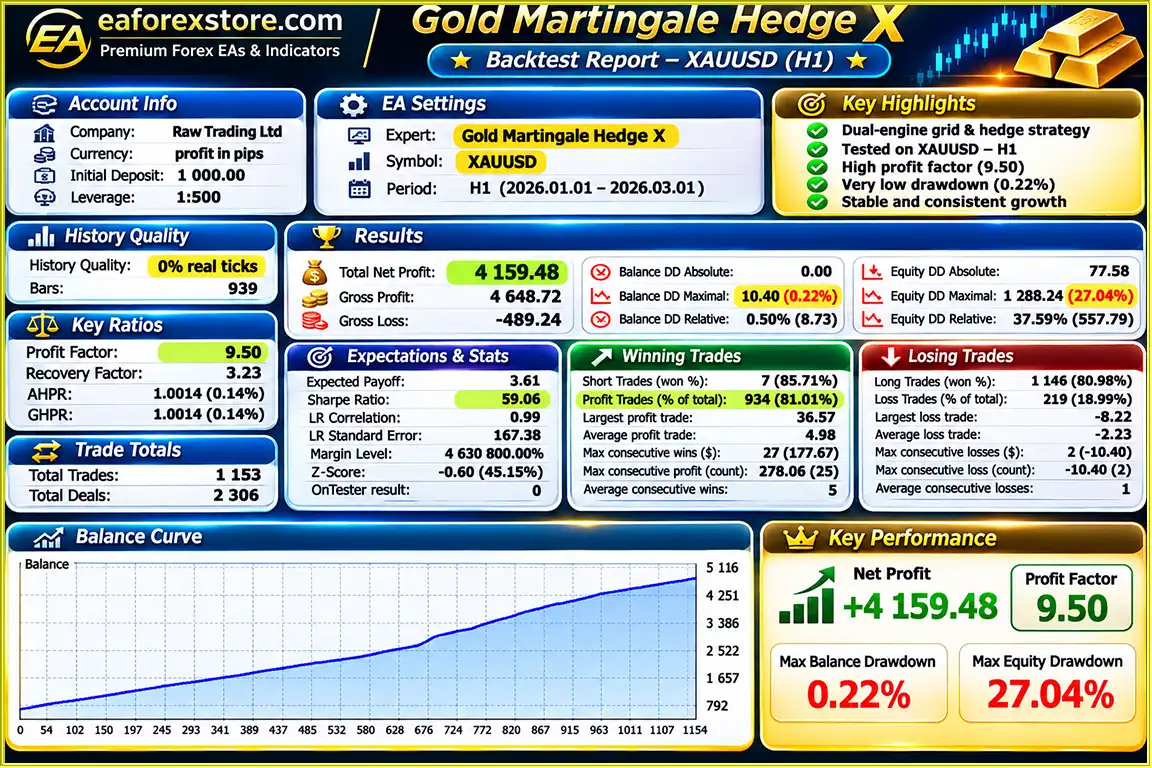
Gold Martingale Hedge X EA MT5 backtets
Gold Martingale Hedge X EA MT5 includes multiple protection mechanisms to help traders monitor and manage the risks associated with grid and martingale trading.
The EA provides selectable trading configurations ranging from Conservative to Aggressive 3.
Higher-risk presets allow greater position sizes or deeper grid structures, increasing the potential for substantial drawdowns.
For balances below $5,000, HedgePro limits individual positions to a maximum of 0.01 lot.
This restriction reduces individual position size but does not prevent cumulative losses from multiple open trades.
This feature closes positions when gold moves a configured dollar distance against their entry price.
Selectable thresholds range from $50 to $1,000, with an Unlimited option.
For accounts below $2,000, the developer recommends setting the guard between $50 and $100.
Positions can be closed automatically after remaining open beyond a selected holding period.
The default setting is 30 days, with available limits from 15 to 180 days.
A configurable maximum drawdown stop allows traders to establish a threshold for automated risk intervention.
Execution delays or sudden market movements can still cause actual losses to exceed the configured level.
Optional equity stop and basket Stop Loss settings provide additional mechanisms for limiting exposure at account and basket levels.
Daily profit and loss halts allow traders to restrict new trading activity after reaching selected daily thresholds.
The EA monitors minimum margin-level requirements and includes an emergency close mechanism.
These features aim to reduce the risk of excessive margin pressure but cannot guarantee the prevention of liquidation.
Sell baskets can require bearish trend, momentum, and structure confirmation.
Filter strictness can be adjusted from Off to Extreme.
Economic news and trading session filters allow traders to avoid certain market periods.
These filters may reduce trading activity during selected events but cannot eliminate sudden volatility.
The optional Telegram integration supports alerts and the following commands:
/status – Check EA status./pause – Pause trading./resume – Resume trading./closebuy – Close buy positions managed by the EA./closesell – Close sell positions managed by the EA./closev190 – Close V190 positions./closeall – Close all positions managed by the EA.Important Risk Warning: Grid and martingale strategies can accumulate substantial exposure during prolonged one-directional gold movements. Even with protection settings enabled, traders may experience deep drawdowns, margin calls, or the loss of their entire trading capital.
Installing Gold Martingale Hedge X EA MT5 requires MetaTrader 5, an XAUUSD trading chart, and the appropriate strategy and risk settings.
Download and install MetaTrader 5 from your broker or the official MetaTrader website.
Log in to a trading account that supports XAUUSD and hedging.
Open MetaTrader 5 and navigate to:
File → Open Data Folder → MQL5 → Experts
Copy the Gold Martingale Hedge X EA file into the Experts folder.
Restart MetaTrader 5 or refresh the Expert Advisors section in the Navigator panel.
Open an XAUUSD gold chart.
The EA supports any chart timeframe, although M5 was used in the developer’s published Strategy Tester results.
Locate the Expert Advisor in the Navigator panel and attach it to the XAUUSD chart.
Choose your preferred operating mode:
For coordinated trading between both engines, select Custom Sequence.
Select the preferred risk preset.
For initial evaluation, consider the default Custom mode with fixed 0.01 lots.
The Aggressive presets should be tested carefully before live use.
For HedgePro, select Custom Lot, Manual Lot, or Auto Lot mode.
Review the per-position lot cap and confirm that the chosen settings are suitable for your account balance and margin requirements.
Review the following settings before enabling live trading:
For balances below $2,000, the developer recommends setting the Price Difference Guard between $50 and $100.
Enable automated trading in MetaTrader 5 and confirm that the EA has the required trading permissions.
To enable Telegram connectivity, open:
Tools → Options → Expert Advisors → Allow WebRequest for listed URL
Add:
https://api.telegram.org
Then configure the EA’s Telegram settings using the required bot credentials and chat information.
Do not share your Telegram bot token publicly.
Use the MetaTrader 5 Strategy Tester to evaluate the EA.
The developer’s Aggressive 1–3 presets can be tested using the free demo version with comparable historical data and testing conditions.
Use the combined on-chart dashboard to monitor both engines, active baskets, profit and loss, trading sequence, and filter status.
For continuous operation, a stable trading environment and VPS are recommended.
| Parameter | Recommended Configuration |
|---|---|
| Expert Advisor | Gold Martingale Hedge X EA MT5 |
| Trading Platform | MetaTrader 5 |
| Trading Symbol | XAUUSD |
| Timeframe | Any (M5 Used in Published Tests) |
| Account Type | Hedging |
| Trading Engines | V190 + HedgePro |
| Default Strategy | Custom Sequence |
| Default Risk Mode | Custom |
| Default Fixed Lot | 0.01 |
| Default Starting Balance | Approximately $500 or More |
| Aggressive 1 | $10,000+ |
| Aggressive 2 | $20,000+ |
| Aggressive 3 | Experienced Traders Only |
| Lot Sizing | Custom / Manual / Auto |
| Price Difference Guard | $50–$1,000 / Unlimited |
| Position Age Guard | 15–180 Days |
| Default Position Age | 30 Days |
| Take Profit | Basket-Based |
| News Filter | MT5 Economic Calendar |
| Telegram Alerts | Supported |
| Remote Commands | Supported |
| Grid Trading | Yes |
| Martingale | Yes |
The deposit amounts above are developer guidance, not a guarantee that the account has sufficient capital for all market conditions.
>>> Join VIP Membership Now <<<
Gold Martingale Hedge X EA MT5 is a dual-engine automated gold trading robot combining the V190 signal-based grid strategy with the HedgePro dual-direction hedge system.
With four strategy modes, multiple risk presets, flexible lot sizing, advanced basket profit management, and extensive protection filters, the EA offers a highly customizable solution for traders interested in automated XAUUSD grid trading.
Its Custom Sequence mode allows both trading engines to coordinate automatically, while separate magic numbers ensure that each engine manages its own positions independently.
The EA also provides useful monitoring and control features, including an on-chart dashboard, MT5 push notifications, Telegram alerts, and remote trading commands.
However, Gold Martingale Hedge X EA MT5 uses grid and martingale techniques, which can expose trading accounts to substantial losses during prolonged market trends. Traders should evaluate margin requirements, cumulative position exposure, and potential drawdowns before using the EA with real capital.
For traders who understand the risks of automated grid and hedge strategies, Gold Martingale Hedge X provides a flexible trading framework with multiple configuration and monitoring options.
Two Engines. Multiple Strategies. One Automated Gold Trading System.
Risk Disclaimer: Gold Martingale Hedge X EA MT5 uses grid averaging and martingale techniques. These strategies can generate sequences of small profitable baskets but may also create large accumulated losses, deep drawdowns, margin calls, or complete account loss. All published performance results described in the source material are Strategy Tester backtests, not verified live trading results. Past performance does not guarantee future results. Test on a demo account first and trade only with money you can afford to lose.
1. What is Gold Martingale Hedge X EA MT5, and how does it work?
Gold Martingale Hedge X EA MT5 is a fully automated gold trading robot designed for MetaTrader 5. It combines two independent trading engines: V190, a signal-based grid trading system, and HedgePro, a dual-direction hedge trading system. The EA automatically analyzes XAUUSD market conditions, executes trades, manages buy and sell baskets, and applies configurable risk protection settings. Traders can run both engines separately, simultaneously, or through the automated Custom Sequence mode.
2. What is the difference between the V190 and HedgePro trading engines?
The V190 engine uses Moving Average trends or candlestick signals to identify gold trading opportunities and manages positions through grid-based basket Take Profit strategies. HedgePro operates as a dual-direction hedge grid system, managing buy and sell baskets independently with separate dollar-based profit targets. Both engines use different magic numbers to prevent order-management conflicts. In the default Custom Sequence mode, V190 leads while HedgePro activates under specific transition or recovery conditions.
3. Does Gold Martingale Hedge X EA MT5 use Grid and Martingale strategies?
Yes, Gold Martingale Hedge X EA MT5 uses both Grid and Martingale trading techniques to manage multiple XAUUSD positions. Its V190 engine applies signal-based grid trading, while HedgePro manages dual-direction hedge baskets. These approaches can help automate basket management and recovery attempts during changing gold market conditions. However, Grid and Martingale strategies can significantly increase trading exposure during strong market trends, potentially resulting in substantial drawdowns, margin calls, or complete account loss.
4. What is the recommended minimum deposit for Gold Martingale Hedge X EA MT5?
The developer lists approximately $500 as a starting balance for the default Custom mode with fixed 0.01 lots. For more aggressive configurations, the recommended capital is $10,000 or more for Aggressive 1 and $20,000 or more for Aggressive 2. Aggressive 3 is intended for experienced traders who understand the risks of deeper grid trading. HedgePro also limits individual positions to 0.01 lot on accounts below $5,000. These figures are developer recommendations rather than guaranteed safe minimum deposits.
5. How profitable is Gold Martingale Hedge X EA MT5, and what are its backtest results?
According to the developer's published two-month XAUUSD backtest, Gold Martingale Hedge X EA MT5 generated a reported net profit of $4,159.48 from an initial deposit of $1,000. The reported win rate was 81.01%, with a maximum drawdown of 0.22%. These results are based on historical Strategy Tester simulations and have not been independently verified. Actual trading performance may differ considerably due to spreads, slippage, execution conditions, market volatility, and accumulated grid exposure. Past backtest performance does not guarantee future profits.
6. What risk management and account protection features does Gold Martingale Hedge X EA MT5 offer?
Gold Martingale Hedge X EA MT5 includes configurable maximum drawdown protection, an optional equity stop, basket Stop Loss, margin-level monitoring, emergency position closure, and daily profit and loss limits. Additional features include the Price Difference Guard, Position Age Guard, Sell Confirmation Filter, Buy Price Ceiling, and economic news filtering. Traders can also select different risk presets, including Conservative, Balanced, and Aggressive configurations. However, these safeguards cannot guarantee protection against severe market movements or prevent all trading losses.
7. Can I control Gold Martingale Hedge X EA MT5 remotely using Telegram?
Yes, Gold Martingale Hedge X EA MT5 supports optional Telegram integration for remote monitoring and trade management. Traders can receive supported notifications, check EA status, pause or resume trading, and close positions using commands such as /status, /pause, /resume, /closebuy, /closesell, /closev190, and /closeall. To enable Telegram connectivity, users must configure their Telegram bot credentials and allow WebRequest access to https://api.telegram.org in MetaTrader 5. The EA also includes an on-chart dashboard and MT5 push notifications.
8. How do I install Gold Martingale Hedge X EA MT5, and can I test it before live trading?
To install Gold Martingale Hedge X EA MT5, open MetaTrader 5 and navigate to File → Open Data Folder → MQL5 → Experts. Copy the EA file into the Experts folder, restart or refresh MT5, and attach the robot to an XAUUSD chart. The EA supports multiple chart timeframes, although M5 was used in the developer's published tests. Select your preferred trading engine, risk mode, lot sizing, and protection settings before enabling Algorithmic Trading. A hedging account is required for the intended dual-direction strategy. Traders can use the free demo version in the MT5 Strategy Tester to evaluate the EA before risking real money.
In stock
In stock
In stock
In stock
In stock
Out of stock
No account yet?
Create an Account












 Automatic EA
 EA Best Seller
 Expert Advisor MT4
 Expert Advisor MT5
 HFT EA



Reviews
Clear filtersThere are no reviews yet.